Session panel
- Utilità
- Versione: 1.0

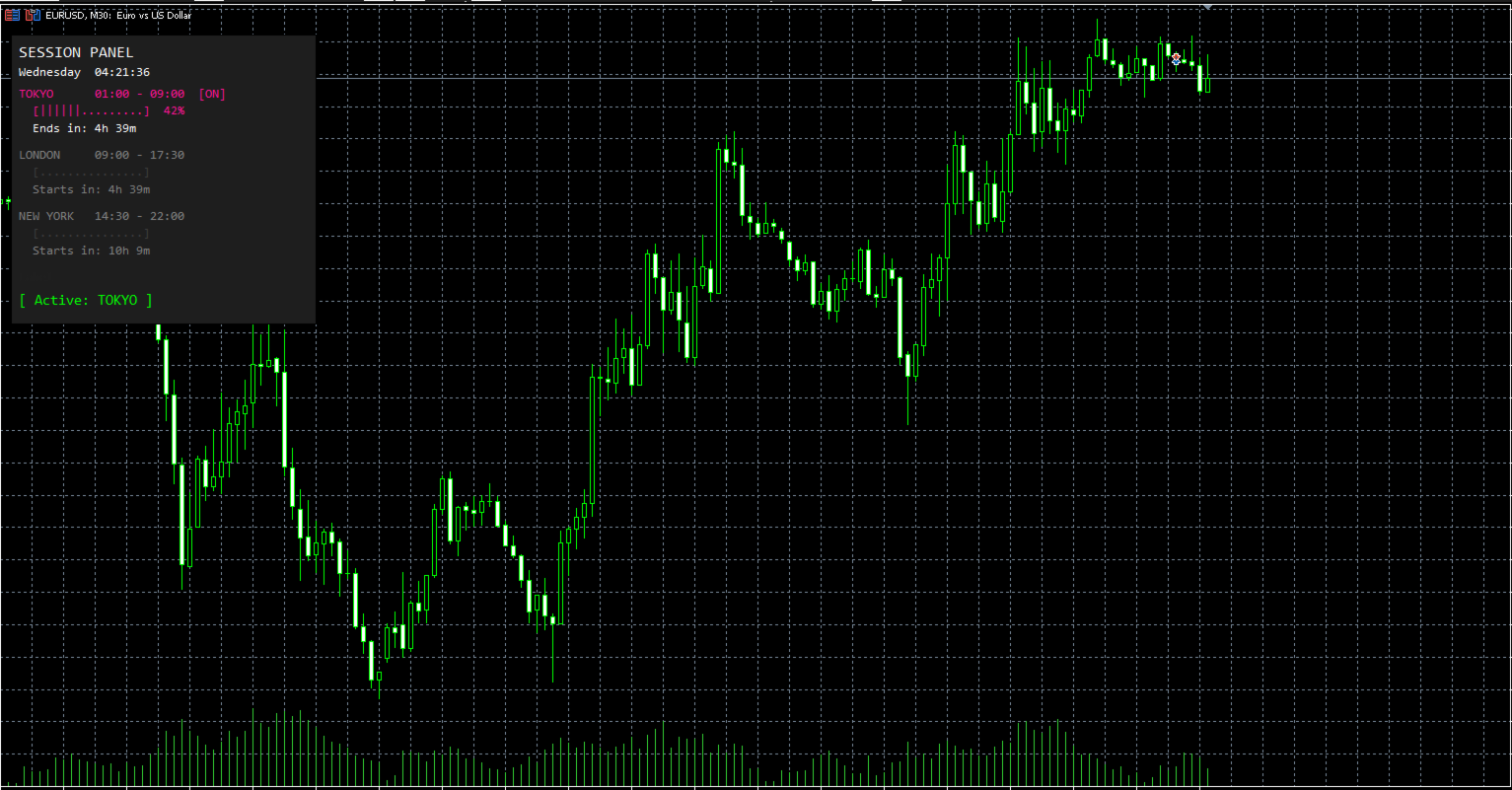
Session Panel is a free MT5 indicator that gives you a fast and convenient live overview of the major trading sessions directly from the chart. Monitor Tokyo, London, and New York session times, see which session is currently active, track countdowns to the next session, and view session overlap information in one compact dashboard. Built for traders who want better market timing, clearer session awareness, and a cleaner chart workflow in live market conditions.
Session Panel is a lightweight and practical market session indicator for MetaTrader 5 that helps you monitor the most important trading sessions directly from the chart.
Instead of manually checking session times or calculating when the next major market opens, this tool provides a clear on-chart panel with the most important session information in one place. It is designed for traders who want better overview, more convenience, and faster awareness during live market conditions.
This indicator does not open or close trades.
Its purpose is to help you monitor global market sessions, track active trading hours, and stay aware of session changes more efficiently.
Key Features
-
Live display of Tokyo, London, and New York sessions
-
Real-time indication of which session is currently active
-
Countdown to the next session start
-
Countdown to the active session end
-
Color-coded active and inactive session display
-
Session progress bar for active sessions
-
Optional overlap display
-
Live status line showing active or next session
-
Live broker time and day display
-
Fully configurable session start and end times
-
Adjustable panel position
-
Customizable panel and session colors
How It Works
After attaching the indicator to a chart, it creates a compact session panel directly on the screen.
You can instantly monitor the following information:
-
Current broker time and day
-
Tokyo session time and status
-
London session time and status
-
New York session time and status
-
Session progress for active sessions
-
Countdown until a session starts
-
Countdown until an active session ends
-
Active session status or next session status
-
Session overlap information
This allows you to keep track of market session timing without unnecessary manual checks.
Session Overview
The panel continuously shows the three main trading sessions:
-
Tokyo
-
London
-
New York
For each session, the indicator displays:
-
the configured session time
-
whether the session is currently active
-
a countdown until it starts or ends
-
a visual progress bar when the session is active
Active sessions are highlighted in their assigned colors, while inactive sessions are shown in a dimmed style for better clarity.
This gives you a faster and clearer overview of the current market session structure during live trading.
Countdown and Status Display
One of the main functions of Session Panel is the live countdown and status tracking.
The indicator automatically shows:
-
how long until the next session starts
-
how long until the active session ends
-
which session is currently active
-
which session will open next when no session is active
This helps traders stay aware of market timing and prepare for upcoming session changes more efficiently.
Overlap Display
The built-in overlap display gives you more awareness of important session intersections.
When enabled, the indicator can show:
-
Tokyo + London overlap
-
London + New York overlap
-
Tokyo + New York overlap
This makes the tool especially useful for traders who want quick visibility of overlapping market hours directly on the chart.
Configurable Session Times
The indicator includes fully adjustable session settings.
You can define custom start and end times for:
-
Tokyo Session
-
London Session
-
New York Session
All session times are based on broker time, allowing you to match the panel to your platform environment and trading setup more easily.
This is useful for traders who want flexibility depending on broker server time or personal session preferences.
Live Broker Time
The panel also shows the current:
-
day of the week
-
broker time
-
seconds in real time
This gives you a clear timing reference directly on the chart and makes the panel even more practical during active market monitoring.
Flexible Panel Layout
The panel can be adjusted to your personal chart setup.
You can customize:
-
Panel X Position
-
Panel Y Position
This allows you to place the panel exactly where it fits best on your chart.
Color Customization
For better visibility and personal styling, the indicator includes color settings for the main panel elements.
You can customize the colors of:
-
Tokyo session
-
London session
-
New York session
-
inactive sessions
-
overlap display
-
background
This helps integrate the panel into your own chart template and improves visual clarity.
Why Use Session Panel
When markets move through different global trading sessions, timing can matter a lot.
However, many traders still check session times manually or lose track of when the next important market phase begins.
Session Panel puts the most important session information directly on the chart, helping you stay aware of active trading hours, overlaps, and upcoming session changes with less effort.
It is especially useful for:
-
manual traders
-
scalpers
-
intraday traders
-
breakout traders
-
session-based traders
-
traders who want a simple live session dashboard
Important Notes
-
Designed for MetaTrader 5
-
Works as an indicator
-
Displays information directly on the chart
-
Does not open trades
-
Does not close trades
-
Session times are based on broker time
-
Overlap display can be enabled or disabled
Conclusion
Session Panel is a simple but highly useful free MT5 indicator for traders who want better session overview, clearer market timing, and more convenient live session awareness directly from the chart.
If you want a clean and practical tool for monitoring the main trading sessions in real time, Session Panel is a smart addition to your MT5 setup.