
Strategy Ledger Pro
- Utilitaires
-
Abdullah Uygar Tuna
 Professionnel de l’informatique spécialisé dans le trading algorithmique, l’analyse quantitative et les outils pratiques pour MetaTrader 5.
 - Version: 4.43
- Mise à jour: 13 octobre 2026
- Activations: 10
Désormais disponible en français.
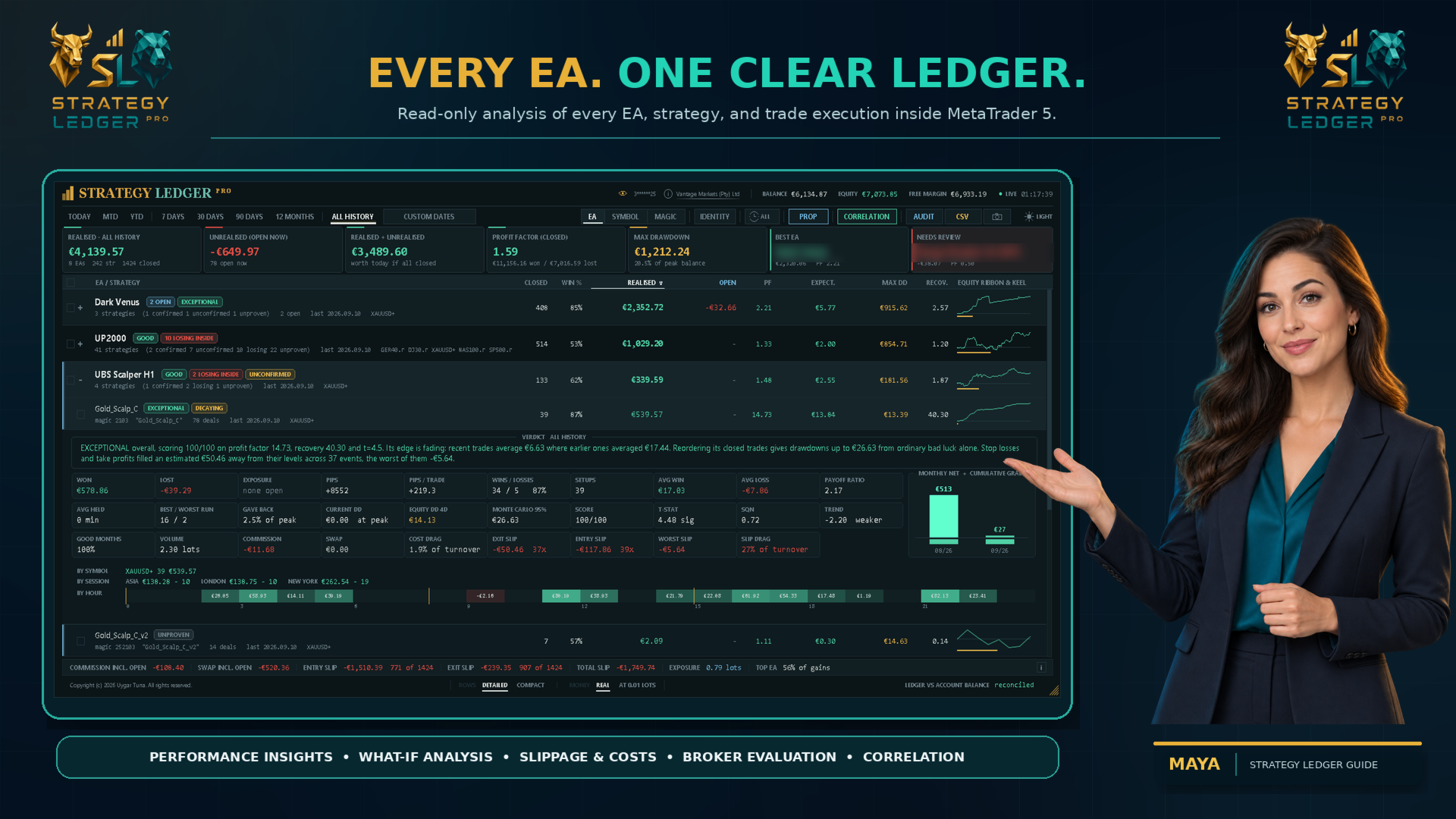
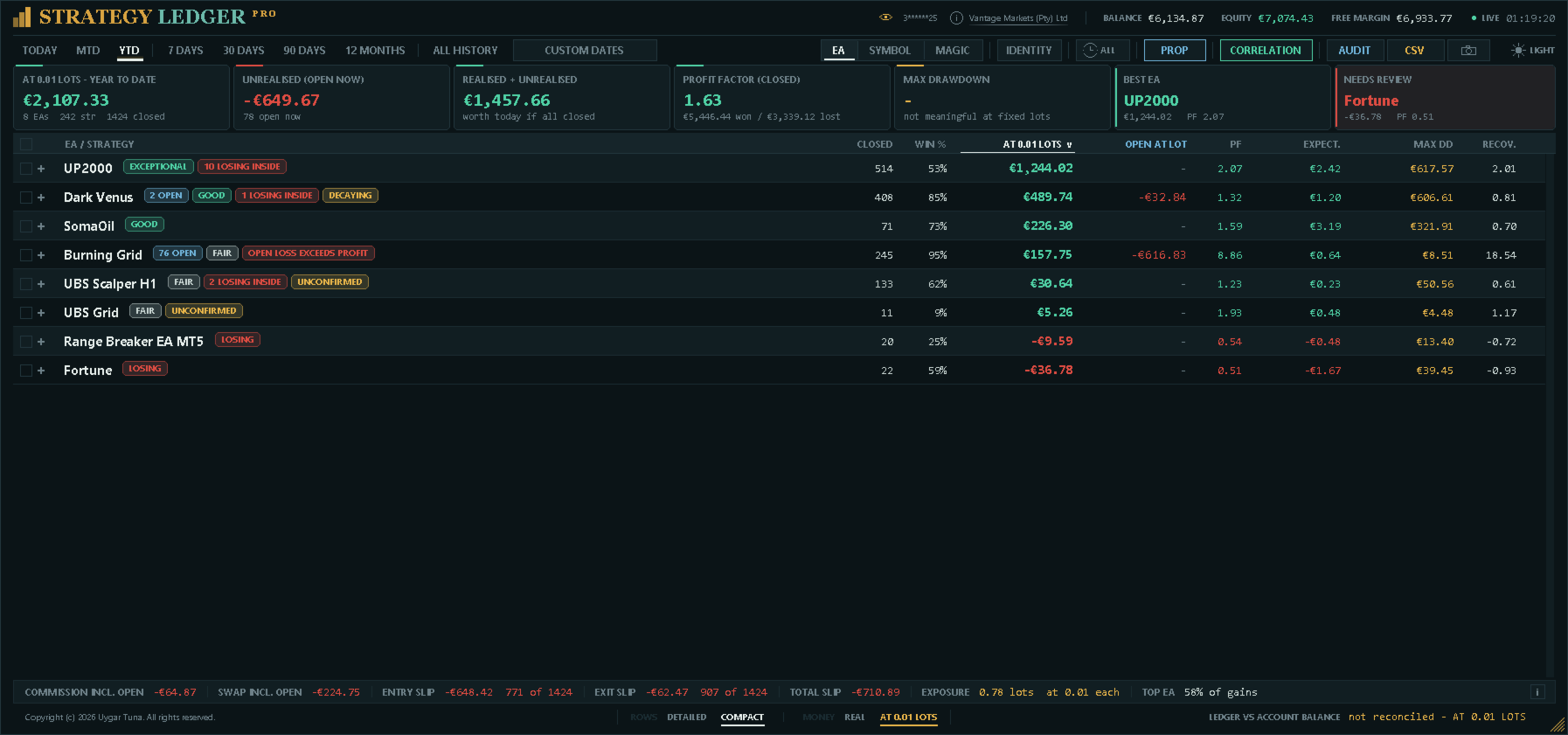
Strategy Ledger Pro est un panneau d'analyse de compte en lecture seule pour MetaTrader 5. Il sépare les résultats du compte par Expert Advisor, stratégie, symbole et numéro magic, pour que vous voyiez ce que chacun apporte réellement.
Le panneau est disponible en 11 langues : English, Français, Deutsch, Español, Italiano, Português, Русский, Türkçe, 中文, 日本語 et 한국어.
Avant de télécharger la démo. Le Market exécute la démo de tout produit payant uniquement dans le Testeur de stratégie. Ce panneau analyse les trades de votre propre compte, et une exécution dans le Testeur n'a aucun historique de compte à lire : la démo s'ouvre donc sur un panneau vide et l'indique. C'est le fonctionnement du mécanisme de démo, pas une limite du produit.
La vidéo de cette description présente le panneau sur un compte réel.
Un manuel détaillé (en anglais) explique chaque fonction, et le groupe AureusAI Trading Suite est ouvert aux discussions et aux annonces.
MetaTrader affiche un seul solde pour tout le compte. Lorsque plusieurs Expert Advisors tradent ensemble, ce solde ne montre pas ce que chacun a apporté. Strategy Ledger Pro lit l'historique du compte, reconstruit les positions clôturées, les attribue aux stratégies et présente les résultats dans un seul panneau.
Le produit ne passe, ne modifie et ne clôture aucun ordre. Il ne contient aucune stratégie de trading, ne crée aucun indicateur et ne lit pas les prix du graphique.
Fonctions principales
- Résultats par Expert Advisor, stratégie individuelle, symbole ou numéro magic.
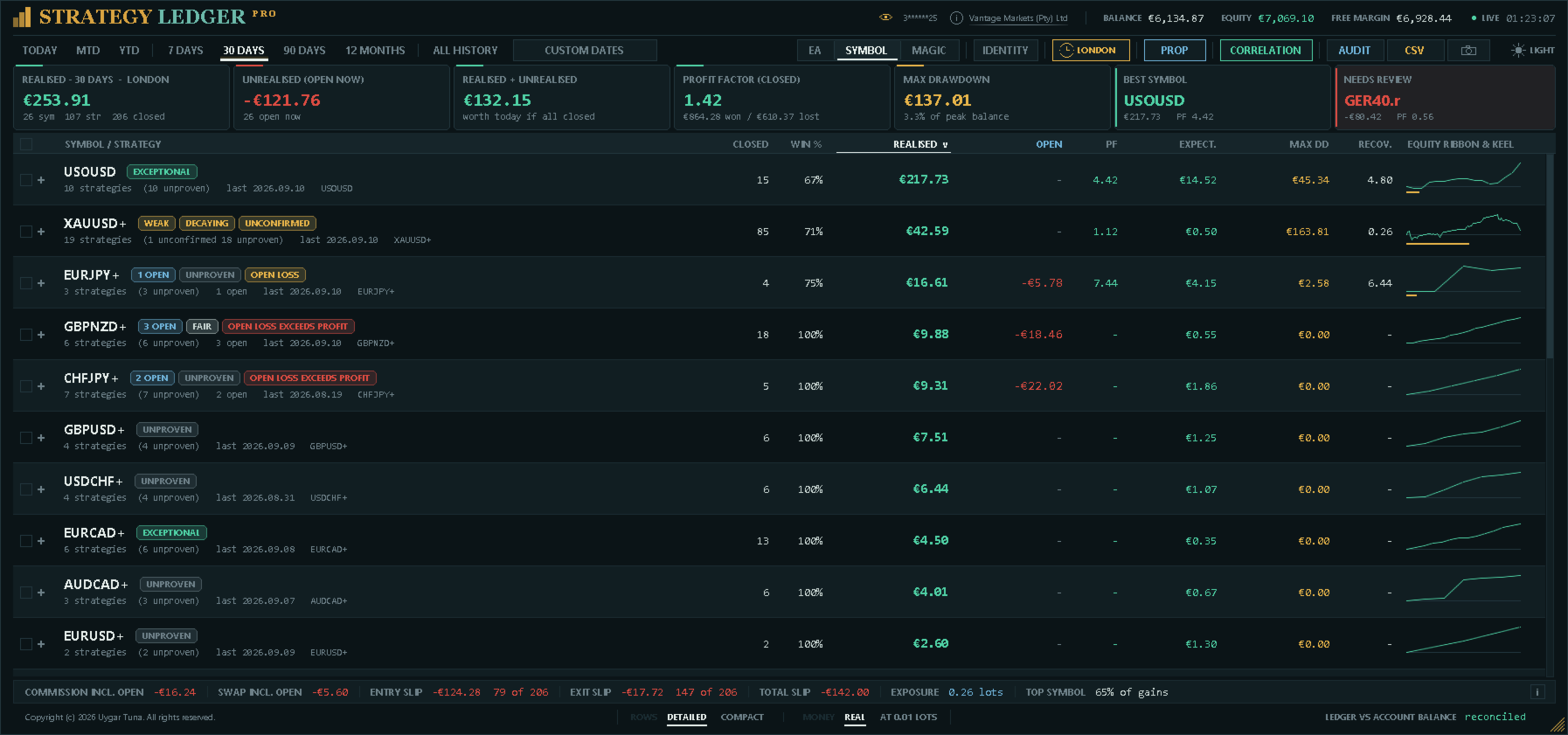
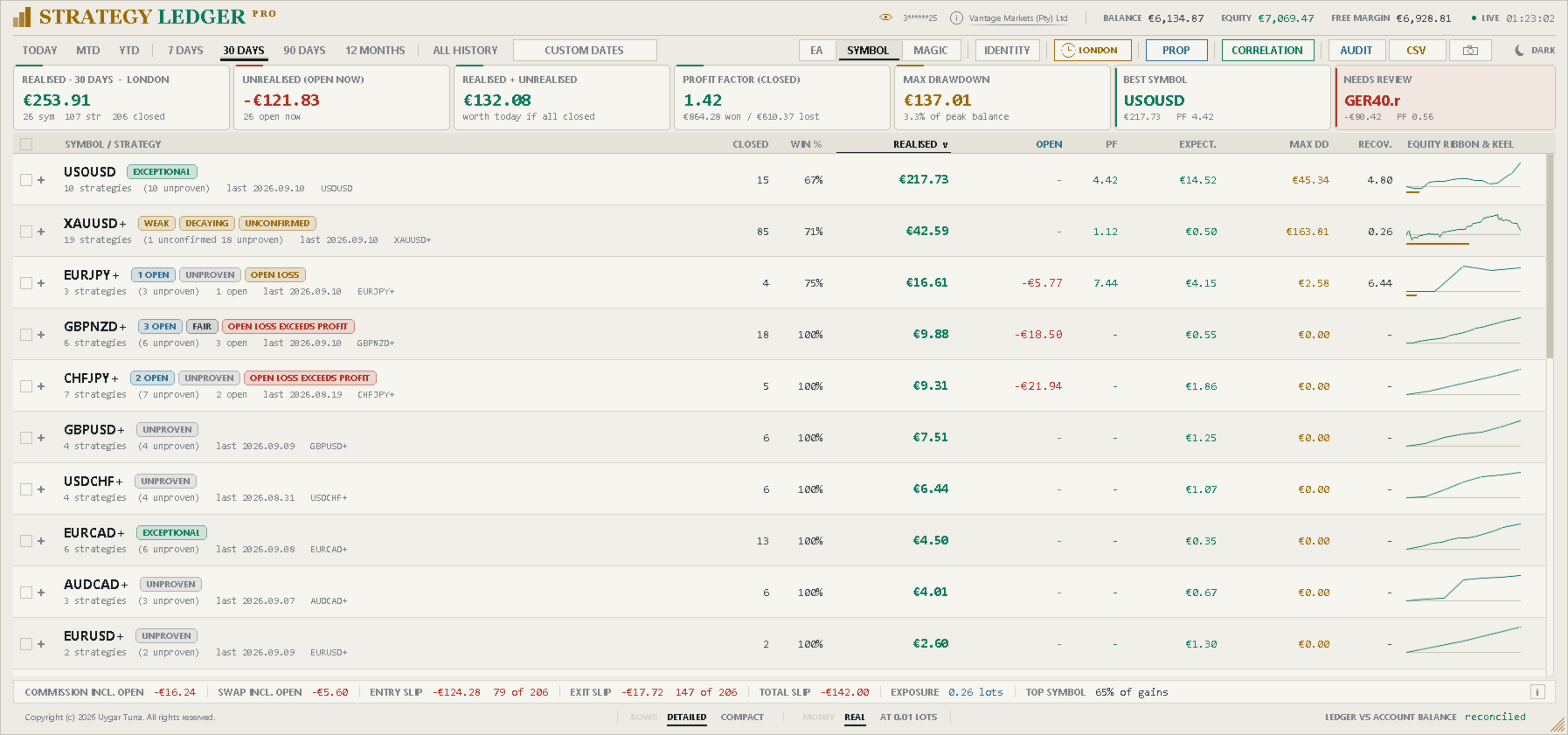
- Périodes prédéfinies, plage de dates personnalisée et filtre de session pour l'Asie, Londres ou New York.
- Résultats réalisés et latents, exposition ouverte, statistiques de trading, pips, drawdown et courbes d'équité.
- Commission, swap, poids des frais et slippage estimé à l'entrée et à la sortie, avec un total combiné.
- Notes de performance, résumés rédigés et marques de statut fondés sur des règles fixes.
- Setups : les positions ouvertes ensemble, ou clôturées ensemble comme un panier, comptent comme une seule décision pour les indicateurs de confiance.
- Suivi en direct du drawdown d'équité pour le compte et pour chaque ligne.
- Renommage, regroupement, déplacement, masquage, restauration, dépliage et tri interactifs.
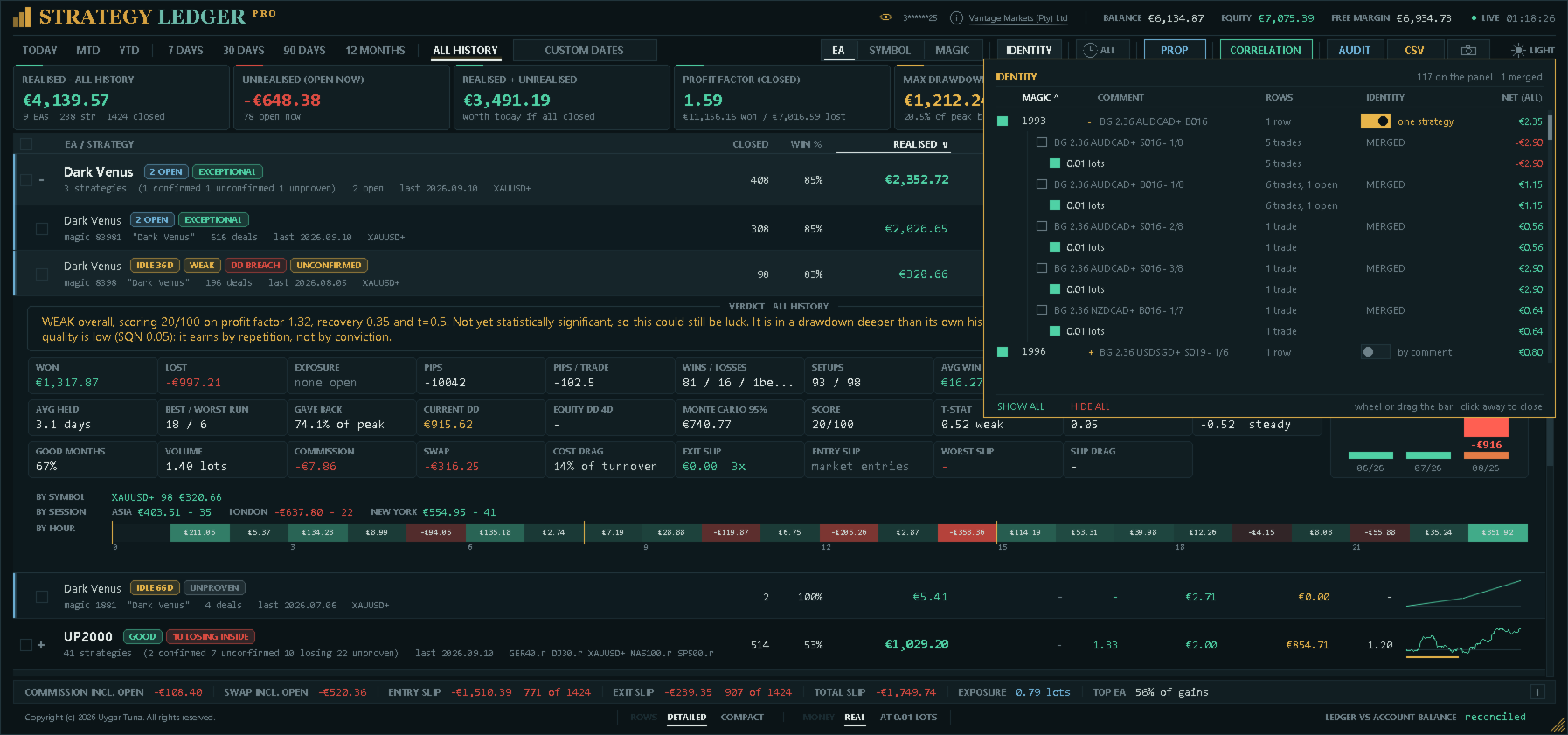
- Identité : déclarer un numéro magic comme une stratégie ou plusieurs, et retirer des numéros magic ou des tailles de lot du tableau en indiquant ce qu'ils valaient.
- Mode lot fixe : chaque trade rejoué à une taille de lot unique, clairement signalé comme une simulation.
- Résultats par session et par heure de la journée, pour chaque stratégie.
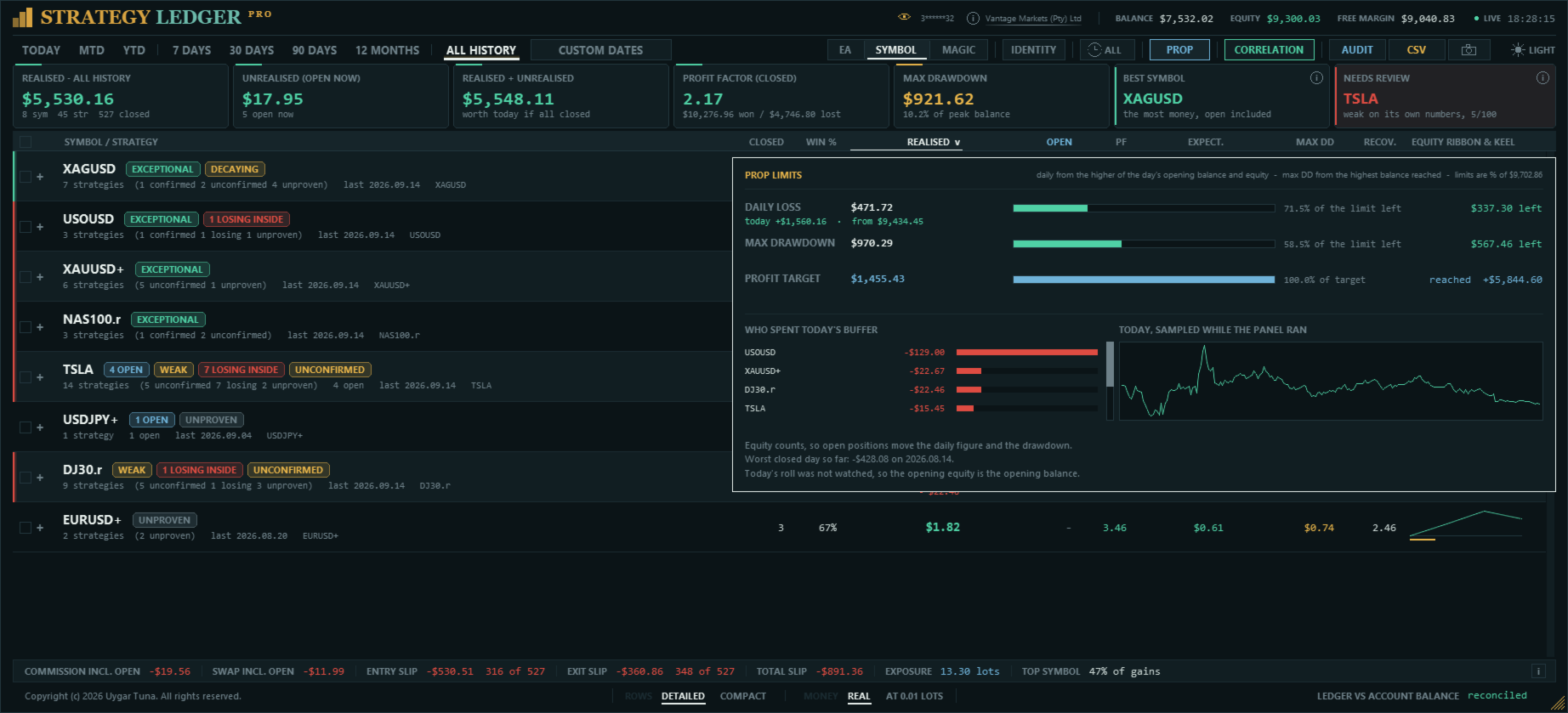
- Limites des prop firms : perte journalière, drawdown maximal et objectif de profit, avec la marge restante pour chacun.
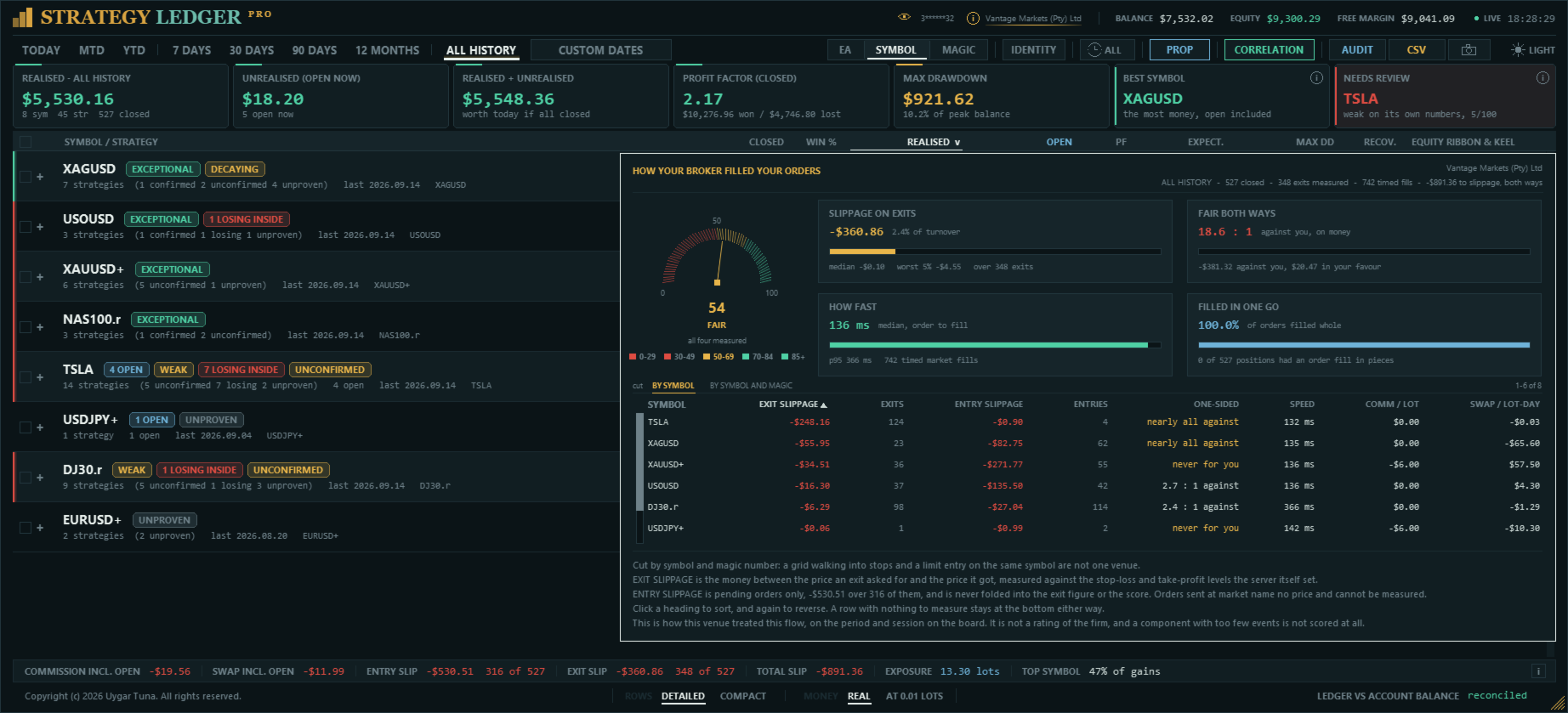
- Rapport d'exécution : ce que coûtent vos exécutions, si elles tombent en votre faveur aussi souvent que contre vous, leur rapidité, et ce que vous payez par lot et par lot-jour.
- Marques de variation journalière indiquant ce que chaque ligne a fait depuis le début de la journée de trading.
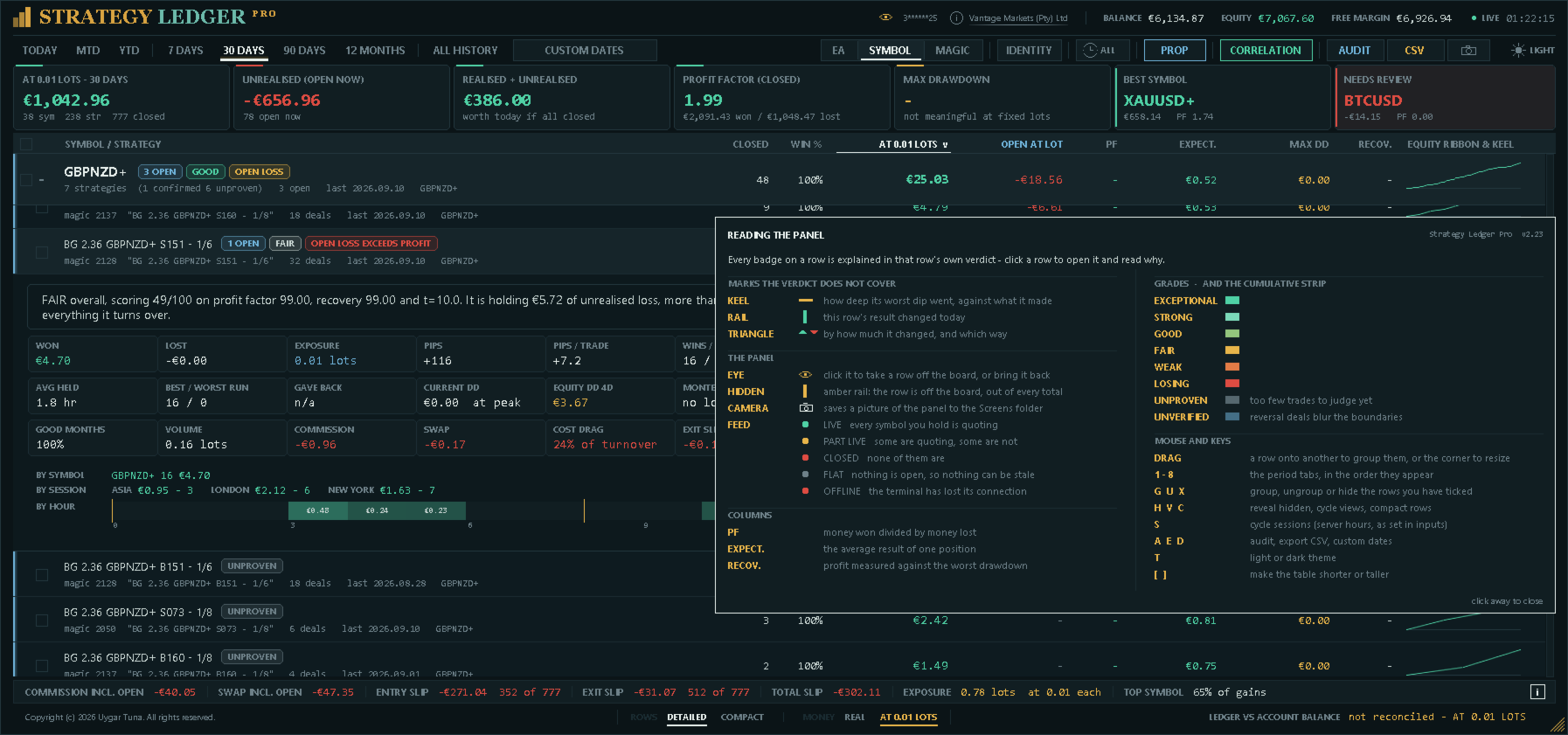
- Guide intégré décrivant chaque marque, colonne et raccourci clavier.
- Corrélation entre Expert Advisors, stratégies ou symboles, à partir des résultats clôturés quotidiens.
- Historique des notes : la note de chaque ligne mois par mois, reconstruite à partir de l'historique des trades.
- Rapports du Testeur de stratégie : un ou plusieurs rapports HTML lus sur le même tableau, signalés comme simulés et jamais mélangés avec le compte.
- Cartes de partage : un clic enregistre une image claire des résultats d'un Expert Advisor, sans numéro de compte ni nom de courtier.
- Une interface en 11 langues, choisie une fois dans les paramètres.
- Exports détaillés des mesures et d'audit au format CSV, et captures du panneau au format PNG.
Comment les données du compte sont construites
Strategy Ledger Pro compte des positions complètes plutôt que des transactions individuelles. MetaTrader peut ouvrir ou clôturer une position en plusieurs transactions. Le panneau regroupe ces transactions par identifiant de position et enregistre un trade lorsque le volume de clôture correspond au volume d'ouverture. Les clôtures partielles restent rattachées à la même position.
Le profit, la commission, les frais et le swap sont inclus dans chaque résultat. Dépôts, retraits, crédits, corrections, bonus, frais, intérêts, dividendes et taxes sont pris en compte dans le rapprochement du compte lorsque le courtier les inscrit dans l'historique. Chaque position porte aussi son résultat en pips — la sortie moyenne face à l'entrée moyenne —, indépendant de la taille du lot.
Une stratégie est normalement identifiée par son numéro magic et le commentaire nettoyé de sa transaction d'ouverture. Cela prend en charge les Expert Advisors qui utilisent un numéro magic pour plusieurs stratégies internes. Les trades copiés d'un signal MQL5 sont regroupés en une stratégie portant le nom du signal. Les trades manuels et mobiles avec un numéro magic nul peuvent aussi être inclus.
Chaque position n'est pas une décision distincte. Un Expert Advisor qui ouvre quatre positions sur un signal a pris une décision, et une grille qui clôture un panier d'un coup a produit un seul résultat. Les positions d'un même numéro magic et symbole ouvertes dans un court intervalle, ou clôturées ensemble en échelle — une direction, des prix d'entrée échelonnés dans un ordre —, comptent donc comme un seul setup. Les montants comptent toujours des positions ; les indicateurs de confiance — confiance statistique, échantillon minimal, note, score et drawdown Monte-Carlo — utilisent les setups, afin qu'un panier ouvert comme une seule décision ne soit pas traité comme quarante résultats indépendants.
Le pied du panneau compare le résultat réalisé reconstruit et les opérations de solde avec le solde et le crédit indiqués par MetaTrader. Tout écart est affiché. Les transactions de retournement sur les comptes netting peuvent rendre incertaines les limites exactes des trades ; les lignes concernées sont alors marquées Non vérifié et ne sont pas notées.
Vues, périodes et organisation
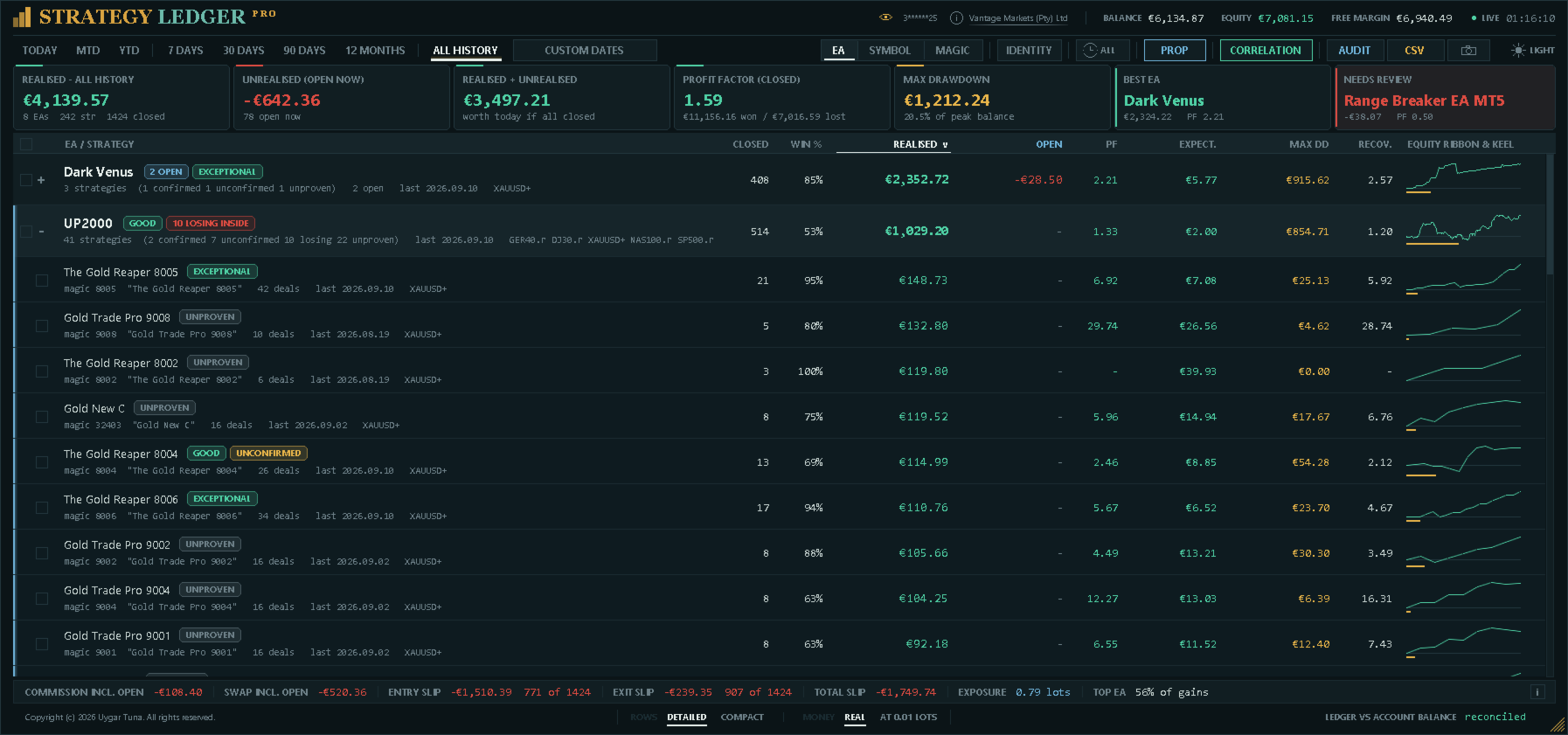
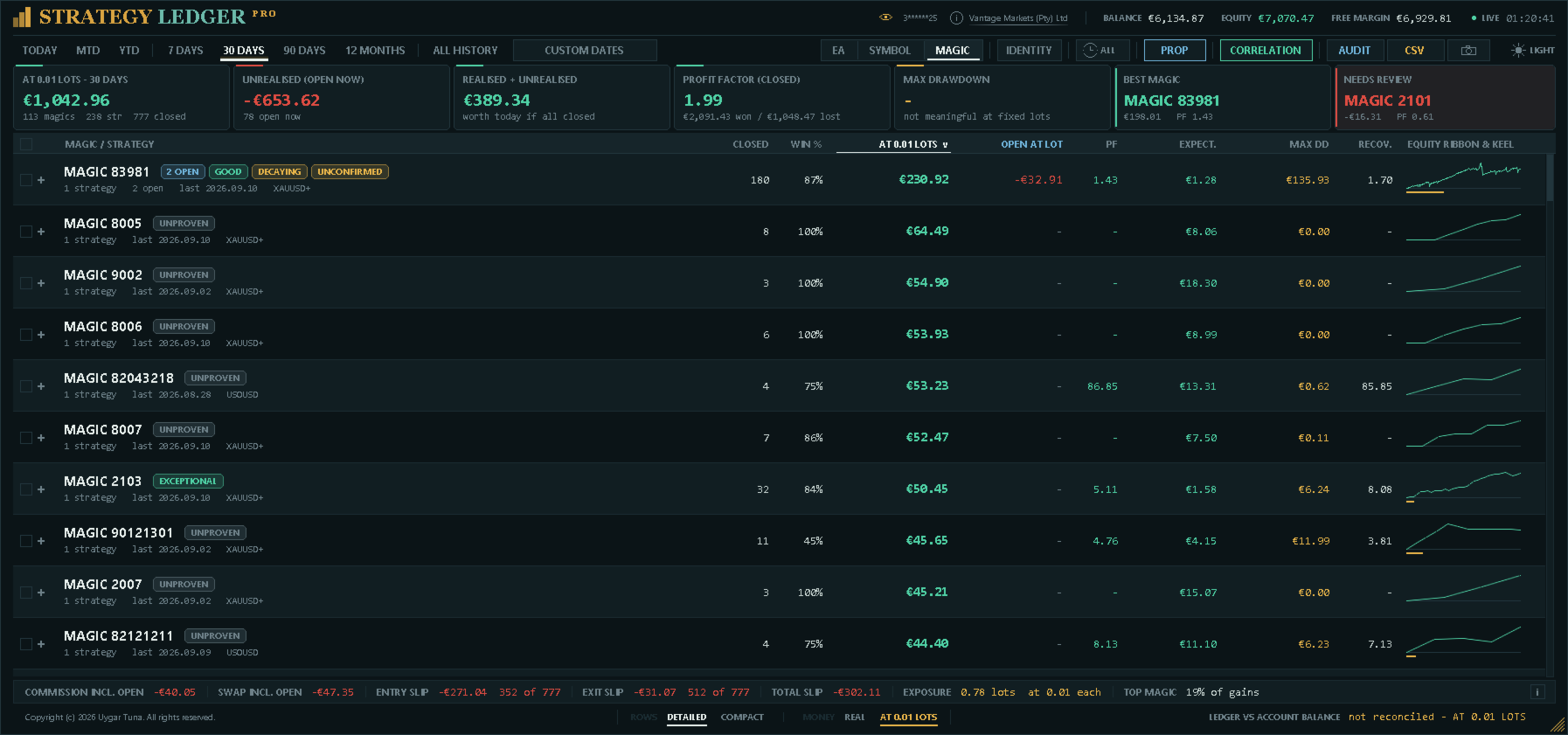
La vue Expert Advisor regroupe les stratégies sous leur Expert Advisor attribué. La vue symbole regroupe les mêmes données par instrument. La vue magic les regroupe par le numéro que chaque Expert Advisor a envoyé, avec ses commentaires comme stratégies en dessous ; c'est là qu'il faut regarder lorsque les commentaires d'un Expert Advisor se comportent de façon inattendue. Plusieurs lignes peuvent rester dépliées en même temps.
Les périodes disponibles sont aujourd'hui, le mois en cours, l'année en cours, 7 jours, 30 jours, 90 jours, 12 mois, tout l'historique et une plage de dates personnalisée. Une position peut être rattachée à une période selon son heure de clôture ou d'ouverture.
Une horloge dans l'en-tête filtre tout le panneau sur une session de trading — Asie, Londres ou New York — dans n'importe quelle vue et sur n'importe quelle période. Une position appartient à la session dans laquelle elle a été ouverte. Les heures de début des sessions sont des paramètres, en heure du serveur, et l'intitulé de la période indique partout quelle session est active.
Les noms peuvent être appris des commentaires des transactions ou définis manuellement. Les stratégies peuvent être renommées, regroupées à partir d'une sélection, glissées vers un autre Expert Advisor, fusionnées ou séparées. Glisser une ligne faisant partie d'une sélection cochée déplace toute la sélection. Les commentaires identiques peuvent être fusionnés entre numéros magic, avec une liste d'exceptions pour ceux qui doivent rester séparés.
Les lignes peuvent être masquées une à une ou par sélection, puis restaurées. Chaque ligne d'Expert Advisor porte deux commandes dans une colonne dédiée à son bord droit : un œil, qui masque la ligne puis passe à l'ambre pour la restaurer, et un appareil photo, qui enregistre la carte de partage de la ligne. Tous deux restent visibles en permanence, discrètement, et s'éclairent au passage de la souris. Les lignes masquées sont mémorisées séparément pour chaque vue. Elles sont exclues des totaux visibles et de la courbe de solde filtrée. Un Expert Advisor dont toutes les stratégies sont masquées n'affiche aucun chiffre, puisqu'il n'en a pas, et se place sous les lignes encore comptées pour ne pas bouger lorsqu'elles changent.
Les colonnes peuvent être triées par nom, résultat, facteur de profit, positions clôturées, drawdown ou espérance.
Identité
La fenêtre d'identité liste chaque numéro magic du compte avec ses lignes, son résultat sur tout l'historique et un sélecteur. Par commentaire est la règle normale : une stratégie est un numéro magic associé à son commentaire. Une stratégie regroupe tous les commentaires de ce numéro magic en une seule ligne, pour les Expert Advisors qui inscrivent des diagnostics ou des numéros de niveau de grille dans le commentaire ; tout commentaire peut retrouver sa propre ligne. Le sélecteur n'est pas proposé pour les signaux MQL5, qui forment déjà une stratégie selon la règle des signaux.
Chaque numéro magic se déplie en ses commentaires et, sous chaque commentaire, en ses tailles de lot, de la plus petite à la plus grande, chacune avec ses trades et son résultat. Une taille de lot peut être retirée du tableau comme un numéro magic ; la même taille sous deux commentaires peut être retirée séparément. Tout ce qui est retiré est indiqué en bas de la fenêtre avec les trades et les montants exclus, de sorte qu'un résultat amélioré n'est jamais affiché sans son coût. Les filtres par magic et par lot sont des lentilles : ils ne sont pas enregistrés et s'effacent ensemble. Le sélecteur d'identité et les promotions sont des décisions et sont mémorisés avec la disposition.
Mode lot fixe
Un sélecteur dans le pied du panneau rejoue chaque trade clôturé et chaque position ouverte comme s'ils avaient été ouverts avec une taille de lot unique (un paramètre, 0,01 par défaut). L'échelle d'une grille s'aplatit, ce qui montre si l'avantage venait des entrées ou seulement du dimensionnement ; un signal montre ce qu'il aurait rapporté à la taille à laquelle il serait copié. Comme tous les montants à l'écran deviennent alors une simulation, le panneau l'indique partout où l'argent se lit : l'intitulé du résultat réalisé et la première case du résumé nomment la taille de lot, la ligne de rapprochement indique non rapproché, les exports sont nommés et marqués comme recalculés, l'audit ne s'exécute pas, l'historique des notes et le suivi d'équité sont suspendus, et rien n'est enregistré. Le mode est désactivé à chaque attachement du panneau. Le lot fixe égalise la taille, pas le risque ; les pips n'égalisent que le mouvement du prix.
Tableau de bord et détails de stratégie
L'en-tête affiche le compte, le courtier, le solde, l'équité, la marge libre, l'heure du serveur et l'état du flux de cotations. L'état s'affiche comme En direct, Partiel, Marché fermé, Sans position ou Hors ligne, afin que des chiffres qui ne peuvent pas se mettre à jour ne soient pas pris pour des chiffres actuels. Un œil à côté du numéro de compte le masque, pour les captures destinées à être partagées.
Le résumé affiche le résultat réalisé, le résultat latent actuel, leur somme, le facteur de profit des positions clôturées, le drawdown maximal du solde, la ligne la plus forte en valeur actuelle et la ligne retenue pour examen par les règles de vigilance du panneau. Les deux dernières cartes donnent la raison de leur choix, et chacune porte une marque qui ouvre la règle correspondante : pour la ligne à examiner, chaque composante du score de vigilance avec les points obtenus et ce qu'elle a relevé ; pour la plus forte, la règle et les chiffres auxquels elle a été appliquée.
Le tableau affiche les positions clôturées, le taux de réussite, le résultat réalisé, le résultat latent, le facteur de profit, l'espérance, le drawdown maximal des positions clôturées, le facteur de récupération et une courbe d'équité compacte avec son tracé de drawdown. Lorsque des lignes sont masquées, ces chiffres décrivent la sélection affichée.
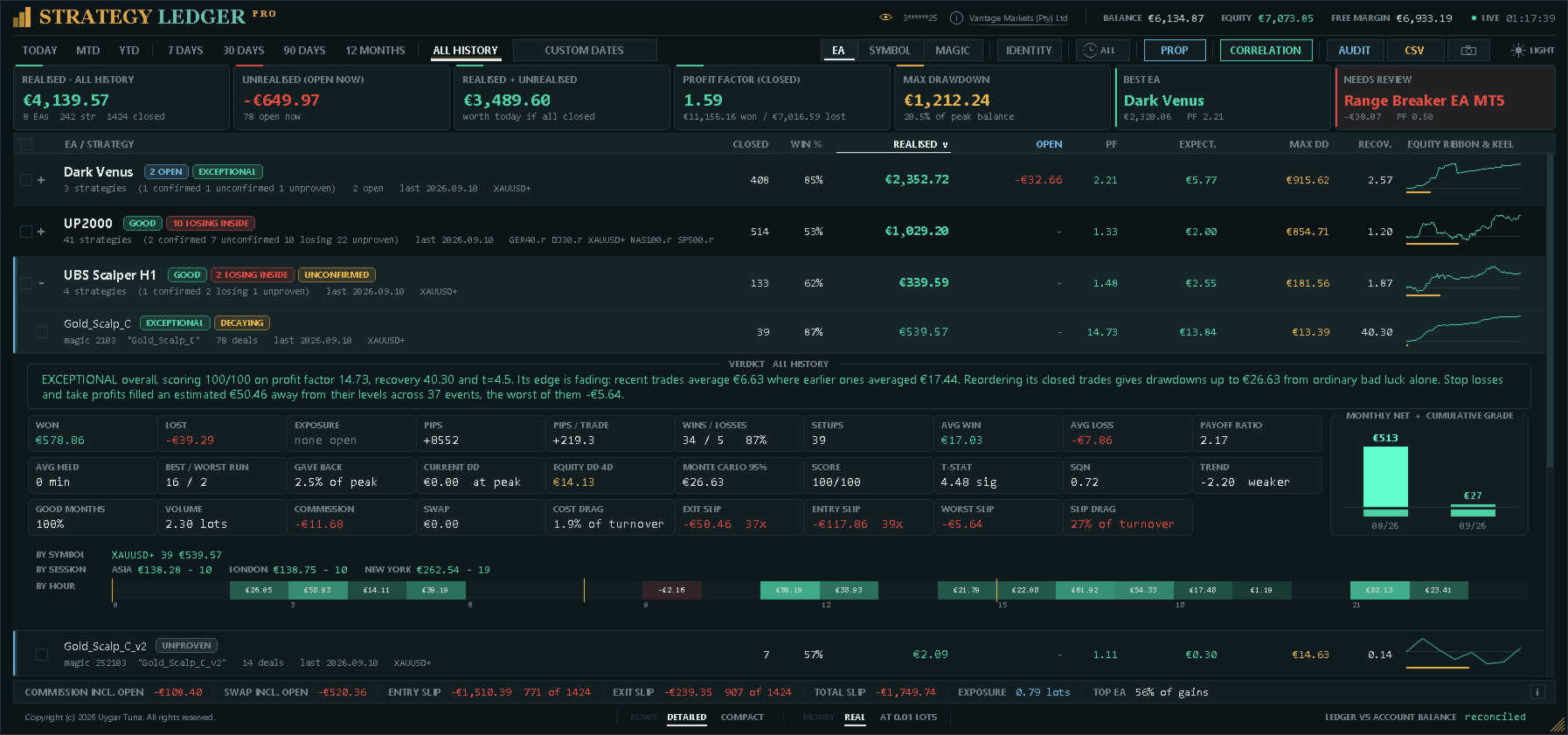
Le détail déplié contient le total gagné et perdu, l'exposition ouverte, les pips et pips par trade, les gains et pertes, les setups, la durée moyenne de détention, le gain et la perte moyens, le ratio gain/perte, les meilleures et pires séries consécutives, le pourcentage de drawdown, le drawdown actuel, la plus longue période sous l'eau, le volume et la part de mois positifs.
La plus longue période sous l'eau est l'intervalle le plus long pendant lequel le résultat clôturé cumulé de la ligne est resté sous son plus haut précédent, d'un sommet au suivant. Ce n'est pas la durée de détention d'une position : un Expert Advisor dont les trades durent quelques minutes peut rester des semaines sous son plus haut. Une période qui n'a pas encore retrouvé son plus haut est comptée jusqu'à aujourd'hui et indiquée « jusqu'ici ».
Le détail affiche aussi le score, la confiance statistique, le System Quality Number, la tendance des résultats récents, l'estimation de drawdown Monte-Carlo, le drawdown d'équité en direct, la commission, le swap, le poids des frais, le slippage à l'entrée et à la sortie, le pire slippage mesuré et le poids du slippage. S'y ajoutent un graphique du net mensuel, une ventilation par symbole, le résultat de la ligne dans chaque session et une bande de vingt-quatre cases teintées selon ce que chaque heure de la journée a gagné ou perdu.
Notes et marques de risque
Le score combine la confiance statistique, le facteur de profit et le facteur de récupération. Chaque composante est plafonnée avant la moyenne. Une perte latente peut limiter le score, car les statistiques des positions clôturées n'incluent pas cette perte ouverte.
L'échantillon minimal par défaut est de 20 setups. Les lignes en dessous sont marquées Non prouvé. Les autres notes vont de Perdant à Exceptionnel selon le score et le seuil de perte configuré. Les notes décrivent des données de compte enregistrées ; ce ne sont ni des signaux de trading ni des prévisions.
Les marques de statut signalent les positions ouvertes, l'absence de trade clôturé, l'inactivité, un résultat perdant, une perte ouverte, une perte ouverte supérieure au profit encaissé, des résultats récents plus faibles, une confirmation statistique insuffisante, un drawdown supérieur à l'estimation de l'historique mélangé, des stratégies perdantes au sein d'un Expert Advisor rentable et un drawdown d'équité nettement supérieur à celui des positions clôturées. Déplier une ligne affiche les marques applicables et une explication rédigée avec les chiffres propres à cette ligne.
Sessions et heures
Le filtre de session s'applique à tout le panneau ; le détail de chaque stratégie indique en outre son résultat dans chacune des trois sessions côte à côte, pour comparer sans rien changer. En dessous, vingt-quatre cases — une pour chaque heure de la journée du serveur au cours de laquelle une position a été ouverte — sont teintées selon ce que cette heure a gagné ou perdu et étiquetées avec le montant, les limites des sessions étant marquées pour que les deux concordent.
Limites des prop firms
La perte journalière, le drawdown maximal et l'objectif de profit peuvent être saisis en devise du compte ou en pourcentage, et le panneau indique la marge restante pour chacun avec une barre qui passe à l'ambre puis au rouge à mesure qu'elle s'épuise. Une limite dépassée est signalée comme franchie plutôt que comme un montant restant négatif.
Les sociétés mesurent le drawdown différemment ; un seul paramètre couvre donc les deux limites : statique depuis le solde de départ, glissant depuis le plus haut solde atteint, ou glissant depuis la plus haute équité observée. La limite journalière applique la même règle au sein de la journée et se réinitialise avec elle — depuis le solde d'ouverture du jour, depuis le plus élevé du solde et de l'équité d'ouverture, ou depuis la plus haute équité du jour. La ligne journalière indique aussi ce que la journée a fait jusqu'ici, et la fenêtre nomme les chiffres à partir desquels elle décompte.
L'équité est utilisée, donc les positions ouvertes font varier le chiffre journalier. L'équité au moment du changement de jour ne peut pas être reconstruite depuis l'historique ; elle est donc relevée pendant que le panneau fonctionne. Lorsqu'elle n'a pas été relevée, la fenêtre l'indique et se rabat sur le solde d'ouverture du jour, reconstruit exactement à partir des transactions.
Rapport d'exécution
Le nom du courtier dans l'en-tête ouvre un rapport sur la façon dont vos propres ordres ont été exécutés. Un cadran note quatre éléments que contrôle un lieu d'exécution, vingt-cinq points chacun : ce que le slippage a coûté par rapport à tout ce que le compte a traité, si les exécutions tombent en votre faveur aussi souvent que contre vous, le temps mis par le courtier entre la réception d'un ordre et son exécution, et la fréquence des exécutions en plusieurs parties. Chaque élément apparaît avec sa propre barre et une phrase expliquant ce qui l'a produit.
Sous le cadran figurent les mêmes chiffres par symbole, avec la commission par lot et le swap par lot-jour. Le slippage de sortie est mesuré par rapport aux niveaux de stop loss et de take profit fixés par le serveur lui-même, de sorte que le prix visé est connu ; le slippage d'entrée est mesuré sur les ordres en attente, et les ordres au marché n'ont pas de prix demandé et ne peuvent pas être mesurés. La vitesse d'exécution provient des horodatages de l'ordre lui-même.
Il s'agit d'une description de vos exécutions sur ce compte, et non d'une évaluation de la société, ce que le rapport précise : le slippage tient largement à la stratégie — une cassure entrée sur un ordre stop le paie partout —, et la commission et le swap dépendent du type de compte que vous avez choisi.
Drawdown, frais et slippage
Le drawdown des positions clôturées ne peut pas montrer tout le mouvement des positions tant qu'elles restent ouvertes. Strategy Ledger Pro peut relever l'équité en direct une fois par seconde et conserver la plus forte baisse observée depuis un plus haut précédent pour le compte, chaque Expert Advisor et chaque stratégie. Le suivi commence lorsque la fonction est activée pour la première fois, et sa date de début est affichée. L'enregistrement suit la vie d'une ligne, jamais l'onglet de période, l'état masqué ou le mode lot fixe : changer de vue n'écrit pas de drawdown.
Lorsque le suivi en direct est désactivé, le détail peut afficher une estimation du drawdown au 95e centile obtenue en remélangeant les résultats clôturés. Le remélange réordonne des setups plutôt que des positions isolées, de sorte qu'un panier qui n'a pu survenir qu'en bloc est modélisé en bloc. Cette estimation et toutes les notes décrivent uniquement des données historiques.
Le slippage de sortie est estimé lorsque l'ordre de sortie contient un prix demandé, y compris stop loss, take profit et sorties par ordres en attente. Le slippage d'entrée est estimé pour les ordres en attente avec un prix d'entrée demandé. Les ordres au marché n'ont pas de prix demandé à comparer ; le panneau indique donc une couverture indisponible ou partielle. Les deux chiffres précisent combien de positions ont été mesurées sur celles clôturées, afin qu'un échantillon partiel ne soit pas lu comme complet. Un total combiné est aussi affiché ; il ne porte pas de décompte, car ses deux parties couvrent des sous-ensembles différents des mêmes positions. Les valeurs sont converties dans la devise du compte avec la valeur de tick actuelle du symbole.
Corrélation
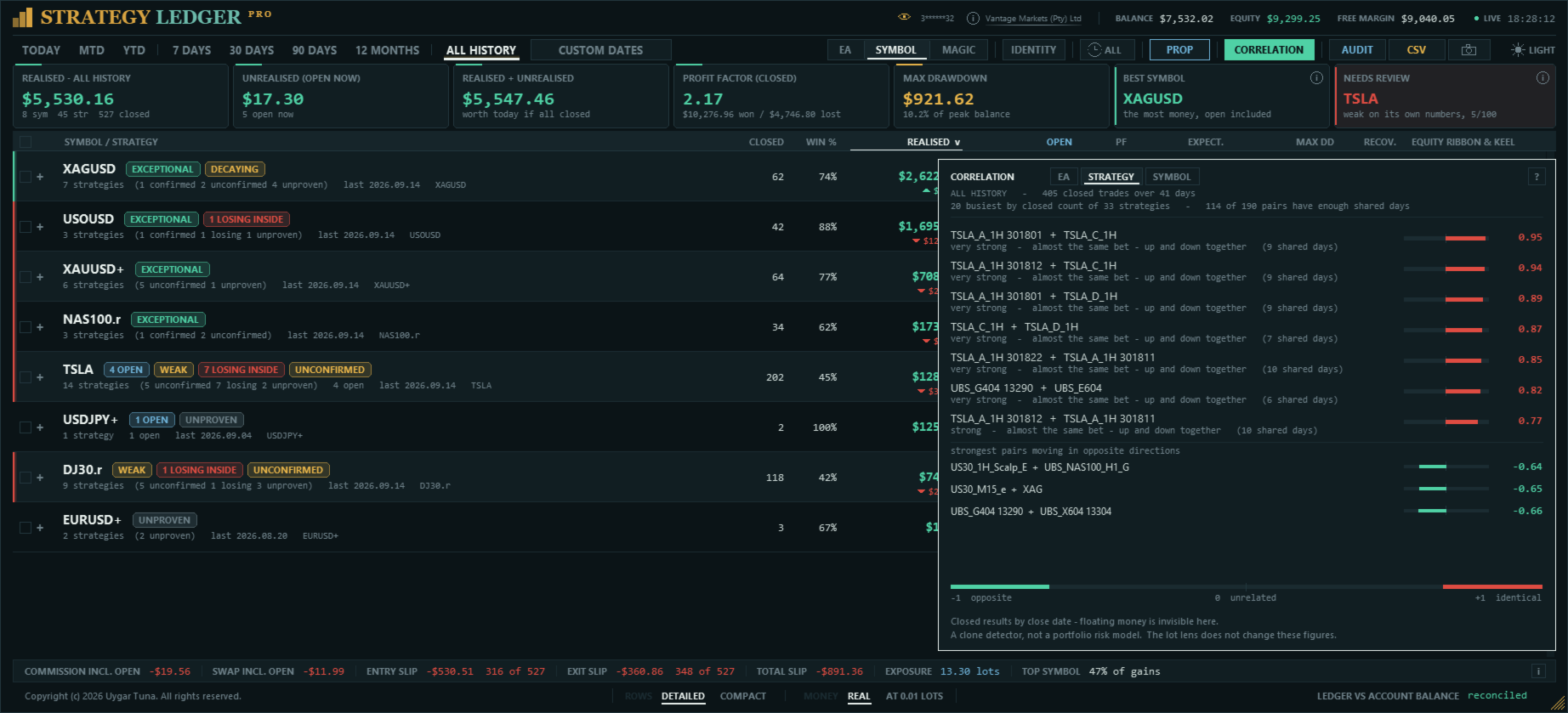
Chaque ligne est mesurée isolément ; plusieurs Expert Advisors peuvent donc paraître solides chacun de leur côté tout en réagissant aux mêmes conditions. La liste de corrélation compare les lignes entre elles au lieu de les noter séparément, et indique lesquelles évoluent dans le même sens les mêmes jours.
Les résultats clôturés de chaque ligne sont totalisés par jour. Deux lignes sont ensuite comparées sur les jours où elles ont toutes deux tradé ; les jours où une seule a tradé sont exclus, car ils n'offrent aucune base de comparaison. Le chiffre affiché est le coefficient de corrélation de Pearson, qui va de +1 (mouvement identique) à 0 (aucun lien) puis à -1 (mouvement opposé).
La liste peut être établie pour les Expert Advisors, les numéros magic, les stratégies individuelles ou les symboles. Seules les vingt lignes comptant le plus de positions clôturées sont comparées, et une paire n'est affichée que si les deux lignes partagent au moins autant de jours de trading que l'échantillon minimal configuré. Les paires évoluant en sens opposé sont listées à part pour rester visibles.
Historique des notes
Le détail déplié d'une ligne comprend une bande de blocs mensuels sous le graphique du net mensuel, alignée sur les mêmes mois. Chaque bloc montre la note de la ligne à la fin de ce mois.
Les blocs sont cumulatifs : chacun est calculé sur toutes les positions clôturées par la ligne jusqu'à la fin du mois, et non sur ce seul mois, car un mois contient rarement assez de positions clôturées pour être noté. Une ligne notée aujourd'hui Exceptionnel peut donc afficher des mois indéterminés au début de son historique, signe qu'à ce moment trop peu de positions avaient été clôturées pour conclure.
Rapports du Testeur de stratégie
Le panneau lit les rapports enregistrés depuis le Testeur de stratégie. Enregistrez un rapport au format HTML dans MQL5\Files\StrategyLedgerPro\Backtests, cliquez sur BACKTEST dans l'en-tête, cochez un ou plusieurs rapports et chargez-les. Chaque rapport devient un Expert Advisor sur le tableau, nommé d'après le rapport ; ses commentaires deviennent ses stratégies et ses symboles se séparent dans la vue symbole, exactement comme des trades réels. Plusieurs rapports peuvent être chargés ensemble.
Tant qu'un rapport est affiché, l'en-tête indique SIMULÉ, avec le nombre de rapports, leurs stratégies et symboles, les dates couvertes et l'origine du numéro magic, et une ligne dorée court en haut du panneau. Le pied rapproche les positions reconstruites de la colonne de solde du rapport lui-même, au centime près. Pour un backtest, les cartes affichent le solde du rapport, la période du test, le rendement annualisé, la plus longue période sous un plus haut précédent et, avec plusieurs rapports, le meilleur en récupération. Les onglets de période partent de la dernière clôture du rapport ; 12 MOIS correspond donc à la dernière année du test.
Le compte réel et le backtest ne sont jamais affichés ensemble. Passer à un rapport remplace le compte sur toutes les vues, et revenir le restaure. Rien de ce qui est lu dans un rapport n'est écrit dans les noms, groupes, lignes masquées, relevé d'équité ou marque de prop firm du compte ; les noms et lignes masquées propres à un rapport sont conservés dans des fichiers séparés. Les exécutions, la latence, le slippage et la marque de prop firm du jour ne peuvent pas être mesurés dans un backtest, et les fenêtres qui les afficheraient l'indiquent. Un rapport ne contient pas d'identifiant de position ; les sorties sont donc appariées aux entrées par volume, puis par le profit indiqué par le testeur ; l'en-tête précise combien d'appariements, le cas échéant, ont dû être déduits.
Cartes de partage
L'appareil photo de chaque ligne d'Expert Advisor enregistre une carte de partage : une image unique de 1240 × 844 présentant les résultats de cet Expert Advisor sur la période affichée, prête à publier. Elle montre le résultat net avec les frais de trading (commission et swap, et leur part du profit brut), les meilleures et pires séries, la courbe d'équité, dix mesures clés, les douze derniers mois, les résultats par session, par jour de la semaine et par heure de la journée, ainsi que le verdict.
Une carte ne contient ni numéro de compte ni nom de courtier : rien ne permet de vous identifier. Chaque carte indique la période couverte et si elle provient d'un compte réel, d'un rapport du Testeur de stratégie ou d'une simulation en lot fixe, afin qu'un résultat simulé ne puisse jamais être pris pour un résultat réel.
Les cartes sont enregistrées dans MQL5\Files\StrategyLedgerPro\Cards, dans un dossier par date, avec le nom de l'Expert Advisor, la période et l'heure dans le nom du fichier ; une carte existante n'est jamais écrasée. Chaque carte porte par défaut la marque Strategy Ledger, qui peut être désactivée dans les paramètres.
Vérifiez les règles de chaque plateforme avant de publier une carte. MQL5.com n'autorise pas la publication de ce type d'images de produit sur son site ; partagez vos cartes sur vos propres canaux.
Langues
La langue du panneau est le premier paramètre d'entrée : English, Français, Deutsch, Español, Italiano, Português, Русский, Türkçe, 中文, 日本語 ou 한국어. Tout ce que le panneau affiche comme libellé la suit : l'en-tête, les onglets de période, les cartes de résumé, les en-têtes de colonne, le détail, les badges, le pied, les fenêtres de corrélation et d'identité, ainsi que les cartes de partage. Les termes sont ceux qu'emploient les traders de chaque marché plutôt que des traductions littérales, et le chinois, le japonais et le coréen sont affichés avec les polices que Windows fournit pour ces langues.
Les verdicts rédigés, la deuxième ligne de chaque entrée et l'invite de renommage sont encore en anglais. Les exports, les noms de fichiers et le journal restent toujours en anglais, afin que les scripts et les outils de support les lisent de la même façon dans toutes les langues.
Exports
L'export des mesures écrit les groupes et stratégies affichés, avec résultats, statistiques, pips, setups, frais, slippage, notes et résumés rédigés. Un export automatique peut s'exécuter après chaque actualisation.
L'export d'audit liste les positions clôturées reconstruites, les positions ouvertes, l'état de période et de masquage, ainsi que des contrôles indépendants des positions face aux transactions. Il sert à rechercher un historique manquant ou des écarts de calcul.
Disposition et paramètres enregistrés
Le panneau propose des thèmes sombre et clair, le défilement à la molette, une largeur et une hauteur de tableau personnalisées, l'ajustement automatique au graphique, la mise à l'échelle de l'affichage, la mise à l'échelle manuelle du texte et une horloge en direct facultative. Les colonnes sont retirées progressivement lorsque le panneau devient trop étroit. Dans l'en-tête, les commandes s'effacent entièrement plutôt que de rétrécir, dans un ordre fixe — appareil photo, CSV, AUDIT, CORRELATION, PROP, IDENTITY, l'horloge de session, les dates personnalisées et le sélecteur de thème —, de sorte que les onglets de période disparaissent en dernier et que rien n'est jamais dessiné par-dessus. Les raccourcis clavier agissent sur le panneau lorsque le curseur le survole ; au-dessus du graphique, le graphique conserve ses touches.
Installation et limites
- Dans l'onglet Historique de MetaTrader, sélectionnez Tout l'historique.
- Attachez Strategy Ledger Pro à un graphique séparé. N'importe quel symbole et unité de temps conviennent.
- Choisissez le français dans le premier paramètre d'entrée.
- Vérifiez la ligne de rapprochement après le premier balayage.
Le panneau lit les trades d'un compte ; il fonctionne donc sur un compte réel ou démo. Dans le Testeur de stratégie, il n'y a aucun historique de compte à lire ; le panneau l'indique et ne fait rien d'autre. Il y affiche le sélecteur de rapports mais ne les charge pas.
Des résultats complets exigent un historique de compte complet. Des enregistrements manquants chez le courtier, des structures de transactions inhabituelles et des retournements sur comptes netting peuvent créer des écarts ou des lignes non vérifiées.
Les valeurs de slippage sont des estimations. La conversion utilise la valeur de tick actuelle du symbole plutôt que sa valeur au moment de l'exécution. Le slippage ne peut pas être mesuré lorsqu'un ordre ne précisait pas de prix demandé.
Le drawdown d'équité en direct, le plus haut du jour et la plus haute équité observée sont relevés pendant que le panneau fonctionne et ne peuvent pas être reconstruits pour les périodes où il ne fonctionnait pas. Les chiffres reconstruits à partir des transactions — soldes, résultats clôturés, drawdown du solde — sont exacts.
Si un Expert Advisor écrit un commentaire différent à chaque trade, les commentaires créent des lignes de stratégie séparées. Les numéros courants et références d'ordre sont retirés automatiquement ; la fenêtre d'identité peut déclarer ce numéro magic comme une seule stratégie, et les lignes restantes peuvent être regroupées manuellement.
Les noms, groupes, lignes masquées et historique d'équité enregistrés lors d'installations précédentes sur le même compte sont conservés. Il est déconseillé d'exécuter deux copies du panneau sur le même compte en même temps, car chacune écraserait la disposition enregistrée de l'autre.
Questions, suggestions et signalements de problèmes sont les bienvenus dans les commentaires du produit, par message privé MQL5 ou dans le canal AureusAI Trading Suite, où la plupart des mises à jour naissent d'un commentaire. Joignez l'export d'audit lorsque vous signalez un écart de calcul.






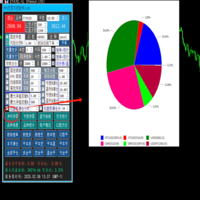










































I’ve been using Strategy Ledger Pro and it’s a really useful tool if you run multiple EAs or strategies on the same MT5 account. It makes it much easier to see what is actually performing well and what isn’t, rather than just looking at the overall account result. I particularly like being able to break things down by strategy, EA and symbol, and the extra stats give a much clearer picture of drawdown and expectancy. It’s also read-only, which I like, because it doesn’t interfere with any trades. Very practical tool and definitely useful for anyone running a portfolio of automated strategies.