Dashboard Signals aNa Magic ATR EA
- Experts
- Versione: 1.2

aNa Magic ATR EA – Dashboard and Signals (MT5)
ATR-based SL/TP (TP1–TP3), EMA200 trend filter, RSI gate, clean on-chart dashboard and segmented guide lines. MagicNumber support for multi-EA setups.
What it does
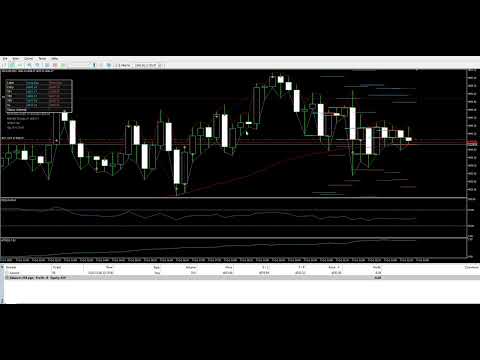
This Expert Advisor automates entries and risk targets using ATR. It filters the market with EMA(200) and an RSI range to avoid low-quality trades. A compact dashboard shows entry, TP1-TP3 and SL for both long and short. Lines are drawn as short segments (not full-width) to keep the chart clean.
Key Features
-
ATR-based targets: TP1 / TP2 / TP3 and stop loss
-
EMA(200) trend filter and RSI gate (configurable)
-
Buy/Sell guide lines with limited bar length (clean chart)
-
On-chart Dashboard with current values and status
-
MagicNumber input to run alongside other EAs
-
Works on any symbol and timeframe (tested on XAUUSD, FX majors)
-
Auto/Manual trading switch
Inputs (main)
-
AutoTrade: true/false
-
MagicNumber: unique number for this EA
-
Lots: fixed lot size
-
ATRPeriod (default 50)
-
Risk multipliers: ATR for SL, TP1, TP2, TP3
-
MA1/MA2 periods (default 50/200), MA method
-
RSI period / min / max (gate zone)
-
Use EMA200 filter: true/false
-
Segment lengths: bars for Buy and Sell guide lines
-
Panel positions/colors and cosmetic options
(Full input list is visible in the “Inputs” screenshot.)
How to Use
-
Attach the EA to a chart.
-
Set MagicNumber (unique per symbol/instance).
-
Choose lot size and ATR multipliers for SL/TPs.
-
Leave Use EMA200 filter = true for trend following.
-
Enable AutoTrade to allow orders, or keep it off for display-only.
Recommended / Notes
-
Symbols: XAUUSD and FX majors; crypto CFDs may require sending market orders without SL/TP first, then modifying (broker rule).
-
Timeframes: M15–H4.
-
For multi-EA: use distinct MagicNumber and/or comment.
Backtest Tips
-
Use Every tick based on real ticks when possible.
-
For crypto symbols that refuse SL/TP on entry, test with “send first, modify later”.
-
Check broker Stops level and Volume step/min in symbol specification.
Limitations
-
No martingale, grid or news trading.
-
EA does not guarantee profit; performance depends on market conditions and broker settings.
Change Log (short)
-
v1.03.004: Stable segmented lines, TF clean-up, Sell enabled, MagicNumber, dashboard improvements.
Support
Questions or issues? Send me a message via MQL5. I respond with setup guidance and input presets.
Keywords: MT5, Expert Advisor, ATR, EMA, RSI, dashboard, multi-TP, magic number, clean chart, segmented lines, risk, XAUUSD, FX
คำอธิบาย ภาษาไทยaNa Magic ATR EA – Dashboard and Signals (MT5)
EA จัดการเข้าออกด้วย ATR (TP1–TP3 + SL), กรองเทรนด์ด้วย EMA200 และ RSI มีแดชบอร์ดบนกราฟและเส้นไกด์แบบสั้นไม่รกจอ รองรับ MagicNumber เพื่อรันคู่กับ EA อื่น
จุดเด่น
-
คำนวณ SL/TP จาก ATR, ตั้งค่าได้
-
ฟิลเตอร์ EMA200 + RSI ลดสัญญาณคุณภาพต่ำ
-
เส้นไกด์แบบ “segment” จำกัดจำนวนแท่ง ดูสบายตา
-
Dashboard แสดง Entry/TP/SL ทั้งฝั่ง Buy/Sell
-
ใช้ได้กับหลายกราฟ หลายสัญลักษณ์ (ตั้ง MagicNumber ไม่ชนกัน)
วิธีใช้งานย่อ
-
ติดตั้ง EA บนกราฟ → ตั้ง MagicNumber และ Lots
-
ปรับตัวคูณ ATR ของ SL/TP ให้เหมาะกับสัญลักษณ์
-
เปิด AutoTrade เพื่อให้ส่งคำสั่งอัตโนมัติ
หมายเหตุโบรกเกอร์
-
บางสัญลักษณ์ (เช่นคริปโต) ไม่รับ SL/TP พร้อมออเดอร์ ให้ส่งออเดอร์ก่อนแล้วค่อย Modify
-
ตรวจสอบ Stops level, Volume step/min ในสเปกของสัญลักษณ์
ข้อจำกัด: ไม่มี martingale / grid / news trading และไม่การันตีผลกำไร