Seen
- Utilità
- Versione: 1.0
- Attivazioni: 5

📊 SEEN
⚠️ IMPORTANT :
The Expert Advisor is designed for manual trading with grid management.
For Strategy Tester compatibility, a special internal tester mode is used
to automatically demonstrate the full functionality (grid placement,
trailing stops, limit orders) during automated testing.
In LIVE trading, the EA requires manual interaction via the panel buttons.
**SEEN** is a high-speed **scalping tool** for MetaTrader 5, built as an interactive trading panel. Unlike classic Expert Advisors, this EA **does not open positions automatically** — all decisions are made manually by the trader through the panel.
The main advantage is **lightning-fast execution speed**: asynchronous order processing and optimized code allow for instant reaction to market changes, which is critical for scalping on small timeframes.
The EA **frees the trader from routine tasks** by automating key operations:
- ✅ Automatic trailing stop (individual or based on average price)
- ✅ Instant closure of all positions with one button
- ✅ Automatic drawdown protection
- ✅ Grid order placement and recovery (optional)
---
## 🚀 Key Features
### ⚡ Ultra-Fast Performance (Asynchronous Mode)
- Asynchronous processing of trading requests — **no delays or freezes**
- Instant trailing stop updates with adjustable step
- Optimized code for minimal terminal load
- Perfect for **scalping on M1-M5**, where every second counts
### 🎮 Manual Control (SCALP Mode)
- Trader independently initiates market entry using **SELL** and **BUY** buttons
- The panel does not generate signals or make autonomous decisions
- Full control over every trade
### 📈 Grid Trading (Optional — can be disabled!)
**IMPORTANT:** The grid can be **completely disabled** by setting `Number of Grid Levels = 0`, turning the panel into a pure scalping tool with trailing functionality.
If the grid is enabled, two calculation modes are available:
- Fixed step in pips
- Dynamic step based on the ATR indicator
- Automatic grid recovery when price changes
- Lot multiplier for each grid level
- Control over maximum number of levels (up to 20)
### 🛡️ Capital Protection (Automatic)
- **Drawdown Protection:** automatic closure of all positions when a specified drawdown percentage is reached — no need to monitor the screen
- Free margin check before opening each position
- Broker stop-level verification
- Volume normalization according to broker limits
### 📉 Trailing Stop (Automatic — eliminates routine work)
Two operation modes:
- **Based on average price of all positions** — optimal for grid strategies
- **Individual for each position** — ideal for scalping
- Configurable parameters: activation, distance, update step
- **Asynchronous mode** for high execution speed
- **Frees the trader** from manually moving stop-losses
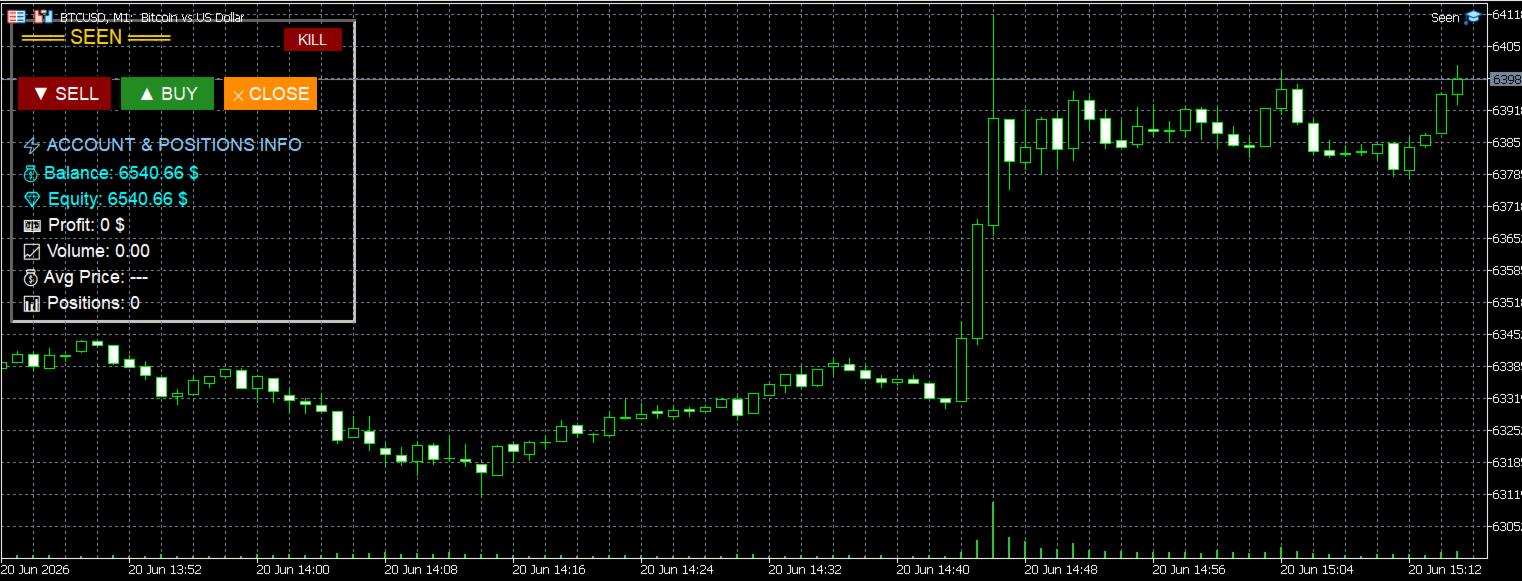
### 🎮 Information Panel — Everything in One Place
The panel displays **key real-time metrics**:
| Indicator | Description |
|-----------|-------------|
| **Balance** | Current account balance |
| **Equity** | Equity including open positions |
| **Profit** | Current floating profit/loss |
| **Volume** | Total volume of all open positions |
| **Avg Price** | Weighted average price of all positions |
| **Positions** | Number of open positions |
| **Level** | Current grid level (when grid is enabled) |
| **Spread** | Current symbol spread |
One-button control:
- 🔴 **SELL** — open a sell position
- 🟢 **BUY** — open a buy position
- 🔵 **CLOSE** — close all positions
- ⚫ **KILL** — emergency close (panic stop)
All data updates **instantly** — without delays or redraws.
---
## ⚙️ Configuration Parameters
### Grid Settings (can be disabled)
| Parameter | Description |
|-----------|-------------|
| **Number of Grid Levels** | **= 0 — grid disabled** (pure scalping) / 1–20 — enabled |
| Grid Calculation Mode | Calculation mode: Fixed Pips / Dynamic ATR |
| Grid Step in PIPS | Grid step in pips (for fixed mode) |
| ATR Multiplier | ATR multiplier (for dynamic mode) |
| ATR Period | ATR period (current timeframe) |
| Base Lot Size | Base lot size |
| Lot Multiplier per Level | Lot multiplier for each level |
### Trailing Settings (eliminates routine work)
| Parameter | Description |
|-----------|-------------|
| Trailing Mode | Mode: Average Price / Individual |
| Trailing Activation | Trailing activation in pips |
| Trailing Distance | Trailing distance in pips |
| Trailing Update Step | Stop update step in pips |
### Drawdown Protection (automatic)
| Parameter | Description |
|-----------|-------------|
| Enable Drawdown Protection | Enable drawdown protection |
| Max Drawdown | Maximum drawdown percentage from balance |
### Debugging
| Parameter | Description |
|-----------|-------------|
| Debug Mode | Debug mode (outputs messages to journal) |
---
## 🔧 System Requirements
- **Platform:** MetaTrader 5
- **Language:** MQL5
- **Type:** Trading panel (Expert Advisor with manual control)
- **Requirements:** No DLL, no WebRequest, no external licenses
---
## 📋 Installation
1. Download the `SeenPanel.ex5` file
2. Place it in the `MQL5/Experts` folder of your MetaTrader 5 terminal
3. Restart the terminal or refresh the Expert Advisors list
4. Drag the EA onto the chart of your desired symbol
5. Configure parameters in the properties window
6. Enable automated trading (the "AutoTrading" button)
7. **Market entry is done manually** through the panel buttons
---
## 🎯 Usage Recommendations (SCALPING)
- Recommended for use on currency pairs with **high volatility** and tight spreads
- For gold (XAUUSD), the correct pip size is automatically determined
- Recommended balance: from **$500** for a minimum lot of 0.01
- **Scalping timeframe:** M1-M5 (the panel works on any TF)
- **To disable the grid:** set `Number of Grid Levels = 0`
- Always test on a demo account before using on a live account
- **The EA does not generate signals** — entry is solely at your discretion
---
## ⚠️ Important Warnings
- Trading on a live account involves **high risk of capital loss**
- **The EA does not guarantee profit** and is not a "holy grail"
- Use only funds you are prepared to lose
- Configure drawdown protection according to your risk strategy
- Regularly check the EA's performance and adjust parameters
- **The panel is not designed for fully automated trading** — it is a manual scalping tool with advanced capabilities
---
## 📊 Statistics
- **Version:** 1.0
- **Author:** AmurSaer
- **Release Year:** 2026
- **Type:** Scalping panel with optional grid and automatic trailing
---
## 📞 Support
For any questions, please contact via private messages on MQL5.com: