SMC Trade Pilot MT4

SMC Trade Pilot MT4

Assistente di trading semi-automatico per i trader Smart Money Concepts. Ricevi i segnali direttamente su Telegram con uno screenshot del grafico e apri l'operazione con un solo tocco. Gestisci le posizioni dal telefono, anche quando sei lontano dal computer.

Il problema che risolve

I setup Smart Money non aspettano. Gli Order Block e i Liquidity Sweep si formano all'apertura di Londra, di New York o nel mezzo della sessione asiatica, spesso mentre sei al lavoro, in riunione o lontano dallo schermo. Quando guardi il grafico, il setup e' gia' passato o il prezzo si e' gia' mosso.

SMC Trade Pilot trasforma il tuo telefono in una cabina di pilotaggio del trading in tempo reale. L'Expert Advisor analizza continuamente il grafico alla ricerca di segnali SMC. Quando si forma un setup, invia un ticket di trading completo al tuo Telegram: screenshot del grafico, direzione, prezzo di ingresso, stop loss suggerito, take profit suggerito e punteggio di qualita'. Decidi tu. Un tocco per eseguire, un tocco per saltare.

Come funziona

  1. L'EA monitora il grafico in background.
  2. Quando viene rilevato un segnale Smart Money (BOS, ChoCH, rottura imminente, nuovo Order Block o Liquidity Sweep), su Telegram arriva un messaggio ricco con screenshot del grafico, dettagli del segnale, prezzo di ingresso e suggerimenti SL/TP.
  3. Tre pulsanti inline ti permettono di decidere: EXECUTE apre l'operazione, SKIP scarta il segnale, MODIFY per una regolazione manuale.
  4. Dopo l'esecuzione, il messaggio viene aggiornato mostrando il ticket aperto e un unico pulsante CLOSE NOW. Puoi chiudere la posizione da Telegram in qualsiasi momento.
  5. Mentre la posizione e' aperta, l'EA puo' spostare lo stop a pareggio dopo 1R, poi applicare un trailing stop basato sull'ATR.

Caratteristiche principali

  • Motore di segnali Smart Money: Break of Structure, Change of Character, rilevamento rottura imminente, Order Block con punteggio di forza, Fair Value Gap, Liquidity Sweep e Volume Profile.
  • Pannello multi-timeframe: bias istantaneo M15, H1, H4 e D1 con punteggio di confluenza.
  • Integrazione Telegram bidirezionale: messaggi ricchi con screenshot del grafico e pulsanti EXECUTE / SKIP / MODIFY / CLOSE.
  • Gestione del rischio integrata: dimensione del lotto in percentuale del capitale, rischio per operazione configurabile, protezione dal drawdown giornaliero e limite giornaliero di operazioni.
  • SL/TP automatici: basati su un multiplo dell'ATR o sull'ultimo Order Block, con rapporto rischio/rendimento configurabile.
  • Gestione della posizione: pareggio dopo 1R, poi trailing stop ATR.
  • Filtro di qualita': ogni segnale riceve un voto. Imposta una soglia minima e solo i setup piu' puliti raggiungeranno il tuo Telegram.
  • Filtro di sessione: restrizione opzionale alle kill zone asiatica, londinese o newyorkese.
  • Filtro di spread: blocca l'esecuzione quando lo spread supera la tua soglia.
  • Statistiche Order Block: tasso di successo, tasso di mitigazione e forza media degli Order Block storici.
  • Scansione storica: analisi degli Order Block fino a 2000 candele all'avvio.
  • Dashboard: pannello spostabile con struttura live, vista multi-timeframe, kill zone e stato del segnale corrente.

Per chi e'

  • Trader SMC e ICT manuali che non vogliono perdere un setup mentre sono assenti.
  • Day trader e swing trader che non possono seguire i grafici durante l'orario di lavoro.
  • Viaggiatori e lavoratori da remoto che vogliono una cabina di trading sul telefono.
  • Candidati funded challenge che hanno bisogno di un rigoroso quadro di gestione del rischio.

Requisiti e installazione

  • MetaTrader 4, qualsiasi broker.
  • Un token bot Telegram, gratuito tramite @BotFather nell'app Telegram.
  • Il tuo chat ID Telegram personale, gratuito tramite @userinfobot.
  • Consenti https://api.telegram.org in Strumenti, Opzioni, Expert Advisor.
  • Dopo l'acquisto viene fornito un manuale PDF completo che ti guida passo dopo passo, con screenshot.

Parametri principali

Parametro Predefinito Funzione
InpTelegramEnable false Interruttore del modulo Telegram
InpTelegramBotToken vuoto Il tuo token bot @BotFather
InpTelegramChatID vuoto Il tuo chat ID @userinfobot
InpExecEnable false Interruttore di esecuzione. Lascia false solo per gli avvisi.
InpExecRiskPct 1.0 Rischio per operazione in percentuale del capitale
InpExecRRRatio 2.0 Rapporto rischio/rendimento del TP automatico
InpExecMaxTradesDay 5 Limite giornaliero del numero di operazioni
InpExecMaxDailyDDPct 3.0 Drawdown giornaliero massimo in percentuale, 0 disattiva
InpExecMinQualityScore 0 Punteggio di qualita' minimo 0-100 per consentire l'esecuzione, 0 nessun filtro

Note importanti

  • Questo EA e' un assistente semi-automatico. Le operazioni vengono aperte solo dopo aver toccato EXECUTE su Telegram. L'EA non apre posizioni da solo.
  • I risultati passati non garantiscono quelli futuri. Il trading a margine comporta un rischio sostanziale di perdita.
  • Testa sempre l'EA su un conto demo prima di usarlo in reale.
  • Il supporto e' fornito tramite la messaggistica MQL5.

Avvertenza sul rischio

Il trading di valute e CFD comporta un elevato livello di rischio e potrebbe non essere adatto a tutti gli investitori. Prima di decidere di operare, valuta attentamente i tuoi obiettivi di investimento, il livello di esperienza e la propensione al rischio. Potresti subire una perdita parziale o totale del capitale iniziale, quindi non investire denaro che non puoi permetterti di perdere.

Prodotti consigliati
BreakEven Grid Utility for MT4 BreakEven Grid is a powerful utility for manual trade management on the MetaTrader 4 platform. It provides a convenient on-screen panel with buttons to help you manage your open positions with a single click.  Features: Set BE+Profit: Automatically sets Take Profit to breakeven + desired profit in pips or money. Close BUY/SELL: Instantly close all Buy or Sell orders for the current symbol. Close +$/-$/Old/New: Close only profitable, losing, oldest or newest tra
An  MT4 Expert advisor for finding Break-Even point of open position, especially grid or hedge orders. also, you can close all open orders, or delete all pending orders , and set your desire Take Profit how far from Break Even point. All traders that using Grid strategy, or Hedge strategy should use this ea. it shows you break-even point by drawing a line and also automatically set your Take profit and stop loss.
Universal TP SL Pips
Genesis Hafalla
5 (1)
This EA utility does not trade on its own, but it only modifies the   open  trades    to add   take profit   and   stop loss   that was  opened manually or by any other expert advisors.  The distance is based on Pips . How Does It Work? If   Symbol to modify   is set to   "All Symbol"   simply attach it to one chart, and all   open trades   in the entire terminal will set the   take profit   and   stop loss   .  If  Symbol to modify   is set to   "Local Symbol"   , it will only set the   ta
Open by Clik
Dariusz Grywaczewski
Open by Clik is a tool that allows you to open positions with two mouse clicks. The place of the click and the direction of clicking decide what position will be opened. Opening of positions is quick and intuitive. If the second click is above the first click, opened are positions Long. If the second click is belowe the first click, opened are positions Short. By clicking in the chart area, opened are Market Order (BUY and SELL). By clicking in the area in front of the chart, opened are Pendin
Trade Manager MT4 DaneTrades
Levi Dane Benjamin
4.09 (11)
Trade Manager per aiutarti a entrare e uscire rapidamente dalle operazioni calcolando automaticamente il tuo rischio. Incluse funzionalità che ti aiutano a prevenire l'eccessivo trading, il vendetta trading e il trading emotivo. Le operazioni possono essere gestite automaticamente e i parametri di performance del conto possono essere visualizzati in un grafico. Queste caratteristiche rendono questo pannello ideale per tutti i trader manuali e aiuta a migliorare la piattaforma MetaTrader 4. Suppo
本エキスパートアドバイザ(EA)は、以下の条件をすべて満たした注文が決済された場合に、自動的に同一内容の注文を再設定します。 対象となるのは指値注文または逆指値注文で、必ずテイクプロフィット(TP)とストップロス(SL)が設定されているものです。 そして、その注文がTPまたはSLによって決済された際、同じロット数・価格・TP・SL・有効期限などの条件を引き継いだ注文を自動で再発注します。 これにより、一度設定した戦略を継続的に適用でき、裁量判断なしに取引を繰り返すことが可能となります。 ただし、ブローカーによっては再注文時にスリッページが発生する場合がありますので、必ずご利用環境をご確認の上、自己責任でお使いください。
Easy Trade Executor è uno strumento per il calcolo rapido del lotto, l'esecuzione degli ordini e la gestione dei trade in MT4. Posiziona direttamente sul grafico i livelli di Entrata, Stop Loss e Take Profit, ottieni il calcolo automatico del lotto e apri trade con rischio controllato in pochi clic. Perché scegliere Easy Trade Executor? Easy Trade Executor è stato progettato per i trader che cercano molto più di un semplice calcolatore del rischio. Vogliono gestire i propri trade in modo rapido
Pomo Panel
Jermias Perkasa
Pomo Panel is a simple panel to help trader using grid strategy. It is designed with grid strategy in mind.  Its features: Open standard transactions Set up pending transactions Delete all pending transactions Modify multiple Stop-Loss and Target-Profit Calculate Lots of all opened transactions Calculate average Open-Close, High-Low Close All Opened Orders
All In One Trade Manager is a trade manager and one-click trading panel for manual traders on MetaTrader 4. It works as a trading assistant, risk manager and position size calculator in one dashboard. It brings together everything below in one panel: order entry with risk sizing automatic trade management advanced order types account protection statistics Its entry checks run in the background and tell you, before you click BUY or SELL, when something speaks against the trade. Also available
SL InfoPanel
Sergei Lopukhov
SL InfoPanel is an information panel that displays operational trading information on the current instrument. The panel contains the following information: The first column: The fixed profit for the specified period of time and the percentage of this profit to the current deposit (the time period is configured in the "Account History"). The value is colored blue if there is a profit and red if there is a loss. Open Long orders (number of lots/number of orders). Open Short orders (number of l
Note: After installation, please go to Tools>Options>Expert Advisors and add https://porsaj.com to 'Allow WebRequest for listed URL'. Still Problem?! Please check Internet connection! An economic calendar in the context of forex refers to a tool or resource that provides information about upcoming economic events, indicators, and data releases that can potentially impact the financial markets, particularly the foreign exchange market. It helps traders stay informed about key economic announce
Trade panel manual is a multifunctional trading assistant. It allows you to open market and pending orders in one click. Value is set via button menu edit or deleted by specific buttons pending orders and the value of take profit and stop loss in one click. Through the edit menu of the button, a value is set that can be easily changed by simply moving level_tp lines for take profit or stop loss levels and for pending orders. It is possible to select orders and determine for them and set the leve
Potenzia i tuoi Segnali di Trading con il nostro avanzato Telegram Bridge EA È giunto il momento di affascinare il tuo pubblico con aggiornamenti di trading in tempo reale, professionali e visivamente accattivanti. Contattami per ricevere una prova gratuita e vedere il canale demo! Abbiamo investito significativamente in funzionalità intuitive che creano un'esperienza unica per clienti e provider.  SIGNAL BRIDGE è in grado di fornire SEGNALI 100% COMPATIBILI CON I COPIER per tutti i casi d'uso,
Position Cloner
Bernhard Stremayr
Position Cloner (PC) is a helpful utility that can be used like an EA to duplicate specific positions within the same MT4 instance. This is valuable e.g. to increase the risk when copying a signal to your account. When trading big capital you can also decrease the original risk of your EAs or manually opened positions and then let PC duplicate them. This way you avoid negative slippage due to inordinate lot sizes. You can choose between different, fully customizable options of how PC must clone
ScalpingOne
Xian Er Sha Ao
Scalping Day Trading Support Utility Scalping One for MT4 setting faile (for white Chart)    http://www.emkyuradias.shop/indexenglish.html One position is displayed with one button. View P & L, Lot, and Point in real time. It is possible to switch the display of positions of only chart currencies and all currency pairs.   Supports automatic identification in Japanese and English   Account currency notation corresponds to dollar, euro, pound, yen (automatic identification) Lot, take profit and
Spread Costs refers to the amount of the loss caused by the spread, and Swap Benefits refers to the amount of the income gained by overnight positions. Spread Costs is an important indicator for short-term traders, especially for scalping traders, and Swap Benefits is an important indicator for long-term traders. Since the spreads and swaps on the MetaTrader 4 platform are all expressed in points, we need to convert it into the amount expressed in the account currency. This tool can display the
Trade Manager G2 MT4
Ida Bagus Putu Mahardika
TRADE MANAGER G2 – PRODUCT DESCRIPTION By Ida Bagus Putu Mahardika Trade Manager G2 – All-in-One Trading Panel for Professional Execution & Risk Management Trade Manager G2 is a next-generation trading panel designed to give you full control over order execution, position management, and profit optimization in real time on MetaTrader 5. With a modern card-based user interface and individual TP actions per level, this panel elevates your trading experience to the next level. KEY ADVANTAGES OF
TSMouseTP
Salvatore Labriola
Script to move the Takeprofit of your positions all on one level, or just a Takeprofit of one of them. Convenient and quick to use. Just drag the script to a point in your template, at the price level you want, and the utility will ask you if you want to move all the Takeprofits to that level, or just move one Takeprofit of a position. Very useful when the positions are very close or the Takeprofits are too close. We would appreciate your feedback, so we can improve ourselves. Good trading.
Broker Analysis Utility
AL MOOSAWI ABDULLAH JAFFER BAQER
Broker Analysis Utility – Your Ultimate Broker Performance Monitor! Get Full Transparency on Your Broker's Execution Quality! Are you a trader who values precision, transparency, and performance? Broker Analysis Utility is an essential tool designed to monitor your broker's execution quality, connection stability, spreads, slippage, and trading costs in real-time. Whether you are a scalper, day trader, or long-term investor, understanding your broker's performance is crucial to optimizing your
Grid Trading
Waseem Raza
5 (3)
Grid Trading EA is a semi-automated one-click trading EA for both Normal Trading and Grid/Martingale Trading . Normal Trading Simply click Buy or Sell directly from the chart. The EA will automatically manage trades by: Setting Stop Loss and Take Profit Managing Trailing Stop Grid / Martingale Trading When Grid Trading mode is enabled, the EA will automatically open additional grid orders at specified distances while increasing the lot size based on your settings. Inputs & Settings Lots — Initia
Free 14-day trial | Manual TrueRisk Trade Manager is a one-click trading panel for MetaTrader 4. You set your risk in percent and the stop loss; the panel works out the lot size, checks that the stop can't take you past your daily or maximum loss limit, opens the trade and then manages it for you: partial close, break-even and trailing stop. Lot size from your risk %, cut to the room left before your loss limits Partial close, break-even and trailing stop in R, automatically Stop loss and lot si
TakeProfit Catcher
Mikhail Kontsevoy
It is so very disappointing when the price does not have enough points to achieve Take Profit and makes a reversal. This EA sets virtual levels near the TakeProfit levels. This EA sets virtual levels next to TakeProfit orders. If these levels are reached by price, breakeven or trailing stop is applied for an order. Features This EA does not set new orders. The aim of this EA is to manage stop losses of existing orders that are set by another EA or manually (magic number equals 0). For correct w
TSTrendLineSymbol
Salvatore Labriola
Utility, which draws buy or sell trendlines, which can also become support or resistances able to close any position on the screen Algorithm that calculates the gain of the position, at the touch closure of the line.   The benefits you get: Works on forex and CFD, timeframe from M1 to Weekly. Easy to use screen control panel. Audible warning messages at the touch of the line. Easy to use.
Risk manager Risk manager - it will simplify the tracking of drawdown and will notify you (alert) when the specified risk is reached, and close/lock orders when the critical DD risk level is reached. If the specified drawdown is exceeded, you can choose two options for actions: All orders will be closed that mean loss will be fixed on depo. The terminal also closes. Instead of fixing the loss on depo, the opposite order will be opened - orders locking will occure. Not a single order will be c
SESSION PILOT MT4 – MARKET SESSION & NEWS FILTER Session Pilot is an intelligent filtering tool designed to focus trading activity on the most liquid market sessions and avoid trades during high-volatility news events. The system continuously monitors current time and upcoming economic announcements. MAIN FEATURES • Automatic detection of London, New Y
EA Hedger
Sergej Chukhista
4 (4)
EA Hedger   è un'utilità di trading professionale con molte impostazioni che ti consente di gestire i rischi utilizzando la copertura. La copertura è una tecnica di trading che prevede l'apertura di posizioni opposte a quelle già aperte. Con l'aiuto della copertura, la posizione può essere completamente o parzialmente bloccata (bloccata). Perché è redditizio acquistare questo prodotto: Affidabilità   : il consulente è accuratamente controllato e testato Utilità -il consulente esperto viene util

HungrySpiderMulti
Aleksandr Hudilainen
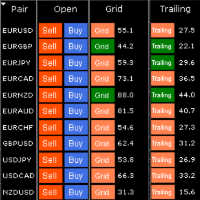
HungrySpiderMulti - is an easy-to-use multi-currency trading panel allowing you to trade 28 trading pairs in one window . The panel also allows you to use grid, and trailing stop. Using this panel trader will receive a push-notification about new events. Opening an order: Opening an order occurs in one click. Near the required currency pair, in the Open section, click on the Sell or Buy button. Grid: Near required pair, there is a Grid button. The button has two states, green - on, orange - off
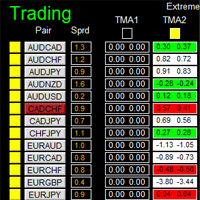
如果产品有任何问题或者您需要在此产品上添加功能,请联系我 Contact/message me if you encounter any issue using the product or need extra feature to add on the base version. There is Demo version of this panel Dashboard Extreme TMA System Demo in my product list, please try it out to get familiar with all functionalities free, LINK . This system basically utilizes 4 TMA (Triangular Moving Average) slope indicators on 4 time-frame and TMA Band as the core indicators to generate trading signal mainly on time-frame M15. The sig
TesterPro
Miguel Angel Barahona Ochoa
TesterPro è un pannello progettato per l’uso nel *Strategy Tester* di MT4. Consente di simulare ordini di acquisto e vendita, impostare la dimensione del lotto, *take profit* e *stop loss*. È possibile modificare gli ordini aperti e chiuderli parzialmente in qualsiasi momento. Inoltre, è possibile regolare i livelli di *take profit* e *stop loss* semplicemente trascinando le linee corrispondenti con il mouse. Durante il *backtesting*, ** TesterPro ** fornisce un rapporto in tempo reale con inf
COP Basket EA
Dirk Reinkober
COP Basket EA Smart Basket Management for MetaTrader 4 COP Basket EA is a professional trade management Expert Advisor for MetaTrader 4 (MT4), designed to manage multiple open positions as one combined trading basket. The EA does not open trades itself . Instead, it works alongside your existing Expert Advisors or manual trading strategies and automatically manages their positions based on configurable basket profit and loss targets. Key Features Basket-Based Trade Management COP Basket EA conti
Gli utenti di questo prodotto hanno anche acquistato
Forex Trade Manager MT4
InvestSoft
4.98 (447)
Benvenuto a Trade Manager EA, lo strumento definitivo per la gestione del rischio , progettato per rendere il trading più intuitivo, preciso ed efficiente. Non è solo uno strumento per l'esecuzione degli ordini, ma una soluzione completa per la pianificazione delle operazioni, la gestione delle posizioni e il controllo del rischio. Che tu sia un principiante, un trader avanzato o uno scalper che necessita di esecuzioni rapide, Trade Manager EA si adatta alle tue esigenze, offrendo flessibilità s
Telegram to MT4 Multi-Channel Copier   copia automaticamente i segnali di trading dai tuoi canali Telegram e Discord direttamente su MetaTrader 4. Niente bot, niente estensioni del browser, niente copia manuale. Il segnale arriva su Telegram o Discord e l'EA apre l'operazione nel tuo terminale in pochi secondi. E prima di copiare un canale, il backtester integrato ti mostra cosa avrebbe fatto quel canale sul tuo conto. Il prodotto include due componenti: un'applicazione Windows che ascolta i tuo
Il MT4 to Telegram Signal Provider è uno strumento facile da usare e completamente personalizzabile che consente l'invio di segnali a Telegram, trasformando il tuo account in un fornitore di segnali. Il formato dei messaggi è completamente personalizzabile! Tuttavia, per un uso semplice, puoi anche optare per un modello predefinito e abilitare o disabilitare parti specifiche del messaggio. [ Dimostrativo ]  [ Manuale ] [ Versione MT5 ] [ Versione Discord ] [ Canale Telegram ]  New: [ Telegram To
PZ Trade Pad Pro MT4
PZ TRADING SLU
3.67 (3)
Effortlessly calculate lot sizes and manage trades to save time and avoid costly errors The Trade Pad Pro EA is a tool for the Metatrader Platform that aims to help traders manage their trades more efficiently and effectively. It has a user-friendly visual interface that allows users to easily place and manage an unlimited number of trades, helping to avoid human errors and enhance their trading activity. [ Installation Guide | Update Guide | Troubleshooting | FAQ | All Products ] One of the k
Trade Indicator Assistant is a powerful MT4 utility designed to turn indicators into automated trading systems. Its main feature is the ability to automatically detect an indicator’s   BUY and SELL signal buffers , without requiring you to know the buffer numbers, search through indicator settings, or modify the indicator source code. Bonus Indicator: After purchasing Trade Indicator Assistant, contact me to receive Trade Signal Pro completely free as a bonus indicator. [Download Demo Version]
The product will copy all telegram signal to MT4   ( which you are member  ) , also it can work as remote copier.  Easy to set up, copy order instant, can work with almost signal formats, image signal, s upport to translate other language to English Work with all type of channel or group, even channel have "Restrict Saving Content", work with  multi channel, multi MT5 Work as remote copier: with signal have ticket number, it will copy exactly via ticket number. Support to backtest signal. How to
Take a Break
Eric Emmrich
5 (31)
Take a Break pauses your Expert Advisors when trading is a bad idea: before news, after a daily loss, outside your trading hours, or when a rule you wrote yourself says so. When the pause is over, your EAs simply continue. Account protection for all your EAs in one tool: news filter, drawdown and equity protection, time filter and custom rules. One EA on one chart protects the whole account, the free indicator gives every chart its own rules on top. Free demo | What is new in 26.09 | Support Ass
FCK CurrencyStrength Pro
Patel Hitendrakumar Mahendrabhai
Hi Friends, " FCK Currency Strength Pro " is a auto & semi auto trading expert with direction of pair. Buy-Sell separate or multi currency in one click. The strategy of  FCK Currency Strength Pro  is a combination of custom indicator, Trendlines, Support & Resistance levels ( Price Action ) and most important secretive trading algorithm mentioned above. Download News Ex4 and csv file You need the following SDSnews.ex4 in MQL4/Libraries and the daylightsavings.csv in MQL4/Files. Only 4 of 5 copi
Unlimited Trade Copier Pro
Vu Trung Kien
4.43 (7)
Unlimited Trade Copier Pro is a tool to copy trade remotely to multiple MT4, MT5 and cTrader accounts at different computers/locations over internet. This is an ideal solution for you if you are a signal provider and want to copy your trades to other receivers globally on your own rules. One provider can copy trades to multiple receivers and one receiver can get trade from multiple providers as well. The provider can even set the subscription expiry for each receiver, so that receiver will not b
Strategy Builder offers an incredible amount of functionality. It combines a trade panel with configurable automation (covert indicators into an EA), real-time statistics (profit & draw down) plus automatic optimization of SL, TP/exit, trading hours, indicator inputs. Multiple indicators can be combined into an single alert/trade signal and can include custom indicators, even if just have ex4 file or purchased from Market. The system is easily configured via a CONFIG button and associated pop-up
Zone Trader MT4
Lee Samson
5 (1)
Fai trading automaticamente su zone di supporto e resistenza o di domanda e offerta una volta identificate le aree chiave da cui vuoi fare trading. Questo EA ti consente di disegnare zone di acquisto e vendita con un solo clic e poi posizionarle esattamente dove ti aspetti che il prezzo cambi. L'EA monitora quindi quelle zone e farà trading automaticamente in base all'azione del prezzo che specifichi per le zone. Una volta che il trading iniziale è stato eseguito, l'EA uscirà in profitto nella
Riskless Pyramid
Snapdragon Systems Ltd
5 (1)
Introduction This powerful MT4 trade mangement EA offers a way potentially to aggressively multiply trade profits in a riskfree manner. Once a trade has been entered with a defined stoploss and take profit target then the EA will add three pyramid add-on trades in order to increase the overall level of profit. The user sets the total combined profit target to be gained if everything works out. This can be specified either as a multiple of the original trade profit or as a total dollar amount. Fo
Prop Guardian Risk Manager MT4 – Drawdown, Risk & Hedge Protection for Prop Firm and Managed Accounts Prop Guardian Risk Manager is a professional risk-control utility for MetaTrader 4, designed for prop firm traders, money managers and anyone who wants strict account-level risk protection. It does not generate trading signals, strategy entries or trading decisions. Instead, it runs in the background, monitors your account risk and can automatically block new exposure, close managed trades or ac
Grid Manual MT4
Alfiya Fazylova
4.71 (17)
Grid Manual è un pannello di trading per lavorare con una griglia di ordini. L'utilità è universale, ha impostazioni flessibili e un'interfaccia intuitiva. Funziona con una griglia di ordini non solo nella direzione delle perdite, ma anche nella direzione dell'aumento dei profitti. Il trader non ha bisogno di creare e mantenere una griglia di ordini, lo farà l'utilità. È sufficiente aprire un ordine e il manuale di Grid creerà automaticamente una griglia di ordini per esso e lo accompagnerà fino
DrawDown Limiter MT4
Haidar Lionel Haj Ali
5 (8)
DrawDown Limiter v5.0 — Advanced Account Protection Controller DrawDown Limiter v5.0 is a client-side account protection controller designed to supervise your trading account and automatically react when configured risk, profit, news, schedule, rollover, or position limits are reached. It can monitor manual trades, automated strategies, multiple Expert Advisors, pending orders and floating positions from one dedicated chart. It can protect the complete account or be configured to supervise a spe
Ultimate Partial Profit EA
BLAKE STEVEN RODGER
4.67 (3)
This EA Utility delivers a robust solution for managing an unlimited array of open orders, both manual and automated. It enables customizable partial profit levels utilizing metrics such as pips, ratios, ATR (Average True Range), and profit amounts for precise trade management. The utility features an advanced on-screen display, offering clear visualization of all orders and their profit levels to enhance strategic decision-making and control. To evaluate its performance and interface, the EA s
Auto Trade Driver
Vu Trung Kien
4.6 (15)
Auto Trade Driver is an automatic powerful tool (run as Expert Advisor) that helps you to manage risk and control orders and maximize your profit in multi-protect/trailing-stop rules. This tool is very useful for both scalpers and trend followers. It not only calculates the trade risk exactly, but also protects and maximizes your profits in real-time. With this tool, the only thing you have to do is to enter trade by your own strategy, then it will auto-drive your position with exit strategy you
The FFx Hidden Manager panel will help you to manage easily your orders directly on the chart. Below all features described: TP, SL and TrailingStop are hidden Each order has its own lines on chart Drag & Drop any line to change the TP/SL as per your need Option to move automatically the SL line at breakeven when TP #1 is reached Option to choose the TP/SL type (by pips or price) Option to choose the TrailingStop type (by pips, MA, Fractals, PSAR or ATR) Define which order(s) you want to manage
FFx Risk Calculator
Eric Venturi-Bloxs
FFx Risk Calculator panel will help you to calculate very easily your trades size, SL or the risk directly on the chart. All features are described below: Option to select which parameter to calculate: Risk, Stop Loss or Lot Size The panel will show if the lot size is allowed according to the current account free margin Button to maximize/minimize the panel Drag and Drop the panel anywhere on the chart How to use it? Select the parameter you want to be calculated. It will be based on the 2 other
Trade Copier Pro
Vu Trung Kien
4.29 (14)
Trade Copier Pro is a tool to copy trade remotely to MT4, MT5 and cTrader accounts at different computers/locations over internet. This is an ideal solution for you if you are a signal provider and want to copy your trades to other receivers globally on your own rules. One provider can copy trades to multiple receivers and one receiver can get trade from multiple providers as well. The provider can even set the subscription expiry for each receiver, so that receiver will not be able to receive t
News Trader Pro
Vu Trung Kien
4.38 (16)
News Trader Pro is a unique robot that allows you to trade the news by your predefined strategy. It loads every piece of news from several popular Forex websites. You can choose any news and preset the strategy to trade it, and then News Trader Pro will trade that news by selected strategy automatically when the news comes. News release gives opportunity to have pips since the price usually has big move at that time. Now, with this tool, trading news becomes easier, more flexible and more exciti
Bears CD HTB Global  (Bears Convergence/Divergence High Top Bottom Global) is an analytical bears convergence/divergence indicator (C, D or CD) between a financial instrument and 22 MT4 indicators working on all periods simultaneously. The indicator measures the power of CD for indicators and periods and is the second one out of the two possible versions (HBT and HTB). Features The analyzer is not a lagging one. It works by ticks and is able to show CD in the main window even in case the MT4 in
Bulls CD LBT Global  (Bulls Convergence/Divergence Low Bottom  Top   Global) is an analytical bulls convergence/divergence indicator (C, D or CD) between a financial instrument and 22 MT4 indicators working on all periods simultaneously. The indicator measures the power of CD for indicators and periods and is the first one out of the two possible versions (LBT and LTB). Features The analyzer is not a lagging one. It works by ticks and is able to show CD in the main window even in case the MT4 i
FFx Watcher PRO
Eric Venturi-Bloxs
The FFx Watcher PRO is a dashboard displaying on a single chart the current direction of up to 15 standard indicators and up to 9 timeframes. It has 2 different modes: 1. Watcher mode: Multi Indicators User is able to select up to 15 indicators to be displayed User is able to select up to 9 timeframes to be displayed 2. Watcher mode: Multi Pairs User is able to select any number of pairs/symbols User is able to select up to 9 timeframes to be displayed This mode uses one of the standard indicat
The VIZUALIZER
Charles Harper
THE [VIZUALIZER] is a MetaTrader (MT4) Script designed to visualize an account history. It will read the account statement and then will visualize the positions on chart in form of rectangles, showing the OpenTime, OpenPrice, CloseTime and ClosePrice. Generally, it has been developed to analyze the trading history, to observe how risky the particular positions were, allowing you to analyze the trading strategy from the account statement. It is working with standard MS Excel CSV files It is visua
NickZ Tool
Nicolas Zouein
This is a must have tool for a serious trader. It saves your precious time spent for opening/closing trades, creating pending trades and modifying your TP/SL in bulk according to either pips or price. If you need to quickly open several pending orders (Buy Stop, Sell Stop) at a certain distance from each other, this script will do all the routine for you! The first time you use this handy tool, you will realize it has already paid for itself. Instructions: Drag and drop this script onto a chart.
The product combines a manual trade panel with the ability to perform actions automatically in a highly configurable way. Actions include capturing indicator values and then based on those values raising alerts, open/close or partially close trades, scale-in, setting up pending orders, adjusting stop loss, take profit and more. On-chart controls can be configured, such as tick boxes and buttons, so can be fully interactive. The EA also handles money management, news events, hidden stop loss, tak
Binary Options Copier Remote is an EA that allows to copy binary options trades between MT4 accounts at different computers. This is an ideal solution for signal provider, who want to share his trade with the others globally on his own rules. Provider can give free bonus license to 10 receivers. That means those 10 receivers can copy from provider by using Binary Options Receiver Free (no cost). From 11th one, receiver have to buy Binary Options Receiver Pro (paid version) in order to copy from
One Click FX Panel
Chantal Sala
5 (2)
Questo pannello è molto semplice da usare ed è un ottimo alleato per gestire le tue posizioni e ordini. Puoi gestire tre tipi di rischio: lotto fisso, denaro e percentuale. Il lotto in percentuale ed in denaro viene calcolato a fronte dei punti di stoploss inseriti. Un click sul pulsante per cambiare modalità velocemente e l'operazione a mercato è inserita! Pulsanti: COMPRARE VENDERE BE: Pareggiare Diviso: chiude metà operazione X:  Chiudi tutte le posizioni §: Hedging (apertura posizione par
The Expert Advisor (EA) generates an advanced trading tool to place a pending or market order on any currency pair symbol , as selected from a drop-down menu in the panel. A market order is placed by clicking appropriate Sell or Buy button. On the other hand, a pending order is placed by selecting a pending order type and thereafter clicking Place button. Moreover, the panel provides various options to define exact parameters for every order before placing it. For instance, the triggering price
Altri dall’autore
Market Structure Order Block Dashboard MT5 è un indicatore MT5 progettato per i trader che vogliono leggere la struttura di mercato e le principali zone di reazione del prezzo direttamente sul grafico. Combina BOS, ChoCH, Order Blocks, Fair Value Gaps (FVG), Liquidità, Kill Zones, Volume Profile e un pannello compatto per un'analisi rapida. Questo indicatore è rivolto ai trader che utilizzano la struttura di mercato, i concetti ICT e Smart Money come quadro decisionale. Può aiutare a individuare
Pannello di trading con un clic, calcolatore di lotti e gestore di operazioni per MetaTrader 5 Trading Panel PRO MT5 è un pannello di trading per preparare, eseguire e gestire operazioni manuali e semimanuali direttamente dal grafico, con un controllo visivo del rischio a ogni passo. Riunisce l'esecuzione con un clic di ordini a mercato, Limit e Stop, un calcolatore di rischio che calcola il lotto dal rischio in percentuale, nella valuta del conto o come lotto fisso, zone di entrata, stop loss e
Position Size Calculator Lite MT5 - Indicatore gratuito di gestione del rischio (v2.0) Versione Lite gratuita del Position Size Calculator. Se hai bisogno del drag and drop interattivo delle linee SL/TP, modalita Lotto Fisso e regolazione di Risk/R:R/ATR dal pannello, vedi la versione PRO sul Market: Position Size Calculator PRO MT5 . Panoramica Position Size Calculator Lite MT5 e un indicatore gratuito che calcola la dimensione del lotto consigliata per un'operazione basandosi su una percentual
FREE
Session Volume Profile Value Area mostra dove il mercato ha realmente scambiato durante la sessione in corso, non solo dove e andato il prezzo. Costruisce un profilo di volume orizzontale direttamente sul grafico e segna i tre livelli che i trader osservano: POC, VAH e VAL. La maggior parte dei grafici mostra solo il prezzo. Il Volume Profile aggiunge la dimensione mancante: quanto e stato scambiato a ogni prezzo . I prezzi dove molto volume ha cambiato di mano sono aree che il mercato ha accet
FREE
Indicatore di doppio massimo, doppio minimo e testa e spalle per MT5 con livelli di entrata, stop e obiettivo Questo indicatore per MT5 rileva le figure grafiche di inversione su candele chiuse: il doppio massimo e il doppio minimo (double top, double bottom, le figure a M e a W), il testa e spalle e il testa e spalle rovesciato (head and shoulders, inverse head and shoulders). Ogni figura diventa tre prezzi scritti sul grafico: l'entrata sulla rottura della neckline, lo stop e l'obiettivo misur
Indicatore di forza delle valute per MetaTrader 4 Questo indicatore di forza delle valute analizza fino a 28 coppie principali e ne ricava un valore per valuta, per le 8 principali: USD, EUR, GBP, JPY, CHF, CAD, AUD e NZD. Invece di aprire un grafico dopo l'altro per capire chi comanda, legge un solo pannello sul suo grafico MetaTrader 4 e sa quale valuta viene comprata e quale venduta. Cosa mostra il pannello Una barra di forza ordinata per ciascuna delle 8 valute, con la sua percentuale Una ma
Trailing Stop Manager Basic — EA gratuito di trailing stop (MT5) Trailing Stop Manager Basic è la versione gratuita di Trailing Stop Manager PRO. Questo Expert Advisor per MetaTrader 5 automatizza la gestione del trailing stop in pip fissi, del break-even e di una chiusura parziale a 1 livello su tutte le posizioni aperte del conto. Funziona con ordini manuali e ordini generati da qualsiasi altro EA. Lo strumento include un dashboard visivo professionale identico alla versione PRO — statistiche
FREE
Calcolatore di Lotto e Rischio PRO MT5 (v2.30) Position Size Calculator PRO è uno strumento avanzato di gestione del rischio per MetaTrader 5 che calcola il volume di lotto consigliato in base al rischio per operazione, alla distanza dello Stop Loss e alle specifiche del simbolo (valore del tick, dimensione del tick, volume min/max/step, margine). Nessuna operazione di trading: questo indicatore non apre o chiude ordini e non gestisce posizioni. È uno strumento di supporto alle decisioni per sta
SMC Trade Pilot MT5
Prime Horizon
5 (1)
Expert advisor order block, BOS e ChoCH per MetaTrader 5, con avvisi su Telegram SMC Trade Pilot MT5 legge la struttura di mercato sul vostro grafico e invia il segnale su Telegram. Segnala le rotture di struttura (BOS) e i cambi di carattere (ChoCH), disegna order block con punteggio di forza , traccia i fair value gap (FVG) e i liquidity sweep, mostra un volume profile con point of control, value area high e value area low, e riassume tutto in un pannello compatto con modulo multi-timeframe, p
Indicatore di forza delle valute e pannello per MetaTrader 5 Questo indicatore di forza delle valute (currency strength) legge fino a 28 coppie forex e le riassume in un valore per valuta, per le 8 principali: USD, EUR, GBP, JPY, CHF, CAD, AUD e NZD. Riunisce un misuratore di forza, una matrice multi-timeframe di concordanza, uno storico di forza per valuta, una ricerca delle migliori e peggiori coppie, un pannello con i differenziali delle 28 coppie, l'esportazione CSV, il cambio di grafico con
Liquidity Sweeps Detector PRO MT4 Un indicatore Smart Money Concepts (SMC / ICT) che mappa la liquidità buy-side e sell-side, rileva quando il prezzo spazza un livello di liquidità, e conferma il Market Structure Shift (MSS) successivo. Ogni sweep + MSS valido è contrassegnato da una freccia e classificato da una confluenza multi-timeframe, con una proiezione rischio-rendimento automatica e un pannello live sul grafico. COSA FA Mappa la liquidità buy-side (BSL) e sell-side (SSL) dai massimi e
Session Volume Profile SMC ti mostra dove il mercato ha realmente scambiato, non solo dove e andato il prezzo. Per ogni sessione (Giorno, Settimana o Mese) costruisce un profilo di volume orizzontale direttamente sul grafico, rivelando i livelli di prezzo che hanno attirato piu attivita e che il prezzo tende a rispettare in seguito. La maggior parte dei grafici mostra solo il prezzo. Il Volume Profile aggiunge la dimensione mancante: quanto e stato scambiato a ciascun prezzo . Questo indicatore
Liquidity Sweeps Detector PRO MT5 — Versione 1.5 Multi-Timeframe Liquidity Sweeps Detector PRO MT5 è un indicatore di analisi tecnica per MetaTrader 5 che rileva le spazzate di liquidità (liquidity sweeps) con conferma del cambio di struttura di mercato (MSS) . Basato sulla metodologia Smart Money Concepts / ICT , identifica i livelli di Buy Side Liquidity (BSL) e Sell Side Liquidity (SSL) e segnala le cacce agli stop seguite da un cambio di struttura. L'indicatore offre un'analisi multi-timefr
Scanner SMC multi simbolo e pannello per MetaTrader 5 Questo scanner Smart Money Concepts legge tutta la sua lista di simboli e mette una riga per simbolo su un unico pannello . Su ogni simbolo gira lo stesso motore SMC: struttura di mercato con break of structure e change of character, blocchi d'ordini, fair value gap e liquidità. Ogni riga mostra la tendenza della struttura su tre timeframe, un segnale di acquisto o vendita, un punteggio di confluenza da 0 a 100, il blocco d'ordini non mitigat
Multi Currency Strength Dashboard Mini (FREE) – Currency Strength Meter for MetaTrader 5 Multi Currency Strength Dashboard Mini è un indicatore gratuito per MetaTrader 5 che mostra in tempo reale la forza relativa delle 8 valute principali (USD, EUR, GBP, JPY, CHF, CAD, AUD, NZD) in un dashboard chiaro e di rapida lettura. Obiettivo: individuare in pochi secondi quali valute sono forti e quali deboli per orientare la propria watchlist (ad esempio, selezionare coppie in cui una valuta forte si co
FREE
Indicatore SuperTrend MT5: più take profit, stop loss e dimensione del lotto Trendline Targets Dashboard è un indicatore di trend following per MetaTrader 5. Riunisce una linea SuperTrend adattiva, una lettura opzionale su candele Heikin Ashi , una modalità di confluenza Triple SuperTrend , uno stop loss automatico e fino a tre obiettivi di take profit (TP1, TP2, TP3), prese parziali, passaggio a pareggio, un modello di rischio-rendimento in multipli di R, un calcolatore della dimensione del lot
Trailing Stop Manager PRO: trailing stop, break-even e chiusura parziale per MetaTrader 5 Trailing Stop Manager PRO è un gestore di posizioni per MetaTrader 5. Applica trailing stop, break-even, chiusure parziali e protezione dal drawdown a ogni posizione aperta del conto, sia aperta a mano sia da un altro Expert Advisor. Lo stop è la parte di un trade che più spesso resta senza gestione. Questa utility lo sposta al posto vostro, secondo una regola che scegliete voi, e non lo sposta mai a sfavor
Position Size Calculator PRO MT4 V2.0 – Calcolo del lotto + Zone SL/TP visive (Drag & Drop) per una gestione del rischio più veloce e precisa Position Size Calculator PRO MT4 V2.0 è un indicatore di position sizing (money management) per MetaTrader 4. Calcola automaticamente la dimensione di lotto ottimale in base al tuo rischio per trade , alla distanza dello Stop Loss e alle caratteristiche del simbolo (tick value, tick size, margine, leva, ecc.). La versione 2.0 è un aggiornamento importante:
Market Structure Order Block Dashboard MT4 è un indicatore MetaTrader 4 progettato per i trader che vogliono leggere la struttura di mercato e le principali zone di reazione del prezzo direttamente sul grafico. Combina BOS, ChoCH, Order Blocks, Fair Value Gaps (FVG), Liquidità, Kill Zones, Volume Profile e una dashboard compatta per un'analisi rapida. Questo indicatore è destinato ai trader che utilizzano la struttura di mercato, i concetti ICT e Smart Money come quadro decisionale. Può aiutare
Session Volume Profile SMC ti mostra dove il mercato ha realmente scambiato, non solo dove e andato il prezzo. Per ogni sessione (Giorno, Settimana o Mese) costruisce un profilo di volume orizzontale direttamente sul grafico, rivelando i livelli di prezzo che hanno attirato piu attivita e che il prezzo tende a rispettare in seguito. La maggior parte dei grafici mostra solo il prezzo. Il Volume Profile aggiunge la dimensione mancante: quanto e stato scambiato a ciascun prezzo . Questo indicatore
Filtro:
Nessuna recensione
Rispondi alla recensione