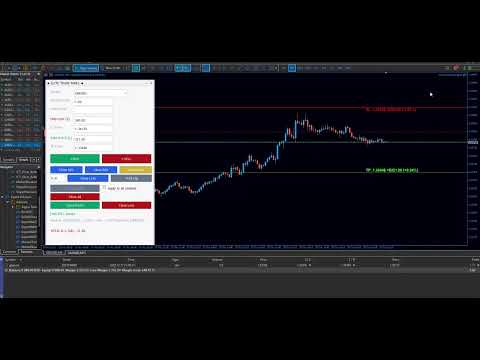
Manual Trade Panel
- Experts
- Versione: 1.0
- Attivazioni: 5

Manual Trade Panel EA
• Efficient panel EA for fast, informed order handling on MT5:
- One-click pending orders with instant display of SL/TP in money and distance, so you know risk/target before
execution.
- Live P/L preview per trade and aggregated, helping you size and place orders confidently.
- Quick management tools: move/modify SL/TP, close partial/full, breakeven and trailing helpers, all from one panel.
- Trade labeling: set custom Magic Number and Comment to track strategies and EAs separately.
- Works with market and pending orders; supports multiple symbols and timeframes without chart clutter.
- Clean, lightweight interface designed for speed; no extra indicators required.
- Priced affordably to make professional-style trade control accessible.
Notes: No strategy or profitability is implied; always test on demo and use proper risk management.
USER GUIDE for “Manual Trade Panel – MQL5 version 1”.
Overview
Manual Trade Panel is a manual execution and management EA for MT5. It lets you place market/pending orders, see SL/TP
in both price and money, manage positions (partial closes, BE, trailing), and tag trades with your own Magic Number
and comment—all from one panel.
Installation
1. Copy the EA file into MQL5/Experts.
2. Attach the EA to any chart, allow Algo Trading.
3. If symbols are hidden, enable them in Market Watch so they show in the Symbol dropdown.
Inputs (key settings)
- UI: UISize (Small/Medium/Large), PanelX, PanelY (screen position).
- Identity: MagicNumber (0 = manual tag), OrderComment (strategy/tag per trade).
- Defaults: DefaultLotSize, DefaultSLMoney, DefaultTPMoney, PartialClose1_Percent, PartialClose2_Percent.
- Trailing: TrailStop_Pips, BE_Buffer_Pips.
- CH Trailing: CH_ATR_Period, CH_ATR_Multiplier, CH_Lookback.
- Advanced: TimerMilliseconds (refresh), MaxRetries, MaxSpread_Pips, MaxSlippage_Pips.
Panel layout & controls
- Symbol & Entry: Symbol dropdown; Position Size; Entry Price (leave blank for market, set a price for pending).
- Risk in $ and Price: Stop Loss ($/Price) and Take Profit ($/Price). Lines on chart mirror these values; drag lines
to update fields.
- Execution: BUY / SELL (market if Entry is blank; pending if Entry is filled).
- Partial & Management:
- Close X% (two buttons per your presets).
- Custom partial (lots field + Close Lots).
- Break Even.
- Trail (fixed pip distance).
- CH Trail (ATR-based trailing on/off).
- Close scope toggle: “Apply to all symbols” checkbox.
- Close actions: Close All, Close Profit, Close Loss.
- Status & Info: Status line; Symbol/Bid/Ask; positions count & P/L for current symbol; total P/L (all symbols) with
color coding.
How to place orders
- Market: Leave Entry blank, set lot and SL/TP (in $ or price), click BUY or SELL.
- Pending: Fill Entry Price; set SL/TP; click BUY (creates buy limit/stop based on price vs ask) or SELL (sell limit/
stop based on price vs bid).
- SL/TP by money: Enter desired $ risk/target; price auto-calculates. Drag SL/TP lines to adjust visually; $ updates
accordingly.
Position management
- Partial closes: Use preset % or custom lots; respects “Apply to all symbols” toggle.
- Break Even: Moves SL to entry plus optional buffer.
- Trail: Activates fixed pip trailing using TrailStop_Pips.
- CH Trail: ATR x multiplier trailing with lookback; toggled by CH Trail button.
- Close buttons: Close All, Close Profit (only profitable), Close Loss (only losing); scope follows the all-symbols
toggle.
Tagging & tracking
- MagicNumber: Set per your strategy or keep 0 for manual-tagged trades(not done yet).
- OrderComment: Custom text to identify the originating strategy/tool.
Spread, slippage, and safety checks
- Spread guard: Blocks entries if spread exceeds MaxSpread_Pips.
- Slippage guard: Uses MaxSlippage_Pips (auto-adjusted to points).
- Stop-level validation: Ensures SL/TP are on the correct side of price and respect broker distance/freeze levels.
Chart interactions
- Horizontal lines: Entry, SL, TP. Drag to reposition; panel updates price/$ accordingly.
- Labels: Show price, $ risk/target, and % distance.
Persistence
- Saves last-used symbol, lot, SL/TP money to a settings file; auto-loads on next attach.
Tips for fast workflow
- Set your default lot and $ risk in inputs; then tweak only price or drag lines.
- Use BE + Trail combo: set BE buffer, hit Break Even after move, then enable Trail or CH Trail.
- For multi-symbol monitoring, keep “Apply to all symbols” off to avoid accidental closes elsewhere.
Testing / Validation
- Always test on demo first.
- If broker requires minimum distances, set reasonable SL/TP or leave them blank and adjust after fill.
- Keep MaxSpread_Pips realistic for the traded symbol.