FootprintOrderflow
- Indicatori
- Versione: 27.22
- Aggiornato: 8 aprile 2026
- Attivazioni: 5

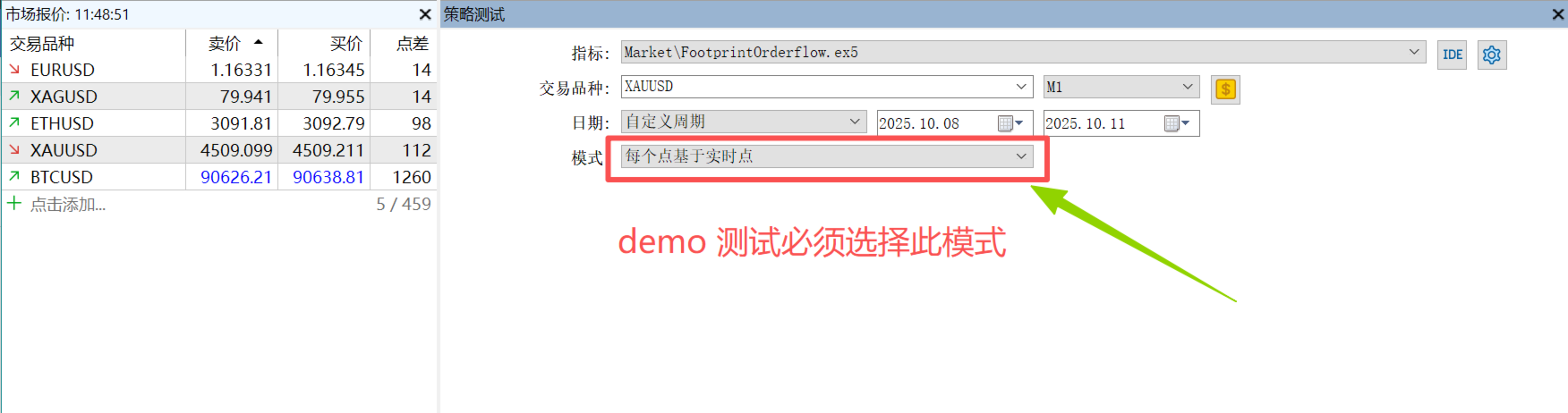
FOOTPRINTORDERFLOW: The Authoritative Guide ( This indicator is also compatible with economic providers that do not offer DOM data and BID/ASK data,It also supports various foreign exchange transactions, DEMO version,modleling must choose " Every tick based on real ticks" )
Important notice: Before placing an order, please contact me first, and I will provide you with professional answers and services
1. Overview
FOOTPRINTORDERFLOW is an advanced Order Flow analysis tool designed for MetaTrader 5 (MT5). Unlike traditional candlestick charts that only show OHLC (Open, High, Low, Close), this indicator parses real-time Tick data to visualize the microstructure inside every candle.
It helps you answer:
-
Who is in control? (Aggressive Buyers vs. Sellers)
-
Where is the volume? (Institutional accumulation/distribution zones)
-
Is the price accepted? (Based on Duration and Value Areas)
-
Is the trend exhausted? (Identified via Divergence signals)
-
Should critical deviations be reminded? (Send MT5 pop-up warnings via deviation signals and push notifications to mobile devices)
2. Interface & Core Features
2.1 Standard Footprint View
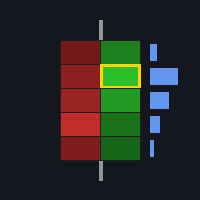
In standard mode, the candle is split into price levels (Bins):
-
Left Number (Bid/Sell): Represents Aggressive Selling volume (Market Sells hitting the Bid).
-
Right Number (Ask/Buy): Represents Aggressive Buying volume (Market Buys lifting the Ask).
-
Heatmap Background: Darker/Brighter colors indicate higher total volume at that specific price, visualizing liquidity clusters.
-
Imbalance Highlights:
-
Definition: When the volume difference between diagonal bids and offers exceeds a set threshold (default 3:1).
-
Visual: The background turns Cyan (Buy Imbalance) or Yellow (Sell Imbalance).
-
Meaning: Indicates overwhelming aggressive pressure from one side.
-
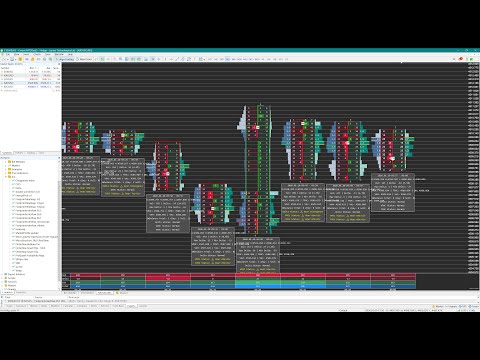
2.2 Microscope Mode - The Core Feature
When enabled, the candle width expands (default 4.5x) to reveal granular data:
-
Left Sidebar: Displays Total Volume or Total Delta (Configurable). Useful for spotting P-shape or b-shape profiles.
-
Right Sidebar: Displays Duration (Time) spent at that price.
-
Time = Acceptance. The longer price stays at a level, the higher the market acceptance.
-
-
Core Delta Bars:
-
Located between the buy/sell numbers.
-
Green bar to the right: Positive Delta (Net Buying).
-
Red bar to the left: Negative Delta (Net Selling).
-
-
DM Label: Marks the price level with the Maximum Absolute Delta inside the candle (the "battleground").
3. Intelligent Summary Box
In Microscope Mode, a semi-transparent data panel floats below each candle. This is your primary decision-making tool.
| Data Item | Description | Trading Significance |
| Time Range | Start & End time of the candle (Local PC Time). | Easy historical backtesting. |
| OHLC | Open, High, Low, Close prices. | Standard reference. |
| Vol / Delta | Total Volume & Net Delta (with %). | Positive Delta = Buyers dominant; Negative = Sellers dominant. |
| Max/Min Delta | The highest and lowest cumulative Delta reached during the candle formation. | Crucial: If a candle closes with Positive Delta, but had a massive Min Delta, it shows buyers absorbed strong selling pressure. |
| VPOC | Volume Point of Control. | The price with the most volume. The "center of gravity" for the candle. |
| TPOC | Time Point of Control. | The price where the market spent the most time (Fair Value). |
| DM | Delta Max Price. | Where the aggressors committed the most capital. |
| VAH / VAL | Value Area High/Low (70% Volume). | Support/Resistance: Re-tests of VAL that hold are bullish; breakdowns are bearish. |
| Imbalance | Total count of Buy vs. Sell Imbalances. | High imbalance counts suggest strong trend momentum. |
| Alerts | Status of Delta, VPOC, and TPOC. | Yellow Highlighted Text indicates anomalies or divergence (Reversal Signals). |
4. Deep Dive: Divergence & Market Sentiment
Divergence is one of the most reliable reversal signals in Order Flow trading. The indicator automatically detects:
4.1 Delta Divergence
-
Scenario:
-
Bullish Divergence: Candle closes DOWN (Bearish), but Delta is POSITIVE (Net Buying).
-
Bearish Divergence: Candle closes UP (Bullish), but Delta is NEGATIVE (Net Selling).
-
-
Sentiment:
-
Absorption: Bearish divergence implies that despite aggressive buying (Positive Delta), price couldn't rise. This means Limit Sell Orders (Icebergs) absorbed all the buying. This is a strong reversal signal.
-
4.2 Structural Divergence (VPOC/TPOC Location)
The indicator analyzes where the POC formed relative to the candle body (Top vs. Bottom).
-
Bullish Top Divergence (Warning):
-
Scenario: Big Green Candle, but VPOC/TPOC remains at the Bottom.
-
Sentiment: Price rallied on low volume at the highs. This is often "Short Covering" or "Retail Chasing." Lacking institutional support at the high, it is a Weak Rally prone to retracement.
-
-
Bullish Bottom Divergence (Healthy):
-
Scenario: Green Candle, VPOC at the Bottom (near Open).
-
Sentiment: Strong base building. Buyers absorbed sellers at the low and pushed price up. This is a Healthy structure.
-
-
Bearish Top Divergence (Healthy):
-
Scenario: Red Candle, VPOC at the Top.
-
Sentiment: Sellers defended the high and pushed price down. Healthy structure.
-
Summary Box Example:
VPOC Status: Bull Top Div (Highlighted Yellow) -> Caution: Longs may be trapped; high prices rejected.
4.3 Volume Burst
-
Scenario: Current candle volume is > 2x the average of the previous two candles.
-
Sentiment:
-
At Breakout: Validates the move.
-
After long trend: Suggests Climax/Exhaustion.
-
5. Parameter Configuration Guide
Adjust these settings based on your asset class:
🔧 Core Settings
-
InpPriceStep: Most Critical Parameter.
-
Defines the size of each "bin" (price aggregation).
-
Forex (EURUSD): Try 0.00005 (5 points) or 0.00010 (10 points). Too small = too much noise; too big = loss of detail.
-
Gold (XAUUSD): Try 0.1 (10 cents) or 0.5 .
-
Indices (US30): Try 1.0 or 5.0 .
-
-
InpMaxBarsToDraw: Number of candles to render. Keep between 200-500 to maintain performance.
Microscope Mode
-
InpMicroscopeMode: Set to true to enable the zoom and summary box.
-
InpMicroZoomScale: Zoom factor. Default is 4.5 (450% width).
-
If text overlaps, increase to 5.0 or 6.0 .
-
If chart is too wide, decrease to 3.0 .
-
-
InpMicroscopeTextMode:
-
Percentage : Shows % of total volume. Good for distribution analysis.
-
Value Coefficient : Shows (Current Vol / Average Vol). Value > 1.0 means high activity.
-
Colors & Alerts
-
InpImbalanceRatio: Threshold for coloring imbalances (Default 3.0 ).
-
InpColorHighlight: Color for warning text in the Summary Box (Default Yellow ).
-
InpAlert...: Enable popup/push notifications for specific divergence types.
6. Installation & Usage
-
Download the footprintdorderflow.
-
Drag the indicator onto your chart.
-
Important: On first load, you will see "Syncing History (Calculating Vol)...". The indicator is downloading high-precision Tick data. Please wait a few seconds to a few minutes depending on your internet and history depth.
-
Tip: Use Ctrl + Mouse Scroll or drag the price scale to adjust the chart height for the best visual experience.
Disclaimer: Footprint charts reveal past microstructure. While they significantly improve probability, no indicator guarantees future price movement. Use in conjunction with your broader trading strategy.














































Great indi as well as good developer.