
Orderflow Super Candles
- Indicatori
- Versione: 1.3
- Aggiornato: 6 febbraio 2026
- Attivazioni: 5

Orderflow Super Candles - Simple Footprint Chart Indicator
Platform: MetaTrader 5 (MT5) (The last screenshot shows the use of the DOM tool in conjunction with the product.)
1. Product Introduction
Orderflow Super Candles is a professional charting tool based on underlying Tick data analysis, designed to provide traders with a deep "X-ray" view of the market.
By parsing the buy and sell volume distribution within each candlestick, this indicator visualizes the hidden market microstructure. It helps traders look past surface-level price action to see the true positioning of institutional capital, accurately identify the validity of support and resistance levels, and make more logical trading decisions.
2. Core Features
Dual Perspective Modes
-
Buy/Sell Volume Profile: The classic footprint mode. The left side displays active selling volume, and the right side displays active buying volume. This visually contrasts bullish and bearish forces at every price tick.
-
Delta Profile: Displays the net value of "Buy Volume minus Sell Volume" at each price level. Green indicates buyer dominance, while red indicates seller dominance.
-
Adaptive Scaling Technology: In Delta Mode, the indicator automatically calculates the maximum absolute Delta value within the current field of view for dynamic normalization. This ensures that color blocks remain clearly visible and readable regardless of market volatility.
Automatic Key Level Labeling
-
POC (Point of Control): The price level with the highest traded volume in each candle, highlighted in gold. This represents the core battleground for bulls and bears within that specific candle.
-
Value Area (VA): Automatically calculates and highlights the price range covering 70% (adjustable) of the total volume, helping traders filter out market noise and focus on the core trading zone.
3. Parameter Settings
Core Settings
-
InpMode: Select display mode. Toggle between "Buy/Sell Volume" or "Delta Profile".
-
InpAlignMode: Alignment style. Center aligns profiles centrally (like traditional candles), while Left aligns them to the left (histogram style).
-
InpHistoryBars: Number of historical bars to calculate. A setting of 100-300 is recommended for optimal performance.
-
InpStepPoints: Price aggregation step. Default is 0.0 (Auto-Detect). For markets like Crypto where tick sizes are small, you can manually set a value to aggregate levels.
Visual Settings
-
InpWidthRatio: Bar width ratio (0.1 - 1.0). Recommended setting is 0.85 to maintain appropriate spacing.
-
InpColorBuy/Sell: Custom colors for Buy and Sell profiles.
-
InpColorPOC: Highlight color for the Point of Control (POC).
Value Area Settings
-
InpValueAreaPct: Value Area percentage. Default is 70.0% (Standard statistical value).
-
InpTransparency: Opacity of the core Value Area (0-255).
-
InpTransparencyWeak: Opacity of the non-core (weak) area.
4. Trading Strategy Reference
POC Migration Analysis
Observe the direction of the POC (Point of Control) movement. If the price is rising but the POC fails to move up (remaining at the bottom), it may suggest a lack of upward momentum or a divergence.
Delta Absorption
If you observe a massive red Delta (large volume of market sell orders) at a key support level, but the price fails to break down effectively, it indicates that passive buyers (Limit Orders) are absorbing the selling pressure. This is often a strong reversal signal.
Value Area Breakout
When the price strongly breaks out of the previous candle's Value Area and successfully retests it without falling back in, it is often a signal of trend continuation.
Disclaimer:
This indicator provides deep market microstructure data to assist in trading decisions but does not constitute direct investment advice. Order flow analysis is an advanced trading technique; users are advised to familiarize themselves with its characteristics in a demo environment first.








































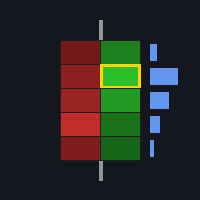



Super Candles is a pro-level confirmation tool. By checking POC migration, Delta bias, and Value Area position, you can instantly judge whether a move will extend or just retrace. A reliable final filter that clears hesitation before entering a trade.