Play Trading
- Utilità
- Versione: 1.41
- Aggiornato: 7 novembre 2025

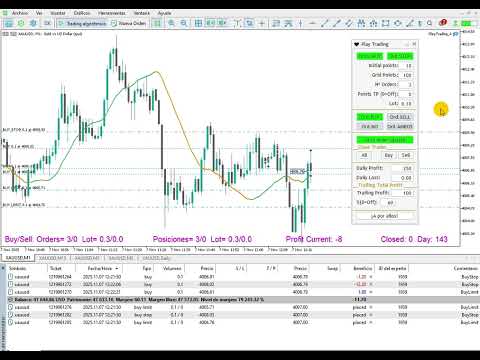
♥ Play Trading: Get started in trading by playing and learning how Limit (rebound) and Stop (continuation) orders work.
From a mobile and transparent panel (by clicking on the header), anticipate market developments and place Limit and/or Stop orders.
Set the initial distance to generate the grid with the number of orders you want (for each type of order).
Set the take profit points and lot size as you wish.
Set the type of orders you want: BUY – SELL – NO (delete orders) – BOTH (Buy and Sell).
Please note that each time you click one of these buttons, the previous orders are deleted and new ones are generated:
This is very useful for maintaining the price level of orders.
Active keys are highlighted in green. Keep this in mind if you do not want new orders to be generated, although you can also stop the robot by pressing the ‘Ord.No’ button.
There is also a button to close all open trades.
Any comments for improvements or corrections are welcome.
UPDATE 10/12/2025:
- Fixed a previous error.
- A button has been added to automatically update orders once the previous price level has been exceeded.
- Buttons have been added to close buy or sell orders, for example, in the event of a trend change.
- More information has been added to the screen: Closed Profit and Daily Profit have been added.
UPDATE 11/07/2025:
- Daily Loss has been added alongside Daily Profit, to limit both maximum amounts. Please be aware of potential slippage due to trading volume.
- A classic trailing function has been added, set by a variable target amount to trigger the trailing percentage.
The variable in the "Note:" box below allows the user to enter the desired message for the trading day.
Remember to trade responsibly. While this feature is intended for use on demo accounts, it is at the user's own risk.