Nivelesfibonacci2

NIVELESFIBONACCI2.12 — Órdenes Pendientes sobre Niveles Fibonacci Personalizados

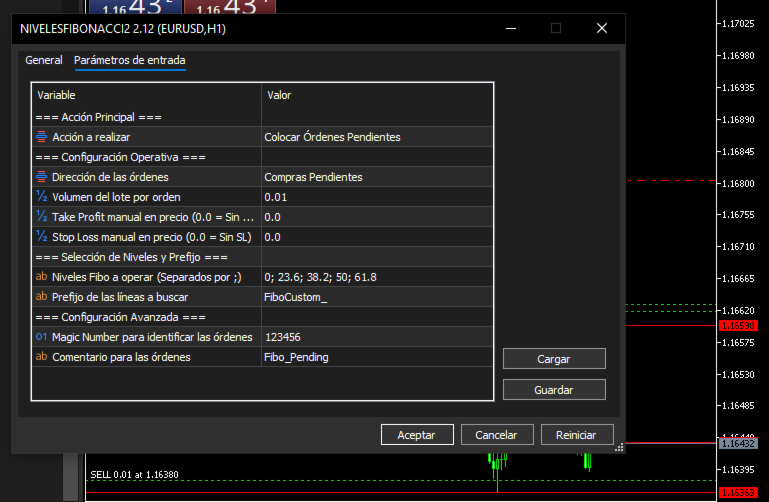
Este script para MetaTrader 5 permite colocar automáticamente órdenes pendientes de compra o venta utilizando como referencia los niveles Fibonacci horizontales previamente dibujados en el gráfico.

El script está diseñado para funcionar conjuntamente con NIVELESFIBONACCI1.1, aunque puede utilizar cualquier conjunto de líneas horizontales que siga la misma estructura de nombres mediante el prefijo configurado.

La primera herramienta calcula los precios correspondientes a los niveles Fibonacci y dibuja las líneas en el gráfico. Esta segunda herramienta utiliza esas líneas como referencia para colocar automáticamente las órdenes pendientes.

¿Cómo funciona?

El usuario configura:

  • Dirección de las órdenes: BUY o SELL.

  • Tamaño del lote.

  • Take Profit opcional.

  • Stop Loss opcional.

  • Niveles Fibonacci que desea operar.

  • Prefijo utilizado para identificar las líneas.

  • Magic Number.

  • Comentario de las órdenes.

El script busca en el gráfico las líneas cuyo nombre comience por el prefijo indicado en:

InpPrefix

Por defecto:

FiboCustom_

Por ejemplo, si el primer script ha creado:

FiboCustom_0.0 FiboCustom_23.6 FiboCustom_38.2 FiboCustom_50.0 FiboCustom_61.8 FiboCustom_100.0 FiboCustom_161.8

el segundo script puede seleccionar únicamente los niveles que se desean utilizar.

Ejemplo:

InpTargetLevels = "0; 23.6; 38.2; 61.8"

Los demás niveles serán ignorados.

Determinación automática del tipo de orden

El tipo de orden pendiente se determina automáticamente en función de la dirección seleccionada y de la posición del nivel respecto al precio actual del mercado.

Órdenes BUY

Si se selecciona:

DIR_BUY

el script utiliza:

Buy Limit

Cuando el precio de la línea está por debajo del precio Ask actual.

Precio línea < Ask

Se coloca una:

BUY LIMIT

Buy Stop

Cuando el precio de la línea está por encima del precio Ask actual.

Precio línea > Ask

Se coloca una:

BUY STOP

Órdenes SELL

Si se selecciona:

DIR_SELL

el script utiliza:

Sell Limit

Cuando el precio de la línea está por encima del precio Bid actual.

Precio línea > Bid

Se coloca una:

SELL LIMIT

Sell Stop

Cuando el precio de la línea está por debajo del precio Bid actual.

Precio línea < Bid

Se coloca una:

SELL STOP

De esta forma, el usuario no necesita seleccionar manualmente entre Limit y Stop. El script determina automáticamente el tipo de orden según la posición del nivel Fibonacci respecto al mercado.

Ejemplo de funcionamiento

Supongamos que el gráfico contiene las siguientes líneas:

FiboCustom_0.0 FiboCustom_23.6 FiboCustom_38.2 FiboCustom_50.0 FiboCustom_61.8 FiboCustom_100.0

Y el usuario configura:

Dirección: BUY
Lote: 0.01
Niveles: 0; 23.6; 38.2; 50; 61.8

El script localizará esas líneas, obtendrá sus precios y decidirá automáticamente si cada una corresponde a una Buy Limit o una Buy Stop dependiendo del precio Ask actual.

Por tanto, un mismo conjunto de niveles Fibonacci puede generar diferentes tipos de órdenes dependiendo de dónde se encuentre actualmente el mercado.

Take Profit y Stop Loss

El script permite introducir opcionalmente un precio de Take Profit y Stop Loss.

Sin Take Profit

InpTakeProfit = 0.0

No se establece TP.

Sin Stop Loss

InpStopLoss = 0.0

No se establece SL.

Cuando se introduce un precio superior a 0.0 , el valor se normaliza automáticamente utilizando los decimales del símbolo:

_Digits

Esto permite adaptar los precios a instrumentos con diferentes cantidades de decimales.

Selección de niveles

Los niveles se introducen mediante:

InpTargetLevels

separados por ; .

Por ejemplo:

0; 23.6; 38.2; 50; 61.8

También pueden utilizarse niveles superiores a 100% o niveles negativos, siempre que las correspondientes líneas existan en el gráfico.

Por ejemplo:

-61.8; 0; 23.6; 38.2; 50; 61.8; 100; 161.8; 261.8; 423.6

El script solamente operará los niveles seleccionados que encuentre mediante el prefijo configurado.

Identificación mediante prefijo

El parámetro:

InpPrefix

permite determinar qué objetos del gráfico serán considerados.

Valor predeterminado:

FiboCustom_

Por ejemplo:

FiboCustom_23.6 FiboCustom_50.0 FiboCustom_61.8

serán reconocidos.

Esta característica permite mantener separadas las líneas utilizadas por esta herramienta de otros objetos existentes en el gráfico.

Magic Number

El parámetro:

InpMagicNumber

permite identificar las órdenes creadas por el script.

Valor predeterminado:

123456

El Magic Number resulta especialmente útil para diferenciar estas órdenes de otras órdenes pendientes que puedan existir en la misma cuenta.

Comentario de las órdenes

El parámetro:

InpOrderComment

permite establecer el comentario asociado a las órdenes.

Valor predeterminado:

Fibo_Pending

Esto facilita su identificación dentro de MetaTrader 5.

Cancelación de órdenes pendientes

El parámetro:

InpAction

permite seleccionar entre dos acciones.

ACTION_PLACE

Coloca las órdenes pendientes correspondientes a los niveles seleccionados.

ACTION_DELETE

Cancela las órdenes pendientes que cumplan simultáneamente estas condiciones:

  • Pertenecen al símbolo actual.

  • Tienen el Magic Number indicado en InpMagicNumber .

Esto permite eliminar las órdenes pendientes gestionadas por este script sin afectar a las órdenes pertenecientes a otros símbolos o Magic Numbers.

Relación con NIVELESFIBONACCI1.1

Los dos scripts pueden utilizarse como un sistema de dos etapas:

NIVELESFIBONACCI1.1 ↓ Calcula los precios Fibonacci ↓ Dibuja las líneas horizontales ↓ NIVELESFIBONACCI2.12 ↓ Lee las líneas por prefijo ↓ Selecciona los niveles indicados ↓ Obtiene sus precios ↓ Determina automáticamente Limit / Stop ↓ Coloca las órdenes pendientes

Por ejemplo:

Primera herramienta

Punto A → 1.16594 = 100%
Punto B → 1.16363 = 423.6%

La primera herramienta calcula los precios correspondientes a:

0% 23.6% 38.2% 50% 61.8% 100% 161.8% 261.8% 423.6%

y los dibuja en el gráfico.

Posteriormente, la segunda herramienta puede seleccionar, por ejemplo:

23.6; 38.2; 50; 61.8

y colocar las órdenes pendientes directamente sobre esos precios.

Características principales
  • Colocación masiva de órdenes pendientes sobre niveles Fibonacci.

  • Compatible con niveles Fibonacci personalizados.

  • Selección independiente de los niveles que se desean operar.

  • Soporte para órdenes Buy Limit.

  • Soporte para órdenes Buy Stop.

  • Soporte para órdenes Sell Limit.

  • Soporte para órdenes Sell Stop.

  • Determinación automática del tipo de orden según el precio actual.

  • Lectura de las líneas mediante un prefijo configurable.

  • Compatible con diferentes números de decimales mediante _Digits .

  • Normalización automática de los precios.

  • Take Profit opcional.

  • Stop Loss opcional.

  • Magic Number configurable.

  • Comentario de órdenes configurable.

  • Función para cancelar las órdenes pendientes gestionadas por el Magic Number.

  • No requiere indicadores externos.

  • No requiere DLL.

Importante

Este script no calcula los niveles Fibonacci por sí mismo.

Utiliza los precios de las líneas horizontales existentes en el gráfico como niveles de entrada para las órdenes pendientes.

Para utilizarlo conjuntamente con NIVELESFIBONACCI1.1, ambos scripts deben utilizar el mismo prefijo, por defecto:

FiboCustom_

El script tampoco genera señales de compra o venta mediante análisis técnico. La dirección de las órdenes ( BUY o SELL ) es seleccionada manualmente por el usuario.

La colocación de órdenes implica riesgo financiero. El comportamiento final de una orden pendiente también depende de las condiciones de mercado, las reglas del bróker, la distancia mínima de órdenes, volumen permitido, stops level y demás restricciones del símbolo.

Versión: 2.12
Plataforma: MetaTrader 5
Tipo: Script
Autor: SPC


//+------------------------------------------------------------------+

//|                                        NIVELESFIBONACCI2.12.mq5 |

//|                                                              SPC |

//|                       https://www.mql5.com/es/users/calimero1166 |

//+------------------------------------------------------------------+

#property copyright "SPC"

#property link      "https://www.mql5.com/es/users/calimero1166"

#property version   "2.12"

#property description "Script para la colocación masiva o cancelación selectiva de órdenes pendientes (Limit/Stop) según niveles Fibonacci trazados por prefijo."

#property script_show_inputs


#include <Trade\Trade.mqh>


//--- Enumeración para la acción principal del script

enum ENUM_SCRIPT_ACTION

  {

   ACTION_PLACE  = 0, // Colocar Órdenes Pendientes

   ACTION_DELETE = 1  // Cancelar Órdenes Pendientes

  };


//--- Enumeración para la dirección de las órdenes

enum ENUM_ORDER_DIRECTION

  {

   DIR_BUY  = 0, // Compras Pendientes

   DIR_SELL = 1  // Ventas Pendientes

  };


//--- Parámetros de Entrada

input group "=== Acción Principal ==="

input ENUM_SCRIPT_ACTION InpAction       = ACTION_PLACE; // Acción a realizar


input group "=== Configuración Operativa ==="

input ENUM_ORDER_DIRECTION InpDirection   = DIR_BUY;      // Dirección de las órdenes

input double               InpLotSize     = 0.01;         // Volumen del lote por orden

input double               InpTakeProfit  = 0.0;          // Take Profit manual en precio (0.0 = Sin TP)

input double               InpStopLoss    = 0.0;          // Stop Loss manual en precio (0.0 = Sin SL)


input group "=== Selección de Niveles y Prefijo ==="

input string               InpTargetLevels = "0; 23.6; 38.2; 50; 61.8"; // Niveles Fibo a operar (Separados por ;)

input string               InpPrefix       = "FiboCustom_";             // Prefijo de las líneas a buscar


input group "=== Configuración Avanzada ==="

input ulong                InpMagicNumber  = 123456;       // Magic Number para identificar las órdenes

input string               InpOrderComment = "Fibo_Pending"; // Comentario para las órdenes


//+------------------------------------------------------------------+

//| Script program start function                                    |

//+------------------------------------------------------------------+

void OnStart()

  {

   CTrade trade;

   trade.SetExpertMagicNumber(InpMagicNumber);


   // --- MODO 1: CANCELAR ÓRDENES PENDIENTES ---

   if(InpAction == ACTION_DELETE)

     {

      int deletedCount = DeletePendingOrders(trade, InpMagicNumber);

      PrintFormat("NIVELESFIBONACCI2.12 (v2.12): Se han eliminado %d órdenes pendientes con Magic %d en %s.", deletedCount, InpMagicNumber, _Symbol);

      return;

     }


   // --- MODO 2: COLOCAR ÓRDENES PENDIENTES ---

   // 1. Procesar el texto de niveles a buscar

   double targetLevels[];

   ushort u_sep = StringGetCharacter(";", 0);

   string rawLevels[];

   int totalSplit = StringSplit(InpTargetLevels, u_sep, rawLevels);


   if(totalSplit <= 0)

     {

      Print("Error: No se especificaron niveles válidos en InpTargetLevels.");

      return;

     }


   ArrayResize(targetLevels, totalSplit);

   int validLevelsCount = 0;


   for(int i = 0; i < totalSplit; i++)

     {

      string trimmed = rawLevels[i];

      StringTrimLeft(trimmed);

      StringTrimRight(trimmed);


      if(StringLen(trimmed) > 0)

        {

         double val = StringToDouble(trimmed);

         if(val == 0.0 && trimmed != "0" && trimmed != "0.0" && trimmed != "0,0")

           {

            continue;

           }

         targetLevels[validLevelsCount] = val;

         validLevelsCount++;

        }

     }


   if(validLevelsCount == 0)

     {

      Print("Error: No se pudieron interpretar los niveles de Fibonacci especificados.");

      return;

     }


   // 2. Obtener precios de mercado actuales

   double ask = SymbolInfoDouble(_Symbol, SYMBOL_ASK);

   double bid = SymbolInfoDouble(_Symbol, SYMBOL_BID);


   if(ask <= 0 || bid <= 0)

     {

      Print("Error: No se pudieron obtener los precios de cotización actuales.");

      return;

     }


   // 3. Buscar objetos con el prefijo en el gráfico

   int totalObjects = ObjectsTotal(0, -1, -1);

   int ordersPlaced = 0;


   for(int i = 0; i < totalObjects; i++)

     {

      string objName = ObjectName(0, i, -1);


      // Verificar si el objeto coincide con el prefijo

      if(StringFind(objName, InpPrefix) == 0)

        {

         // Extraer el nivel numérico del objeto

         string levelStr = StringSubstr(objName, StringLen(InpPrefix));

         double objLevel = StringToDouble(levelStr);


         // Verificar si el nivel de la línea está en nuestra lista seleccionada

         if(!IsLevelSelected(objLevel, targetLevels, validLevelsCount))

            continue;


         double linePrice = ObjectGetDouble(0, objName, OBJPROP_PRICE);

         linePrice = NormalizeDouble(linePrice, _Digits);


         if(linePrice <= 0)

            continue;


         // Normalizar TP y SL si están configurados

         double tp = (InpTakeProfit > 0) ? NormalizeDouble(InpTakeProfit, _Digits) : 0.0;

         double sl = (InpStopLoss > 0)   ? NormalizeDouble(InpStopLoss, _Digits)   : 0.0;


         // 4. Determinar tipo de orden y enviar

         if(InpDirection == DIR_BUY)

           {

            if(linePrice < ask)

              {

               if(trade.BuyLimit(InpLotSize, linePrice, _Symbol, sl, tp, ORDER_TIME_GTC, 0, InpOrderComment))

                 {

                  PrintFormat("Buy Limit colocada en el nivel %.1f%% al precio %.*f", objLevel, _Digits, linePrice);

                  ordersPlaced++;

                 }

               else

                 {

                  PrintFormat("Error al colocar Buy Limit en %.1f%%: %s", objLevel, trade.ResultComment());

                 }

              }

            else if(linePrice > ask)

              {

               if(trade.BuyStop(InpLotSize, linePrice, _Symbol, sl, tp, ORDER_TIME_GTC, 0, InpOrderComment))

                 {

                  PrintFormat("Buy Stop colocada en el nivel %.1f%% al precio %.*f", objLevel, _Digits, linePrice);

                  ordersPlaced++;

                 }

               else

                 {

                  PrintFormat("Error al colocar Buy Stop en %.1f%%: %s", objLevel, trade.ResultComment());

                 }

              }

           }

         else // DIR_SELL

           {

            if(linePrice > bid)

              {

               if(trade.SellLimit(InpLotSize, linePrice, _Symbol, sl, tp, ORDER_TIME_GTC, 0, InpOrderComment))

                 {

                  PrintFormat("Sell Limit colocada en el nivel %.1f%% al precio %.*f", objLevel, _Digits, linePrice);

                  ordersPlaced++;

                 }

               else

                 {

                  PrintFormat("Error al colocar Sell Limit en %.1f%%: %s", objLevel, trade.ResultComment());

                 }

              }

            else if(linePrice < bid)

              {

               if(trade.SellStop(InpLotSize, linePrice, _Symbol, sl, tp, ORDER_TIME_GTC, 0, InpOrderComment))

                 {

                  PrintFormat("Sell Stop colocada en el nivel %.1f%% al precio %.*f", objLevel, _Digits, linePrice);

                  ordersPlaced++;

                 }

               else

                 {

                  PrintFormat("Error al colocar Sell Stop en %.1f%%: %s", objLevel, trade.ResultComment());

                 }

              }

           }

        }

     }


   PrintFormat("NIVELESFIBONACCI2.12 (v2.12): Proceso finalizado. Total de órdenes colocadas: %d", ordersPlaced);

  }


//+------------------------------------------------------------------+

//| Función auxiliar para comprobar si un nivel pertenece a la lista |

//+------------------------------------------------------------------+

bool IsLevelSelected(double level, const double &selectedLevels[], int count)

  {

   for(int i = 0; i < count; i++)

     {

      if(MathAbs(level - selectedLevels[i]) < 0.01)

         return true;

     }

   return false;

  }


//+------------------------------------------------------------------+

//| Función auxiliar para borrar las órdenes pendientes por Magic   |

//+------------------------------------------------------------------+

int DeletePendingOrders(CTrade &trade, ulong magic)

  {

   int deleted = 0;

   int totalOrders = OrdersTotal();


   // Recorremos las órdenes en orden inverso para evitar desajustes de índice

   for(int i = totalOrders - 1; i >= 0; i--)

     {

      ulong ticket = OrderGetTicket(i);

      if(ticket > 0)

        {

         if(OrderGetString(ORDER_SYMBOL) == _Symbol && OrderGetInteger(ORDER_MAGIC) == magic)

           {

            if(trade.OrderDelete(ticket))

               deleted++;

            else

               PrintFormat("Error al borrar la orden #%d: %s", ticket, trade.ResultComment());

           }

        }

     }

   return deleted;

  }

//+------------------------------------------------------------------+

Prodotti consigliati
Free automatic Fibonacci is an indicator that automatically plots a Fibonacci retracement based on the number of bars you select on the BarsToScan setting in the indicator. The Fibonacci is automatically updated in real time as new highest and lowest values appears amongst the selected bars. You can select which level values to be displayed in the indicator settings. You can also select the color of the levels thus enabling the trader to be able to attach the indicator several times with differe
FREE
Gold Session Levels Pro MT5 is a manual MetaTrader 5 indicator designed to display relevant intraday reference levels for XAUUSD. The indicator automatically calculates and draws the Asian range, its midpoint, the daily open, the London and New York opens, the previous trading day's high and low, and targets derived from the size of the Asian range. FEATURES - Dynamic Asian range while the configured session is active. - Range freezing after the configured Asian session close. - Asian range
FREE
Automatic fibonacci with alerts is an indicator that automatically plots a fibonacci retracement based on the number of bars you select on the BarsToScan setting in the indicator. The fibonacci is automatically updated in real time as new highest and lowest values appear amongst the selected bars. You can select which level values to be displayed in the indicator settings. You can also select the color of the levels thus enabling the trader to be able to attach the indicator several times with d
FREE
Smart Round Levels
Sebastian Omar Saralegui
Smart Round Levels disegna automaticamente sul grafico i livelli dei numeri tondi, chiamati anche livelli psicologici. Funziona su qualsiasi simbolo: coppie forex, metalli, indici e cripto. Aggiungilo al grafico e i livelli appaiono a una distanza adatta a quel simbolo, senza alcuna configurazione. Se ti è utile, lascia una valutazione con le stelle e un breve commento nella scheda Recensioni. Mi aiuta a continuare a migliorare questo strumento. Grazie. Come viene scelto il passo Il passo è
FREE
Fibo Trader FREE MT5
Grzegorz Korycki
3 (3)
Fibo Trader is an expert advisor that allows you to create automated presets for oscillation patterns in reference to Fibonacci retracements values using fully automated and dynamically created grid. The process is achieved by first optimizing the EA, then running it on automated mode. EA allows you to switch between automatic and manual mode. When in manual mode the user will use a graphical panel that allows to manage the current trading conditions, or to take control in any moment to trade ma
FREE
Sviluppo della versione precedente dell'indicatore ZigZag WaveSize MT4 ZigZag WaveSize - indicatore ZigZag standard modificato con l'aggiunta di informazioni sulla lunghezza d'onda in punti, livelli e diverse logiche di allarme Miglioramenti generali: Adattamento del codice per MetaTrader 5 Lavoro ottimizzato con gli oggetti grafici Novità: Livelli orizzontali agli estremi Scelta del tipo di livelli: orizzontale/raggi/segmenti Filtro per livelli liquidi (non penetrati dal prezzo) Buffer per le
FREE
The jcoworld OTE EA is an automated trading bot for MetaTrader 5 built on Smart Money Concepts (SMC) . It accurately identifies market impulse moves and automatically enters trades within the Optimal Trade Entry (OTE) zone (61.8% – 79.0% Fibonacci) as soon as a confirmation candle closes. Optimized for: XAUEUR, XAUUSD, and Major Forex Pairs Features: Automatic risk management, dynamic lot sizing & automated Stop Loss/Take Profit. Try for free: This demo version is 100% free! Pricing Plans for Fu
FREE
SP_AUTO FIBO_Crash 1000 is an indicator for automatic plotting and tracking of Fibonacci levels on the Crash 1000 Index chart . Key Features Automated Fib Grid: plots Fibonacci levels between the signal high ( 100.0% ) and the historical low over a configurable lookback window ( Lookback_Bars ) . Breakout Color Coding: dynamically updates level colors on upward or downward breakouts for clear visual context . Full Customization: supports custom percentage levels, line width and style, optional p
FREE
How the day starts
Sergio Antoni Escudero Tirado
This indicator draws the high intraday price and the low intraday price of the first n minutes of the day. The chart shows the days with vertical lines and two horizontal lines to indicate the max and the min close price of the n first minutes of the day. The max/min lines start and end with the day calculated. With this indicator you can see how starts the day compared with the previous days. It is valid for any market inasmuch as the start time is calculated with the data received. Parameter
FREE
MultiTimeframe Trend Pro shows you the market direction across 7 timeframes at a glance. Clear colors, no repainting, fully customizable. Perfect as a quick filter for any intraday or swing strategy. Key Features Supports M1, M5, M15, H1, H4, D1 and W1 Colors MediumSeaGreen when the close is above the MA, and Red when below No repainting → always based on the last closed candle for each timeframe Fully customizable: MA period (200 by default) font, size and colors X/Y offsets, spacing
FREE
Fibonacci Moving Averages
Brendan Jonathan Stoyanowski-campbell
2 (1)
OVERVIEW The Fibonacci Moving Averages are a toolkit which allows the user to configure different types of Moving Averages based on key Fibonacci numbers. Moving Averages are used to visualise short-term and long-term support and resistance which can be used as a signal where price might continue or retrace. Moving Averages serve as a simple yet powerful tool that can help traders in their decision-making and help foster a sense of where the price might be moving next. The aim of this scrip
FREE
Price Ray
Keni Chetankumar Gajanan -
5 (7)
Price Ray indicator is a utility that will improve the way you trade. Primarily, it shows the Bid, Ask or Last price as a line ray which beams till the current candle, last visible chart candle or extended to all candle bars. The enhanced features in this indicator provide information in an area where you focus most, right next to the current candle. You can select text to be shown above or below the Price ray. The indicator is fully customizable, allowing it to fit any strategy requirements. Th
FREE
FIBONACCI WITH AVG 250 — автоматические уровни Фибоначчи по экстремумам за 250 баров. Индикатор сам находит максимум и минимум за последние 250 баров и строит по ним полноценную сетку Фибоначчи с ценовыми метками: 0 / 23.6 / 38.2 / 50 / 61.8 / 78.6 / 100%. ЧТО ДЕЛАЕТ ИНДИКАТОР: • Автоматически определяет High/Low за период 250 баров и строит уровни Фибоначчи • Показывает цену каждого уровня прямо на линии • Определяет направление тренда текущего таймфрейма (Trend: Up/Down) • Выводит фильтр вола
FREE
AP Fibonacci Retracement PRO (MT5) Overview AP Fibonacci Retracement PRO is a trend-continuation pullback EA. It waits for a confirmed swing, calculates the Fibonacci retracement zone, and looks for entries in the direction of the original move. No grid, no martingale. Strategy logic Detects the last valid swing high/low using Fractals on the selected signal timeframe. Calculates the retracement zone between 38.2% and 61.8% (configurable). On a closed bar, if price is inside the zone (with opti
FREE
MT4 Version Most indicators draw lines. This one draws the battlefield. If you ever bought an EA or indicator based on a perfect equity curve — and then watched it bleed out live — you’re not alone. The problem? Static logic in a dynamic market. Fibonacci Bollinger Bands   adapts. It combines Bollinger structure with customizable Fibonacci levels to mark   zones of control   — where price reacts, pauses, or reverses. No magic. Just logic that follows volatility. Why this tool matters   It
FREE
The   Pivot Point indicator   automatically calculates and displays the pivot point line and support and resistance levels. Pivot can be calculated according to the Classic, Floor, Fibonacci, Woodie, Camarilla or DeMark formula. It is also possible to select the period for calculating the indicator. A trader can choose from daily, weekly, monthly, or user-defined periods. Types of pivots Classic Floor Fibonacci Woodie Camarilla DeMark Main features The indicator shows the current and historic
FREE
London Sweep
Enrique Valeros Muriana
London Sweep and Asian Range is a chart indicator for traders who study session liquidity and intraday price movement. It measures the Asian session range and highlights possible sweeps of that range during a configurable London trading window. How it works The indicator tracks the highest and lowest prices recorded during the configured Asian session. Once that session is complete, it draws an outline box around the range and projects the Asian high and low through the London window. A bearish
FREE
DrawDock Drawing Panel
Tamara Garcia Infantes
DrawDock — your drawing tools in a slim panel under the chart Drawing in MetaTrader means opening the Insert menu, finding the tool, drawing it and then opening its properties to change the colour, every single time. DrawDock puts the tools you use in a panel docked under the chart, each one with its own colour and style, so you drag it onto the chart or click and draw. What it includes • Every object in the MT5 Insert menu: lines, channels, Gann, Fibonacci, Elliott waves, shapes, arrows and
FREE
Auto Fib Retracements
Ross Adam Langlands Nelson
4.2 (5)
Automatic Fibonacci Retracement Line Indicator. This indicator takes the current trend and if possible draws Fibonacci retracement lines from the swing until the current price. The Fibonacci levels used are: 0%, 23.6%, 38.2%, 50%, 61.8%, 76.4%, 100%. This indicator works for all charts over all timeframes. The Fibonacci levels are also recorded in buffers for use by other trading bots. Any comments, concerns or additional feature requirements are welcome and will be addressed promptly. 
FREE
Babel Assistant
Iurii Bazhanov
4.33 (9)
Babel assistant 1 Il robot di netting per MT5 "Babel_assistant_1" utilizza l'indicatore ZigZag per generare livelli di Fibonacci su vari timeframe (M1, M5, M15, H1, H4, D1 e W1) e calcola la forza delle tendenze di acquisto e vendita. Apre una posizione utilizzando l'impostazione "Lot for open a position" se viene superato il livello di tendenza specificato di 4,925. Dopodiché, Babel posiziona ordini pendenti su determinati livelli di Fibonacci e imposta le linee di Stop Loss e Take Profit speci
FREE
Trend Catcher EA Pro MT5
Issam Kassas
4.43 (42)
Trend Catcher EA Pro combina trading automatico e comandi manuali sul grafico in MetaTrader 5. Il trading e la gestione seguono le regole configurate. L’esecuzione dipende dal mercato, dalle regole del broker e dalla qualità della connessione. Per domande sul prodotto, indicazioni sulla configurazione o supporto tecnico, scrivimi direttamente qui su MQL5. Strategie principali: L’EA include due modalità operative integrate: I. Smart Trend Mode opera in una sola direzione alla volta. II. Dynamic D
FREE
A ready-made multitimeframe trading system based on automatic plotting and tracking of Fibonacci levels for buying and selling any symbol. Demo version - calculation of the last 390 bars is not performed. Advantages Determines the trend direction based on a complex of 14 indicators ( Cx ), extremums of ZigZag ( Z ), RSI ( R ), Impulse ( I ) Displaying the values of 14 indicators comprising the trend direction ( Cx ) Plotting horizontal levels, support and resistance lines, channels View the plo
FREE
LZ Auto Fibo Retracement automatically detects the most significant swing highs and lows on your chart and instantly draws accurate Fibonacci retracement levels between them. Stop drawing Fibs manually—let the indicator do it for you dynamically as the market evolves. Feature highlights - Auto Swing Detection: identifies the most relevant market extremes based on a configurable swing period and lookback range. - Dynamic Updates: the Fibonacci levels automatically adjust to new highs and lows
FREE
Session High Low Boxes
Shanawaz Mohammed Nabi Rasool Pinjori
Session High Low draws the Asian, London and New York sessions on your chart as colored boxes, with the high and low of each session. Optional extension lines continue the session high and low after the session ends, which is useful for breakout and retest trading. Features Asian, London and New York boxes, each can be turned on or off Session high and low prices shown as labels Extension lines after the session end (hours adjustable, 0 = off) Ranges are built from M5 data, so the boxes are the
FREE
Strategy: This is a Guard for your account in case the Margin Call of the Account is called. The most brokers have Margin Call at Margin Level of 100%. If account Margin Level is below TriggerMarginLevelPercent (100%), the EA checks all open account positions. For every non-hedge position it opens one reverse position with the same symbol and same volume. After that it will remove itself from the Chart IMPORTANT: CHECK this manually on the Account before using this EA. Only some Broker offer t
FREE
CloseAll MT5
Mr Sorachai Pitakjarukul
4.33 (3)
ขอบคุณ แรงบันดาลใจ จากโค้ชแพม ที่ทำให้เริ่มทำ    Close all ตัวนี้  และขอขอบคุณทุกคนที่ให้ความรู็มาโดยตลอด ไม่ว่าจะทางตรงทางอ้อม ขอบคุณทุกคนที่ให้ความรู้เพื่อนร่วมเทรด ทั้งนี้เพื่อให้นักเทรดทุกคนได้มีเครื่องมือในการควบคุมการปิดการซื้อขาย จึงขอพัฒนาโปรแกรม close all version 5 ได้ใช้ทุกคน  Close all and update profit Version 1.00 (MT5) Full version Give you free  For MT4 Click  https://www.mql5.com/en/market/product/79252 Fix TPSL calculate  Program function Tab 1 Close order function and show br
FREE
Pivot Points are used by Forex traders to find support and resistance levels based on the previous day's price action. There are various ways to calculate pivot points, including averaging the open, high, low, and close of the previous day's chart price. Forex Traders use a combination of pivot points with moving averages to find trading opportunities in the currency markets. Pivot points are very useful tools that use the previous bars' highs, lows and closings to project support and resist
FREE
Haven Key Levels PDH PDL
Maksim Tarutin
4.91 (11)
L'indicatore   "Haven Key Levels PDH PDL"   aiuta i trader a visualizzare i livelli chiave sul grafico. Marca automaticamente i seguenti livelli: DO (Daily Open)   — Livello di apertura giornaliera. NYM (New York Midnight)   — Livello di mezzanotte di New York. PDH (Previous Day High)   — Massimo del giorno precedente. PDL (Previous Day Low)   — Minimo del giorno precedente. WO (Weekly Open)   — Livello di apertura settimanale. MO (Monthly Open)   — Livello di apertura mensile. PWH (Previous We
FREE
Dual Fibo Auto Pro MT5
Rustamzhan Salidzhanov
Dual Fibo Auto Pro è uno strumento professionale di analisi tecnica e delle onde di Elliott che individua automaticamente gli estremi di prezzo tramite uno ZigZag ottimizzato, sovrapponendovi due griglie di Fibonacci indipendenti gestite da un algoritmo intelligente. La prima griglia mostra la direzione corrente dell'azione di prezzo rispetto all'ultimo swing completato dello ZigZag. La seconda griglia seleziona automaticamente nello storico lo swing che esercita la maggiore influenza sulla situ
FREE
Auto Breakeven
David Muriithi
Introducing a powerful MetaTrader 5 Expert Advisor designed to enhance your trading strategy – the Auto Breakeven EA! This feature-rich EA is tailored to bring your stop-loss to breakeven, ensuring a risk-free trade once the market moves in your favor up to a specified price. Explore the full potential of the Auto Breakeven EA. Download it for free now, and find the download link at the bottom of our page. Elevate your trading experience and take control of your risk management strategy. Happy
FREE
Gli utenti di questo prodotto hanno anche acquistato
Trade Assistant MT5
Evgeniy Kravchenko
4.43 (216)
It helps to calculate the risk per trade, the easy installation of a new order, order management with partial closing functions, trailing stop of 7 types and other useful functions. Additional materials and instructions Installation instructions - Application instructions Line function -   shows on the chart the Opening line, Stop Loss, Take Profit. With this function it is easy to set a new order and see its additional characteristics before opening.   Risk management  - The risk calculation
Forex Trade Manager MT5
InvestSoft
4.98 (694)
Benvenuto a Trade Manager EA, lo strumento definitivo per la gestione del rischio , progettato per rendere il trading più intuitivo, preciso ed efficiente. Non è solo uno strumento per l'esecuzione degli ordini, ma una soluzione completa per la pianificazione delle operazioni, la gestione delle posizioni e il controllo del rischio. Che tu sia un principiante, un trader avanzato o uno scalper che necessita di esecuzioni rapide, Trade Manager EA si adatta alle tue esigenze, offrendo flessibilità s
Telegram to MT5 MultiChannel Copier
Sergio Marquez Uroz
4.73 (26)
Telegram to MT5 Multi-Channel Copier   copia automaticamente i segnali di trading dai tuoi canali Telegram e Discord direttamente su MetaTrader 5. Niente bot, niente estensioni del browser, niente copia manuale. Il segnale arriva su Telegram o Discord e l'EA apre l'operazione nel tuo terminale in pochi secondi. E prima di copiare un canale, il backtester integrato ti mostra cosa avrebbe fatto quel canale sul tuo conto. Il prodotto include due componenti: un'applicazione Windows che ascolta i tuo
Local Trade Copier EA MT5
Juvenille Emperor Limited
4.94 (150)
Local Trade Copier EA MT5 è un trade copier rapido e flessibile per copiare e gestire operazioni tra più conti MetaTrader 5 sullo stesso computer Windows o Windows VPS. Combina la sincronizzazione locale delle operazioni con controlli lato Receiver per dimensione del lotto, gestione del rischio, filtraggio delle operazioni, mappatura dei simboli, gestione delle operazioni e protezione del conto. Configura i terminali Transmitter e Receiver in circa 1 minuto e copia operazioni manuali o aperte d
FarmedHedge Pair Trading Dashboard
Tanapisit Tepawarapruek
5 (7)
Farmed Hedge Yield Farming | All Markets (Manual - Hybrid - Semi/Automated EA) VERIFIED TRADING RESULTS - Farmed Hedge Yield Axi Copy:  https://www.mql5.com/en/signals/2356376 - Farmed Hedge Yield Exn Copy:   https://www.mql5.com/en/signals/2356404 - Farmed Hedge Yield V Copy:  https://www.mql5.com/en/signals/2357156 IMPORTANT NOTICE: FarmedHedge is a MANUAL-FOCUSED TRADING UTILITY ,not a fully automated EA. Results shown on this Signal include manual trades and overall strategic management.
TradePanel MT5
Alfiya Fazylova
4.89 (176)
Trade Panel è un assistente commerciale multifunzionale. L'applicazione contiene più di 50 funzioni di trading per il trading manuale e permette di automatizzare la maggior parte delle attività commerciali. Istruzioni per l'applicazione: https://www.mql5.com/it/blogs/post/762331 Versione di prova dell'applicazione per un conto demo: https://www.mql5.com/it/blogs/post/762419 Come installare l'applicazione: https://www.mql5.com/it/blogs/post/762362 Come testare l'applicazione in modalità visuale:
Strategy Ledger Pro
Abdullah Uygar Tuna
5 (17)
Ora disponibile in italiano. Strategy Ledger Pro è un pannello di analisi del conto in sola lettura per MetaTrader 5. Separa i risultati del conto per Expert Advisor, strategia, simbolo e numero magic, così puoi vedere quanto contribuisce davvero ciascuno. Il pannello è disponibile in 11 lingue: English, Français, Deutsch, Español, Italiano, Português, Русский, Türkçe, 中文, 日本語 e 한국어. Prova la demo. Avviala in modalità visuale dello Strategy Tester: il pannello si apre su un conto di esempio int
EA Overfitter
Stephen J Martret
5 (5)
That backtest looks great. But will it still be making money tomorrow, next week, next month? EA Overfitter re-runs your EA on 100 price histories it has never seen. One score tells you if the edge is real. A backtest tells you what an EA did on one price history — the one that happened to occur. What you cannot tell from it is how much of that result was the strategy and how much was the particular path. EA Overfitter answers that. It builds up to 100 synthetic price histories your EA has n
Copia i segnali Telegram con le tue regole di trading Telegram to MT5 Signal Trader copia automaticamente i segnali di trading testuali dai canali e gruppi Telegram pubblici e privati in MetaTrader 5. Gestisci più fornitori e conti MT5 da un'unica applicazione desktop, con impostazioni di rischio e di trading specifiche per ogni fornitore . Per copiare i segnali non servono bot Telegram né configurazioni API. Accedi semplicemente con il tuo account Telegram tramite numero di telefono o codice QR
Exp COPYLOT CLIENT for MT5
Vladislav Andruschenko
3.97 (35)
Copiatore professionale di trade per MetaTrader 5 Un copiatore di trade veloce, professionale e affidabile per MetaTrader . COPYLOT consente di copiare operazioni Forex tra terminali MT4 e MT5 con supporto per conti Hedge e Netting . La versione MT5 di COPYLOT supporta: - MT5 Hedge → MT5 Hedge - MT5 Hedge → MT5 Netting - MT5 Netting → MT5 Hedge - MT5 Netting → MT5 Netting - MT4 → MT5 Hedge - MT4 → MT5 Netting Versione MT4 Descrizione completa + DEMO + PDF Come acquistare Come installare Come ot
AI Agents Supervisor
Ho Tuan Thang
5 (1)
AI Agent Supervisor is NOT an Expert Advisor. AI Agent Supervisor   is a   multi-agent AI risk & portfolio supervisor   that watches every EA on your account and intervenes in real time.  WANT AN AI PORTFOLIO MANAGER WATCHING YOUR FLEET 24/7?   Run your fleet on the same brokers I do:   IC MARKETS , IC TRADING   .  Unlike the centralized stock market, Forex has no single, unified price feed.  Every broker sources liquidity from different providers, creating unique data streams. The Supervisor r
HINN MagicEntry Extra
ALGOFLOW OÜ
4.74 (19)
HINN MAGIC ENTRY 4 – click the chart, the trade is done! SIMPLE. FAST. PRECISE. Stop, entry and take right on the chart – the lot is sized to your risk automatically. full description   ::  install & FAQ   ::  support chat What's inside: - LIMIT in 3 clicks, MARKET in 2 – risk in %, $, lots or classic Fixed Lots - DEFAULTS: your TP, partials and BE scheme pre-loaded into every new trade – MARKET in 1 click - Unlimited partial take-profits with a % volume splitter - Breakeven with any trigger an
================================================================================ POC BREAKOUT - V20.72. Full Professional Grade Toolkit ================================================================================ POC Breakout is a full MetaTrader 5 trading dashboard for discretionary traders who want breakout signals, Point of Control (POC) context, volume profiles, order flow, market structure, news, alerts, and advanced trade planning in one professional workspace. Attached directly to you
News Trade EA MT5
Konstantin Kulikov
4.55 (11)
Presento un utile robot che io stesso utilizzo da diversi anni. Questo robot può essere utilizzato sia in modalità semiautomatica che completamente automatica. >>> Chat <<< Il programma contiene le impostazioni flessibili per fare trading sulle notizie del calendario economico. Non può essere verificato nel tester delle strategie. Soltanto il vero lavoro. Scarica l'ultimo archivio di impostazioni: https://www.mql5.com/en/blogs/post/747929 Monitoraggio dei segnali: https://www.mql5.com/en/signa
Serve supporto? Come configurarlo? Hai domande? Chiedi qui nella tua lingua, risposta rapida: https://www.mql5.com/en/market/product/139088/comments Scarica la demo funzionante Copy Cat More (Gatto Copione) — Copiatore di Trade (Trade Copier) MT5 è un copiatore locale di trade e un framework completo di gestione del rischio e di esecuzione, progettato per le sfide di trading di oggi. Dalle challenge delle prop firm alla gestione di portafogli personali, si adatta a ogni situazione con una comb
The product will copy all telegram signal to MT5 ( which you are member) , also it can work as remote copier.  Easy to set up, copy order instant, can work with almost signal formats, image signal,  s upport to translate other language to English Work with all type of channel or group, even channel have "Restrict Saving Content", work with  multi channel, multi MT5 Work as remote copier: with signal have ticket number, it will copy exactly via ticket number. Support to backtest signal. How to s
EA Auditor
Stephen J Martret
5 (7)
EA Auditor is an independent analysis tool for traders evaluating Expert Advisors and trading signals on MetaTrader 5. It audits backtest reports, reviews posted developer signals, and cross-verifies the two against each other to help traders assess strategies before committing capital. The MQL5 market offers a wide range of Expert Advisors from many developers, with varying approaches, quality, and transparency. EA Auditor provides a consistent, data-driven framework for reviewing them, answer
Astro Trade MT5
Indra Maulana
5 (8)
25% discount on the release of the tool: only for the next 3 buyers Send a message to receive a demo version. AstroTrade Trading Assistant AstroTrade is a comprehensive multi-functional trading utility developed for the MetaTrader 5 platform. It integrates essential tools for trade execution, risk management, and technical monitoring into a single unified interface. The application is designed to assist traders in managing their daily operations through a visual and structured environment. Vi
Power Candles Strategy Scanner: ricerca di setup multi-simbolo che si ottimizza da sola Uno scanner che suona a ogni minimo movimento ti abitua a ignorarlo. Una chiusura di candela movimentata, un avviso dopo l'altro, e l'unico setup su cui operi davvero affoga nel rumore. Power Candles Strategy Scanner esegue il motore auto-ottimizzante di Power Candles su ogni simbolo del tuo Market Watch e ti avvisa solo di ciò che supera i tuoi filtri: la forza dell'ultima candela chiusa, il rapporto rendime
Equity Protect Pro: Il tuo esperto di protezione del conto completo per un trading senza preoccupazioni Se stai cercando funzionalità come protezione del conto, protezione del capitale proprio, protezione del portafoglio, protezione multi-strategia, protezione dei profitti, raccolta dei profitti, sicurezza del trading, programmi di controllo del rischio, controllo automatico del rischio, liquidazione automatica, liquidazione condizionale, liquidazione programmata, liquidazione dinamica, trailin
Timeless Charts
Samuel Manoel De Souza
5 (9)
Timeless Charts è un'utilità di trading completa progettata per trader professionisti. Combina tipi di grafici personalizzati come Grafici a Secondi e Renko con analisi avanzata del flusso ordini tramite Footprints , Clusters , Profili di Volume , studi VWAP e strumenti di analisi ancorata per una visione più approfondita del mercato. Il trading e la gestione delle posizioni vengono eseguiti direttamente dal grafico tramite un pannello integrato di gestione delle operazioni , mentre Market Repla
EA Performance Hub
Joao Jara Carvalho
5 (2)
EA Performance Hub — Performance dashboard for MetaTrader 5 See which Expert Advisors are driving your account’s results. EA Performance Hub brings your strategies into one indicator panel, with a portfolio overview and a detailed view for each EA or group. Identify and group your EAs The indicator detects Magic Numbers from trade history and open positions. It uses suitable trade comments as names when available. EAs running across multiple symbols can be grouped into a single row. You can a
Zentral Trading Manager
Ray Zeanrik Parreno Fredeluces
5 (4)
Zentral Manager Your Command Center for Precision Trading — Now Stronger than Ever Take control of your trades like never before. Zentral Trading Manager is your all-in-one manual trading panel for MetaTrader 5 — built for scalpers, day traders, and serious strategy execution. Fully compatible with both Mac and Windows laptops. High-DPI safe. No more layout issues. Key Features (Latest 2025 Update): • One-Click Close – Instantly close Buy/Sell, winning/losing trades, or even half positions with
KT Equity Protector MT5
KEENBASE SOFTWARE SOLUTIONS
3.6 (5)
An equity protection EA for MetaTrader that enforces your loss limits and profit target for you: when your account reaches a rule you set, it closes your trades on every symbol, before one bad day turns into a lost account. It suits prop firm challenges and personal accounts alike. Attach it to one chart, answer a few questions in the on-chart setup wizard, and it watches your whole account in the background while you trade by hand or with other EAs. What it protects Daily loss limit: a percenta
Custom Alerts MT5
Daniel Stein
5 (8)
Custom Alerts: Monitora più mercati e non perdere mai un setup importante Panoramica Custom Alerts è una soluzione dinamica per i trader che desiderano monitorare più strumenti da un unico punto centrale. Integrando i dati dei nostri strumenti principali — come FX Power, FX Volume, FX Dynamic, FX Levels e IX Power — Custom Alerts ti avvisa automaticamente degli sviluppi cruciali del mercato, senza dover passare continuamente da un grafico all'altro o rischiare di perdere opportunità importanti
Trade copier MT5
Alfiya Fazylova
4.62 (58)
Trade Copier è un'utilità professionale progettata per copiare e sincronizzare le transazioni tra conti di trading. La copiatura avviene dal conto/terminale del fornitore al conto/terminale del destinatario, che sono installati sullo stesso computer o vps. Prima di acquistare, puoi testare la versione demo su un account demo. Versione demo qui . Istruzioni complete qui . Funzionalità e vantaggi principali: Supporta la copia degli ordini: MT5> MT5, MT4> MT5, MT5> MT4, inclusi i conti di compensaz
Conosci il tuo rischio prima di cliccare. Gestisci il trade dopo. Trascina le linee, clicca BUY o SELL e la dimensione del lotto viene calcolata per te. Poi gestisci il trade con break even, chiusura parziale, obiettivi multipli e altro ancora. Mercurial Position Sizing PRO è uno strumento MT5 per trader manuali. Calcola il lotto corretto in base al tuo saldo, alla percentuale di rischio e alla distanza dello stop loss, poi apre il trade con SL e TP già impostati. Include tutto ciò che offre la
I segnali dei suoi canali Telegram, copiati su MetaTrader 4 e MetaTrader 5 in pochi secondi. TradingMind Signal Bridge legge i canali e i gruppi che lei sceglie, riconosce ogni segnale con regole rapide integrate, passa quelli più disordinati a un modello di IA, compresi i segnali pubblicati come screenshot, e consegna l'ordine a un expert advisor sul suo terminale. Un filtro notizie, la protezione per i conti delle prop firm e un bot Telegram per il controllo a distanza lasciano a lei la decisi
Telegram To MT5 Ultra
Mirel Daniel Gheonu
5 (5)
Telegram To MT5 — Copiatore di segnali Trasforma le indicazioni di trading dei tuoi canali Telegram in veri ordini MT5 — automaticamente, su quanti account vuoi, con rischio e regole totalmente sotto il tuo controllo. Telegram To MT5 collega i canali VIP / di segnali che già segui su Telegram al tuo terminale MetaTrader 5. Un'app desktop companion gratuita legge i messaggi (anche dai canali che bloccano i bot), e questo Expert Advisor li esegue sul tuo conto — applicando le tue impostazioni di r
Seconds Chart MT5
Boris Sedov
4.61 (18)
Seconds Chart - uno strumento unico per creare grafici in secondi su MetaTrader 5 . Con Seconds Chart , puoi generare grafici con timeframe definiti in secondi, ottenendo una flessibilità e una precisione d'analisi ideali, non disponibili nei grafici standard in minuti o ore. Ad esempio, il timeframe S15 indica un grafico con candele di 15 secondi. Puoi utilizzare qualsiasi indicatore e Expert Advisor con supporto per simboli personalizzati. Lavorare con loro è comodo quanto operare sui grafici
Altri dall’autore
Ajustartplinea
Sergio Piqueras Cuevas
AJUSTAR TP SEGÚN LÍNEA DE TENDENCIA — Modificación Dinámica de Take Profit en MT5 Este script para MetaTrader 5 permite proyectar el precio actual de cualquier línea de tendencia presente en el gráfico y asignarlo automáticamente como Take Profit (TP) a las posiciones abiertas que cumplan con los criterios de filtrado seleccionados. Es una herramienta imprescindible para traders que proyectan sus objetivos de salida basándose en estructuras diagonales, canales de precio, directrices de tendencia
FREE
TendenciaPrecioFecha2
Sergio Piqueras Cuevas
TrendLinesFromFiboAndTrend2 — Proyección Dinámica de Tendencias en Niveles Fibonacci Descripción general: TrendLinesFromFiboAndTrend2 es una herramienta para MetaTrader 5 diseñada para clonar el ángulo y la velocidad de una línea de tendencia existente y proyectarla automáticamente a través de todos los niveles clave (retrocesos y extensiones) de un objeto Fibonacci dibujado en el gráfico. Ventajas principales: Proyección geométrica exacta: Mantiene la inclinación y duración exacta de la línea d
FREE
NivelesFibonacci
Sergio Piqueras Cuevas
NIVELES FIBONACCI 1.14 — Proyección de niveles Fibonacci personalizados Este script para MetaTrader 5 permite calcular y dibujar automáticamente niveles de Fibonacci personalizados a partir de dos precios conocidos y sus correspondientes niveles Fibonacci. La herramienta utiliza una relación matemática lineal entre los dos puntos introducidos para proyectar cualquier nivel Fibonacci que el usuario desee. ¿Cómo funciona? El usuario debe introducir: Precio del Punto A Nivel Fibonacci asignado al P
FREE
TendenciaPrecioFecha
Sergio Piqueras Cuevas
AutoFindBestTrendLine — Detector Automático de Líneas de Tendencia Descripción general: AutoFindBestTrendLine es una utilidad para MetaTrader 5 que analiza el historial del gráfico y detecta automáticamente la mejor línea de tendencia posible, ya sea de máximos (resistencias), mínimos (soportes) o ambos. El script identifica los dos puntos más relevantes y dibuja una línea óptima basada en el número de toques reales sobre el precio. Ventajas principales: Detección automática de líneas de tendenc
FREE
Filtro:
Nessuna recensione
Rispondi alla recensione