Play Trading

♥ Play Trading: Get started in trading by playing and learning how Limit (rebound) and Stop (continuation) orders work.

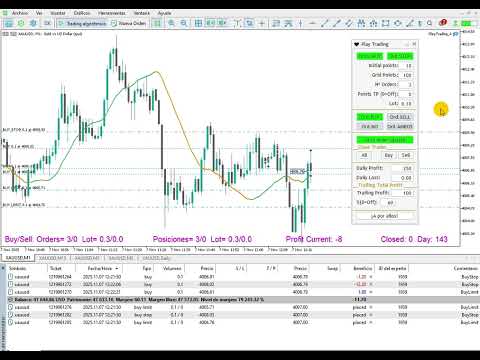
From a mobile and transparent panel (by clicking on the header), anticipate market developments and place Limit and/or Stop orders.

Set the initial distance to generate the grid with the number of orders you want (for each type of order).

Set the take profit points and lot size as you wish.


Set the type of orders you want: BUY – SELL – NO (delete orders) – BOTH (Buy and Sell).

Please note that each time you click one of these buttons, the previous orders are deleted and new ones are generated:

This is very useful for maintaining the price level of orders.


Active keys are highlighted in green. Keep this in mind if you do not want new orders to be generated, although you can also stop the robot by pressing the ‘Ord.No’ button.

There is also a button to close all open trades.

Any comments for improvements or corrections are welcome.


UPDATE 10/12/2025:

- Fixed a previous error.

- A button has been added to automatically update orders once the previous price level has been exceeded.

- Buttons have been added to close buy or sell orders, for example, in the event of a trend change.

- More information has been added to the screen: Closed Profit and Daily Profit have been added.


UPDATE 11/07/2025:

- Daily Loss has been added alongside Daily Profit, to limit both maximum amounts. Please be aware of potential slippage due to trading volume.

- A classic trailing function has been added, set by a variable target amount to trigger the trailing percentage.

The variable in the "Note:" box below allows the user to enter the desired message for the trading day.

Remember to trade responsibly. While this feature is intended for use on demo accounts, it is at the user's own risk.

추천 제품
MT5toTLGRM
Fernando Morales
4.2 (5)
Do not use Windows 7 with this EA MT5toTLGRM EA only sends text messages to a Telegram group or channel of your choice. The messages are customizable to show information about any trading activity in the account. Also it shows a daily PnL report. Several instances of this EA can be used simultaneously in the same MT5 terminal for sending messages to different Telegram group/channel but ensure that each one has a different number in [B13] setting. Following are the features of MT5toTLGRM EA send
FREE
Minimalist Manager
Nestor Sanchez Gomez
Minimalist Manager is a manual trade-management panel for traders who place their own entries and want precise, fast control over risk, stops, and targets directly on the chart. It is a discretionary tool. You decide when to enter; Minimalist Manager handles the sizing, stop-loss, take-profit, break-even and trailing mechanics around your decision. Trading several accounts? Its Trade Copier places the same trade on all of them, each at its own risk. Key features Risk-based position sizing. Se
FREE
The utility for setting a common stop loss for multiple orders. Beta version. After the test,  common take profit function will be added, orders close function will be added , and other necessary features will be added. Please do not give bad ratings to this free beta version. If you like it, give it a good rating and write to the author about any errors you find and what you would like to see in the utility. I made this utility for myself and use it daily. I am sharing it with you. A commercial
FREE
차트 링크 보조 도구: 이 도구는 MetaTrader의 열린 차트와 메인 차트의 전문가 간의 인터페이스 역할을 합니다. 많은 다중 타임프레임 전문가들은 이 파일이 화면에 열린 차트와 통신하기 위해 필요합니다. 이 도구를 차트에서 실행하면 메인 차트의 전문가와 차트를 쉽게 연결할 수 있습니다. 이 파일의 주요 기능은 열린 차트에서 발생하는 모든 이벤트를 메인 차트의 전문가에게 보내는 것입니다. 예를 들어, 메인 차트에 가이드라인을 배치해도 이러한 가이드라인의 변경 사항이 메인 패널의 전문가 매개변수에 반영되지 않을 수 있습니다. 이 도구를 차트에 드래그 앤 드롭하거나 실행함으로써 차트를 연결하여 차트에서의 변경 사항이 메인 차트의 전문가에게 전달되도록 할 수 있습니다. 또한 이 도구에는 메인 차트 전문가의 디버거와 상태 확인 기능도 포함되어 있습니다. 메인 차트의 전문가와의 연결이 끊어지면 이 도구는 몇 가지 작업을 수행합니다: 먼저 MetaQuotes ID에 알림을 보내고, Tele
FREE
Objects Styler
Filipp Pavlov
5 (2)
Objects Styler   는 차트에서 직접 표준 그래픽 개체의 속성을 편집할 수 있는   상황 인식 패널   을 제공하는 유틸리티입니다. 핵심 기능은 사용자가 복잡한 스타일 세트를 개체에 저장하고 관리하며 즉시 적용할 수 있는 강력한   템플릿 시스템   입니다. 주요 기능 인터페이스 및 상호작용 상황별 활성화:   그래픽 개체를 클릭하거나 (또는   Shift   + 클릭) 하면 패널이 호출됩니다. 모든 표준 개체와 대부분의 속성을 지원합니다. 드래그 가능한 인터페이스:   패널을 차트의 어느 영역으로든 자유롭게 이동할 수 있습니다. 팝업 창:   스타일 선택, 색상 팔레트, 타임프레임 목록과 같은 추가 옵션은 컴팩트한 팝업 창에서 열려 기본 인터페이스를 깔끔하게 유지합니다. 템플릿 관리 시스템 스타일 저장 및 적용:   개체의 전체 속성 세트를 이름이 지정된 템플릿으로 저장합니다. 템플릿은 한 번의 클릭으로 적용됩니다. 개체 유형별:   템플릿은 특정 개체 유형에 맞게 저장
FREE
One Trade Risk Selector with Order Type and Trail(MT5) One Order Risk Selector with Order Type and Trailing stop, as optional (MT5) is a powerful, smart and simple execution Expert Advisor (EA) designed to provide precise risk management for MetaTrader 5 traders. It allows for a single trade with selected risk,   order type  , configurable stop loss, optional take profit and optional trailing stop settings, making it ideal for disciplined traders who want to keep accurate risk per trade. Key F
FREE
Ajustartplinea
Sergio Piqueras Cuevas
AJUSTAR TP SEGÚN LÍNEA DE TENDENCIA — Modificación Dinámica de Take Profit en MT5 Este script para MetaTrader 5 permite proyectar el precio actual de cualquier línea de tendencia presente en el gráfico y asignarlo automáticamente como Take Profit (TP) a las posiciones abiertas que cumplan con los criterios de filtrado seleccionados. Es una herramienta imprescindible para traders que proyectan sus objetivos de salida basándose en estructuras diagonales, canales de precio, directrices de tendencia
FREE
Automated Timeframe cycling with Symbols centered.  Force every timeframe onto one clock window, so the story you see on Daily is the same story you are slicing on H4, H1, and M1.  Traders usually flip timeframes and lose the span. A Daily chart shows a few weeks, then M15 shows a few hours, and the eye treats them as different markets. TASSERACT locks the window to N bars of the highest enabled timeframe — default 10 Daily — and maps every lower timeframe to that same stretch. You stay inside o
FREE
Average Price Calculator is an MT5 trade management utility for calculating the volume-weighted average entry price and maintaining a common Take Profit for multiple positions opened on the same symbol and in the same direction. BUY and SELL positions are processed as separate baskets. The utility calculates the average entry price according to the volume of every position and sets a common Take Profit at the specified distance from that average. It can also calculate a suggested additional volu
FREE
AutoClose MT5 - Your 24/7 Automatic Capital Guardian Stop the bleeding. Lock in profits. Trade with peace of mind. ️ Why Your Trading Account Is Incomplete Without AutoClose MT5 You have your strategy, your EA, your analysis. But what's your automatic fail-safe ? One emotional decision, one missed market gap, one bad day can undo months of work. AutoClose MT5 is that non-negotiable layer of protection. It's not just a tool; it's your trading insurance policy that works 24/7. The Profession
FREE
CopyRiskGuard
Mario Rafael Cheong Nistal
Do you follow signals or copy trades from a provider and worry that a single position could spiral out of control before you can react? CopyRiskGuard watches every open position in your account independently and automatically closes it as soon as its loss exceeds the risk percentage you define — without you needing to be in front of the screen. How does it work? The EA does not open or modify trades: it only monitors. Every few seconds it checks all open positions, and if any one of them accumu
Trade Manager – BreakEven and Global Stop Loss with one click This Expert Advisor (EA) is designed to help traders manage their positions faster and more efficiently. It comes with two main features, accessible through on-chart buttons: BreakEven function: Instantly moves all open trades to the entry price with a single click. Option to add a configurable margin (e.g., +2 pips) to cover spreads or commissions. Global Stop Loss function: Instantly applies the same stop loss level to
FREE
CloseAllPosition
Konstantin Chernov
4 (2)
A script for closing positions If you need to quickly close several positions, this script will make all the routine for you! The script does not have any input parameters. Allow AutoTrading before running the script. Usage: Run the script on a chart. If you need to specify the maximal deviation and the number of attempts to close positions, use the script with input parameters https://www.mql5.com/en/market/product/625 You can download MetaTrader 4 version here: https://www.mql5.com/en/market/
FREE
One Click MT5
MQL TOOLS SL
5 (1)
One Click Close MT5 is an EA which allows you close orders quickly. EA display on chart two buttons. The first button "Close All Positions" is using to close all opened orders. The second button "Close Profit Positions" is using to close only profitable orders. EA is closing orders for all available symbols, not only for chart symbol. In EA params you can set distance from upper chart frame (Y Offset) and from left chart frame (X Offset). For installation EA it is only need to copy One Click Clo
FREE
Arixis Grid Risk Calculator — Understand Grid Exposure Before Trading Arixis Grid Risk Calculator is a professional mathematical analysis tool for traders who use grid, recovery or progressive position-sizing systems. Configure the initial lot size, distance between entries, maximum number of levels and position-sizing progression to visualize how exposure evolves as additional positions are added. The calculator generates a detailed level-by-level representation including individual lot size,
FREE
SterlingSniperBot
Diego Trigueros Makabe
SterlingSniperBot is an advanced trading algorithm meticulously designed for the GBP/USD currency pair, specifically tailored to operate on 4-hour bars and synchronize seamlessly with brokers in the UTC+2 time zone. This sophisticated bot stands out as a precision instrument in the world of forex trading. Key Features: Timeframe Optimization: Operating exclusively on 4-hour bars, SterlingSniperBot focuses on capturing strategic trading opportunities within this specific time frame, aligning with
FREE
Bneu Prop Firm Pass System
Marvinson Salavia Caballero
5 (1)
BNEU PROP FIRM PASS SYSTEM v2.37 PRODUCT OVERVIEW Bneu Prop Firm Pass System is a professional risk management and account protection utility for MetaTrader 5. Attach to any chart and configure your account rules. The system monitors daily loss, maximum drawdown, profit target, trading days, open risk, margin usage, news events, pending orders, weekend restrictions, and rollover restrictions from one dashboard. It includes a 5-tab premium dashboard, prop firm presets, custom rules, Risk Sentine
Gold Session Levels Pro MT5 is a manual MetaTrader 5 indicator designed to display relevant intraday reference levels for XAUUSD. The indicator automatically calculates and draws the Asian range, its midpoint, the daily open, the London and New York opens, the previous trading day's high and low, and targets derived from the size of the Asian range. FEATURES - Dynamic Asian range while the configured session is active. - Range freezing after the configured Asian session close. - Asian range
FREE
AI Swing EA Meta5
Reza Aghajanpour
5 (1)
Introduction : AI Swing EA is a fully automated trader with Fixed SL and high win rate. It will be 200$, it is now just 49$. No Martingale, No Grid Contact me  to send you instruction and add you in group. The next generation OpenAI model quickly gained significant attention with its broad range of capabilities and versatility, We used its expertise in assisting prediction prices in formulating and applying improved trading strategies. Our AI core is capable of extracting data insights from
Aurum PhaseBreak EA is an MT5 trading robot that combines structure-based phase-break signals, MSS/BOS-style logic, EMA crossover entries, trend filtering, support and resistance protection, trailing stops, spread control, and candle-based exit management in one automated system. Important Note Aurum PhaseBreak EA does not guarantee profit. Market conditions can change, and all automated systems carry risk. Users should test the EA on a demo account first and optimize settings according to the

Grid Machine MT5
Ivan Grachev
4.09 (46)
EA finds the largest volume in the market and determines the level for entry. After crossing the level towards the breakdown, a market order is opened. The EA builds a two-sided grid of orders, adapting to the market. Each direction of orders works separately and has its own take-profit. Thus, the adviser covers the whole trend, starting from its start, while the adviser perfectly passes the flat market condition, trading both directions. Please see all my products:  https://www.mql5.com/en/user
FREE
Trade ManagementG
Aaron Salcedo Sulit
A manual trading tool that places buy, sell, stop, and limit orders. Easily configure your settings for risk, take profit, stop loss, break-even, and trailing stops. It works in any timeframe and serves as a highly reliable tool for manual trading. Settings can be changed easily right on the panel—no more clicking the small Expert Advisor icon in the corner of the screen.
FREE
Script for Metatrader 5. One click to Delete the background grid and object, all objects on the chart such as Trend lines you have drawn or created by another program arrows text Fibonacci lines removes the background grid making a clearer clean chart horizontal and vertical lines Easy for clearing a chart or when opening new charts. Please leave a review on how its working.
FREE
BlackHoleV12
Sif-eddine Tabet
BlackHoleV12 – Grid Trading Expert Advisor for MT5 BlackHoleV12 is an automated Expert Advisor developed for trading EURCAD on the H1 timeframe in MetaTrader 5. The EA uses a grid-based trading approach combined with dynamic basket management. It manages multiple positions as a unified trading sequence, with configurable position scaling, execution filters and basket-level profit targeting. Main Features Fully automated trading and order management. Grid-based execution system. Dynamic basket-le
FREE
Trend Catcher EA Pro MT5
Issam Kassas
4.43 (42)
Trend Catcher EA Pro는 MetaTrader 5에서 자동매매와 차트의 수동 제어 기능을 결합합니다. 거래와 포지션 관리는 설정된 규칙을 따릅니다. 체결은 시장 상황, 브로커 규칙과 연결 품질에 영향을 받습니다. 제품 문의, 설정 안내 또는 기술 지원이 필요하면 MQL5에서 직접 메시지를 보내 주세요. 핵심 전략 구성: EA 내부에는 두 가지 거래 모드가 포함되어 있습니다: I. Smart Trend Mode는 한 번에 한 방향으로 거래합니다. II. Dynamic Dual Mode(공격형)는 헤지를 사용해 양방향 거래를 할 수 있습니다. 또한 Buy 전용 / Sell 전용 / 양방향 을 자유롭게 선택하여 개인 매매 스타일에 맞게 조정 할 수 있습니다. 하이브리드 제어 시스템: Trend Catcher EA 는 대부분의 EA 에 없는 기능 — 차트의 제어 버튼으로 거래를 수동 관리할 수 있습니다. 즉시 실행 버튼: 모든 포지션 청산 (C) 수익 포지션만 청산 (L) 손실
FREE
Nivelesfibonacci2
Sergio Piqueras Cuevas
NIVELESFIBONACCI2.12 — Órdenes Pendientes sobre Niveles Fibonacci Personalizados Este script para MetaTrader 5 permite colocar automáticamente órdenes pendientes de compra o venta utilizando como referencia los niveles Fibonacci horizontales previamente dibujados en el gráfico. El script está diseñado para funcionar conjuntamente con NIVELESFIBONACCI1.1 , aunque puede utilizar cualquier conjunto de líneas horizontales que siga la misma estructura de nombres mediante el prefijo configurado. La pr
FREE
Lightning Pegasus
Jackson Varela Moreira
LIGHTNING PEGASUS — NAS100 Liquidity Sweep System PEGASUS is an Expert Advisor built for one market: the NAS100 index. It hunts liquidity sweeps — moments when price takes out a key level, traps traders on the wrong side, and reverses. A state machine detects the sweep, waits for confirmation, and enters on the return into the zone. Everything is already configured. The default settings are the final, tested configuration — no optimization and no maintenance required. Attach it to a NAS100 chart
Phoenix Breakeven Button
PHOENIX GLOBAL INVESTMENTS LTD
시장이 급변하는 상황에서 여러 개의 미결제 포지션에 대해 손절매를 수동으로 손익분기점으로 이동시키는 작업은 시간이 많이 소요될 뿐만 아니라, 실수로 여전히 손실을 보고 있는 포지션에 적용하기 쉽습니다. ‘피닉스 손익분기점 버튼’은 단 한 번의 클릭으로 수익이 나는 모든 미결제 포지션의 손절매를 손익분기점으로 이동시키며, 여전히 손실을 보고 있는 포지션은 자동으로 건너뜁니다. 수익을 보호하는 방식 - 한 번의 클릭으로 계좌 내 모든 미결제 포지션에 손익분기점 보호를 적용합니다. - 현재 손실을 보고 있는 포지션을 자동으로 감지하여 건너뜁니다. - 손익분기점은 스탑을 정확한 진입 가격으로 설정합니다. 해당 가격에 도달할 경우 스프레드는 여전히 부과되며, 패널은 무료 보호를 암시하지 않고 이를 명확하게 안내합니다. - 성공 또는 실패 시 소리 알림이 제공되며, 수정된 항목, 건너뛴 항목, 이미 보호된 항목에 대한 상세한 로그가 기록됩니다. 사용자 지정 패널의 위치 및 오프셋 조
FREE
SD FirmPrism Pro
Patel Dipeshkumar Ramanbhai
SD FirmPrism Pro - (프랍파밍 규정 준수 XAUUSD 트렌드 스윙 트레이더)는 차세대 프랍파밍 트레이더(Goat Funded Trader, FTMO, MFF 등)를 위해 처음부터 독자적으로 설계된 고성능 기계적 엑스퍼트 어드바이저(EA)입니다. 계좌를 파산으로 이끄는 위험한 마틴게일이나 그리드(Grid) 전략에 의존하는 일반 EA와 달리, SD FirmPrism Pro는 엄격한 단일 포지션 추세 크로스오버 로직과 기관급 자산 보호 시스템을 결합했습니다. 금(XAUUSD) 종목에 특화되어 설계되었으며, 높을 확률의 모멘텀 돌파를 포착하는 동시에 프랍파밍의 손실 제한(Drawdown) 규칙을 엄격하게 준수합니다. 핵심 전략: SD FirmPrism Pro는 두 개의 단순 이동평균선(SMA 44 Fast / 200 Slow) 크로스오버 시스템을 사용하여 거시 추세를 판단합니다. 상위 타임프레임의 모멘텀과 가격 흐름이 일치할 때까지 기다렸다가, 틱 노이즈와 HFT(고주파 매
FREE
GGT Trend Donchian
Khunakorn Krachao-ngoen
A textbook daily Donchian trend rule for gold — published with its full 9-year test, including the losing year. We build and sell Gold GodTier. Before that, we tested the simplest trend rule there is, with no parameter tuning, under the same rules we use for our paid EA. It did not pass our bar (small edge, t = 0.74), so we are giving it away with every number attached. If you want to see what an honestly tested EA looks like, this is it. Rule (defaults are the tested values) Entry: price breaks
FREE
이 제품의 구매자들이 또한 구매함
Trade Assistant MT5
Evgeniy Kravchenko
4.43 (216)
거래당 위험 계산, 라인을 사용한 손쉬운 신규 주문, 부분 청산 기능을 통한 주문 관리, 7가지 유형의 트레일링 스탑 및 기타 유용한 기능을 제공합니다. 추가 자료 및 지침 설치 지침   -   애플리케이션 지침   라인 기능       - 차트에 개시선, 손절매, 차익실현을 표시합니다. 이 기능을 사용하면 새로운 주문을 쉽게 하고 개봉 전에 추가 특성을 볼 수 있습니다. 위기 관리       -       위험 계산 기능은 설정된 위험과 손절매 주문의 크기를 고려하여 새 주문의 볼륨을 계산합니다. 이를 통해 손절매 크기를 설정하고 동시에 설정된 위험을 존중할 수 있습니다. 로트 계산 버튼 - 위험 계산을 활성화/비활성화합니다. 필요한 위험 값은 위험 필드에 0에서 100 사이의 백분율 또는 예금 통화로 설정됩니다. 설정 탭에서 위험 계산 옵션을 선택합니다. $ 통화, % 잔액, % 지분, % 자유 마진, % 사용자 정의, % AB 이전 일, % AB 이전 주, % AB 이전
Trade Manager EA에 오신 것을 환영합니다. 이 도구는 거래를 보다 직관적이고 정확하며 효율적으로 만들기 위해 설계된 궁극적인 리스크 관리 도구 입니다. 단순한 주문 실행 도구가 아닌, 원활한 거래 계획, 포지션 관리 및 리스크 제어를 위한 종합 솔루션입니다. 초보자부터 고급 트레이더, 빠른 실행이 필요한 스캘퍼에 이르기까지 Trade Manager EA는 외환, 지수, 상품, 암호화폐 등 다양한 시장에서 유연성을 제공합니다. Trade Manager EA를 사용하면 복잡한 계산은 이제 과거의 일이 됩니다. 시장을 분석하고 진입, 손절 및 익절 수준을 차트의 수평선으로 표시한 후 리스크를 설정하면, Trade Manager가 이상적인 포지션 크기를 즉시 계산하고 SL 및 TP 값을 실시간으로 표시합니다. 모든 거래가 간편하게 관리됩니다. 주요 기능: 포지션 크기 계산기 : 정의된 리스크에 따라 거래 크기를 즉시 결정합니다. 간단한 거래 계획 : 진입, 손절, 익절을 위한
Local Trade Copier EA MT5
Juvenille Emperor Limited
4.94 (149)
Local Trade Copier EA MT5는 동일한 Windows 컴퓨터 또는 Windows VPS에서 여러 MetaTrader 5 계정 간에 거래를 복사하고 관리할 수 있는 빠르고 유연한 거래 복사기입니다. 로컬 거래 동기화 기능과 함께 Receiver 측에서 로트 크기, 리스크 관리, 거래 필터링, 심볼 매핑, 거래 관리 및 계정 보호를 독립적으로 설정할 수 있습니다. Transmitter와 Receiver 터미널을 약 1분 안에 설정하고, 동일한 브로커 또는 서로 다른 브로커의 계정 간에 수동 거래 또는 EA 거래를 복사할 수 있습니다. 적절한 조건에서는 로컬 MetaTrader 터미널 간의 거래 정보가 0.5초 이내 에 동기화될 수 있습니다. 실제 체결 속도는 브로커 지연 시간, 네트워크 상태, 컴퓨터/VPS 성능 및 터미널 부하에 따라 달라집니다. 구매 전에 무료 데모를 사용해 보세요 MT5 데모 계정에서 Local Trade Copier EA MT5의 모든 기능을
Telegram to MT5 Multi-Channel Copier   는 Telegram 및 Discord 채널의 트레이딩 시그널을 MetaTrader 5로 자동 복사합니다. 봇도, 브라우저 확장도, 수동 복사도 필요 없습니다. Telegram이나 Discord에 시그널이 도착하면 EA가 몇 초 안에 터미널에서 주문을 실행합니다. 그리고 채널을 복사하기 전에, 내장 백테스터가 그 채널이 내 계좌에서 어떤 결과를 냈을지 보여줍니다. 제품은 두 가지 구성 요소로 이루어집니다: Telegram 채널을 수신하는 Windows 애플리케이션과, MT5 터미널에서 시그널을 실행하는 본 EA입니다. MT4 버전도 제공됩니다   여기 . 설정 가이드와 앱 다운로드:   https://www.mql5.com/en/blogs/post/768988 텔레그램 시그널 채널을 백테스트하는 방법 을 확인하세요. 현재 가격은 향후 인상될 예정입니다. 작동 방식 앱은 여러분 자신의 Telegram 계정으로 연결되므
Farmed Hedge Yield Farming | All Markets (Manual - Hybrid - Semi/Automated EA) VERIFIED TRADING RESULTS - Farmed Hedge Yield Axi Copy:  https://www.mql5.com/en/signals/2356376 - Farmed Hedge Yield Exn Copy:   https://www.mql5.com/en/signals/2356404 - Farmed Hedge Yield V Copy:  https://www.mql5.com/en/signals/2357156 IMPORTANT NOTICE: FarmedHedge is a MANUAL-FOCUSED TRADING UTILITY ,not a fully automated EA. Results shown on this Signal include manual trades and overall strategic management.
내 거래 규칙에 맞춰 Telegram 신호 복사 Telegram to MT5 Signal Trader 는 공개 및 비공개 Telegram 채널과 그룹의 텍스트 기반 거래 신호를 MetaTrader 5로 자동 복사합니다. 하나의 데스크톱 앱에서 여러 신호 제공자와 MT5 계좌를 관리하고, 제공자마다 위험 관리 및 거래 설정을 개별적으로 지정 할 수 있습니다. 신호 복사에는 Telegram 봇이나 API 설정이 필요하지 않습니다. 전화번호 또는 QR 코드로 본인의 Telegram 계정에 로그인한 후, 이미 가입한 채널이나 그룹을 선택하면 됩니다. 봇을 만들거나 Telegram API 토큰, API ID 또는 API 해시를 입력할 필요가 없습니다. 포지션 크기를 선택하고, 여러 익절 목표에 청산 물량을 배분하며, 손익분기점 이동과 트레일링 스톱을 자동화하세요. 제공자의 신호를 따르면서도 실제 거래 방식은 직접 설정할 수 있습니다. 이 제품은 MT5 Expert Advisor와 필수 Win
================================================================================ POC BREAKOUT - V20.72. Full Professional Grade Toolkit ================================================================================ POC Breakout is a full MetaTrader 5 trading dashboard for discretionary traders who want breakout signals, Point of Control (POC) context, volume profiles, order flow, market structure, news, alerts, and advanced trade planning in one professional workspace. Attached directly to you
TradePanel MT5
Alfiya Fazylova
4.88 (170)
Trade Panel은 다기능 거래 도우미입니다. 이 애플리케이션에는 50개 이상의 수동 거래 기능이 포함되어 있으며 대부분의 거래 작업을 자동화할 수 있습니다. 앱 사용 설명서: https://www.mql5.com/en/blogs/post/756482 데모 계정용 앱 체험판: https://www.mql5.com/en/blogs/post/750865 앱 설치 방법: https://www.mql5.com/en/blogs/post/756239 시각 모드에서 앱 테스트 방법: https://www.mql5.com/en/blogs/post/770277 VPS MetaTrader에 앱 설치 방법: https://www.mql5.com/en/blogs/post/770190 거래. 한 번의 클릭으로 거래를 수행할 수 있습니다: 리스크 자동 계산과 함께 예약 주문 및 포지션 열기. 한 번의 클릭으로 여러 주문 및 포지션 열기. 주문 그리드 열기. 예약 주문 및 포지션을 그룹별로 닫기. 포지션
Strategy Ledger Pro
Abdullah Uygar Tuna
5 (11)
이제 한국어로 이용할 수 있습니다. Strategy Ledger Pro 는 MetaTrader 5용 읽기 전용 계좌 분석 패널입니다. 계좌 성과를 전문가 어드바이저(EA), 전략, 심볼, 매직 넘버별로 나누어 각각이 실제로 얼마나 기여하는지 보여줍니다. 패널은 11개 언어를 지원합니다: English, Français, Deutsch, Español, Italiano, Português, Русский, Türkçe, 中文, 日本語, 한국어. 데모를 다운로드하기 전에. Market은 모든 유료 제품의 데모를 전략 테스터에서만 실행합니다. 이 패널은 사용자 자신의 계좌 거래를 분석하는데, 전략 테스터에는 읽을 계좌 기록이 없으므로 데모는 빈 패널로 열리고 그 사실을 표시합니다. 이는 데모 방식에 따른 것이며 제품의 제약이 아닙니다. 이 설명의 동영상에서 실계좌에서 작동하는 패널을 확인할 수 있습니다. 모든 기능을 설명한 자세한 매뉴얼 (영문)과 토론 및 공지를 위한 AureusAI
News Trade EA MT5
Konstantin Kulikov
4.55 (11)
제가 몇 년 동안 사용하고 있는 유용한 로봇을 소개드립니다. 반자동뿐만 아니라 자동 모드로도 사용할 수 있습니다. >>> Chat <<< 본 프로그램에는 경제 캘린더의 뉴스별로 유연한 거래 설정이 포함되어 있습니다. 전략 테스터에서 확인할 수 없습니다. 진짜 작업뿐입니다. 터미널 설정에서 허용된 URL 목록에 뉴스 사이트를 추가해야 합니다. 서비스>설정 > 조언자>를 클릭합니다. "다음 URL에 대해 WebRequest 허용:" 확인란을 선택합니다. 다음을 추가합니다 (공백 삭제): https://  nfs.faireconomy.media 최신 설정 아카이브 다운로드: https://www.mql5.com/en/blogs/post/747929 신호 모니터링: https://www.mql5.com/en/signals/author/test-standart 이 전문가를 위해 고유 설정 세트를 만들 때 블로그의 모든 매개변수에 대한 설명을 참조하십시오: https://www.mql5.
Master Your Trading Discipline   Stop losing your hard-earned gains to overtrading and emotional decisions. The Discipline Tool is your ultimate trading assistant, ensuring strict risk management in real-time. Key Protection Features: Advanced Drawdown Defense : Automatically halts trading if your daily drawdown exceeds a preset threshold (percentage or dollar amount). Real-Time Equity Lock : Safeguard profits by referencing peak equity, ensuring drawdown stays within control. Hard Profit Target
파워 캔들 전략 스캐너 - 자체 최적화 다중 종목 설정 찾기 도구 파워 캔들 전략 스캐너는 마켓 워치에 등록된 모든 종목에 대해 파워 캔들 지표와 동일한 자체 최적화 엔진을 동시에 실행합니다. 하나의 패널에서 현재 통계적으로 거래 가능한 종목, 각 종목별 최적의 전략, 최적의 손절매/익절 조합을 알려주며, 새로운 신호가 발생하면 즉시 알림을 전송합니다. 이 도구는 Stein Investments 에코시스템의 일부입니다. 18개 이상의 도구와 함께 당신의 1대1 AI 트레이딩 멘토 Max.  항상 대기 중, 모든 인디케이터를 깊이 있게 이해, 무언가를 차근차근 생각해보고 싶은 순간에 도움을 줍니다.  https://stein.investments 에서 만나보세요 완벽한 시장 모니터링. 종목당 3,000건 이상의 자동 최적화. 2가지 알림 유형. 한 번의 클릭으로 차트를 전환하고 바로 거래하세요. 이 도구가 필요한 이유 대부분의 다중 종목 스캐너는 가격 변동만 보여줍니다. 티커별
The product will copy all telegram signal to MT5 ( which you are member) , also it can work as remote copier.  Easy to set up, copy order instant, can work with almost signal formats, image signal,  s upport to translate other language to English Work with all type of channel or group, even channel have "Restrict Saving Content", work with  multi channel, multi MT5 Work as remote copier: with signal have ticket number, it will copy exactly via ticket number. Support to backtest signal. How to s
Exp COPYLOT CLIENT for MT5
Vladislav Andruschenko
3.97 (35)
MetaTrader 5용 전문 트레이드 복사기 MetaTrader 용 빠르고 전문적이며 신뢰할 수 있는 트레이드 복사기 입니다. COPYLOT 은 MT4와 MT5 터미널 간의 Forex 거래 복사를 지원하며, Hedge 및 Netting 계좌를 모두 지원합니다. COPYLOT MT5 버전 지원 구성: - MT5 Hedge → MT5 Hedge - MT5 Hedge → MT5 Netting - MT5 Netting → MT5 Hedge - MT5 Netting → MT5 Netting - MT4 → MT5 Hedge - MT4 → MT5 Netting MT4 버전 전체 설명 + DEMO + PDF 구매 방법 설치 방법 로그 파일 확인 방법 테스트 및 최적화 방법 Expforex의 모든 제품 MT4 터미널로도 거래를 복사할 수 있습니다(MT4 → MT4, MT5 → MT4): COPYLOT CLIENT for MT4 COPYLOT은 2개, 3개, 심지어 10개의 터미널과 동시에 작동할
Signal TradingView to MT5 Pro Automator TradingView와 MetaTrader 5 간의 즉각적인 전문 실행 TradingView 알림과 MT5의 실제 실행을 연결하는 가장 강력한 커뮤니케이션 브리지로 거래 전략을 자동화하세요. 속도, 유연성 및 완벽한 위험 관리를 요구하는 트레이더를 위해 설계된 이 Expert Advisor는 모든 알림 메시지를 정확한 시장가 또는 지정가 주문으로 변환합니다. 강점 및 이점 범용 파싱 엔진(독점 기술): 모든 알림 형식에서 데이터를 자동으로 인식하고 추출할 수 있는 고급 기술입니다. 단일하고 엄격한 형식에 얽매일 필요가 없습니다. 시스템은 심볼, 액션, 가격, SL 및 TP를 자동으로 이해합니다. 실시간 실행: 지연 시간을 최소화하도록 최적화된 1초 미만의 초고속 폴링 기술. 신호 수신 후 몇 밀리초 내에 주문 실행이 이루어집니다. 기관 수준의 위험 관리: 다음 기준에 따른 자동적이고 정확한 로트(Lot) 크기 계
HINN MagicEntry Extra
ALGOFLOW OÜ
4.74 (19)
HINN MAGIC ENTRY – the ultimate tool for entry and position management! SIMPLE. FASTEST. INTUITIVE. MAX AUTOMATED. Place orders by selecting a level directly on the chart! full description   ::  demo-version  :: 60-sec-video-description Key features: - Market, limit, and pending orders - Automatic lot size calculation - Automatic spread and commission accounting - Unlimited partitial take-profits  - Breakeven and trailing stop-loss and take-profit  functions - Invalidation leves - Intuitive, a
Entry In The Zone with SMC Multi Timeframe is a real-time market analysis tool based on Smart Money Concepts (SMC), designed to analyze market structure, price direction, and key trading zones. It supports both Single-Timeframe and Multi-Timeframe Analysis, providing a clearer view of overall market structure across multiple timeframes, with real-time BUY / SELL signals designed with a strict focus on No-Repaint principles.   The signals are designed to help filter unclear setups and evaluate tr
EasyInsight AIO MT5
Alain Verleyen
4.92 (12)
EASY Insight AIO – 스마트하고 손쉬운 트레이딩을 위한 올인원 솔루션 개요 외환, 금, 암호화폐, 지수, 심지어 주식까지 — 전 시장을 몇 초 만에, 수동 차트 확인이나 복잡한 설치, 인디케이터 설정 없이 스캔할 수 있다고 상상해 보세요. EASY Insight AIO 는 AI 기반 트레이딩을 위한 궁극의 플러그 앤 플레이(Plug & Play) 데이터 내보내기 도구입니다. 단 하나의 깔끔한 CSV 파일로 전체 시장 스냅샷을 제공하며, ChatGPT, Claude, Gemini, Perplexity 등 다양한 AI 플랫폼에서 즉시 분석할 수 있습니다. 창 전환, 복잡함, 차트 오버레이는 더 이상 필요 없습니다. 자동으로 내보내지는 순수하고 구조화된 데이터 인사이트만으로, 반복적인 차트 감시 대신 데이터 기반의 스마트한 의사결정에 집중할 수 있습니다. 왜 EASY Insight AIO인가요? 진정한 올인원 • 별도의 설정, 인디케이터 설치, 차트 오버레이가 필요 없습
지원이 필요하신가요? 설정 방법이 궁금하신가요? 질문이 있으신가요? 여기에 고객님의 언어로 문의하세요, 빠른 답변: https://www.mql5.com/en/market/product/139088/comments 작동 데모 다운로드 Copy Cat More (카피캣) MT5 트레이드 카피어 (Trade Copier) 는 로컬 트레이드 카피어이자, 오늘날의 트레이딩 과제를 위해 설계된 완전한 리스크 관리 및 실행 프레임워크입니다. 프롭 펌 (prop firm) 챌린지부터 개인 포트폴리오 관리까지, 견고한 실행, 자본 보호, 유연한 설정, 고급 트레이드 처리의 조합으로 모든 상황에 적응합니다. 이 카피어는 마스터 (Master, 송신측) 와 슬레이브 (Slave, 수신측) 두 모드 모두에서 작동하며, 시장가 주문과 대기 주문, 트레이드 수정, 부분 청산, 상호 청산 (Close By) 작업을 실시간으로 동기화합니다. 데모 및 실거래 계좌, 트레이딩 또는 인베스터 로그인 모두와 호환
MT5 to Telegram Signal Provider 는 사용하기 쉽고 완전히 커스터마이즈 가능한 유틸리티로, 특정 신호를 Telegram의 채팅, 채널 또는 그룹으로 전송하고, 귀하의 계정을 신호 제공자 로 만듭니다. 경쟁 제품과 달리 DLL 임포트를 사용하지 않습니다. [ 데모 ] [ 매뉴얼 ] [ MT4 버전 ] [ 디스코드 버전 ] [ 텔레그램 채널 ]  New: [ Telegram To MT5 ] 설정 단계별 사용자 가이드 가 제공됩니다. 텔레그램 API에 대한 지식은 필요하지 않습니다; 개발자가 제공하는 모든 것이 필요합니다. 주요 특징 구독자에게 보낸 주문 상세 정보를 커스터마이즈할 수 있습니다. 예를 들어, 브론즈, 실버, 골드와 같은 계층 구독 모델을 만들 수 있습니다. 골드 구독에서는 모든 신호를 받습니다. id, 심볼, 또는 코멘트로 주문을 필터링할 수 있습니다. 주문이 실행된 차트의 스크린샷이 포함됩니다 보낸 스크린샷에 닫힌 주문을 그려 추가 검증을 합니다
Trade Indicator Assistant   is a powerful MT5 utility designed to turn indicators into automated trading systems. Its main feature is the ability to automatically detect an indicator’s   BUY and SELL signal buffers , without requiring you to know the buffer numbers, search through indicator settings, or modify the indicator source code. Bonus Indicator:   After purchasing Trade Indicator Assistant, contact me to receive   Trade Signal Pro   completely free as a bonus indicator. [Download Demo V
Trade copier MT5
Alfiya Fazylova
4.61 (57)
Trade Copier는 거래 계정 간의 거래를 복사하고 동기화하도록 설계된 전문 유틸리티입니다. 복사는 공급자의 계정/단말기에서 동일한 컴퓨터 또는 vps에 설치된 수신자의 계정/단말기로 발생합니다. 구매하기 전에 데모 계정에서 데모 버전을 테스트할 수 있습니다. 데모 버전 여기 . 전체 지침 여기 . 주요 기능 및 이점: 복사기는 "МТ5> МТ5", "МТ4> МТ5", "МТ5> МТ4" 복사를 지원합니다. 복사기는 데모 계정 > 실 계정, 실 계정 > 데모 계정, 데모 계정 > 데모 계정 및 실제 계정 > 실 계정 복사를 지원합니다. 복사기는 읽기 전용 암호가 적용된 투자자 계정에서 복사를 지원합니다. 하나의 공급자 터미널은 여러 수신 터미널로 트랜잭션을 보낼 수 있고 하나의 수신 터미널은 여러 공급자 터미널에서 트랜잭션을 수신할 수 있습니다. 복사기는 귀하 또는 귀하의 고문이 거래하는 동일한 터미널에서 작동할 수 있습니다. 높은 복사 속도(0.5초 미만). 복사기에는 간편
Grid Manual MT5
Alfiya Fazylova
4.73 (22)
"Grid Manual"은 주문 그리드 작업을 위한 거래 패널입니다. 이 유틸리티는 보편적이며 유연한 설정과 직관적인 인터페이스를 제공합니다. 그것은 손실을 평균화하는 방향뿐만 아니라 이익을 증가시키는 방향으로 주문 그리드와 함께 작동합니다. 거래자는 주문 그리드를 만들고 유지할 필요가 없으며 유틸리티에서 수행합니다. 거래자가 주문을 시작하는 것으로 충분하며 "Grid Manual"는 자동으로 그를 위한 주문 그리드를 생성하고 거래가 마감될 때까지 그와 동행할 것입니다. 전체 설명 및 데모 버전 여기 . 유틸리티의 주요 기능: 모바일 터미널을 포함하여 어떤 방식으로든 열린 주문과 함께 작동합니다. "제한" 및 "중지"의 두 가지 유형의 그리드와 함께 작동합니다. 고정 및 동적(ATR 표시기 기반)의 두 가지 유형의 그리드 간격 계산과 함께 작동합니다. 오픈 오더 그리드의 설정을 변경할 수 있습니다. 차트에서 각 주문 그리드의 손익분기점 수준을 표시합니다. 각 주문 그리드에 대한 이익
The Patch
Mian Rameez Ali
The Patch It never opens a trade. It walks behind the ones that did. Every open position, every pending order — checked twice a second for the one thing that's easy to forget: a stop, a target. Found bare, it doesn't ask. It writes the missing number in, measured in points from wherever the position began, and moves on to the next. No strategy, no opinion on direction. Just the quiet assumption that nothing should ever sit on the market unprotected — not because someone decided it shouldn't,
Telegram to MT5 Coppy
Sergey Batudayev
5 (10)
Telegram에서 MT5로:   최고의 신호 복사 솔루션 DLL 없이도 Telegram 채널과 채팅에서 MetaTrader 5 플랫폼으로 거래 신호를 직접 복사하는 최신 도구인 Telegram to MT5를 사용하여 거래를 간소화하세요. 이 강력한 솔루션은 정밀한 신호 실행, 광범위한 사용자 정의 옵션을 제공하고 시간을 절약하며 효율성을 높여줍니다. [ Instructions and DEMO ] 주요 특징 직접 Telegram API 통합 전화번호와 보안 코드를 통해 인증하세요. 사용자 친화적인 EXE 브리지를 통해 채팅 ID를 쉽게 관리하세요. 여러 채널/채팅을 추가, 삭제, 새로 고침하여 동시에 신호를 복사합니다. 고급 필터를 사용한 신호 파싱 예외 단어(예: "보고서", "결과")가 포함된 원치 않는 신호를 건너뜁니다. 유연한 SL 및 TP 형식을 지원합니다: 가격, 핍 또는 포인트. 가격 대신 포인트를 지정하는 신호에 대한 진입 포인트를 자동으로 계산합니다. 주문 맞춤화 및
Telegram To MT5 Ultra
Mirel Daniel Gheonu
5 (5)
Telegram To MT5 — 시그널 카피어 텔레그램 채널의 트레이딩 콜을 실제 MT5 주문으로 바꿔 드립니다 — 자동으로, 원하는 만큼의 계좌에서, 리스크와 규칙을 완전히 당신의 통제 아래 둡니다. Telegram To MT5는 이미 텔레그램에서 팔로우하고 있는 VIP / 시그널 채널을 당신의 MetaTrader 5 터미널에 연결합니다. 무료 동반 데스크톱 앱이 메시지를 읽고(봇을 차단하는 채널에서도 가능), 이 EA가 당신의 계좌에서 이를 실행합니다 — 당신만의 리스크 설정, 심볼 매핑, 익절(TP) 처리, 세션 및 뉴스 필터를 적용합니다. 이것은 블랙박스 전략이 아니라 시그널 카피어입니다. 어떤 채널을 신뢰할지, 각 거래의 수량과 관리 방식을 당신이 결정합니다. 단계별 설정 및 동반 앱 설치 가이드 작동 방식 [당신의 텔레그램 채널] -> [동반 데스크톱 앱] -> [MT5 + 이 EA] -> 주문 동반 데스크톱 앱(무료, 포함)은 당신의 텔레그램 계정으로 로그인하여 선택한
The News Filter MT5
Leolouiski Gan
4.79 (24)
이 제품은 뉴스 시간 동안 모든 전문가 어드바이저 및 수동 차트를 필터링하여 수동 거래 설정이나 다른 전문가 어드바이저가 입력한 거래가 파괴될 수 있는 급격한 가격 상승으로부터 걱정하지 않아도 됩니다. 이 제품은 또한 뉴스 발표 전에 열린 포지션과 대기 주문을 처리할 수 있는 완전한 주문 관리 시스템이 함께 제공됩니다.   The News Filter  를 구매하면 더 이상 내장 뉴스 필터에 의존할 필요가 없으며 이제부터 모든 전문가 어드바이저를 여기서 필터링할 수 있습니다. 뉴스 선택 뉴스 소스는 Forex Factory의 경제 캘린더에서 얻어집니다. USD, EUR, GBP, JPY, AUD, CAD, CHF, NZD 및 CNY와 같은 어떤 통화 기준으로 선택할 수 있습니다. Non-Farm (NFP), FOMC, CPI 등과 같은 키워드 식별을 기준으로 선택할 수도 있습니다. 저, 중, 고 영향을 가지는 뉴스를 필터링할 수 있도록 선택할 수 있습니다. 차트와 관련된 뉴스만 선
MetaTrader 5용 트레이딩 패널 — 차트와 키보드에서 실행하는 프로페셔널 원클릭 트레이딩 활동적인 트레이더를 위해 설계된 고급 Trading Panel로, MetaTrader 기본 인터페이스보다 훨씬 빠르고 직관적으로 포지션과 주문을 열고, 관리하고, 종료할 수 있습니다. 이 패널은 포지션 관리, 대기 주문 제어, 총수익 관리, 체결 속도를 하나의 전문적인 작업 공간에 통합하고 싶은 트레이더를 위한 솔루션입니다. 이것은 단순한 보조 유틸리티가 아닙니다. MetaTrader 5를 위한 진정한 trading cockpit입니다. 차트에서 직접 거래하고, 키보드로 빠르게 명령을 실행하며, 자동 계산과 시각적 가이드를 통해 수동 트레이딩을 더 빠르고, 더 명확하고, 더 편리하게 만들어 줍니다.  이 패널을 사용하면 차트에서 단 한 번의 클릭으로 거래를 실행할 수 있으며, 표준 MetaTrader 컨트롤보다 최대 30배 빠르게 거래 작업을 수행할 수 있습니다. 새로운 프리미엄 버전
Floor Watch
Syed Tauqeer Hussain Shah
Floor Watch One number, watched every thirty seconds: how far equity has fallen since the day began — or since its highest point, if it's told to trail the peak instead of the open. Cross the line and it doesn't argue. Every open position closes, every pending order vanishes, and anything that slips through afterward gets shut the moment it appears. Not asked. Removed. The floor holds until the clock turns 5 AM Pakistan time — then, and only then, does the day start over. One rule. No except
Seconds Chart MT5
Boris Sedov
4.61 (18)
Seconds Chart - MetaTrader 5에서 초 단위 차트를 생성하는 독특한 도구입니다. Seconds Chart 를 사용하면 초 단위로 설정된 타임프레임으로 차트를 작성할 수 있어, 표준 분 또는 시간 단위 차트에서는 불가능한 유연성과 정밀한 분석이 가능합니다. 예를 들어, S15 타임프레임은 15초 동안의 캔들로 구성된 차트를 의미합니다. 사용자 정의 심볼을 지원하는 모든 인디케이터와 전문가 어드바이저를 사용할 수 있습니다. 이를 사용하는 것은 표준 차트에서 거래하는 것만큼 편리합니다. 표준 도구와 달리, Seconds Chart 는 초고속 타임프레임에서도 높은 정확도와 지연 없이 작업할 수 있도록 지원합니다. 무료 데모: Seconds Chart v2.29 Demo.ex5 무료 데모를 다운로드하고 직접 확인하십시오: 완전한 기능 - 모든 기능 사용 가능 24시간 테스트 - 정확성과 편리성을 평가하기에 충분한 시간 데모 계정만 - 대부분의 브로커에서 쉽게 개설 가능
제작자의 제품 더 보기
LineaResultadoyEjecucion
Juan Luis De Frutos Blanco
Result and Execution line, which shows the net global position, the expected profit at a given price level, and its percentage of the account balance. Additionally, with the line unselected, it executes position and/or order closing actions. You can move the line from one price to another by selecting it, to obtain information on the closing result of positions at different price levels. If you wish to close trades and/or orders, select this option in the EA parameters and then deselect the li
FREE
Este indicador para Metatrader5 analiza múltiples timeframes dinámicamente para identificar máximos   y mínimos significativos según va avanzando el precio, proyectando niveles de recuperación   (Fibonacci o personalizados). Incluye sistema de caché para máximo   rendimiento y validación no intrusiva de timeframes.     CARACTERÍSTICAS PRINCIPALES: 1.   Análisis multi-timeframe (hasta 3 timeframes simultáneos) 2.   Dinámico: Sigue la evolución del precio   3. Sistema de caché inteligente (optimiz
필터:
리뷰 없음
리뷰 답변