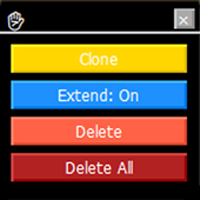
MT4 Trendline Toolbox
- Indicatori
- Versione: 1.31
- Aggiornato: 10 ottobre 2025

Trendline Toolbox (MT4)
Trendline Toolbox is a utility indicator for MetaTrader 4 that helps manage trendlines and common chart objects. It does not provide trading signals and does not guarantee any profit.
Main functions
- Clone the selected trendline (style, angle, and price levels are preserved).
- Toggle the “Extend” property for the selected trendline.
- Delete the selected trendline.
- Delete all objects on the current chart.
- Double-click the hand icon to enable move mode, then drag the panel to a new position.
How to use
- Attach the indicator to a chart.
- Select a trendline on the chart.
- Use the panel buttons to clone, extend, or delete the selected trendline.
- Use the “Purge” button to remove all objects from the current chart.
- Double-click the hand icon to reposition the panel.
Inputs
- Panel_Anchor – corner selection.
- Panel_Offset_X / Panel_Offset_Y – pixel offsets.
- Confirm_Delete_All – true / false.
- Fast_Delete_Enabled – true / false.
Notes
- Works with standard MT4 chart objects.
- No DLLs required.
- This is a charting tool. It does not open, manage, or close trades.
- You can review panel behavior in Strategy Tester visual mode.
Limitations
- Actions apply to the current chart window only.
- Clone/extend/delete actions affect the actively selected trendline.
Support
If you find this tool helpful, your honest review or rating is appreciated. It motivates further development and helps prioritize useful features for future updates.
Updates
The seller may publish updates to maintain stated functionality. Users can install updates at their discretion.































































L'utente non ha lasciato alcun commento sulla valutazione.