Risk Panel VIP
- Utilità
- Versione: 1.63
- Aggiornato: 10 ottobre 2025
- Attivazioni: 5

Risk Panel VIP (MT4)
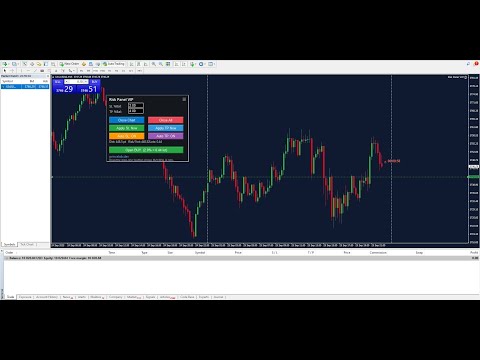
Risk Panel VIP is a professional Tool for MetaTrader 4 designed for fast, disciplined execution. It calculates position size from your balance risk and places Stop Loss / Take Profit accordingly. This is a trade management utility; it does not provide trading signals and does not guarantee any profit.
Main functions
- Draggable Stop Line: place the stop on chart; the panel auto-calculates lot size from your configured risk % of balance (default 2%, editable).
- Context-aware action button: if the stop line is above current price → Open Sell; if below → Open Buy.
- Auto SL/TP: Stop Loss at the line; Take Profit by reward % (default 4% of balance, editable).
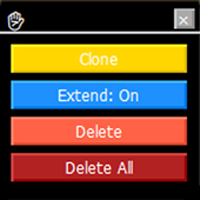
- Manual controls: Apply SL / Apply TP to existing positions at any time.
- Close Chart: close all positions on the current symbol.
- Close All: close all positions across all symbols.
- Draggable panel: double-click top, then drag to reposition.
How to use
- Attach the EA to a chart in MetaTrader 4.
- Ensure AutoTrading is ON (toolbar button is green) and Allow live trading is enabled in EA settings.
- Set risk % for SL and reward % for TP, or keep defaults (SL 2%, TP 4%).
- Drag the Stop Line to the desired price level and use the context button to open a position.
- Use manual buttons to Apply SL/TP later if needed; use Close Chart / Close All with care.
Inputs
- RiskPercent_SL – percent of balance to risk for Stop Loss.
- RewardPercent_TP – percent of balance to target for Take Profit.
- Auto_SLTP_Enabled – on/off for automatic SL/TP on new orders.
- Panel_Corner – top-left / top-right / bottom-left / bottom-right.
- Panel_Offset_X / Panel_Offset_Y – pixel offsets from the chosen corner.
- FontSize, Padding, Color_Scheme – panel styling options.
- Confirm_Close_All – true/false confirmation before closing all positions.
Notes
- No DLLs required; no external libraries.
- The EA does not open trades by itself unless you press the action button; it manages SL/TP and close actions.
- Position sizing is calculated from current account balance and your configured percentages.
- Behavior depends on broker execution and trading permissions.
Limitations and safety
- Close All affects all open symbols in the terminal. Enable confirmation if needed.
- Backtesting can be used to review panel behavior in Strategy Tester visual mode.
Support
If you find this tool helpful, your honest review or rating is appreciated. It motivates further development and helps prioritize useful features for future updates.
Updates
Updates may be published to maintain the stated functionality. Users can install updates at their discretion.