Dark Nova
- Experts
-
Marco Solito
 Do you have Questions about my Products? STOP! For a quick answer, do NOT write to me on mql5. Instead, contact my super fast assistant: https://www.mql5.com/en/users/shiv5 or use my website: https://darkeas.com/submitticket.php Hello, I'm Marco and I'm an mql4 and mql5 programmer from 10 years
 - Versione: 1.10
- Attivazioni: 10
Last copy at 499$ -> next price 599$
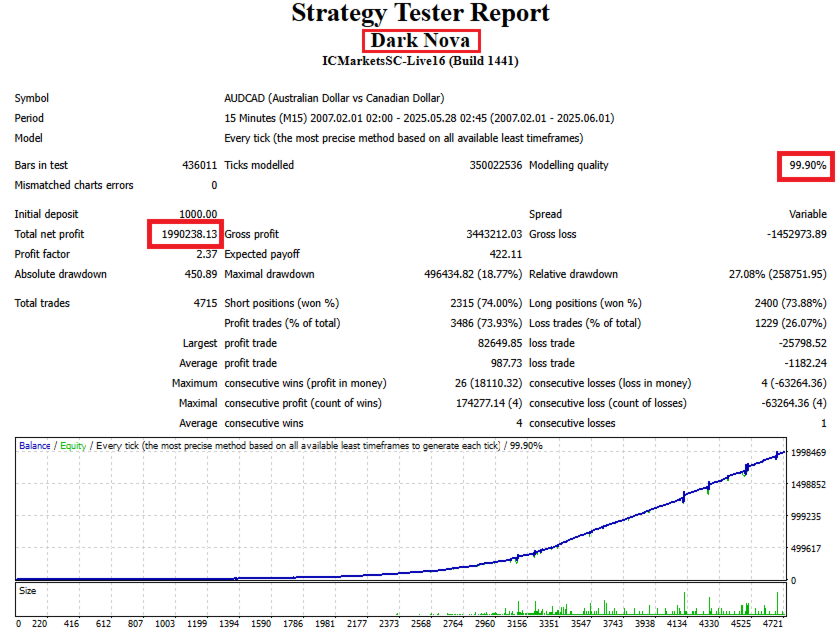
Dark Nova is a fully automatic Expert Advisor for Scalping Trading on AUDCAD, AUDNZD and NZDCAD.
This Expert Advisor is based on a sophisticated multi-indicator algorithm combining Bollinger Bands, Moving Averages, ADX, RSI and Extreme Points detection. It is highly customizable to suit your trading needs.
If you Buy this Expert Advisor you can write a feedback at market and get a second EA for Free, for More info contact me
The basic strategy of this EA is built on a counter-trend approach that identifies oversold and overbought market conditions using Bollinger Bands, then confirms entries with multiple filters. This advanced algorithm takes into account a wide range of market data and historical information to make its predictions. It is designed to adapt as the market changes, making it one of the most advanced trading tools available in my collection.
Live Signal
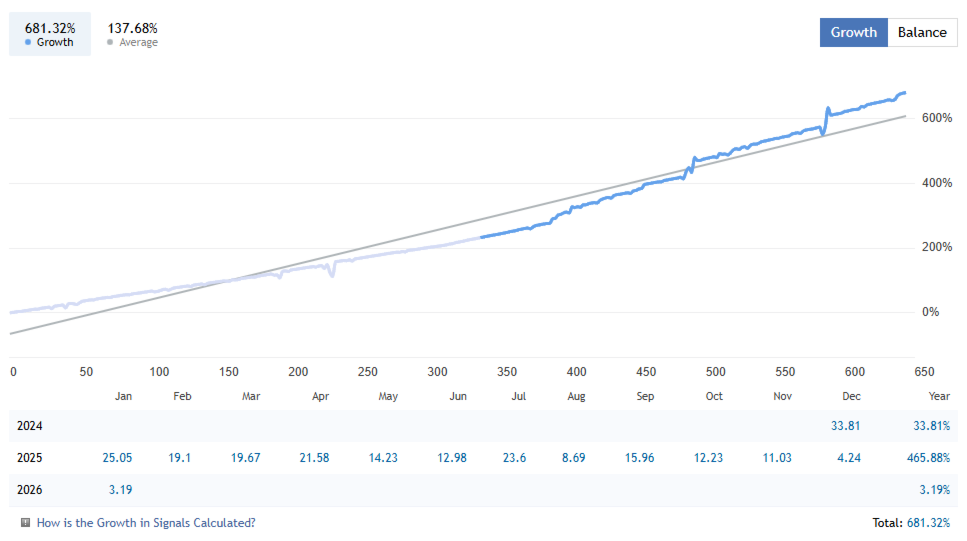
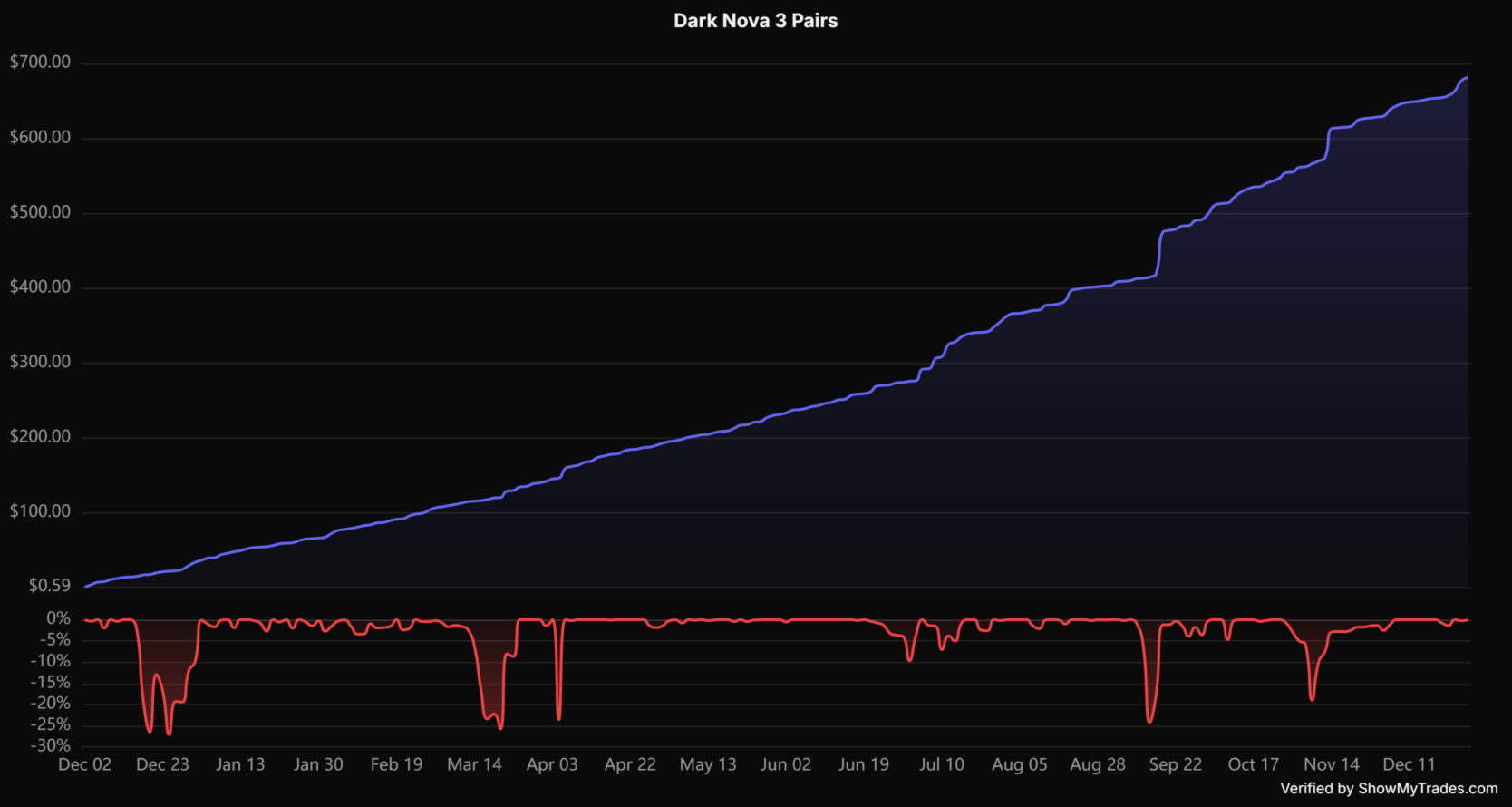
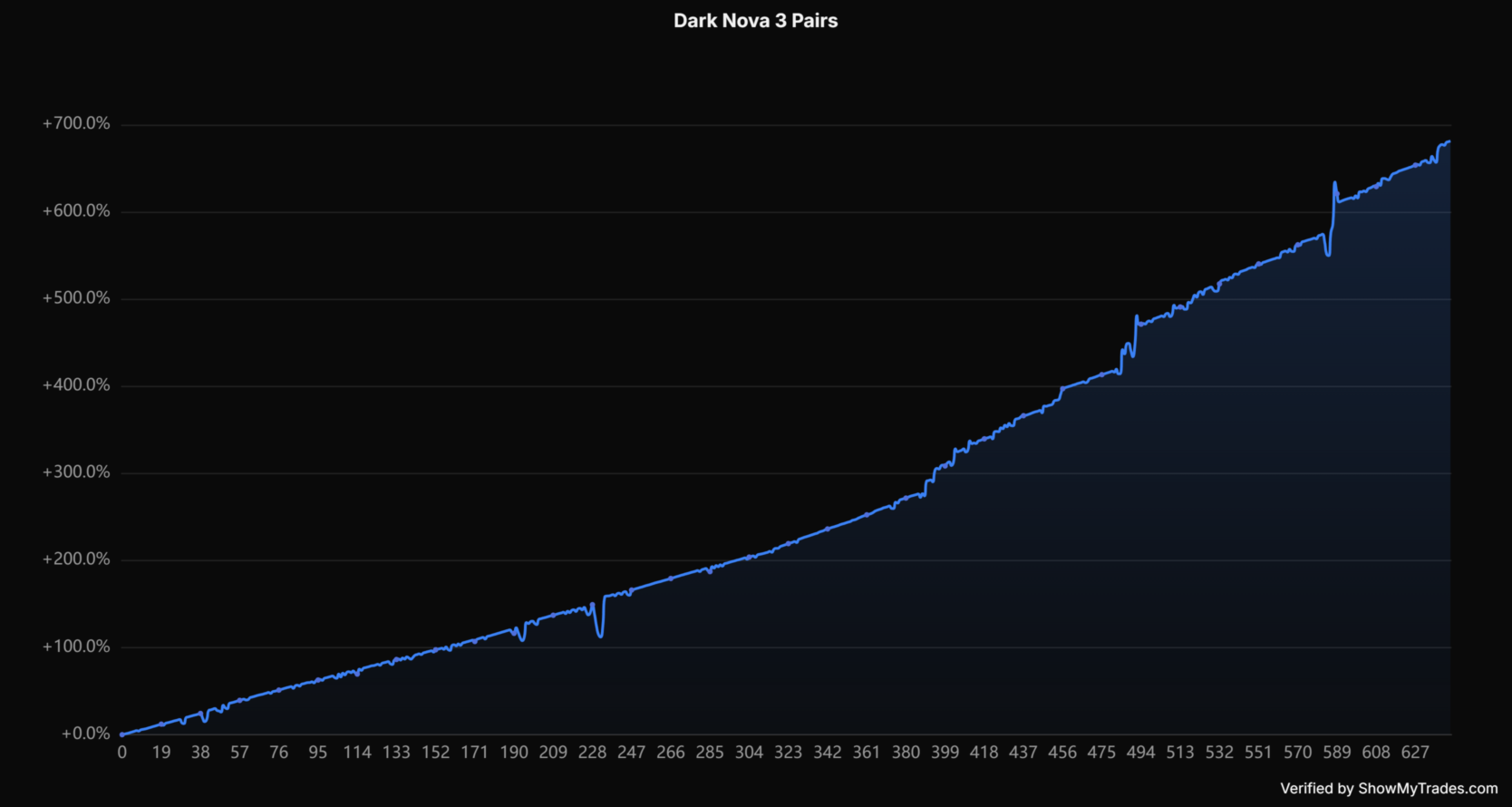
- This EA is Live from more then 1 Year, MQL5 Signal: Dark Nova 3 Pairs - Growth 681%, Win Rate 77%, Profit Factor 2.93
Recommendations
- The Recommended Timeframe is M15
- The Expert is optimized for AUDCAD, AUDNZD and NZDCAD, but also works on other pairs with appropriate settings
- An ECN broker is always recommended ► Recommended Brokers
- A low latency VPS is always recommended
- The minimum Leverage is 1:20 and the minimum deposit 1000 USD
- FTMO compatible
- You can start by using Default Settings, no specific set files are required.
- Understand how the EA works by reading the ► instructions and Set files
Parameters
Dark Nova Settings
- Allow Buy: Whether the EA is allowed to open buy trades
- Allow Sell: Whether the EA is allowed to open sell trades
- Max Number of Orders: The maximum number of orders that the EA is allowed to have open at one time
- Max one Trade any Bar: Whether the EA is allowed to open only one trade per bar
- Fifo Closing: Whether the EA will use the First In First Out mode for closing trades
- Allow Buy and Sell at Same Time: Whether the EA is allowed to open both buy and sell trades at the same time
- Magic Number: ID number of the orders
- Max Spread: Maximum spread to trade
- Max Average Spread: The maximum average spread that the EA will accept before not opening a trade
Money Management Settings
- Lots: Number of lots if the money management option is disabled
- Money Management: If true, enables the money management option
- Risk Percent: If the money management option is enabled, it indicates the risk factor
Bollinger Bands Settings
- Enable Bollinger Bands: Enable/disable the Bollinger Bands filter
- Bollinger Strategy: Choose between SellAboveAndBuyBelow (counter-trend) or BuyAboveAndSellBelow (trend following)
- Bollinger Period: The period for Bollinger Bands calculation
- Bollinger Deviations: Standard deviations for band width
- Bollinger Timeframe: The timeframe for Bollinger Bands indicator
Extreme Point Settings
- Enable Extreme Point: Enable/disable the Extreme Point detection
- Extreme Point Period: Number of bars to analyze for highest/lowest point
- Extreme Point Timeframe: The timeframe for Extreme Point detection
Moving Average Settings
- Enable MA: Enable/disable the Moving Average filter
- Fast MA Period: Period for the fast moving average
- Slow MA Period: Period for the slow moving average
- MA Method: Moving average calculation method (SMA, EMA, etc.)
- MA Timeframe: The timeframe for Moving Average indicator
ADX Settings
- Enable ADX: Enable/disable the ADX filter
- ADX Period: Period for ADX calculation
- ADX Limit: Threshold for ADX filter
- ADX Reverse Rules: If true, trades when ADX is below the limit (low volatility)
- ADX Timeframe: The timeframe for ADX indicator
RSI Settings
- Enable RSI: Enable/disable the RSI filter
- RSI Period: Period for RSI calculation
- RSI Upper Level: Level above which sell signals are generated
- RSI Lower Level: Level below which buy signals are generated
- RSI Timeframe: The timeframe for RSI indicator
Grid Settings
- Enable Grid: Enable/disable grid trading
- Grid Management: Choose grid lot sizing method (LotsSum, Martingale, AllLotsSum, Fix)
- Coefficient Grid Management: Multiplier for grid lot sizing
- Min Distance: Minimum distance in points between grid orders
- Min Distance On ATR: Use ATR-based dynamic distance
- Min Distance Multiplier: Progressive distance multiplier for each grid level
Target Settings
- Take Target: Take profit in points from weighted average price
- Different Take Target For First Order: Use different target when only one order is open
- Take Target First Order: Take profit for first order only
- Only End Of Bar: Close trades only at candle close
Stop Loss Settings
- Enable Monetary Loss: Enable monetary stop loss
- Monetary Loss Amount: Maximum loss in account currency
- Multiply Monetary Loss: Scale stop loss with lot size
- Stop EA After Money Loss: Remove EA after stop loss hit
For other questions or support for this EA, you can contact me.