MaSonar MT4
- Indicatori
-
Tadanori Tsugaya
 自分の使いたいインジケータを製作
中でも便利なものを出品してます
世界中の皆様と良いトレードを共有出来たらうれしいです
トレードスタイルは裁量トレード
私の無料のEAプログラムの不具合等において生じた損失については責任を負いません。自己責任でご使用ください。 - Versione: 2.33
- Aggiornato: 10 maggio 2025
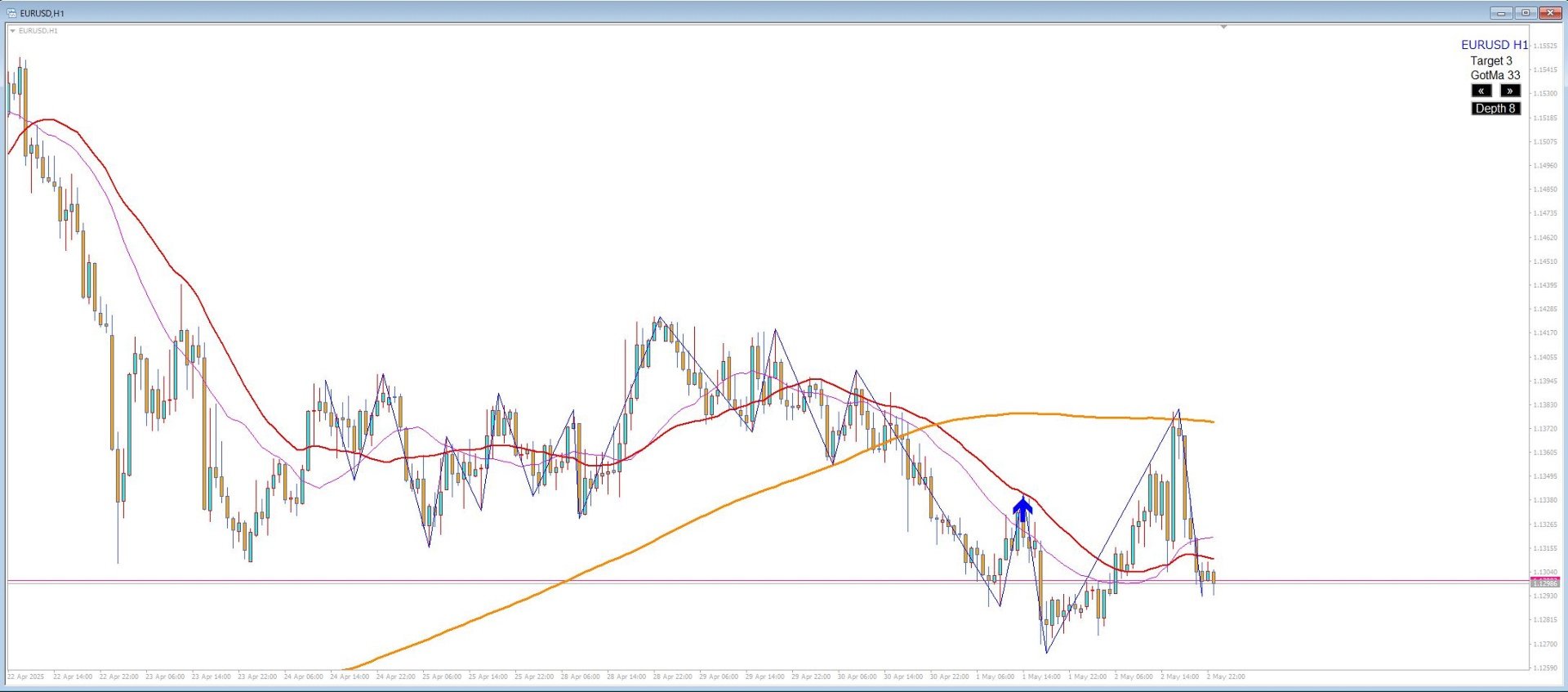
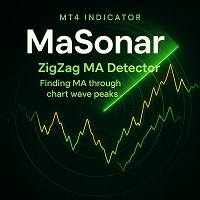
MaSonar is a powerful indicator designed to automatically detect and display the relevant Moving Averages (MA) that align with the peaks of a ZigZag. It quickly searches for the most suitable MA at each ZigZag peak, helping you analyze the market trend and its momentum with ease.
Please try the new, even more convenient version of "MaSonic".
Key Features:
-
ZigZag Peak Matching: Automatically identifies and displays the MAs that match the ZigZag peaks.
-
Quick Button Search: Simply press a button to search for the matching MA from the most recent peaks.
-
Adjustable ZigZag Settings: You can toggle the visibility of ZigZag and adjust its Depth between 4 and 12 directly on the chart, with the option for manual fine-tuning.
-
Fixed MA Display: Once an MA is identified, you can keep it fixed on the chart independently.
-
ZigZag Timeout: ZigZag can either stay on the chart permanently or be set to disappear after a specified number of seconds.
Additional Information:
-
Search for up to 19 Peaks: The indicator searches through up to 19 peaks (depending on the number of available bars on the chart). If no matching MA is found, the value will return -1, and no MA will be displayed.
-
Spacebar Key: If using the spacebar for key operations, make sure to hide the time scale, as it may conflict with other indicators.
-
Compatibility Warning: While MaSonar works well in most environments, there may be compatibility issues with other indicators, and functionality cannot be fully guaranteed in all cases.
-
ZigZag Options: You can use either the built-in MT4 ZigZag or the custom ZigZag logic embedded in MaSonar.
Important Notes:
-
There may be occasional data retrieval issues that could cause ZigZag to behave unexpectedly. Adjusting the ZigZag settings may help resolve some of these issues.
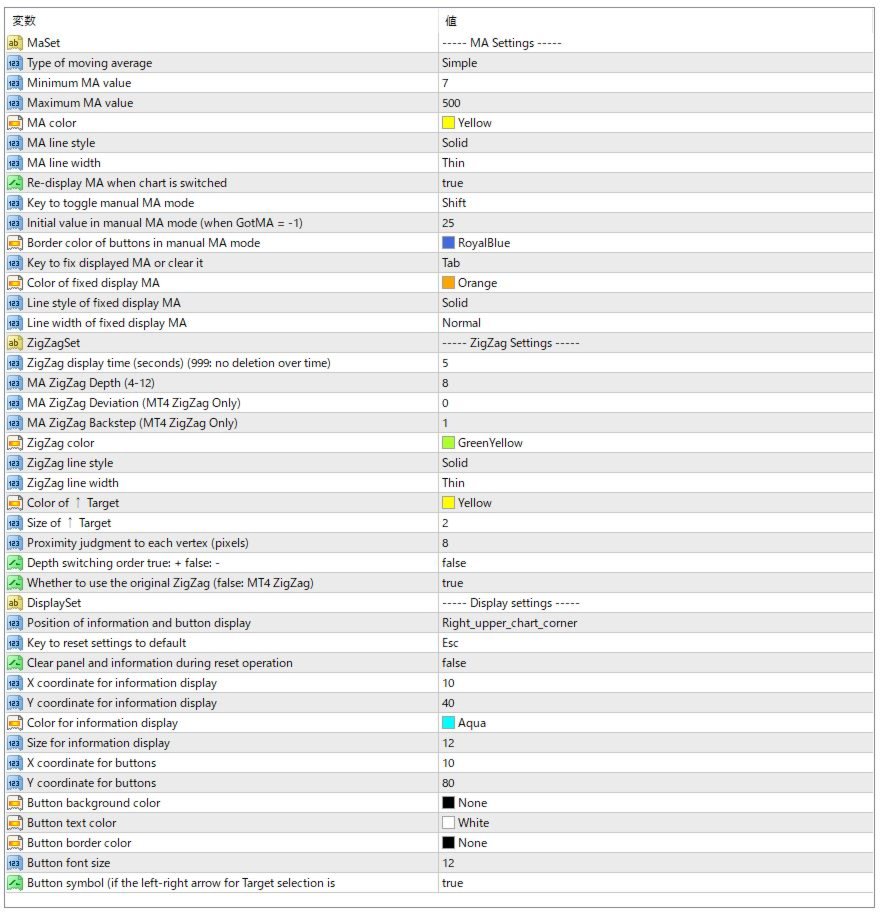
Parameter Settings
-
Type of Moving AverageThe method used for the moving average (e.g., SMA, EMA, etc.)
-
MA Minimum Value
The minimum period of the moving average -
MA Maximum Value
The maximum period of the moving average that can be displayed (Minimum is fixed at 7) -
MA Line Style
Line style for the moving average (Solid, Dashed, etc.) -
MA Color
Color of the moving average -
MA Thickness
Line width of the moving average -
Keep MA Display After Switching Timeframes If enabled, the drawn MA will remain displayed even after switching timeframes.
When redrawn, the MA will be shown as Target 19 (not the previously drawn value).
You can remove it using the left button to switch to Target 0, or by pressing the Depth button or hotkeys.
Target 0 represents the tip of the currently forming ZigZag.
Note: If disabled, switching timeframes on this chart may reset MA displays on other charts. -
Manual MA Mode Toggle Key
Switch the function of the left/right keys to manually increase or decrease the displayed MA period. -
Manual MA Initial Value
Initial value of the MA in manual mode (when GotMA = -1) -
Manual Mode Button Border Color
Border color of the button when manual mode is selected -
Fixed MA Toggle Key
Hotkey to fix or remove the displayed MA -
Fixed MA Color
Color of the fixed (memorized) MA -
Fixed MA Line Style
Line style for the fixed MA -
Fixed MA Line Width
Line width for the fixed MA
ZigZag Settings
-
ZigZag Display Duration (seconds)
Time after which the ZigZag will disappear automatically [999 = Never disappears automatically. You can refresh/remove it manually with chart switch or buttons.] -
MA ZigZag Depth (4–12) Depth setting for the ZigZag that determines peaks/valleys used for MA analysis
-
MA ZigZag Deviation Only effective when using MT4's built-in ZigZag
-
MA ZigZag Backstep
Only effective when using MT4's built-in ZigZag -
ZigZag Color
Line color of the ZigZag -
ZigZag Line Style Line style of the ZigZag
-
ZigZag Line Width
Line thickness of the ZigZag -
Target ↑ Size
Size of the "Target ↑" marke -
Target ↑
ColorColor of the "Target ↑" marker
-
Proximity Pixels for Peak Detection
Number of pixels used to detect proximity to ZigZag vertices -
Depth Change Order
true: Ascending order false: Descending order (default) -
Use Original ZigZag Logic Use the internal ZigZag logic instead of MT4's built-in ZigZag
false: Use MT4's ZigZag
Display Settings
-
Display Position of Info and Buttons
Select the display position for information and control buttons (top left or top right) -
Reset to Default Settings Key Key to reset each button's settings to their default values (optional)
-
Hide Info and Buttons on Reset
Whether to hide information panel and buttons when reset is triggered (toggle again to show) -
Text X Coordinate X position of the information display
-
Text Y Coordinate
Y position of the information display -
Text Color
Color of the information text -
Text Size
Font size of the information text -
Button X Coordinate
X position of buttons -
Button Y Coordinate
Y position of buttons -
Button Background Color
Background color of the buttons -
Button Text Color Text color of the buttons
-
Button Border Color Border color of the buttons
-
Button Font Size Font size of the button text
-
Button Symbols Prevents character corruption of arrow symbols (set to false if corrupted)
ZigZag Button Behavior (when "Depth Change Order" is true : Ascending)
When the ZigZag button is pressed, the Depth cycles through 4 to 12. After 12, it switches to the parameter's initial setting and the button color changes. In this state, ZigZag is hidden and only MA behavior continues. Pressing again will return to Depth 4, then 5, 6, etc.
Notes:
In addition to the internal ZigZag logic, the standard MT4 ZigZag can also be used. Make sure the ZigZag indicator file exists in your indicators folder. There may be cases where data acquisition causes problems and distorts the ZigZag display. Adjusting the ZigZag settings may help resolve such issues, but please understand there may be limitations.
Depending on your environment, it may not function properly or may experience issues, but please note that support will generally not be provided.