

Risk Management (Part 1): Fundamentals for Building a Risk Management Class
 8 876
8 876
 0
0

- Introduction
- What Is Risk Management?
- Importance in Automated Trading
- Key Concepts in Risk Management
- Creating the Include File and Explaining the Plan
- Creating Functions for Lot Size Calculation
- Creating Functions to Calculate Profits
- Practical Test with a Simple Script and an Include File
- Conclusion
Introduction
In this article, we will explore what risk management means in trading and why it is essential for automated operations. We will start from the basic concepts, laying the groundwork to understand how proper risk management can make the difference between success and failure in the financial markets.
Later, we will build step by step an MQL5 class that implements a complete risk management system, allowing control over key aspects such as lot size, maximum losses, and expected profits.
What Is Risk Management?
Risk management is a fundamental pillar of any trading strategy. Its main purpose is to monitor and control open positions, ensuring that losses do not exceed the limits established by the trader, such as daily, weekly, or overall losses.
In addition, risk management determines the appropriate lot size for each trade, based on the user's rules and preferences. This not only protects capital but also optimizes the strategy performance, ensuring that trades align with the defined risk profile.
In short, good risk management not only reduces the chances of catastrophic losses but also provides a disciplined framework for making intelligent financial decisions.
Importance in Automated Trading
Risk management plays a crucial role in automated trading, as it acts as a control system that prevents costly mistakes such as overtrading or excessive exposure to unnecessary risks. In the context of trading bots, where decisions are made fully automatically, proper risk management ensures that strategies are executed in a disciplined and efficient manner.
This is especially valuable in scenarios such as funding challenges, where complying with strict daily, weekly, or total loss limits can be the difference between passing or failing. Risk management enables the precise establishment of these boundaries, protecting the user's capital and optimizing performance in competitive environments.
Moreover, it helps the bot operate with a more strategic approach by setting clear limits to avoid overtrading or taking disproportionate risks. By automatically calculating lot sizes and limiting losses per trade, risk management not only safeguards capital but also provides peace of mind to the trader, knowing that their bot is operating within controlled and secure parameters.
Key Concepts in Risk Management
Before starting to code, it is essential to understand the main variables and concepts involved in risk management. These concepts form the foundation of an effective system that protects the user's capital and ensures controlled operation. Below, we break down each of them:
1. Maximum Daily Loss
This is the maximum loss a bot can accumulate within a day (24 hours). If this limit is reached, the bot typically closes all open trades and suspends any trading activity until the next day. This concept helps prevent a streak of losing trades from severely impacting capital.
2. Maximum Weekly Loss
Similar to the daily loss limit, but applied over a one-week horizon. If the bot exceeds this threshold, it will stop trading until the start of the following week. This parameter is ideal for preventing significant losses over longer periods.
3. Maximum Total Loss
This represents the absolute loss limit that, when reached, triggers a special recovery strategy. Such a strategy may include reducing lot sizes and trading more cautiously to gradually recover lost capital. This concept helps control the overall account risk.
4. Maximum Loss per Trade
Defines the largest loss a single trade can incur. This value is critical, as it allows the automatic calculation of the optimal lot size for each trade based on the level of risk the user is willing to accept.
5. Daily, Weekly, and Total Profits
These are variables that record accumulated profits over different time periods. These metrics are useful for assessing the automated robot's performance and adjusting strategies according to the results obtained.
Creating the Include File and Explaining the Plan
In this section, we will begin coding our include file.
1. At the top of your MetaTrader platform, click on the "IDE" button:

2. In the upper-left corner of the MetaEditor, click on the File tab, then select New. The following window will appear:
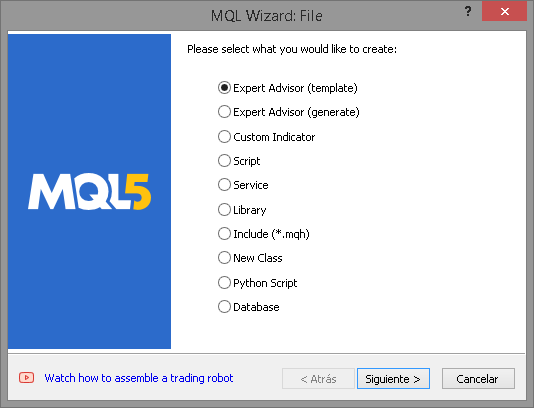
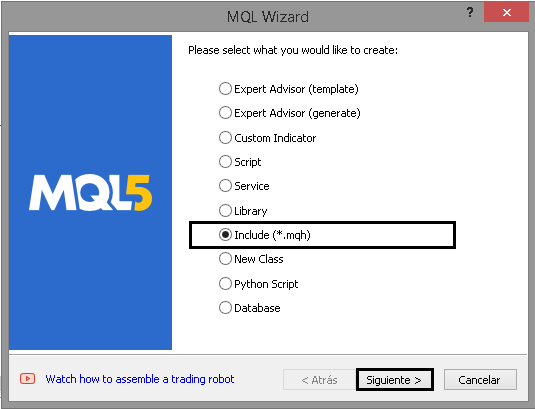
3. Select Include and click Next:
4. Set up the include by assigning a name and author:
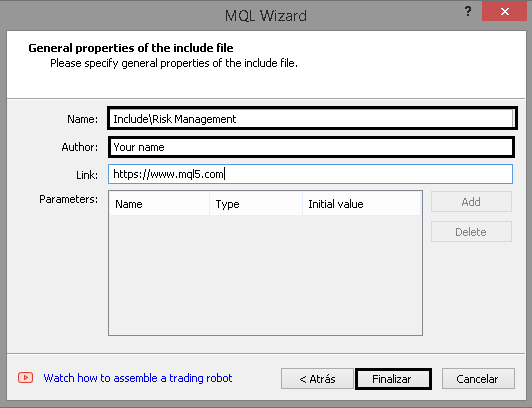
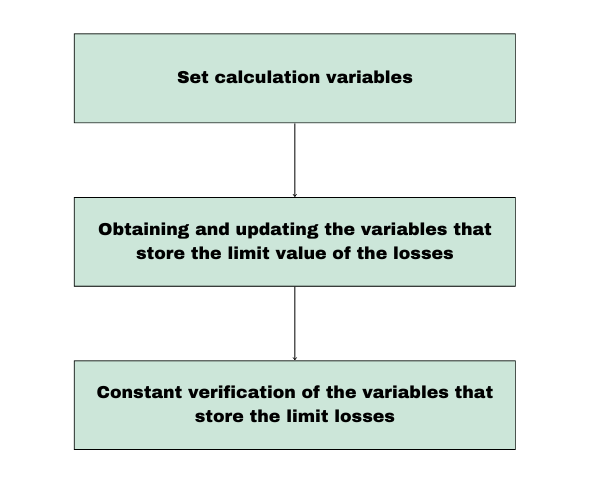
We've finished creating the file. This is just the beginning. Now, let's go over the plan for how our risk management system will work.
Below is a diagram showing how risk management will work:
| Section | Description | Execution Frequency |
|---|---|---|
| 1. Set Calculation Variables | In this initial phase (executed only once), all necessary variables for loss and profit calculations are established. The main tasks include:
| Executed once, or whenever the EA is configured. |
| 2. Calculation of Losses and Profits | In this phase, the current state of the account's losses and profits is calculated. This includes:
| Executed daily, when opening a trade, or weekly depending on configuration. |
| 3. Real-Time Verification | During live operation, the EA continuously checks (on every tick) to ensure that current losses have not exceeded the defined limits. If any loss variable surpasses its threshold, the EA will immediately close all open positions to prevent further losses. | On every tick (real-time process). |
Taking into account all of the above, we move on to creating the first functions.
Creating Functions for Lot Size Calculation
Before developing the class itself, we must first create the functions that will allow us to calculate the appropriate lot size.
Calculating the Ideal Lot Size
To determine the ideal lot size, we first need to calculate the gross lot, which represents the maximum volume our account can buy or sell. This calculation is based on the margin required (in the account's currency) to open one lot. Once this value is known, we divide the account's free margin by the required margin, round the result, and thus obtain the maximum lot size permitted by our account.
Prerequisites
Before performing the calculation, we need to determine the margin required per lot for any given symbol. In this example, our symbol will be gold (XAUUSD), although the same process applies to any other financial instrument.
The main goal is to establish a solid foundation for calculating lots efficiently — adapting dynamically to the account balance and available margin.

As shown, the approximate initial margin required to buy one lot of gold is 1,326 USD. Therefore, to calculate the maximum allowed lot, we simply divide the account's available free margin by the required margin per lot. This relationship can be expressed as follows:

Free margin:
- Free Margin represents the available capital in your account that can be used to open new trades. In MetaTrader, it is calculated as:

Calculating the Price for Any Order Type
Now that we know how to calculate the maximum lot size, the next step is to implement this logic in code. However, before we do that, we must determine the price at which the order will be executed. To achieve this, we will create a function called PriceByOrderType, which will calculate and return the corresponding price based on the order type.
double PriceByOrderType(const string symbol, const ENUM_ORDER_TYPE order_type, double DEVIATION = 100, double STOP_LIMIT = 50)
Inputs:
- symbol: The trading symbol (e.g., EURUSD) on which the order will be executed.
- order_type: The type of order, based on the ENUM_ORDER_TYPE enumeration.
- DEVIATION: The allowed price deviation in points.
- STOP_LIMIT: The distance in points for orders of type STOP_LIMIT.
Step 1. Create the Required Variables
First, we declare the variables that will store the symbol’s digits, point value, and current bid/ask prices, all within an MqlTick structure.
int     digits=0;
double  point=0;
MqlTick tick={};
Step 2. Assign Values to Variables
We use built-in functions to retrieve the symbol information, such as number of decimal places, point value and current prices.
Get the SYMBOL_POINT value:ResetLastError(); if(!SymbolInfoDouble(symbol, SYMBOL_POINT, point)) { Print("SymbolInfoDouble() failed. Error ", GetLastError()); return 0; }
Get the SYMBOL_DIGITS value:
long value=0;
if(!SymbolInfoInteger(symbol, SYMBOL_DIGITS, value))
  {
   Print("SymbolInfoInteger() failed. Error ", GetLastError());
   return 0;
  }
digits=(int)value;
Get current symbol prices:
if(!SymbolInfoTick(symbol, tick))
  {
   Print("SymbolInfoTick() failed. Error ", GetLastError());
   return 0;
  }
Step 3. Calculating Price Based on Order Type
Depending on the order type, we return the appropriate price using the switch construct:
switch(order_type)
  {
   case ORDER_TYPE_BUY              :  return(tick.ask);
   case ORDER_TYPE_SELL             :  return(tick.bid);
   case ORDER_TYPE_BUY_LIMIT        :  return(NormalizeDouble(tick.ask - DEVIATION * point, digits));
   case ORDER_TYPE_SELL_LIMIT       :  return(NormalizeDouble(tick.bid + DEVIATION * point, digits));
   case ORDER_TYPE_BUY_STOP         :  return(NormalizeDouble(tick.ask + DEVIATION * point, digits));
   case ORDER_TYPE_SELL_STOP        :  return(NormalizeDouble(tick.bid - DEVIATION * point, digits));
   case ORDER_TYPE_BUY_STOP_LIMIT   :  return(NormalizeDouble(tick.ask + DEVIATION * point - STOP_LIMIT * point, digits));
   case ORDER_TYPE_SELL_STOP_LIMIT  :  return(NormalizeDouble(tick.bid - DEVIATION * point + STOP_LIMIT * point, digits));
   default                          :  return(0);
  }
Here's the final implementation of the function:
double PriceByOrderType(const string symbol, const ENUM_ORDER_TYPE order_type, double DEVIATION = 100, double STOP_LIMIT = 50)
  {
   int     digits=0;
   double  point=0;
   MqlTick tick={};

//--- we get the Point value of the symbol
   ResetLastError();
   if(!SymbolInfoDouble(symbol, SYMBOL_POINT, point))
     {
      Print("SymbolInfoDouble() failed. Error ", GetLastError());
      return 0;
     }

//--- we get the Digits value of the symbol
   long value=0;
   if(!SymbolInfoInteger(symbol, SYMBOL_DIGITS, value))
     {
      Print("SymbolInfoInteger() failed. Error ", GetLastError());
      return 0;
     }
   digits=(int)value;

//--- we get the latest prices of the symbol
   if(!SymbolInfoTick(symbol, tick))
     {
      Print("SymbolInfoTick() failed. Error ", GetLastError());
      return 0;
     }

//--- Depending on the type of order, we return the price
   switch(order_type)
     {
      case ORDER_TYPE_BUY              :  return(tick.ask);
      case ORDER_TYPE_SELL             :  return(tick.bid);
      case ORDER_TYPE_BUY_LIMIT        :  return(NormalizeDouble(tick.ask - DEVIATION * point, digits));
      case ORDER_TYPE_SELL_LIMIT       :  return(NormalizeDouble(tick.bid + DEVIATION * point, digits));
      case ORDER_TYPE_BUY_STOP         :  return(NormalizeDouble(tick.ask + DEVIATION * point, digits));
      case ORDER_TYPE_SELL_STOP        :  return(NormalizeDouble(tick.bid - DEVIATION * point, digits));
      case ORDER_TYPE_BUY_STOP_LIMIT   :  return(NormalizeDouble(tick.ask + DEVIATION * point - STOP_LIMIT * point, digits));
      case ORDER_TYPE_SELL_STOP_LIMIT  :  return(NormalizeDouble(tick.bid - DEVIATION * point + STOP_LIMIT * point, digits));
      default                          :  return(0);
     }
  }
In addition, we need a function to get the market order type by order type:
ENUM_ORDER_TYPE MarketOrderByOrderType(ENUM_ORDER_TYPE type)
  {
   switch(type)
     {
      case ORDER_TYPE_BUY  : case ORDER_TYPE_BUY_LIMIT  : case ORDER_TYPE_BUY_STOP  : case ORDER_TYPE_BUY_STOP_LIMIT  :
        return(ORDER_TYPE_BUY);
      case ORDER_TYPE_SELL : case ORDER_TYPE_SELL_LIMIT : case ORDER_TYPE_SELL_STOP : case ORDER_TYPE_SELL_STOP_LIMIT :
        return(ORDER_TYPE_SELL);
     }
   return(WRONG_VALUE);
  }
Calculating the Maximum Lot
GetMaxLot calculates the maximum lot size which can be opened based on the available free margin and specified order type. It is a key risk management tool that ensures that trades comply with the margin requirements set by the broker.
1. Create function parameters
The function takes the following parameters:
double GetMaxLote(ENUM_ORDER_TYPE type, double DEVIATION = 100, double STOP_LIMIT = 50)
- Type: Defines the order type, such as ORDER_TYPE_BUY or ORDER_TYPE_SELL. This parameter is important for correctly calculating price and margin.
- DEVIATION:Specifies the allowed deviation in points for pending orders. Its default value is 100.
- STOP_LIMIT: Represents the distance in points for STOP_LIMIT orders. Its default value is 50.
2. Initialize the required variables
Four variables of type double and one of the ORDER_TYPE enumeration are declared for use in the calculations:
   //--- Set variables
   double VOLUME = 1.0; //Initial volume size
   ENUM_ORDER_TYPE new_type = MarketOrderByOrderType(type);
   double price = PriceByOrderType(_Symbol, type, DEVIATION, STOP_LIMIT); // Price for the given order type
   double volume_step = SymbolInfoDouble(_Symbol, SYMBOL_VOLUME_STEP); // Volume step for the symbol
   double margin = EMPTY_VALUE; // Required margin, initialized as empty
3. Calculate the required margin for one lot
The OrderCalcMargin function is used to determine the margin required to open one lot under the current market conditions. If the function fails, an error message is printed and the function returns 0:
ResetLastError();
if (!OrderCalcMargin(new_type, _Symbol, VOLUME, price, margin))
  {
   Print("OrderCalcMargin() failed. Error ", GetLastError());
   return 0; // Exit the function if margin calculation fails
  }
4. Calculate the maximum lot size
The previously mentioned formula is applied to calculate the maximum lot size. This involves dividing the free margin by the required margin, normalizing the result according to the allowed volume step, and rounding it down to avoid errors:
double result = MathFloor((AccountInfoDouble(ACCOUNT_MARGIN_FREE) / margin) / volume_step) * volume_step;
5. Return the result
Finally, the calculated maximum lot size is returned:
return result; // Return the maximum lot size
Complete function:
double GetMaxLote(ENUM_ORDER_TYPE type, double DEVIATION = 100, double STOP_LIMIT = 50)
  {
   //--- Set variables
   double VOLUME = 1.0; // Initial volume size
   ENUM_ORDER_TYPE new_type = MarketOrderByOrderType(type);
   double price = PriceByOrderType(_Symbol, type, DEVIATION, STOP_LIMIT); // Price for the given order type
   double volume_step = SymbolInfoDouble(_Symbol, SYMBOL_VOLUME_STEP);    // Volume step for the symbol
   double margin = EMPTY_VALUE; // Required margin, initialized as empty

   //--- Get margin for one lot
   ResetLastError();
   if (!OrderCalcMargin(new_type, _Symbol, VOLUME, price, margin))
     {
      Print("OrderCalcMargin() failed. Error ", GetLastError());
      return 0; // Exit the function if margin calculation fails
     }
   //--- Calculate the maximum lot size
   double result = MathFloor((AccountInfoDouble(ACCOUNT_MARGIN_FREE) / margin) / volume_step) * volume_step;
   return result; // Return the maximum lot size
  }
Creating Functions to Calculate Profits
Once the functions for determining the maximum lot size have been completed, the next step is to develop functions that calculate profit from a specific date up to the current time. This is crucial because, when evaluating each tick, it’s necessary to determine whether a maximum loss variable has been exceeded. To do this, we use variables that store profit data. For example, to verify whether the maximum daily loss has been surpassed, it’s essential to know the accumulated daily profit in addition to the current equity.
The calculation of current profit will be performed using functions designed to access order and transaction history. This enables us to obtain accurate and up-to-date information on profits and losses over a defined period.
Detailed Function Description
1. Variable Initialization and Error Reset
double total_net_profit = 0.0; // Initialize the total net profit
ResetLastError(); // Reset any previous errors
- total_net_profit: Initialized to 0.0, meaning no net profit has yet been calculated.
- ResetLastError: Ensures that any previous errors in the code are cleared before execution begins.
Verification of the Start Date (start_date):
if((start_date > 0 || start_date != D'1971.01.01 00:00'))
This line checks whether the provided start_date is valid (i.e., not an invalid default date such as 1971.01.01, nor a zero date). If the date is valid, the code proceeds to select the trade history.
3. Deal History Selection
if(!HistorySelect(start_date, TimeCurrent()))
{
   Print("Error when selecting orders: ", _LastError);
   return 0.0; // Exit if unable to select the history
}
- HistorySelect: Selects the deal history from the specified start_date up to the current time (TimeCurrent).
- If the history selection fails, an error message is printed, and the function returns 0.
4. Get Total Number of Deals
int total_deals = HistoryDealsTotal(); // Get the total number of deals in history
- HistoryDealsTotal: Returns the total number of deals in the trade history, allowing iteration through each deal.
5. Iterate Through All Deals
for(int i = 0; i < total_deals; i++)
{
   ulong deal_ticket = HistoryDealGetTicket(i); // Retrieve the deal ticket
- At this point, a for loop begins to iterate over all deals in the history.
- HistoryDealGetTicket: Retrieves the unique deal ticket at position i, which is required to access deal details.
6. Filter Out "Balance" Operations
if(HistoryDealGetInteger(deal_ticket, DEAL_TYPE) == DEAL_TYPE_BALANCE) continue;
If the deal type is a balance operation (such as a deposit, withdrawal, or adjustment rather than a real trade), it is skipped, and the loop continues to the next record.
7. Get Deal Details
ENUM_DEAL_ENTRY deal_entry = (ENUM_DEAL_ENTRY)HistoryDealGetInteger(deal_ticket, DEAL_ENTRY); // Get deal entry type
long deal_close_time_long = HistoryDealGetInteger(deal_ticket, DEAL_TIME);                    // Get deal close time (as long)
datetime deal_close_time = (datetime)deal_close_time_long;                                    // Explicit conversion to datetime
ulong position_id = HistoryDealGetInteger(deal_ticket, DEAL_POSITION_ID);                     // Get the position ID
- deal_entry: Defines whether the deal was an entry or an exit (used to determine whether the operation was an opening or closing deal).
- deal_close_time: Represents the deal closing time, converted to datetime for convenience.
- position_id: The ID of the position associated with the deal, useful for verifying the magic number.
8. Filter Deals by Date and Type
if(deal_close_time >= start_date && (deal_entry == DEAL_ENTRY_OUT || deal_entry == DEAL_ENTRY_IN))
The condition ensures that only deals whose closing time is greater than or equal to the start_date are considered, and that they are valid entry or exit deals.
9. Filter Deals by Magic Number and Inclusion Type
if((HistoryDealGetInteger(deal_ticket, DEAL_MAGIC) == specific_magic || specific_magic == GetMagic(position_id))
   || include_all_magic == true)
- HistoryDealGetInteger: Get the magic number of the deal.
- If the deal magic number matches the provided specific_magic, or if including all deals is allowed (include_all_magic == true), the net profit of the trade is calculated.
10. Calculate the Net Profit of the Deal:
double deal_profit = HistoryDealGetDouble(deal_ticket, DEAL_PROFIT);         // Retrieve profit from the deal
double deal_commission = HistoryDealGetDouble(deal_ticket, DEAL_COMMISSION); // Retrieve commission
double deal_swap = HistoryDealGetDouble(deal_ticket, DEAL_SWAP);             // Retrieve swap fees

double deal_net_profit = deal_profit + deal_commission + deal_swap;          // Calculate net profit for the deal
total_net_profit += deal_net_profit;                                         // Add to the total net profit
- deal_profit: get the profit of the deal.
- deal_commission: get the commission charged for the deal.
- deal_swap: get the swap (interest or overnight charge).
The net profit of the deal is then calculated as the sum of these three values and added to total_net_profit.
11. Return the Total Net Profit:
return NormalizeDouble(total_net_profit, 2); // Return the total net profit rounded to 2 decimals
Finally, the total net profit is returned, rounded to two decimal places using NormalizeDouble to ensure the value is properly formatted for further use.
Complete function:
double GetNetProfitSince(bool include_all_magic, ulong specific_magic, datetime start_date)
{
   double total_net_profit = 0.0; // Initialize the total net profit
   ResetLastError();              // Reset any previous errors

   // Check if the start date is valid
   if((start_date > 0 || start_date != D'1971.01.01 00:00'))
   {
      // Select the order history from the given start date to the current time
      if(!HistorySelect(start_date, TimeCurrent()))
      {
         Print("Error when selecting orders: ", _LastError);
         return 0.0; // Exit if unable to select the history
      }

      int total_deals = HistoryDealsTotal(); // Get the total number of deals in history

      // Iterate through all deals
      for(int i = 0; i < total_deals; i++)
      {
         ulong deal_ticket = HistoryDealGetTicket(i); // Retrieve the deal ticket

         // Skip balance-type deals
         if(HistoryDealGetInteger(deal_ticket, DEAL_TYPE) == DEAL_TYPE_BALANCE) continue;

         ENUM_DEAL_ENTRY deal_entry = (ENUM_DEAL_ENTRY)HistoryDealGetInteger(deal_ticket, DEAL_ENTRY); // Get deal entry type
         long deal_close_time_long = HistoryDealGetInteger(deal_ticket, DEAL_TIME);                    // Get deal close time (as long)
         datetime deal_close_time = (datetime)deal_close_time_long;                                    // Explicit conversion to datetime
         ulong position_id = HistoryDealGetInteger(deal_ticket, DEAL_POSITION_ID);                     // Get the position ID

         // Check if the deal is within the specified date range and is a valid entry/exit deal
         if(deal_close_time >= start_date && (deal_entry == DEAL_ENTRY_OUT || deal_entry == DEAL_ENTRY_IN))
         {
            // Check if the deal matches the specified magic number or if all deals are to be included
            if((HistoryDealGetInteger(deal_ticket, DEAL_MAGIC) == specific_magic || specific_magic == GetMagic(position_id))
               || include_all_magic == true)
            {
               double deal_profit = HistoryDealGetDouble(deal_ticket, DEAL_PROFIT);         // Retrieve profit from the deal
               double deal_commission = HistoryDealGetDouble(deal_ticket, DEAL_COMMISSION); // Retrieve commission
               double deal_swap = HistoryDealGetDouble(deal_ticket, DEAL_SWAP);             // Retrieve swap fees

               double deal_net_profit = deal_profit + deal_commission + deal_swap; // Calculate net profit for the deal
               total_net_profit += deal_net_profit; // Add to the total net profit
            }
         }
      }
   }

   return NormalizeDouble(total_net_profit, 2); // Return the total net profit rounded to 2 decimals
}
Additional function for getting the order's magic number:
ulong GetMagic(const ulong ticket)
{
HistoryOrderSelect(ticket);
return HistoryOrderGetInteger(ticket,ORDER_MAGIC);
}
Practical Test with a Simple Script and an Include File
We'll now create a function that converts an absolute distance into point units for the current symbol. This conversion is fundamental in trading, since points are the standard measure used to calculate price levels, stop losses, and targets.
Mathematical Formula
The formula to calculate the distance in points is straightforward:

where:
- dist is the absolute distance we want to convert.
- pointSize is the size of one point for the financial instrument (for example, 0.0001 for EUR/USD).
Representing the Formula in Code
To implement this formula in MQL5, we follow these steps:
-
Obtain the point size (pointSize).
We use the SymbolInfoDouble function to get the point size of the current symbol. The parameter _Symbol represents the symbol currently running, and SYMBOL_POINT provides its point size.
- Divide the distance by the point size and convert it to an integer
We divide the distance (dist) by the point size (pointSize) to calculate the number of points. Then, we convert the result to an integer using int, since point values are always whole numbers.
double pointSize = SymbolInfoDouble(_Symbol, SYMBOL_POINT);
return (int)(dist / pointSize);
Complete Function
Below is the function in its final form:
int DistanceToPoint(double dist)
{
  double pointSize = SymbolInfoDouble(_Symbol, SYMBOL_POINT); // Get the point size for the current symbol
  return (int)(dist / pointSize); // Calculate and return the distance in points
}
To put the concepts covered in this article into practice, we'll create two scripts.
Next, we'll develop two important functions: one to calculate the ideal lot size based on the risk per trade and another to calculate the ideal stop loss in points for the symbol, based on the lot size and risk per trade.
Function: Calculating the Ideal Lot Based on Risk per Trade
The GetIdealLot function calculates the ideal lot size (nlot) by considering the maximum loss allowed per trade and the stop loss distance (StopLoss). This ensures that all trades comply with the user-defined risk limit.
void GetIdealLot(
    double& nlot,                     // Calculated ideal lot
    double glot,                      // Gross Lot (max lot accorsing to the balance)
    double max_risk_per_operation,    // Maximum allowed risk per trade (in account currency)
    double& new_risk_per_operation,   // Calculated risk for the adjusted lot (in account currency)
    long StopLoss                     // Stop Loss distance (in points)
)
Parameter Description
- nlot: The ideal lot size adjusted by the function.
- glot: The gross (maximum) lot size that can be opened using all available account funds.
- max_risk_per_operation: The maximum allowed risk per trade, expressed in the account currency.
- new_risk_per_operation: The actual risk of the adjusted trade, considering the calculated lot (nlot). This represents how much would be lost if the price reaches the stop loss.
- StopLoss: The stop loss distance in points.
1. Initial Verification
The function first checks that the StopLoss value is greater than zero, since an invalid stop loss would make risk calculation impossible.
if(StopLoss <= 0)
{
    Print("[ERROR SL] Stop Loss distance is less than or equal to zero, now correct the stoploss distance: ", StopLoss);
    nlot = 0.0;
    return;
}
2. Initialize Variables
The following variables are initialized for later calculations:
- spread: The current spread of the symbol.
- tick_value: The value per tick, indicating how much a minimum price movement represents in account currency.
- step: The minimum allowed increment for lot size.
new_risk_per_operation = 0;  // Initialize the new risk
long spread = (long)SymbolInfoInteger(_Symbol, SYMBOL_SPREAD);
double tick_value = SymbolInfoDouble(_Symbol, SYMBOL_TRADE_TICK_VALUE);
double step = SymbolInfoDouble(_Symbol, SYMBOL_VOLUME_STEP);
3. Current Risk Calculation (rpo)
Current risk per operation (rpo) is calculated using the following formula:

In the code:
double rpo = (glot * (spread + 1 + (StopLoss * tick_value)));
4. Check Maximum Risk
The function evaluates whether the current risk (rpo) exceeds the maximum acceptable risk per deal (max_risk_per_operation):
Case 1. The risk exceeds the maximum level
- The lot size is adjusted proportionally to the maximum acceptable risk.
- The adjusted lot is rounded down to the nearest allowed increment (step).
- A new risk corresponding to this adjusted lot is calculated.
if(rpo > max_risk_per_operation)
{
    double new_lot = (max_risk_per_operation / rpo) * glot;
    new_lot = MathFloor(new_lot / step) * step;
    new_risk_per_operation = new_lot * (spread + 1 + (StopLoss * tick_value));
    nlot = new_lot;
}
Case 2. Risk within acceptable limits
- If the current risk does not exceed the set limit, the original values are retained:
else
{
    new_risk_per_operation = rpo; // Current risk
    nlot = glot;                  // Gross lot
}
Finally, we will create the last function to calculate the stop loss based on the maximum allowable loss per trade and the user-specified lot size:
long GetSL(const ENUM_ORDER_TYPE type , double risk_per_operation , double lot)
{
 long spread = (long)SymbolInfoInteger(_Symbol, SYMBOL_SPREAD);
 double tick_value = SymbolInfoDouble(_Symbol, SYMBOL_TRADE_TICK_VALUE);
 double result = ((risk_per_operation/lot)-spread-1)/tick_value;

return long(MathRound(result));
}
Parameter Description
- type: order type (buy or sell), although it's not directly used in this function.
- risk_per_operation: maximum allowed loss per trade in account currency.
- lot: user-defined lot size.
Step-by-Step Logic
1. Basic Formula
The basic formula for calculating the risk per operation (rpo) is as follows:

In this function, we will isolate the stop loss to calculate its value based on rpo, lot size, and other relevant factors.
2. Isolating the Stop Loss
- Divide both sides of the equation by the lot size:

- Subtract spread and 1 from both sides:

- Divide by tick_value to isolate StopLoss:
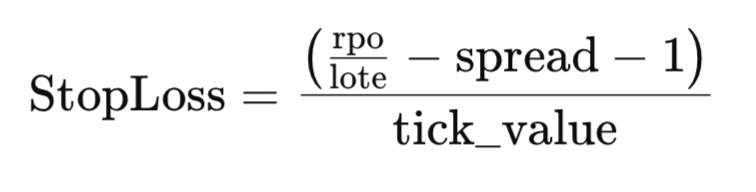
Implementation in Code
The formula above is directly translated into the calculation in the function body:
double result = ((risk_per_operation / lot) - spread - 1) / tick_value;
- risk_per_operation / lot: Calculates the risk per lot unit.
- - spread - 1: Subtracts the spread and any additional margin.
- / tick_value: Converts the result to points by dividing by the tick value.
The result is then rounded and cast to long to match the required format.
return long(MathRound(result));
Finally, we will create two scripts to calculate the ideal lot and ideal stop loss (SL) according to the risk defined per trade. Both scripts use a simple but efficient logic to automate these calculations, based on account balance and user-defined parameters.
First Script: Calculating the Ideal Lot
This script calculates the ideal lot based on a risk percentage per trade, a stop loss defined in points, and the order type.
-
Script Properties
- #property strict: Ensures the code adheres to strict compilation rules.
- #property script_show_inputs: Allows the user to enter parameters via the graphical interface.
- Input Parameters
input double percentage_risk_per_operation = 1.0; //Risk per operation in %
input long   sl = 600; //Stops Loss in points
input ENUM_ORDER_TYPE Order_Type = ORDER_TYPE_BUY; //Order Type
Calculating Risk per Trade
The formula calculates the amount in account currency that the user is willing to risk per trade based on the defined percentage:
double risk_per_operation = ((percentage_risk_per_operation/100.0) * AccountInfoDouble(ACCOUNT_BALANCE));
Calling the Ideal Lot Calculation Function
GetIdealLot(new_lot, GetMaxLote(Order_Type), risk_per_operation, new_risk_per_operation, sl);
User Messages: Details about the calculated values, such as the ideal lot and adjusted risk, are printed both to the console and the chart for easy reference.
//+------------------------------------------------------------------+
//|                             Get Lot By Risk Per Trade and SL.mq5 |
//|                                                        Your name |
//|                                             https://www.mql5.com |
//+------------------------------------------------------------------+
#property copyright "Your name"
#property link      "https://www.mql5.com"
#property version   "1.00"
#property strict
#property script_show_inputs

input double percentage_risk_per_operation = 1.0; // Risk per operation in %
input long   sl = 600; // Stop Loss in points
input ENUM_ORDER_TYPE Order_Type = ORDER_TYPE_BUY; // Order Type

#include <Risk Management.mqh>

//+------------------------------------------------------------------+
//| Main script function                                             |
//+------------------------------------------------------------------+
void OnStart()
  {
   // Calculate the maximum allowable risk per operation in account currency
   double risk_per_operation = ((percentage_risk_per_operation / 100.0) * AccountInfoDouble(ACCOUNT_BALANCE));

   // Print input and calculated risk details
   Print("Risk Per operation: ", risk_per_operation);
   Print("SL in points: ", sl);
   Print("Order type: ", EnumToString(Order_Type));

   double new_lot;
   double new_risk_per_operation;

   // Calculate the ideal lot size
   GetIdealLot(new_lot, GetMaxLote(Order_Type), risk_per_operation, new_risk_per_operation, sl);

   // Check if the lot size is valid
   if (new_lot <= 0)
     {
      Print("The stop loss is too large or the risk per operation is low. Increase the risk or decrease the stop loss.");
     }
   else
     {
      // Display calculated values
      Print("Ideal Lot: ", new_lot);
      Print("Maximum loss with SL: ", sl, " | Lot: ", new_lot, " is: ", new_risk_per_operation);
      Comment("Ideal Lot: ", new_lot);
     }

   Sleep(1000);
   Comment(" ");
  }
//+------------------------------------------------------------------+
Second Script: Calculating the Ideal SL
This script calculates stop loss in points based on the user-specified lot size and maximum risk per trade.
input double percentage_risk_per_operation = 1.0; //Risk per operation in %
input double Lot = 0.01; //lot
input ENUM_ORDER_TYPE Order_Type = ORDER_TYPE_BUY; //Order Type
Calculating the ideal sl: The get sl function is used to determine the stop loss in points:
long new_sl = GetSL(Order_Type, risk_per_operation, Lot);
Check results: If the calculated value of sl is invalid (new_sl is less than or equal to 0), the user is notified accordingly.
//+------------------------------------------------------------------+
//|                         Get Sl by risk per operation and lot.mq5 |
//|                                                        Your name |
//|                                             https://www.mql5.com |
//+------------------------------------------------------------------+
#property copyright "Your name"
#property link      "https://www.mql5.com"
#property version   "1.00"
#property strict
#property script_show_inputs

input double percentage_risk_per_operation = 1.0; // Risk per operation in %
input double Lot = 0.01; // Lot size
input ENUM_ORDER_TYPE Order_Type = ORDER_TYPE_BUY; // Order Type

#include <Risk Management.mqh>

//+------------------------------------------------------------------+
//| Main script function                                             |
//+------------------------------------------------------------------+
void OnStart()
  {
   // Calculate the maximum allowable risk per operation in account currency
   double risk_per_operation = ((percentage_risk_per_operation / 100.0) * AccountInfoDouble(ACCOUNT_BALANCE));

   // Print input and calculated risk details
   Print("Risk Per operation: ", risk_per_operation);
   Print("Lot size: ", Lot);
   Print("Order type: ", EnumToString(Order_Type));

   // Calculate the ideal stop loss
   long new_sl = GetSL(Order_Type, risk_per_operation, Lot);

   // Check if the SL is valid
   if (new_sl <= 0)
     {
      Print("The lot size is too high or the risk per operation is too low. Increase the risk or decrease the lot size.");
     }
   else
     {
      // Display calculated values
      Print("For lot: ", Lot, ", and risk: ", risk_per_operation, ", the ideal SL is: ", new_sl);
      Comment("Ideal SL: ", new_sl);
     }

   Sleep(1000);
   Comment(" ");
  }
//+------------------------------------------------------------------+
Now, to put the script into practice, we use it to obtain the ideal lot size based on the given risk per trade. We'll test it on the XAUUSD symbol, which corresponds to gold.
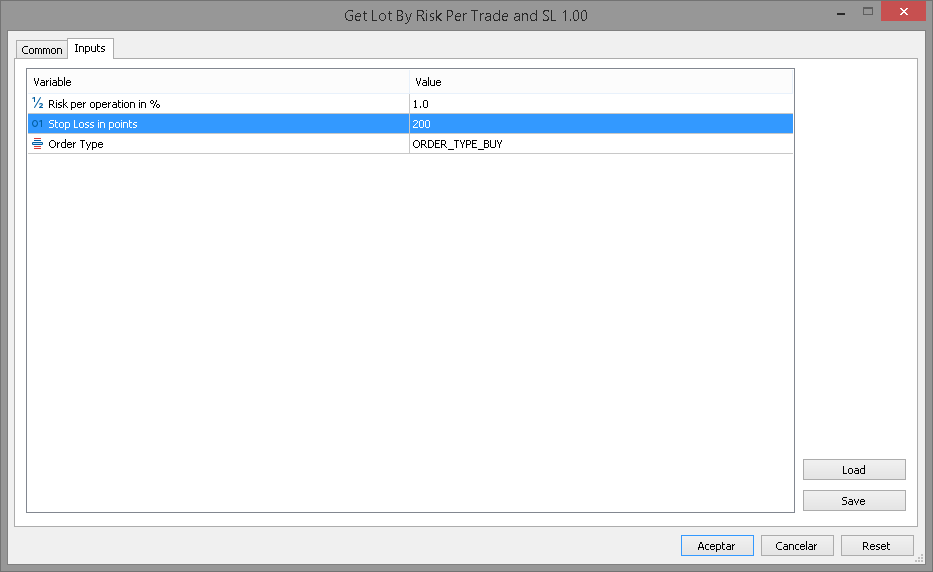
With parameters such as a stop loss of 200 pips and a risk per trade of 1.0% of the account balance, and specifying the order type as ORDER_TYPE_BUY, the result will be as follows:
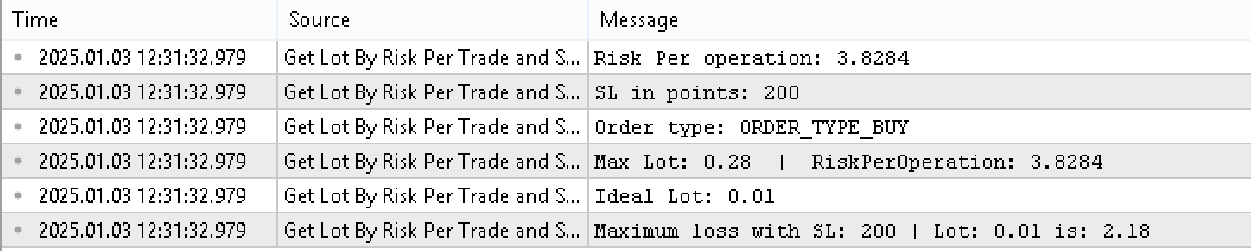
The result shown in the Experts tab corresponds to a lot size of 0.01 with a stop loss of 200 pips and a risk per trade of 3.81, which is 1% of the account balance.
Conclusion
We have completed the first part of this series, focusing on developing the core functions that will be used in the risk management class. These functions are essential for obtaining profit data and performing additional calculations. In the next part, we will explore how to integrate everything we have learned into a graphical interface, using the MQL5 control libraries.
Translated from Spanish by MetaQuotes Ltd.
Original article: https://www.mql5.com/es/articles/16820
Warning: All rights to these materials are reserved by MetaQuotes Ltd. Copying or reprinting of these materials in whole or in part is prohibited.
This article was written by a user of the site and reflects their personal views. MetaQuotes Ltd is not responsible for the accuracy of the information presented, nor for any consequences resulting from the use of the solutions, strategies or recommendations described.

 Self Optimizing Expert Advisors in MQL5 (Part 15): Linear System Identification
 Introduction to MQL5 (Part 23): Automating Opening Range Breakout Strategy
 Biological neuron for forecasting financial time series
 MQL5 Wizard Techniques you should know (Part 83): Using Patterns of Stochastic Oscillator and the FrAMA — Behavioral Archetypes

- Free trading apps
- Over 8,000 signals for copying
- Economic news for exploring financial markets
You agree to website policy and terms of use