Quantum Gold X
- Experts
-
ALGOECLIPSE LTD
 My name is Bailey Wickens, I am the founder of a UK-based software company, AlgoEclipse Ltd. We are dedicated to creating trading algorithms for MetaTrader 5. Our focus is on developing Expert Advisors with clean coding practices, clear logic, and stability in mind.
- Version: 1.0
- Activations: 10
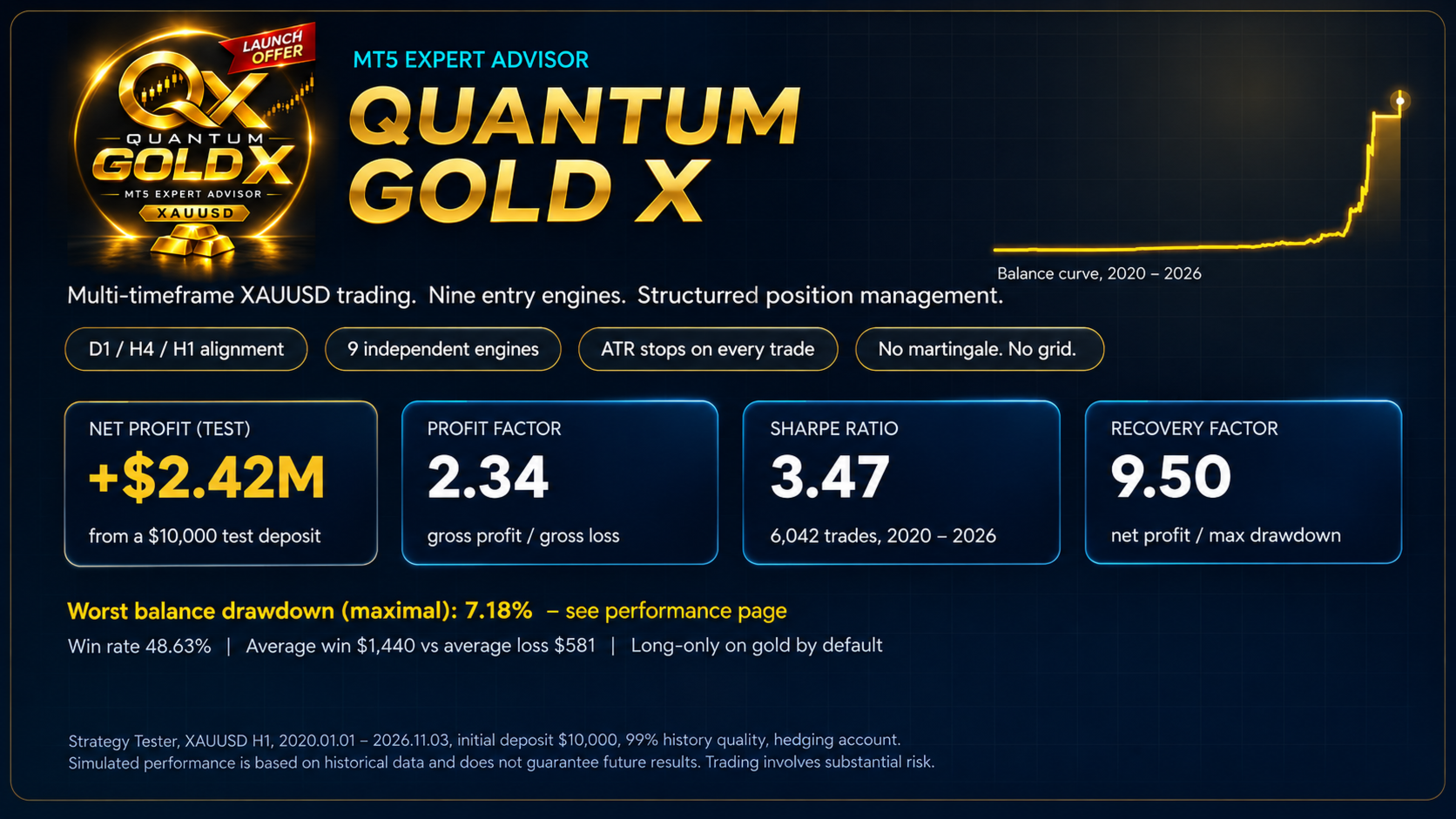
Quantum Gold X - multi-timeframe gold trading with nine entry engines and structured position management.
Quantum Gold X is an automated Expert Advisor for MetaTrader 5, developed and tuned for XAUUSD (Gold). It reads the trend on three timeframes, waits for one of its entry engines to produce a valid signal, and manages every trade with volatility-based stops, a staged exit and a time limit.
Instead of trading all day long, the EA only looks for an entry when the market passes a configurable alignment score. Independent entry engines then search for a pullback or a breakout in the direction of that trend.
HOW QUANTUM GOLD X WORKS
1. Multi-timeframe alignment
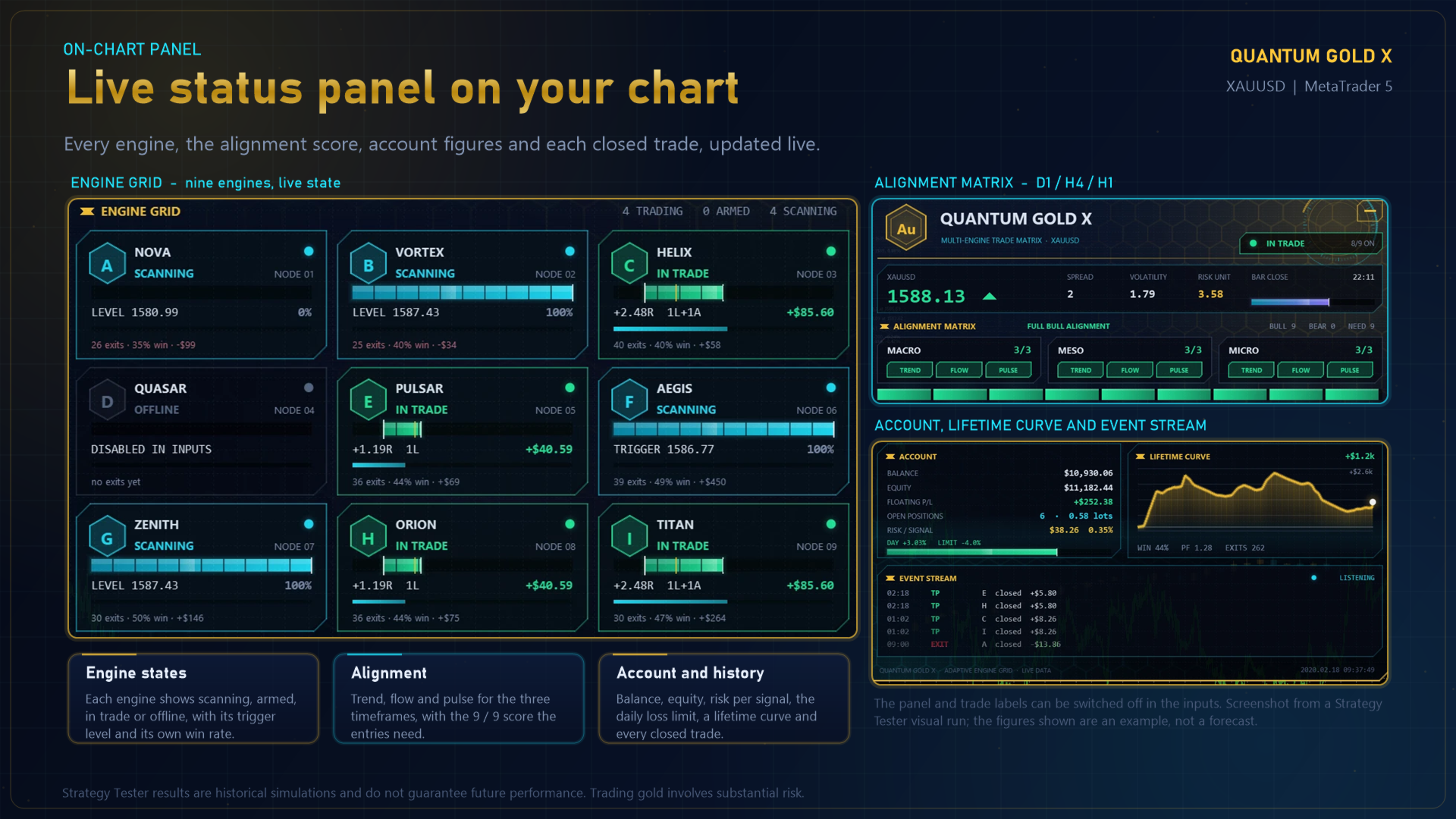
The EA analyses three configurable timeframes, set by default to D1, H4 and H1. Each timeframe is scored on three tests (trend direction, price position and momentum), which gives a nine-point alignment score for each direction. The default minimum score is 9, so every test has to agree before an entry engine can qualify.
2. Nine entry engines (A to I)
Each engine runs independently and holds at most one signal at a time.
- Engine A: pullback into the middle-timeframe value zone, followed by a confirming breakout on the signal timeframe.
- Engine B: breakout stop order when price is close to a recent range extreme.
- Engine C: pullback to the signal-timeframe average.
- Engine D: breakout stop order on a wider range (off by default).
- Engine E: breakout stop order on a tight range.
- Engines F to I: variants of the same ideas with different look-back settings.
Eight of the nine engines are enabled by default; Engine D is off. Pending breakout orders are cancelled after their configured lifetime, or earlier if the trend alignment is lost. Because the engines run independently, several signals can be open at the same time, so total exposure can be a multiple of the single-signal risk. Keep the risk setting modest and review it for your account.
3. Staged position management
On a hedging account, each signal opens two separately managed positions and splits the signal risk between them:
- Quick position: take-profit at 1R (the initial stop distance).
- Runner position: take-profit at 6R by default, with an ATR-based trailing stop that starts once the trade is 1R in profit.
- Time limit: every position of a signal is closed after 36 signal-timeframe bars (36 hours on H1) if it is still open.
- Optional runner-stop tightening after the Quick position closes (unchanged by default).
- Optional add-on: one extra position can be added to a winning signal for each 1.5R of profit (enabled by default, one add-on, 75% of the signal risk, sharing the runner stop). It is only added after favourable movement and never to average into a loss.
The default allocation gives 30% of the signal risk to the Quick position and 70% to the Runner. Stops and trailing distances are based on the Average True Range (ATR), so they follow the measured volatility of gold.
Netting accounts: a netting account allows only one position per symbol, so the EA switches to a simplified mode. It opens a single Runner position per signal, one signal at a time, with no Quick position and no add-ons. Results on netting accounts will differ from hedging accounts. A hedging account is recommended.
RISK AND EXECUTION CONTROLS
- Position sizing: percentage of the account balance, or a fixed-lot setting.
- Risk ramp: by default the risk per signal starts at 0.35% while the account is small and rises smoothly to 0.6% as the balance grows from 2x to 8x the starting balance. The base is the balance when the EA was first attached and can be set manually. Setting the start value to 0 turns the ramp off.
- Stop-loss: an ATR-based initial stop (2 x ATR) on every position. Every trade has a stop-loss.
- Daily equity-loss entry filter (4% by default): new signals pause once the daily threshold is reached. This is not a guaranteed maximum loss and does not close existing positions.
- Spread filter for new signals.
- Trading hours and Friday controls: defined on a fixed clock (GMT+2, or GMT+3 during US summer time). On live charts the EA converts your broker server time to this clock; the Strategy Tester uses server time as it is.
- Safety checks: minimum-lot risk check, pre-trade free-margin check, per-order lot cap and broker volume-limit check.
- Direction: long only, long and short, or Auto (on gold, long only).
- Optional selective mode: limit how many engines may hold a trade at the same time (0 = no limit) with a configurable engine priority, and an optional lot-step sizing mode in which the lot size grows in steps with the balance. Both are off by default. Lot-step sizing can risk much more per trade than the percentage setting, so use it with care.
No martingale, no grid, no recovery averaging. The EA never increases the position size after a loss.
ON-CHART PANEL AND LABELS
The EA draws a status panel on the chart that shows the state of each entry engine, open positions, session and account information, and the lifetime result of the EA's own trades. The panel size fits the chart window automatically or can be set manually. Every closed trade also gets a blue (profit) or red (loss) label at its exit point; labels closed in the same bar stack upwards. Both the panel and the labels can be switched off in the inputs. In the Strategy Tester they are shown in visual mode only.
DEFAULT CONFIGURATION
- Market: XAUUSD (Gold) on a gold symbol from any broker, including symbols with prefixes or suffixes and 2- or 3-digit quotes.
- Platform: MetaTrader 5, hedging account recommended (netting account supported in simplified mode).
- Timeframes: D1 trend, H4 intermediate, H1 signal.
- Minimum alignment: 9 out of 9.
- Engines: A, B, C, E, F, G, H, I enabled; D disabled.
- Direction: Auto (long only on gold; long and short on other symbols).
- Risk per signal: 0.35% rising to 0.6% with the risk ramp, shared between the two positions.
- Initial stop: 2 x ATR. Targets: Quick 1R, Runner 6R, plus an ATR trailing stop and a 36-bar time limit.
- Daily equity-loss entry filter: 4%.
- Trading hours: 08:00 to 22:00, no new signals on Fridays after 20:00 (GMT+2 / GMT+3 clock).
- Add-on positions: one, enabled.
These are software input defaults, not suggested settings for every account. Actual exposure depends on contract specifications, account size, order execution and the selected configuration.
Other symbols: the EA can be attached to other symbols, where it uses the same logic in both directions, but it was built and tuned for gold only. Performance on other symbols has not been optimised or tested, and the short side in particular should be checked in the Strategy Tester before use.
GETTING STARTED
- Open MetaTrader 5 and a chart of your broker's gold symbol (XAUUSD or equivalent). An H1 chart is a practical starting point.
- Attach Quantum Gold X and enable algorithmic trading.
- Review the risk, spread and trading-hour settings for your broker and account size. Very small accounts may skip signals when the smallest lot would risk more than the allowed multiple of the intended risk.
- Test the EA in the MetaTrader 5 Strategy Tester, preferably with real-tick data and realistic transaction costs, before any live use.
The EA reads its analysis timeframes internally, so the chart timeframe does not change its signals. Candle boundaries follow your broker server time, so signals can differ slightly between brokers.
WHO IS QUANTUM GOLD X FOR?
Quantum Gold X is for traders who want a rules-based gold Expert Advisor that combines multi-timeframe trend confirmation, several entry approaches and staged position management. Use the Strategy Tester to examine its entry behaviour, trade management and sensitivity to your broker's gold pricing before any live-trading decision.
IMPORTANT TRADING INFORMATION
Trading gold involves substantial risk, including the possibility of losing the invested capital. Stop-loss orders, risk settings and daily entry limits cannot guarantee a particular result or prevent slippage or losses beyond a chosen threshold. Several engines can be open at once, which increases total exposure. Strategy Tester results are historical simulations and do not establish future performance. Trade frequency and outcomes vary with market conditions, settings, spreads and broker execution.