EA Algo Lab Portfolio Trader
- Experts
- Version: 1.0
- Activations: 5

EA Algo Lab Portfolio Trader
13 established trading approaches. No Grid. No Martingale. An automated multi-strategy portfolio for MetaTrader 5.
EA Algo Lab Portfolio Trader combines 13 individually configurable trading strategies in a single Expert Advisor.
The system is based on classic trading concepts that have been used in professional and retail trading for many years. These include breakout strategies, range trading, trend-following approaches, fractals, RSI-based methods, and time-based trading models.
The individual strategies have been developed over several years, tested using historical market data, and continuously refined.
Our trading philosophy: Established concepts instead of risky loss progression
No Grid trading. No Martingale. No systematic doubling of lot sizes after losses.
EA Algo Lab Portfolio Trader does not use Grid or Martingale systems that build positions at fixed price intervals or progressively increase lot sizes after losses to recover previous losses.
Instead, the portfolio consists of 13 rule-based strategy modules, each with its own entry, position-sizing, and exit rules.
The underlying trading concepts have been known and established in the trading industry for many years.
Our development approach focuses on:
- Clear and transparent trading rules
- Different strategy types and market conditions
- Individual position-size calculations
- Separate management of each strategy
- Historical analysis and long-term refinement
- Transparent live observation of trading activity
The aim is a structured, diversified, and risk-aware trading system—not the recovery of losses through ever-larger positions.
Even established trading approaches can incur significant losses. Some strategies operate without a fixed server-side Stop Loss. Therefore, low risk or a particular level of profitability cannot be guaranteed.
13 strategies – multiple markets
The portfolio includes trading approaches for:
- Indices: USTEC, US500, DE40, and JP225
- Gold: XAUUSD
- Forex: EURUSD, GBPUSD, and USDJPY
- Cryptocurrencies: BTCUSD
Depending on the strategy, the system uses range breakouts, time-based trading patterns, fractal setups, RSI analysis, and other rule-based approaches.
Each module can be enabled or disabled independently.
Years of development and historical testing
The strategies have been developed over several years and evaluated using historical price data to examine their behavior and results.
Profitable results were achieved during the historical test periods examined internally. The methods were further refined and combined into a single multi-strategy portfolio.
However, changing market conditions, transaction costs, slippage, and other factors may cause future results to differ from historical results. Positive backtests are not a guarantee.
Live trading – transparency instead of profit promises
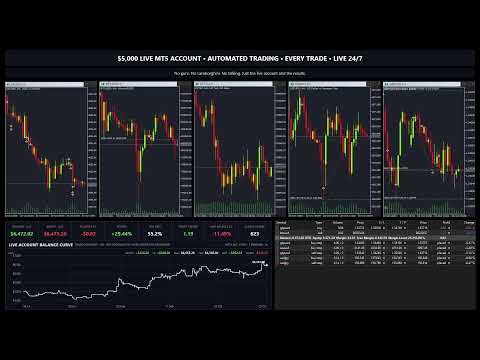
The developer streams the Expert Advisor operating on a USD 5,000 real-money account in a 24/7 livestream on Twitch, simultaneously broadcast on YouTube.
Viewers can watch the displayed trading positions and results.
A public trading history is also available through the MQL5 Signal:
https://www.mql5.com/de/signals/2381180
The Signal provides information on completed trades, account history, and risk metrics.
Results on the live account may differ from those obtained with other brokers, accounts, settings, and software versions.
Broker selection and trading conditions
ICTrading was an important development and reference environment for the EA.
The choice of broker is particularly important for actual trading results.
Spreads, commissions, slippage, execution speed, trading hours, server time, and contract specifications can significantly affect performance.
The EA was developed and tuned with ICTrading's trading conditions in mind.
However, it is not restricted to ICTrading and can generally be used with other suitable MetaTrader 5 brokers.
Different trading conditions can lead to different results. No broker guarantees profitable trades.
Features
- 13 independently configurable strategy modules
- No Grid or Martingale trading logic
- Trading multiple instruments from a single EA instance
- Separate Magic Numbers for each strategy
- Automatic detection of supported broker symbols
- Optional manual symbol mapping
- Individual position-size calculation
- Optional margin check before opening new orders
- Automatic entry and exit management
Installation and usage
1. Install the Expert Advisor
Install EA Algo Lab Portfolio Trader from the MQL5 Market in MetaTrader 5 and attach it to an open chart.
Enable algorithmic trading in the terminal and in the EA settings.
2. Select the account type
A hedging account is recommended because several strategies may manage positions on the same instrument simultaneously.
Full compatibility with netting accounts has not been confirmed.
3. Enable strategies
Under Strategy 1 through Strategy 13, you can enable the desired modules and adjust their individual parameters.
4. Configure broker symbols
Automatic symbol detection is used when the corresponding input fields are left empty.
If automatic mapping does not work or your broker uses different symbol names, enter the actual broker symbols manually.
For example, NAS100 instead of USTEC , or XAUUSD.m instead of XAUUSD .
Then check the symbol and initialization messages in the Experts journal.
5. Margin check
The additional margin pre-check can be enabled with InpCheckMarginBeforeEntry .
If insufficient margin is detected, a new entry may be skipped. This check does not automatically change the intended lot sizes or trading signals.
6. Operation
The EA operates according to the programmed trading hours and enabled strategy modules.
For reliable continuous operation, a suitable VPS or a permanently running MetaTrader 5 terminal is recommended.
Test the EA on a demo account and in the MT5 Strategy Tester before using it with real money.