Ironframe SMC Gold MT5 EA
- Experts
- Version: 1.3
- Activations: 5

Range-Bound Edition · EA Manual · v1.31 Architecture
Trade Gold With Verified Structure — And Automate the Execution
Most retail Expert Advisors execute from a single trigger: an indicator crossover, a moving average, or a simple pattern. Ironframe SMC Gold MT5 EA is designed differently. It converts a multi-layer Smart Money Concept framework into an automated execution workflow built around confirmed price-action structure, optional order-flow confirmation, options-market confluence, macro regime, and market sentiment.
The EA is based on the same core architecture as the Ironframe SMC Gold MT5 indicator. Instead of stopping at chart signals, the EA evaluates the qualifying setup and can automate the trade-management sequence according to the configuration implemented in the EA.
It is built for traders who already understand order blocks, liquidity sweeps, supply/demand zones, and institutional-style market structure and want those conditions evaluated consistently by an automated system.
Important: The exact order-entry, stop-loss, position-sizing, spread, trading-hours, and trade-management inputs depend on the EA implementation. The sections below describe the documented strategy architecture and the execution layer that should be matched to the actual EA inputs.
What sets it apart
-
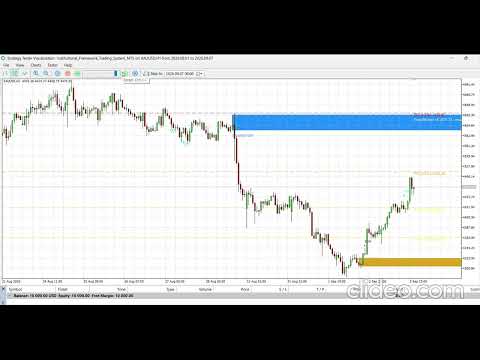
A complete SMC structure engine — order blocks, liquidity sweeps, and supply/demand zones built from confirmed, closed-bar price action.
-
Multi-layer confirmation, not just structure. Structural setups can be cross-checked against divergence, exhaustion, absorption, and cluster confluence before execution.
-
Real options-market confluence. The system can use COMEX Gold futures options data, including open interest, Max Pain, and liquidity levels, where a supported data source is configured.
-
Macro-aware by design. Fundamental inputs can incorporate Fed balance-sheet data, CPI/PPI, employment data, and related macro regime information.
-
Sentiment-aware. CFTC Commitment of Traders positioning and Fear & Greed inputs can be used as a contrarian filter.
-
Two purpose-built signal modes. Conservative Mode uses a scoring framework for stronger confirmation, while Range-Bound Mode focuses on structural zones plus confirmation in consolidating conditions.
-
Automated execution. Once a setup satisfies the EA's active rules, the EA can translate the signal into an automated trade according to its execution and risk-management settings.
-
Configurable architecture. Advanced layers can remain disabled, allowing the core structure engine to operate with fewer external dependencies.
How the EA thinks
The EA should be understood as a decision pipeline rather than a single indicator signal:
Market Structure → Structural Setup → Confirmation → Confluence → Regime Check → Trade Filter → Execution → Trade Management
Each stage is intended to reduce the number of low-quality setups reaching the execution layer.
1. Quick Start-
Copy the .ex5 file into your terminal's MQL5\Experts folder (File → Open Data Folder from within MT5). If you are installing from source, compile the .mq5 file in MetaEditor.
-
Restart or refresh the Navigator if the EA does not immediately appear.
-
Attach the EA to a gold chart. The original architecture is designed around XAUUSD, although the core structure logic may operate on other symbols depending on the implementation.
-
Confirm the symbol, timeframe, broker contract specification, and trading conditions before enabling automated trading.
-
Start with the EA's default settings. The underlying strategy architecture defaults to Range-Bound Mode in the documented build.
-
Enable Algo Trading / AutoTrading only after confirming that the EA is receiving market data correctly and all required data sources are available.
-
Monitor the Experts and Journal tabs during the first deployment. External-data failures, execution errors, rejected orders, invalid stops, or broker restrictions should be resolved before unattended operation.
-
For options-market confluence, configure one supported data path. The EA can operate without options data when that layer is disabled.
enum ENUM_SIGNAL_MODE { MODE_CONSERVATIVE, MODE_RANGEBOUND };
Conservative Mode
A point-scoring framework is used. Order block, liquidity sweep, divergence, exhaustion, absorption, cluster confluence, and options confluence can contribute to the signal score.
A trade is considered only after the score satisfies MinSignalScore and the active directional/regime filters permit the setup.
Range-Bound Mode
Range-Bound Mode is the documented default in this build. It requires:
-
one structural condition: an order block or an active demand/supply zone;
-
one confirmation: divergence, exhaustion, or absorption;
-
a minimum score through RangeBoundMinScore (documented default: 2).
The regime filter does not block direction in Range-Bound Mode. Both directions therefore remain available even when fundamentals or sentiment establish a directional bias.
3. Core Structure Detection| Input | Default | What it controls |
|---|---|---|
| SwingWing | 3 | Bars required on each side of a candle to confirm a swing high/low. Lower values produce more swings; higher values produce fewer, more significant swings. |
| SwingLookback | 100 | How far back the swing finder searches when evaluating divergence or sweep structure. |
| ATRPeriod | 14 | ATR period used to scale distance-based thresholds such as displacement, exhaustion, absorption, and divergence filters. |
| OBDisplacementMult | 1.0 | Minimum body-size-to-ATR ratio for a candle to qualify as the displacement candle associated with an order block. |
| OBMaxWickRatio | 0.3 | Maximum proportion of the displacement candle range that may be wick. |
| SDMoveMultiple | 3.0 | Multiple of the base candle range required for a subsequent explosive move to qualify a supply/demand pattern. |
| EquilibriumBandPct | 0.05 | Width of the equilibrium band around the 50% level of a detected range. |
| Input | Default | What it controls |
|---|---|---|
| EnableExhaustion | true | Enables the exhaustion detector. |
| ExhaustionWickMult | 0.6 | Minimum wick-to-range ratio required for an exhaustion condition. |
| ExhaustionBodyMult | 0.3 | Maximum body-to-range ratio permitted alongside the exhaustion wick. |
| EnableAbsorption | true | Enables the absorption detector. |
| AbsorptionVolFactor | 1.5 | Minimum volume-versus-average multiple required for absorption. |
| AbsorptionRangeFactor | 0.8 | Maximum range-versus-ATR ratio allowed for the high-volume/small-range absorption condition. |
| AbsorptionRejectPct | 0.2 | Minimum wick-rejection proportion required. |
| EnableDivergence | true | Enables the divergence detector. |
| DrawDivergenceMarks | false | Visual setting only when supported; does not determine whether divergence is evaluated. |
| DivergenceMinSwingATR | 1.0 | Minimum swing-to-swing price difference in ATR terms before divergence is evaluated. |
| MaxTickBars | 50 | Maximum recent bars that can use real buy/sell tick delta before falling back to raw tick volume. |
| Input | Default | What it controls |
|---|---|---|
| UseClusterScoring | true | Whether multiple confirmations occurring on the same bar receive a scoring bonus. |
| MinClusterSignals | 3 | Number of simultaneous confirmations required for the cluster bonus. |
| ClusterBonusScore | 2 | Score added when the cluster threshold is met. |
| Input | Default | What it controls |
|---|---|---|
| DrawSupplyDemandZones | true | Master switch for the zone-detection/drawing engine where chart visualization is implemented. |
| SDLookback | 100 | Historical range searched for qualifying base-plus-explosive-move patterns. |
| SDMaxBaseCandles | 4 | Maximum number of base/consolidation candles permitted before the displacement move. |
| SDDisplacementMult | 0.5 | Minimum body-to-ATR ratio for the explosive move away from a zone. |
| SDMaxZonesShown | 3 | Maximum number of zones displayed simultaneously when visualization is enabled. |
| SupplyZoneColor / DemandZoneColor | Red / Blue | Chart display colors. |
| Input | Default | What it controls |
|---|---|---|
| UseHTFFilter | true | Requires the higher-timeframe directional read to agree before a signal/trade is permitted, where implemented. |
| HTFTimeframe | H4 | Higher timeframe used for the directional read. |
| HTFLookbackBars | 20 | Number of closed higher-timeframe bars used for the trend read. |
| HTFNeutralPct | 0.05 | Threshold around a flat higher-timeframe trend that classifies the market as neutral. |
| Input | Default | What it controls |
|---|---|---|
| AllowedSession | SESSION_ALL | Limits trading to SESSION_ALL, SESSION_LONDON, SESSION_NEWYORK, or SESSION_LONDON_NY. |
| UTCOffsetHours | 0 | Adjusts the session calculation when the broker server operates away from UTC. |
| Input | Default | What it controls |
|---|---|---|
| SignalCooldownBars | 5 | Minimum bars, or required price distance where applicable, between repeated signals at the same zone. |
| MaxBarAgeForSignal | 25 | Maximum age of an order block that may still qualify as valid structure for a new signal. |
The EA version converts the signal framework into an execution process. The exact implementation of the following items must match the EA inputs provided in the compiled product:
Entry
The EA should open a position only after the active signal mode, structural rules, confirmation layer, optional confluence layers, timeframe filters, and execution filters have all been satisfied.
Stop Loss
The stop should be placed according to the EA's implemented structural-risk model. Where the original indicator logic is retained, the order block or qualifying structural zone serves as the key reference for invalidation.
Take Profit
The original architecture plots Fibonacci extension targets:
-
FibTP1 = 1.618
-
FibTP2 = 2.618
-
FibTP3 = 4.236
The strategy architecture supports two ways to supply options-market information to the confluence layer. Only one source is required when options confluence is enabled.
Option A — FlashAlpha Live API
-
Obtain an API key from lab.flashalpha.com.
-
Set UseLiveAPI = true and enter the key in FlashAlpha_API_Key.
-
Set FlashAlpha_Expiration to the desired expiration using yyyy-MM-dd.
-
Leave FlashAlpha_Symbol at its documented default ( NEM) unless there is a specific reason to change it.
Option B — Monthly CSV from Barchart.com
This path uses literal COMEX Gold ( GC) futures-options data rather than an equity proxy.
-
Download the Gold futures options chain for the desired contract month from Barchart.
-
Save the chain as CSV.
-
The documented parser requires at least 13 comma-separated columns per row.
-
Required positions are:
-
Column 1 = Strike
-
Column 9 = Volume
-
Column 10 = Open Interest
-
Column 13 = Option Type ( C or P)
-
-
Place the CSV in the terminal's MQL5\Files directory.
-
Set CSV_File_Name to the exact filename.
-
Set UseLiveAPI = false.
Options Display / Confluence Settings
| Input | Default | What it controls |
|---|---|---|
| Min_OI_Threshold | 100 | Minimum open interest for a strike to count toward BSL/SSL calculations. |
| Min_Volume_Threshold | 200 | Minimum options volume filter. |
| Max_Pain_Buffer | 5 | Strike tolerance around the calculated Max Pain level. |
| Max_Strikes_Processed | 100 | Maximum number of strikes loaded, starting nearest to price. |
| Max_Battle_Zones_Shown | 5 | Maximum number of high-OI battle-zone levels displayed. |
| Refresh_Hotkey | R | Chart hotkey for a manual options refresh when supported. |
| Auto_Refresh_Seconds | 60 | Frequency at which the EA checks whether an options refresh is due. |
| UseOptionsConfluence | true | Master toggle for the options-confluence score contribution. |
| OptionsConfluenceATRMult | 0.5 | ATR-based proximity tolerance to a key options level. |
| OptionsConfluenceBonus | 1 | Score bonus for qualifying options confluence. |
The original framework uses two normalized scores:
-
Fundamental score: 0 = bearish for gold, 100 = bullish for gold.
-
Sentiment score: 0 = extreme fear, 100 = extreme greed.
-
Neutral/default value: 50.
Manual inputs
| Manual input | Meaning | Source / method |
|---|---|---|
| ManualFedStance | 0 = very hawkish … 100 = very dovish | Manual interpretation. |
| ManualCmeCutProb | CME FedWatch next-meeting cut probability | CME FedWatch Tool. |
| ManualNFPActual / ManualNFPExpected | Non-farm payrolls, actual vs consensus | BLS for actual; consensus is external. |
| ManualADPActual / ManualADPExpected | ADP employment, actual vs consensus | ADP / external consensus. |
| ManualGeoScore | Geopolitical tension score | Manual assessment. |
| BPR_USBanksLong / BPR_USBanksShort | CFTC Bank Participation Report positioning | CFTC reports. |
Automatically retrieved inputs
When enabled, the architecture can retrieve:
-
Fed balance-sheet data from FRED;
-
CPI, PPI, and unemployment data from BLS;
-
broker oil-symbol pricing;
-
CFTC Commitment of Traders positioning;
-
JM Bullion Fear & Greed data.
Tools → Options → Expert Advisors → Allow WebRequest for listed URL
Add only the domains actually required by the configuration. The documented architecture references:https://publicreporting.cftc.gov
https://www.jmbullion.com https://api.stlouisfed.org https://api.bls.gov https://lab.flashalpha.com