 MetaTrader 5
 Experts
 Indicators
 Libraries
 Utilities
 Widgets
 Rules
Rules
Watch the Market tutorial videos on YouTube
How to buy а trading robot or an indicator
Run your EA on
virtual hosting
virtual hosting
Test аn indicator/trading robot before buying
Want to earn in the Market?
How to present a product for a sell-through
Free trading utilities for MetaTrader 5 - 15
 Below are trading programs simplifying trading in MetaTrader 5. Hover over a utility to read its description and purpose.
AutoTarget Guardian is a trade management utility for MetaTrader 5 that automatically sets Take Profit and Stop Loss levels for newly opened positions. Instead of calculating point distances manually or dragging order lines on the chart, the utility can set target levels based on a specified monetary amount in the account deposit currency, or by fixed points. The target levels are calculated and applied immediately when a position opens. Key Features The utility monitors positions and applies ri
FREE

Broker Preflight is a free MetaTrader 5 utility designed to quickly inspect your current trading environment before running an Expert Advisor. It analyzes key account, terminal and symbol conditions that may affect automated trading and presents them in a clear PASS / WARNING / FAIL format. Broker Preflight does not place, modify or close trades. It works entirely as a diagnostic tool. Main features Detects account mode: Hedging, Netting or Exchange Checks trading and Expert Advisor permissions
FREE

PTS Smart Trader is a capital-management and fast trade-execution expert for MetaTrader 5. Fast Stop Loss and Entry point placement using draggable chart lines Risk selection as a percentage, a fixed money amount, or a fixed volume Profit target definition based on R-multiple, with trade Split Market or Pending Limit execution Drawing, managing, hiding/rebuilding of setups directly on the chart Live profit/loss display and group-closing via the Close button
FREE

We apologize, but we are unable to provide service due to network issues. If you encounter any problems during installation or use, please contact 9048914@qq.com. Thank you. Binance is a world-renowned cryptocurrency exchange! In order to facilitate the real-time data analysis of the encrypted digital currency market, the program can automatically import the real-time transaction data of Binance Futures to MT5 for analysis. The main functions are:
1. Support the automatic creation of USD-M futu
FREE

Unlock lightning-fast trade replication across multiple MetaTrader 5 accounts on the same PC or VPS. The AW Local Trade Copier is designed for speed, reliability, and ease of use. Using an advanced shared-file architecture, it achieves near-zero latency (under 100ms) without locking your terminal or overloading your CPU. ️ IMPORTANT NOTICE: This system requires TWO files to work together (Master and Slave).
Get the FREE Slave version here: AW Trade Copier Slave KEY FEATURES Ultra-Fast Ex
FREE

Account Guard Daily Limit is the free version of Account Guard. It watches the whole account and enforces two rules: a daily loss limit and a maximum drawdown. It opens no trades of its own. It works for manual trades and for any EA on the account. The panel shows the state, the day result against the limit, and how much room is left above the drawdown floor. The two rules Daily loss limit in percent of the initial balance. When it is hit, every position and pending order is closed. Any trad
FREE

Closes your positions and deletes your pending orders when the day's equity drawdown reaches your limit, and closes anything you open for the rest of that day. FEATURES On breach: closes every open position, deletes pending orders, locks the day. Panel: drawdown percentage, equity, state. HOW TO USE IT 1. Enable Allow Algo Trading. 2. Attach it to a chart and set the loss and warning levels. 3. Choose the breach actions. PARAMETERS InpDailyMaxLossPercent, InpDailyWarningPercent, InpAutoCloseOnBr
FREE
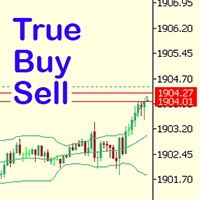
Have you ever noticed how on the forex symbols, the buy / sell button's price doesn't match the buy / sell lines on the chart? The spread always looks a lot tighter on the chart, you open a position and then realise the spread is huge. This is a very simple utility, it adds lines on the chart which match the buy / sell price on the buttons. Once installed I recommend right clicking the chart, go to Properties and uncheck "Show bid price line" and "Show ask price line", now click OK. Then righ
FREE

Trade Manager Panel is a free on-chart utility that helps you manage open positions quickly with a set of one-click buttons. It does not open trades on its own and generates no trading signals - it is a pure manual-trading assistant that works on any account with no restrictions.
Features: - Close All: close every open position at once. - Close Profit: close only the positions currently in profit. - Close Loss: close only the positions currently in loss. - Partial Close: close a configurable p
FREE

The PromptGen AI is a utility that generates AI prompts that are specific to your account, trading history and market context. WORKS WITH ALL LLMs. No more generic trading advice from AI agents, get custom trade ideas, trade management recommendations and even historical trade analytics and improvement advice that is relevant and specific to you, using expertly designed prompt templates that use your account details like Balance, Equity, Net Exposure, Price Quotes, Historical Trades and even tra
FREE

MT4 MT5 Trade Bridge for MetaTrader 5 is the MetaTrader 5 component of the MT4 MT5 Trade Bridge system. It allows a MetaTrader 5 terminal to work either as a Master or as a Slave in a local bridge connection with MetaTrader 4. When configured as Master , the MT5 component reads trading activity from the MetaTrader 5 terminal and writes structured trade data into a local bridge file. The connected MT4 component can then read this data and mirror the trading activity according to its selecte
FREE

Elevate your trading with this Metatrader 5 expert – the Position Volume Calculator. This tool takes the guesswork out of risk management and profit optimization. Simply input your desired stop-loss points with dragging the stop-loss line, and let the expert advisor compute the optimal position volume for your trade. Plus, with customizable reward ratios, it's easier than ever to set your take-profit points for maximum gains. Trade with confidence and precision. Try the Position Volume Calculat
FREE

Tick Data HTTP Exporter NZDUSD This free version exports NZDUSD only; the full version, Tick Data HTTP Exporter , exports any symbol. Description The EA turns your terminal into a historical/realtime tick data provider for your application.
There are many market data providers on the internet, but in practice, the data provided is not always of good quality. Moreover, these services are often more expensive and typically require monthly subscription fees per each symbol.
With this EA, you can fe
FREE

We apologize, but we are unable to provide service due to network issues. If you encounter any problems during installation or use, please contact 9048914@qq.com. Thank you. Binance is a world-renowned cryptocurrency exchange! In order to facilitate real-time data analysis of the encrypted digital currency market, the program can automatically import Binance real-time transaction data to MT5 for analysis. The main functions are:
1. Support the automatic creation of spot trading pairs in the cur
FREE

Automatically sends real-time notifications about trade opening, closing, partial closing and modification of MT5 to Slack. The utility supports 16 languages : English, French, German, Indian (Hindi), Indonesian, Italian, Kazakh, Korean, Dutch, Polish, Portuguese, Russian, Spanish, Turkish, Ukrainian, and Vietnamese. You can also use any other language by customizing the notification text. The product is designed for traders who need to receive Slack notifications without constantly monitoring
FREE

ClearAllObjects — Instant MT5 Chart Cleanup Purpose
One-click removal of ALL graphical objects (trendlines, Fibs, arrows, labels, Gann tools) from cluttered charts after strategy testing, candlestick patterns, or manual drawing. Usage
Drag from Navigator > Scripts onto any chart → optional confirm → instantly cleared. Key Features Current chart only (multi-tab safe) Lightning fast, zero DLLs, Market-ready All object types across the chart Essential For
traders cleaning objects. Live tr
FREE

See Your Key Trading Measurements at a Glance Smart Pips Meter is a free utility that displays important market measurements directly on your chart—so you can make faster trading decisions without manually calculating pip distances. WHAT IT SHOWS ADR (Average Daily Range)
See the current ADR pip value directly on your chart. Current Candle Size
Instantly see the size of the current candle in pips. Previous Candle Size
Quickly check the size of the last completed candle.
FREE

JVH Protection – Universal Prop Firm Risk Manager (MT5) Broker-Time Reset | Daily Max Loss | Overall Drawdown | Trailing Lock | Full Account Guard JVH Protection is a professional-grade equity protection tool for MetaTrader 5, built for prop firm traders, EA users, and anyone who wants strict automated risk control. This EA acts as a real-time risk firewall for your entire MT5 trading account. Key Features Full Account Protection Monitors all symbols Covers all magic numbers Works with m
FREE

️ TradeGuard by Brian_Breyli_Vana Your Trading Co-Pilot for MetaTrader 5 TradeGuard is a professional manual trading assistant for MetaTrader 5, designed for traders who want to stay in control of every trading decision while letting the EA handle the repetitive, time-consuming, and error-prone parts of trade management. Built for Price Action, Support & Resistance, Breakout, Swing, and Day Trading, TradeGuard combines fast execution, visual risk management, automated protection, session-based
FREE

TerminalBridge Trade Copier TerminalBridge Trade Copier is a local MetaTrader 5 position copier designed to synchronize trading actions between two MT5 terminals running on the same Windows computer or VPS. One terminal operates as the MASTER and publishes position changes. The second terminal operates as the SLAVE and receives and processes these events through the shared MetaTrader Common Files folder. Both roles are included in the same EX5 file. Main Features Local MT5-to-MT5 position copyin
FREE

The Quick Style utility is designed for facilitation and acceleration of working with the properties of graphical objects. Left-click a graphical object while holding the Shift key to open the quick access window for configuring the object properties. In the window, you can change the color, style and line width with one click, including those of other graphical objects. All changes are displayed immediately. To close the Quick Style , simply click the free space on the chart. The utility is eas
FREE

Assets can behave based on repetitive patterns on specific times of the day, for example at the opens and closes of the sessions. Daily Vertical Lines helps us draw vertical lines at any given time of the day as many days as required, as simple as sliding a vertical line. This free version only draws vertical lines, while the paid version (to be published) collects and presents technical and statistical information regarding the price behavior at that time of the day.
FREE

Full Automated Trading panel . it works on any trading instruments: Forex, Stocks, Futures, Indices, CFD, Bonds, Cryptocurrencies; interface minimization function; flexibility of use;
Join my channel and check video of it ===> https://t.me/Ash_TheTrader/4986
Features :
Auto SL and TP Auto Close partial Auto Trailing Session Time Alert Time of trading Alert Profit and Percentage and etc.
FREE

Trade Risk Desk answers one question at the moment you need it answered: what volume makes this stop cost exactly what you decided to risk. Drag the stop line to where it belongs on the chart and the panel prints the volume, the money behind it, and the margin the position will hold. What It Answers Set the risk as a percent of balance or as a fixed amount in account currency. Put the stop where your idea says it belongs. The panel reads the symbol settings your broker publishes and prints: the
FREE

Overview The Expert Advisor sends notifications to a mobile phone, via e-mail or activates an audio alarm in case any changes are detected on the trading account: opening/closing positions, changing order parameters, balance or leverage. Also, the Expert Advisor can inform that Equity on the trading account has dropped below a specified value or Free Margin is small compared to Margin. The Expert does not trade, it only monitors your account and orders.
Launching the Expert Advisor You should a
FREE

Drawdown Dashboard Lite 適合希望隨時掌握帳戶風險狀態的 MT5 使用者。
工具掛到任意圖表後,會每秒自動更新帳戶資料,讓使用者可以快速查看目前資金狀況與回撤程度,而不需要另外計算。
主要顯示內容包括:
Balance:目前帳戶已實現資金餘額 Equity:Balance 加上目前所有未平倉浮動損益後的實際帳戶權益 Floating P/L:目前全部持倉的總浮動盈虧 Current Drawdown:目前 Equity 低於 Balance 的金額與百分比 Session Peak Equity:自工具啟動後曾出現過的最高 Equity Session Max Drawdown:自工具啟動後,從最高 Equity 回落所出現的最大回撤 Positions:目前帳戶中的持倉總數
例如:
Balance: 10,000 USD Equity: 9,820 USD Floating P/L: -180 USD Current DD: 180 (1.80%) Session
FREE

Logo MT4 Version : https://www.mql5.com/en/market/product/121289 MT5 Version : https://www.mql5.com/en/market/product/121290
Watermark MT4 Version : https://www.mql5.com/en/market/product/120783 MT5 Version : https://www.mql5.com/en/market/product/120784
The "Logo" script is designed to display a custom logo or image as a background on a trading chart in MetaTrader 4 (MT4). This script allows traders to personalize their charts with logos or any other desired images.
How It Works:
Image P
FREE

Starter version of Market Watch Bulk Loader: paste a list of tickers and add them to Market Watch in one click. Up to 5 tickers per load.
Add tickers to Market Watch from the clipboard instead of typing them one by one.
This is the starter version of Market Watch Bulk Loader. It works exactly like the full product, with one limit: 5 tickers per load. Use it to check that the utility recognises how your broker spells its symbols.
How it works
1. Copy a list of tickers to the clipboard (scree
FREE

Instantly focus on the selected time point no matter how you move the chart.
If you like it, please consider "Focus Time Line" as well: https://www.mql5.com/en/market/product/154363 In addition to this feature, it allows synchronization of multiple charts at the exact same MTF time, making multi-timeframe analysis effortless.
【Features】 ・Focus Mode: SingleLine (default display) ・Crt FocusLine: Create one focus line at any desired time ・Position: Switch display position ・Focus: Move the char
FREE

AT Scalper Helps trader to place order seamlessly Close mulitple position at a time Place SL or TP for multiple position in a click Place hedge order same time with predefined SL and TP Place multi layer pending order in a click Place martingale layer Be informed about SL and TP in currency Get to know time remaining in current candle Get to know current spread View PnL, Balance, Equity on screen
FREE

Opening EA - Start Edition
Is a tool to trade the OpeningStrategy! The Opening EA is a semi-automated EA for MetaTrader 5! This means that the trader must actively start the EA using the Start button and stop it using the Stop button.
This EA pursues an opening strategy which, at the start of trading, e.g. on the DAX or Nasdaq, etc., opens a trading channel with predefined TP's (TakeProfit). Two pending orders with the same lot size are set at the beginning. As soon as one of the pending order
FREE
Overview
Performance Indicator shows a heatmap of percentage returns for a list of symbols over configurable time intervals. It is used to visually compare relative strength and weakness , without giving any guarantee of results. Configuration
SymbolsList: comma-separated symbols; must match exactly the names in the terminal.
BaseTF: base timeframe for calculations.
UpdateSeconds: interval in seconds for automatic refresh.
CapPercent: normalization value for color intensity.
PeriodsList: stri
FREE

QuickClose EA: Manage Trades Quickly and Efficiently QuickClose EA is a tool designed to help traders manage orders on the current chart easily and quickly. It provides full control over your trading status with clear feedback. Key Features of QuickClose EA: User-Friendly Control Panel: Clearly displays essential information such as the current symbol name, total profit/loss for Buy and Sell positions, and open lot sizes, giving you an immediate overview of your trading status. Precise Lot Size
FREE

Global Equity Manager Global Equity Manager is an account-level risk management tool designed to protect your trading capital by monitoring the entire account equity in real time and acting immediately when your predefined limits are reached. It works independently of any trading strategy and manages all open positions together as one basket . Key Advantages Full Account Protection
Monitors total account equity instead of individual trades. Works with Any Strategy
Compatible with manual
FREE

Lot Dashboard is a trade execution and position-management panel for MetaTrader 5. It is designed for traders who want faster entries, clearer exposure visibility, and more flexible manual exit planning directly on the chart. The dashboard combines one-click market entries, quick management tools, live open-position metrics, and scenario-based exit lines in one compact panel. It is suitable for traders who scale in, manage multiple open positions, and want more control over how exits are planne
FREE

What It Does Scans Multiple Symbols Simultaneously From all pairs for the signal in real time. Detects Overbought/Oversold Conditions Using customizable RSI thresholds (e.g., 80 for overbought, 20 for oversold) and Alerts You Instantly . Send you Notifications to MT5 in your PHONE Using MetaQuotes ID Pop-up Alerts Telegram Push Messages Whether you're at your desk or on the move, you’ll know the moment a signal hits.
FREE

Overview Advanced MT5 EA that automatically detects, scores, and visualizes support/resistance levels with integrated trading panel, risk management, and multi-channel alerts. Installation (3 Steps) Copy EA File : Place Saturno_Smart_SR_PRO_EA.ex5 in MQL5\Experts\ folder Refresh : Right-click "Expert Advisors" in Navigator → "Refresh" Attach : Drag EA to chart → Click "OK" → Enable AutoTrading button Note : Ensure "Allow Automated Trading" is checked and the EA shows a smiley face Qu
FREE

Drawdown Shield — Free Prop Firm Drawdown Protector & Risk Manager for MT5
Free Prop Firm Drawdown Protector | FTMO Compliant | No DLL Required | NFP Safe
Failed a prop firm challenge because of a drawdown breach? You're not alone. Over 70% of traders fail due to risk management — not strategy. Drawdown Shield gives you the essential Drawdown Protector to pass your FTMO challenge, completely free. Brought to you by the PropGuard Pro team.
What You Get in This FREE Version
Feature Stat
FREE

TRADE WITH MAGIC – Professional One-Click Trading Panel
| Crystal AI Systems
Trade With Magic is a fast, lightweight, and highly efficient one-click trading panel designed for traders who require precise manual execution and full control over magic numbers, comments, and risk parameters. It is suitable for both manual trading and advanced EA testing environments where ac
FREE

️ SMART PANEL TESTER — TEST YOUR STRATEGY. CONTROL YOUR RISK. SMART PANEL TESTER is a simplified version of the main SMART PANEL , specially designed for convenient and efficient strategy testing in the Strategy Tester . The main focus of the panel is Risk Management . A trading strategy is not only about finding good entries — its long-term performance also depends on how effectively you control risk on every trade. ️ BUILT-IN RISK MANAGER Set your risk as a percentage of your account balan
FREE

Introducing a powerful MetaTrader 5 Expert Advisor designed to enhance your trading strategy – the Auto Breakeven EA! This feature-rich EA is tailored to bring your stop-loss to breakeven, ensuring a risk-free trade once the market moves in your favor up to a specified price.
Explore the full potential of the Auto Breakeven EA. Download it for free now, and find the download link at the bottom of our page. Elevate your trading experience and take control of your risk management strategy. Happy
FREE

Liquidity Seeker EA
Why You MUST Have This EA Unlock the power of ICT (Inner Circle Trader) methodology with the most advanced Smart Money Concept trading system available. This EA transforms complex institutional trading concepts into automated precision, giving you the unfair advantage that professional traders use to consistently profit from liquidity manipulation and market structure shifts. START trading WITH market makers using their own playbook. You don't need to do much other than to
FREE

Automatically synchronise your MetaTrader 5 trading activity with your HybridTrader journal. HybridTrader AI Journal Sync is the official MetaTrader 5 companion utility for HybridTrader. It securely synchronises your trading activity with your HybridTrader journal, removing the need to enter every position manually. To use this utility, you must have an active HybridTrader.ai subscription or free trial. Your personal API key is generated from within your HybridTrader account and is required to c
FREE

Close Positions on Candle Close This tool allows you to automatically close positions based on the last candle's closing price, helping confirm trade exits and avoiding unpredictable price movements. How It Works: The EA waits for a candle to close above or below the Stop Loss level before executing a position close. It eliminates the need to manually monitor trades and helps automate exit strategies. Settings: Order_Type: Select the types of orders or positions to be managed. CandleTimeFrame:
FREE

We apologize, but we are unable to provide service due to network issues. If you encounter any problems during installation or use, please contact 9048914@qq.com. Thank you. Binance is a world-renowned cryptocurrency exchange! In order to facilitate more accurate analysis of the encrypted digital currency market, the program can automatically import Binance’s futures K-line data to MT5 for analysis. The main functions are:
1. Support the automatic creation of all futures trading pairs on Binanc
FREE

Risk Manager - Equity and Trade Protection Risk Manager is a utility Expert Advisor for MetaTrader 5 that monitors open positions and account equity and closes trades when predefined risk limits are reached. The EA does not open trades. It can run alongside manual trading, signal services, or other Expert Advisors and manages risk by closing positions when defined thresholds are reached. The program operates using two independent modules. Per-trade profit and loss monitoring
Account equity monit
FREE

This utility clones the chart it is running on. It opens the same chart with the same graphical objects, set of indicators (saving the parameters) and the rest of the elements. In essence, it performs a deep copying of the original chart, transferring the template to the opened chart. The symbol and the timeframe of the original chart are also saved.
FREE
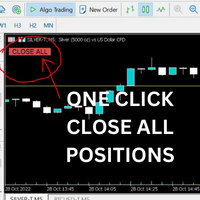
Just Attach to the Chart to be able to Click Button to Close all Open Positions in your Trading Account. Change Horizontal And Vertical Pixel based positioning for Button placement on chart. Appreciate your feedback and reviews. Note: All open positions on your trading account will be closed when button pressed.
If you need help with any simple utility happy to help.
FREE

BRE Behavioural Replay - Trade Psychology Analyzer
This is an analytics and awareness tool. It does not place, modify, or block trades.
It scans your local MetaTrader 5 deal history for revenge-trading patterns (a loss followed quickly by a larger re-entry) and shows a simple on-chart summary: - Trades scanned - Revenge entries flagged - Estimated cost of those patterns
Designed to run alongside your existing risk management EA. It shows you the why and the cost, complementing tools that alr
FREE

AI Telegram Trade Signal Sender automatically sends every trade opened or closed on the chart straight to your own Telegram bot/channel, in real time, using MetaTrader 5's native WebRequest function. Key features: Listens to OnTradeTransaction and instantly detects every deal (open, close, partial close) on the account Sends a clean formatted message to your Telegram chat: symbol, type, volume, price, SL/TP, and profit on close Works with your own Telegram Bot Token and Chat ID - you stay in ful
FREE

NIVELESFIBONACCI2.12 — Órdenes Pendientes sobre Niveles Fibonacci Personalizados Este script para MetaTrader 5 permite colocar automáticamente órdenes pendientes de compra o venta utilizando como referencia los niveles Fibonacci horizontales previamente dibujados en el gráfico. El script está diseñado para funcionar conjuntamente con NIVELESFIBONACCI1.1 , aunque puede utilizar cualquier conjunto de líneas horizontales que siga la misma estructura de nombres mediante el prefijo configurado. La pr
FREE

Product Name: Anchor auto TP and SL Trade Manager MT5 Your manual trade will be managed automatically. Turns single trades into smart grids with auto-sync TP/SL.
Anchor Auto TP and SL Trade Manager is a powerful trade assistant designed for manual traders who use averaging or recovery strategies. Stop calculating grid levels manually! This EA turns your manual trade into an automated "Anchor." If the market moves against you, the EA automatically builds a recovery grid based on your specific S
FREE

NinjaClose is the ultimate headless trading utility designed specifically for manual scalpers, price-action traders, and mobile traders. It operates completely silently in the background without any graphical user interface (GUI) panels, keeping your charts 100% clean. Whether you execute trades from your desktop terminal or the MetaTrader mobile app, NinjaClose detects your manual orders instantly and applies your pre-defined risk management rules at lightning speed. Key Features Mobile-Friendl
FREE

The simplest and most useful trading panel for every manual trader!
Are you tired of closing trades one by one during news? Do you want to protect your profit with one click?
This panel does exactly that:
CLOSE ALL - Instantly closes ALL open positions with one click. You can choose to close all symbols or only current symbol. Essential for scalpers and news traders.
BREAKEVEN ALL - Instantly moves Stop Loss to entry price (breakeven) for all profitable trades. Protect your profits and
FREE

AI Correlation Pair Scanner is a real-time multicurrency correlation monitor that helps you avoid hidden overexposure when trading several pairs at once. Many traders unknowingly double their risk by holding positions on two pairs that move almost identically (for example EURUSD and GBPUSD, or the JPY crosses). This tool calculates live Pearson correlation between every pair in your watchlist and warns you the moment your open positions overlap on two highly correlated instruments. KEY FEATURES
FREE

DESCRIPTION: Position Size Calculator — On-Chart Risk Management Tool Never risk too much on a single trade again. This calculator displays real-time position sizing for 3 risk levels simultaneously, calculated from your live account balance and current ATR-based stop loss distance. DISPLAYS 3 RISK SCENARIOS AT ONCE: Risk Level 1 (1%): Risk amount in dollars + Lot size Risk Level 2 (2%): Risk amount in dollars + Lot size Risk Level 3 (3%): Risk amount in dollars + Lot size All lot sizes are dyna
FREE

Exact Countdown Timer — shows the remaining time before the current bar closes and a new bar forms. A fast and exact countdown timer will help you find the best moment to open a position. For example, it can be used on a seconds chart built using the Seconds Chart utility. Inputs Base corner — the chart corner to which an timer Is attached. X distance — the horizontal distance from the chart corner. Y distance — the vertical distance from the chart corner. Text font — font name Font size — font
FREE

"All in One" panel. You can simultaneously control: up to 3 symbols; up to 6 periods; up to 31 popular signals. You can see the sum for all signals taking into account the weight of the signal Version for MetaTrader 4: https://www.mql5.com/ru/market/product/27880 Version for MetaTrader 5: https://www.mql5.com/ru/market/product/27830
Parameters NUM_BAR - number of the bar to analyze (set a value greater than 0 to work on closed bars). timeframe_1....timeframe_6 - working timeframes (if set to "c
FREE
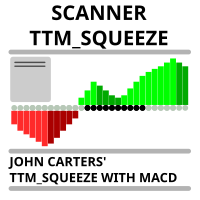
Market scanner based on the indicator published here Download the 'John Carters TTM Squeeze with MACD' Technical Indicator for MetaTrader 5 in MetaTrader Market (mql5.com) . Only the instruments that are in the Market Watch window are scanned. Maximum number of scanning tools up to 5000. The scan timeframe is selected from the timeframe panel of the terminal. To use it, open any chart and attach the Expert Advisor to the chart, the 'Search' button will appear in the upper left corner. When you
FREE

The EA supports closing orders based on the preset amount. It can close all orders on all pairs, or it can close orders based on Magic ID. Button "Close All" manual Input - Magic Number: Magic Number = 0: Close All pairs Magic Number diffrent 0: Close All with Magic - Money TP: Profitable in money. the EA will close all orders - Money SL: Loss in money. the EA will close all orders Contact: t.me/nguyenvanbo128
FREE

[Win Panel] Simple Entry and Close Positions Introducing WinPanel , an order management tool designed to enhance and simplify your trading experience. WinPanel features a clean and intuitive interface, allowing you to close orders instantly with ease. It supports flexible position management, enabling you to close losing positions, profitable positions, or all open positions with a single click. In addition, WinPanel displays the total number of open positions, current profit, and the overall p
FREE

PositionsLimiter EA: Enforcing Trade Discipline with Position Limits The PositionsLimiter EA is a powerful risk management tool designed to help traders control the number of open positions at any given time. By allowing traders to set a maximum limit on simultaneous trades, this EA ensures that no additional trades exceed the specified threshold. If a trader or another automated system attempts to open a new position beyond the set limit, the EA will automatically close the excess trade, ensur
FREE

Imagine what results you could achieve in your manual trading if you had a tool that notifies you of a possible price reversal for all the symbols you are interested in at the same time (futures, stocks, forex or cryptocurrency)?
VSA screener is just the right tool. It was created for traders who value their time and make their own trading decisions on opening or closing a position. The software monitors the presence of trading patterns on the preselected tickers under several timeframes (up to
FREE

Overview Multi-TF Alert System is a professional monitoring dashboard for MetaTrader 5 that tracks up to ten symbols simultaneously across five timeframes: M15, M30, H1, H4, and Daily. For each combination, it calculates the highest and lowest prices over a configurable lookback period and tracks how close the current price is to these levels. When price reaches or approaches key levels, you receive instant notifications through sound alerts, popup messages, or push notifications to your mobile
FREE

VolPulse Telegram Bridge forwards the alerts of the free VolPulse Volume Profile indicator to Telegram: market-state changes, touches of key levels (POC, VAH, VAL, naked POC) and new entry signals with stop and target. It does not trade. It does not read your positions, balance or account number. Setup (about 2 minutes) Install the free indicator "VolPulse Volume Profile" and attach it to your charts:
https://www.mql5.com/en/market/product/200141 Tools → Options → Expert Advisors → tick "Allow W
FREE

Relentless Prop Firm Risk Guardian — Free Risk Dashboard for Prop-Firm and Funded Traders
Most funded challenges are not lost to bad trades. They are lost to a limit the trader did not see coming. One oversized position, one rough day, and the account is gone.
Relentless Prop Firm Risk Guardian keeps your limits in front of you, in real time, on your chart, so you always know how much room you have left.
It is free. If it saves you from one avoidable breach, an honest review helps the next tr
FREE

Most blown accounts don't come from not knowing the rules. They come from breaking them in the moment. Seven Sins is there for that moment.
It watches your MetaTrader 5 account. When you break one of your own rules, a "sin card" appears on your charts: what you did, which rule it broke, and a dry one-liner. If one trade breaks several rules, they appear together on one card, with one sound. Get through a whole trading day without a sin and your clean-day streak goes up by one. One sin resets i
FREE

RiskCompass Panel MT5 1. The Problem and the Approach You have a position idea, and the first real question is always the same: how much of this account am I about to put at risk, and can the account carry it. The information that answers that question is scattered across half a dozen windows. Balance is on one tab. Margin level is somewhere else. The spread you just paid is visible only if you look at the instrument row. The server day, which decides whether your daily loss limit has already be
FREE

This tool allows you to export MetaTrader indicator data (buffers) for any financial instrument available in your MetaTrader 5. You can export multiple Symbols and Timeframes into a single CSV file. You can also schedule the export frequency (every 1 minute, 5 minutes, 60 minutes, etc.). There is no need to open multiple charts to retrieve recent data—the tool downloads the data directly. The CSV file will be saved in the folder: \MQL5\Files .
How it works Report Tab Select the indicators and o
FREE

AJUSTAR TP SEGÚN LÍNEA DE TENDENCIA — Modificación Dinámica de Take Profit en MT5 Este script para MetaTrader 5 permite proyectar el precio actual de cualquier línea de tendencia presente en el gráfico y asignarlo automáticamente como Take Profit (TP) a las posiciones abiertas que cumplan con los criterios de filtrado seleccionados. Es una herramienta imprescindible para traders que proyectan sus objetivos de salida basándose en estructuras diagonales, canales de precio, directrices de tendencia
FREE
The MetaTrader Market is a unique store of trading robots and technical indicators.
Read the MQL5.community User Memo to learn more about the unique services that we offer to traders: copying trading signals, custom applications developed by freelancers, automatic payments via the Payment System and the MQL5 Cloud Network.

You are missing trading opportunities:
- Free trading apps
- Over 8,000 signals for copying
- Economic news for exploring financial markets
Registration
Log in
You agree to website policy and terms of use
If you do not have an account, please register