Keep your drawings when you change templates, profiles or restart MT5 and MT4

The most common complaint about chart sync tools is simple: "I restarted MetaTrader and my drawings were gone." Or a template wiped them, or a profile switch did. Chart Sync 2.0 was built to keep your analysis through all of that. This guide explains where your drawings live, what happens on a restart, a template or a profile change, and what the panel tells you when something goes wrong.
Where your drawings live
- Chart Sync saves every synced drawing per symbol, in the terminal's data folder (File > Open Data Folder, then MQL5\Files\ChartSync, or MQL4\Files\ChartSync on MT4).
- Each save writes a new file first, checks it, keeps the previous file as a backup copy and only then replaces it. A crash or power cut in the middle of a save leaves the last good file in place.
- Removing Chart Sync from your last chart, closing charts or switching profiles never deletes the saved drawings.
- Drawings saved by Chart Sync 1.7 load after the upgrade.
Restarting MT5 or MT4
- Close the terminal as usual. When it opens again, your charts come back with Chart Sync on them and each one draws the saved drawings for its symbol.
- This has been checked on MT4 by exiting and restarting the terminal: every drawing was back.
- After a crash the same applies: the drawings come from the last good save, not from whatever the terminal managed to write on its way down.
- Switching symbols works the same way. Leave gold for EURUSD and come back, and your gold levels are there.
Changing templates
Applying a template replaces the chart's objects in MetaTrader itself. That is the terminal's own behaviour, and it is why other tools lose drawings here. With Chart Sync:
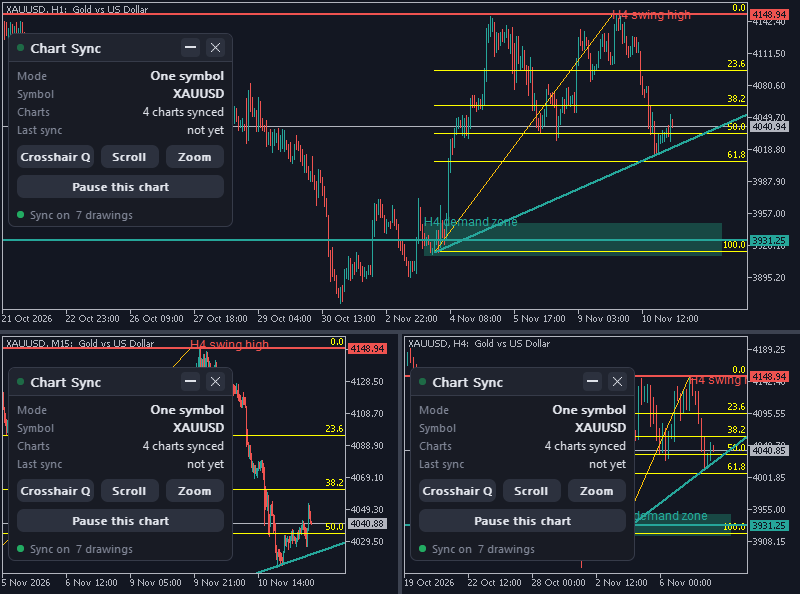
- A template with Chart Sync on it: Chart Sync reloads and draws the symbol's saved drawings again. A template that carries Chart Sync twice runs one copy.
- A template without Chart Sync: that chart leaves the group cleanly. Its mouse and scroll settings go back to how they were, and the other charts stop counting it within seconds and keep syncing with each other. Your saved drawings are not touched.
- Attach Chart Sync again, or apply a template that has it, and the symbol's drawings come back on that chart.
- Drawings that came with the template are kept when Chart Sync is attached, and join the synced drawings like any drawing already on a chart.
- A chart's Pause state and panel position survive a template that brings Chart Sync back.
- Tip: save your templates and profiles with Chart Sync on the charts, so a template change never takes it off.
Switching profiles
- A profile reopens its charts with their own objects, and Chart Sync on them picks up the saved drawings for each symbol.
- One case to know: a chart in a profile you have not opened since you deleted a drawing elsewhere still holds that drawing on the chart. When the profile opens, Chart Sync treats it like any drawing already on a chart and shares it again. Delete it once more there.
Deleted drawings stay deleted
- Every delete is remembered (the last 1,000), and every drawing carries its own edit version.
- When two charts missed each other's changes, they merge their lists: the newer copy of each drawing wins, and an older copy never brings back a drawing that was deleted after it.
- Delete a drawing that other charts show and the panel asks "Delete 1 drawing on all charts?" while they keep it. Keep puts it back; an unanswered question (chart closed, terminal shut down) means kept.
- After a delete, "Undo delete" stays on the panel of the chart you deleted from for 15 seconds and brings the drawings back on every chart. One step only.
When the panel shows a warning
The status line on the panel says what is going on with the drawings file:
- "Paused: drawings file locked, retrying": another program, often a backup, cloud sync or antivirus tool, holds the file. Chart Sync draws, removes and saves nothing on that chart while it waits, retries every 2 seconds and carries on once the file is free.
- "Saving failed, retrying": a save did not go through. Chart Sync keeps the drawings and tries again.
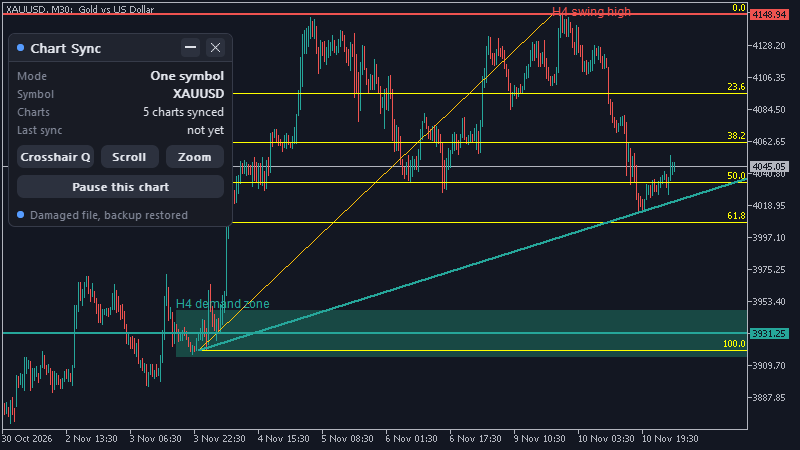
- "Damaged file, backup restored": the saved file could not be read, so the backup copy was loaded instead.
- "Damaged file set aside, started empty": neither file could be read. The damaged file is renamed with a time stamp, never deleted, and that symbol starts with an empty list so you can carry on.
Your own backup
- To keep a copy of your analysis, close the terminal and copy the ChartSync folder from MQL5\Files (MQL4\Files on MT4) somewhere safe.
- Copy it back the same way, with the terminal closed, to restore it.
Risk note
Chart Sync protects your chart analysis, not your trading results. Saved levels are not signals, and price can run through any of them. Trading forex and CFDs is high risk, and this article is educational, not financial advice.
Learn more
- Chart Sync user manual
- How to sync drawings across timeframes and charts in MT5 and MT4
- How to sync the crosshair, scroll and zoom across charts in MT5 and MT4
- Multi-timeframe analysis on gold (XAUUSD): draw once on H4, trade on M15