Here's how I managed a GOLD Sell Stop with Easy Trade Executor, my trade panel for MT5.
At about 09:00 terminal time, I placed a Sell Stop order at 4108 with the stop loss at 4130. Right after placing the order, I set up breakeven and two profit targets in the panel:
- Breakeven at 4098, one of yesterday’s local lows
- TP1 at 4086, yesterday’s local low
- TP2 at 4064, the weekly open
The entry, stop loss and take profit lines can be moved directly on the chart. As the lines move, the panel recalculates the lot size and the corresponding monetary values. The Take profits window supports up to five levels in MT5.
The order filled at about 4108 at 11:00. During the same drop, price reached the 4098 breakeven level, and the panel moved the stop to breakeven. The terminal needs to remain running for the panel to execute the move.
TP1 was hit at 11:35. At 12:40, GOLD was trading at 4076.76. TP2 at 4064 had not been reached, and the trade was still open as I wrote this.
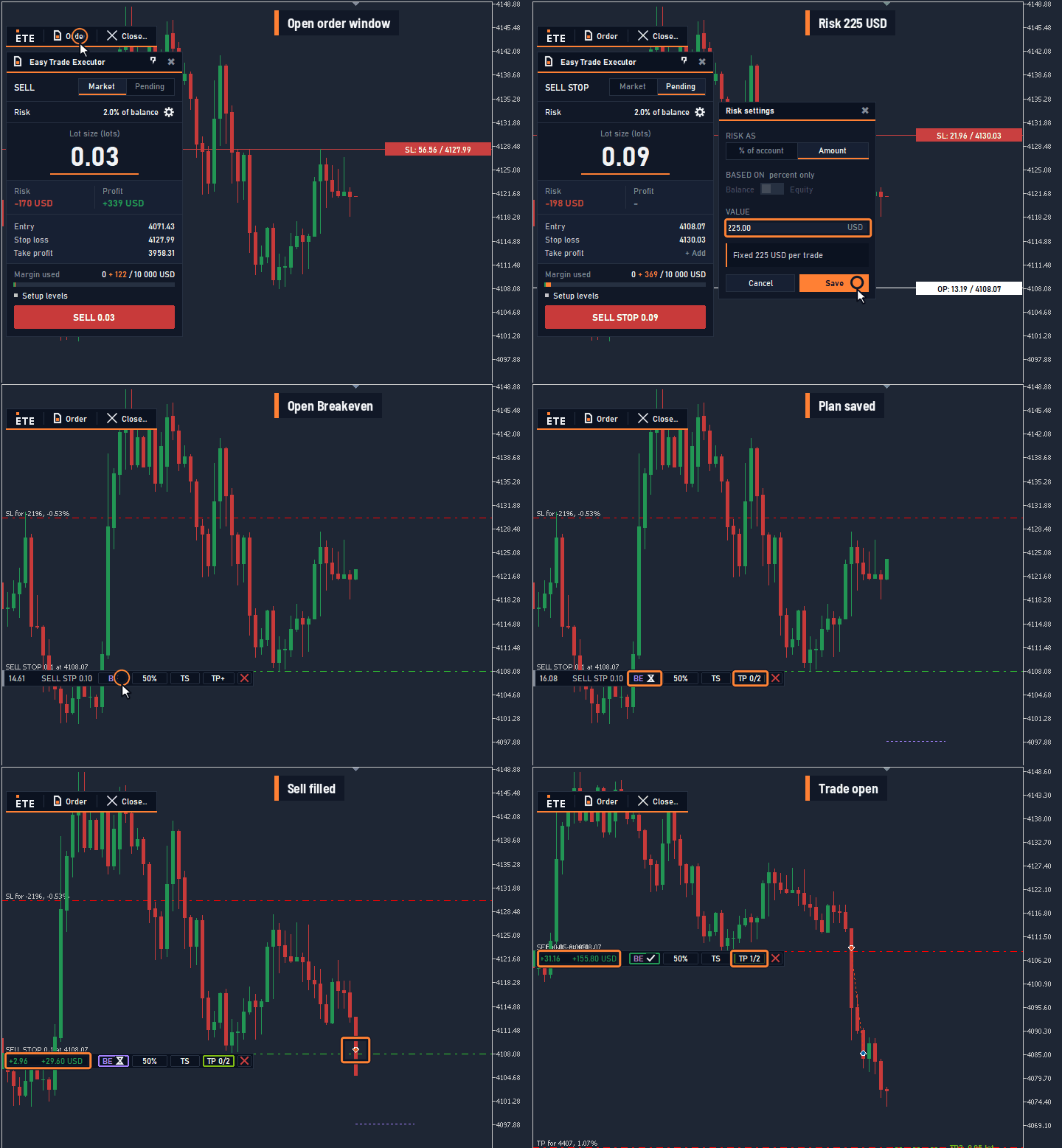 Figure 1. Setting up the plan in the panel.
Send me a private message on MQL5 and try the Easy Trade Executor panel free for 7 days.
Easy Trade Executor