
How an Auto SL/TP and Trailing Stop Manager Helps Traders Control Open Positions

Many traders spend a lot of time looking for better entries, but the exit side of trading is often less organized.
A good entry can still become a poor trade if the stop loss is not placed, if profit is not protected, or if the trader reacts emotionally when price starts moving fast.
That is why I built SL/TS/TP Auto Manager Pro: a simple trade management Expert Advisor for MetaTrader 4 and MetaTrader 5.
It does not open trades by itself.
It does not predict the market.
It does not replace a trading strategy.
Its job is focused: manage already opened positions with automatic Stop Loss, Take Profit, Break-even, Profit Lock, and Trailing Stop tools.
Why Trade Management Matters
Most trading mistakes do not happen only at entry.
They often happen after the trade is open:
- forgetting to place a stop loss
- moving stop loss manually without a plan
- closing winners too early
- letting profitable trades return to loss
- using different exit rules from one trade to another
- missing fast price movement because of hesitation
A trade manager can help make this part more systematic.
It gives the trader a fixed structure for protecting risk and managing floating profit.
What This EA Is Designed To Do
SL/TS/TP Auto Manager Pro is designed as a position protection tool.
The main functions are:
- automatic Stop Loss
- automatic Take Profit
- virtual or server-side SL/TP mode
- break-even management
- profit lock
- trailing stop
- spread filter
- symbol, magic number, and comment filters
- on-chart dashboard
- quick buttons for live control
The EA can be used by manual traders or together with another Expert Advisor that opens trades.
Server SL/TP vs Virtual SL/TP
The EA supports two main protection styles.
Server Mode
In server mode, Stop Loss and Take Profit are placed directly on the broker server.
This is useful because the protection remains visible and active even if the terminal is disconnected.
Virtual Mode
In virtual mode, Stop Loss and Take Profit are managed by the EA without placing visible SL/TP levels on the broker side.
This can be useful for traders who prefer hidden exits, but the terminal must remain connected and AutoTrading must stay enabled.
For beginners, server mode is usually easier to understand.
For experienced users, virtual mode provides more flexibility.
Break-even and Profit Lock
Break-even is one of the simplest ways to reduce emotional pressure.
For example, after a trade reaches a defined profit distance, the EA can move the stop loss to the entry price, or slightly above it.
Profit Lock goes one step further.
Instead of only protecting the entry, it can lock a fixed amount of floating profit once the trade moves far enough.
This helps avoid the common situation where a good trade returns all the way back to zero or loss.
Trailing Stop
Trailing Stop is useful when the trader wants to let a winning trade continue while still protecting part of the movement.
The EA includes different trailing behaviors, including step-based trailing.
This helps reduce excessive stop modifications and gives price more room to move naturally.
The purpose is not to catch the exact top or bottom.
The purpose is to manage open profit with a repeatable rule.
Dashboard and Live Controls
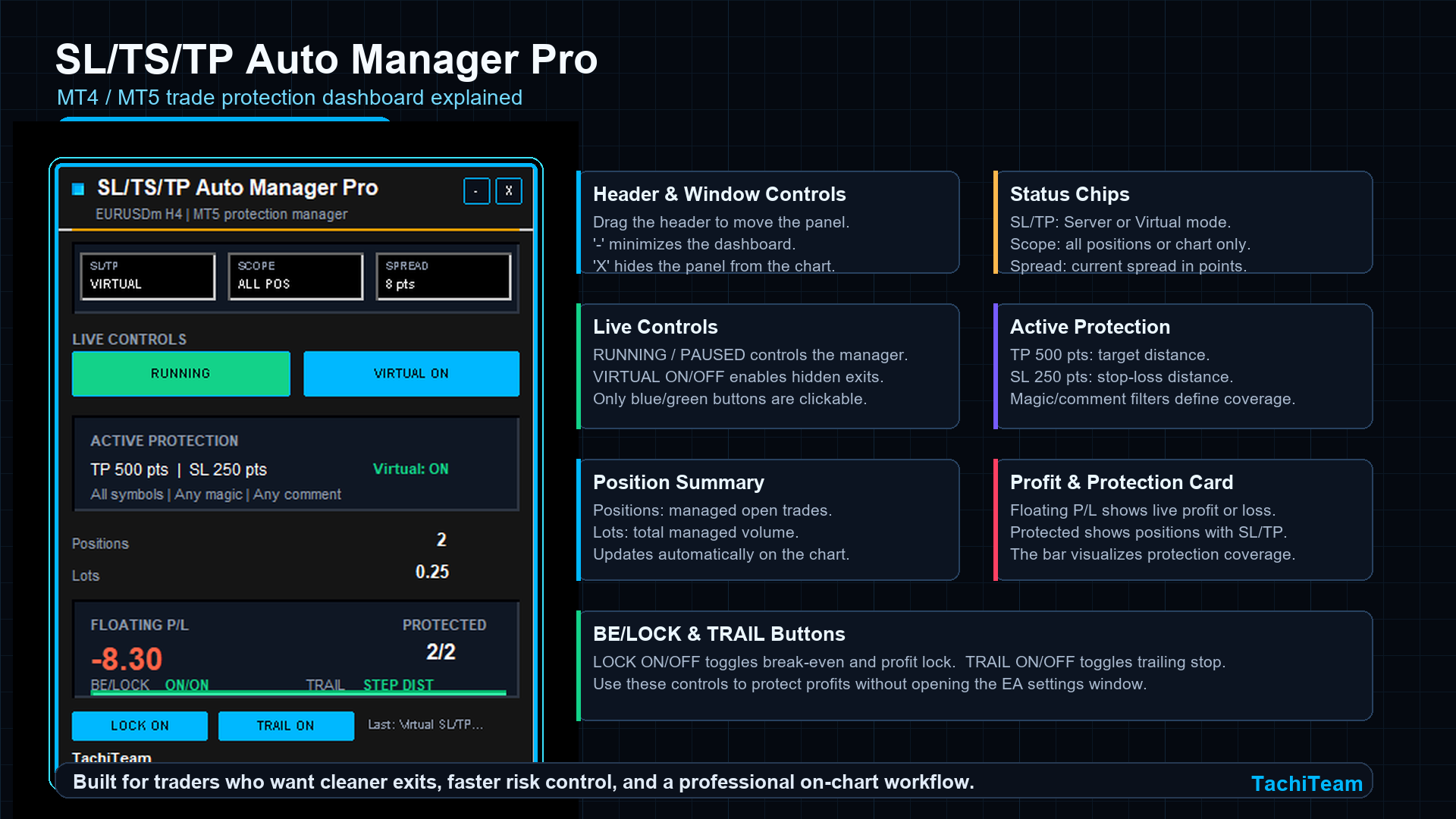
The EA includes a compact on-chart dashboard.
The dashboard shows:
- current SL/TP mode
- management scope
- current spread
- number of managed positions
- total lots
- floating profit/loss
- protected positions
- break-even/profit lock status
- trailing stop status
There are also quick control buttons:
- RUNNING / PAUSED: enable or pause the manager
- VIRTUAL ON / OFF: enable or pause virtual protection
- LOCK ON / OFF: enable or pause break-even and profit lock
- TRAIL ON / OFF: enable or pause trailing stop
- - / +: minimize or expand the dashboard
- X: hide the dashboard
The panel can also be moved around the chart.
Who May Find This Useful
This type of EA may be useful for:
- manual traders
- scalpers who need faster exit control
- traders using signal entries
- traders using another EA for entries
- traders who want consistent stop management
- traders who want a cleaner chart workflow
It is especially helpful when the entry logic and exit management are separated.
One tool opens or identifies trades.
Another tool manages risk and exits.
Important Notes
This EA is not a guarantee of profit.
It does not predict market direction and does not make trading decisions by itself.
It only manages open positions according to the settings selected by the trader.
Every symbol behaves differently.
Settings that may be reasonable for EURUSD may not be suitable for XAUUSD, indices, or crypto symbols.
Always test settings on a demo account first.
Final Thoughts
In trading, entries are important, but exits decide how risk and profit are actually handled.
A trade manager cannot replace discipline, but it can help create a more structured trading process.
For me, the goal of SL/TS/TP Auto Manager Pro is simple:
make position protection faster, cleaner, and easier to control directly from the chart.
-------------------------------------------------------------------------------
- MT5: https://www.mql5.com/en/market/product/193334
- MT4: https://www.mql5.com/en/market/product/193347


