
Why Your EA Dies on Another Broker: The Hidden Costs Behind Every Backtest

Nov 9, 2026 · David
Same EA, same settings, different result
Same EA, same symbol, same inputs, two brokers, and the equity curves drift apart within weeks. Most traders blame the code or the market. Far more often the cause is the broker: what each trade costs, and how the price feed behaves, is different on every server.
This matters most for the strategies MQL5 traders like to build: scalpers, grids, news EAs, anything that trades often for a small edge per trade. When an EA earns a fraction of a pip per trade before costs, a broker that charges 0.4 pips more per trade can erase the edge completely.
In this article:
- the six places where broker costs hide, and what the MT5 Strategy Tester can and cannot know about them;
- a break-even calculation you can reuse with your own numbers;
- a short MQL5 script that logs your broker's spread, swap and stop levels;
- a 7-point broker check, with the tools I built into ForexRater to do it faster.
Who is writing: I run ForexRater, a broker review and comparison site, so part of this article is about my own product. I say so where it applies. Information only, not financial advice.
Six places where broker costs hide
The headline spread is only one of six costs that decide whether an EA survives on a given server. Compare all of them, not the one in the advert.
| Cost | What to check | Why it hurts an EA |
|---|---|---|
| Spread | Average at the hours you trade, widening at rollover and news, floating or fixed | Paid on every entry; scalpers and grids feel it first |
| Commission | Per lot, per side; raw-spread account vs standard account | Replaces part of the spread, so compare spread plus commission, never either alone |
| Swap | Long vs short rates per instrument, triple-swap day | Eats every overnight position and often differs by direction |
| Slippage and execution | Fill speed, requotes, rejected orders, order-rate limits | Invisible on the chart; turns a backtest entry into a worse live one |
| Non-trading fees | Deposit, withdrawal, inactivity | Never shows in the EA's profit factor but still leaves your balance |
| Symbol rules | Minimum stop distance, freeze level, lot step, contract size, whether scalping, hedging and EAs are allowed | A stop that works on one server is rejected on another |
What the MT5 Strategy Tester knows, and what it cannot
The tester is honest about one thing and silent about the rest. According to the MetaQuotes Testing Features page, the spread is not modelled: it comes from the historical data you downloaded and is always treated as floating. The instrument specification, including contract size and minimum stop levels, is also the one from the server you tested on.
That has three consequences for anyone moving an EA between brokers:
- A backtest describes one broker, not all of them. Its spread history belongs to the server that supplied the data. Run the same EA on another server and you are testing a different cost structure.
- Modes differ in how fills are treated. In "Every tick" and "Real ticks" orders execute at the current Bid or Ask; in "Open prices only" and "1 minute OHLC" stops and targets fill at the price you set, so the gap to a real fill can be large. Use real ticks for the final check.
- Swap, commission and slippage need your own check. Price history does not carry a broker's swap table or commission schedule, so read the tester report for what it actually charged, and set an execution delay in the tester settings instead of assuming instant fills.
A cheap stress test: run the same period on the history of a second broker. If the result collapses, the edge was a cost-structure artefact, not a market edge.
The break-even math
A half-pip cost gap wipes out a high-frequency EA and barely moves a swing system. The rule is one line:
\text{net edge per trade} = \text{gross edge} - (\text{spread} + \text{commission} + \text{slippage})
An EA is dead the moment its all-in cost reaches its gross edge. Below, the same three styles run on two hypothetical brokers with an all-in cost of 0.6 pip (A) and 1.1 pips (B). These numbers are for illustration only, not measurements of any real broker.
| Style | Trades per month | Gross edge per trade (pips) | Net per month on A (pips) | Net per month on B (pips) |
|---|---|---|---|---|
| Scalper | 400 | 0.9 | +120 | -80 |
| Intraday | 60 | 5 | +264 | +234 |
| Swing | 15 | 40 | +591 | +583.5 |
The scalper flips from profit to loss on a 0.5-pip difference. The swing system loses about 1% of its result. That is why a backtest that looks great on a raw-spread server can disappoint on a standard account, and why the more often your EA trades, the more the broker choice is part of the strategy.
Measure your own broker in five minutes
Comparison tables are a start; your own terminal is the ground truth. The script below samples the spread of the symbols you list once per second and writes one CSV row per symbol: average and maximum spread, swap long and short with the swap mode, the triple-swap day, stop and freeze levels, and contract size.
//+------------------------------------------------------------------+
//| BrokerCostCheck.mq5 |
//| Logs the cost-related specs of symbols on the connected server. |
//+------------------------------------------------------------------+
#property version "1.00"
#property script_show_inputs
input string InpSymbols = "EURUSD,GBPUSD,XAUUSD"; // Symbols, comma separated
input int InpSamples = 60; // Spread samples per symbol
input int InpPauseMs = 1000; // Pause between samples, ms
string DayName(const long day)
{
switch((int)day)
{
case SUNDAY: return "Sun";
case MONDAY: return "Mon";
case TUESDAY: return "Tue";
case WEDNESDAY: return "Wed";
case THURSDAY: return "Thu";
case FRIDAY: return "Fri";
case SATURDAY: return "Sat";
}
return "?";
}
void OnStart()
{
string list[];
int n = StringSplit(InpSymbols, ',', list);
if(n <= 0)
{
Print("No symbols given");
return;
}
int h = FileOpen("broker_cost_check.csv", FILE_WRITE | FILE_CSV | FILE_ANSI | FILE_COMMON, ';');
if(h == INVALID_HANDLE)
{
Print("FileOpen failed, error ", GetLastError());
return;
}
string server = AccountInfoString(ACCOUNT_SERVER);
FileWrite(h, "server", "symbol", "avg_spread_pts", "max_spread_pts", "digits",
"swap_long", "swap_short", "swap_mode", "triple_swap_day",
"stops_level_pts", "freeze_level_pts", "contract_size", "samples");
for(int i = 0; i < n && !IsStopped(); i++)
{
string s = list[i];
StringTrimLeft(s);
StringTrimRight(s);
if(!SymbolSelect(s, true))
{
Print("Symbol not available: ", s);
continue;
}
long sum = 0, mx = 0;
int got = 0;
for(int k = 0; k < InpSamples && !IsStopped(); k++)
{
long sp = SymbolInfoInteger(s, SYMBOL_SPREAD);
sum += sp;
if(sp > mx)
mx = sp;
got++;
Sleep(InpPauseMs);
}
if(got == 0)
continue;
double avg = (double)sum / got;
FileWrite(h, server, s, DoubleToString(avg, 1), (string)mx,
(string)SymbolInfoInteger(s, SYMBOL_DIGITS),
DoubleToString(SymbolInfoDouble(s, SYMBOL_SWAP_LONG), 2),
DoubleToString(SymbolInfoDouble(s, SYMBOL_SWAP_SHORT), 2),
EnumToString((ENUM_SYMBOL_SWAP_MODE)SymbolInfoInteger(s, SYMBOL_SWAP_MODE)),
DayName(SymbolInfoInteger(s, SYMBOL_SWAP_ROLLOVER3DAYS)),
(string)SymbolInfoInteger(s, SYMBOL_TRADE_STOPS_LEVEL),
(string)SymbolInfoInteger(s, SYMBOL_TRADE_FREEZE_LEVEL),
DoubleToString(SymbolInfoDouble(s, SYMBOL_TRADE_CONTRACT_SIZE), 0),
(string)got);
PrintFormat("%s %s: avg spread %.1f pts, max %I64d pts (%d samples)", server, s, avg, mx, got);
}
FileClose(h);
Print("Saved to the common Files folder: broker_cost_check.csv");
}
How to use it:
- Save it as BrokerCostCheck.mq5 in MQL5\Scripts , compile in MetaEditor (F7) and drag it onto any chart.
- Run it during the hours your EA trades. A closed market shows a stale spread.
- Open broker_cost_check.csv from %APPDATA%\MetaQuotes\Terminal\Common\Files and repeat on a second broker's terminal.
Two cautions. Spread is in points, so divide by 10 for pips on 5-digit forex symbols. And the swap unit depends on the swap mode in the CSV (points, money or annual interest), so never compare raw swap numbers across different modes. Sixty samples are a quick look, not a statistic: run it at the open, at rollover and around a news release to see the widening that an average hides. Property definitions are in the MQL5 reference.
A 7-point broker check, and where ForexRater helps
Run these seven checks before you move an EA to a new server. ForexRater covers checks 1 to 4 and 7; checks 5 and 6 you verify on your own terminal.
| # | Check | How to verify | ForexRater tool |
|---|---|---|---|
| 1 | Regulation and legal entity | Find the entity that holds your contract, its regulator and licence number, then confirm them on the regulator's own register | Regulatory record on each broker page |
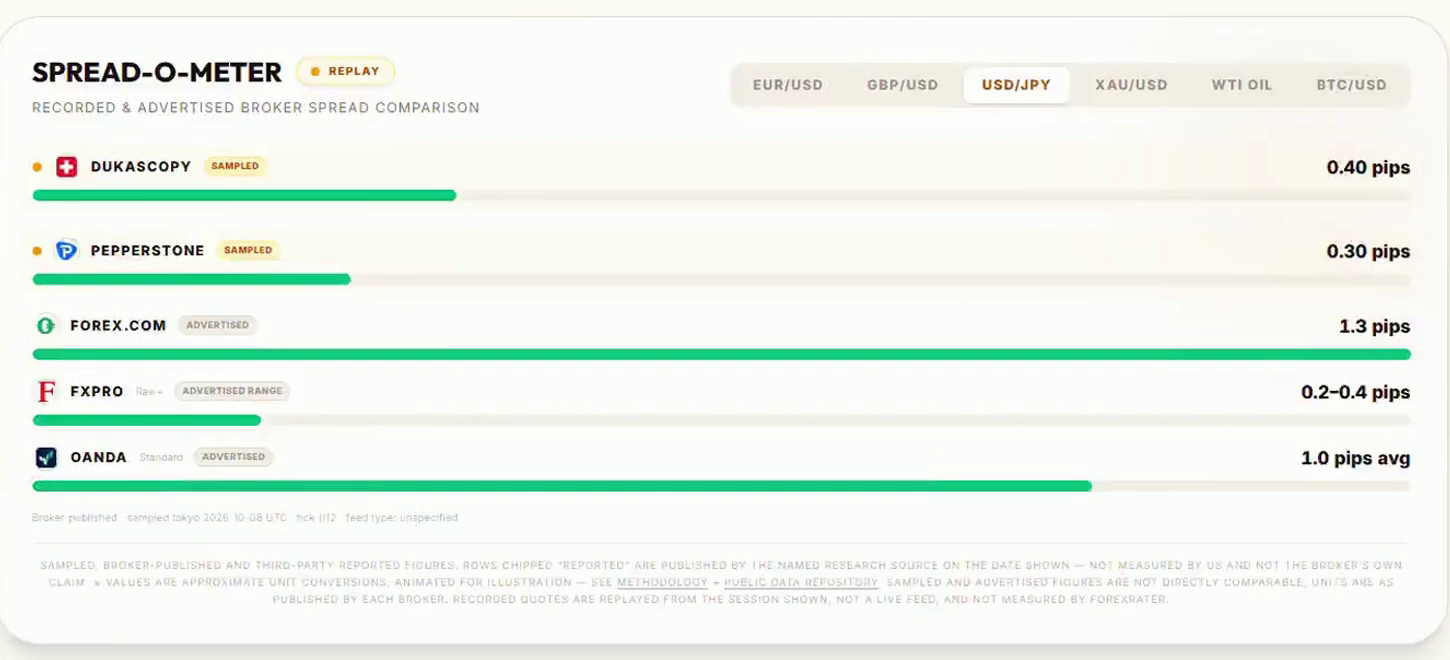
| 2 | Spread at your hours | Sample live spreads with the script above, including rollover and news | Spread-O-Meter |
| 3 | Commission and swap | All-in cost per round trip; swap long vs short, its unit, the triple-swap day | Swap-O-Meter; cost analysis on each broker review |
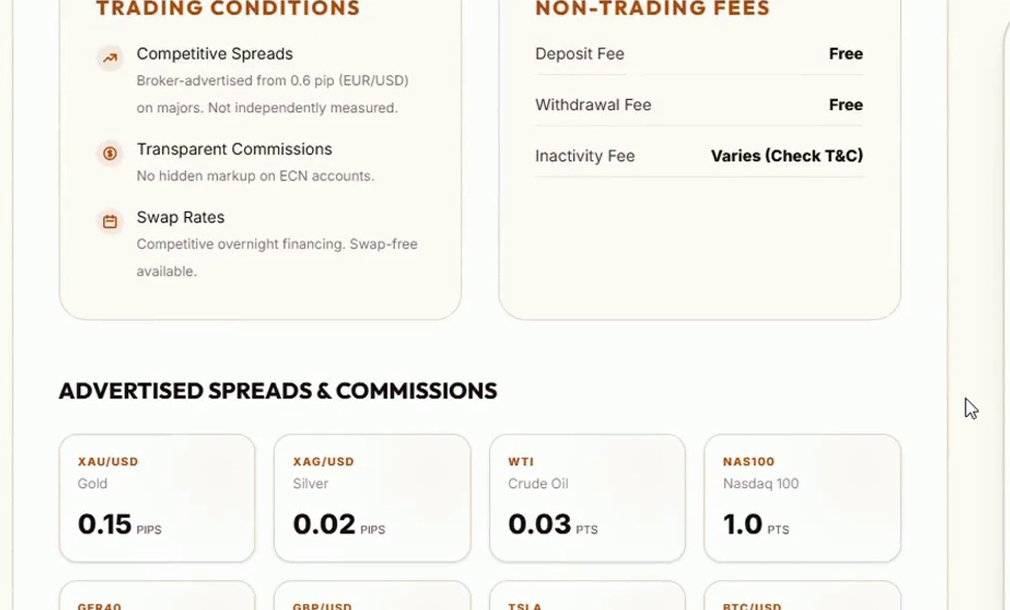
| 4 | Non-trading fees | Deposit, withdrawal and inactivity charges | Hidden Fee Investigator |
| 5 | EA rules and symbol specs | Scalping, hedging and EAs allowed; stops and freeze levels; order-rate limits; lot step | Your terminal (the script above) and the broker's terms |
| 6 | Server time and data | GMT offset and DST switch, tick history depth, symbol naming | Your terminal; run the same period on two servers |
| 7 | Scam and clone check | Domain age, regulator claims that do not match the register, complaint patterns | Scam Detector |
Two honest limits of my own tools. Spread-O-Meter replays recorded quote samples next to figures brokers publish, and its footnote says the two are not directly comparable, so use it to build a shortlist, not to predict your own fills. Swap-O-Meter shows each broker's swap in its own unit, so read the unit column before you read the number.
A broker review page keeps trading conditions apart from non-trading fees, and labels advertised figures as advertised.
Spread-O-Meter: sampled and broker-published spreads side by side, each row labelled.
Swap-O-Meter: overnight financing by instrument, shown in each broker's own unit.
To get from "any broker" to a shortlist quickly, the Matchmaker asks which assets you trade and how much you are starting with, then returns audit score, minimum deposit, regulator and spread in one row per broker.
ForexRater in a two-minute video
The tour below shows every tool mentioned above in action: the audit scorecard, costs and regulatory record, the Matchmaker, Spread-O-Meter, Swap-O-Meter, Hidden Fee Investigator, the Scam Detector, AccountConcierge for applying to several brokers at once, and the education section.
Chapters: 0:12 audit scorecard, 0:27 costs and regulatory record, 0:44 Matchmaker, 0:57 the tools, 1:16 AccountConcierge, 1:34 education, 1:44 toolbox.
Try it: forexrater.com
Disclosure: ForexRater is my own project and may earn a commission if you open a broker account through links on the site. I do not recommend any broker in this article; the screenshots are examples of the tools' output.
Checklist before you move an EA
The edge you backtested belongs to a strategy and a broker together. Measure the broker before you blame the code.
- Backtest on real ticks with an execution delay, and remember the spread history belongs to one broker
- Re-run the same period on a second broker's history
- Work out the all-in cost per round trip and compare it with the EA's gross edge per trade
- Log spread at your trading hours, at rollover and around news with BrokerCostCheck
- Read the swap unit and the triple-swap day for every symbol you hold overnight
- Check non-trading fees and the broker's rules on EAs, scalping and hedging
- Confirm the licence on the regulator's own register
- Forward-test on a demo or a small account on the new server before you scale
Which cost has surprised your EA most: spread, swap or slippage? Tell me in the comments.
Risk warning: information only, not financial advice. Trading forex and CFDs involves a high risk of losing money, and backtests do not guarantee future results. The numbers in the break-even table are hypothetical.



