When you are in a hurry, it is easy to get the lot size wrong and risk more than you planned. Let’s go through the process of placing an order using gold as an example.
Same lot size, different risk
Let’s use the gold chart on the M5 timeframe. First, you decide how much you are prepared to lose: in the screenshot, it is about 3% of the funds in the account. For a BUY STOP pending order, the Entry is 4053.03 and the SL is 4036.07. With a distance of 16.96 from Entry to SL and a lot size of 0.15, you are risking 254 USD.
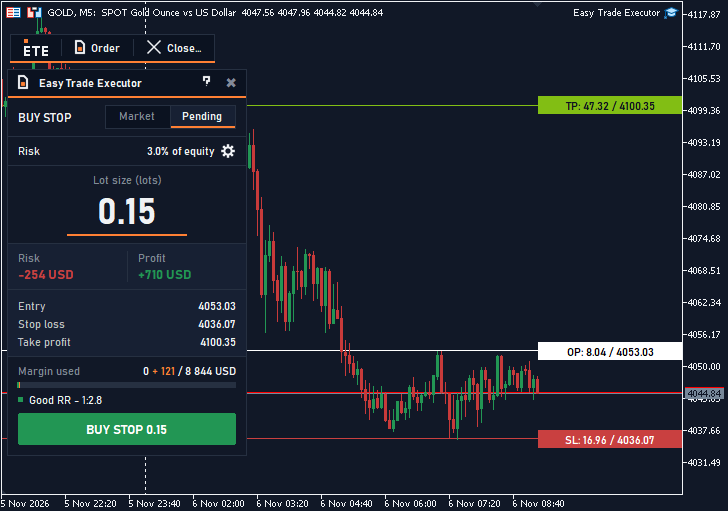 Figure 1. The panel calculates the lot size based on the risk and the distance to the SL.
Now imagine doubling the distance to the SL to 33.92 while keeping the lot size at 0.15. In this example, you would now be risking about 508 USD. The lot size has not changed, but the amount at risk has roughly doubled.
Risk first, then SL and lot size
First, decide how much you are prepared to lose. Then place the SL, because the lot size depends on the distance to it. Only after that should you calculate the lot size based on your chosen risk. This keeps the amount at risk within the limit you chose.
Check the order on the chart
In Easy Trade Executor, you set the risk and place the Entry, SL and TP lines on the chart. The panel calculates the lot size. When you move the lines, the lot size and amounts are recalculated immediately.
Before you press Send, the panel shows how much you are risking, the take-profit amount and the required margin. You can see the cost of a mistake before sending the order.
The white line in the screenshot marks the Entry, while the red line marks the SL. The position of the SL relative to the Entry determines the order direction, and the panel selects the pending order type. The lot size is rounded down to the lot step set by the broker.
You can follow this rule: the take-profit amount should be at least twice the amount at risk. Here, the amount at risk is 254 USD, while the take-profit amount is 710 USD. The status line shows “Good RR - 1:2.8”.
Check the margin separately to make sure you have enough funds to place the order. Here, the panel shows the margin required for the order: 121 USD, with equity of 8,844 USD. Send is disabled if the order would use too much margin; the button is dimmed, and the status line gives the reason.
Send me a private message and try the panel free for 7 days.
Easy Trade Executor