You Never Saw a Trade Management Panel Like This. Try It Free and Prove Me Wrong.

I’ll make this easy. Below is everything All In One Trade Management Panel MT5 does on one MT5 chart. It’s an MT5 trade manager, an MT5 trading panel, a lot size calculator and a risk management tool in one. If your current panel does all of it, tell me in the comments. If not, the free version is below, with no time limit on demo accounts.
1. Position size calculator MT5: plan the trade by dragging three lines
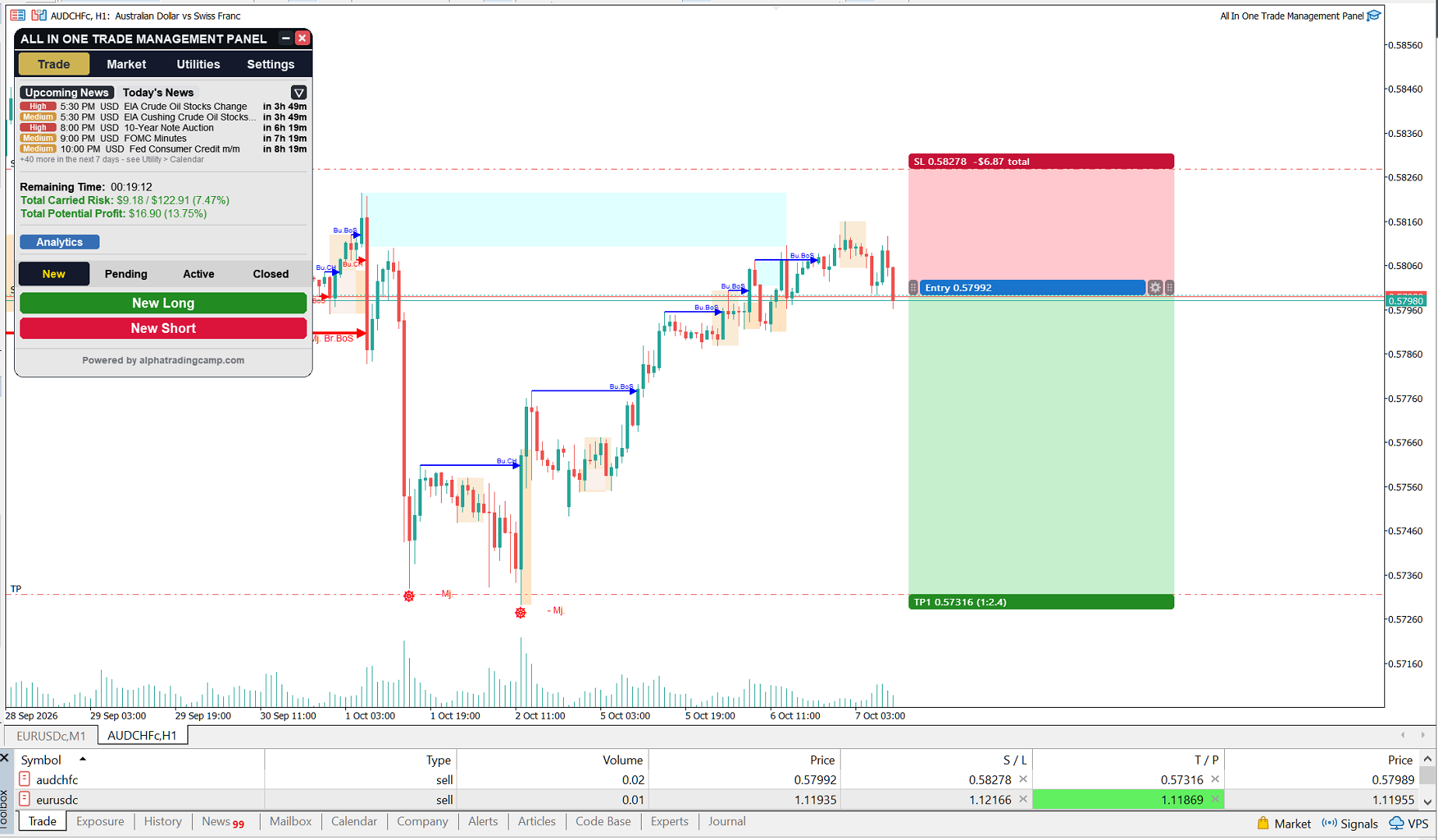
Stop doing lot-size math. The lot size calculator is built into the chart. Click New Long or New Short, place the entry, then drag your stop loss and take-profit.
- Lot size from a % of balance or a fixed lot, rounded to your broker’s lot step
- Up to 10 take-profit levels for multiple take profit MT5 trades, each with its own share of the position
- Risk in money, reward and R:R update live while you drag
- Send it as a market order, a pending order, or save it as a plan, or schedule the plan for a set time
- Risk presets: save your own levels (e.g. A+ 2%, B 1%) and pick one in a click, like a position size calculator MT5 that remembers your rules
- Optional cap on total risk across all open trades
2. Manage every trade from one place with a trade management panel MT5
A proper MT5 trade manager keeps every trade in view, so this one does.
- Pending, Active and Closed lists with live P&L, including net P&L on active trades
- Drag the stop, targets or pending entry of a live trade right on the chart
- Breakeven, partial close and close from each trade’s own controls
- Close all, only profitable, only losing, or this chart only, plus cancel all pending
- Reverse a position in one click, with the same size and the same stop and target distances
- OCO for pending groups: when one fills, the linked orders are cancelled
- Pending expiry: GTC, today, 4h, 24h or a date. Expired orders stay on the chart as plans you can place again
- Every closed trade goes into a CSV journal
- Trades missing from the panel are found and offered back to you
3. Let it manage the trade for you: break even and trailing stop EA features
Think of it as a break even and trailing stop EA that lives inside your panel. Set defaults once, then adjust each trade on its own.
- Breakeven at a chosen R or when TP1 closes, with a pip buffer
- Trailing stop by fixed pips, ATR multiple, steps in R, or behind a market structure level
- Partial close at a chosen R, and a different partial for each take profit, which suits multiple take profit MT5 plans
- Trades on pairs you aren’t watching are still managed

4. Protect your account: a risk management EA that respects daily limits
Whether you trade your own money or a prop firm challenge MT5 account, limits protect you from yourself.
- Daily loss limit (in the style of an FTMO daily loss limit) and daily profit target, as a % or in money
- Max drawdown, measured from the peak (trailing), from an initial balance (like FTMO 2-Step) or from the monthly balance
- Max open trades and max new trades per day
- When a limit is hit, new trades are blocked and the panel’s trades can be closed automatically
- Live status lines show today’s P&L, distance to each limit and trades left

5. Know your numbers: performance analytics and trading journal
A trade management panel MT5 traders trust should also tell you how you’re really doing.
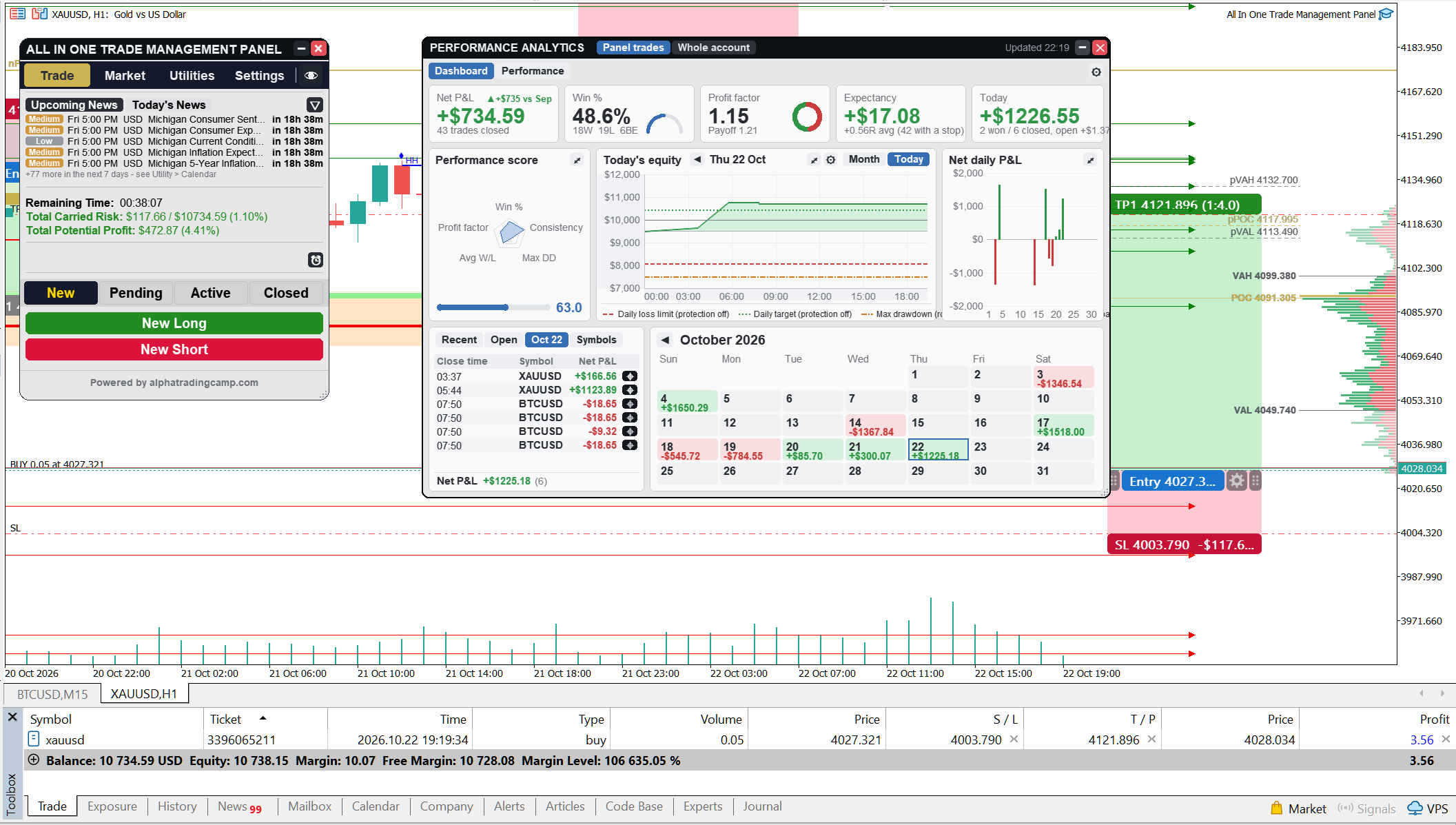
- Net P&L, win rate, profit factor, expectancy per trade and today’s result, compared with last month
- Equity curve with drawdown, plus day and month pages, with your daily loss limit, daily target and max drawdown drawn on it as lines
- Deposits and withdrawals are marked and never counted as profit or loss
- Performance by day, week, month, quarter, year or symbol, with streaks, hold times, costs, max drawdown and a score
- R distribution and long vs short results
- Click any bar or row to see its trades and show one on the chart
6. News lock and time rules
News is the classic account killer, so this risk management tool locks new trades around it.
- Block new trades from X minutes before to X minutes after high (or medium and high) impact news for the chart’s currencies
- Optionally move trades to breakeven, or close them, when the lock starts
- Close trades or move them to breakeven at a set time every day and/or on Friday
- Upcoming News tab: the next 7 days of events with live countdowns, turning red within 15 minutes
- Economic calendar with impact and currency filters, in your own time zone
7. Read the market: volume order flow
Want an MT5 order flow indicator that sits in the same panel as your trades?
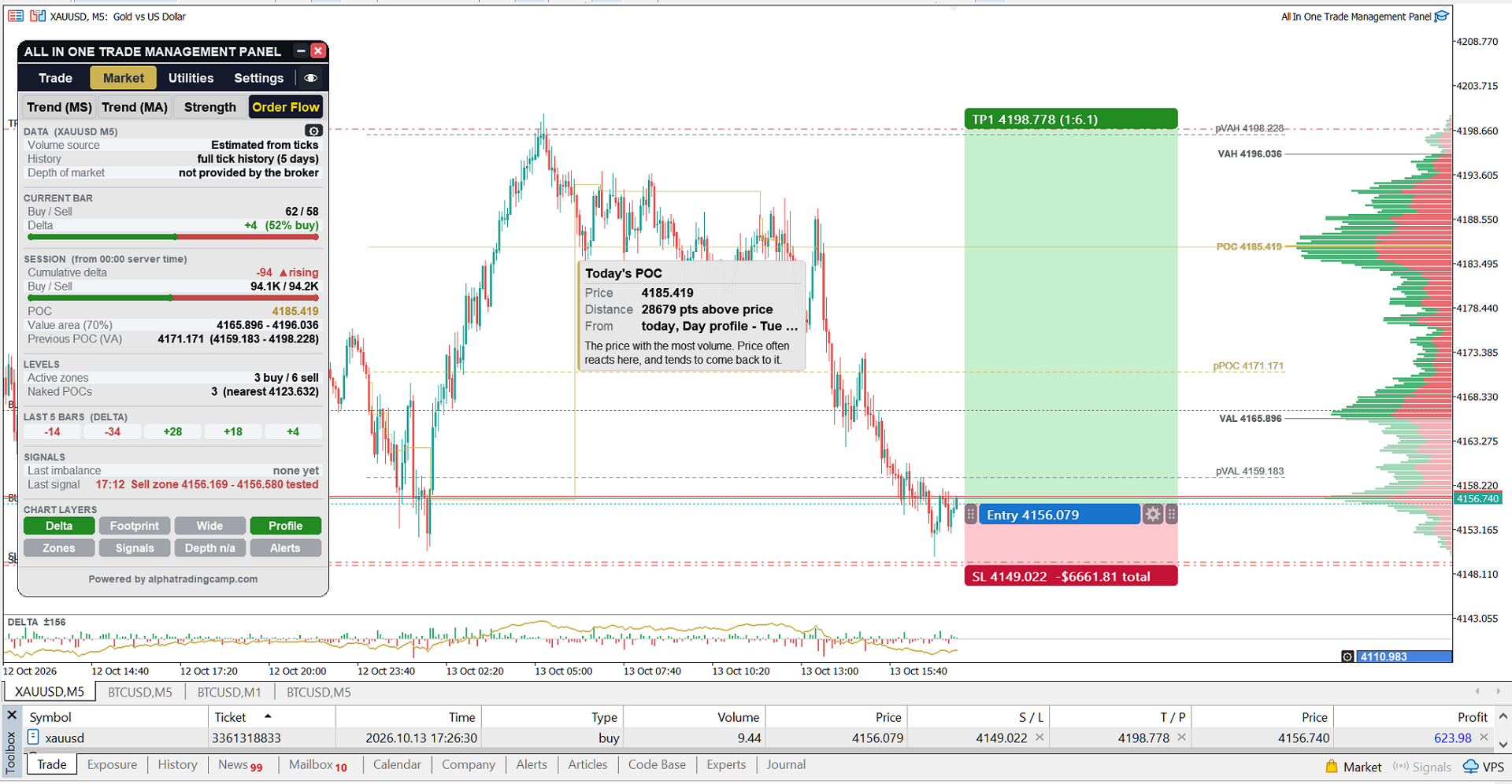
- Buy and sell volume, delta, cumulative delta, point of control, value area and the latest signal
- Chart layers you switch on one at a time: delta and CVD strip, footprint, wide footprint, candles coloured by delta
- Volume profile MT5 for the day, for the Asia / London / New York sessions, or for the visible chart
- Stacked-imbalance zones, naked POCs, delta and CVD divergence, absorption and large-trade bubbles
- Up to 30 days of history, and alerts by pop-up, sound, push or Telegram
Real buy and sell volume is used where the broker provides it. On forex and CFDs it is estimated from price ticks, and the panel always shows which source it uses. Order book features need a broker that provides market depth.
8. Read the market: structure and strength
A good MT5 trading panel shows context, not just buttons.
- Trend by market structure on four timeframes, and by moving averages across timeframes
- BOS / CHoCH breaks, built from candle wicks or bodies, plus equal highs and lows
- Fair value gaps, order blocks, displacement candles and liquidity levels, marked valid, tested or swept
- Asian, London and New York session ranges with automatic daylight saving time
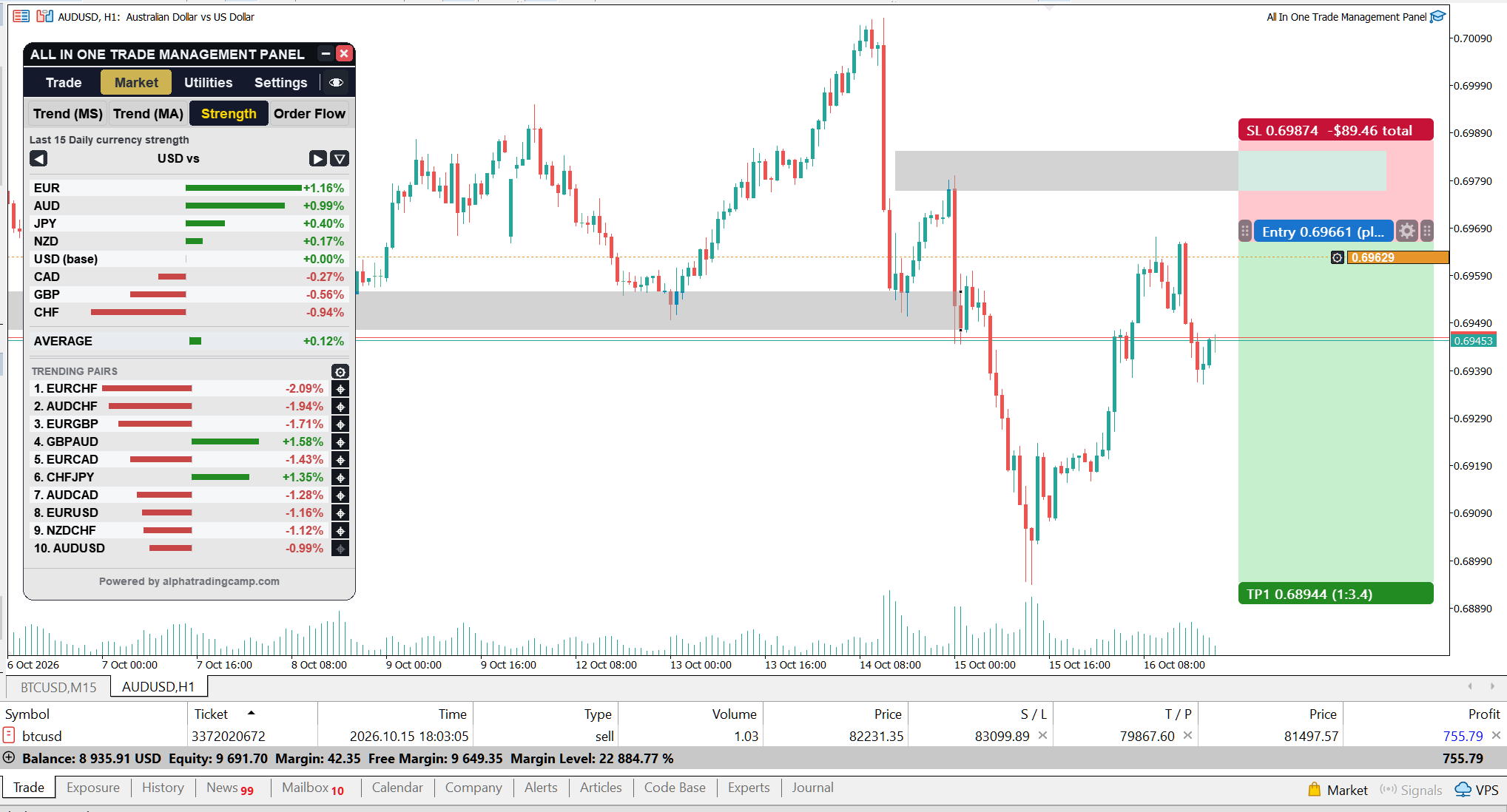
- Currency strength meter for the 8 majors. Click a currency to compare it with each of the others, and filter the Trending Pairs list
- NEW: Fundamental Analysis tab that ranks currencies by their economic news and shows the strongest vs weakest pairs, with Buy / Sell
9. Comfort details
- One-click trade screenshots, sent to Telegram automatically when a trade opens or closes
- Push and Telegram alerts for fills, closes, breakeven, partials, protection limits and news lock actions
- Price alarms you can drag on the chart
- Hotkeys for new buy, new sell, confirm, close all and breakeven all
- Hover info on everything the panel draws
- Shift+H hides every drawing and brings it all back as it was, so your own chart stays clean
- Resizable panel, light, dark and custom themes, and saved presets
- This MT5 trading panel opens instantly on any chart, and works offline when the terminal loses its connection
Who it’s for
This trade management panel MT5 is built for:
- Discretionary traders who want a position size calculator MT5 and trade plans right on the chart
- Prop firm traders who need daily limits and drawdown rules during a prop firm challenge MT5
- Anyone who wants consistent risk, with a lot size calculator and a break even and trailing stop EA in one panel
- Order flow readers who want volume profile MT5 and delta without installing another tool
Good to know
- Works on any symbol, timeframe and broker
- Multiple take profit MT5 setups (several levels per trade) need a hedging account
- Account protection, auto management and the close buttons act on the panel’s own trades
- Telegram needs a one-time setup in MT5’s Expert Advisor options, and step-by-step instructions are in the comments
Your turn
Try this MT5 trade manager for free on a demo account. Pick where you’d like to start:
- All In One Trade Management Panel for free: download the demo version and test it on a live chart in your demo account
- All In One Trade Management Panel MT5: the full version on the MQL5 Market
Found a feature your panel does better, or one you wish this one had? Tell me in the comments. I read them all, and feature requests are welcome.




