Relay EA – complete guide: Dawnbreak, LongRunner and Second Wind in one EA, 13 slots, overview, every setting

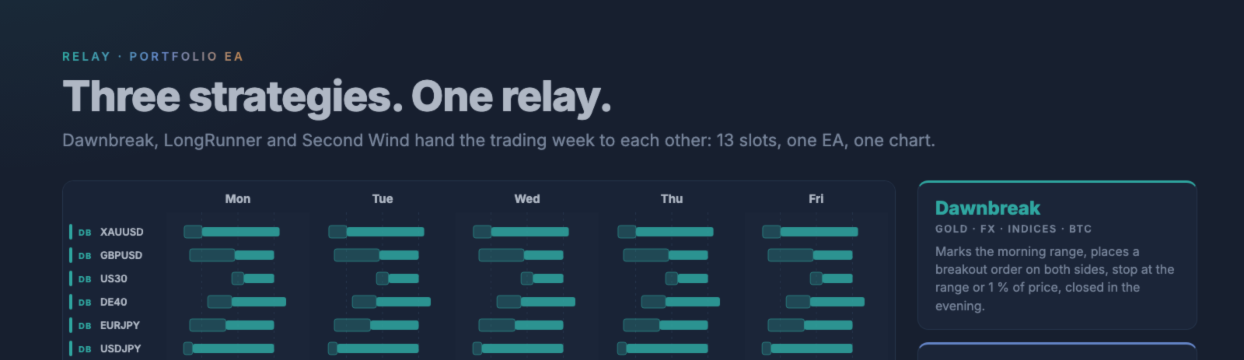
Relay runs three strategies as one Expert Advisor on MetaTrader 5: Dawnbreak (morning range breakout), LongRunner (daily index long without swap) and Second Wind (Turnaround Tuesday). This post explains the slot concept, the master chart, the overview panel, every input, the per-slot override files and how to set Relay up on your broker. Product page: https://www.mql5.com/en/market/product/201730
Guides for the single EAs, with the strategy details:
- Dawnbreak: https://www.mql5.com/en/blogs/post/776683
- LongRunner: https://www.mql5.com/en/blogs/post/778433
- Second Wind: https://www.mql5.com/en/blogs/post/778434
1. What Relay is
You attach Relay to a single chart, the master chart. Relay then opens one chart per slot with that strategy's own dashboard and shows the whole portfolio on one overview panel on the master chart.
The strategy code is the code of the single EAs, moved into classes. A script finds every original line again; only renamed event handlers and similar details differ. Version 1.1 contains Dawnbreak 3.7, LongRunner 2.0 and Second Wind 1.0.
No grid, no martingale, no averaging.
2. The three strategies
- Dawnbreak on XAUUSD, GBPUSD, US30, DE40, EURJPY, USDJPY, BTCUSD: marks a morning range, places a breakout order on both sides, stop at the range or 1 % of price, closes in the evening. Monday to Friday.
- LongRunner on US30, USTEC, DE40: buys the index after the session open and sells before the daily rollover. One long a day, no swap.
- Second Wind on US30, USTEC, DE40: buys on Monday while the index is below its daily moving average, sells on Tuesday.
The full rules and every strategy input are in the guides of the single EAs linked above.
3. Slots and magic numbers
One strategy on one symbol is a slot. Relay has 13 slots built in. Each slot has its own magic number and the published example set of its single EA: the same times and rules, with the sizes listed in section 6.
Times are server time (UTC+2 in winter, UTC+3 in summer). For Dawnbreak the time column shows the range window and the close time.
| Slot | Strategy | Market | Times (built-in set) | Size (built-in) | Magic | Default |
|---|---|---|---|---|---|---|
| DB_XAUUSD | Dawnbreak | Gold | range 03:05–06:05, close 18:55 | 1 % risk | 20269112 | on |
| DB_GBPUSD | Dawnbreak | GBPUSD | range 04:00–11:30, close 18:00 | 1 % risk | 20269106 | off |
| DB_US30 | Dawnbreak | Dow Jones | range 11:00–13:00, close 18:00 | 1 % risk | 20269111 | on |
| DB_DE40 | Dawnbreak | DAX 40 | range 07:00–11:00, close 20:00 | 1 % risk | 20269110 | on |
| DB_EURJPY | Dawnbreak | EURJPY | range 04:00–10:00, close 18:00 | 1 % risk | 20269305 | on |
| DB_USDJPY | Dawnbreak | USDJPY | range 03:00–04:30, close 18:00 | 1 % risk | 20269302 | on |
| DB_BTCUSD | Dawnbreak | Bitcoin | range 05:00–09:30, close 20:00 | 1 % risk | 20269308 | on |
| LR_US30 | LongRunner | Dow Jones | buy 01:05, sell 23:50 | 0.7 × balance | 20261101 | on |
| LR_USTEC | LongRunner | Nasdaq 100 | buy 01:05, sell 23:50 | 0.5 × balance | 20261102 | on |
| LR_DE40 | LongRunner | DAX 40 | buy 09:05, sell 22:55 | 0.1 × balance | 20261103 | on |
| SW_US30 | Second Wind | Dow Jones | Mon from 01:05, Tue 23:50, below SMA 25 | 0.5 × balance | 20261111 | on |
| SW_USTEC | Second Wind | Nasdaq 100 | Mon from 01:05, Tue 23:50, below SMA 9 | 0.5 × balance | 20261112 | on |
| SW_DE40 | Second Wind | DAX 40 | Mon from 09:05, Tue 22:55, below SMA 40 | 0.5 × balance | 20261113 | on |
Every slot can be switched off on its own. A switched-off slot touches nothing. The slot name (for example DB_XAUUSD) is also the name of its override file, see section 7.
Which Dawnbreak slots to use. Please read.
12 of the 13 slots are switched on by default. Only Dawnbreak GBPUSD is off, because it failed the test described below. Dawnbreak's latest test of its published sets used Darwinex real ticks from January 2025 to October 2026 at 1 % risk per trade. Only gold (XAUUSD) and the DAX (DE40) passed.
- GBPUSD, EURJPY and USDJPY did not pass: the profit factor was below 1.15 or the drawdown above 25 %.
- The US30 result was not valid. A lot-size error took about three times the intended volume on that broker's Dow CFD. Version 1.1 fixes the error, but US30 has not been tested again yet.
- BTCUSD could not be tested there because the broker has no such symbol.
EURJPY, USDJPY, US30 and BTCUSD stay on by default, even though they did not pass or were not tested. If you want only the markets that passed, switch these four Dawnbreak slots off with one input each. Gold and DAX are the two with a passed test. The LongRunner and Second Wind slots are not affected.
4. Master chart and slot charts
- Master chart: Relay runs here and shows the overview. Any symbol works, for example EURUSD H1. All trading happens in this one EA.
- Slot charts: Relay opens one chart per slot (H1 by default) with that strategy's own dashboard and levels. No EA runs on a slot chart; it is display only.
- Found again after a restart: every slot chart carries a small marker. After a terminal restart Relay picks up its charts instead of opening new ones.
- Comes back: close a slot chart by hand and it is back within about five seconds. The button "Rebuild slot charts" on the overview builds all slot charts again.
- Removing the EA leaves the slot charts open. On the next start Relay picks them up.
- If you do not want the slot charts, switch them off with "Open one chart per slot". The terminal needs enough free chart slots for 13 slot charts plus the master chart.
5. The overview panel
- Balance, equity, open P&L, today and a chosen period (today, week, month, year, all) for the whole account.
- Profit matrix: every symbol against every strategy, closed plus open, with totals per symbol and per strategy.
- Slot list with state (orders set, entered, done, paused, symbol missing), open lots and open P&L.
- Pause switch per slot: no new entries, open trades are managed as usual. Saved across restarts. Relay asks for a confirmation before it pauses or resumes a slot. A day that was already skipped while paused stays skipped.
- Rebuild button for the slot charts.
The overview never sends, changes or deletes an order. The pause switch only stops the slot's new entries.
6. Built-in sizes
Dawnbreak risks 1 % of the balance per trade on every market. LongRunner holds a position value of 0.7 × the balance on US30, 0.5 × on USTEC and 0.1 × on DE40. Second Wind holds 0.5 × the balance per index.
LongRunner and Second Wind trade without a stop loss. On a Monday, LongRunner and Second Wind together can hold about 2.8 × the balance in indices. You can change every size per slot with an override file (section 7).
New in 1.1: Dawnbreak takes the loss per lot from the terminal's own profit calculation. Before, on some index CFDs the lot could be about three times the size that 1 % risk allows.
7. Per-slot override files
Any input of the single EA can be changed per slot without recompiling, for example the size or the times.
- Create the folder MQL5\Files\PortfolioEA\ in the terminal's data folder (File, Open Data Folder).
- Put a file named after the slot into it, for example LR_US30.set or DB_XAUUSD.set.
- Write only the lines you want to change, in the format MT5 uses for set files (input name=value). A set file saved by MT5 (UTF-16) works as well as a plain UTF-8 text file.
- Restart Relay. Only the lines in the file replace the built-in values. The Journal shows how many values were taken from the file.
Example: LongRunner on US30 with a position value of 0.3 × the balance instead of 0.7 ×. File MQL5\Files\PortfolioEA\LR_US30.set:
InpRiskPercent=30
The input names are the names of the single EA, as you see them in its saved set files. Typical lines:
| Strategy | Size | Times |
|---|---|---|
| Dawnbreak | InpRiskValue (1.0 = 1 %) | InpRangeStartHour, InpRangeStartMin, InpRangeEndHour, InpRangeEndMin, InpCloseHour, InpCloseMin |
| LongRunner | InpRiskPercent (70 = 0.7 × balance) | InpOpenHour, InpOpenMin, InpCloseHour, InpCloseMin |
| Second Wind | InpRiskPercent (50 = 0.5 × balance) | InpOpenHour, InpOpenMin, InpCloseHour, InpCloseMin |
If your broker's server time is not UTC+2 / UTC+3, shift the times of each slot with these files. The input "Read Files\PortfolioEA\<slot>.set if present" switches the override files on or off.
8. All inputs explained
Slots: Dawnbreak, LongRunner, Second Wind
One switch per slot, with the magic number in the input name: Dawnbreak XAUUSD, GBPUSD, US30, DE40, EURJPY, USDJPY, BTCUSD; LongRunner US30, USTEC, DE40; Second Wind US30, USTEC, DE40. All on, except Dawnbreak GBPUSD.
Broker symbol names
- Suffix for every symbol: for example + or .r. Added to every market name below.
- One name per market: Gold (XAUUSD), GBPUSD, EURJPY, USDJPY, Bitcoin (BTCUSD), Dow Jones (US30; for example DJ30, WS30), Nasdaq 100 (USTEC; for example NAS100, US100), DAX 40 (DE40; for example GER40, DAX40).
A symbol that does not exist on your broker only switches that slot off. The overview then shows "symbol missing", the other slots keep trading.
Charts
- Open one chart per slot: on by default.
- Timeframe of the slot charts: H1 by default.
- Template for slot charts: empty = none.
- Strategy dashboards on the slot charts: on by default.
- Dashboard redraw every N s: 3 by default. Display only.
Overview
- Label in the overview: for example the account or an edition name.
- Show the slot list under the profit matrix: on by default.
The pause switches have no input; they sit on the overview.
More
- Read Files\PortfolioEA\<slot>.set if present: on by default (section 7).
- Tester: check other symbols every N s: 5 by default. Only used in the Strategy Tester.
9. Installation
- Use a hedging account. Up to three strategies hold the same index at the same time, each as its own position.
- Remove any single Dawnbreak, LongRunner or Second Wind EA that uses a Relay magic number on this account. Only one Relay per terminal. Relay warns if a single Dawnbreak, LongRunner or Second Wind EA with a Relay magic runs on the same account.
- Open one chart, any symbol (for example EURUSD H1), and attach Relay. Tick "Allow Algo Trading".
- Enter your broker's symbol names and suffix (section 8).
- Switch off the slots you do not want, for example the Dawnbreak slots without a passed test (section 3).
- Check the server time. Relay's built-in times assume UTC+2 in winter and UTC+3 in summer (New York close = midnight). If your server uses another time, shift the times with the override files.
- Press OK. Relay opens the slot charts. Check the overview and the Experts log: a missing symbol shows as "symbol missing", an override file is reported with the number of values it changed.
- Keep the terminal online. A VPS is recommended for an EA that trades 13 slots across the week.
10. How it was checked
We ran the MT5 Strategy Tester on IC Markets data, every tick based on real ticks, 1 January to 9 October 2026, 20,000 USD, 1:100. Relay and the single EAs ran with the author's live sizes, which are larger than the built-in sets: Dawnbreak 50 USD or 0.5 % per trade, LongRunner 1.8 ×, Second Wind 0.9 ×.
- Each slot alone against the single EA: 12 of 13 slots were identical deal for deal. The 13th had the same result, with one deal 5 seconds earlier on a holiday at the same price.
- All 13 slots on one account: all 1,848 entries of the single EAs were found again. Net +40,997.55 USD, profit factor 1.18, 1,852 trades, maximum equity drawdown 28.2 %.
This test shows that Relay trades like the single EAs. It is not a result of the built-in example sets, and it was run before the Dawnbreak lot-size fix in 1.1. Nine months is a short period.
In the Strategy Tester all slots run in one test (MT5 multi-symbol). Please run your own test on your broker's data with "Every tick based on real ticks", and with the slots and sizes you actually plan to trade.
11. Risk and costs
- LongRunner and Second Wind trade without a stop loss. A sharp index drop hits the full position. On a Monday both together can hold about 2.8 × the balance in indices.
- US30, USTEC and DE40 move together. Several slots on the same or related indices add up their risk.
- Dawnbreak risks 1 % of the balance per trade on every market that is switched on, and several markets can trade on the same day.
- Second Wind holds one night, so the long swap of the index is part of every Second Wind trade.
A matching tool: Drawdown Minimizer, a utility that uses saved profit to close old losing positions of the EAs you choose: https://www.mql5.com/en/market/product/201728
12. Requirements
- MetaTrader 5, hedging account.
- Server time UTC+2 in winter / UTC+3 in summer (New York close = midnight), or the times shifted with override files.
- Enough free chart slots in the terminal for 13 slot charts plus the master chart. You can switch the slot charts off.
13. Support
Post questions in the product comments or send a private message. Please include your broker, the slot, your symbol names, any override file and the Experts log lines from the day in question.
Risk warning: trading CFDs involves a high risk of losing money. Past results, including backtests, do not guarantee future results. The built-in sets are examples, not recommendations.




