Their backtest, your account: test gold EAs on your own data

A gold EA backtest can look convincing. The seller's backtest ran on the seller's data; your account trades on your broker's data.
You will finish with one tester run on your broker's history. You need MetaTrader, your broker account, and the EA file.
First, understand why the same EA can produce different results elsewhere.
Why does the same EA give different results on another broker?
- Price quotes and history differ, changing the prices available to the EA.
- Spread, the gap between buying and selling prices, changes entry and exit costs.
- Commission, the fee charged for trading, changes the final result.
- Swap, the charge or credit for holding trades overnight, affects longer positions.
- Contract size changes the value of each price movement.
- Stop level, the minimum distance for stops and pending orders, affects order placement.
- Server time changes how candles and trading periods are formed.
- The gold symbol may have a suffix or another name, affecting symbol selection.
Now prepare the exact history and trading conditions your account uses.
Prepare your broker's data
- Right-click inside the Market Watch window and choose “Symbols”.
- Pick XAUUSD or the gold name used by your broker.
- Open the “Bars” or “Ticks” tab.
- Set the period you want.
- Press “Request” to load your broker's history.
- Open the symbol specification.
- Read its contract size, spread type, stop level, commission and swap.
With the history ready, set up the test through another short sequence of single actions.
Set up your test step by step
Open the Strategy Tester from the View menu, or use Ctrl+R.
On its Settings tab, look for these labels because their wording may differ slightly between builds.
- In the Expert field, choose the EA file.
- Under “Symbol and period”, choose your account's gold name and the timeframe stated for the EA.
- Under “Date”, set a range containing quiet and fast periods.
- Choose “Every tick based on real ticks” as the stricter tick generation mode.
- Under “Initial deposit and leverage”, set values close to your real account.
- Press “Start”.
Real ticks use your broker's recorded history, where spread can change inside a minute.
Generated ticks use one fixed spread for each minute bar and can look smoother.
Test with your trading broker, in real-ticks mode, over a period containing news days.
The first figure puts the tester settings in the order you need.

Figure 1. This schematic illustration shows the order of the tester settings, with no source data and no real figures.
Once the run finishes, the report gives you three checks to read first.
Read these results first
Open the results tab when the run ends. The Graph tab shows balance and equity. The Journal tab holds test messages.
- Read drawdown, including floating loss, because equity can fall while trades remain open.
- Check the number of open positions at once, because several positions can concentrate your exposure.
- Find the largest single loss, because it shows how hard one bad trade hit the account.
A balance line can look smooth while open positions sit deep in floating loss.
The second figure keeps those three report checks in their reading order.
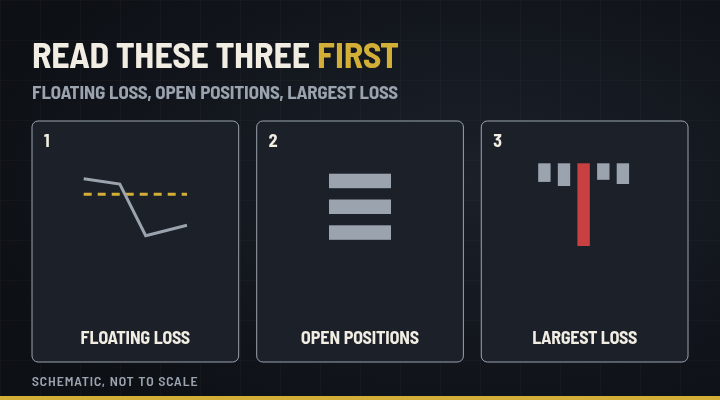
Figure 2. This schematic illustration shows the three report items to read first, with no source data and no real figures.
Before testing another period, clear four common reasons a run fails.
What if the test will not run?
- If the history did not load, request it again for a longer period.
- If the gold symbol is missing, look for your broker's own name in the symbols list.
- If the tester shows no trades, check the date range, chosen symbol, and timeframe.
- If the run stops at once, read the Journal tab.
Once the run works, another period shows how firmly the result holds together.
Make your test harder
Run the same test again on another period. A large change warns you that the setup may be fragile.
Treat that as a reading rule, then judge the run against the firm limits of historical testing.
Keep the limits in view
A live account fills orders differently through slippage, delays, and requotes. Your broker's history can also contain gaps.
A good run is a reason to look further, never a reason to trust.
Your next task is applying this same check to the product you are considering.
Run the same check on Gold Storm PRO
Gold Storm PRO is an Expert Advisor for MetaTrader 5 that trades XAUUSD.
Apply the same check to Gold Storm PRO. Open its product page and run the test version for the Strategy Tester on your own broker's history before you decide.