Snapback Pro EA – complete guide: multi pair reversal grid, every setting, set files by account size

Snapback Pro EA is a mean reversion grid Expert Advisor for forex pairs on MetaTrader 5. It waits for a day on which price runs far beyond the previous day's range and then trades the move back. This post explains how it trades, what every input does, how to set it up and what the set files contain. Product page: https://www.mql5.com/en/market/product/202250
Recommended brokers for Snapback: https://www.mql5.com/en/blogs/post/778007
1. How Snapback trades
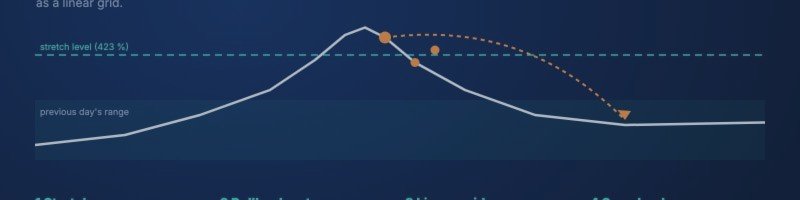
Days on which a pair runs far beyond yesterday's range are rare, and the move often snaps back. Snapback waits for exactly these days, on every pair in its list:
- Stretch: from the previous day's range Snapback builds two levels. In the set files they lie at 423 % of half that range, which is about 112 % of the range beyond yesterday's high or low. The signal is an H1 close beyond a level.
- Confirmation: after the stretch Snapback does not sell the high or buy the low at once. A virtual step follows the move, and a virtual entry order trails the price at a pullback distance (20 pips in the sets, 40–50 on some pairs).
- Entry: when price turns and reaches that virtual order, the first position opens against the stretch.
- Grid: if price keeps going, more positions are added at fixed steps. Lots grow by one start lot every three orders. This is linear, not an exponential martingale. From a set total lot on one side the step widens.
- Exit: once the basket is far enough in profit (measured from its average price), one stop is placed on all positions and trailed until the basket closes.
Three drawdown reduction methods use the profit of newer positions to close the oldest, worst entries early. Details are in section 4.
Please read this first: Snapback is a grid. Single positions have no stop loss, and the supplied set files use no equity stop. Protection comes from enough capital, the limit of 5 pairs at risk at the same time and the basket trailing. A long trend against an open basket causes a deep drawdown, and with too little capital it ends in a stop out.
2. Pairs and set files
One EA on one chart trades all pairs of a set. All three sets are attached to this post:
| Set file | Pairs | Recommended min. equity |
|---|---|---|
| Snapback_3Pairs_2500USD_v1.9.set | GBPCAD, CADJPY, NZDUSD | 2,500 USD |
| Snapback_5Pairs_5000USD_v1.9.set | + NZDCAD, USDCAD | 5,000 USD |
| Snapback_7Pairs_5000USD_v1.9.set | + NZDCHF, EURCHF | 5,000 USD |
| 9 pairs (on request) | + EURUSD, EURNZD | 10,000 USD |
What all sets have in common:
- Attach to one CADJPY M15 chart. CADJPY is part of every set. The dashboard only appears when the chart symbol is in the list.
- Fixed start lot 0.01, no equity stop, at most 5 pairs at risk at the same time.
- All sets use the same magic number (20261016). Run one set per account, not several side by side.
- Each pair has its own timeframe and a few own values in the portfolio line (pullback, grid step, trailing). CADJPY uses fixed lots without the linear increase.
- Not included: EURAUD and EURJPY. Both had very deep drawdowns in the tests.
- Symbol suffix: if your broker names the pairs for example GBPCAD.r , enter .r as the symbol suffix (Portfolio group). The set itself stays the same.
The recommended equity keeps the largest drawdown of the test at or below roughly 35 % of the account. Because only 5 pairs can be at risk at once, the drawdown depends on which pairs hold those slots. That is why the 5-pair set had a deeper drawdown than the 7-pair set.
3. Setup in five minutes
- Use a hedging account. On a netting account Snapback runs in a reduced mode (no drawdown reduction, no pyramiding).
- Open a CADJPY chart and set it to M15.
- Attach Snapback, tick "Allow Algo Trading", load the set file that fits your account size (Inputs → Load).
- Check the Experts log. On start Snapback lists every pair with its timeframe and settings, marks the dashboard pair and prints the magic number and the limit of pairs at risk. A missing symbol, a typo in the portfolio line or a pair listed twice shows up at once.
- Keep the terminal online 24/5. Baskets can stay open for days and the trailing stop is managed by the EA, so a VPS is strongly recommended.
Server time does not matter for the signal: the levels come from the previous day's range and the signal is an H1 close. There is no fixed trading hour to shift.
4. All settings explained
Every setting below is the global default. In portfolio mode each pair can override it in its portfolio line (section "Portfolio"). The values in brackets are the ones in the set files.
General
- Magic number (20261016) and order comment (Snapback).
- Allow buy / sell cycles: both sides on.
- Start new cycles after a cycle ends: on. Off = finish the current basket, then stop.
- Check entries and grid only on a new bar: on. Trailing and partial closes run on every tick only if you switch that on (off in the sets).
- Pip size override: 0 = automatic.
Stretch signal
- Extension level: how far beyond yesterday's range the close must be. Choices from 160 % (inside the upper or lower fifth of the range) to 423 % (about 112 % of the range beyond the high or low). Sets: 423 %.
- Signal timeframe: the timeframe of the closing price and of the virtual steps (H1).
- Move both levels towards the range: in pips or as a price distance. The sets move the levels by 0.0011 (11 pips on CADJPY), so the signal comes slightly earlier.
- Ignore Sunday D1 bars: on, so a short Sunday bar does not become the reference day.
- Skip small reference days: skip days smaller than X × the 20-day average range (off in the sets).
Entry confirmation
- Virtual steps before the entry order: 1. The step distance is the grid step unless set otherwise.
- Count further virtual steps only while the signal is active: on.
- Pullback that triggers the entry: 20 pips (GBPCAD 50, NZDCAD 40). The virtual entry order trails the price in 1-pip steps.
- Drop the virtual state after X hours: 0 = never.
- While new cycles are blocked (pairs at risk, news, time, holiday, drawdown): freeze = keep counting and resume after the block; reset = start over. Sets: freeze.
- Track while a basket is open / re-arm after a cycle: on in the sets. Snapback keeps counting the stretch while a basket is open, so the next entry can be placed as soon as it is allowed.
Grid
- Max positions per pair: 100.
- Grid step: 5 pips (GBPCAD and CADJPY 10).
- Wider step for larger lots: on. Once the open lots of one side reach 5 × the start lot, the step widens to 30 pips.
- Step exponent: 1.0 = constant steps.
- Pyramid: adds start lots in the profit direction while fewer than 3 positions are open (hedging only).
Lots
- Lot progression: linear = + one start lot every 3 orders. Other modes: fixed, additive, multiplier. The multiplier mode is an exponential martingale and is not used in the sets.
- Start lot: 0.01. Start lot from balance: off (optional: one lot step per X of balance).
- Max lot per order: 1.0.
Stops and trailing
- Trailing mode: basket = one stop for all positions, from the average price.
- Trailing start: 25 pips beyond the average price (per pair 30–50).
- Basket stop distance: 20 pips from price (per pair 25–45). In the sets the first stop therefore lands about 5 pips beyond the average price, then it follows the price.
- Never below break-even: when on, the stop is never set below the average price plus costs. Off in the sets; the gap between trailing start and stop distance does that job there.
- Virtual basket SL/TP: off.
- Broker-side emergency stop per position: off (0). It would protect positions while the EA is offline.
Drawdown reduction 1: winners close the worst entry
On a side with at least 4 open positions, the worst entry and all winners are closed together as soon as the result is at least 10 pips × start lot. Other methods: both sides together, first two plus last two orders.
Drawdown reduction 2: worst loser closed by all winners
From 4 positions on one side: when the best single winner exceeds the worst loss by 1 %, the worst loser is closed by all winners.
Drawdown reduction 3: part-close the worst entry
From 4 positions on one side and a last grid lot of 0.02: half of the worst entry is closed together with all winners, if that yields at least 20 pips × start lot. Off on GBPCAD.
Drawdown reduction: common
- Position result used: profit + swap (commission not counted).
- Order of the checks per bar: 1, then 3, then 2.
- No new entry in the bar of a reduction close: on.
In every reduction the losing position is closed first.
Equity stop
Built in, off in all set files. When switched on it closes the EA's positions at a maximum floating loss (% of balance or money), at an account drawdown, or when the margin level falls below a set value, then pauses (until the next day, for X hours, or until RESUME) and can send a push notification.
Filters
- Max spread for entries: 20 pips.
- Max pairs with an unprotected basket: 5. A pair counts as at risk while any of its positions has no stop. Pairs whose basket is already trailed in profit do not count, so new cycles can start there.
- Soft stop: no new cycles above an account drawdown of X % (off).
- Time filter: off. Holiday filter (22 Dec – 5 Jan): off in the sets.
- News filter: on. Uses the MT5 economic calendar (high importance, 60 minutes before and after) and also blocks grid orders. It works live only, not in the Strategy Tester.
Execution and display
Max slippage 3 pips, minimum stop distance if the broker reports 0, estimated exit commission, dashboard on/off, corner and offset, start collapsed, lines for average price, entry and levels on the chart.
Portfolio (several pairs in one EA)
- Portfolio line: SYMBOL:TIMEFRAME:key=value,... separated by ; . Example from the 3-pair set: NZDUSD:H1:wide=30,ts=30,bstop=25 . Short keys: pend pullback, step grid step, wide wider step, ts trailing start, bstop basket stop distance, lotmode , offpips / offprice level offset, cp3 reduction 3 on/off. Three more fields continue the line if it gets long.
- Symbol suffix: added to every symbol.
- Timer: checks all pairs every 1,000 ms, not only on chart ticks.
- Pairs without new cycles: comma separated. Open baskets on those pairs are still managed.
The pair table shows status, open basket and result per pair, a switch "no new cycles" and a CLOSE button per pair.
5. What Snapback does on its own
- One EA, up to 20 pairs, each pair handled separately with its own basket and settings.
- The limit of pairs at risk is account-wide for the magic number. While 5 pairs hold an unprotected basket, no new cycle starts elsewhere; virtual entries are frozen and resume afterwards.
- On a netting account the drawdown reductions and pyramiding are off.
- A pair can be switched off without removing the EA; its open basket keeps running.
- The Experts log prints every pair on start and explains manual closes from the pair table.
6. Backtests
MT5 Strategy Tester, "Every tick based on real ticks", RoboForex ECN data, 01.01.2025 – 09.10.2026, fixed 0.01 start lot, set files above:
| Set | Start balance | Net | Max. drawdown | Profit factor |
|---|---|---|---|---|
| 3 pairs | 1,000,000 USD* | +2,637 USD | 818 USD | 1.68 |
| 5 pairs | 1,000,000 USD* | +3,231 USD | 1,618 USD | 1.47 |
| 7 pairs | 3,000 USD | +3,606 USD | 1,147 USD | 1.59 |
| 9 pairs (on request) | 10,000 USD | +6,014 USD | 1,620 USD | 1.73 |
* Measuring run: with a fixed 0.01 lot the trades do not depend on the balance; the large balance only shows the full drawdown without a stop out. The recommended equity is derived from it (max. drawdown ≤ about 35 %).
What the tests also show:
- All 20 pairs on 3,000 USD reached a stop out in March 2026. More pairs need more capital. Use at least the equity recommended for your set.
- EURAUD and EURJPY are left out of all sets because of their deep drawdowns.
- The test covers less than two years. Past results do not guarantee future results.
Please run your own test on your broker's data with "Every tick based on real ticks".
7. Risk and costs
- No stop loss per order, no equity stop in the sets. A long trend against an open basket is the main risk. The equity stop is there if you want a hard limit; it will turn some drawdowns into realised losses.
- Swap: baskets can stay open for days, including Wednesday's triple swap. Compare the swap on the pairs of your set between brokers.
- Spread and commission: a grid opens many small orders, so the cost per order adds up. Low spreads on the CAD, NZD and CHF crosses matter.
- Correlation: several pairs share CAD or NZD. A strong move in one currency can put several baskets under pressure at the same time; the limit of 5 pairs at risk caps that, it does not remove it.
8. Live
There is no public live signal for Snapback yet. A signal will be linked here and on the product page once it is running. Until then, judge it by the backtests and your own demo test.
9. Support
Post questions in the product comments or send a private message. Please include your broker, account type (hedging or netting), the set file, the symbol suffix if any and the Experts log lines from the day in question.
Risk warning: trading CFDs and forex on margin carries a high risk of loss. Grid trading without a stop loss can lose a large part of the account. Backtests are not a guarantee of future results. The set files are examples, not recommendations.




