
PropDip setup guide: one chart per index, a checked clock, a decision at 16:00 New York

After this guide PropDip runs on your broker's S&P 500, Nasdaq 100 or Dow chart, the panel shows the last cash close with RSI(2) and both averages, and you know what the journal says on a trade day. Time needed: about ten minutes, plus one strategy tester run if you want to see the trades first.
| You get | PropDip on one or more US index charts, with a checked server clock, enough history for the 200 day average and a risk per trade that fits your account. |
| Time | About ten minutes, plus one strategy tester run. |
| You need | MetaTrader 5, PropDip, your broker's US500, NAS100 or US30 cash CFD, an account that allows holding over the weekend, and a terminal or VPS that runs at 16:00 New York. |
What you need
- PropDip installed (after purchase it appears under Market in the Navigator).
- Your broker's US index cash CFDs in Market Watch: US500, NAS100 or US30, or names like SPX500, USTEC, US100, DJ30, WS30. Use the cash CFD, not a forward or futures CFD: those jump at every roll date, and RSI(2) reads the jump as a dip or a rally.
- Algo Trading switched on and a terminal that runs at 16:00 New York on every trading day. That is 22:00 in Central Europe most of the year. A VPS is the simple answer.
- An account that allows holding positions over the weekend. About two thirds of the trades run over a weekend, and that is where the result comes from.
Step 1: one chart per index
PropDip picks the index from the chart symbol and stays idle on anything else (the journal says so). Attach it to one chart per index; the timeframe does not matter, PropDip builds its own daily series from the M30 history. Each index gets its own magic number (base plus 0 for the S&P 500, plus 1 for the Nasdaq 100, plus 2 for the Dow), so three charts in one terminal never touch each other's positions. If your broker uses an unusual name, choose the index in Index chart with another symbol name.
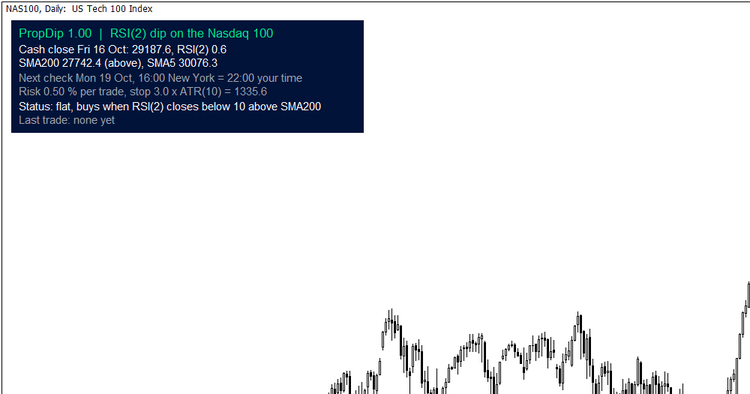
The panel on the Nasdaq 100: last cash close with RSI(2), the 200 and 5 day averages, the next check in your local time, risk, status and last trade.
Step 2: check the start line and the clock
When PropDip starts, it writes one line to the Experts journal, for example:
PropDip 1.00: NAS100, Nasdaq 100, server clock GMT+2/+3 with US DST, 333 cash closes in the history, risk 0.50 % | last cash close Fri 16 Oct 2026: close 29187.6 | RSI(2) 0.6 | SMA200 27742.4 | SMA5 30076.3 | ATR10 445.2
The server clock is how your broker's server time relates to UTC. PropDip needs it to find the 16:00 New York close in the history. Most MT5 brokers run GMT+2 in winter and GMT+3 in summer with the US daylight saving dates, which is the default. In live trading PropDip compares the input with the real offset of the server and corrects it if it does not fit; the journal says so. The number of cash closes must be at least 201. If it is lower, PropDip waits, and the panel shows Loading history. Opening the M30 chart of the symbol and scrolling back usually loads it.
Step 3: risk per trade and the protective stop
By default PropDip sizes every trade so that it loses 0.50 % of equity if the protective stop is hit. The stop sits 3 x ATR(10) of the cash session below the entry, on average about 5 % away on the Nasdaq 100 and about 3 % on the S&P 500 and the Dow, and it is sent with the order. In the tests 7 to 11 % of the trades ended at the stop.
The three indices usually signal on the same day. If you run all three, a bad week hits all three positions, so set the risk per chart with the total in mind. At 0.5 % per chart the research saw about +1.0 % a year on 2000 to 2018 and +1.7 % a year on 2019 to 2026, with a largest drawdown of 3.6 % and 2.0 %. That is a small return at a small risk, and I would rather you know it before you buy.
The other sizing modes: Position value sets the position to a share of equity (100 % = one times the account in index exposure; then a full stop costs 3 to 5 %), and Fixed lots.
Step 4: what happens at 16:00 New York
Once a day, between 16:00 and 16:15 New York, PropDip takes the close of the cash session and decides:
- A position is open and the close is above the 5 day average, or it has been held for 20 closes: it sells.
- No position, RSI(2) is below 10 and the close is above the 200 day average: it buys. This can happen on the same day as an exit, exactly as in the tested rule.
- Otherwise nothing happens until the next day.
On US holidays and half days (Black Friday, Christmas Eve) there is no cash close at 16:00, and PropDip skips the day. After a stop it does not buy again on the same trading day.
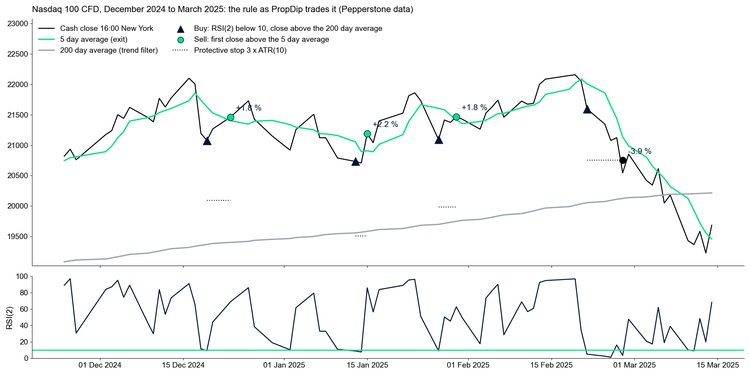
The rule on the Nasdaq 100 from December 2024 to March 2025: three exits above the 5 day average and one stop in the February 2025 sell off.
Step 5: try it in the strategy tester first
Select your broker's US500, NAS100 or US30 symbol, the model 1 minute OHLC or Every tick based on real ticks, and a start date at least one year after the first data of the symbol, because the 200 day average needs the history. Set Broker server clock to your broker's clock; the tester cannot check it. If a long test ends with "0 ticks generated", split it into blocks of three to four years.
Check the broker data before you trust a test: on my broker the S&P 500 history before 2020 had no cash session at all, so PropDip found no closes there. On any other symbol the tester runs a demo schedule with one trade every weekday, so you can watch the order handling. That run says nothing about the strategy.
The inputs that matter
| Input | Default | What it does |
|---|---|---|
| Sizing mode | Risk % of equity | Risk at the protective stop, position value in % of equity, or fixed lots. |
| Risk per trade | 0.50 | % of equity lost if the protective stop is hit, 0.01 to 5. |
| Position value | 100 | % of equity, only in sizing mode Position value. |
| Fixed lots | 0.10 | Only in sizing mode Fixed lots. |
| Protective stop | 3.0 | Multiples of the 10 day ATR of the cash session, 1 to 10. The tests used 3. |
| Entry waits while the spread is wider | 5 | Basis points of price. |
| Maximum slippage for market orders | 50 | Points. |
| Index chart with another symbol name | Detect | S&P 500, Nasdaq 100 or Dow for unusual names. |
| Broker server clock | GMT+2 / GMT+3 with US DST | Needed in the tester; live trading checks and corrects it. |
| Magic number | 26020100 | Plus 0, 1 or 2 by index. |
| Journal: daily values | false | One line with close, RSI(2), both averages and ATR at every cash close. |
The rule itself (RSI(2) below 10, the 200 and 5 day averages, the 20 close limit) has no inputs. These are the tested values, and I left no knobs to tune them into a nicer backtest.
Typical journal lines
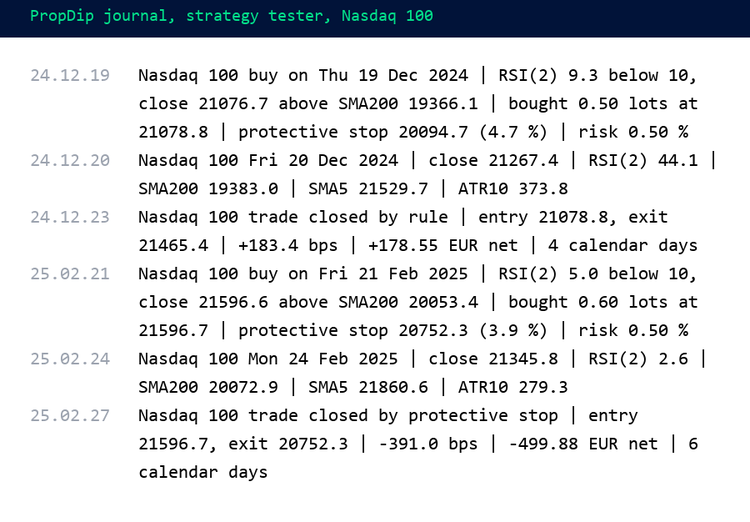
Two trades from the strategy tester on the Nasdaq 100: an exit by the rule after four days and a stop in February 2025.
- ... buy on Thu 19 Dec 2024 | RSI(2) 9.3 below 10, close ... above SMA200 ... | bought ... | protective stop ... | risk 0.50 %: the entry with its reason, size and stop.
- ... exit on ... | close ... above SMA5 ... and ... trade closed by rule | ... | +183.4 bps | +178.55 EUR net: the exit and the result after commission and swap.
- ... trade closed by protective stop or ... by hand or broker: the position ended before the rule exit.
- ... buy signal ... skipped, ...: the reason why a signal was not traded (AutoTrading off, market closed, size below the broker minimum, not enough margin, netting account with another position).
Get it: PropDip on the Market · the research behind it: RSI(2) dip buying on US index CFDs · guards the account while it runs: PropGuardian
Questions: the Comments tab of the product or a message.
More guides: my blog · Tools for prop firm accounts: all my products
Past results do not guarantee future results. Test on a demo account first.




