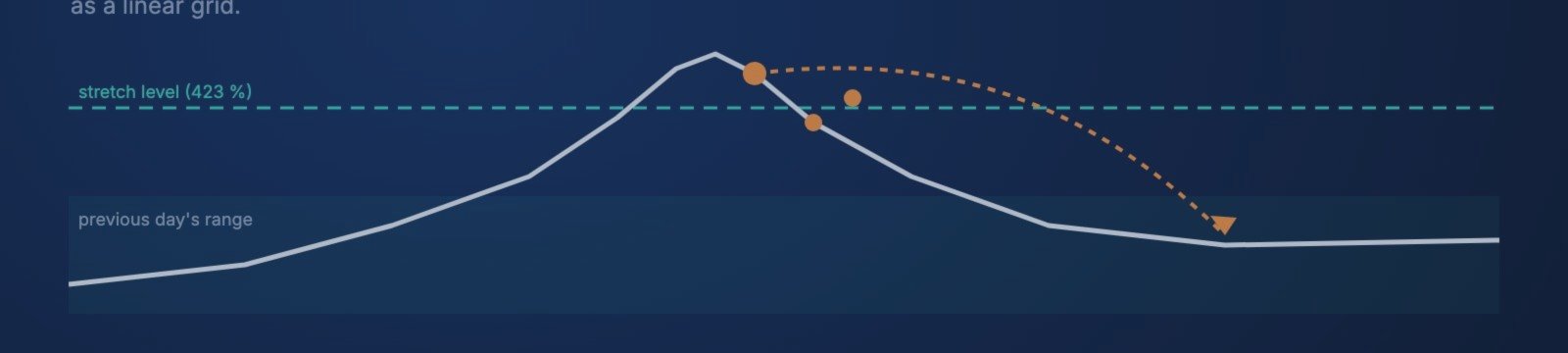

Snapback waits until a forex pair runs far beyond the previous day's range and then trades the move back as a linear grid. One EA on one chart trades up to 20 pairs. That makes five broker properties matter more than anything else:
- Hedging account. Snapback needs it for the full feature set. On a netting account the drawdown reductions and pyramiding are off.
- Low spreads and commission on FX crosses. The sets trade CAD, NZD and CHF crosses such as GBPCAD, CADJPY, NZDCAD and NZDCHF. A grid opens many small orders, so the cost per order adds up.
- Swap. A grid basket can stay open for days, including Wednesday's triple swap. The swap on the pairs of your set is part of the cost.
- VPS 24/5. The basket trailing stop is managed by the EA and baskets run overnight, so the terminal has to stay online.
- Server time does not matter. The levels come from the previous day's range and the signal is an H1 close. There are no fixed trading hours to shift.
These are the two brokers I recommend for Snapback. Disclosure: the links below are my affiliate links. If you open an account through them, I receive a commission. Your conditions stay the same.
To be clear: Snapback's MT5 real-tick backtests were run on RoboForex ECN data. I have not published tests on IC Markets or BlackBull data. Please run the set file on your broker's data before going live.
🥇 IC Markets – Raw Spread
- Raw Spread: spreads from 0.0 pips, commission 3.50 USD per lot per side (MT)
- MT4, MT5, cTrader, TradingView
- Regulation: ASIC (Australia), CySEC (EU), FSA (Seychelles). EU clients are served through the CySEC entity.
- Free VPS from 15 lots per month
👉 Open an IC Markets Raw Spread account: https://icmarkets.com/?camp=93107
🥈 BlackBull Markets – ECN Prime
- ECN Prime: spreads from 0.0 pips, commission 3.00 USD per lot per side
- MT4, MT5, cTrader, TradingView
- No minimum deposit (200 USD recommended; Snapback's sets need 2,500 USD and more)
- Free VPS from 2,000 USD deposit and 20 lots per month
- Regulation: FSP register New Zealand, FSA Seychelles
- ⚠️ Clients outside New Zealand are served by the Seychelles entity (FSA). There is no EU investor protection: no ESMA leverage limits and no EU compensation scheme.
👉 Open a BlackBull ECN Prime account: https://go.blackbull.com/visit/?bta=43289&brand=blackbull
What to check on any broker
- Account type: MT5 hedging. Check it in the account details before you attach the EA.
- Spread on the crosses: compare GBPCAD, CADJPY, NZDCAD, NZDUSD, NZDCHF, EURCHF and USDCAD at quiet and busy times. The sets skip entries above 20 pips spread.
- Swap: check the long and short swap for 1 lot on every pair of your set in the symbol specification. Baskets can be held over several nights, triple swap day included.
- Symbol names: if the broker adds a suffix (for example GBPCAD.r ), enter it as the symbol suffix in the Portfolio group. The set file stays the same.
- Leverage and margin: a grid adds positions while price moves against it. Make sure your margin allows the recommended equity for your set to work.
- VPS: close to the broker's server, online 24/5.
- Run the set file in the Strategy Tester on your broker's data with "Every tick based on real ticks" before going live.
Conditions as published by the brokers on 30.09.2026; they can change. Full guide to Snapback: https://www.mql5.com/en/blogs/post/778006 Product page: https://www.mql5.com/en/market/product/202250
Risk warning: trading CFDs and forex on margin carries a high risk of loss. Snapback is a grid without a stop loss per order; the set files use no equity stop.




