
PropCorrelation setup guide: when three positions are one bet

After this guide PropCorrelation sits on one chart of your account, you can read its headline in two seconds, and you know what the numbers in the matrix do and do not tell you. Time needed: about five minutes.
| You get | A matrix on your chart that tells you which open positions are one bet, and what that bet risks to its stops. |
| Time | About five minutes. |
| You need | MetaTrader 5 and PropCorrelation (free). |
What you need
- PropCorrelation installed (free; after download it appears under Market in the Navigator).
- Bar history for your symbols on the timeframe it uses (default H1). The terminal loads it on first use; the first matrix can take a few seconds.
Step 1: attach it to one chart
PropCorrelation reads the whole account, so one chart is enough. Drag it onto any chart and click OK; the defaults work. With no position open, the panel shows the watchlist. With positions open, it shows them.
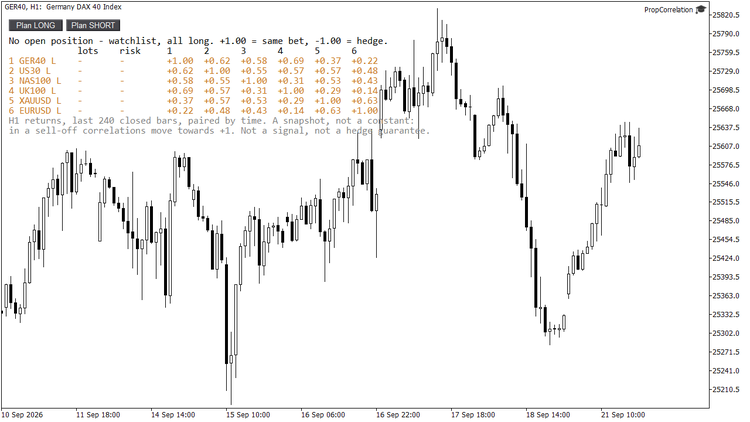
No position open: the watchlist takes the place of the book.
Step 2: read the headline
The first line is the summary. Three cases:
- ONE BET: NAS100 S + US30 S + GER40 S = 0.12% at risk: these positions are linked above the threshold, and together they risk 0.12 percent of equity to their stops. That is one trade, whatever the position list says.
- No pair above 0.70, the open positions are separate bets: nothing is clustered.
- ... > LIMIT in red: the largest cluster risks more than the limit you set, and the alert has fired.

Three index shorts: linked above 0.70, so the headline adds them up as one bet of 0.12 percent.
Step 3: read the matrix
Every row is a position: number, symbol, direction (L or S), lots, risk to the stop. The columns to the right are the correlations with the other rows, signed by direction. +1.00 means the two win and lose together, -1.00 means one hedges the other. A long and a short in the same market show -1.00. A position without a stop shows NO STOP in red, because its risk is not a number anyone can add up.
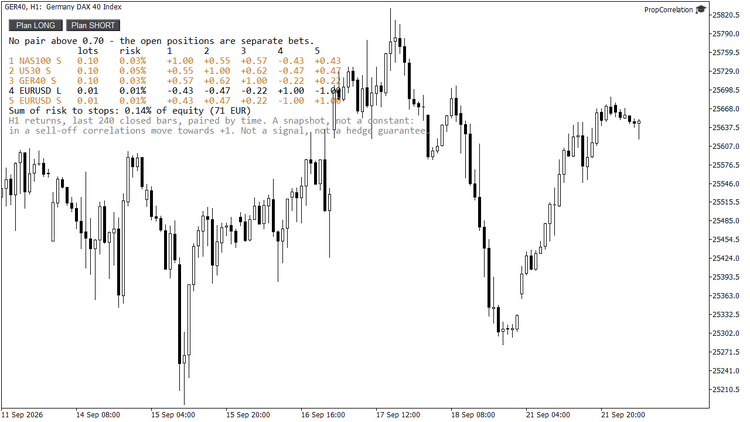
A long and a short in EURUSD show -1.00: direction is part of the number.
The two grey lines under the matrix say how it was calculated: H1 returns, last 240 closed bars, paired by time. Pairs with fewer than 30 shared returns show n/a.
Step 4: the cluster limit and the alert
Input Alert when the largest cluster risks more than this % (default 1.00). When the cluster's combined risk exceeds it, the headline turns red and an alert fires, as popup, push notification or both. PropCorrelation never closes or sizes anything; the number is for you.
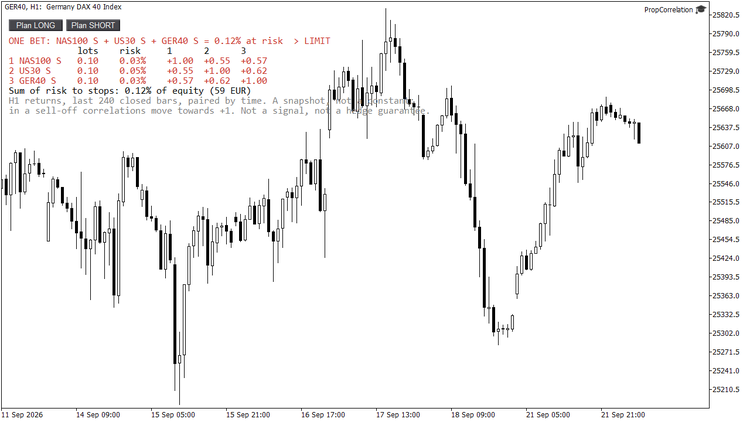
Cluster limit 0.10 percent: the headline turns red and the alert fires.
For push notifications on your phone, enter your MetaQuotes ID under Tools, Options, Notifications in the terminal.
Step 5: plan a trade before you click
The two buttons in the panel, Plan LONG and Plan SHORT, add the chart symbol to your book as a hypothetical position and show what the cluster would become. Click again to remove it. Use it before the entry, not after.
What the number is and is not
A correlation over two weeks of hourly returns is a snapshot. It changes, and in a sell-off the correlations between indices move towards +1, exactly when it matters. Read the matrix as a risk mirror: it tells you what your book looks like today. It does not predict direction, and a negative number is not a guaranteed hedge.
The inputs that matter
| Input | Default | What it does |
|---|---|---|
| Return timeframe | H1 | Bars whose returns are correlated. |
| Closed bars used | 240 | Window length; 240 H1 bars are about two weeks. |
| Minimum matched returns per pair | 30 | Below this a pair shows n/a. |
| Correlation from which positions count as ONE bet | 0.70 | Cluster threshold. |
| Recalculate every N seconds | 30 | Plus every trade event. |
| Risk in % of | equity | Equity or balance as the basis for the risk column. |
| Alert when the largest cluster risks more than this % | 1.00 | 0 switches the alert off. |
| Popup / push | on / off | Alert channels. |
| Watchlist | EURUSD,GBPUSD,USDJPY,XAUUSD | Shown, all long, while no position is open and in the tester. |
| Panel corner, X, Y, font size, colours | left upper, 12, 60, 9, auto | Layout. |
Get it: PropCorrelation on the Market (free) · sizes the single trade: PropSizer
Questions: the Comments tab of the product or a message.
More guides: my blog · Tools for prop firm accounts: all my products