QRM Risk Calculator is a position-sizing and margin calculation utility for MetaTrader 5 designed to support trade preparation before an order is entered.
Its purpose is specific: determine a trading volume compatible with a selected percentage risk, a stop-loss distance, current account data, symbol specifications, and the margin constraints configured by the user.
The product calculates BUY and SELL separately, because Bid and Ask prices, account-currency conversion, and broker calculation rules may produce different monetary results for the two directions.
QRM Risk Calculator does not generate trading signals and does not execute orders. The calculated volume remains under the user's control and must be transferred manually into the trading workflow.
1. What QRM Risk Calculator calculates
The starting point is the requested risk percentage.
The monetary risk budget is calculated from the account balance:
Requested monetary risk = Balance × Risk / 100
The calculator then uses the stop-loss distance and current broker data to determine a compatible volume separately for BUY and SELL.
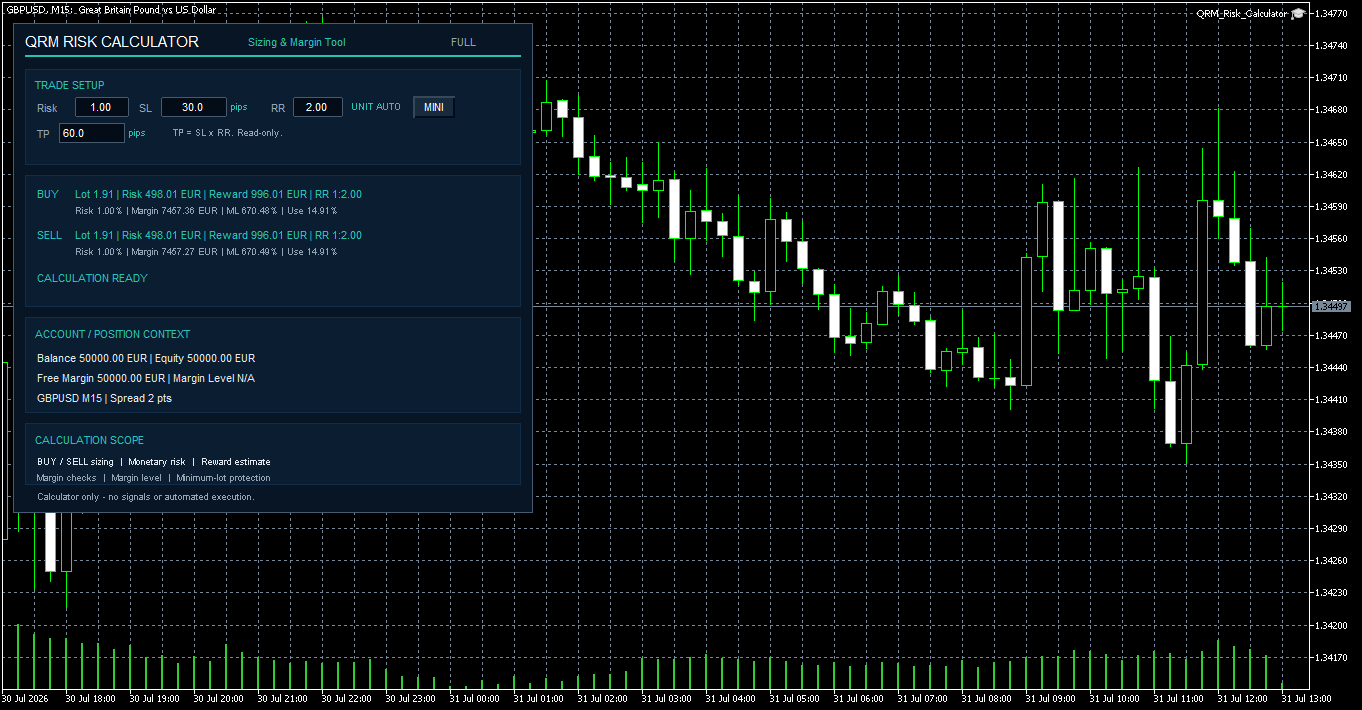
For each direction, the panel can display:
• Lot — normalized trading volume
• Risk — estimated monetary loss at the theoretical stop-loss price
• Reward — theoretical monetary profit at the take-profit price
• RR — effective monetary reward/risk ratio
• Risk % — effective monetary risk as a percentage of balance
• Margin — estimated margin required for the calculated volume
• ML — internal pre-trade margin-level projection based on current margin and estimated new margin
• Use — percentage of current equity absorbed by the new margin
The theoretical take-profit distance is calculated automatically:
TP distance = SL distance × RR
TP is displayed as a read-only field.
2. Conservative position sizing
A percentage such as 1% does not automatically mean that the final position will use exactly 1% of the balance.
The calculated volume must comply with the broker's minimum volume, maximum volume, and volume step.
QRM Risk Calculator normalizes volume according to these specifications.
The volume is not rounded upward when doing so would cause the effective monetary risk to exceed the requested risk budget.
For this reason, the effective monetary Risk shown in the BUY or SELL row is the operational reference that should be checked before using the calculated volume.
If the theoretical volume exceeds the maximum permitted by the broker, the calculator applies the maximum volume and reports:
READY - MAX LOT LIMIT APPLIED
In that situation, the effective risk can be lower than the percentage originally requested.
3. AUTO, PIPS and POINTS
Different instruments cannot always be handled correctly by assuming that every distance is expressed in pips.
QRM Risk Calculator therefore provides three distance modes.
AUTO
For Forex symbols, distances are interpreted in pips.
For other instruments, distances are interpreted in MetaTrader 5 points.
PIPS
Forces SL and TP distances to be interpreted in pips.
POINTS
Forces SL and TP distances to be interpreted in MetaTrader 5 points.
This distinction becomes especially important when moving from Forex to instruments such as metals, indices, energy products, cryptocurrencies, or CFDs.
The same numerical distance does not necessarily represent the same monetary risk on different symbols because contract size, tick value, quotation format, and other broker specifications may differ.

Fig. 2 — AUTO mode on SpotBrent: SL and TP distances are handled in MetaTrader 5 points for a non-Forex instrument.
4. Why BUY and SELL are calculated separately
It may be tempting to assume that one position-size calculation is sufficient for both directions.
QRM Risk Calculator does not make that assumption.
The BUY and SELL calculations are performed independently because several elements may differ:
• current Bid and Ask prices
• account-currency conversion
• symbol calculation rules
• broker specifications
As a result, BUY and SELL may occasionally show slightly different lot sizes, monetary risk, reward, or margin values.
This is expected behaviour rather than an inconsistency in the calculation.
5. Margin is part of the pre-trade calculation
Position sizing based only on stop-loss risk does not describe the complete impact of a proposed position on the account.
QRM Risk Calculator therefore also evaluates margin.
The estimated new margin is calculated using the MetaTrader 5 broker calculation environment.
The tool evaluates three important elements.
Required Margin
The estimated margin required for the new calculated volume.
Projected Margin Level
An internal pre-trade projection of the margin level based on current account equity, current margin and the estimated margin required for the proposed trade:
Projected ML = Equity / (Current Margin + Estimated New Margin) × 100
This is a pre-trade projection. The actual post-execution margin level remains subject to the broker's margin calculation rules and account conditions.
The default minimum projected margin level is:
300%
New Trade Margin Usage
The percentage of current equity that would be absorbed by the new margin:
Use = New Margin / Equity × 100
The default maximum new-trade margin usage is:
25%
The calculator also verifies whether sufficient free margin is available.
6. Safety blocks are part of the calculation
QRM Risk Calculator can refuse to provide an operational result when the requested setup is incompatible with available broker, account, price, or margin constraints.
This is intentional.
A blocked calculation should be interpreted by reading the displayed status code rather than by forcing a volume manually.
RISK_BELOW_MIN_LOT
This condition occurs when the theoretical volume required to respect the requested risk is below the broker's minimum tradable lot.
QRM Risk Calculator does not automatically force the minimum lot because doing so could exceed the monetary risk selected by the user.
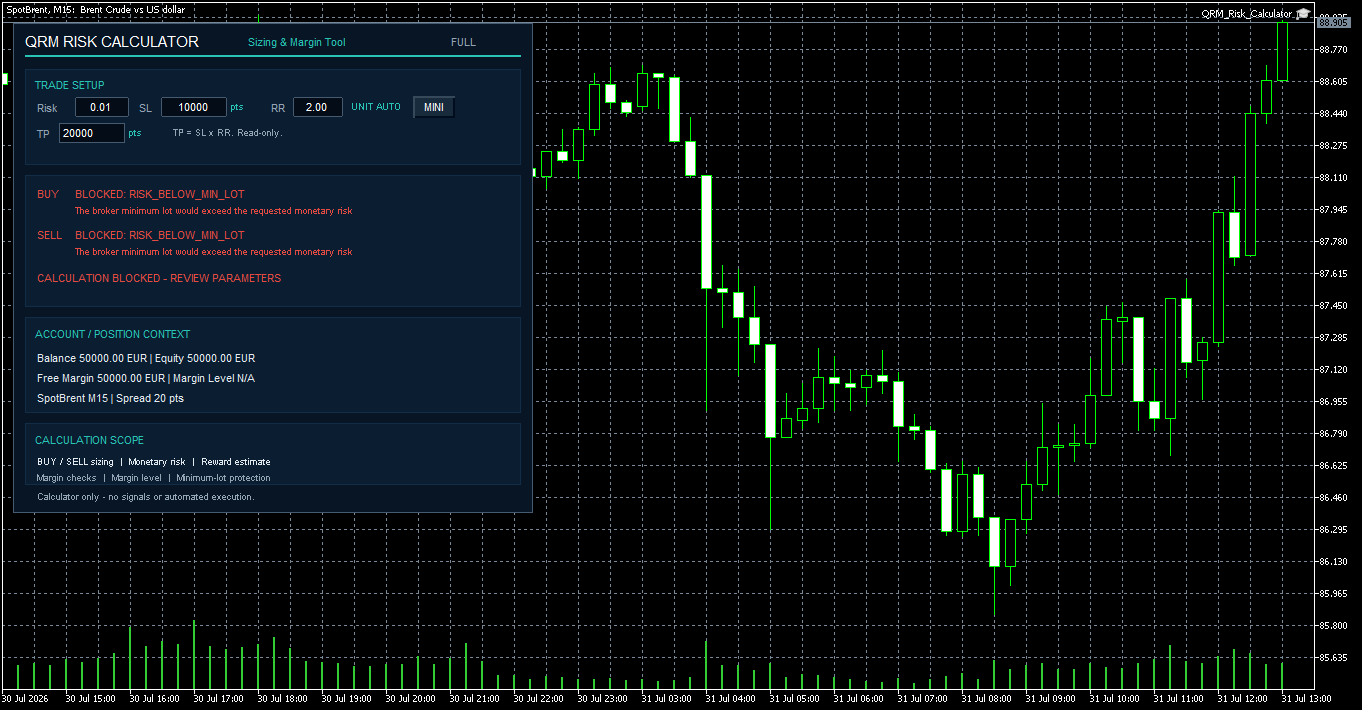
The correct response is not necessarily to increase the risk. Risk or SL should only be changed if that modification is consistent with the trader's original plan.
7. Margin-related blocks
QRM Risk Calculator includes several margin-related protection states.
MARGIN_LEVEL
This state is displayed when QRM's internal pre-trade projected margin level falls below the configured minimum.
MARGIN_USAGE
This state is displayed when the margin required for the proposed trade would absorb more than the configured maximum percentage of equity.
A margin block does not indicate a trading signal. It only means that the calculated position is not compatible with the configured margin constraints.
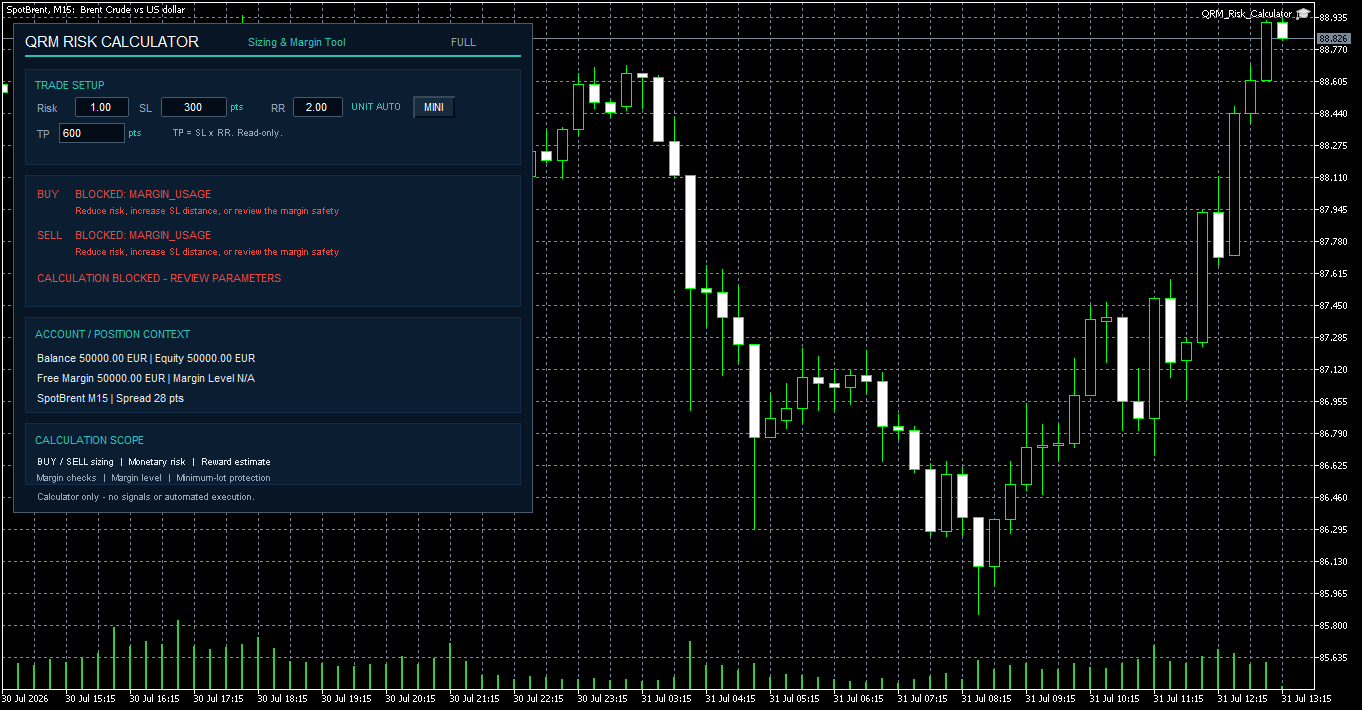 Fig. 4 — MARGIN_USAGE: the proposed position would exceed the configured maximum new-trade margin allocation.
 INSUFFICIENT_FREE_MARGIN
This state occurs when the estimated new margin for the calculated volume exceeds the currently available free margin under QRM's pre-trade margin check.
In this situation, QRM Risk Calculator does not present the result as operationally available. Actual margin treatment remains subject to the broker's margin rules and account configuration.
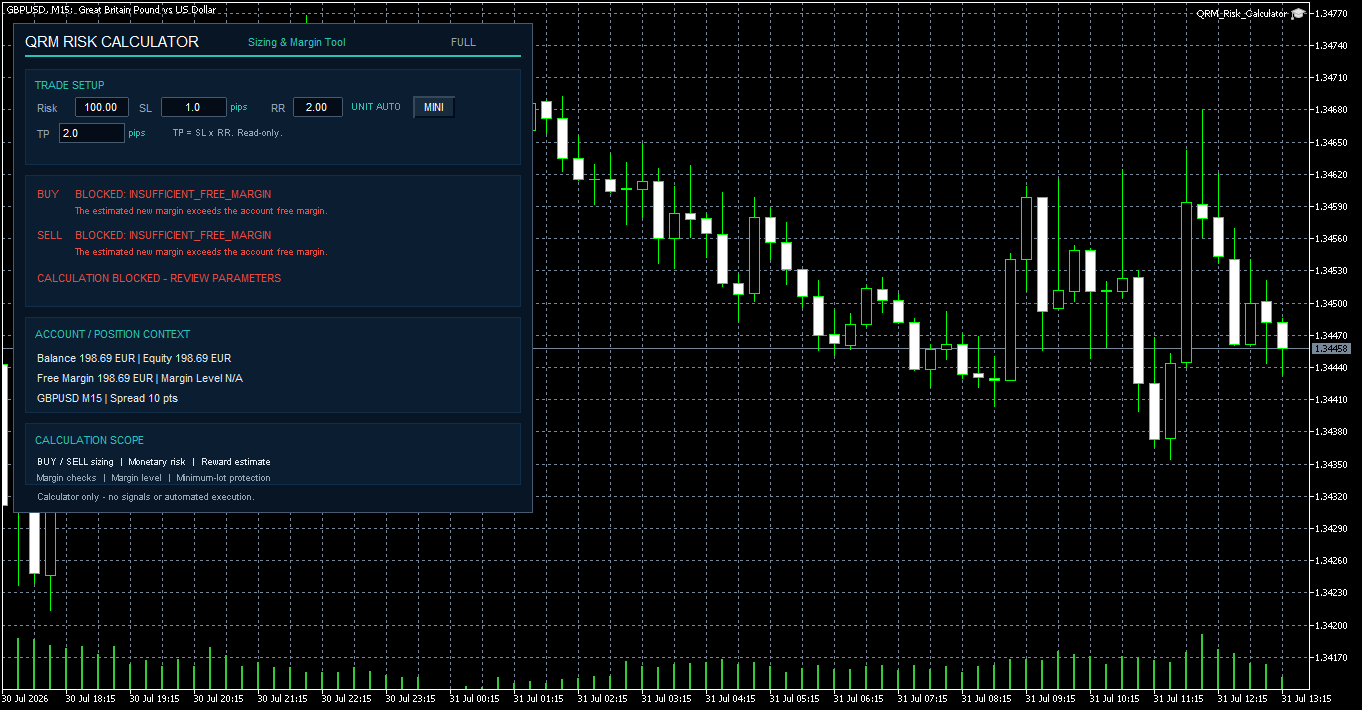
Fig. 5 — INSUFFICIENT_FREE_MARGIN: the estimated required margin exceeds the available free margin.
8. Invalid price ranges
Some combinations of stop-loss distance and risk/reward ratio can imply an invalid or non-positive theoretical price.
In this situation, QRM Risk Calculator reports:
INVALID_SL_RANGE
The entered value is not silently replaced or corrected. The invalid setup remains visible so that the user can review the parameters directly.
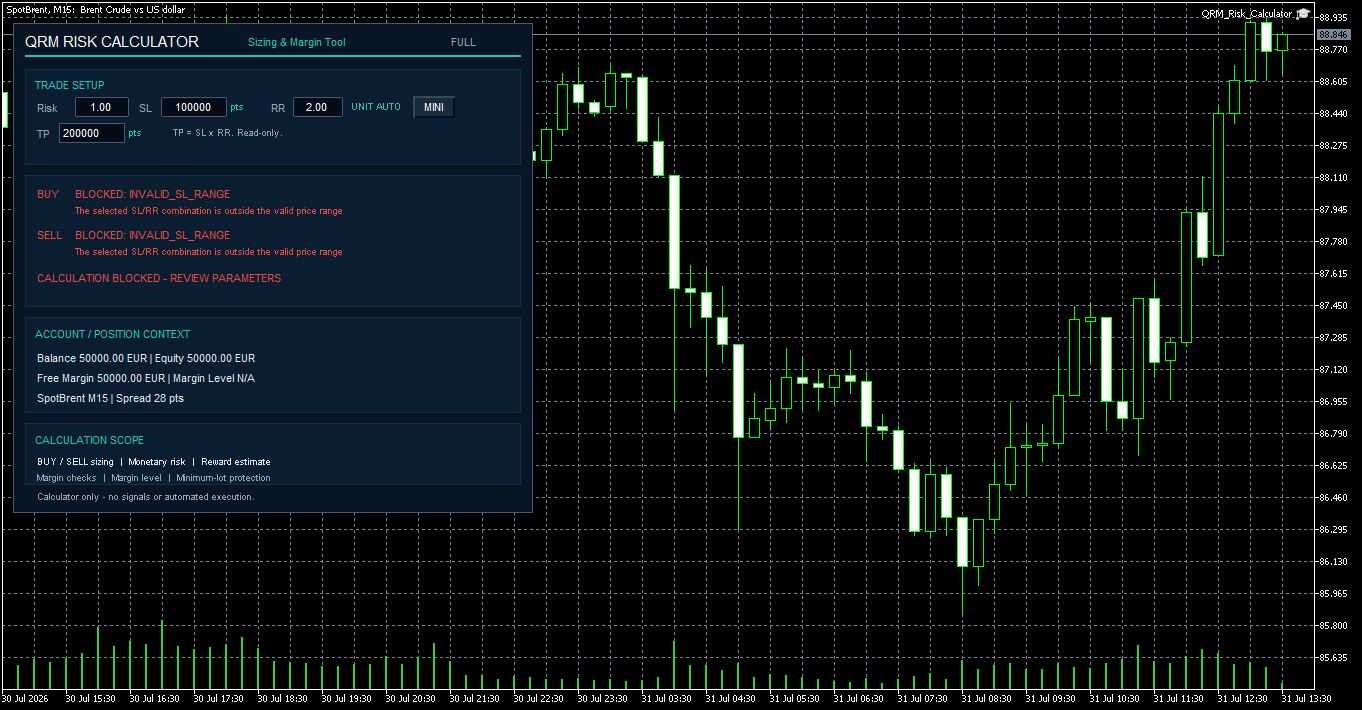
Fig. 6 — INVALID_SL_RANGE: the selected SL/RR configuration produces an invalid theoretical price range.
9. FULL and MINI interface
QRM Risk Calculator provides two panel layouts.
FULL
The FULL panel shows the extended operating context, including:
• Risk, SL, distance unit, RR, and read-only TP
• BUY and SELL calculations
• calculation status
• account balance and equity
• free margin
• symbol and timeframe
• spread
• calculation scope
MINI
The MINI panel reduces the chart footprint while keeping the essential operational information:
• Risk
• SL
• distance unit
• RR
• TP
• BUY and SELL calculations
• current calculation status
When RememberPanelMode=true , the FULL/MINI choice is remembered separately for each chart.
When RememberTradeInputs=true , Risk, SL, and RR can also be remembered for the individual chart.
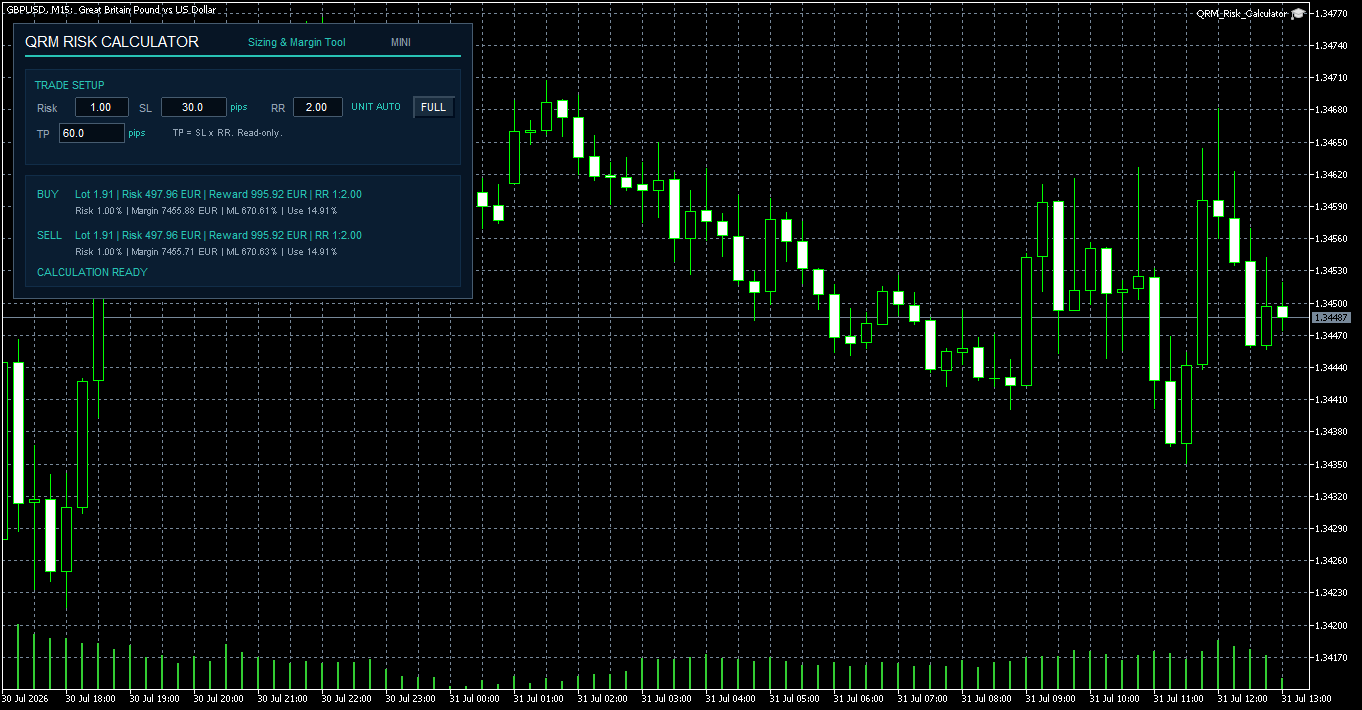 Fig. 7 — QRM Risk Calculator MINI panel: a compact view that retains the essential position-sizing and risk-calculation information.
10. Configuration inputs
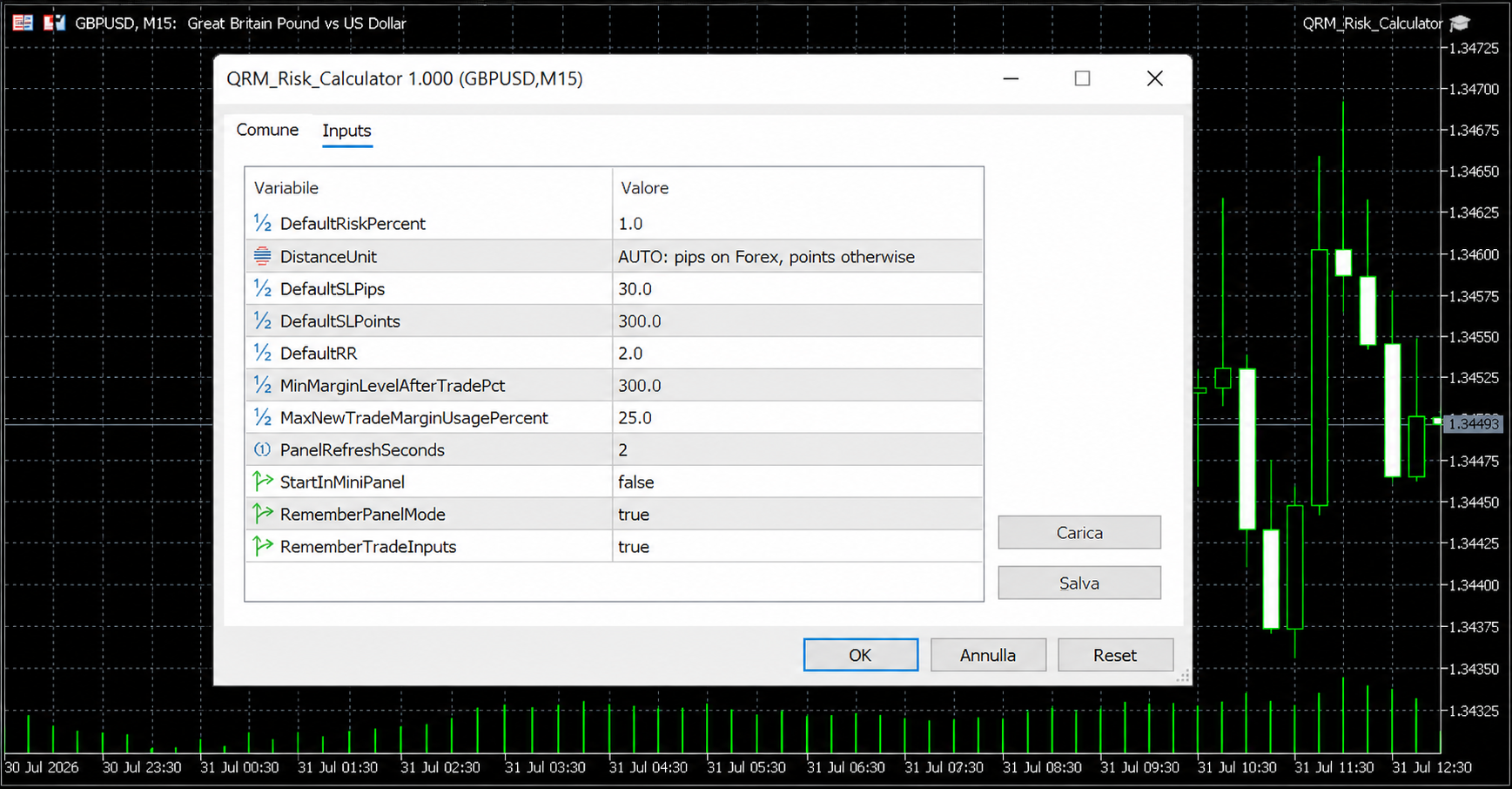
QRM Risk Calculator v1.000 provides eleven configuration inputs.
For normal use, Risk, SL, and RR can be changed directly from the panel, while the Inputs define defaults, distance units, margin thresholds, refresh behaviour, and persistence.
The available parameters are:
• DefaultRiskPercent
• DistanceUnit
• DefaultSLPips
• DefaultSLPoints
• DefaultRR
• MinMarginLevelAfterTradePct
• MaxNewTradeMarginUsagePercent
• PanelRefreshSeconds
• StartInMiniPanel
• RememberPanelMode
• RememberTradeInputs
The default configuration includes:
• Risk: 1.00%
• Distance Unit: AUTO
• Forex SL: 30.0 pips
• Non-Forex SL: 300 MT5 points
• RR: 2.00
• Minimum projected Margin Level: 300%
• Maximum new-trade margin usage: 25%
• Panel refresh: 2 seconds
Margin thresholds should only be changed after their implications have been verified, preferably on a demo account.
11. Recommended operating workflow
A typical workflow is straightforward.
- Open the desired symbol and timeframe.
- Apply QRM Risk Calculator to the chart.
- Verify the displayed account, symbol, and timeframe.
- Set Risk, SL, and RR.
- Check the effective distance unit.
- Wait for the calculation to update.
- Read BUY and SELL separately.
- Verify Lot, Risk, Reward, Margin, ML, and Use.
- Check the current calculation status.
- Transfer the calculated volume manually only after the result has been verified.
The operational reference is the effective monetary risk shown in the BUY or SELL row, not only the percentage entered by the user.
For a newly used broker or symbol, the calculation should first be verified on a demo account.
12. What QRM Risk Calculator intentionally does not do
The functional scope of QRM Risk Calculator v1.000 is deliberately defined.
The product does not:
• generate entry or exit signals
• decide trade direction
• send BUY or SELL orders
• open, modify, or close positions
• aggregate portfolio risk
• aggregate the risk of existing open positions
• calculate total currency exposure
• manage prop-firm daily or maximum drawdown
• generate CSV audit files or trading reports
The absence of signals and automated execution is intentional.
QRM Risk Calculator calculates and verifies. The trading decision and the order remain under the user's control.
13. Before using a calculated volume
Before transferring a calculated lot size into an order, verify:
• the correct account and server
• the correct account currency
• the correct symbol and timeframe
• Risk, SL, and RR
• the effective monetary risk shown for the selected direction
• broker minimum, maximum, and volume step
• any MAX LOT LIMIT APPLIED status
• Margin
• internal projected ML
• Use
• available free margin
When using a new broker or symbol, an independent demo-account verification is recommended.
Risk warning
QRM Risk Calculator is a calculation and operational-support tool.
It does not constitute financial advice, does not generate trading signals, does not guarantee profits, and does not eliminate trading risk.
Results depend on data supplied by MetaTrader 5 and the broker, including prices, symbol specifications, tick value, margin rules, minimum and maximum volume, volume step, and the availability of calculation functions.
Every trading decision and every manually entered order remain the responsibility of the user.
QRM Risk Calculator
QRM Risk Calculator on MQL5 Market