

Haven Currency Strength — User Guide and FAQ
1. Before You Start
Haven Currency Strength helps you quickly see the relative strength of the eight major currencies, find pairs with a noticeable strength difference, and compare the situation across M15, H1, and H4.
The workflow is simple: first look at the overall market picture, then select a pair of interest, evaluate the Differential and MTF context, and only then move to the price chart.
| Main idea Overview → Strong / Weak → Top Pairs → Differential → MTF Context → Pair Focus → Open Chart |
The indicator is designed for relative-strength analysis and pair selection. It does not determine the entry point, Stop Loss, or position size.
Quick Start
- Add Haven Currency Strength to a MetaTrader 5 chart.
- For the first launch, leave Calculation timeframe = Current.
- Wait for the READY status.
- Check the Primary value at the top of the panel.
- Open Overview and find the strongest and weakest currencies.
- Select one of the Top Pairs.
- In Pair Focus, check the Differential, M15 / H1 / H4, and history.
- Click Open Chart to open the pair's price chart.
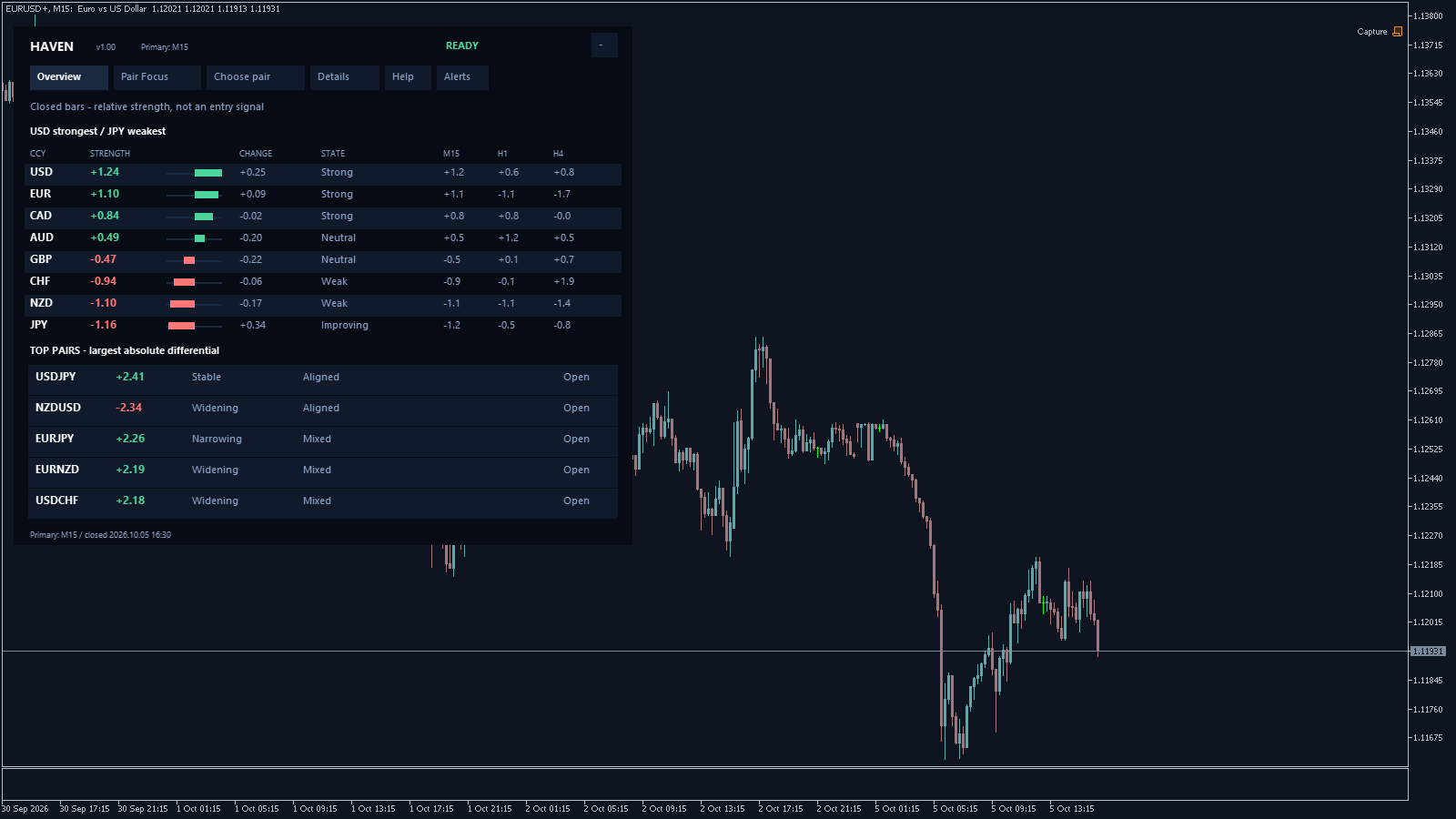
| For your first introduction: use EURUSD on M15 or H1, keep the default settings, and first become familiar with Overview and Pair Focus only. |
1. Overview — the overall currency market picture
The Overview tab displays eight major currencies:
USD, EUR, GBP, JPY, CHF, AUD, CAD, and NZD.
They are automatically ranked from strongest to weakest based on the selected Primary.
The calculation takes into account the relationships between 28 major currency pairs. USD is not used as a separate base against which all other currencies are measured.
Strength — relative currency strength
The higher the Strength value, the higher the currency ranks in the current comparison.
The compact bars next to the values make it easy to compare currencies at a glance.
| Important: Strength is a relative measure within the FX basket. It is not a percentage price change and not a probability of future movement. |
For example, Strength +1.20 does not mean that the currency has risen by 1.20%. A negative value also does not mean that the currency must continue falling.
Change — how strength is changing
Change shows the change in relative strength over three closed bars of the calculation timeframe.
- Positive value — the currency was gaining strength.
- Negative value — the currency was losing strength.
- Value near zero — the change was small.
Strength shows the current position, while Change shows how that position is developing.
Therefore, a strong currency may already be weakening, while a weak currency may be starting to recover.
State — a short description of the current condition
| State | What it means |
|---|---|
| Strong | The currency is in the strong zone without sufficiently pronounced weakening. |
| Weak | The currency is in the weak zone without sufficiently pronounced recovery. |
| Weakening | The currency is still strong but is already noticeably losing relative strength. |
| Improving | The currency is still weak but is already noticeably recovering. |
| Neutral | Strength is within the neutral zone. |
Improving does not mean that the currency has already become strong. Weakening also does not mean that it has already become weak.
| State thresholds Strong area: from +0.50 Weak area: from -0.50 Weakening: Change below -0.10 Improving: Change above +0.10 |
The values shown in the interface are rounded, while State is determined using the full value. Therefore, a displayed value of +0.10 may theoretically be slightly above +0.10 internally.
2. Top Pairs — which pairs are worth checking
Below the currency list, Haven displays Top Pairs — the five pairs with the largest absolute strength difference.
In compact mode, three pairs are shown first; the remaining pairs are available through the All 5 button.
| Top Pair means: there is currently a noticeable relative-strength difference between the two currencies, so the pair may be worth opening for further analysis. |
| Top Pairs are not trading signals. The list does not rank future profitability and does not tell you which trade to open. |
The same currency may appear in several Top Pairs at the same time.
For example, pronounced EUR weakness may highlight EURAUD, EURUSD, and EURGBP at the same time. This represents one common currency factor rather than necessarily three independent trading ideas.
Through Choose pair, you can select any of the 28 major FX pairs regardless of whether it appears in Top Pairs.
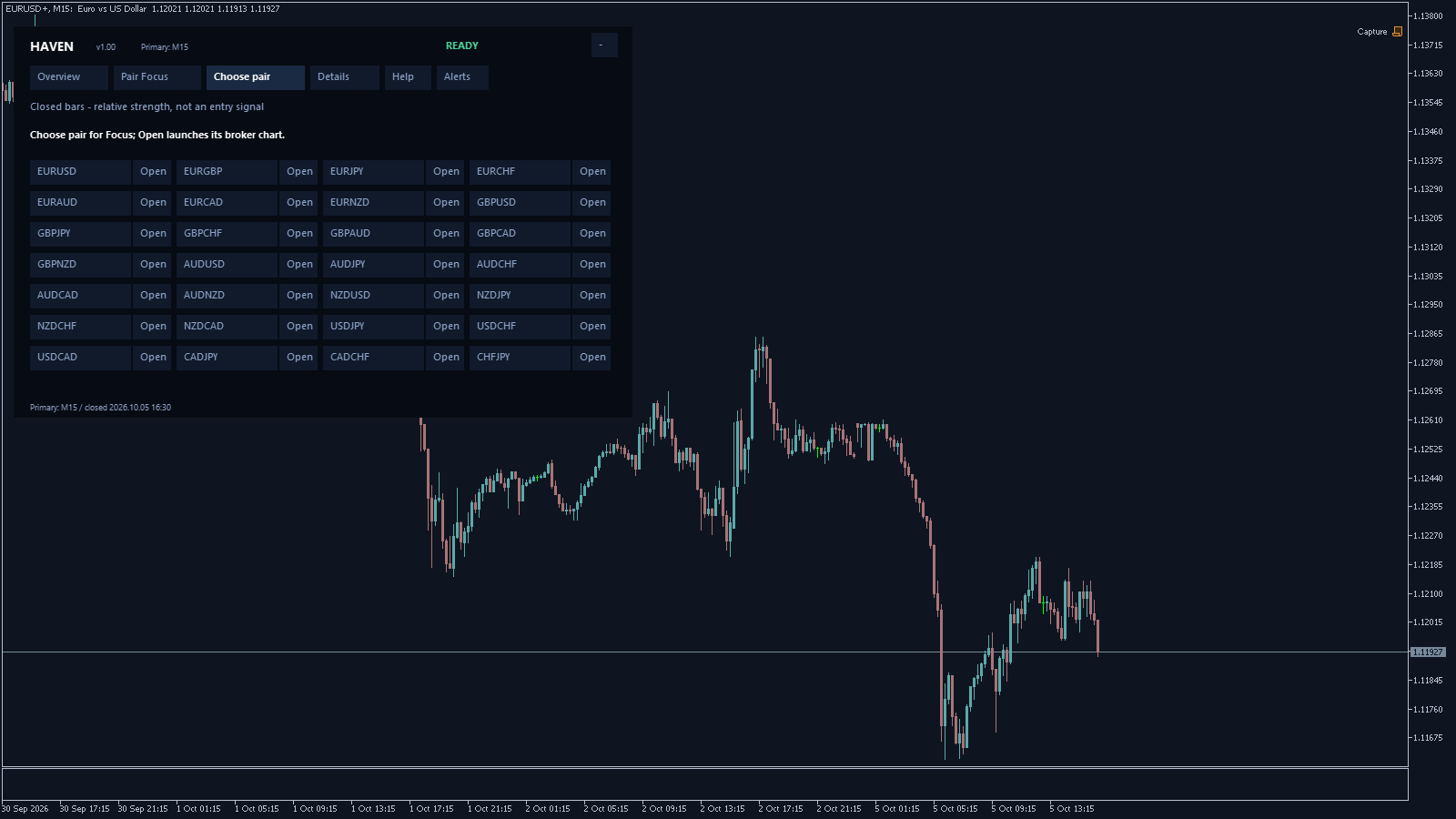
3. Pair Focus — analyzing the selected pair
Pair Focus follows a simple structure:
| BASE → DIFFERENTIAL → QUOTE |
For EURUSD:
- BASE — EUR.
- QUOTE — USD.
- Differential — the difference between EUR Strength and USD Strength.
| Differential = BASE Strength − QUOTE Strength |
- Positive Differential — BASE is stronger than QUOTE.
- Negative Differential — QUOTE is stronger than BASE.
- Value near zero — the difference between the currencies is small.
Example:
| EUR Strength | +1.10 |
| USD Strength | +1.24 |
| EURUSD Differential | -0.14 |
In this example, USD is relatively stronger than EUR.
This describes the relative-strength context, not an automatic SELL command.

Widening / Narrowing / Stable
| State | What happens to the Differential |
|---|---|
| Widening | The distance between the two currencies is increasing. |
| Narrowing | The distance between the two currencies is decreasing. |
| Stable | The change in the difference is small. |
| Unavailable | There is not yet enough data to evaluate the change. |
The sign of the Differential and the change in its magnitude are two different things.
For example:
| Differential changed from -1.00 to -2.00. The value remains negative, but its distance from zero has increased. Therefore, the state will be Widening. |
A large Differential is a reason to take a closer look at the pair. Then check whether the difference continues to widen or has already started to narrow.
4. Multi-Timeframe Context — M15 / H1 / H4
Haven calculates the pair's Differential separately across three horizons:
- M15
- H1
- H4
| Context | What it means |
|---|---|
| Aligned | All three periods are READY and show a sufficiently pronounced Differential in the same direction. |
| Mixed | There is no full agreement. The signs may differ, or the Differential on one period may be too small. |
| Unavailable | A complete comparison is temporarily unavailable because of data quality. |
| Matching signs are not enough. For Aligned, each Differential must be at least +0.50 or no greater than -0.50. |
| Aligned and Widening are not the same thing. Aligned describes agreement across the three horizons. Widening describes the change in the size of the current gap. Therefore, Aligned + Narrowing is a completely normal situation. |
With the standard Context = 20, one calculation covers approximately:
- M15 — about 5 hours of market bars;
- H1 — about 20 hours;
- H4 — about 80 hours.
5. Primary and Current
Primary is the main calculation timeframe.
It determines:
- the currency ranking;
- Top Pairs;
- the main Pair Focus values;
- Strength history.
| Calculation timeframe | Chart | Primary |
|---|---|---|
| Current | M15 | M15 |
| Current | H1 | H1 |
| Current | H4 | H4 |
| Current | Other TF, including M5 | H1 |
| Explicit M15 / H1 / H4 | Any | Selected TF |
| M5: you can use an M5 price chart, but the current version does not include a separate Currency Strength calculation for M5. With Current on M5, H1 is used. If you need the shortest available calculation horizon, select M15 manually. |
The actual Primary is always displayed at the top of the panel.
6. Strength and Differential History
Three lines are available in the expanded Pair Focus:
| Blue | Strength of the base currency. |
| Amber | Strength of the quote currency. |
| Green | Differential of the selected pair. |
Each line can be enabled or disabled separately.
Why can the lines look stepped?
For each historical point, Haven uses only the value that had already been confirmed by the opening of the corresponding host bar.
For example, an M15 bar at 10:45 cannot use the final value of an H1 bar that will not close until 11:00.
| A stepped line is normal behavior. It shows that the higher-timeframe value is not updated retroactively before the closed bar is confirmed. |
A broker may still load or revise its own historical data later, so an absolute promise that “past values can never change” would be incorrect.
7. Examples of Reading Market States
Below are examples based on real broker data observations. They demonstrate how to read Haven Currency Strength and are not trade results.
| Situation | Observation | Interpretation |
|---|---|---|
| EURAUD Aligned + Widening | EUR -1.27 AUD +1.12 H1 D -2.39 M15 -1.19 H4 -1.78 | AUD was stronger than EUR across all three horizons, while the H1 difference was widening. The next step is to analyze the EURAUD price chart. |
| USDJPY Aligned + Narrowing | H1 +1.05 M15 +2.28 H4 +1.10 | MTF alignment remained intact, but USD's relative advantage was narrowing. |
| EURUSD Mixed | H1 -1.91 M15 +0.64 H4 -2.67 | M15 disagreed with the two higher horizons. There was no full MTF alignment. |
| USDCAD Small Differential | USD +0.64 CAD +0.49 D +0.14 | USD ranked above CAD, but there was no significant relative contrast between the currencies. |
| NZD Improving | Strength -0.88 Change around +0.105 | NZD was recovering but still remained within the weak zone. |
| For everyday use, it is enough to distinguish four things: Strength → Change → Differential → MTF Context |
8. Data Quality
The normal operating state is READY.
| Status | What it means |
|---|---|
| READY | The data is suitable for the current analysis. |
| DEGRADED | The calculation is available, but there is a limitation in data or coverage. |
| STALE | An expected fresh data update has not yet been received. |
| UNAVAILABLE | A reliable value cannot currently be displayed. |
| MARKET CLOSED | The trading session is closed. |
| LAST VALID | The last usable context is shown rather than a new fresh value. |
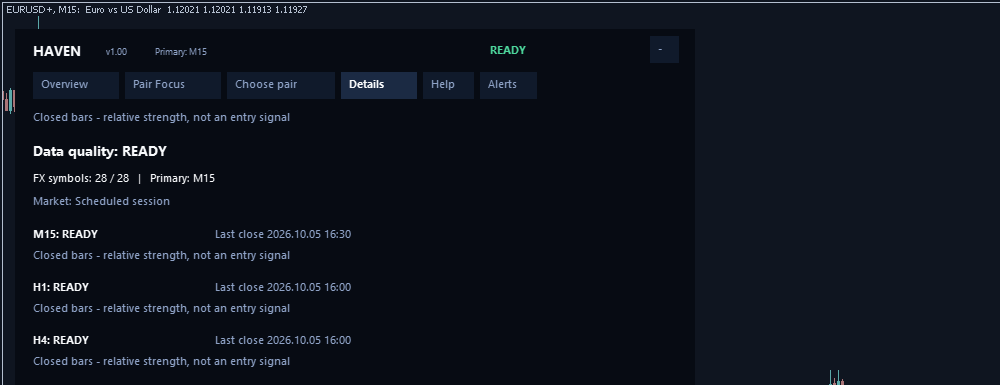
During the first launch, INITIALIZING, LOADING, and WARMING UP may also appear while the terminal loads and prepares historical data.
Clicking the status opens Details.
28/28 means that the full set of major FX symbols is available. It is not a rating of trade quality.
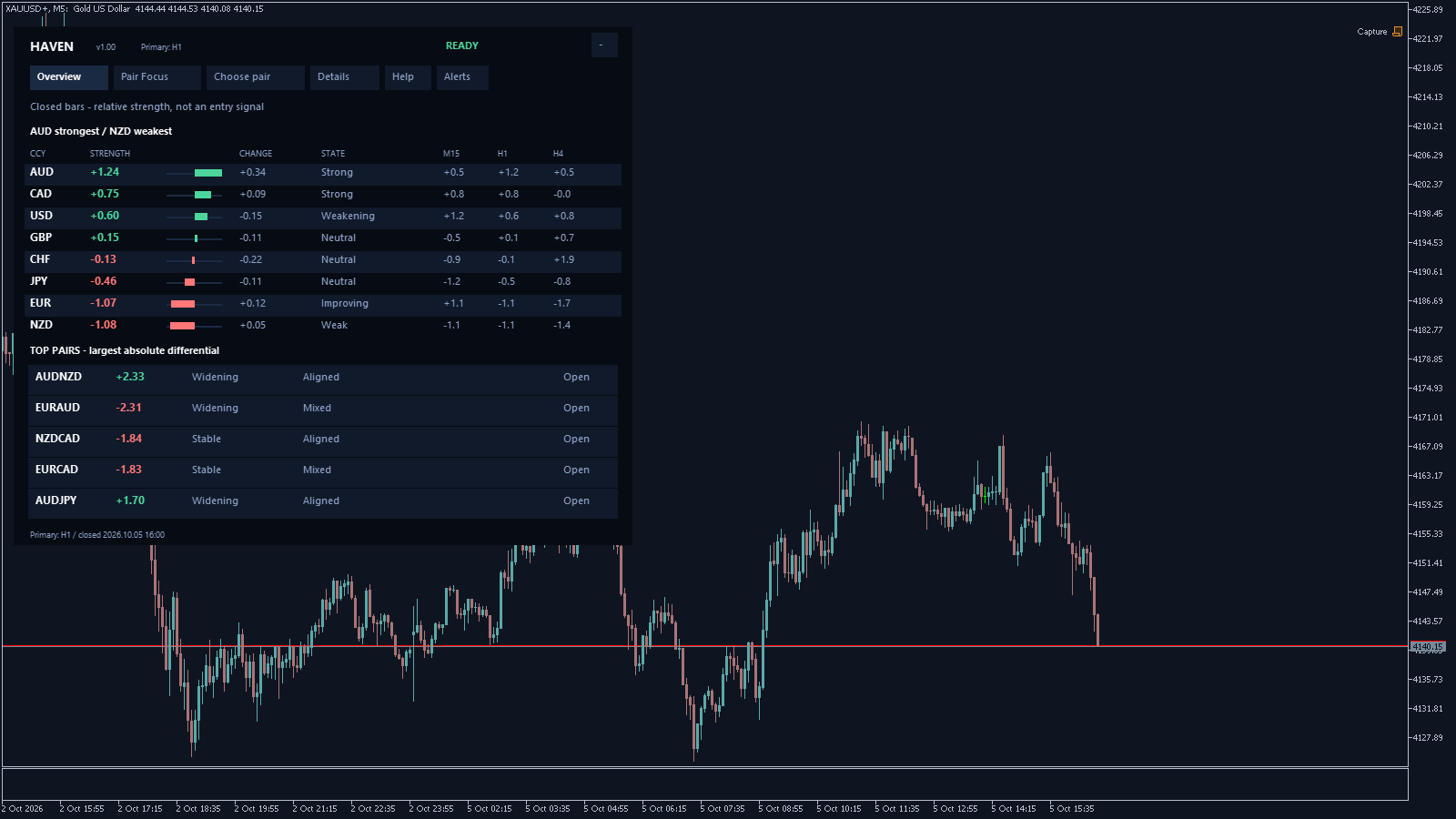
Can Haven be used on a Gold chart?
Yes.
Overview will continue to display the eight FX currencies as long as the broker provides the required currency pairs and historical data.
XAUUSD does not become a ninth currency — it is only the host chart.
9. Alerts
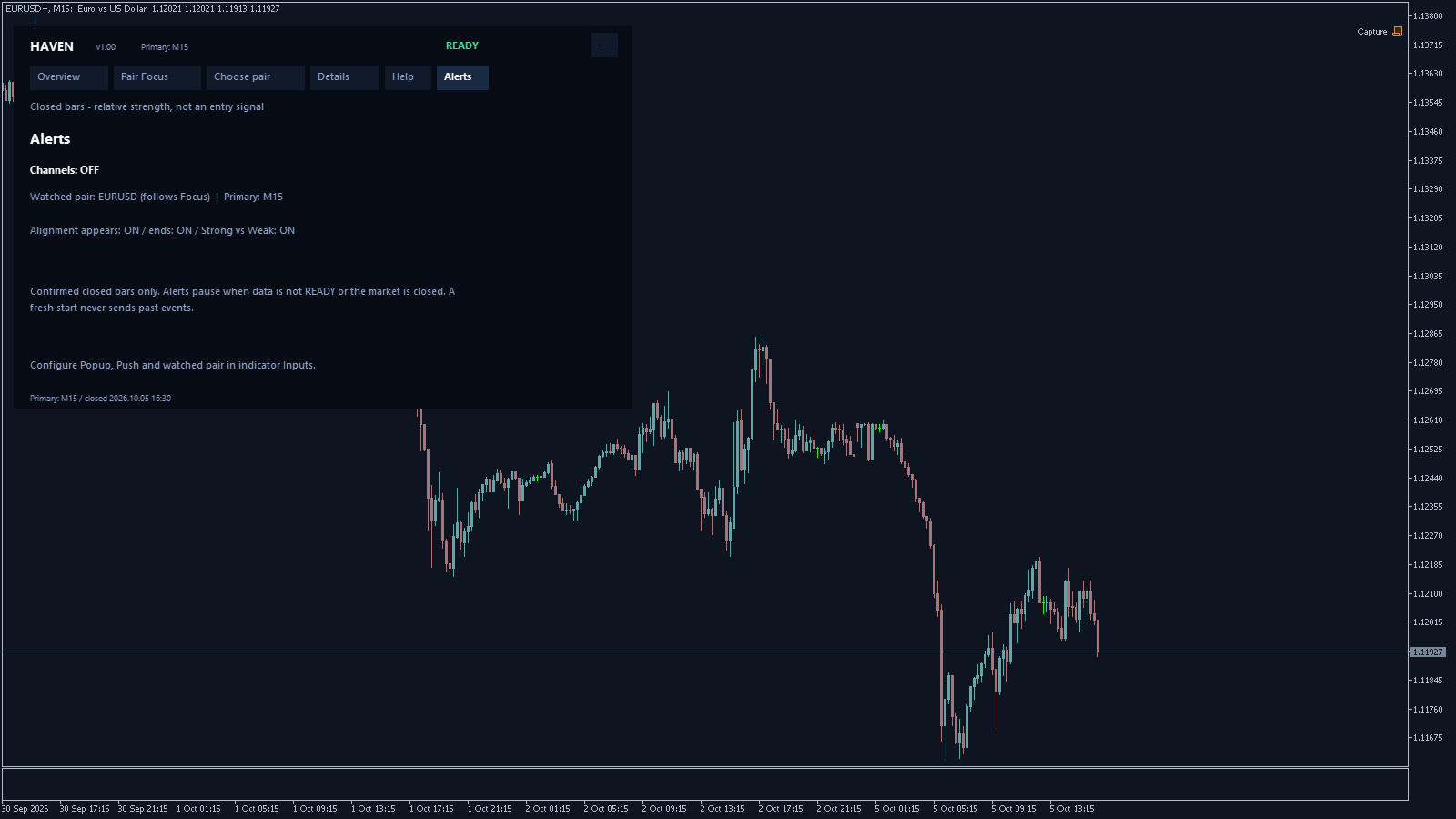
Popup and Push notifications are disabled by default.
Three event types are available:
- MTF Alignment Appears — M15 / H1 / H4 alignment appeared.
- MTF Alignment Ends — the alignment ended.
- Strong / Weak — a pronounced separation between a strong and weak currency appeared.
If Watched FX Pair is empty, alerts follow the current Pair Focus pair.
If a specific pair is entered, for example EURUSD, monitoring is fixed to that pair.
| Haven is not a mass alert scanner for all 28 pairs at the same time. Alerts apply to one selected or fixed pair. |
Alerts are evaluated using confirmed closed bars.
After startup or after changing the selected pair, an already existing state is not sent as a new event.
Configuring Push Notifications
- Open Tools → Options → Notifications.
- Configure your MetaQuotes ID.
- Send a test notification using MetaTrader 5 itself.
- After a successful test, enable Push inside Haven Currency Strength.
10. Main Settings
| Parameter | Purpose |
|---|---|
| Calculation timeframe | Current or explicitly M15 / H1 / H4. Start with Current. |
| History length | Number of chart bars used for history. Default: 600. |
| Show Differential | Show the green Differential line at startup. |
| Show Currency Strength dashboard | Show the main dashboard. |
| Theme | Auto, Dark, or Light. |
| Panel width | Panel width. Default: 680. |
| Panel scale | Interface scale. Default: 100%. |
| Broker symbol suffix | An empty field means automatic selection. Set it manually only when necessary. |
| Popup / Push | Notification channels. |
| Watched FX Pair | An empty field follows Pair Focus; a specified pair fixes monitoring to that pair. |
| Service parameters: Reserved compatibility API FX pair Validation export Developer diagnostics Leave them at their default values for normal use. |
Troubleshooting and FAQ
1. Can I use M5?
Yes, as a price chart.
However, there is no separate Currency Strength calculation for M5.
Current on M5 uses H1. For the shortest available Strength context, explicitly select M15.
2. Why does Primary remain H1 after changing the chart timeframe?
There are two main possible reasons:
- H1 is explicitly selected in Calculation timeframe.
- Current is being used on a timeframe that is not M15 / H1 / H4.
An old MT5 template may also preserve the previous input value.
3. Why does a positive currency have State = Weakening?
Because Strength and Change describe different things.
The currency may still be in the strong zone while already losing relative strength.
4. Why does Change show +0.10 while State is already Improving?
The displayed value is rounded. For example, an internal value of +0.1046 is shown as +0.10, but it is already above the +0.10 threshold.
5. Does a negative Differential mean SELL?
No.
It only means that QUOTE is relatively stronger than BASE.
Your own trading system determines the entry point, Stop Loss, and position size.
6. Why is the Differential negative but Widening?
Widening measures the change in distance.
-2 is farther from zero than -1. Therefore, a negative Differential can widen.
7. Why are M15, H1, and H4 the same sign but the context is Mixed?
Matching signs alone are not enough for Aligned.
Each of the three Differentials must have sufficient magnitude.
8. Why does the same currency appear in several Top Pairs?
One very strong or weak currency can create a pronounced Differential against several other currencies at the same time.
Keep in mind that such instruments may depend on the same underlying currency factor.
9. Why are the history lines not moving?
A higher timeframe updates only after a new confirmed bar close.
A stepped history line is not an error by itself.
10. Why are there no values for a long time after installation?
- Check the MT5 connection.
- Wait for the historical data to load.
- Open Details.
- Make sure the broker provides the required FX pairs.
11. My broker uses EURUSD+, EURUSD.m, or another suffix
First, leave automatic symbol detection enabled.
Set the suffix manually only if Details shows a symbol-family selection problem.
12. Why do values differ between brokers?
Brokers may differ in prices, trading sessions, available instruments, and historical data.
Before comparing results, check Primary, bar close time, and Data Quality.
13. Does READY mean a good trading opportunity?
No.
READY only means that the data is ready for calculation.
14. Is MARKET CLOSED or LAST VALID on weekends an error?
No.
During a closed trading session, new bars may not be available. LAST VALID clearly shows the last usable context.
15. Alerts are enabled, but no messages arrive
A new alert appears only after a new qualifying event occurs.
A state that already existed when the indicator was launched is not sent retroactively.
16. Popup works, but Push does not arrive
First test Push notifications directly from MetaTrader 5.
Then check your MetaQuotes ID, connection, Haven Push settings, and the terminal Journal.
17. What should I send to support?
- Haven Currency Strength version.
- Broker and server.
- Exact symbol.
- Chart timeframe.
- Selected FX pair.
- Screenshot of Details.
- For alerts — channel, event, and Journal message.
| Never send your trading account password or terminal access details. These details are not required to diagnose Haven Currency Strength. |
Quick Check Before You Start
| Check the following: ✓ Status = READY ✓ Primary matches your calculation timeframe ✓ Overview displays 8 currencies ✓ FX symbols = 28/28 when the broker provides the full set ✓ Top Pairs are populated ✓ Pair Focus displays Differential ✓ M15 / H1 / H4 are available ✓ Open Chart opens the correct broker pair |
Haven Currency Strength is a tool for relative-strength analysis, currency-pair selection, and market-context evaluation. It is not an automated trading system and does not guarantee the direction or continuation of price movement.



