Time ZeroShot EA (MT5): User Manual, the AI Tab, Settings and Set Files

Time ZeroShot EA runs two tested rule sets on one MetaTrader 5 chart, the USDJPY gotobi Tokyo fixing and BTCUSD multi-week momentum, together with a zero-shot time-series AI that runs inside the terminal. This manual explains how it works, how to install it, the chart panel including the AI tab, every input, ready-made set files, how to backtest it yourself and the questions buyers ask most. It applies to version 1.00.
What it does
- USDJPY, gotobi Tokyo fixing. On gotobi days (the 5th, 10th, 15th, 20th, 25th and the last day of the month, moved to the previous business day when they fall on a weekend or a Japanese bank holiday) it buys at 07:30 JST, closes the buy at the 09:55 JST Tokyo fixing, then sells until 10:30 JST. One attempt per window per day. These are the same signals as Nakane USDJPY Gotobi 1.10.
- BTCUSD, multi-week momentum, long only. It holds a long while the daily close is above the closes of 14 and 56 daily bars ago. The first stop is 3.0 x ATR(14, D1), the trailing stop 4.0 x ATR from the best close, and it waits 3 days after a stop-out. These are the same signals and stops as Ikioi Bitcoin Momentum 1.10.
- Every trade has a stop-loss. No grid, no martingale, no averaging.
- It trades on about 6 gotobi mornings a month (up to 2 trades each) and makes about 10 BTCUSD trades a year, often held for days to weeks. Quiet days are normal; the Status tab always shows the next gotobi date.
What the AI does
- The model is IBM Granite TimeSeries TTM-R2 (Apache License 2.0), converted to ONNX and embedded in the EA. No DLL, no WebRequest and no API key are needed, and it also runs in the Strategy Tester.
- From the last 512 closed H1 bars it forecasts the high-low range of the next 1, 4 and 24 hours. It does not forecast the direction.
- Gotobi: the stop-loss is 1.5 x the 4-hour range forecast. The lot follows the stop, so a wider expected range means a smaller lot for the same risk. A gotobi window is skipped when the 4-hour forecast is 1.25 x or more of the median of the same-hour forecasts of the previous 20 trading days.
- BTCUSD: stops use ATR(14, D1). In our tests the AI version was worse there on both profit factor and drawdown in 2023–2026, so the BTCUSD forecast is shown on the AI tab for information only.
- What our tests showed for the gotobi part, ATR stops against AI stops: 2015–2021 profit factor 1.22 vs 1.34 and maximum drawdown 6.5% vs 3.8%; 2022–2026 profit factor 1.28 vs 1.29 and drawdown 6.6% vs 4.9%. The AI version traded less (489 vs 586 trades in 2022–2026) and earned less in total. Its job is to trim the wild mornings and lower the drawdown, not to raise the profit.
Installation
- After you buy or rent the EA, install it in MetaTrader 5: Toolbox > Market > Purchased > Install. Updates are in the same place (Update).
- Attach it to one USDJPY chart (any timeframe). Your broker must offer USDJPY and BTCUSD. The EA finds both symbols by itself: the chart symbol, the exact name, then the shortest name that starts with USDJPY or BTCUSD (for example BTCUSD.raw). You can also type the names in SymbolUSDJPY and SymbolBTCUSD.
- Allow Algo Trading in the Common tab and check that the Algo Trading button on the toolbar is on.
- Keep the terminal running; a VPS is recommended. The gotobi trades take place between 07:30 and 10:30 JST.
- We recommend a USDJPY chart. On another chart both parts still trade, but in the Strategy Tester the BTCUSD part then reacts to weekend moves only on Monday.
The chart panel
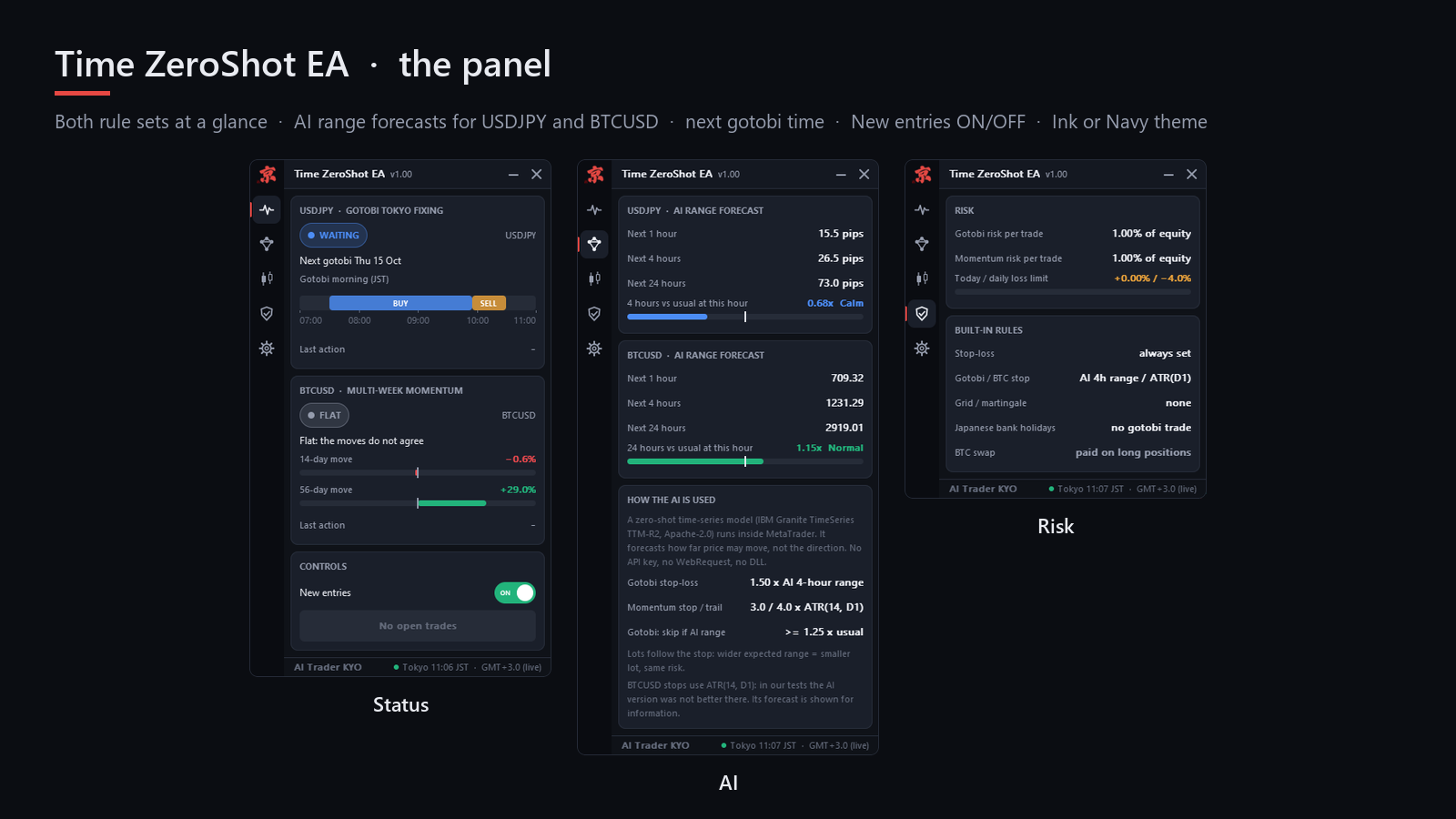
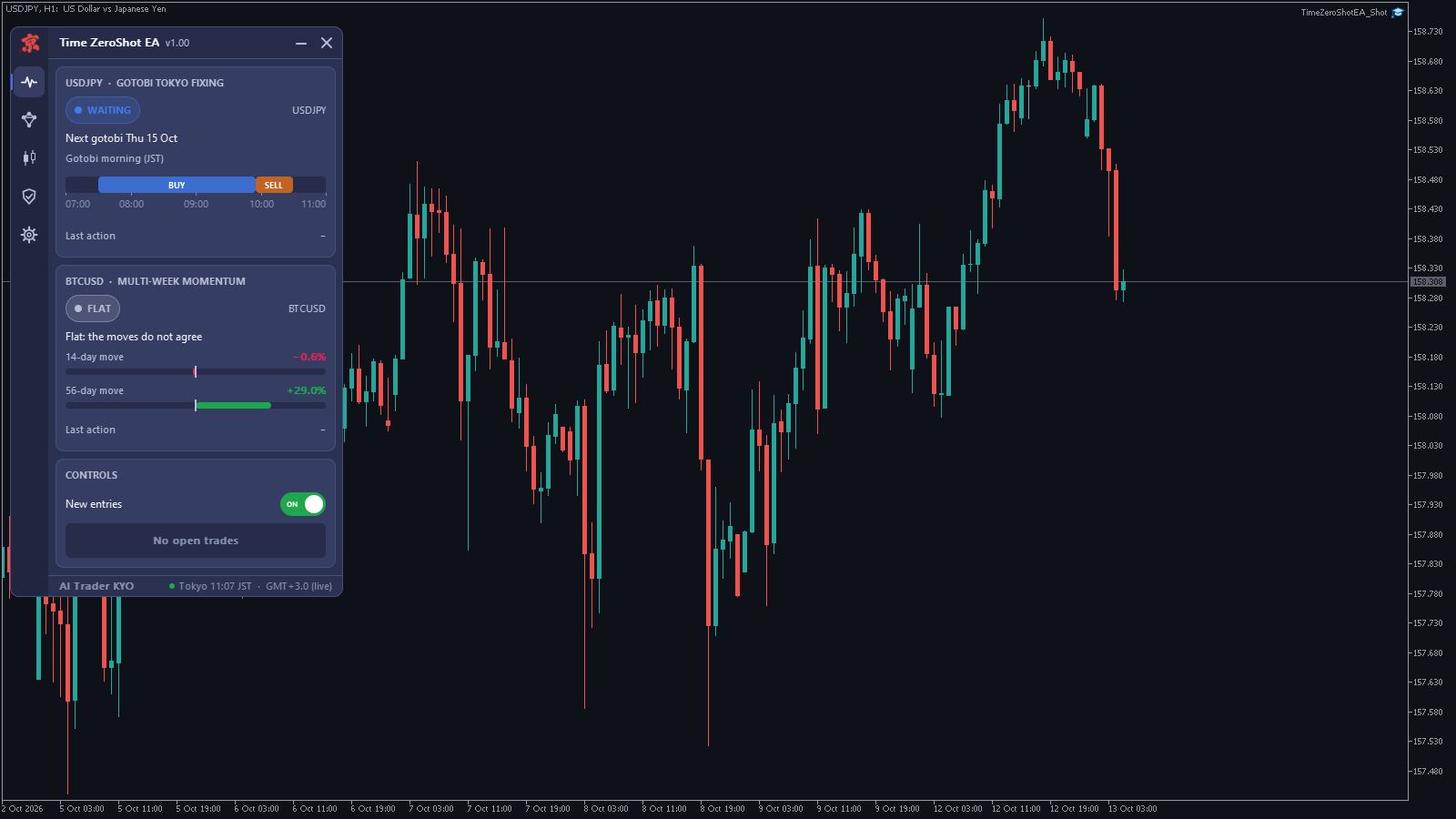
- Status: both rule sets at a glance. USDJPY shows WAITING or GOTOBI TODAY, the next gotobi date and the morning schedule; BTCUSD shows FLAT, SIGNAL or LONG with the 14-day and 56-day moves. Last action shows the reason when a trade was skipped.
- AI: the range forecasts for the next 1, 4 and 24 hours for USDJPY and BTCUSD, how the current forecast compares with the usual value at this hour, and how the AI is used.
- Trade: the open trades and this EA's trades on this account.
- Risk: risk per trade for each part, today's result against the daily loss limit, and the built-in rules.
- Settings: theme (Ink or Navy), size (S, M, L), price tags on the chart, the version, and a button that writes the AI model's license text to MQL5\Files.
- New entries (Status tab): switches new trades off and on. Open trades are still managed. The switch is kept after a restart; while it is off the panel shows PAUSED.
- Close this EA's trades (Status tab): closes this EA's open trades. Click twice within a few seconds to confirm.
- You can minimize the panel (—), move it by dragging the title bar, or close it (×) to a small button at the top right of the chart.
Inputs
| Input | Default | What it does |
|---|---|---|
| UseGotobi | true | Trade the USDJPY gotobi rule set. |
| UseMomentum | true | Trade the BTCUSD momentum rule set (long only). |
| SymbolUSDJPY | (empty) | USDJPY symbol name. Empty = find it automatically. |
| SymbolBTCUSD | (empty) | BTCUSD symbol name. Empty = find it automatically. |
| RiskGotobi | 1.0 | Percent of equity at risk per gotobi trade, measured to the stop-loss. 0 = use FixedLot. |
| RiskMomentum | 1.0 | Percent of equity at risk per BTCUSD trade, measured to the stop-loss. 0 = use FixedLot. |
| FixedLot | 0.0 | Fixed trade size, used when a risk input is 0. |
| DailyLossLimit | 4.0 | No new trades for the rest of the day after this loss, in % of equity. 0 = off. |
| TradeAfterFixing | true | Gotobi: also sell from 09:55 to 10:30 JST. |
| MagicNumber | 26101310 | Gotobi trades use this number, BTCUSD trades this number + 1. |
| GMTOffsetHours | -99 | The broker's GMT offset. -99 = automatic. |
Set files
Download a file, open the EA's settings (F7 on the chart), go to the Inputs tab, click Load and choose the file. Each file keeps the defaults except the values named here.
- TimeZeroShot_Standard_1pct.set: the defaults. Both rule sets, 1% risk per trade each, daily loss limit 4%.
- TimeZeroShot_Conservative_0.5pct.set: both rule sets, 0.5% risk per trade each, daily loss limit 3%.
- TimeZeroShot_GotobiOnly_1pct.set: the gotobi rule set only (UseMomentum = false), for accounts under about 3,000 USD.
The trading rules and the AI are the same in every file; only the trade size and which rule sets run change.
Deposit and costs
- BTCUSD trades need about 3,000 USD or more. With less, the minimum lot would risk more than 3% of equity, and the EA skips the trade with the message "min lot would risk ...". The gotobi part works from about 300 USD.
- Low spreads and commission matter for the gotobi trades. BTCUSD long positions pay the broker's swap.
Backtest it yourself
- Open the Strategy Tester (Ctrl+R) and choose the EA.
- Symbol USDJPY, any timeframe (we used M5), model "1 minute OHLC".
- Dates: for example from 2018.01.01 to today. Deposit 10,000 USD.
- The EA reads BTCUSD by itself; the tester loads its history when it is needed. Because the AI runs inside the test, a long test takes longer than with a simple EA.
For comparison, our backtest on IC Markets demo data (2018-01 to 2026-10, 1 minute OHLC, commission included, 1% risk per trade for each part, 10,000 USD) gave 1,065 trades, profit factor 1.59, a net result of +91% and a maximum drawdown of 6.1% on closed trades, 7.0% on equity, with 2 losing years out of 9 (2018 and 2025). The gotobi part made 948 trades with profit factor 1.27, the momentum part 117 trades with profit factor 3.35. The rules were fixed on 2015–2021 (gotobi) and 2018–2022 (momentum). Your numbers will differ with your broker's data and costs, and a backtest is not a promise of future results.
Technical notes
- Zero-shot means the model was not trained on your symbol. IBM Research pre-trained it on about 700 million time-series samples; the EA gives it the recent prices and reads the forecast.
- Japanese bank holidays and the broker's time zone are handled inside the EA, as in Nakane USDJPY Gotobi. In the Strategy Tester the time zone is estimated from the last bar before each weekend.
- Every skipped gotobi window writes the reason to the Experts tab, for example "Buy skipped: the AI expects an unusually wild morning (1.32x usual)", and every entry writes the spread.
- Order comments are "TZS gotobi", "TZS after fix" and "TZS momentum". A trade journal is written to MQL5\Files\TimeZeroShotEA\trades_<symbol>_<magic>.csv.
- The EA does not use Nixtla's TimeGPT or any online AI service, and it is not affiliated with or endorsed by Nixtla or IBM.
Questions buyers ask
- It does not trade. Check the Status tab. USDJPY trades only on gotobi mornings between 07:30 and 10:30 JST, and BTCUSD only while both moves are up (FLAT is a normal state). Then check that Algo Trading is on and that the panel does not show PAUSED (if it does, switch New entries back on). Last action and the Experts tab tell you why a trade was skipped.
- Why does the AI only set stops and skip mornings? Because it forecasts how far the price may move, not which way. The direction comes from the two rule sets.
- My account is small. Use TimeZeroShot_GotobiOnly_1pct.set: below about 3,000 USD the BTCUSD trades would be skipped anyway.
- Where is the license of the AI model? Settings tab, "Write license text to Files": it writes MQL5\Files\TimeZeroShotEA_LICENSE.txt.
- Can I run it on several charts? Use one chart per account, or give each chart a MagicNumber at least 2 apart, because each chart uses two numbers (the input and the input + 1). A purchase includes 10 activations.
Product page: Time ZeroShot EA. If something is unclear, send me a private message on MQL5 with a screenshot of the panel and the last lines of the Experts tab.