Gotobi Day and Tokyo Fixing Marker (MT5/MT4): User Manual, the Panel, Inputs and Time Zones

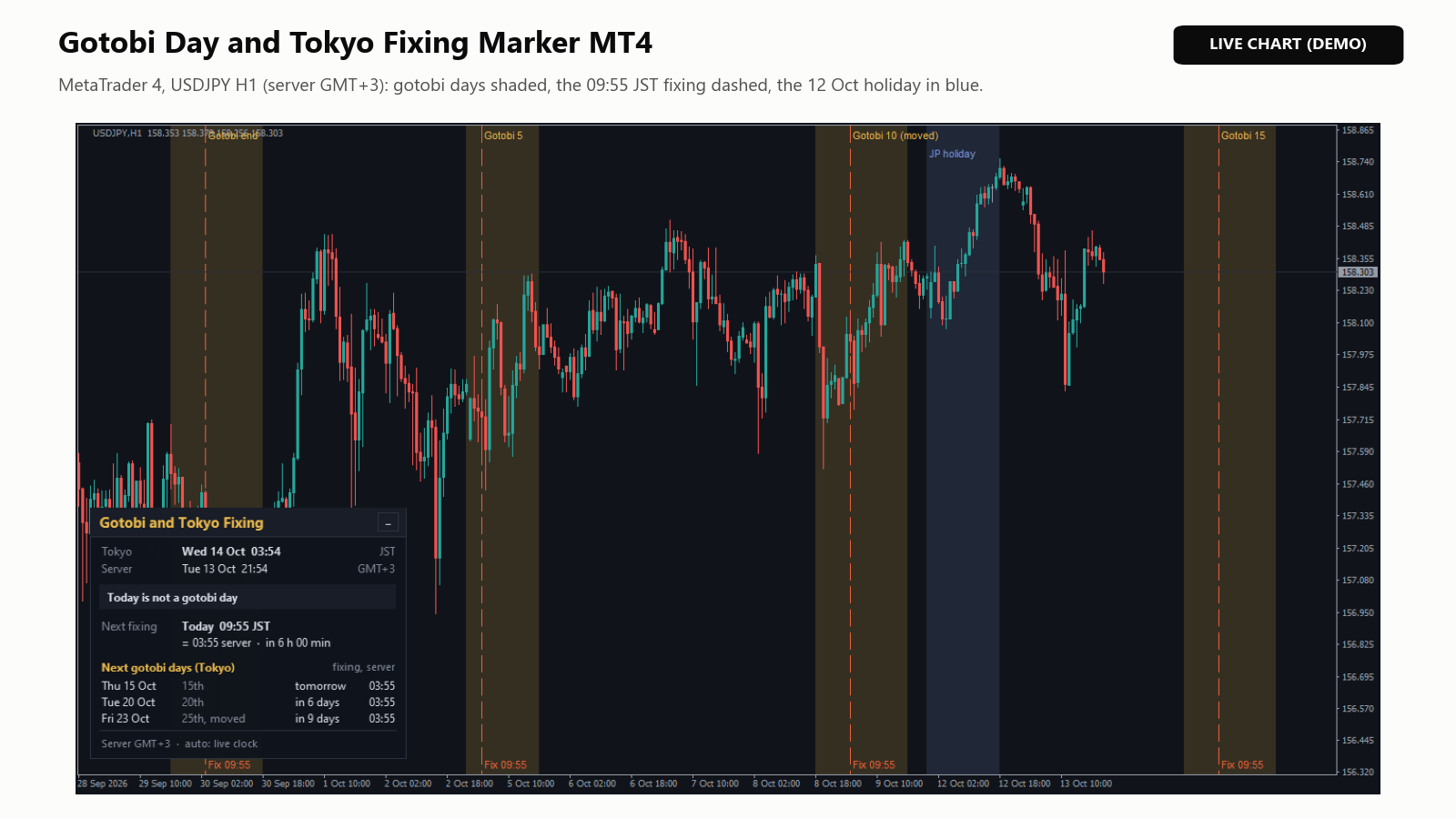
Gotobi Day and Tokyo Fixing Marker is a free indicator that marks the Japanese gotobi days, the Tokyo fixing at 09:55 Japan time and Japanese bank holidays on your chart, and shows the next gotobi days in a small panel. It is for traders who trade or test ideas around the Tokyo fixing, mainly in USDJPY, and for anyone who wants to know when the next gotobi day is. This manual covers both versions, MetaTrader 5 and MetaTrader 4 (Gotobi Day and Tokyo Fixing Marker MT4), which share the same marks, panel and inputs; the few MT4 differences are pointed out. It applies to version 1.00 of both.
What it marks
- Gotobi days: the 5th, 10th, 15th, 20th and 25th of each month and the last day of the month. When one of them falls on a weekend or a Japanese bank holiday, it moves to the previous Tokyo business day. Many Japanese companies settle payments on these days.
- Tokyo fixing: the reference rate that Japanese banks set at 09:55 Japan time, watched closely on gotobi days, especially in USDJPY.
- Japanese bank holidays from Monday to Friday, including 31 December and 1 to 3 January. There is no Tokyo fixing on these days.
The indicator does not trade, predict prices or give signals or alerts; it marks dates and times. It uses no DLL, no web requests and no files, and works on any symbol and timeframe.
Installation
- On the product page click Free Download (it opens MetaTrader), or open the Market tab in MetaTrader (Toolbox in MT5, Terminal window in MT4), find the product and install it. MT5 and MT4 are separate products: install the one for your platform.
- Installed products are listed under Market > Purchased, where updates appear too (Update).
- Drag the indicator from Navigator > Indicators > Market onto a chart, for example USDJPY H1, and click OK. It is in the same place in MT5 and MT4.
- The marks and the panel (lower left) appear at once. All inputs have safe defaults.
Reading the chart and the panel
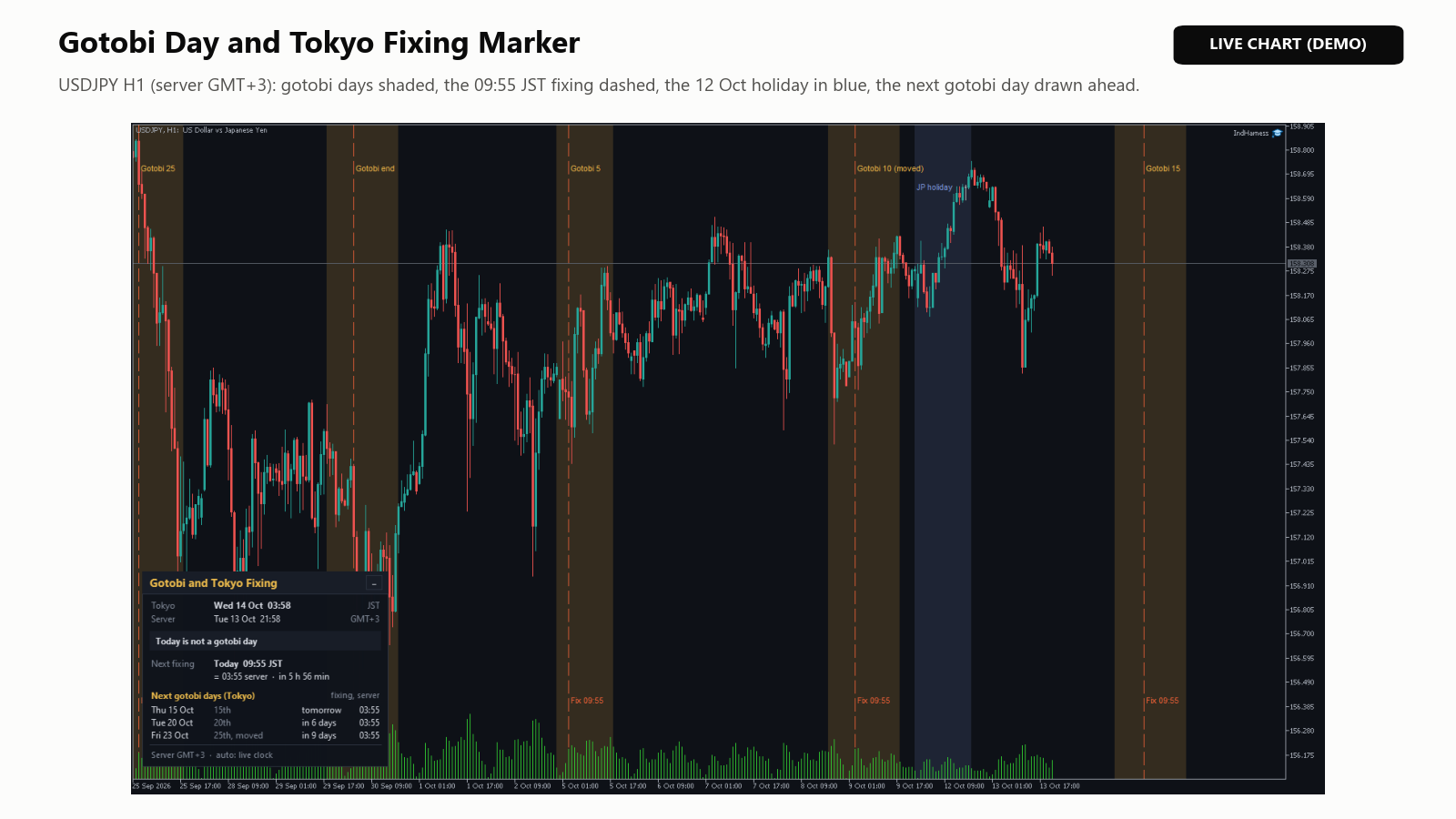
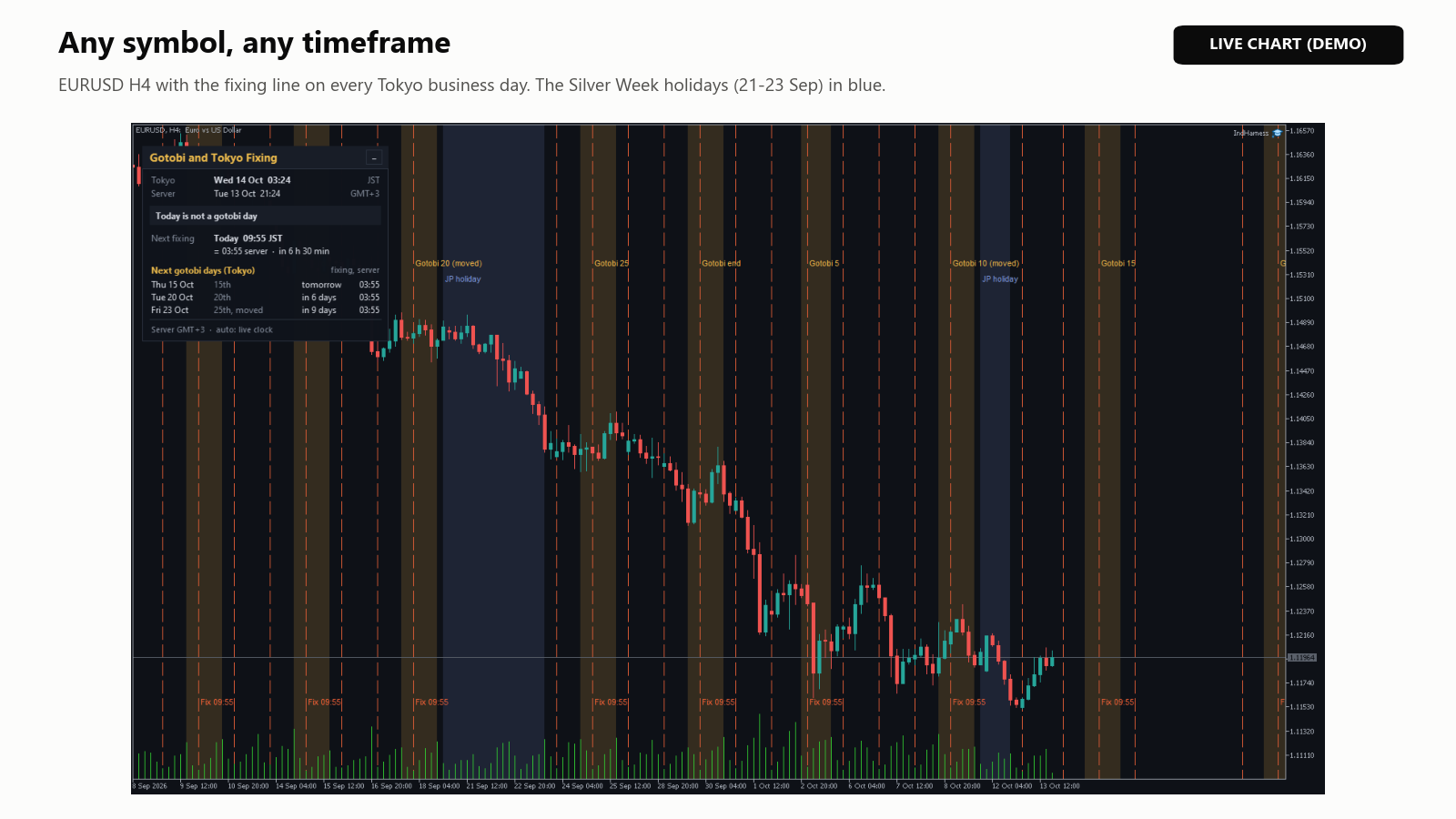
- Gotobi band: shades the Tokyo day, 00:00 to 24:00 Japan time. The label names the day it stands for: "Gotobi 15", "Gotobi end" for the month-end, "Gotobi 10 (moved)" when the 10th fell on a weekend or holiday. Two days can land on one date: "end+5" on Friday 30 April 2027.
- Fixing line: dashed, at 09:55 Japan time, with "Fix 09:55" at the bottom on gotobi days.
- Holiday band: blue, with "JP holiday" on the first day of a run of holidays.
- Tooltips: point at a band or line. On Friday 23 October 2026: "for the 25th: Sun 25 Oct is not a Tokyo business day" and, on a GMT+3 server, "Tokyo fixing 09:55 JST = 03:55 server (Fri 23 Oct)". Holiday tooltips name the holiday.
- Zoomed out, labels get shorter ("Gotobi 10", then "10"), then disappear. Colors suit a dark or light background.
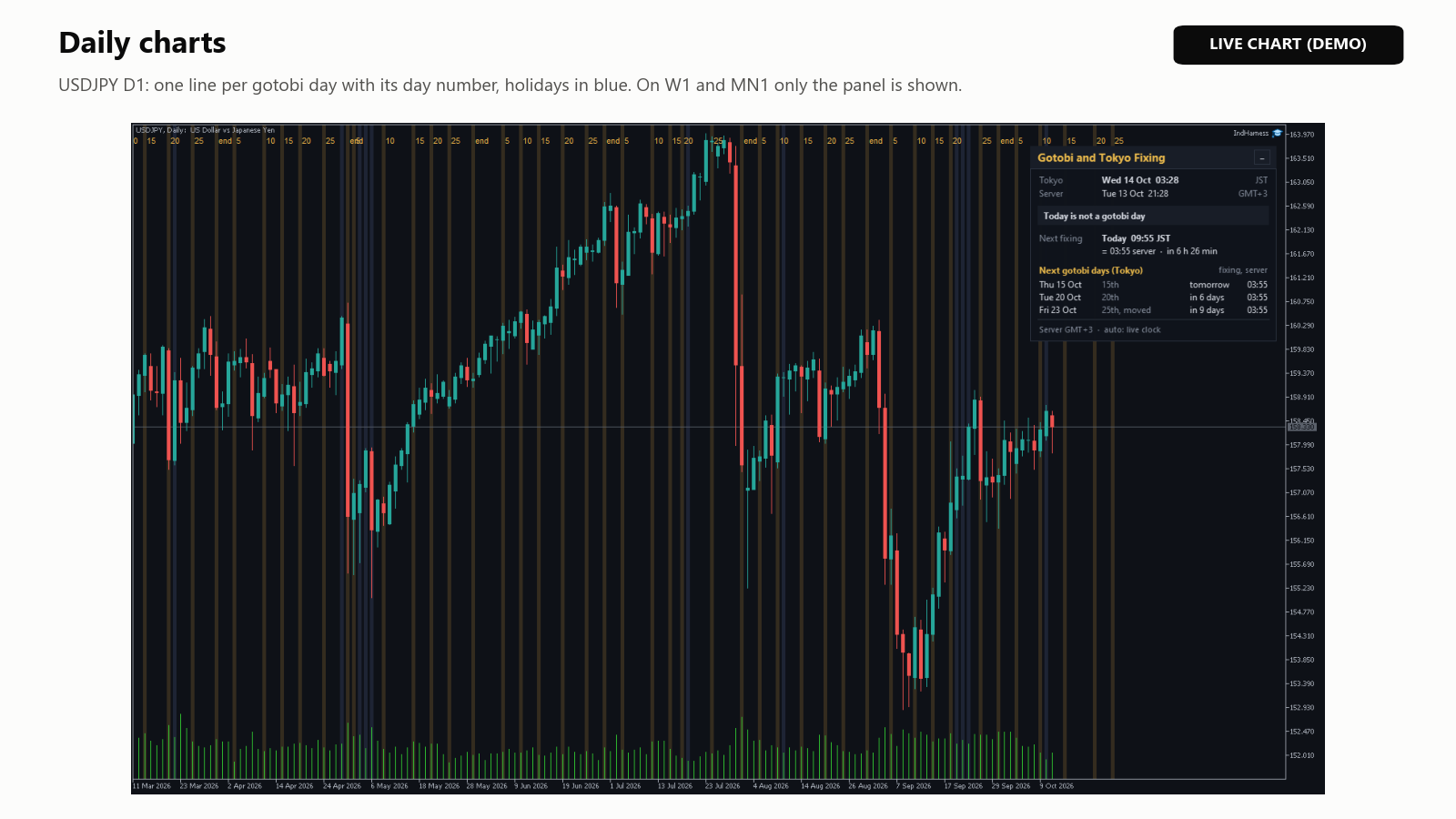
- D1: one thick line per gotobi day with its day number, and a blue line per holiday. On W1 and MN1 only the panel is shown.
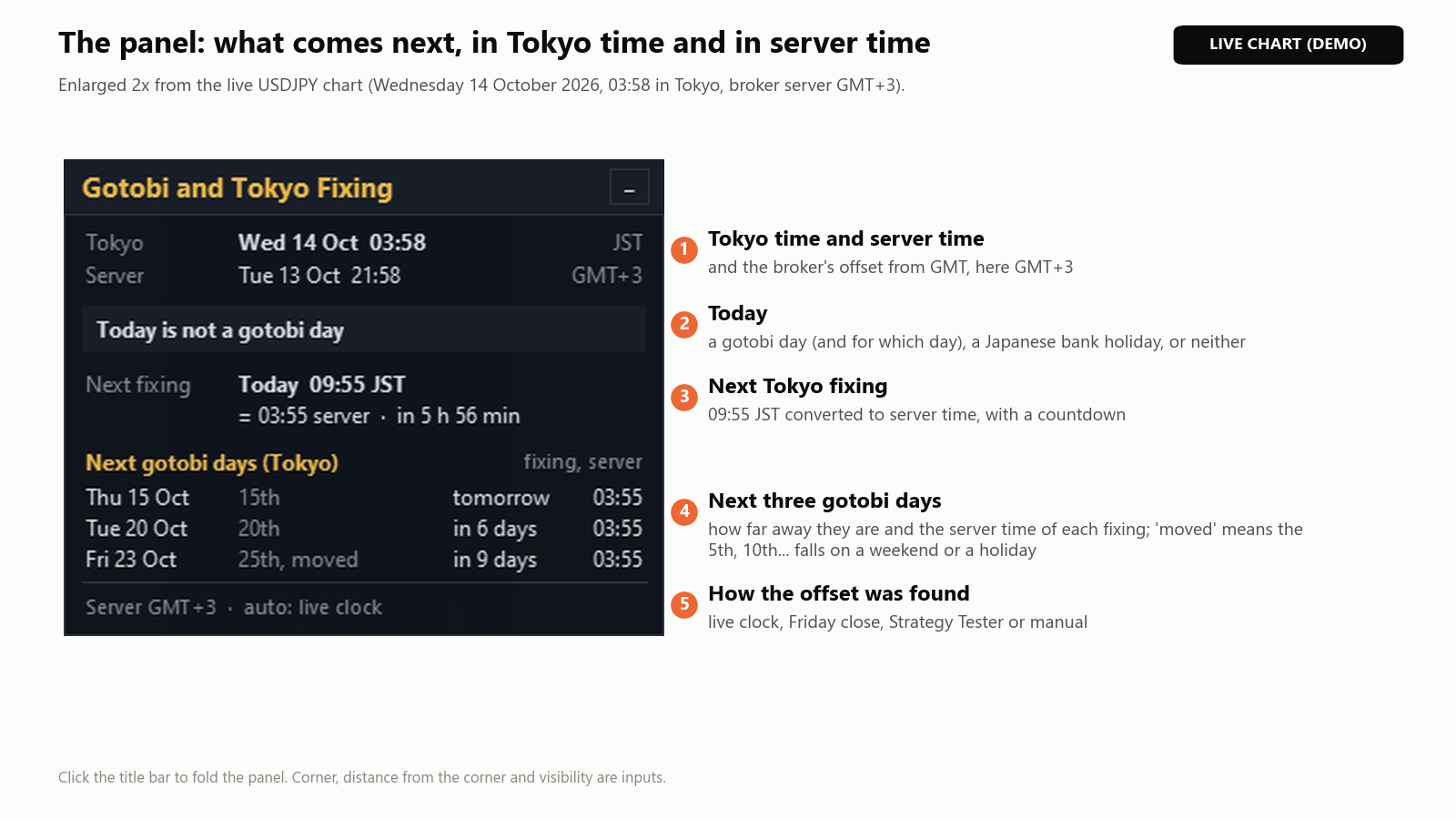
- Tokyo and Server: the time in Tokyo (JST) and on the broker's server, with its offset, for example GMT+3.
- Today: "Today is a gotobi day (15th)", "Today is not a gotobi day", "Japanese bank holiday" with its name, or "Weekend in Tokyo".
- Next fixing: the next fixing on a Tokyo business day in Japan and server time, with a countdown; "gotobi" on the right if that day is a gotobi day.
- Next gotobi days (Tokyo): the next three, what each stands for ("20th", "month-end", "25th, moved"), how far away it is and its fixing in server time.
- Bottom line: the offset in use and how it was found: "auto: live clock", "auto: Friday close", "tester: Friday close", "tester: manual offset" or "manual".
- Click the title bar to fold or open the panel; it stays folded when you change the timeframe.
Inputs
Names as shown on the Inputs tab. MT5 groups them under Time conversion, Gotobi days, Tokyo fixing, Japanese bank holidays, Range and labels, and Panel; MT4 shows the same inputs and defaults without groups.
| Input | Default | What it does |
|---|---|---|
| Server time zone | Automatic (live clock and Friday close) | Or Manual offset (inputs below), which uses the next two inputs. |
| Manual server GMT offset in winter, hours (also the tester fallback) | 2.0 | -12 to 14, in 15-minute steps. Used in manual mode, and in the tester when no Friday close is found. |
| Summer time rule for the manual offset | +1 hour during US summer time | Or None (same offset all year), or +1 hour during EU summer time. |
| Gotobi day mark | Shaded band | Or Vertical line at the band start, or Off. |
| Band start, Tokyo time (HH:MM) | 00:00 | Start of the band. |
| Band end, Tokyo time (HH:MM) | 24:00 | End of the band. Start 07:00 and end 10:00 shade only the Tokyo morning. |
| Band color (None = automatic for the chart background) | None | Color of the gotobi band or line. |
| Fixing line | Gotobi days only | Or Every Tokyo business day, or Off. |
| Fixing time, Tokyo time (HH:MM) | 09:55 | Used for the line and on the panel. |
| Fixing line color | 232,96,56 (vermilion) | Any color. |
| Fixing line style | Dash | Any line style. |
| Mark Japanese bank holidays (Monday to Friday) | true | Draws the holiday bands. |
| Holiday band color (None = automatic) | None | Color of the holiday bands. |
| Days of history to mark (1-1000) | 120 | Days marked back from today. |
| Days ahead to mark (0-60) | 14 | Days marked ahead. |
| Text labels on the chart | true | "Gotobi 15", "Fix 09:55", "JP holiday". |
| Label font size | 8 | 6 to 24. |
| Label color (None = automatic) | None | Automatic: amber (gotobi), blue (holidays), fixing line color (Fix). |
| Show the panel | true | Turns the panel on or off. |
| Panel corner | Left lower | Any of the four corners. |
| Panel distance from the corner, X (pixels) | 12 | Horizontal distance. |
| Panel distance from the corner, Y (pixels) | 16 | Vertical distance. |
Fixing line set to Every Tokyo business day, on EURUSD H4:
Gotobi rules, holidays and time zones
- Japanese national holidays are calculated by rule, including substitute holidays, citizens' holidays and the special dates of 2019–2021: no calendar file and no yearly update are needed. The equinox days use the standard formula (the official dates are announced every February for the next year).
- For 2026 and 2027 the calendar was checked day by day: 143 gotobi days and 36 weekday bank holidays, identical to an independent calculation from the Cabinet Office holiday list. Before 2004 it is not exact (9 days in 2000–2003 differed), which matters only in the Strategy Tester.
- Japan time is UTC+9 all year (no summer time); only the broker's offset changes.
- This week, MT5: server time minus GMT from the terminal clock, rounded to 15 minutes; right as long as your computer's clock and time zone are right.
- This week, MT4: MetaTrader 4 has no server-clock function, so the server time of the latest tick is compared with the computer's clock. Until the first new tick arrives, for example at the weekend, the offset found for past weeks (next point) is used.
- Past weeks: FX closes at 17:00 New York on Friday, so the last bar before each weekend gives that week's offset (from the chart symbol if it is an FX pair, otherwise from an FX pair in Market Watch such as USDJPY or EURUSD). The summer time rule (US, EU or none) that fits these weeks best is applied to future dates and to weeks without a Friday close.
- Manual: the winter offset plus the summer time rule, for the whole year.
- When the offset changes, for example at a summer time switch, the marks are placed again at the right server times.
Using it in the Strategy Tester
Open the Strategy Tester (Ctrl+R), choose the indicator, a symbol, a timeframe up to D1 and the dates, and use visual mode: without it nothing is drawn. The marks and the panel follow the tester's clock.
The tester cannot use the terminal clock, so the offset comes from the Friday close of the tested symbol. On a symbol that also trades at weekends there is none, and the manual offset is used ("tester: manual offset"): set your broker's winter offset and summer time rule.
Questions users ask
- The times are off by an hour. If the panel says "auto: live clock", check your computer's clock and time zone. If your broker uses an unusual server time, set Server time zone to Manual offset and enter its winter offset and summer time rule.
- There is no fixing line today. By default it is drawn on gotobi days only; choose Every Tokyo business day for all business days. Weekends, Japanese bank holidays and D1 charts have no fixing line.
- I see no marks. Marks are drawn on D1 and lower timeframes, within the days back and ahead you set. Also check that Gotobi day mark is not Off.
- The panel says "auto: not detected yet". No offset could be measured yet: no live clock (in MT4, before the first new tick) and no Friday close in the loaded H1 history. The indicator retries for about two minutes and uses the manual offset meanwhile.
- Can it alert me, or can an EA read it? No. Version 1.00 has no alerts and no indicator buffers; it only draws chart objects. The panel shows a countdown to the next fixing.
Product pages: Gotobi Day and Tokyo Fixing Marker (MT5) and Gotobi Day and Tokyo Fixing Marker MT4. If something is unclear, send me a private message on MQL5 with a screenshot of the chart and the panel.