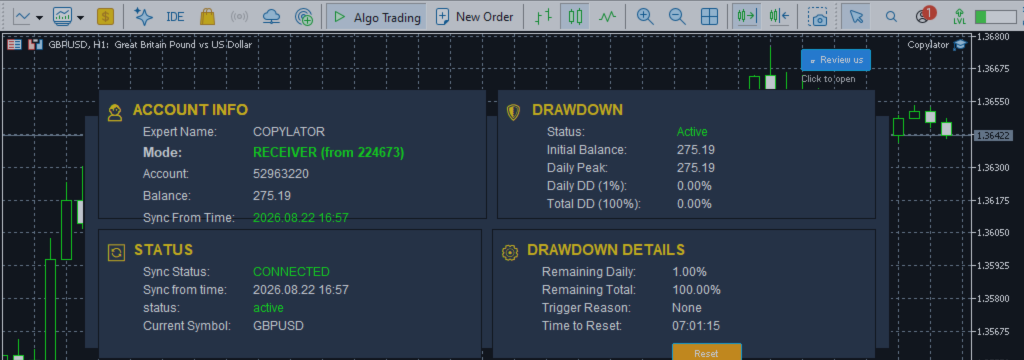
MT5 Trade Copier Reverse Trade Mode: How to Copy Trades in the Opposite Direction

Product link:
https://www.mql5.com/en/market/product/191385
Reverse Trade Mode is a powerful feature in an advanced MT5 Trade Copier that allows copied trades to be opened in the opposite direction of the original Sender trade.
When Reverse Trade Mode is enabled, a Buy position on the Sender is copied as a Sell position on the Receiver, while a Sell position on the Sender is copied as a Buy.
This functionality can provide additional flexibility for traders who want to use a trade copier for hedging, contrarian strategies, directional bias management, or portfolio diversification.
What Is Reverse Trade Mode?
In normal trade-copying mode, the direction of the Receiver trade matches the Sender:
| Sender | Receiver |
|---|---|
| Buy | Buy |
| Sell | Sell |
With Reverse Trade Mode enabled, the direction is automatically inverted:
| Sender | Receiver in Reverse Mode |
|---|---|
| Buy | Sell |
| Sell | Buy |
The trader does not need to manually open an opposite trade on the Receiver account. The MT5 Trade Copier performs the directional conversion automatically.
How Reverse Trade Mode Works
Consider a Sender account that opens a Buy position on EURUSD.
In normal copying, the Receiver would also open a Buy position.
When Reverse Trade Mode is active, the Receiver instead opens a Sell position.
The basic process is:
- The Sender opens a Buy or Sell trade.
- The copier detects the new trade.
- The trade direction is automatically reversed.
- The appropriate Receiver symbol is identified.
- The Receiver opens the opposite position.
- SL and TP are automatically adjusted for the reversed direction.
This allows the Receiver to follow the timing and trade events of the Sender while taking the opposite market direction.
Automatic SL/TP Adjustment
One of the most important aspects of Reverse Trade Mode is that simply changing Buy to Sell is not enough.
The Stop Loss and Take Profit levels must also be adjusted to remain logically correct for the opposite direction.
For example, consider a Sender Buy trade:
- Entry: 1.17000
- Stop Loss: 1.16800
- Take Profit: 1.17400
For a Buy position, the SL is below the entry and the TP is above the entry.
When this trade is reversed into a Sell position, the protective levels must be placed on the opposite sides:
- Entry: 1.17000
- Stop Loss: 1.17200
- Take Profit: 1.16600
This preserves the original distance and risk/reward structure while reversing the trading direction.
Why Automatic SL/TP Conversion Matters
A basic reversal system that only changes Buy to Sell could easily produce invalid or incorrectly positioned Stop Loss and Take Profit levels.
For a reversed trade, the relationship between entry, Stop Loss, and Take Profit must also be reversed.
COPYLATOR is designed to automatically adjust SL/TP when Reverse Trade Mode is used, helping maintain the intended structure of the original trade.
Reverse Trade Mode for Hedging
One of the most important applications of Reverse Trade Mode is hedging.
Suppose a trader has exposure generated by a strategy or signal provider and wants another account to take the opposite direction.
If the Sender opens a Buy position, the Receiver can open a Sell position.
If the Sender later opens a Sell position, the Receiver can open a Buy position.
This creates an opposing exposure between the two accounts.
However, traders should understand that this does not automatically guarantee a profitable hedge. Spread, commission, swaps, slippage, execution differences, contract specifications, and position sizing can all affect the final result.
Reverse Copying for Contrarian Trading
Reverse Trade Mode can also be useful for traders who have a different market view from the original strategy.
For example, a trader may believe that a particular signal provider's strategy is consistently too bullish on a specific market.
Instead of manually analyzing and reversing every signal, the trader can use Reverse Trade Mode to automatically convert the trade directions.
The timing of the original signal is preserved while the directional bias is inverted.
Example of a Reversed Trade
Suppose the Sender opens:
BUY EURUSD 1.00 lot
with:
SL = 1.16500
TP = 1.17500
With Reverse Trade Mode enabled, the Receiver opens:
SELL EURUSD
The corresponding SL and TP are automatically adjusted to match the reversed direction.
The result is not simply a copy of the original order. It is a structurally reversed version of the trade.
Reverse Trade Mode and Pending Orders
Reverse Trade Mode can also be relevant when working with pending orders.
Pending orders have directional characteristics, so reversing them requires more than simply changing the Buy/Sell label.
For example:
- Buy Limit → Sell Limit
- Sell Limit → Buy Limit
- Buy Stop → Sell Stop
- Sell Stop → Buy Stop
The entry level and protective SL/TP relationships must also be handled appropriately for the reversed direction.
This makes Reverse Trade Mode particularly useful for strategies that rely heavily on pending orders, although account type and broker rules should always be considered.
Reverse Trade Mode with Lot Management
Reverse direction does not necessarily mean that the Receiver must use exactly the same lot size as the Sender.
Reverse Trade Mode can be used together with different lot-management approaches.
For example:
- Fixed Lot: Always use a predefined Receiver volume.
- Multiplier: Multiply the Sender volume by a specified factor.
- Balance Ratio: Scale volume according to the relative account balances.
- Maximum Lot: Limit the final calculated volume.
This means traders can control both the direction and the size of the copied position.
Reverse Mode with Balance-Ratio Scaling
Consider a Sender account with $10,000 and a Receiver account with $2,000.
The Sender opens a 1.00 lot Buy position.
With balance-ratio scaling, the Receiver's approximate volume could be adjusted according to the account-size ratio:
$2,000 ÷ $10,000 = 0.20
The Receiver could therefore use approximately:
1.00 × 0.20 = 0.20 lot
With Reverse Trade Mode enabled, that position would be a 0.20 lot Sell rather than a 1.00 lot Buy.
This combination provides both directional reversal and account-size-based volume scaling.
Reverse Trade Mode in Hedging Accounts
Hedging accounts allow multiple positions on the same symbol.
This structure can provide greater flexibility when using Reverse Trade Mode because separate positions can be maintained independently.
COPYLATOR automatically detects the account type and applies the appropriate trade-handling logic.
In Hedging accounts, individual positions can be associated with their corresponding copied trades, allowing the reversal logic to operate at the position level.
Reverse Trade Mode in Netting Accounts
Netting accounts operate differently because only one net position per symbol is generally maintained.
This means multiple Buy and Sell operations on the same symbol may modify or offset the existing net position instead of creating independent positions.
As a result, Reverse Trade Mode can have different practical behavior on Netting accounts compared with Hedging accounts.
COPYLATOR automatically detects the account structure and adjusts its synchronization behavior accordingly.
Traders should always test reversed strategies on their specific broker and account type before using them with real capital.
Reverse Trade Mode for Portfolio Diversification
Reverse trading can also be used as part of a broader portfolio-management approach.
For example, a trader could use one account to follow a strategy normally while another account takes the opposite side.
This can create different exposure profiles across a group of accounts.
However, traders should not assume that opposite positions automatically reduce risk. If the positions are not correctly sized or if execution costs are significant, the combined portfolio may still experience losses.
Reverse Trading and Risk Management
Reverse Trade Mode changes the directional exposure of a strategy, but it does not eliminate trading risk.
Before using it, traders should consider:
- Account balance and equity.
- Position size.
- Margin requirements.
- Leverage.
- Spread and commission.
- Swap costs.
- Slippage.
- Broker execution rules.
- Maximum lot limits.
- Overall portfolio exposure.
A reversed strategy can potentially produce losses just as the original strategy can.
Reverse Trade Mode vs. Normal Copying
| Feature | Normal Mode | Reverse Mode |
|---|---|---|
| Sender Buy | Receiver Buy | Receiver Sell |
| Sender Sell | Receiver Sell | Receiver Buy |
| SL adjustment | Copied normally | Automatically adjusted |
| TP adjustment | Copied normally | Automatically adjusted |
| Lot management | Supported | Supported |
| Hedging use | Possible | Particularly useful |
When Should You Use Reverse Trade Mode?
Reverse Trade Mode may be useful when your objective is to deliberately take the opposite side of the Sender's trades.
Potential applications include:
- Hedging selected portfolio exposure.
- Contrarian trading.
- Directional bias adjustment.
- Experimental strategy research.
- Portfolio diversification.
- Testing the inverse behavior of a trading strategy.
It is not necessarily appropriate for every trading system. Some strategies depend on market structure, execution direction, or trade sequences that may not behave symmetrically when reversed.
Testing Reverse Trade Mode
Before enabling Reverse Trade Mode on a live account, it is strongly recommended to test the complete configuration on a demo account.
Testing should include:
- Buy-to-Sell conversion.
- Sell-to-Buy conversion.
- SL conversion.
- TP conversion.
- Pending-order reversal.
- Lot-size calculations.
- Hedging account behavior.
- Netting account behavior.
- Broker-specific execution rules.
This allows traders to understand how their particular strategy behaves when its directional exposure is reversed.
How to Enable Reverse Trade Mode in COPYLATOR
COPYLATOR includes the CopyWithReversal parameter for reversing copied trades.
When enabled, the copier changes the direction of copied trades:
BUY → SELL
SELL → BUY
The system also adjusts SL/TP according to the reversed trade direction.
This feature can be combined with other COPYLATOR capabilities such as symbol mapping, flexible lot management, maximum lot limits, and real-time SL/TP synchronization.
Best Practices
- Test Reverse Trade Mode on a demo account before using it live.
- Verify that the Receiver broker supports the required order types.
- Check margin requirements and available leverage.
- Use appropriate lot sizing for the Receiver account.
- Consider setting a maximum lot size.
- Monitor spreads, commissions, and execution differences.
- Do not assume that reversing a strategy produces the exact mathematical inverse of its performance.
- Evaluate the complete portfolio rather than looking at the reversed account in isolation.
Conclusion
Reverse Trade Mode transforms an ordinary MT5 Trade Copier into a more flexible tool for directional and portfolio management.
Instead of simply duplicating the Sender's Buy and Sell orders, the Receiver can automatically take the opposite side. COPYLATOR also adjusts the corresponding Stop Loss and Take Profit levels to match the reversed direction.
Combined with flexible lot sizing, balance-ratio scaling, symbol mapping, and support for different MT5 account structures, Reverse Trade Mode provides traders with additional possibilities for hedging, contrarian strategies, and portfolio experimentation.
However, reverse trading should always be evaluated carefully. Opposite positions do not automatically eliminate risk, and execution costs, margin requirements, broker conditions, and strategy characteristics can significantly affect the result.
For this reason, thorough demo testing and appropriate risk management are essential before deploying a reversed strategy on a live MT5 account.
Product link:
https://www.mql5.com/en/market/product/191385




