If MT5 refuses to show a buy and a sell as two separate trades, the platform is usually doing exactly what the account's position-accounting mode requires. MetaTrader 5 supports netting and hedging accounts, and the difference changes what an order does after it is executed.
The setting belongs to the trading account. The broker makes that account type available under the rules of its market and jurisdiction; it is not a switch you choose separately for each trade.
How MT5 identifies the account mode
In MQL5, read ACCOUNT_MARGIN_MODE with AccountInfoInteger(). The relevant values are:
- ACCOUNT_MARGIN_MODE_RETAIL_NETTING for an over-the-counter retail account using net positions.
- ACCOUNT_MARGIN_MODE_EXCHANGE for an exchange account, which also uses one net position per symbol but calculates margin under exchange rules.
- ACCOUNT_MARGIN_MODE_RETAIL_HEDGING for an over-the-counter retail account with independent positions.
That third value is the only hedging mode in this list. Code that merely tests whether the value equals ACCOUNT_MARGIN_MODE_RETAIL_NETTING can misclassify an exchange account, so robust tools identify hedging explicitly or handle both netting values.
What a netting account does
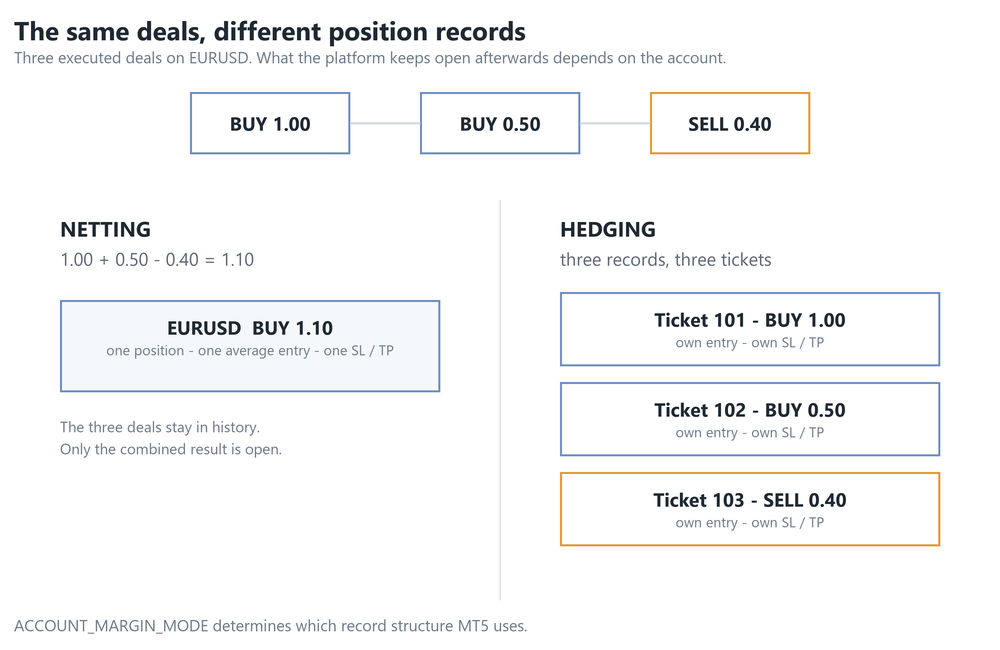
A netting account holds at most one position per symbol. Orders and deals still have their own records in history, but their result is combined into one open position.
Start with a 1.00-lot EURUSD buy. If a 0.40-lot sell is executed, the open result becomes a 0.60-lot buy. If a 1.00-lot sell is executed instead, the buy closes. If the sell is 1.40 lots, the position first closes and then reverses into a 0.40-lot sell.
Adding in the same direction increases the position's volume and recalculates its volume-weighted average open price. Buy 0.50 lots at one price and another 0.50 at a higher price, and MT5 shows one 1.00-lot long with one average entry. The deal history preserves both fills, but there are not two separate open longs with independently editable stops.
A pending order follows the same rule when it executes. An opposite pending order is not protected from netting merely because it began as a separate order: its deal reduces, closes or reverses the existing position.
What a hedging account does
A hedging account can hold several positions on the same symbol. Each position has its own ticket, open price, volume, Stop Loss and Take Profit. Two EURUSD buys can remain as two open positions, and a sell can remain open at the same time as both buys.
The word hedging describes the accounting system, not the economic result. A 1.00-lot buy and a 1.00-lot sell leave little directional exposure while both positions, their spreads, swaps and commissions still exist. Closing one leg restores the exposure of the other.
Ticket selection therefore matters. In MQL5's standard trade class, a symbol-only close on a hedging account selects the lowest-ticket position. A management tool that means to modify or close a particular leg should work with its position ticket and verify the trade-server result.
Partial closes are different operations
On a hedging account, a partial close targets one position ticket and closes part of its volume. A 0.30-lot partial close applied to a 1.00-lot position leaves that ticket open at 0.70 lots, subject to the symbol's minimum volume and volume step.
On a netting account, reducing the position means executing a smaller deal in the opposite direction. The standard MQL5 CTrade::PositionClosePartial() method is defined for hedging accounting; netting code reduces exposure with an opposite order. The end result can look similar in the Trade tab, but the request and the records behind it are different.
This distinction explains why a partial-close button written for one mode can fail or reverse exposure on the other. It must know the current position volume, normalise the reduction to the permitted step, and use the operation appropriate to the account.
Close losers and break even
On a netting account there is only one current position to classify for each symbol. Its floating profit belongs to the combined net exposure. A command to close all losing trades can close losing net positions across symbols, but it cannot pick an older losing EURUSD entry out of a profitable combined EURUSD position.
On a hedging account, the command can inspect each independent ticket. One EURUSD leg can be losing while another is profitable, so the tool needs a clear scope: a selected ticket, the current symbol, a magic number, or the whole account.
Break-even arithmetic follows the same bookkeeping. A net position already has an average open price, although commission, swap and closing costs can move the true flat account result away from that displayed price. On a hedging account, several same-direction entries have separate open prices. A basket break-even tool must combine their volumes and cash effects, then decide whether to move each leg's stop or manage the basket as a whole.
Opposite hedged legs require signed exposure in that calculation. Equal buy and sell volumes do not produce an ordinary single break-even price because their price gains and losses offset; transaction costs remain. Unequal sides produce a net directional exposure whose flat price depends on every leg and its costs.
Scaling in and scaling out
Netting makes scaling in look like one growing position. Each same-direction fill changes its volume and average price. Scaling out reduces that one position. Strategy code can still reconstruct individual entries from deal history, but it cannot assign a separate live SL and TP to each historical layer.
Hedging keeps the layers visible as positions. A trader can give each entry its own stop and target, close selected tickets, or leave earlier legs running while later legs exit. The cost is that basket exposure and break even must be calculated across several records.
Opposite positions still use margin
Hedged exposure is not automatically margin-free. MT5 supports broker-defined margin treatment for the matched volume. The symbol can use SYMBOL_MARGIN_HEDGED in its hedged-margin calculation, or the broker can enable SYMBOL_MARGIN_HEDGED_USE_LEG so margin is based on the larger of the long and short sides.
Unmatched volume, pending orders and instrument-specific margin rules also contribute. The resulting amount is determined by the account, symbol specification and broker configuration. Check the live margin figure and the symbol's Specification instead of treating an equal long and short as free exposure.
Why EAs and panels must check
An EA written around ticket-level control can behave differently on a netting account because several deals have become one position. An EA written around one position per symbol can touch the wrong leg on a hedging account if it selects by symbol and assumes the selection is unique.
Before opening, modifying, partially closing or closing a position, a tool should read ACCOUNT_MARGIN_MODE, choose the matching operation, select by ticket where independent positions exist, and check the trade-server return code. That small branch protects scaling, break-even and batch-close logic from a different accounting model.
Neither mode is better. Netting and hedging are different ways of recording open exposure. The practical choice is the account type your broker and jurisdiction offer that matches the way your strategy manages positions.
BrioQuant Break Even is a free MT5 indicator that solves the price at which every open position on a symbol comes out flat, swap and commission included. It reads each open position individually and prices it on its own closing side, so the calculation holds whether the account keeps one net position or several hedged legs.
BrioQuant Assistant Panel is a free MT5 trade panel with lot sizing, partial close, break-even and position-management controls. It reads ACCOUNT_MARGIN_MODE and treats an exchange account as netting rather than testing only for the retail netting value, which is the distinction described above.