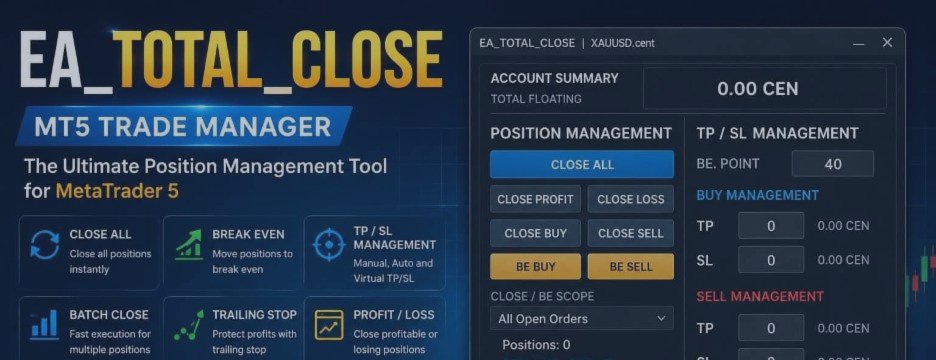

EA_TOTAL_CLOSE is a MetaTrader 5 trade and position management utility designed for traders who already have open positions and want a faster, clearer, and more controlled way to manage them.
It is not a signal EA and it does not automatically open trades.
The main purpose of EA_TOTAL_CLOSE is to reduce repetitive manual work when managing individual positions or large groups of open positions, especially on hedging accounts.
Main Functions
- Close All
- Close BUY
- Close SELL
- Close Profit
- Close Loss
- Break Even BUY / SELL
- Manual BUY TP / BUY SL
- Manual SELL TP / SELL SL
- Broker Auto TP/SL
- Virtual Auto TP/SL
- Trailing Stop
- Current Chart Only / All Open Orders scope
- Batch operation status
- Last Close information
- Light and Dark themes
Each tool is designed to manage existing positions without changing the trader's entry strategy.
Close Position Controls
Close All
Closes all eligible positions according to the selected scope.
Close BUY
Closes BUY positions only.
Close SELL
Closes SELL positions only.
Close Profit
Closes positions currently showing a profit.
Close Loss
Closes positions currently showing a loss.
Important: Close commands are executed directly when the button is pressed. There is no confirmation window before these position-closing commands.
Position Scope
EA_TOTAL_CLOSE can operate using two different scopes:
Current Chart Only
Actions are limited to positions belonging to the symbol of the chart where the EA is attached.
All Open Orders
Actions can apply across all eligible open positions.
On a fresh EA attachment, the default scope is:
All Open Orders
If the chart timeframe is changed, the selected scope is retained.
If the EA is removed and attached again, the scope returns to the default:
All Open Orders
Always check the selected scope before performing a batch action.
Manual TP/SL Management
EA_TOTAL_CLOSE provides four independent manual TP/SL fields:
- BUY TP
- BUY SL
- SELL TP
- SELL SL
Each field is applied independently.
For example, changing BUY TP does not remove or modify BUY SL. Likewise, changing BUY SL does not remove BUY TP.
A value can be confirmed by pressing Enter or by clicking outside the field.
Valid value above 0
A valid price greater than 0 applies the selected TP or SL.
- BUY TP must be above Bid
- BUY SL must be below Bid
- SELL TP must be below Ask
- SELL SL must be above Ask
Broker Stop Level and other trading restrictions may also affect whether the modification can be accepted.
Entering 0
Entering 0 or 0.0 cancels the current edit and restores the last successfully applied manual value.
Empty field
Leaving the field empty removes only the corresponding TP or SL.
Invalid input
Malformed or non-numeric input is rejected as an invalid value.
No numeric value is extracted from malformed text. The EA treats the value as invalid, displays a warning, and does not send a trade modification request.
Manual TP/SL scope
Manual TP/SL applies to the current chart symbol.
Break Even
Break Even controls are available separately for BUY and SELL positions.
BUY positions
- BE at 0 point moves SL to the position open price.
- A positive BE Offset moves SL above the open price.
SELL positions
- BE at 0 point moves SL to the position open price.
- A positive BE Offset moves SL below the open price.
Break Even follows the selected position scope.
A Break Even request can fail if the requested SL is too close to the current market price or violates the broker's Stop Level or Freeze Level.
This is a broker-side trading restriction and does not necessarily indicate a problem with the EA.
After a successful Break Even operation, the related manual SL field is reset to 0.
Setting TP afterward does not remove the Break Even SL unless the SL itself is edited or removed.
Broker Auto TP/SL
Broker Auto TP/SL places visible TP and SL levels on the broker side.
Important rule:
Broker Auto TP/SL only fills TP or SL levels that are currently missing.
- If an existing position already has a non-zero TP or SL, changing the saved Auto TP/SL values later does not move that existing level.
- New positions use the latest saved Auto TP/SL settings.
- Manual non-zero TP/SL changes remain in place.
- If a TP or SL is removed and becomes 0 while Broker Auto TP/SL is still enabled, the EA may automatically fill the missing level again on a following tick.
If you want a TP or SL level to remain empty, disable the relevant Auto TP/SL function first.
Virtual Auto TP/SL
Virtual TP/SL works differently from Broker Auto TP/SL.
Virtual levels are monitored internally by the EA and are not placed as visible TP or SL levels on the broker server.
When the market reaches a virtual target or virtual stop condition, the EA sends a close request for the affected position.
Because Virtual TP/SL is managed by the EA itself, the terminal and EA must remain running and connected for the virtual protection to operate.
Trailing Stop
EA_TOTAL_CLOSE includes a configurable Trailing Stop module.
Trailing can be managed separately for BUY and SELL positions and includes adjustable trailing parameters and scope control.
Trailing behavior is still subject to broker trading rules, including Stop Level, Freeze Level, market price, and execution conditions.
Batch Position Management
One of the main purposes of EA_TOTAL_CLOSE is managing large groups of positions.
The EA includes batch-operation handling, progress information, retry/recovery logic, and overlapping-batch protection.
A completion status helps the trader confirm how many operations were completed successfully rather than assuming every request was accepted.
Example Stress Test: 100 SELL Positions
- TP applied: 100/100 — approximately 250 ms
- SL applied: 100/100 — approximately 1219 ms
- TP removed: approximately 328 ms
- SL removed: approximately 281 ms
- Close All: approximately 438 ms
Example Stress Test: 205 BUY Positions
- TP applied: 205/205 — approximately 578 ms
- SL applied: 205/205 — approximately 563 ms
- TP removed: approximately 562 ms
- SL removed: approximately 578 ms
- Close All: approximately 985 ms
These figures are test results, not guaranteed execution times.
Actual performance can vary depending on:
- Internet connection
- Ping to the trading server
- Broker response time
- Broker server load
- Current market conditions
- Number of positions
- Trading restrictions
For large position groups, completeness and reliability are more important than expecting identical execution times on every operation.
Last Close Information
The Last Close section can detect closes originating from multiple sources, including:
- Dashboard close buttons
- Manual closing from another device
- Break Even
- TP/SL
- Trailing Stop
- Auto TP/SL
- Virtual TP/SL
When multiple positions are closed as part of the same batch, the EA can summarize the result.
When scope is set to Current Chart Only, Last Close follows the current symbol.
When scope is set to All Open Orders, Last Close can reflect closes across all symbols.
Light and Dark Themes
EA_TOTAL_CLOSE includes both:
Light Theme
The original interface appearance.
Dark Theme
A darker interface designed for traders who prefer reduced brightness or use dark chart environments.
The selected theme is applied immediately and the preference is saved.
The theme system changes the interface appearance only and does not alter trading logic.
Who Is EA_TOTAL_CLOSE For?
- Manual traders
- Scalpers
- Hedging-account users
- Traders managing multiple positions
- Traders using another EA for entries but wanting separate position-management controls
- Traders who want faster access to Break Even, TP/SL, trailing, and batch close functions
EA_TOTAL_CLOSE is primarily a trade-management utility, not a trading strategy.
Important Notes
Broker trading rules always take priority over requested position modifications.
TP, SL, Break Even, Trailing Stop, and other modifications can be rejected if they violate Stop Level, Freeze Level, available price distance, or other broker restrictions.
Execution speed can vary significantly between brokers and trading conditions.
EA_TOTAL_CLOSE is designed to improve position-management workflow, but it does not guarantee execution speed, trading profits, or trading results.
Free Demo
A separate Demo version is available for traders who want to test the EA dashboard and workflow before purchasing.
The Demo version works on MT5 Demo Accounts only.
It allows traders to test the interface and position-management workflow directly on a Demo account.
Full Version
The official full version of EA_TOTAL_CLOSE is available on the MQL5 Market:
EA Total Close Trade Manager MT5
https://www.mql5.com/en/market/product/188753
The official MQL5 Market version is the full retail version and uses MQL5 Market activations.
Video Guide
A complete video guide is available here:
EA_TOTAL_CLOSE – Complete MT5 Trade Manager Guide
The video demonstrates the dashboard, major functions, and large-position batch testing.
Final Words
EA_TOTAL_CLOSE was created to make MT5 position management more direct, predictable, and practical, especially when many positions are open at the same time.
Reduce repetitive clicks, improve visibility, and give the trader clearer control over existing positions.
Questions and feedback are welcome through the EA_TOTAL_CLOSE product page on MQL5.