Why Your Backtest Lies: The Problem of Quote History and How the Dukascopy History Loader Solves It

Every trading-system developer sooner or later runs into an unpleasant discovery: a beautiful backtest with an equity curve heading straight to the sky turns into something completely different on a live account. There can be many reasons — over-optimization, unrealistic spread, slippage. But there's one that's discussed least of all, even though it often lies at the very root of the discrepancy: the quality and depth of the quote history the testing is run on.
In this article we'll look at why broker history is an unreliable foundation for a backtest, what the notorious "99% modeling quality" actually means and why that number is misleading, and how the Dukascopy History Loader built into FX Monitor Studio solves this problem.
Broker history: a foundation you can't trust
When you launch the Strategy Tester in MetaTrader, by default it uses the history the terminal downloads from your broker's server. At first glance this seems logical — test where you trade. But in practice this approach has several serious problems.
History depth is limited. Most brokers store and serve a relatively short slice of history. For popular pairs this might be a few years; for exotics and indices, even less. Which means you physically cannot check how a strategy would have behaved during the 2008 crisis, the 2010 flash crash, the 2015 franc collapse, or the COVID crash of March 2020. A strategy that looks great on the calm bull market of recent years may fall apart in exactly those moments that aren't present in the available history.
Every broker's data is its own. Quotes aren't an objective truth but a stream that each broker shapes in its own way. One records every price change, another thins the stream out. Spreads, gaps, overnight candles, tick density — all of this differs from broker to broker. The same Expert Advisor on different brokers' data can generate a different number of trades, and you may effectively be testing against a smoothed-out market environment. A backtest on broker A's data and broker B's data will give different results — and which one is "correct" is anyone's guess. MQL5
There are gaps in the data. History from a broker's server often contains holes, missing bars, and incorrect ticks. The tester swallows them silently, and the result is distorted without you noticing.
In other words, you're building a structure on a foundation whose very shape you don't really control.
The myth of "99% modeling quality"
Here we need to pause on a number that misleads an enormous number of traders. When a backtest finishes and you see "99% modeling quality" (in MT5, a high modeling-quality percentage), it creates the impression that the data is practically perfect and the result can be trusted.
This is a dangerous misconception. Modeling quality characterizes not the quality of the data itself, but how densely the tester was able to fill the intervals with ticks. A high percentage only tells you there were enough price points between bars for simulation — but says nothing about where that data came from, how well it matches reality, or whether it contains systematic distortions.
As authors of analytical material on the subject put it precisely: the source and quality of tick data can drastically influence results — even if MT5 reports that the backtest was near-perfect. You can get "99%" on low-quality data and come to believe in a strategy that hasn't actually been tested on anything reliable. MQL5
What "Every tick based on real ticks" is and why it matters
MT5 has several modeling modes, and understanding the difference between them is critical.
The fastest and crudest are Open prices only and 1 minute OHLC, which work only with opening prices or the OHLC of minute bars. They're fine for an initial screening of ideas, but not for a final check.
Next comes Every tick — a mode in which the ticks are virtual, generated from M1 OHLC data, while the real tick data is ignored. The tester essentially "invents" price movement within the bar by interpolating between OHLC. This is better than OHLC, but it's still simulation. MQL5
And finally, Every tick based on real ticks — a mode unique to MT5. Testing is performed using real ticks of the instrument, with no simulation at all. This mode gives conditions as close to reality as possible — but with one condition: the quality of the result depends directly on which tick data is loaded into the symbol. If the data comes from the broker's server with all its gaps and quirks, the "real ticks" mode will faithfully run on that imperfect data. MetaTrader 5
And here's where the key idea emerges: to get a truly reliable backtest, you need independent, complete, and deep tick data from a trustworthy source — not whatever the broker hands you.
Dukascopy as a reference source
Among retail traders and algo developers, Dukascopy has long been considered one of the best free sources of historical data. It's a Swiss bank and broker that publishes tick history for a wide range of instruments, and for most symbols this history goes back as far as May 2003.
That means access to more than two decades of market data, including every significant crisis and market regime. You can test a strategy not on a "polished" bull window of recent years, but over the full distance — with crashes, flat periods, and stretches of high and low volatility.
The problem was always one thing: getting that data and bringing it into a form usable by MT5 is no trivial task. Downloading raw Dukascopy files, converting them, creating a custom symbol in the terminal, importing bars and ticks with the correct GMT and DST settings — all of this requires fiddling, third-party utilities, and an understanding of many nuances. Many traders simply gave up and stayed on broker data.
Dukascopy History Loader: the whole journey in one app
This is exactly the pain the Dukascopy History Loader built into FX Monitor Studio addresses. It takes on the entire journey from downloading history to a backtest-ready MT5 custom symbol — without leaving the app.
Downloading
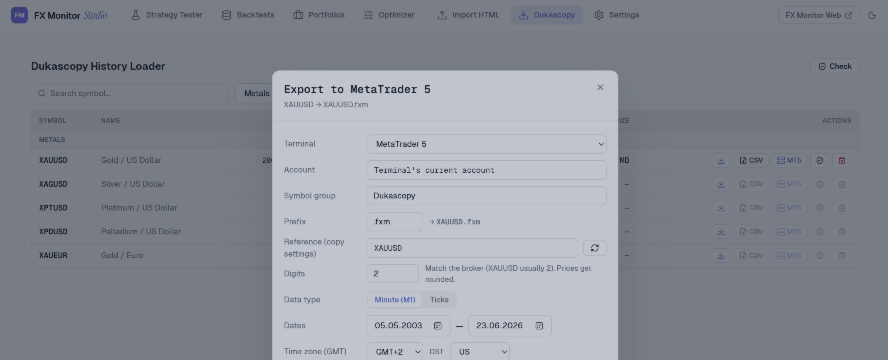
The Loader opens the full Dukascopy instrument catalog — Forex, Metals, Indices, Commodities, Crypto and Stocks — with search and grouping. For any symbol you download either M1 bars or real tick data over an arbitrary date range, going back to 2003. Downloads run multi-threaded, with a live progress queue showing exactly which date is being processed at any moment.
Incremental downloading
One of the most convenient aspects in practice: re-running a download fetches only what's missing. If you downloaded history a year ago and now need only the latest weeks, the Loader fills the gap instead of pulling the whole dataset again. This saves hours when you update data regularly.
Integrity check
Large volumes of tick data inevitably carry the risk of corrupted files — an interrupted download, a bad chunk. A dedicated Check function validates every cached file individually, finds the corrupted ones, removes them, and automatically re-queues them for download. You can run the check across your whole cache or on a specific symbol. This matters especially because a single corrupted chunk of data can quietly distort an entire backtest.
Export
Finished data is exported in two ways.
CSV — MetaTrader-compatible files with a configurable GMT offset, Daylight Saving Time (DST) handling, and a selectable date range. Getting GMT/DST right here is no small thing: it determines whether candles land at the correct time, and whether the whole history "shifts" relative to the real market.
Direct to MetaTrader 5 — the most convenient path. The Loader creates a custom symbol right in your terminal. You choose a reference symbol to copy your broker's contract settings (important, so the symbol's behavior matches real trading conditions), set the symbol group, prefix and number of digits, and select the export period independently for bars and ticks. Incremental mode adds only the missing history, while Force re-import performs a clean full rebuild.
Backtest readiness
Custom symbols are built so the Strategy Tester correctly reconstructs accurate M1 history from the downloaded data, delivering high modeling quality. In practice this means that after export you select your custom symbol in the tester, set the Every tick based on real ticks mode — and get a backtest on honest, deep, independent data. After export, your broker symbol list refreshes automatically, so the new symbol is available right away, without restarting the terminal.
What this changes in practice
Switching from broker data to the full Dukascopy history changes the very nature of testing.
First, you get an honest picture over the long run. A strategy that has been making money for the past two years gets checked over twenty years — and often it turns out its "edge" was tied to a specific market regime.
Second, you get a reproducible basis for comparison. When you and any other trader test on the same Dukascopy data, results can be meaningfully compared, rather than writing off discrepancies as "different brokers."
Third — and this is especially important for those who buy or sell advisors — you gain the ability to verify someone else's backtest. When an EA developer shows a perfect curve, it's far from always clear what history it was produced on. A run on independent Dukascopy data over the full period quickly shows whether the claimed result holds over a real distance or is an artifact of a conveniently chosen window.
Availability
It's worth noting separately: the Dukascopy History Loader is available completely free, regardless of your subscription plan. It's built into FX Monitor Studio — a free desktop application for Windows 10/11 (x64) which, in addition to the history loader, provides full backtest analytics, Monte Carlo simulation, strategy portfolios, and sync with the FX Monitor cloud.
A quality backtest begins with quality data. And now getting that data is a matter of a few clicks.
👉 Learn more about FX Monitor Studio




