New York AM Session Profile — Full Setup Guide & Strategy Playbook

New York AM Session Profile — Full Setup Guide & Strategy Playbook
Companion guide for the New York AM Session Profile indicator (MT5 & MT4). This guide explains what each part of the indicator shows, how to configure it, and how to read the structure it draws. It is a teaching tool, not a signal service — so this guide focuses on reading the market, not on entries and exits.
MT5 Version: https://www.mql5.com/en/market/product/180798
MT4 Version: https://www.mql5.com/en/market/product/180946
Free Demo: Available on both product pages.
Install the demo first to follow along with this guide.
If anything in this guide is unclear, message me directly via MQL5. I respond to every message personally.

1. What This Indicator Is (and Is Not)
The New York AM Session Profile is a market-structure visualization framework built entirely around the New York AM session. Its objective is not to generate buy or sell signals — it is to train your eye to read price: its behaviour, structure, flow, and sequence. Think of it as a silent mentor that sharpens your structural edge over time, so you learn to read the market's intent the way institutional order flow actually moves.
It does not print arrows, give entries, or tell you what to do. It draws a clean, consistent map of how the AM session is building — the session open, the equilibrium, the 4-hour block sequence, and the liquidity sweeps between those blocks — and leaves the decision to you.
2. The Idea Behind the AM Profile
The trading day can be broken into 4-hour blocks. The New York AM session — the most active and most institutionally-driven part of the day — is the first three of those blocks. Read in sequence, those blocks tend to express a recognizable rhythm:
- Block 1 — early range / accumulation. Price builds an initial range.
- Block 2 — manipulation. Price often runs the prior block's high or low to take liquidity, then rejects.
- Block 3 — distribution. Once the manipulation is done, price tends to deliver in the opposite direction.
This is the accumulation → manipulation → distribution sequence. The indicator does not assume this will always happen; it simply makes the building blocks visible so you can judge, in real time, whether the sequence is unfolding.
3. Quick Start (3 steps)
- Attach the indicator to any chart (M5 is the natural execution timeframe; it works on any timeframe and any symbol).
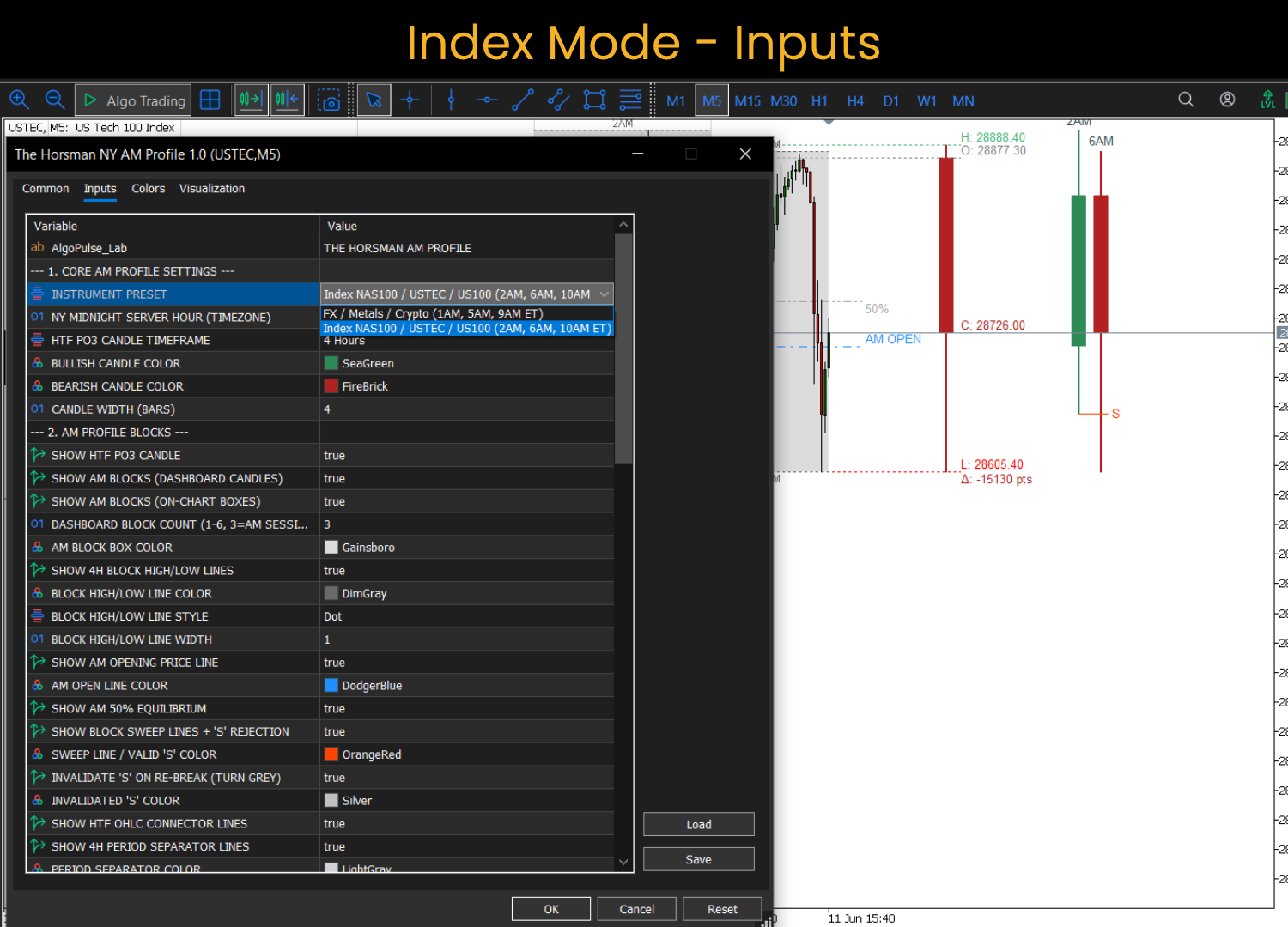
- Choose your preset ( AM_Preset ): FX for forex, metals, and crypto; Index for NAS100 / USTEC / US100.
- Set your broker timezone ( NY_Midnight_Hour ) so the AM session aligns to true New York time. For a GMT+2/+3 broker (e.g. IC Markets), this is 7 . See Section 6 for how to find yours.
Defaults are tuned so that, out of the box, you see the full 24-hour 4-hour grid with one day of lookback, the three AM dashboard candles, the AM Open and 50% lines, and sweep detection active.
4. Understanding the Display
The indicator draws in two zones: on the chart (over real price) and in the dashboard (projected to the right of live price, so it never sits on top of your candles).
The HTF Power-of-3 candle (dashboard). The leftmost dashboard candle is the current higher-timeframe candle (default H4, selectable). It shows full O/H/L/C and the running delta in points, with dotted connector lines projecting those levels back across the chart. This is your higher-timeframe context at a glance.
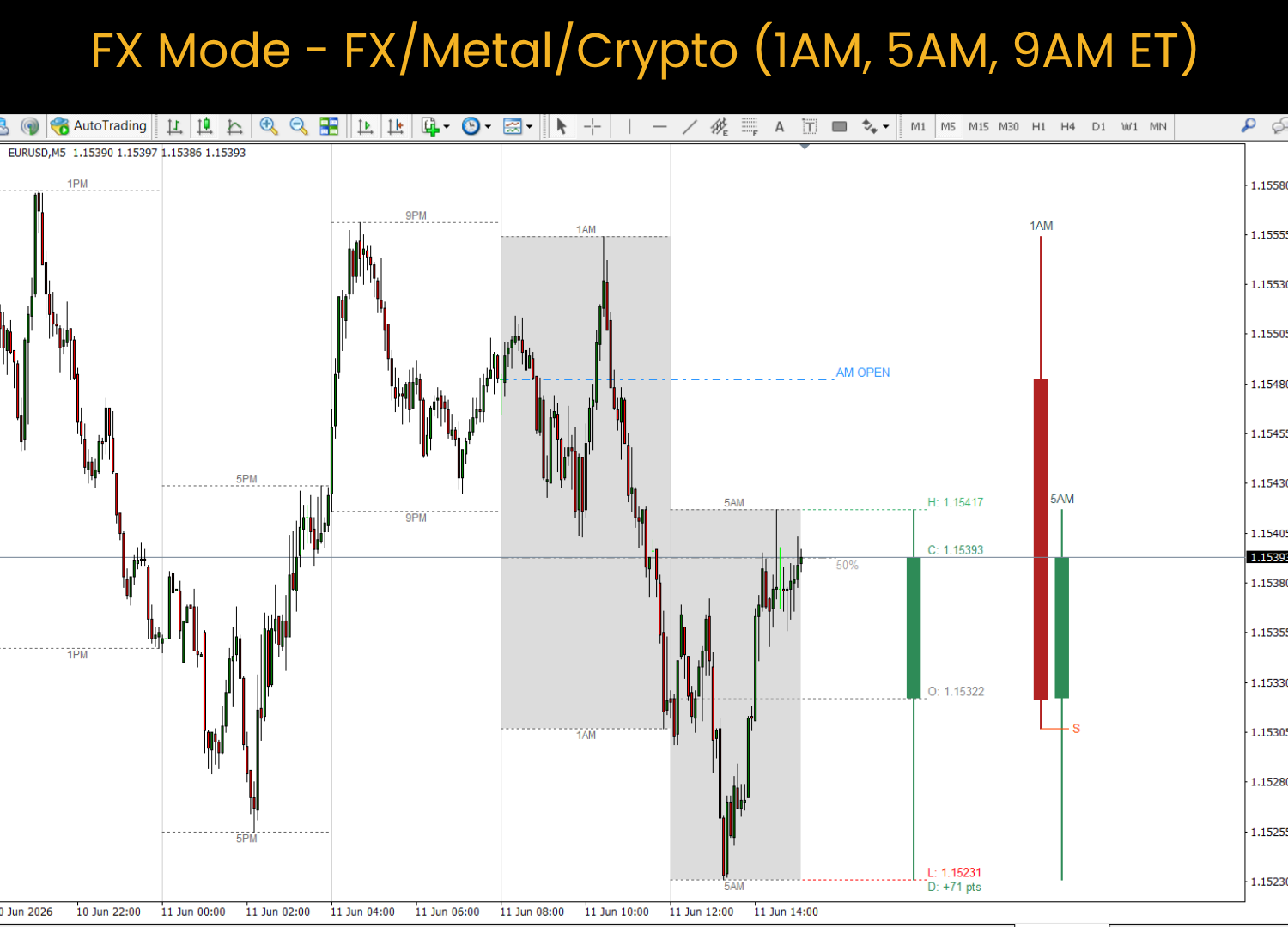
The AM dashboard candles. To the right, the three AM session blocks are projected as clean 4-hour candles, labelled by their New York start time (1AM/5AM/9AM for FX, 2AM/6AM/10AM for Index). They appear one by one as the session progresses. You can show more than three with Dashboard_Block_Count if you want to study other parts of the day.
The on-chart boxes. The same AM blocks are shaded directly over the price bars that formed them, so you can connect the dashboard projection to the real candles.
The AM Open line. A single reference line at the open of the first AM block — the session's anchor price. It is drawn strictly from the AM session (never the evening blocks). Before today's AM session begins, it shows the previous day's AM Open as an overnight reference, then switches to today's once the session starts.
The 50% equilibrium. The midpoint of the AM session's range. Price above equilibrium vs below it is a fast read on which side is in control.
The 4-hour block grid. Vertical separators mark every 4-hour boundary, and each block carries high/low projection lines with a time label. This is the on-chart decomposition of the day into its 4-hour structure, adjustable for how many days back it draws ( Block_Grid_Lookback ) and whether it covers the 3 AM blocks or the full 24 hours ( Grid_Full_Day ).
The sweep lines and the "S". Covered in detail in Section 7 — this is the heart of the tool.
5. The Two Presets — and Why They Differ
The AM session blocks are anchored to different New York hours depending on the instrument:
- FX / Metals / Crypto → 1AM, 5AM, 9AM ET
- Index (NAS100 / USTEC / US100) → 2AM, 6AM, 10AM ET
The index preset is shifted one hour later to align with the cash-index rhythm. Pick the preset that matches what you're trading. If your blocks look "off" by an hour on an index, you are probably on the FX preset (or vice versa).
6. Timezone Setup (the one input you must get right)
Everything is anchored to true New York time, so the indicator needs to know which server hour equals New York midnight. That is the NY_Midnight_Hour input.
- For a GMT+2 / GMT+3 broker (most common, e.g. IC Markets), set it to 7.
- To verify: the AM session boxes should sit over the correct hours of price action, and the dashboard labels (1AM/5AM/9AM or 2AM/6AM/10AM) should line up with where those New York hours actually fall on your chart.
If the whole framework looks shifted left or right by a fixed number of hours, adjust NY_Midnight_Hour by that many hours until the AM boxes land on the right candles.
7. How to Read the Sweep and the "S" (the core skill)
This is the most important section. The sweep logic is what turns a passive map into a tape-reading tool.
Step 1 — The sweep line appears. When a 4-hour block trades beyond the previous block's high (or below its low), it has swept that level — a run on liquidity. The indicator draws a horizontal sweep line at the swept level, connecting the two blocks. A sweep on its own is just that: liquidity was taken. It is not yet a signal.
Step 2 — The "S" confirms the rejection. A sweep only becomes meaningful if price rejects it. The indicator waits for an M5 candle to close back inside the previous block's range. The moment that happens, it prints an "S" at the end of the sweep line, in the sweep colour (default orange). This is the confirmed failed sweep — liquidity was grabbed and rejected, the classic reversal tell. This is also when the alert fires (once).
Step 3 — Invalidation (the grey "S"). A confirmed rejection is not a promise. If, after the "S" prints, an M5 candle later closes back beyond the swept level — reclaiming it and continuing — the rejection has failed. The indicator then turns that "S" grey to mark it invalidated. It stays on the chart as an honest record: "a rejection was attempted here, and it failed."
So the three states you will see:
| What you see | What it means |
|---|---|
| Sweep line, no "S" | Liquidity was taken; no rejection yet. Wait. |
| Orange "S" | Confirmed rejection on the M5 close — the reversal read is live. |
| Grey "S" | The rejection failed; price reclaimed the level and continued. The read is dead. |
Why it does not re-validate. Once an "S" goes grey, it stays grey for the rest of the day, and no second alert fires — even if price wobbles back inside again later. This is deliberate. A level that has been swept, rejected, and reclaimed is compromised; treating every subsequent wobble as a fresh signal would turn a clean structural event into noise. Each block gets one clean read against the block before it. The next genuine setup is the next block sweeping its predecessor — a new, separate event.
A practical way to hold it in your head: orange = the rejection is holding; grey = the rejection broke. You can recolour both via Sweep_Color and Sweep_Fail_Color , or switch the invalidation behaviour off entirely with Invalidate_Sweep .
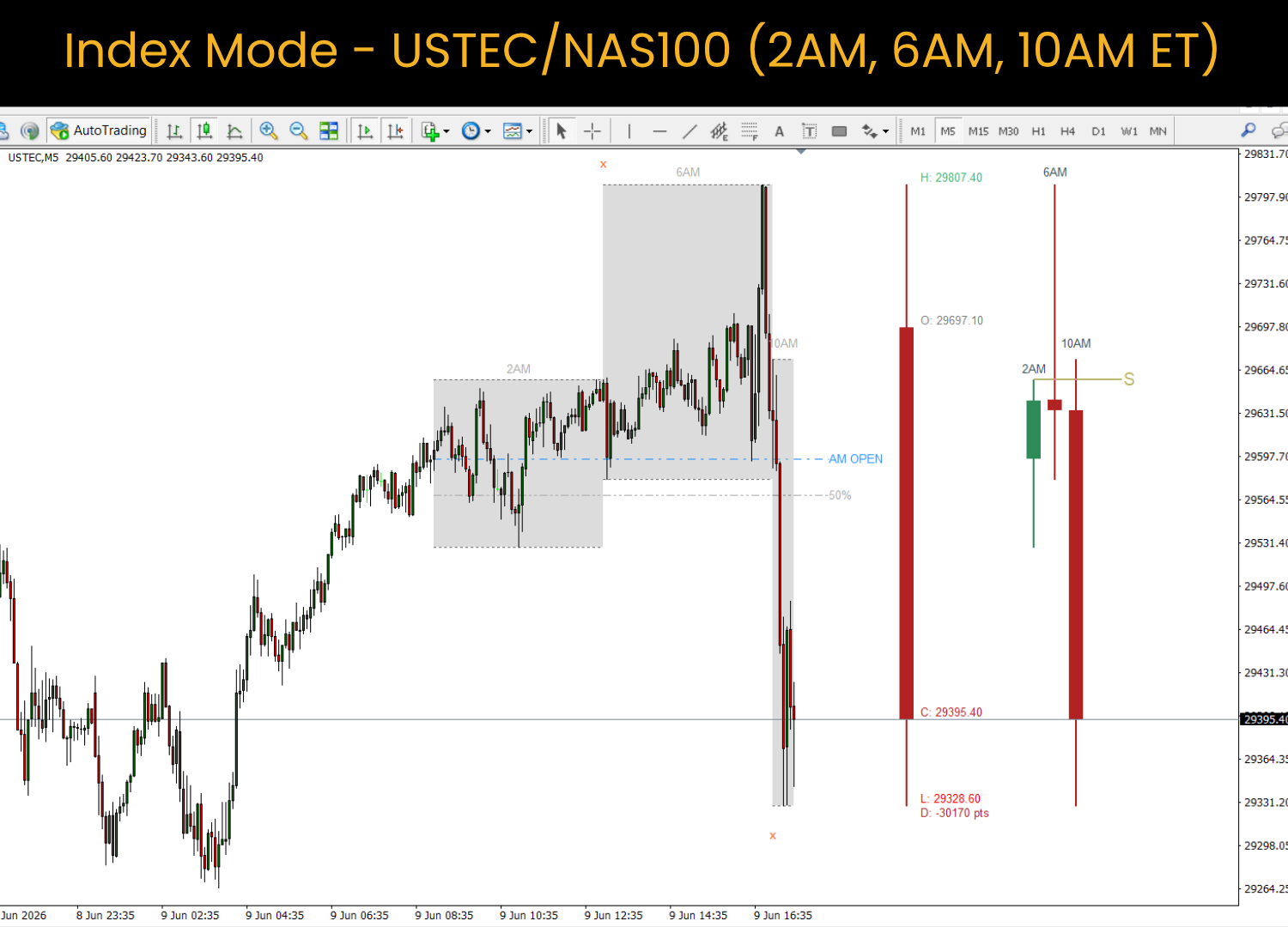
8. Worked Example — A Clean AM Reversal (USTEC, Index preset)
This is a real session that shows the full sequence.
- 2 AM block set the early range — the first reference.
- 6 AM block ran above the 2 AM high: a liquidity sweep (manipulation). It then closed back inside the 2 AM range on the M5 — so the indicator printed the orange "S". Buy-side liquidity above the 2 AM high had been taken and rejected.
- 10 AM block then distributed sharply lower — the markdown leg that so often follows a confirmed manipulation.
Read as a sequence: accumulation (2 AM) → manipulation + rejection (6 AM, the "S") → distribution (10 AM). The indicator marked the swept level and confirmed the rejection; the structural read — and the execution — was left to the trader. Note the honest framing: the "S" flagged a high-probability condition, not a guarantee. Had the 6 AM block instead reclaimed the 2 AM high and continued up, the "S" would have turned grey and the read would have been off.
9. Full Inputs Reference
1. Core AM Profile Settings
- AM_Preset — FX/Metals/Crypto (1/5/9 AM) or Index (2/6/10 AM).
- NY_Midnight_Hour — server hour equal to NY midnight (GMT+2/+3 broker = 7).
- HTF_Period — the higher-timeframe Power-of-3 candle (default H4; H1/H4/D1/W1).
- BullColor / BearColor — dashboard candle colours.
- CandleWidth — width of the projected candles in bars.
2. AM Profile Blocks
- Show_HTF_Candle — show the HTF candle in the dashboard.
- Show_AM_Dashboard — show the AM blocks as dashboard candles.
- Show_AM_Boxes — shade the AM blocks on the chart.
- Dashboard_Block_Count — how many 4-hour candles to project (1–6; default 3 = the AM session).
- AM_Box_Color — on-chart box colour.
- Show_Block_HL , Block_HL_Color , Block_HL_Style , Block_HL_Width — the grid high/low lines.
- Show_AM_Open , AM_Open_Color — the AM session open line.
- Show_Equilibrium — the AM 50% line.
- Show_Sweeps , Sweep_Color — sweep lines and the valid "S".
- Invalidate_Sweep , Sweep_Fail_Color — grey-out behaviour for failed rejections.
- Show_OHLC_Lines — the HTF OHLC connector lines.
- Show_Period_Sep , Sep_Color , Sep_Style , Sep_Width — the vertical 4-hour separators.
- Grid_Full_Day — grid covers all 6 blocks (24h) vs the 3 AM blocks.
- Block_Grid_Lookback — how many days back the grid draws (0 = today only).
- Show_Grid_Labels , Grid_Label_Color , Grid_Label_Size — the block time labels.
3. Layout & Spacing
- Manual_Chart_Shift_Pct — chart shift so the dashboard has room.
- Chart_Gap_Bars — gap from live price to the HTF candle.
- Dash_Gap — gap from the HTF text to the AM blocks.
4. Chart Environment
- Chart_Theme — Keep Existing / Institutional (white) / Dark Mode.
- LineColor — base line colour.
5. Market Sessions (optional, off by default)
- ShowSessions , Ses_Lookback , and Asia/London/NY start, end, and colour.
6. Macro Liquidity (optional, off by default)
- Show_PDHL , PDHL_Lookback , PDHL_Color — previous day high/low.
- Show_PWHL , PWHL_Color — previous week high/low.
- Liq_Text_Align , Liq_Extension_Bars — label alignment and line extension.
7. NY Equity Open (optional, off by default)
- Show_NY_IB , NY_Equity_Time , NY_IB_Minutes , NY_IB_Color — the NY initial-balance range.
8. Alerts (optional, off by default)
- Alerts_Enabled — master toggle.
- Alert_Desktop — popup.
- Alert_Mobile — push notification.
- Alert_Email — email (configure Tools → Options → Email in the terminal).
- Alert_Sweep — alert on the confirmed "S" rejection.
10. Alerts Setup
Turn on Alerts_Enabled , then enable whichever channels you want ( Alert_Desktop , Alert_Mobile , Alert_Email ). For mobile push, link your MetaQuotes ID in the terminal; for email, configure the SMTP settings under Tools → Options → Email. Alerts fire once per block per direction, only on the confirmed orange "S" — never on the raw sweep, and never again once an "S" has gone grey.
11. Best Practices
- Trade the M5 for execution; the AM blocks are 4-hour structure, the "S" confirms on the M5 close.
- Let the structure build. The cleanest reads come when block 2 manipulates block 1 and rejects (orange "S"), then block 3 distributes.
- Use the AM Open and 50% as your bias filter — which side of equilibrium is price delivering from?
- A grey "S" is information too: it tells you the obvious reversal didn't hold, which often precedes continuation.
- This is a framework, not a system. Pair it with your own model, risk, and execution rules.
12. A Final Word
The New York AM Session Profile won't tell you when to buy or sell. What it will do — session after session — is show you the same clean structure, so that reading liquidity, sweeps, equilibrium, and the block-to-block sequence becomes second nature. That repetition is the edge. Trade your own model; let the framework train your eye.
Both MT4 and MT5 versions are available. This indicator is non-repainting and operates in real time on any symbol and timeframe.
…..........................
Developer Support
New York AM Session Profile is designed, developed, and maintained by Ravi Gurung.
If you have any questions before/after purchasing, need assistance with setup, or require clarification regarding any feature, please send a private message through MQL5.
Every message is personally reviewed and answered directly by the developer.
Your feedback, suggestions, and feature requests are always welcome.




