Stop Guessing Your XAUUSD Risk - Manage Every Trade with One Click Using Gold Trade Manager PRO

💎 TL;DR
Gold Trade Manager PRO is a one-panel trade management utility for XAUUSD on MetaTrader 5. It handles broker-accurate risk calculation, spread and margin validation, one-click market and pending entries with automatic SL/TP placement, break-even, trailing stop, partial close, and full basket management - all from a single adaptive panel that runs live on your chart. Reduces manual lot calculations and helps ensure stop-loss and take-profit orders are attached automatically according to your settings. Designed for manual traders who want cleaner, more consistent execution - not an automated strategy.

🔔 The Problem Every Active Gold Trader Eventually Faces
You know where you want to enter. The structure is clear. The session is right. The spread looks acceptable.
Then comes the mechanical part - and that is where most trades go wrong before they even start.
You open the order window. You try to calculate lot size in your head while price is moving. You set the stop but forget the take profit. Or you set both, hit confirm, and only then realize you risked twice what you intended because the SL distance was different from what you assumed.
And if the trade does go your way? Now a new problem starts. You know you should move to break-even, but you are watching two other charts. By the time you come back, price has already reversed through your entry. The trade that was up $600 is now a loss.
This is not an analysis problem. This is an execution problem. And on XAUUSD - where a 40-point spike in either direction can happen in under a minute - the gap between a good decision and a clean execution of that decision can become an expensive source of avoidable errors.
Gold Trade Manager PRO closes that gap.
🏆 The Real Engine: Entry Validation Before You Touch the Market
Most trade management panels focus on what happens after you are in a trade. This tool starts one step earlier.
Before any order is sent, the panel validates three things in real time: margin availability, spread conditions, and stop distance legality. If your broker's spread has widened beyond the threshold you set - a common occurrence on XAUUSD during news releases - new entries are blocked with a clear status indicator. If free margin after the trade would fall below your floor, it blocks. If the requested stop levels violate the broker's minimum stop or freeze restrictions, it blocks.
The real-time panel shows you exactly what you are about to do: risk in dollars, projected reward at your R/R ratio, required margin, current spread versus your maximum threshold. Lot size, required margin, and spread validation are all calculated using the actual symbol specifications reported by your connected MT5 broker - not generic pip-value formulas or estimates. This matters more than it sounds: XAUUSD tick values and margin requirements vary meaningfully across brokers, and the tool accounts for your broker's actual parameters on every calculation.
The screenshot from June 10–11, 2026 makes this concrete: the panel shows "Risk: 1.00% Eq | Lot 2.83 | R/R $849.00 / $1,698.00 | 2.00R | Spread 17/80 OK." All key trade parameters are visible before execution. One click to send.
That pre-entry validation layer - not the buttons themselves - is the real engine of this tool.
🚀 What the Panel Shows and Does on Your Chart
Attach it to your XAUUSD chart on any timeframe and the following become available immediately:
🎖️ RISK Section - displays live lot size calculated from your risk mode (percent of equity, fixed dollar amount, or fixed lot), the dollar risk and projected reward at your configured R/R ratio, required margin for the trade, and current spread versus your maximum allowed spread. The panel refreshes continuously while the market is active, updating on live price movement.
🎖️ ENTRY Section - BUY and SELL for immediate market orders; BUY LIMIT and SELL LIMIT for pending entries placed at a configurable distance from current price. All entries attach SL and TP automatically at the distances you configured. Margin, spread, and stop validity are all checked before the order fires. Note that pending orders validate against the specified limit price offset rather than current market price, which is the standard MT5 behavior for limit order placement.
🎖️ EXIT Section - CLOSE ALL (with optional double-confirm to prevent accidental full closure during fast markets), CLOSE HALF across all open positions simultaneously, CLOSE BUY and CLOSE SELL for directional exit. One click each.
🎖️ MANAGE Section - MOVE BE applies break-even to all managed positions at once; TRAIL ALL activates trailing stop across the book; PROFIT and LOSS close only the winning or losing side of the basket respectively; BASKET TP closes the full basket when aggregate profit reaches your configured target.
🎖️ STATUS Section - live buy/sell position count, total lots per direction, current basket P&L in dollars, and required margin. Always visible, always current.
The panel layout adapts automatically to different chart sizes and screen resolutions - laptop, desktop, or VPS environment. It rebuilds itself when you resize the chart and cleans up completely when removed, leaving no orphaned objects on the chart.
🔎 What This Looks Like in Real Trading
The M15 screenshot from June 10–11, 2026 on XAUUSD shows the tool running with two active buy positions.
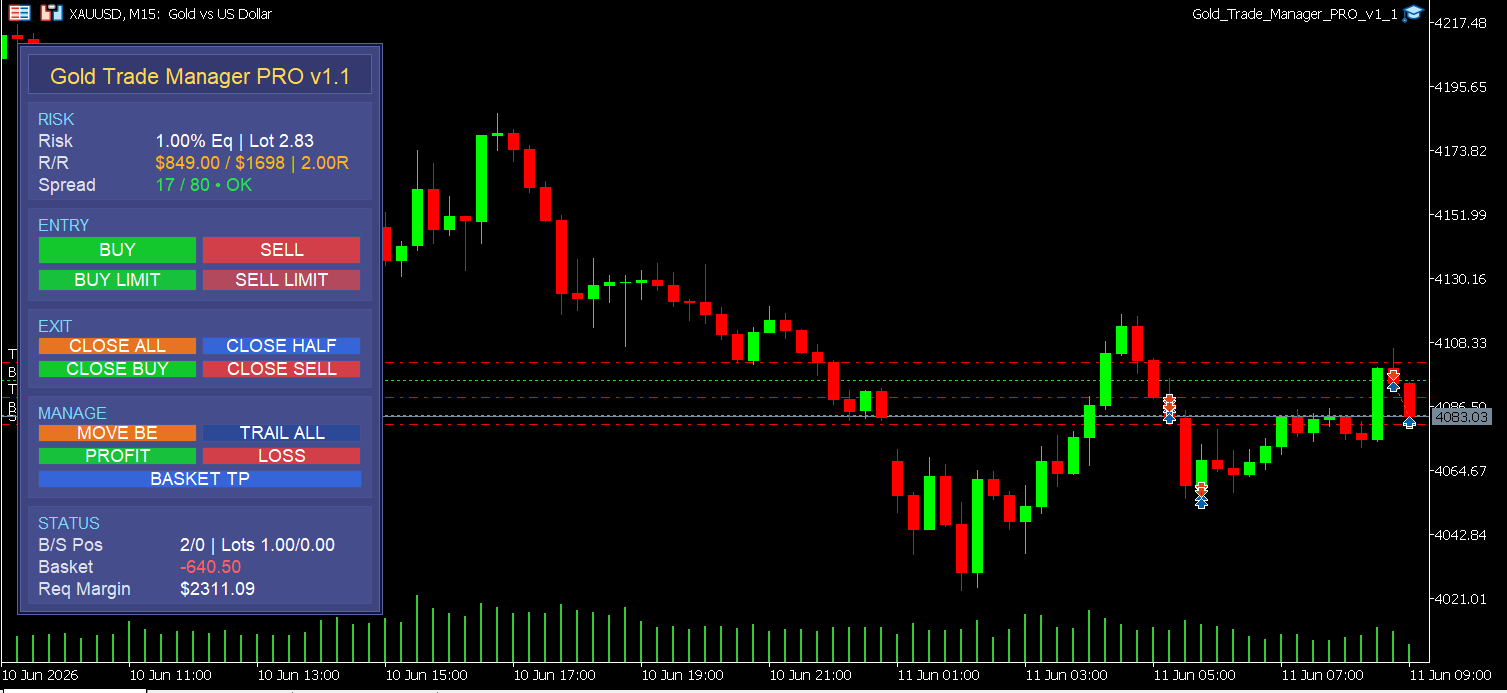
The STATUS section reads: "B/S Pos 2/0 | Lots 1.00/0.00 | Basket -640.50 | Req Margin $2,311.09." The basket is underwater at that moment - $640 drawdown with $2,311 margin committed. Every number needed to make a management decision is visible without opening a single additional window.
The RISK section confirms spread at 17 points against an 80-point maximum threshold - well within acceptable range, status "OK." Had the spread climbed above 80 during that period, new entries would have been blocked automatically until spread returned to normal.
This is the workflow in practice: you read the chart, decide direction, glance at the panel to confirm the risk numbers and spread status, click once. The trade goes in with correct sizing and automatic stop placement. From that point forward, the MANAGE section handles protection and exit - either manually when you decide, or automatically via the configured break-even and trailing parameters.
🌟 Practical Advantages Worth Noting
Beyond the main workflow, a few details matter for regular MT5 use:
- The panel manages only the symbol it is attached to by default, which prevents accidental interference with positions on other instruments if you run multiple charts simultaneously
- CLOSE ALL uses a double-confirmation option - the first click arms the action, the second within a configurable window executes it, which helps prevent unintended full closures during fast-moving markets
- The modification queue processes SL/TP updates in controlled batches with retry logic, which helps reduce the order rejection errors that frequently occur during high-volatility periods on XAUUSD - particularly the "too many requests" rejections that manual editing triggers during news spikes. This is one of the most practically useful features for traders who actively manage stops during live sessions
- All panel objects are cleaned up completely on removal - no ghost labels or orphaned elements remain on the chart after the utility is detached
🎁 Who This Is For
- XAUUSD manual traders on any timeframe who regularly experience execution errors or inconsistent trade management - not traders whose analysis is wrong, but traders whose mechanics don't match their decisions
- Traders who run multiple positions simultaneously and need basket-level visibility and one-click directional exit controls
- Anyone who has placed a trade with the wrong lot size, or held a losing position longer than intended because closing it felt harder than it should
- Prop firm traders who need hard risk controls at the point of entry - fixed percent risk mode, maximum spread blocking, and margin validation all serve firm-rule compliance workflows
📢 Who This Is NOT For
- Traders looking for automated entries or signal generation - this tool executes your decisions, it does not make them for you
- Anyone wanting backtestable strategy logic - it is a manual utility, not an EA with a strategy engine
- Traders who use a single fixed lot on every trade regardless of account size - the risk calculation engine is designed for traders who want position sizing to adapt to their equity
📝 What It Doesn't Do
Gold Trade Manager PRO MT5 does not generate signals, analyze price action, or decide when to enter. It has no built-in strategy and no profit guarantee.
What it does is make sure that once you decide to trade, the execution mechanics of that trade are handled correctly - right size, right stops, right protection, right exit controls. The analysis is yours. The execution becomes reliable.
Think of it as the infrastructure between your trading decision and order execution.
🎁 Get the Tool
👉 Gold Trade Manager PRO on MQL5 Market: https://www.mql5.com/en/market/product/168958
If execution errors - inconsistent lot sizing, missing stops, slow reaction on profitable trades - are a regular part of your trading workflow, this panel helps reduce much of that friction. Attach it to your XAUUSD chart, set your risk parameters once, and it handles the execution mechanics from entry to exit.
🧰 Related Tools
These tools integrate naturally into the same trading workflow:
- Gold Session Box MT5 - session structure, rolling range calibration, and breakout awareness for context-aware entry timing on XAUUSD
- Gold Bias Regime Filter MT5 - intraday market bias classification to help you decide direction before you look for entry
- Equity Protector Pro MT5 - hard daily and weekly drawdown limits that pause trading automatically when your account reaches predefined loss thresholds
❓ FAQ
✅ Does it work on symbols other than XAUUSD? Although optimized for XAUUSD, the tool can be used on other MT5 symbols supported by your broker. Lot calculation, margin check, and spread validation all use the actual symbol specifications of whatever instrument the panel is attached to.
✅ Can I control which positions the panel manages? Yes. By default it manages only the symbol it is attached to. You can also enable a magic number filter to restrict management to positions placed by the panel itself, or configure it to manage manually opened trades only.
✅ What risk modes are available? Three: percent of equity (e.g., 1% risk per trade), fixed dollar amount (e.g., $50 per trade regardless of account size), or fixed lot (manual lot input). You can also switch between using live equity or a fixed balance value as the risk base - useful for traders who want to size against a defined capital segment rather than total account equity.
✅ Does break-even trigger automatically or manually? Both options are available. You can trigger it manually at any time via the MOVE BE button, or configure it to apply automatically when a position reaches a defined profit distance - with a configurable offset to place break-even slightly above entry rather than exactly at it.
✅ Will it conflict with other EAs or indicators on the same chart? The panel is a trade management utility, not an EA with its own strategy logic. It uses a configurable magic number and symbol filter, which allows it to coexist with other tools. The main consideration is that CLOSE ALL or basket controls affect all managed positions on that symbol, not only those placed via the panel.
✅ Does it repaint? Since this is a trade management utility rather than a predictive indicator, repainting is not applicable. The panel reads live account and market state from the MT5 environment and displays it directly. There is no calculated value or historical buffer that would repaint.
✅ How quickly does the panel update? The panel updates on every live price tick during active market conditions, so in practice it refreshes sub-second during fast XAUUSD moves. A background timer serves as a fallback to keep the display current during quieter market periods. There is no meaningful display lag during normal trading conditions.
🎁 New to Gold Algo Lab?
Start with the Gold Algo Lab Tool Map - a practical guide that organizes our MT5 tools into 6 connected stages: market context, setup selection, risk planning, trade execution, position management and account protection.
→ Gold Algo Lab Tool Map: Where to Actually Start With MT5 Tools for XAUUSD
https://www.mql5.com/en/blogs/post/771930
Do not choose a tool by its name alone. Start with the part of your trading process that needs the most control, then build your workflow one layer at a time.
Gold Algo Lab builds practical, risk-first MT5 tools for serious XAUUSD traders, shaped by 8 years of developing and trading real systems to help traders identify clearer setups, manage risk with greater confidence and execute with more discipline.