Table of Contents
1. Introduction
Recovery Booster is a trading utility for MetaTrader 5 designed to help your existing, well-performing Expert Advisor recover faster from periods of losses.
Its main idea is simple: when your primary EA (which we will also call the MASTER) experiences a drawdown, Recovery Booster starts opening additional positions with your chosen lot multiplier (which we will also call the SLAVE). This gives the strategy an extra boost during the recovery phase, without changing the logic of the main EA itself.
Important: Recovery Booster is not a standalone trading robot. It only works together with your main EA.
2. How Recovery Booster Works
Recovery Booster continuously analyzes the results of your account from various Expert Advisors. It compares the current cumulative profit (Current Profit) with the previously reached maximum (Peak Profit).
The operating principle is based on two scenarios:
- No Drawdown – If the profit is equal to or above the previous maximum, Recovery Booster does nothing (it only observes).
- Drawdown Active – If the profit falls below the previous maximum, a loss period begins and Recovery Booster activates.
At the moment of activation, Recovery Booster opens additional positions (SLAVE) in the same direction as your main EA (MASTER), using the Lot Multiplier coefficient (for example, 1.5 = 50% larger lots).
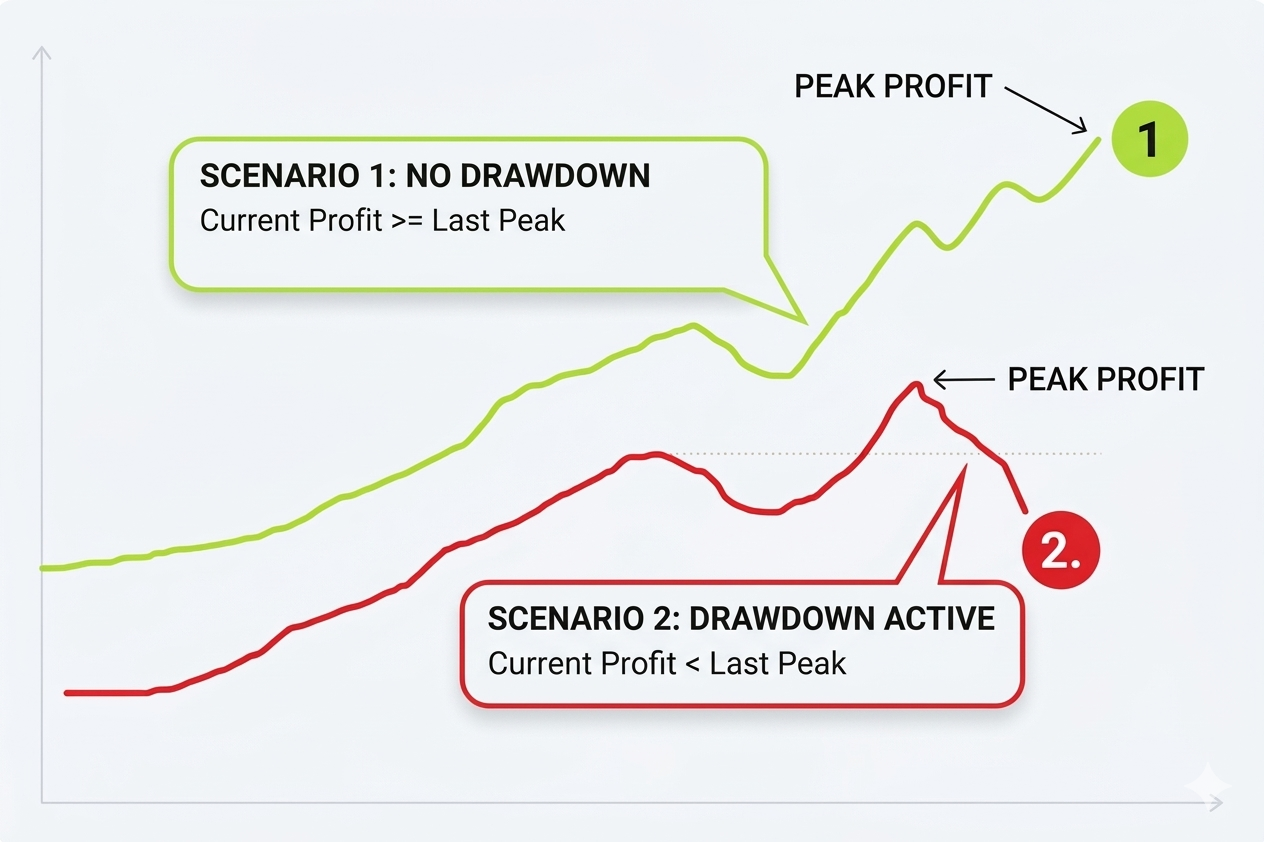
Figure 1: Recovery Booster Activation Logic
3. How Position Copying Works
Recovery Booster analyzes the trade history of the account it is attached to. That is why it can be attached to any chart in the MT5 terminal.
Important to understand:
Unlike regular copiers, Recovery Booster cannot be attached to one account and then attach the Recovery Booster to another account and expect the positions to be copied. It does not work that way.
If Recovery Booster is attached to one account, it will not see positions from other accounts and nothing will be copied.
For Recovery Booster to work correctly, both the EAs you want to monitor and Recovery Booster must be attached to the same account.
There are two main options for placing Recovery Booster:
- OPTION 1 – Same Terminal
Recovery Booster and the other EAs run in the same MT5 terminal (but on different charts). In this case, everything works simply and without additional restrictions. - OPTION 2 – Different Terminal
Recovery Booster is opened in a separate MT5 terminal. In this case, this terminal must remain open at all times. If the terminal is closed, Recovery Booster stops working and no longer copies positions.
The image below shows the two main deployment options for Recovery Booster in MetaTrader 5.
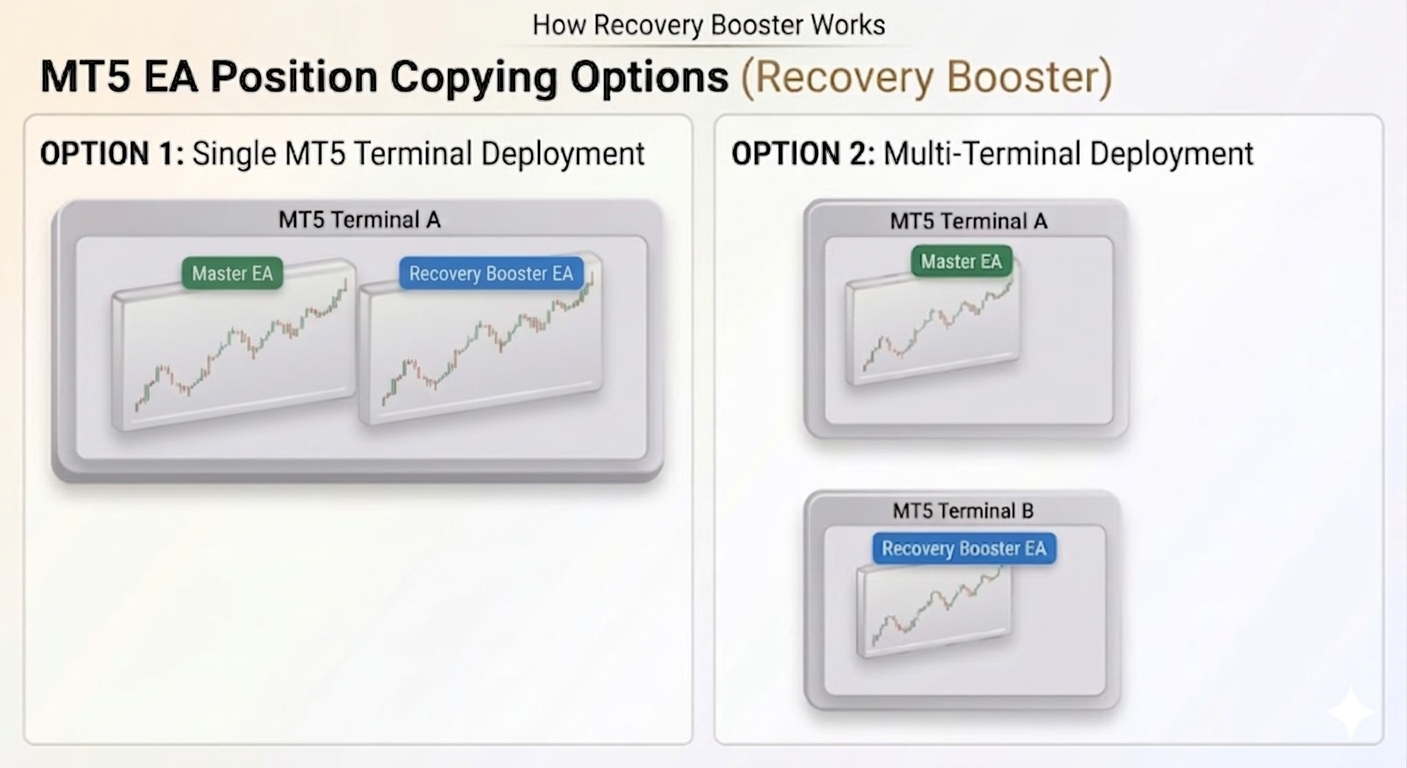
Figure 2: Recovery Booster Position Copying Options
4. Main Parameters and Their Explanation
Recovery Booster is a flexible tool. Below are the most important parameters with explanations.
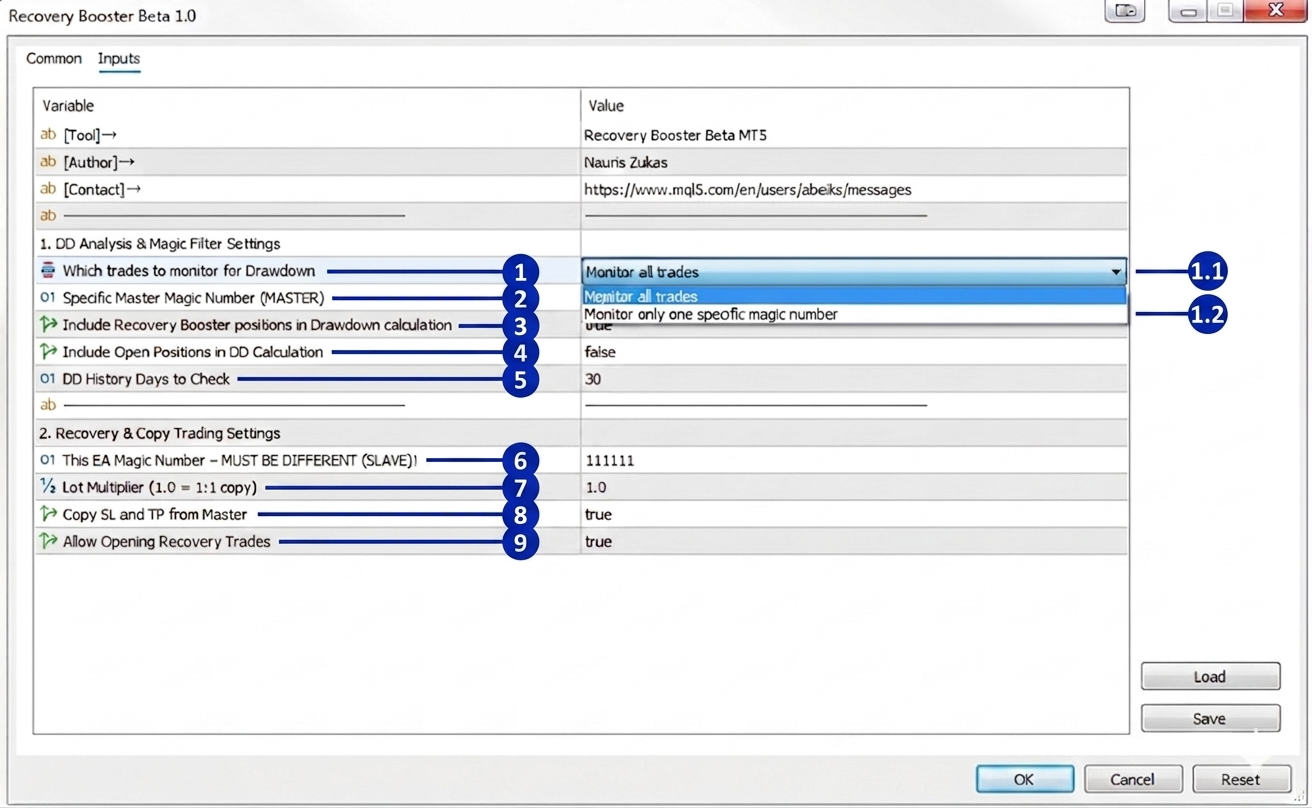
Figure 3: Recovery Booster Main Settings
DD Analysis & Magic Filter Settings
- Which trades to monitor for Drawdown
This parameter determines which trades Recovery Booster will monitor to calculate drawdown. You have two options:- 1.1 Monitor all trades
Monitors all automated trades on the account. Suitable when multiple EAs are running on the account and you want to monitor all of them. - 1.2 Monitor only one specific magic number
Will monitor only one specific magic number, which you specify in the parameter Specific Master Magic Number below. Use this mode when you want Recovery Booster to react only to the trades of a specific EA, not to all trades on the account.
- 1.1 Monitor all trades
- Specific Master Magic Number
Specify the magic number of the EA you want to analyze. This parameter works only if you selected Monitor only one specific magic number in the previous setting. - Include Own Positions in DD
If enabled (true), Recovery Booster also takes its own opened positions into account when calculating drawdown.
Why is this important? When the parameter is enabled, the total profit from the main EA and Recovery Booster is combined. As soon as this combined profit exceeds the previous Peak Profit, the drawdown period ends, the status becomes inactive, and Recovery Booster stops opening additional positions.
If the parameter is disabled (false), Recovery Booster ignores its own positions and continues to operate only when the main EA (MASTER) is in drawdown – even if the combined result with Recovery Booster shows good profit.
Note: This parameter works only when the "Monitor only one specific magic number" mode is selected. - Include Open Positions in DD Calculation
If enabled (true), open positions (floating loss) are also taken into account in the drawdown calculation. If disabled, only closed positions are considered.
Important warning:
This is a rather specific and complex parameter. It is recommended to enable it only if you fully understand how it affects the drawdown calculation and the operation of Recovery Booster.
Default recommendation:
For most users, it is recommended to leave this parameter disabled (false) – it is the safer and simpler option.
How it affects Peak Profit and Peak Time:
When this parameter is enabled, Peak Profit and Peak Time are dynamically updated during the session, taking into account the profit of open positions as well.
However, after restarting the platform, changing parameters, or removing and re-attaching the EA, Peak Profit and Peak Time are recalculated only from closed positions. The profit/loss of open positions is not saved.
Therefore, after every platform restart or settings change, Peak Profit and Peak Time start over based only on closed positions.
Note: If this parameter is enabled, Recovery Booster may activate more frequently because every open position affects the calculation. This is practically useful in situations where there are long-open positions in loss, but closed positions are in profit or close to the Peak level. - DD History Days to Check
How many days back the EA will look into the history to determine drawdown. If you set it to 0, the entire available history will be checked.
Recovery & Copy Trading Settings
- This EA Magic Number – MUST BE DIFFERENT!
This is Recovery Booster's own magic number. It must be different from the magic numbers being analyzed! - Lot Multiplier (1.0 = 1:1 copy)
Determines how much larger (or smaller) the lots Recovery Booster will open compared to your main EA (MASTER).Master lot Lot Multiplier Slave lot 0.10 0.5 0.05 0.10 1.0 0.10 0.10 1.5 0.15 Figure 4: Lot Multiplier Examples
Important: If the calculated lot size is smaller than the broker's minimum allowed lot (usually 0.01), the position will be opened with the smallest available lot. For example, if the Master EA opens 0.03 lots and the Lot Multiplier is 0.1, the calculated lot will be 0.003, but the system will open 0.01 lot.
5. Panel Explanation
Below is a detailed explanation of each element displayed on the Recovery Booster dashboard.
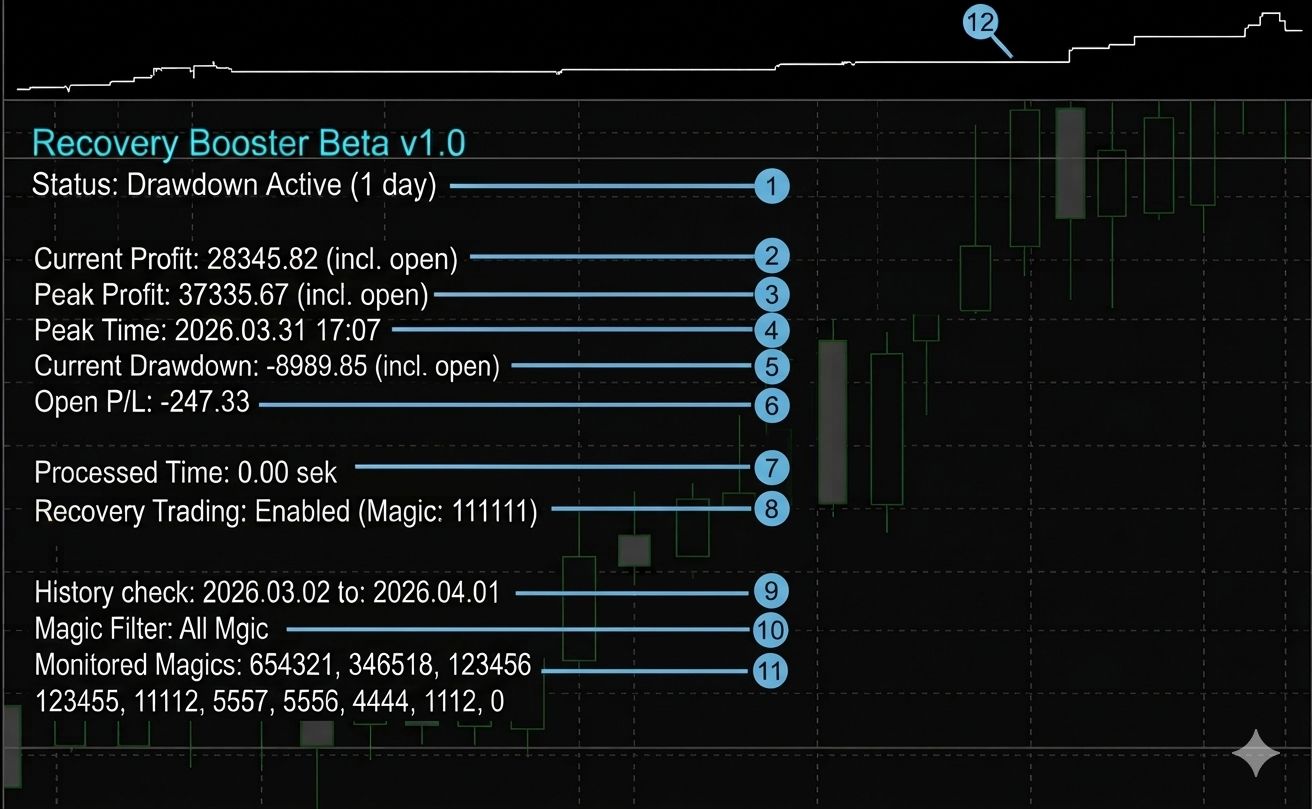
Figure 5: Recovery Booster Panel
- Status
Shows whether there is currently a loss period or not.
Why is it important? This is the main indicator that shows whether Recovery Booster is ready to open additional positions. If you see "Drawdown Active", the EA has activated. If "No Drawdown" – everything is normal and no additional positions are being opened. - Current Profit
Shows how much your total profit or loss is from all closed positions at the moment.
Why is it important? Recovery Booster uses this value to understand whether you are in profit or loss compared to your best result (Peak Profit). Current Profit changes every time a new position is closed.
Example: You have closed positions with a total profit of +1200 USD. If a new position is closed with +300 USD, Current Profit becomes +1500 USD. If a new position is closed with -400 USD, Current Profit decreases to +800 USD. - Peak Profit
Shows the highest profit level you have ever reached.
Why is it important? Drawdown (Current Drawdown) is measured from this level. Peak Profit from closed positions never decreases – it can only stay the same or increase.
Example: Your best result so far was +2000 USD. Even if you then lose 500 USD, Peak Profit remains +2000 USD. - Peak Time
Shows the date and time when the last Peak Profit (the highest profit level of all time) was reached.
Why is it important? This time serves as the reference point for Recovery Booster to determine whether a drawdown period has begun. When Peak Profit is updated, Peak Time also changes to the newest moment. - Current Drawdown
Shows how far you have fallen from your best result (Peak Profit).
Why is it important? If Current Drawdown is negative, Recovery Booster is ready to open additional positions to help you recover.
Example: Peak Profit is +2000 USD, but Current Profit is +1400 USD. Then Current Drawdown will be -600 USD. - Open P/L (appears only when Include Open Positions in DD Calculation = true)
Shows how much profit or loss is currently on all open positions.
Why is it important? Open P/L directly affects Current Profit and Max DD, but it does not affect Peak Profit. Peak Profit is formed only from closed positions. Current Profit includes closed positions + the result of open positions. A negative open P/L deepens the Max DD, while Peak Profit and Peak Time stay based on closed positions only.
Why is Peak Profit not raised by open profit? The recovery logic needs to know when the account has truly returned to its previous high, and this can only be confirmed by closed (realized) profit. If open profit were allowed to raise the peak, the peak would follow the floating result up and down, and the condition "closed profit reaches the peak again" could never be met, because closed profit would always be below a peak that includes floating profit. As a result, the recovery would never complete and the drawdown state would never close. Keeping the peak based on closed positions only ensures the recovery can actually finish.
Example 1 (Positive Open P/L)
Closed positions show a total profit of +500 USD and open positions are +300 USD. This makes the current profit +800 USD. The peak profit stays at +500 USD and the peak time does not change, because open profit does not raise the peak. Max DD stays at 0.00, because the current profit is above the peak.
Example 2 (Negative Open P/L)
Closed positions show a total profit of +500 USD, while open positions are -300 USD. In this case, the current profit is +200 USD. The peak profit remains +500 USD and the peak time does not change. Max DD now shows -300 USD, because the open loss is included in the drawdown.
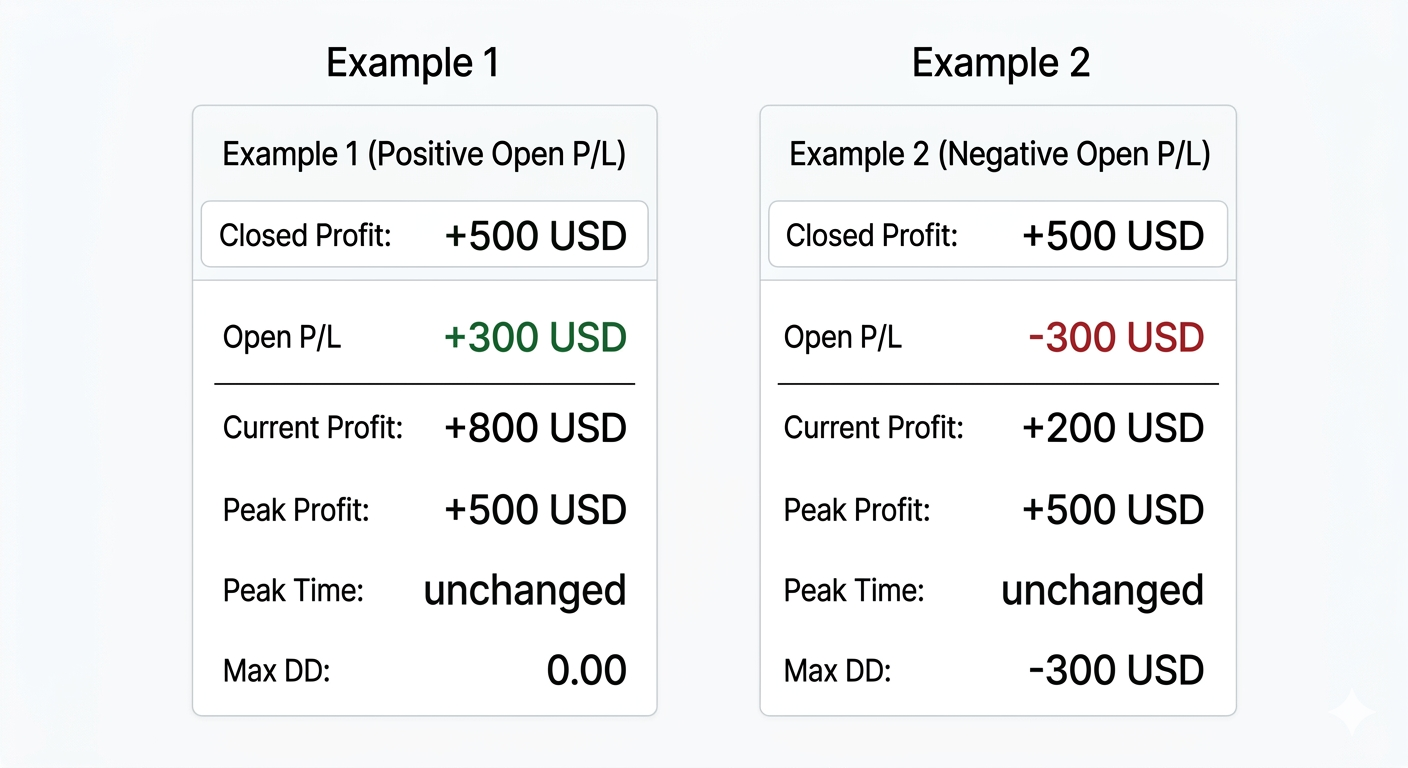
Figure 6: How Open P/L Affects Current Profit, Peak Profit and Max DD - Processed Time
Shows how much time it takes for Recovery Booster to process the data.
Why is it important? It allows you to see how fast the EA is working. Usually this number is very small (fractions of a second). If the value is significantly larger, it may indicate high load or other problems. - Recovery Trading
Shows whether Recovery Booster is allowed to open additional positions.
Why is it important? This field directly reflects your setting from the Input parameters – the parameter "Allow Opening Recovery Trades".
If you see "Enabled", it means you have set Allow Opening Recovery Trades = true and Recovery Booster is allowed to open additional positions during drawdown periods.
If you see "Disabled", it means you have set Allow Opening Recovery Trades = false and the EA only observes the situation but does not trade. - History Check
Shows the time period over which Recovery Booster analyzes your EA history to determine drawdown.
Why is it important? It shows how far back the EA looks to evaluate the situation. - Magic Filter
Shows which mode of "Which trades to monitor for Drawdown" Recovery Booster is currently using to monitor drawdown.
Why is it important? It indicates whether Recovery Booster is monitoring all magic numbers from all EAs on the account, or only one specific magic number.
If you see "All Magic" – Recovery Booster monitors all magic numbers from all EAs on the account.
If you see a specific number (for example "4444") – Recovery Booster monitors only this one magic number. - Monitored Magics
Shows all magic numbers that Recovery Booster is currently monitoring.
Why is it important? Each EA trades only its own positions using a unique magic number. This ensures that one EA does not interfere with another EA's positions and does not disrupt its logic. If Recovery Booster's magic number matches your main EA (Master EA) magic number, then the Master EA will see the positions opened by Recovery Booster as its own. This can disrupt the Master EA's internal logic – for example, incorrectly calculate grids, batches or close positions.
Recommendation: Always make sure that the Recovery Booster magic number (This EA Magic Number) is completely different from your main EA magic number. - Current Profit Chart (top box)
At the top of the panel there is a small chart that visually represents the changes in Current Profit over time.
Why is it important? The chart allows you to quickly and intuitively understand the current situation:
If the line goes up or stays near the top edge – you are close to or at your best result (Peak Profit).
If the line drops significantly below the top edge – it visually shows the drawdown period.
The chart helps you quickly assess whether Recovery Booster has activated or not, without needing to read the numbers.
6. Practical Recommendations and Best Practices
- Recommended Settings for Starting
To safely get familiar with how Recovery Booster works, I recommend starting on a demo account with the default settings.
This will allow you to see how Recovery Booster monitors all closed trades over the last 5 days.
Once you are familiar with its operation, you can choose a magic number from the "Monitored Magics" panel, enter it into the Specific Master Magic Number parameter and switch the mode to "Monitor only one specific magic number". This will help you see how Recovery Booster behaves with a specific EA and its trades. - How to Safely Start Working with Recovery Booster
- Choose your main EA (Master EA)
Make sure you have already selected and tested the main trading EA that you want to improve with Recovery Booster. - Attach Recovery Booster to a chart
Attach Recovery Booster to any chart. The EA analyzes the account's trade history, so it can monitor your Master EA positions regardless of which symbol it is attached to. - Set a different magic number
Set a unique magic number for Recovery Booster (This EA Magic Number), which must be different from your main EA's magic number. - Start with a very small Lot Multiplier
Set the Lot Multiplier to a very small value, for example 0.001 or 0.01. This will allow Recovery Booster to open additional positions with the minimum possible lot (usually 0.01). This way you can safely and without risk see how Recovery Booster reacts to drawdown periods and starts opening additional positions. - Use a demo account
For the first period, test only on a demo account to fully understand how Recovery Booster works in practice.
- Choose your main EA (Master EA)
- How to Choose the Lot Multiplier
Lot Multiplier is one of the most important parameters of Recovery Booster. It determines how aggressively the EA will help recover from losses.
How to choose the right value?
It all depends on the character of your main EA. If your EA is stable with frequent small corrections, a smaller multiplier is usually sufficient. If the EA has rare but large losses, a larger multiplier can help return to the previous maximum much faster.
Practical example from the author's experience: For one EA I used Lot Multiplier = 5.0 because it had very rare but quite large losses. The high multiplier helped recover quickly and return to the previous profit level.
Recommendation: Start on a demo account with a very small value (for example 0.001 or 0.01) to see how Recovery Booster reacts to drawdown. Gradually increase the multiplier only when you are confident in its performance and behavior.
In the attachment you will find test results with multiplier 1.0 and 5.0 for comparison. You can also check the real account on Myfxbook, where the recovery process is visible in practice: myfxbook.com/members/ForyouRobots/imperial-dominator/10736632
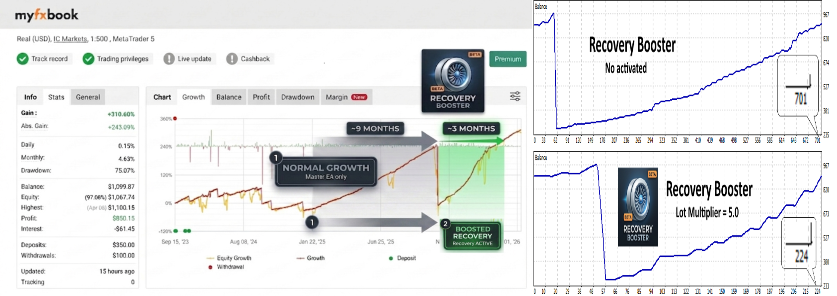
Figure 7: Impact of Recovery Booster on Recovery Speed - When and How Recovery Booster Can Be Useful
One of the common situations where Recovery Booster can help is when you want to gradually increase the lot size of your main EA (for example, +0.01 lots every 500 USD of profit).
In such moments, an unpleasant situation often occurs: exactly when you increase the lot (from 0.01 to 0.02), a loss comes. As a result, the loss becomes twice as large as it would have been with the old lot.
How can Recovery Booster help in this situation? You allow the main EA to continue opening positions with the old lot, but when the position is closed with a loss and the next position opens, Recovery Booster comes to help and opens an additional position.
This way you can more easily and safely move through the lot increase levels without increasing the risk so sharply. - Working with Multiple EAs or Multiple Magic Numbers
If multiple EAs are running on your account or one EA uses several magic numbers, and you do not want Recovery Booster to activate on all of them, proceed as follows:
Open additional charts (any symbol and timeframe can be used). On each chart attach one instance of Recovery Booster and set:- The mode to "Monitor only one specific magic number"
- The specific Specific Master Magic Number (for example 222 or 333)
- For each Recovery Booster instance, set its own unique This EA Magic Number (Slave Magic)
Example: You need to monitor 5 magic numbers, but you want Recovery Booster to activate only on 2 of them (222 and 333). In this case, open 2 charts and on each:- On one set Specific Master Magic Number = 222 and Slave Magic = 1111222
- On the other set Specific Master Magic Number = 333 and Slave Magic = 1111333
Recommendation for choosing magic numbers: To avoid confusion, I recommend using systematic numbering for all Recovery Booster instances, for example: 1111222, 1111333, 1111444, 1111555 etc.
This will help you quickly understand which Slave Magic corresponds to which Master Magic.
7. Potential Mistakes to Avoid
To ensure Recovery Booster works safely and as intended, please pay attention to these potential mistakes:
- Using the same magic number as the Master EA
This is one of the most serious mistakes. If Recovery Booster and your main EA use the same magic number, the Master EA may incorrectly perceive the additional positions as its own. This can disrupt its internal logic, incorrectly calculate positions, or cause other unexpected effects. Always use a different magic number for Recovery Booster. - Increasing the Lot Multiplier too quickly
Start with a very small Lot Multiplier value and increase it gradually, only after you have thoroughly tested how the EA behaves in different market conditions. - Ignoring that Open P/L affects the drawdown calculation
If the DDIncludeOpen parameter is enabled, open positions (floating loss/profit) affect both Current Drawdown and Peak Profit. This can cause Recovery Booster to activate more frequently than initially expected. Before enabling this parameter, make sure you understand how it changes the EA's behavior.
8. Sharing Experience
This chat is intended for users to share their practical experience using Recovery Booster – how it performs with different strategies, what nuances you have noticed, and how to apply it most effectively.
Please, before asking questions, first carefully read the User Guide. Most questions that arise in the beginning are already answered there. This will help save time for both you and other chat participants.
We especially value respectful and constructive communication in the chat. More experienced users can often provide valuable insights, while newcomers can more quickly reach the best solutions and settings that help improve the results of their main EA.
It is prohibited in the chat to advertise your own or other people's EAs, signals, services, or other products. This space is intended solely for exchanging experience and ideas on using Recovery Booster.
If valuable ideas for improving Recovery Booster arise during the discussion, I will be happy to listen to them and evaluate how feasible it is to integrate them into the RB logic.
Note: The chat is conducted in English. Please respect other members and use a translation tool to ensure your messages are clear to everyone.
Link to the chat: https://www.mql5.com/en/messages/0110eea668cddc01
9. New Additional Parameters
This section contains newly added parameters and features that extend the functionality of Recovery Booster.
Unlike the main parameter section, this part is designed to be continuously updated without modifying the core documentation.
Each parameter is described independently to ensure clarity and scalability.
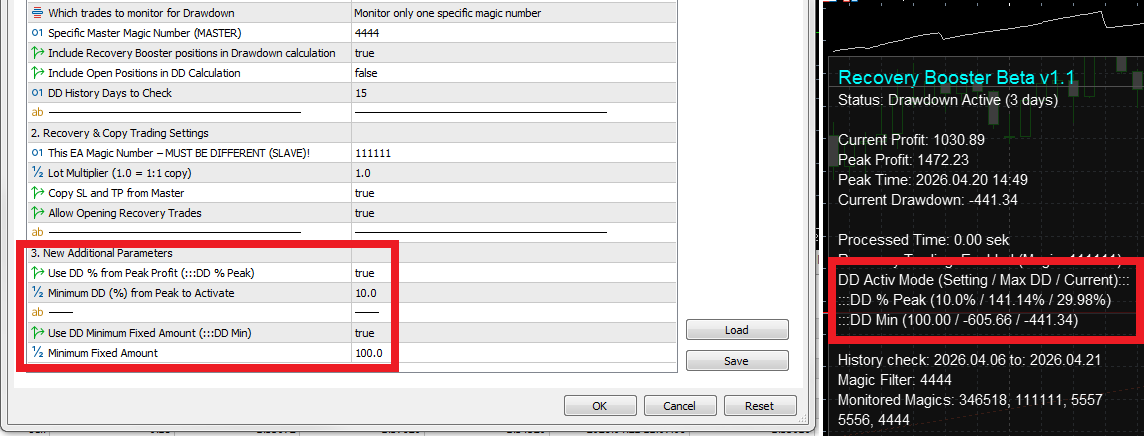
Figure 8: New Drawdown Activation Parameters in Settings and Panel
9.1 Use DD % from Peak Profit (DD % Peak)
Enables activation based on percentage drawdown from the last Peak Profit.
DD % = (Peak Profit - Current Profit) / Peak Profit × 100
Why is it important? This parameter allows Recovery Booster to activate only when the drawdown reaches a defined percentage relative to the highest achieved profit. This makes the activation adaptive to account growth.
Example: Peak Profit = 5000 USD, Current Profit = 4700 USD
DD % = (5000 - 4700) / 5000 × 100 = 6%
If set to 3%, Recovery Booster will activate when the drawdown reaches or exceeds 3%.
Drawbacks: Changes depending on the selected history period. For example, it might show 6% over 5 days, but only 5% over 10 days because Current Profit and Peak Profit will be different.
Panel Display: DD Activ Mode (Setting / Max DD / Current):: DD % Peak (10.0% / 141.0% / 29.0%)
- Setting – value defined in the input parameters.
- Max DD – the maximum drawdown reached since the last Peak Profit.
- Current – the current drawdown value.
Note: This line is shown only if "Use DD % from Peak Profit" is enabled (true).
9.1.1 Minimum DD (%) from Peak to Activate
Defines the minimum percentage drawdown required to activate Recovery Booster.
Lower values make Recovery Booster more sensitive, while higher values delay activation.
9.2 Use DD Minimum Fixed Amount (DD Min)
Enables activation based on a fixed monetary drawdown.
DD Amount = Peak Profit - Current Profit
Why is it important? This parameter allows you to control activation using a fixed value in your account currency, independent of percentage-based changes.
Example: Peak Profit = 8000 USD, Current Profit = 7200 USD
DD Amount = 8000 - 7200 = 800 USD
If set to 300 USD, Recovery Booster will activate when the drawdown reaches or exceeds 300 USD.
Drawbacks: Does not scale with account size. When the account grows, the same fixed number becomes too small and meaningless.
Panel Display: DD Activ Mode (Setting / Max DD / Current):: DD Min (100.0 / 600.0 / 127.0)
- Setting – value defined in the input parameters.
- Max DD – the maximum drawdown reached since the last Peak Profit.
- Current – the current drawdown value.
Note: This line is shown only if "Use DD Minimum Fixed Amount" is enabled (true).
9.2.1 Minimum Fixed Amount
Defines the minimum fixed drawdown (in account currency) required to activate Recovery Booster.
Should be adjusted as the account grows to maintain effectiveness.
9.3 Panel Abbreviations
To save space on the panel, the following abbreviations are used:
- (DD % Peak) → Use DD % from Peak Profit
- (DD Min) → Use DD Minimum Fixed Amount
These labels are displayed on the panel to indicate which activation methods are currently enabled.