

Beyond Clone and Commit: The Advanced Side of MQL5 Algo Forge
 246
246
 1
1

Introduction
The existing material on MQL5 Algo Forge covers the basics: creating a repository, committing from MetaEditor, pushing, pulling and branching. This article covers what comes after that. I went through the platform feature by feature and checked each one against the live instance, because Algo Forge is built on Forgejo, and what Forgejo documents is not always what this instance has switched on.
What follows is a practical map of the parts that matter for MQL5 development, including three additions MetaQuotes built for this community and a few limits worth knowing before they cost you time. Where a feature needs setup, such as the CI pipeline that compiles .mq5 files and fails the build on errors, I show the steps and the output.
What Algo Forge actually is
Algo Forge runs Forgejo, the community-maintained fork of Gitea, behind MQL5.com authentication. Knowing that lets you predict most of its behavior. The version endpoint answers without logging in:
GET https://forge.mql5.io/api/v1/version

{"version":"16.0.5+gitea-1.22.0"}
Listing 1. Version endpoint
The two halves of that string say different things. 16.0.5 is the Forgejo release; Gitea numbers its own releases 1.x and has never reached 16. The +gitea-1.22.0 suffix is build metadata that Forgejo appends to declare which Gitea API it stays compatible with, so tools written for Gitea keep working. The Forgejo-only route /api/forgejo/v1/version returns the same string, and a plain Gitea server has no such route.
Because this is a live service, dates matter. I tested the features below in August 2026, when the instance reported Forgejo 16.0.1, and rechecked the settings endpoints and limits quoted in this article on 12 October 2026, when it reported 16.0.5. Read every state described here as of those dates.
Forgejo inherited pull request reviews, branch protection, a package registry, webhooks, LFS and CI from Gitea. Inherited code says what the platform can do, not what a given instance switches on or how it is configured, which is why I checked each feature here rather than citing Forgejo's documentation. The API specification is public at https://forge.mql5.io/swagger.v1.json and describes 326 paths and 506 operations.
Table 1 shows what is switched on, and its last column matters as much as the middle one. Working means I exercised the feature end to end. Switched on means a settings endpoint or the page that configures the feature confirms it is enabled, without my testing its full lifecycle. Three additions are specific to MQL5: an Open with MetaEditor link and a README translator, covered next, and a MetaTrader 5 gitignore template, covered near the end.
| Capability | State on Algo Forge | How I checked |
|---|---|---|
| Actions (CI/CD) | Working | Ran real builds on a runner |
| Package registry | Working | Uploaded a generic package |
| Webhooks | Working | Created one, inspected deliveries |
| Branch and tag protection | Switched on | Rule builder, 20+ fields |
| Git LFS | Switched on | lfs_disabled: false |
| Push and pull mirrors | Switched on | mirrors_disabled: false, settings present |
| Repository migration | Switched on | Migration page, ten sources |
| SSH access | Disabled | HTTPS-only clone panel |
| Code search, across the platform | Disabled | /explore/code redirects |
| Code search, inside one repository | Working | Line-level matches returned |
| ActivityPub federation | Disabled | Spec endpoints return 404 |
Table 1. Capabilities probed on the live instance, August 2026
Repositories can be public or private, chosen on the creation form. A private one is visible only to you and the collaborators you add, and the CI pipeline described later builds it without extra credentials.
One link that opens a repository in MetaEditor
Open any repository and click the three-dot button beside the clone URL. Next to the usual ZIP and TAR.GZ downloads sit two less ordinary entries. Download BUNDLE gives you the entire repository, history included, as a single file you can clone from offline. Open with MetaEditor is the MetaQuotes addition.
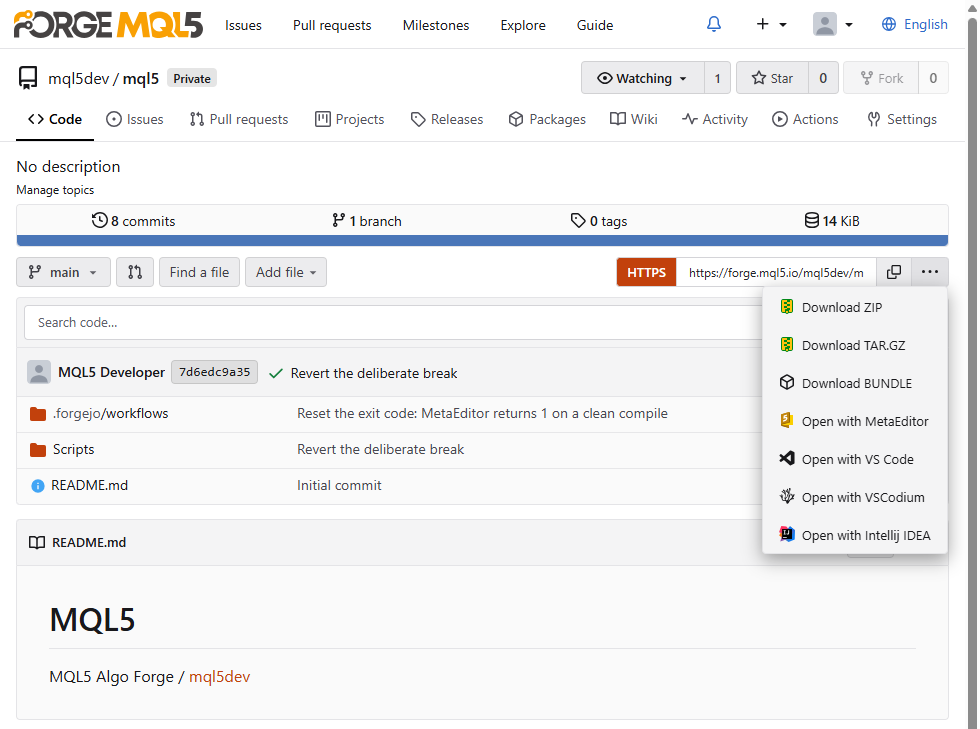
Fig. 1. Clone dropdown with the MetaEditor handler
The link behind it uses a custom URL scheme registered by the MetaTrader 5 installer:
metaeditor5://checkout?repo=https%3A%2F%2Fforge.mql5.io%2Fmql5dev%2Fmql5.git
Listing 2. The MetaEditor protocol handler
Clicking it launches MetaEditor and starts a checkout of the named repository. Because a protocol handler works from any HTML a browser renders, the link is not tied to Algo Forge: you can put it in a README, a forum post or your own site, and a reader with MetaTrader 5 goes from your text to a cloned repository in one click. To build one, percent-encode the clone URL and append it to metaeditor5://checkout?repo=.
Note: the handler only fires on machines where MetaTrader 5 is installed, and browsers ask for confirmation before launching an external application. Keep the plain HTTPS clone URL beside it for everyone else. The portability works in both directions: any page can carry such a link, pointing at any repository. A click only starts a checkout that you confirm, but treat what arrives like any code from the internet and read it before you compile or run it.
A README that reads itself in fifteen languages
The second MetaQuotes addition sits on the header bar of any rendered Markdown file: a Translate control showing the current language code.
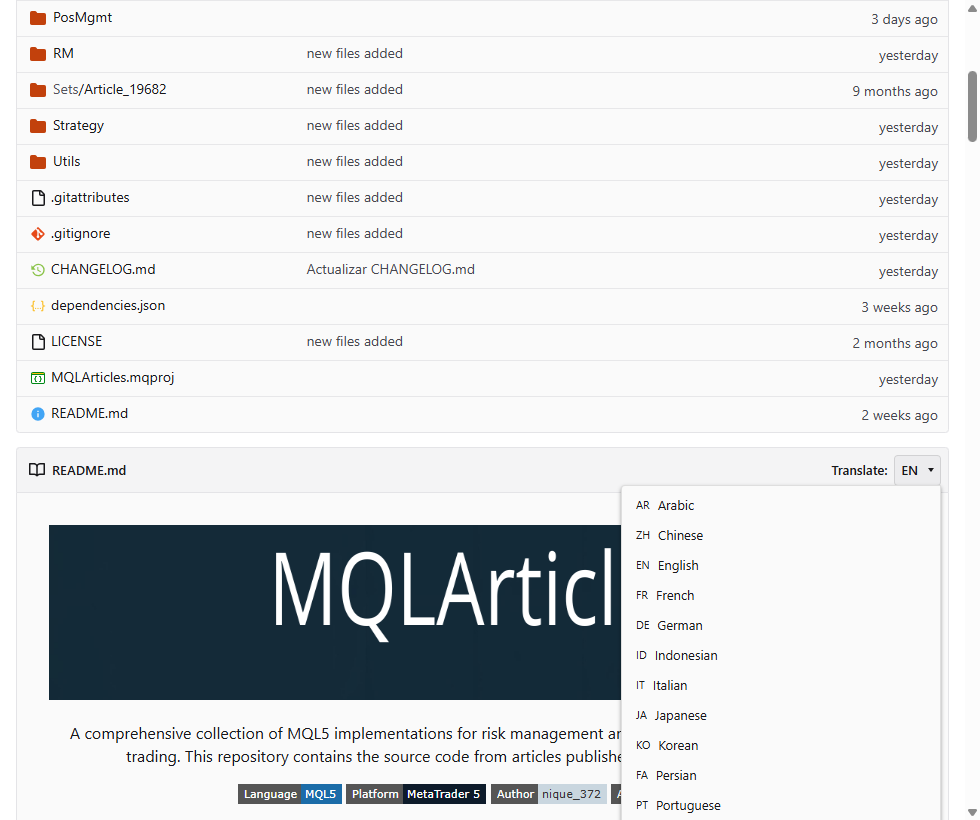
Fig. 2. The README Translate control
It offers fifteen languages, the same set MQL5.com uses for its articles, and re-renders the document in place. Nothing like it exists in stock Forgejo, and it changes how you can approach a README here: instead of maintaining a copy per language, you can write one, in the language you are strongest in, and offer readers a machine translation of it. A machine translation is not a reviewed one, so this lowers the barrier for a reader rather than replacing a translator.
That moves the priority from style to structure. Machine translation handles short declarative sentences, clear headings and short paragraphs well, and dense idiom and long nested clauses badly. A README in short sections with descriptive headings reads far better in Japanese than a wall of conversational text. Identifiers, file names, code and tables are where technical text suffers most, so switch to one language you can read and check how your README's code blocks and tables come through before relying on it.
Repository Units, the tab that controls everything else
The Units tab in repository settings looks like a list of on/off switches, which is why people skip it. It actually configures how issues, pull requests and the wiki behave for the life of the project. Four settings there matter most for day-to-day maintenance.
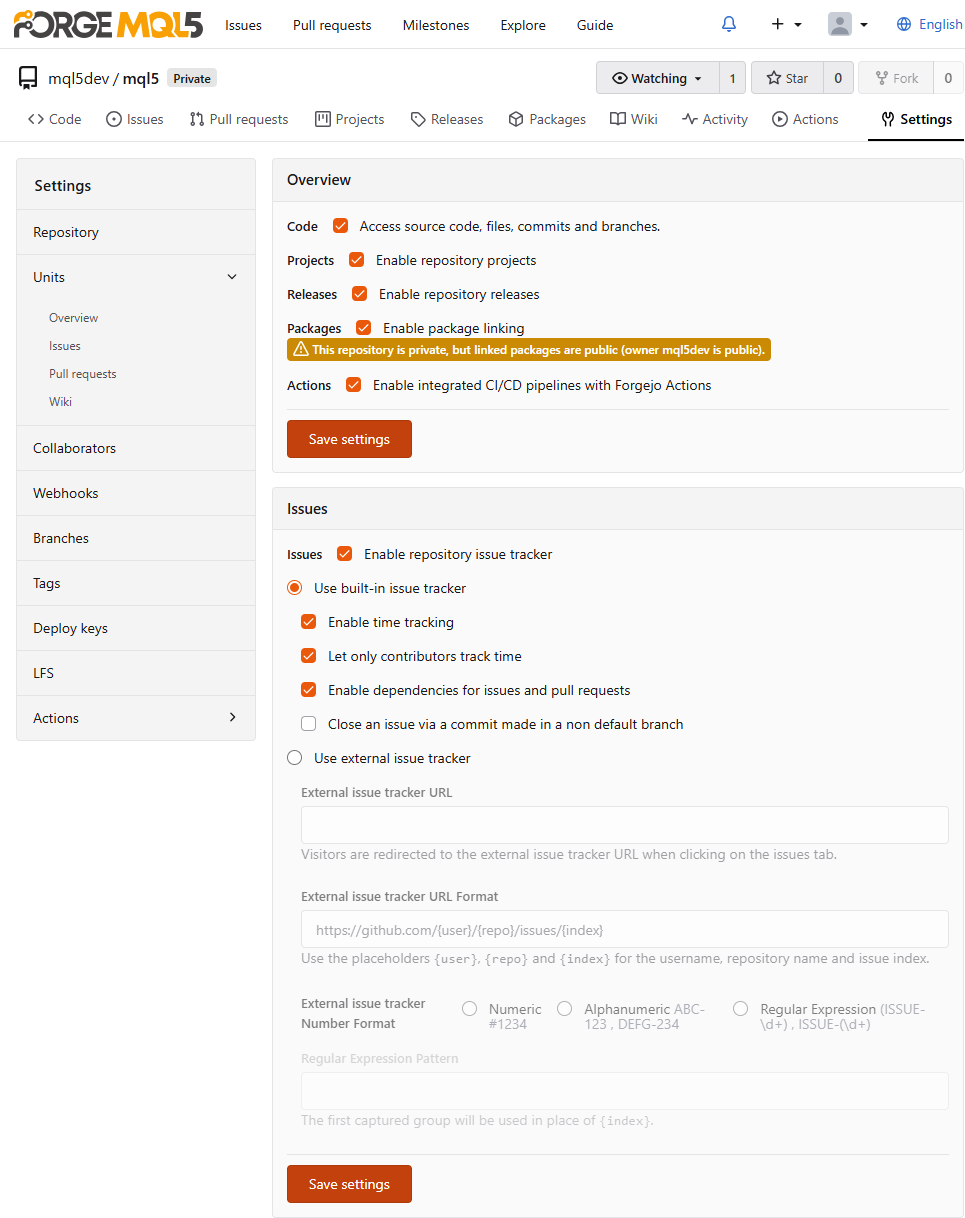
Fig. 3. The Units tab: Overview and Issues
Merge policy. Each of the six merge styles has its own checkbox, plus a setting for which one is the default. For a library with a linear history, leave only fast-forward enabled and the platform refuses a merge commit you did not intend. A neighbouring toggle deletes the source branch after a merge, so dead feature branches do not pile up.
Time tracking and issue dependencies. Both were already enabled on the repositories I checked. Time tracking adds a stopwatch to every issue. Dependencies let one issue be marked as blocked by another, so "the indicator waits on the buffer refactor" is recorded rather than buried in a comment.
External tracker and wiki. The Issues tab and the wiki can each point at an external URL, with a configurable format and a regular expression for matching issue references in commit messages. This matters when Algo Forge mirrors a project whose real home is elsewhere.
Closing issues from any branch. By default, a commit that closes an issue only takes effect on the default branch. One switch widens that to every branch.
Protecting branches and tags
Settings, Branches holds a rule builder with more than twenty fields per rule.
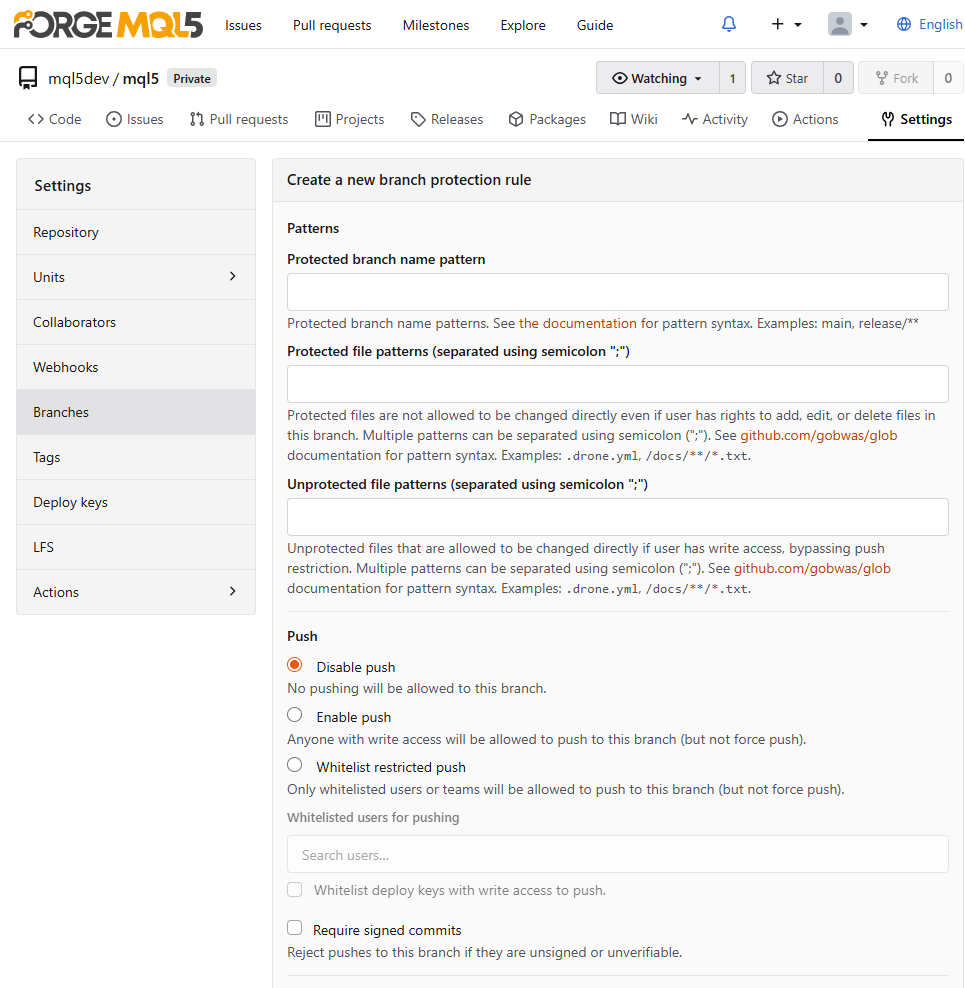
Fig. 4. Branch protection: patterns and push restrictions
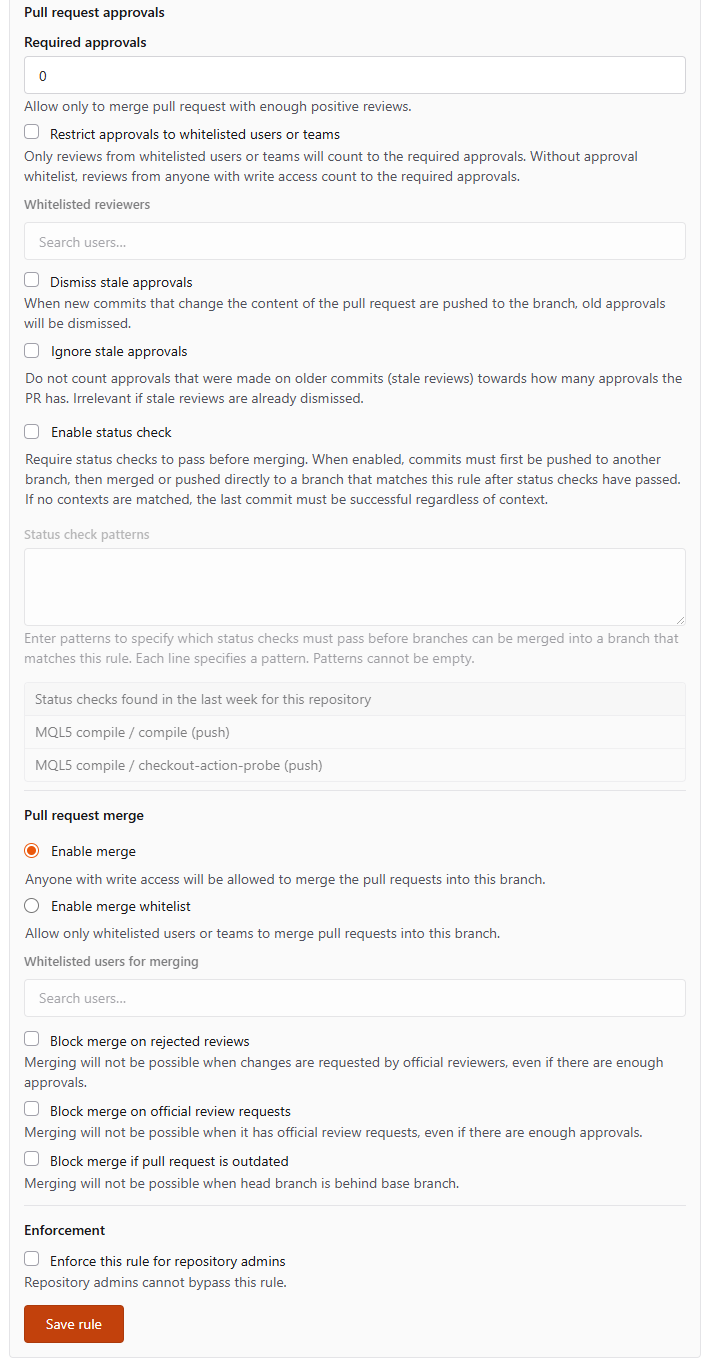
Fig. 5. Branch protection: approvals, status checks and merge blocking
The usual review and merge restrictions are all there. Two fields go further, and both suit the way MQL5 projects are laid out.
Protected file patterns takes a list of glob patterns, and a direct push to the protected branch that touches a matching file is refused. In a repository with Include/ at its root, Include/** means headers on that branch change only through a pull request, while scripts and experts stay freely pushable. Unprotected file patterns carves exceptions back out.
The pattern has to match your layout. It is compared with the path from the repository root, so a project kept as MQL5/Include/ needs MQL5/Include/**, and Git paths are case-sensitive, so include/** does not cover Include/. The rule also covers only the branches its branch pattern names, and the push allowlist on the same form decides who may push at all. One test push that touches a header confirms the rule does what you meant; the checklist at the end includes it.
Status check contexts names the CI checks that must succeed before the merge button unlocks. The names are the ones your CI reports, which the CI section below sets up.
Tags have their own page, Settings, Tags, with a name pattern and a user allowlist. If you distribute through version tags, protecting v* so only you can create a release tag is worth the minute it takes.
Pull requests and the review machinery behind them
Once a project outgrows what you can keep in your head, the review machinery starts catching your own mistakes, even when you work alone.
Reviews carry structure. A review is an approval, a change request or a plain comment, and it can pin comments to individual lines of the diff. An approval can later be dismissed when the branch changes after it was given.
There are six ways to merge. Merge commit, rebase, rebase with a merge commit, squash, fast-forward only, and marking a pull request as manually merged. Squash suits most library work: fourteen commits called "fix" and "fix again" land on main as one commit with a real message.
Out-of-date branches can be updated from the interface, by merge or by rebase. Combined with the protection setting that blocks merging an out-of-date branch, a pull request is always tested against current main.
Two smaller settings pay for themselves. Ignore whitespace for conflicts stops a pure reindentation from registering as a merge conflict, which matters because MetaEditor reformats generously. Allow edits from maintainers lets a project owner push a small correction into a contributor's branch instead of writing another round of comments. For forks, sync fork pulls upstream changes into your copy per branch, without adding a second remote by hand.
Browser-side tools and reading code
The row of buttons above the file list holds three tools with no equivalent in MetaEditor's Git integration. Find a file is a fuzzy finder over every path in the branch, much faster than clicking down a deep Include tree; it matches paths only, and searching file contents is covered in the last section. Add file creates or uploads a file without a local clone. Apply patch, at /_diffpatch/ on any branch, takes a pasted unified diff and commits it.
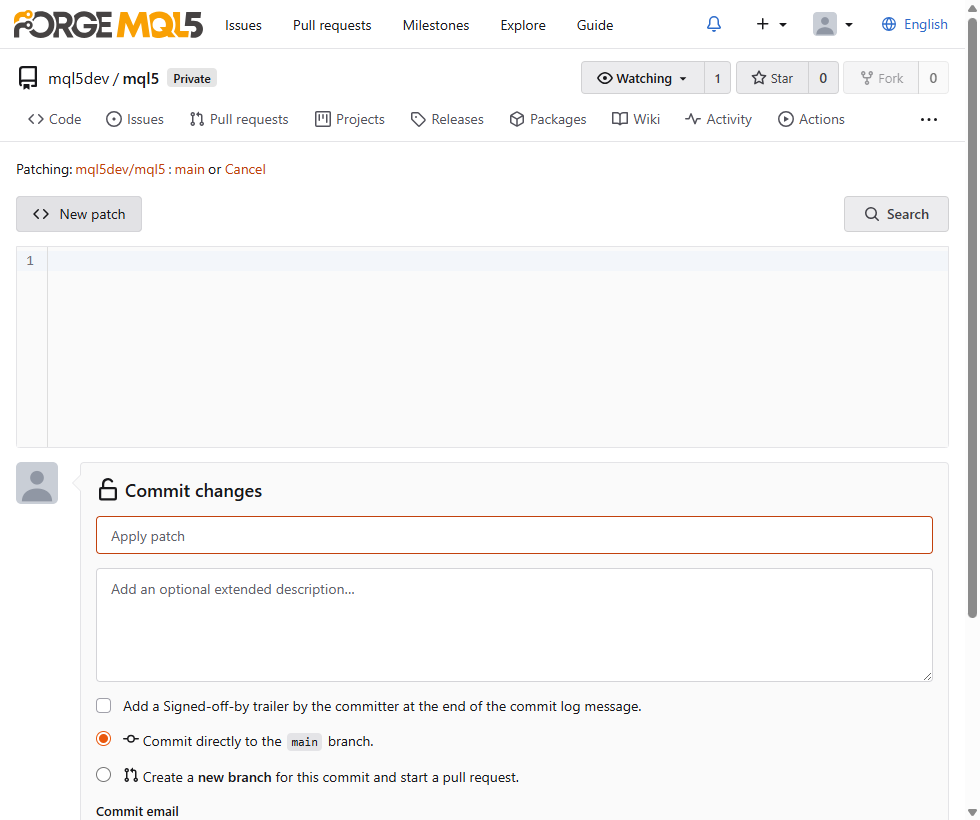
Fig. 6. Applying a patch from the browser
The patch form carries the web editor's options: commit directly or to a new branch, sign off, and choose the author email. A three-line fix someone posts as a diff in a forum thread becomes a commit without them creating an account and opening a pull request.
Open any .mq5 file and the header above the code reports it as MQL5, with syntax highlighting.
![[An MQL5 source file rendered with syntax highlighting and file actions]](https://c.mql5.com/2/242/fig08_file_view_mq5.png "An MQL5 source file rendered with syntax highlighting and file actions")
Fig. 7. An .mq5 file recognized as MQL5
This needs no configuration: a repository with no .gitattributes file at all still reported MQL5 correctly. A .gitattributes file is still worth adding for line endings and binary marking. Marking *.ex5 as binary stops Git from diffing it and converting its line endings, and * text=auto keeps a repository sane when it is cloned on both Windows and Linux.
Tester .set files need the opposite treatment if you version them. MetaTrader 5 saves them as UTF-16, which Git already treats as binary, so a changed input shows as a changed blob with no diff. The line *.set text working-tree-encoding=UTF-16LE-BOM eol=crlf makes Git store them as UTF-8 and write them back as UTF-16: on a .set file saved by the terminal, the commit showed line counts, git grep found its parameters, and a fresh checkout matched the original byte for byte.
The same header bar has Permalink, which pins the URL to the exact commit, so a code link in a forum post keeps pointing at the same code after you push. Blame annotates every line with the commit that last touched it, which on a trading library answers when a threshold changed and what changed with it.
Three more features are worth knowing. The Activity tab summarizes a repository over a period from one day to one year, a quick way to judge whether a library you might depend on is maintained. The wiki is a separate Git repository with its own clone URL, so documentation can be written locally and pushed; pages named _Sidebar and _Footer appear on every page. And a new repository can be created from a template, copying content, webhooks, topics, labels, branch protection and Git hooks as separate options.
Releases and the file type you cannot attach
The release form supports drafts, pre-releases, hiding the automatically generated source archives, and reusing the release body as the tag message.
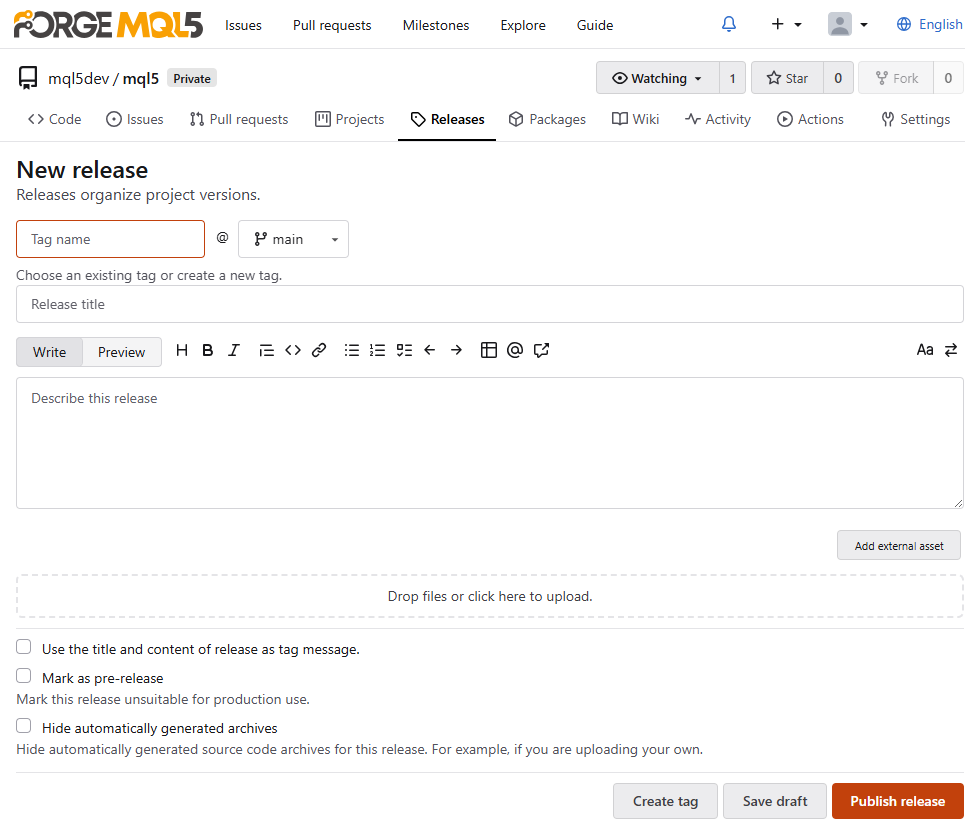
Fig. 8. Creating a release
Attachments are where it catches you. The /api/v1/settings/attachment endpoint, readable without logging in, lists the extensions the instance accepts: mostly documents, images, archives and data formats, with no .ex5, .mq5, .mqh or .set. The same response sets max_files to 5 and max_size to 2048 (MB), so a release takes at most five files. Attaching the compiled Expert Advisor straight to a version tag therefore needs one extra step.
There are two ways around it. Pack the compiled files into a .zip, which is allowed, or use Add external asset on the same form, which lists a download pointing to a URL of your choice. The package registry is a natural target for that URL.
The package registry
Packages belong to an account, not to a repository. Every account has a package area at /{user}/-/packages, and the API addresses packages by owner, as Listing 3 shows. A repository's Packages tab lists the packages linked to it; you make the link from the package's own settings page, and it applies to the whole package rather than to one version. I uploaded a generic package to confirm the registry works, not merely appears in the specification. There is no platform-wide index: /explore/packages does not exist, so you need to know whose account to look at.
Of the supported package types, the generic registry is the one that matters for MQL5. It accepts any file, with no extension whitelist, addressed by package name and version:
PUT https://forge.mql5.io/api/packages/{owner}/generic/{package}/{version}/{filename}

curl -H "Authorization: token YOUR_TOKEN" \
     --upload-file MyExpert.ex5 \
     https://forge.mql5.io/api/packages/yourname/generic/myexpert/1.4.0/MyExpert.ex5
Listing 3. Uploading a compiled binary to the generic registry
The token is a personal access token with the write:package scope; the REST API section covers creating one. Compiled binaries go to the generic registry, versioned, and the release links to them as an external asset.
Whether that link works for someone else depends on the package's owner, not on the repository. Forgejo makes a user's packages readable by everyone when the account is public and by that user alone otherwise, and an organization's packages follow the organization's visibility in the same way. Open the link once from a logged-out browser before you publish it.
Package cleanup rules in account settings expire old versions by count, by age or by a version pattern, one package type per rule, so pushing a build on every tag does not fill the registry with years of old artifacts. They also delete the files old releases point to. If releases link into the registry, give the rule a keep pattern that matches your release versions, such as ^\d+\.\d+\.\d+$, and let it expire only the rest.
Continuous integration that compiles MQL5
Algo Forge repositories have an Actions tab, and it works. Below is a pipeline I built and ran that compiles a named .mq5 file and fails the build on errors, with the setup decisions it depends on and the two details of MetaEditor's command line that it has to handle.
Choosing a runner
Forgejo's official runner publishes Linux builds only: every release asset is linux-amd64 or linux-arm64. MetaEditor is Windows software, so that runner cannot host an MQL5 build. Gitea's act_runner does ship a Windows executable, a single file with no installer, and it registers against Forgejo because Forgejo's runner is a fork of it; newer releases are published under the name gitea-runner. That compatibility comes from shared ancestry rather than from a promise either project makes, so treat it as verified, not permanent. Everything below ran against Forgejo 16.0.1 with act_runner 0.3.0, and if a newer runner fails its handshake, suspect the version pairing first.
Registration
Runner labels default to Docker, and a container will not have MetaEditor in it. Registering with the :host suffix runs jobs directly on the machine that already has MetaTrader 5 installed. Get a registration token from Settings, Actions, Runners by clicking Show registration token. It is not the personal access token used for the package registry: it is short-lived and does nothing except attach a runner. Run this from a Command Prompt, where ^ continues the line:
act_runner register --no-interactive ^
  --instance https://forge.mql5.io ^
  --token YOUR_REGISTRATION_TOKEN ^
  --name mt5-windows-host ^
  --labels "self-hosted:host,windows-mt5:host"

act_runner daemon
Listing 4. Registering a self-hosted runner
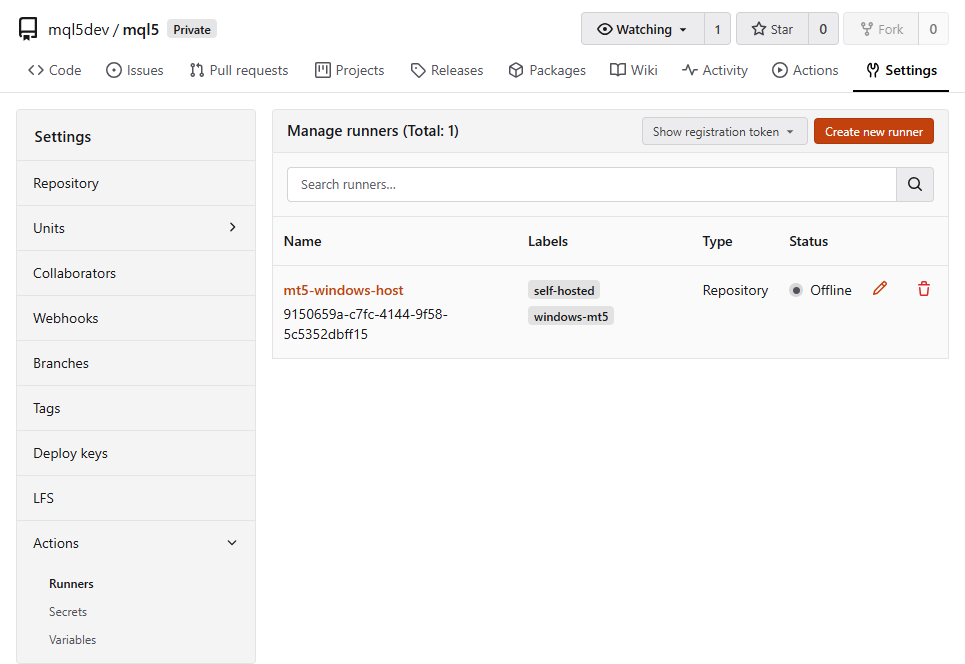
Fig. 9. The registered runner
The same page exists at account level, at /user/settings/actions/runners, where one runner serves all your repositories.
The workflow
Algo Forge scans .forgejo/workflows/ for YAML files. In the demo repository, Scripts/ and .forgejo/workflows/ sit at the root, so every path below is relative to the repository, not to the terminal's data folder. The workflow checks out, compiles with MetaEditor's command line, decodes the log and decides whether the build passed:
name: MQL5 compile

on:
  push:
  workflow_dispatch:

jobs:
  compile:
    runs-on: windows-mt5
    steps:
      - name: Checkout
        uses: https://code.forgejo.org/actions/checkout@v4

      - name: Compile with MetaEditor
        shell: powershell
        run: |
          $me = "C:\Program Files\MetaTrader 5\metaeditor64.exe"
          if (-not (Test-Path $me)) { Write-Host "::error::MetaEditor not found at $me"; exit 1 }
          $src = Join-Path $PWD "Scripts\HelloForge.mq5"
          $log = Join-Path $PWD "compile.log"
          Remove-Item $log -ErrorAction SilentlyContinue
          & $me /compile:"$src" /log:"$log" | Out-Null
          Write-Host "metaeditor exit code = $LASTEXITCODE   <- not a pass/fail signal, see below"
          if (-not (Test-Path $log)) { Write-Host "::error::no log file produced"; exit 1 }
          $lines = Get-Content $log -Encoding Unicode
          Write-Host "----- compile log (UTF-16, decoded) -----"
          $lines | ForEach-Object { Write-Host $_ }
          Write-Host "----------------------------------------"
          $result = $lines | Where-Object { $_ -match 'Result:' } | Select-Object -Last 1
          if (-not $result) { Write-Host "::error::no Result line in log"; exit 1 }
          if ($result -match '(\d+)\s+error') { $errs = [int]$Matches[1] } else { $errs = 0 }
          if ($errs -gt 0) { Write-Host "::error::compile failed with $errs error(s)"; exit 1 }
          Write-Host "compile clean -> $result"
          Get-ChildItem -Recurse -Filter *.ex5 | ForEach-Object { Write-Host "artifact: $($_.Name)  $($_.Length) bytes" }
          exit 0
Listing 5. .forgejo/workflows/compile.yml
The uses: line carries a full URL rather than the bare actions/checkout@v4, because this instance has no default action registry alias. The checkout action writes a temporary credential into the local Git configuration, which is how it clones a private repository with no token of yours in the file. The log is deleted before compiling so that a leftover log from an earlier run can never pass for a fresh build.
Two lines are specific to my machine and worth changing in yours. The MetaEditor path is the default installation; with several terminals or a portable install, point $me at the metaeditor64.exe of the terminal whose headers you build against. And @v4 is a tag, which whoever controls that repository can move to different code. On a host-mode runner the action runs with your permissions, so once the pipeline works, replace @v4 with the full commit SHA it currently points to.
The compile target is deliberately trivial, so the pipeline is the subject rather than the code:
//+------------------------------------------------------------------+
//|                                                   HelloForge.mq5 |
//|                                         Copyright 2026, ShahZaib |
//+------------------------------------------------------------------+
#property script_show_inputs

input int InpBars = 10;   // how many bars to report

//+------------------------------------------------------------------+
//| Script entry point: prints a one-line proof of compilation.      |
//+------------------------------------------------------------------+
void OnStart()
  {
   Print("HelloForge on ", _Symbol, ", reporting ", InpBars, " bars");
  }
//+------------------------------------------------------------------+
Listing 6. Scripts/HelloForge.mq5
Reading the compile result
MetaEditor's command line compiler returns the number of files it compiled successfully, not an error code. On MetaEditor build 6230, a clean file returned 1, the same file with an error returned 0, and a folder of five files with one error returned 4. CI reads exit codes the other way round. The runner appends an exit-code check to every PowerShell step, so the 1 from a successful compile, still in $LASTEXITCODE when the step ends, fails the job. A green log inside a red job sends you looking in the wrong place, which is why the workflow prints the exit code first and does not use it as the verdict: it parses the log for the Result: line, decides for itself whether the build passed, and ends with an explicit exit 0.
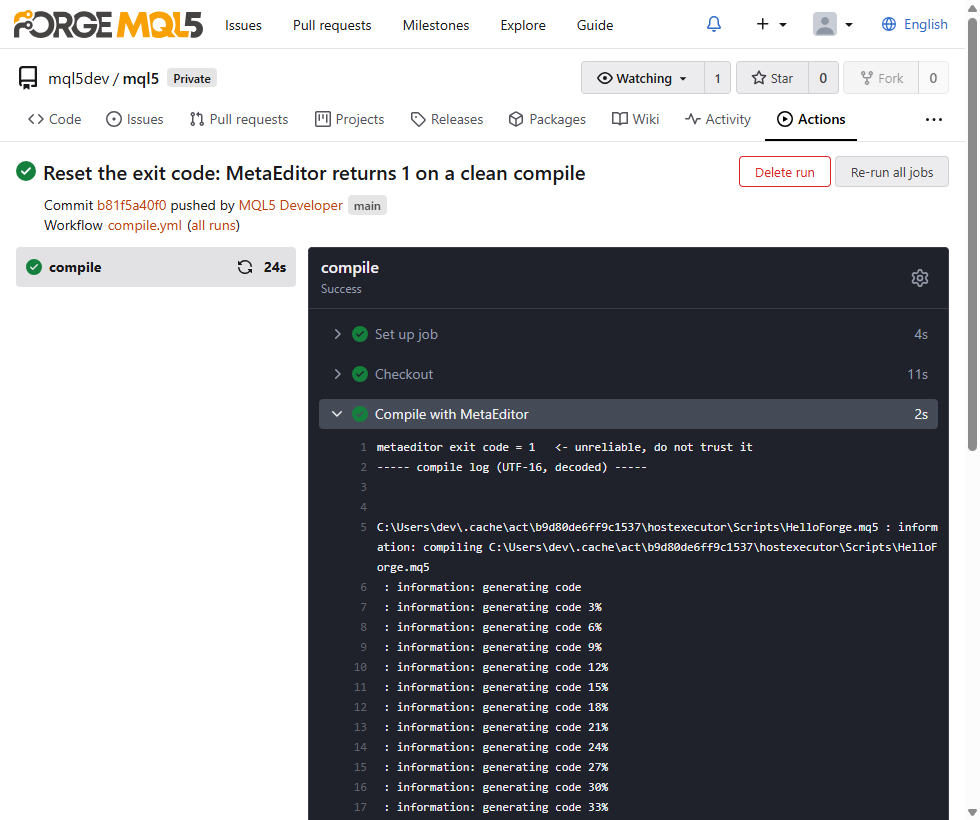
Fig. 10. Exit code 1 after a clean compile
The log itself is UTF-16. Read it as UTF-8 and you get unusable text, which is why the script reads it with -Encoding Unicode. With both details handled, the compile took 795 ms and produced a 6,038-byte .ex5, in a job that finished in 24 seconds including checkout.
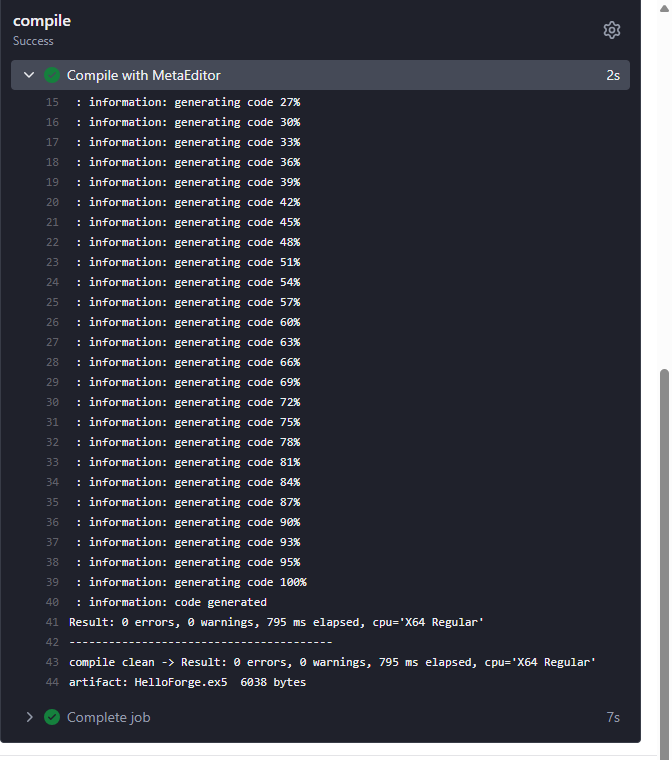
Fig. 11. The result line and the compiled artifact
A build system that cannot fail is decoration, so I also pushed a version with an undeclared identifier:
Scripts\HelloForge.mq5(14,28) : error 256: undeclared identifier '_Symbol_TYPO_UNDECLARED'
Result: 1 errors, 0 warnings
::error::compile failed with 1 error(s)
Listing 7. The failure path
From one file to a project
Listing 5 compiles one named file, which proves the pipeline but does not build a project. MetaEditor's /compile: also accepts a folder: given one, it compiles every .mq5 inside it, subfolders included, and writes one Result: line per file. That changes the parsing. Select-Object -Last 1 reads only the last file's line, so a failure in any other file would pass. Sum the error counts over every Result: line instead, or compare the exit code with the number of .mq5 files you expected to build.
The parsing also depends on the log's wording, the Result: label and the word error, as build 6230 writes them. A missing Result: line stops the job, which is the safe direction. A reworded error count is not: the regular expression would find nothing and the step would count zero errors. The exit-code comparison above gives a second signal that does not depend on wording.
Finally, the workflow only lists the .ex5 files it produced. They stay in the runner's working folder, where the next run can overwrite them. To keep a build, add a step that uploads it with the call from Listing 3, reading the token from a repository secret, so each tagged build lands in the package registry.
Include files
HelloForge.mq5 has no #include directives. A project that includes Trade\Trade.mqh or its own headers gives the compiler nothing to resolve them against when the source sits in a checkout folder rather than under the terminal's data folder. MetaEditor's /inc: argument points the compiler at an MQL5 root to search: set $inc to the MQL5 folder of the terminal that holds those headers and change the compile line to & $me /compile:"$src" /inc:"$inc" /log:"$log". A missing header is a compile error, so the pipeline tells you if the path is wrong.
Secrets and variables have their own tabs beside Runners, so deployment credentials never appear in the YAML. Name this job in a branch protection rule's status check contexts, and a pull request that breaks the compile cannot be merged.
Important: a self-hosted runner in host mode executes whatever the workflow says, directly on your machine, with your user account's permissions. That is fine for your own repositories. Think carefully before enabling it on a repository that accepts pull requests from strangers, because a workflow is code and a pull request can change it. Listing 5 triggers on push and workflow_dispatch only, so it runs code that someone with write access pushed. Adding a pull_request trigger is the step that lets a contributor's code, including an edited workflow, reach your machine, and repository secrets are exactly what such a workflow would try to print. Keep that trigger off a host-mode runner.
Webhooks
Settings, Webhooks offers thirteen webhook types. Most are chat formatters, such as Slack, Discord, Telegram and Microsoft Teams, which shape the message for that service. When the receiver is your own code, pick one of the three generic types, Forgejo, Gitea or Gogs, which post plain JSON to any endpoint. Choose Forgejo unless the receiver already expects one of the others.
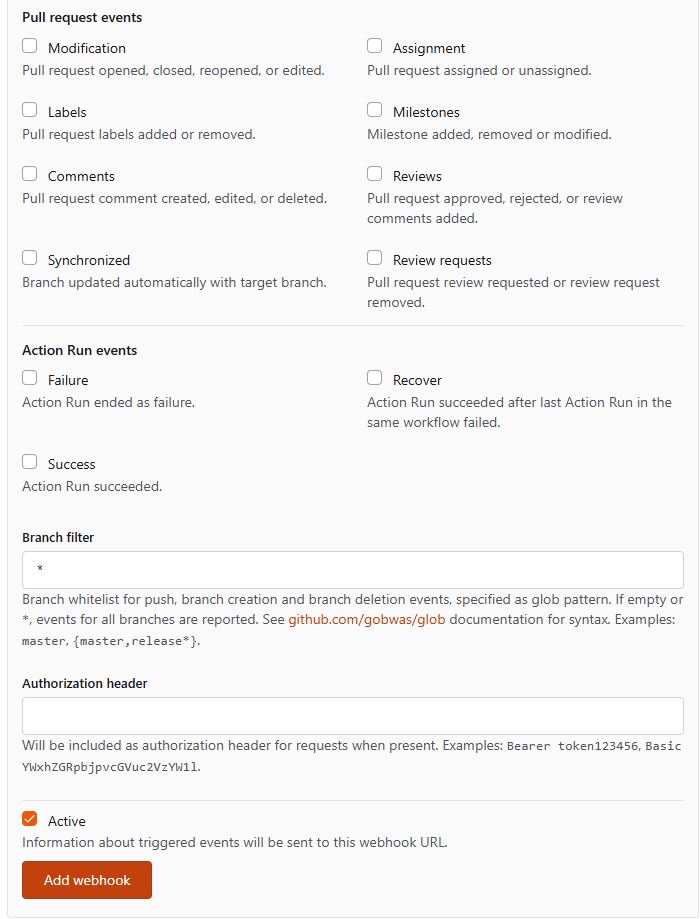
Fig. 12. Action Run events, branch filter and authorization header
Among the twenty-four events, three tie webhooks to CI: action_failure, action_success and action_recover fire on the outcome of a run, so a hook on action_failure tells you the moment a compile breaks. Branch filter limits a hook to matching branches, and Authorization header sends a credential with each request, so an authenticated endpoint does not need a token in its URL.
Every delivery is recorded. Open a saved webhook and expand an entry under Recent deliveries.
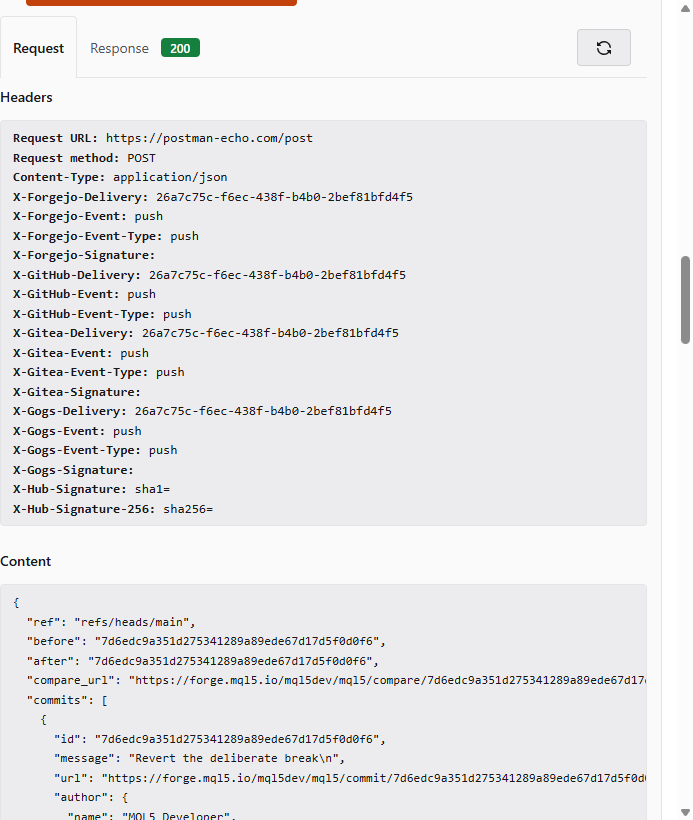
Fig. 13. A recorded delivery
Each delivery carries parallel X-Forgejo-, X-GitHub-, X-Gitea- and X-Gogs- headers, plus X-Hub-Signature and X-Hub-Signature-256. Matching header names do not make it a GitHub webhook, though. The body follows Gitea's schema, which resembles GitHub's but differs in event names and fields, so a receiver written for GitHub needs its parsing checked against a real delivery before you trust it. The full payload is stored, and a Test delivery button and a redeliver control let you develop a receiver against real payloads without pushing junk commits.
Access tokens and the REST API
Two credentials in this article are both called tokens. The registration token from the CI section only attaches a runner. The personal access token, from Settings, Applications, is what the package upload and any API script use. Webhooks need neither; they carry a secret you choose.
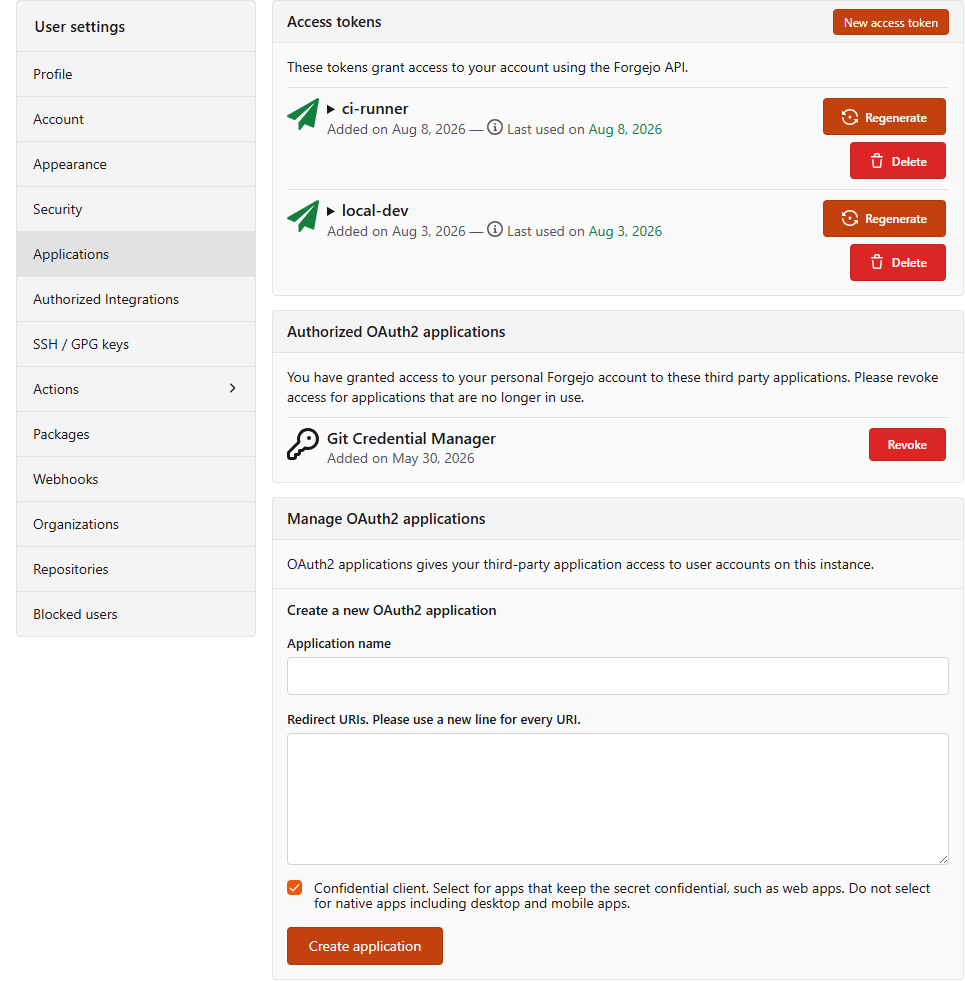
Fig. 14. Access tokens and OAuth2 applications
Besides permission scopes, a token can be restricted to named repositories, so a publishing script's token cannot touch anything else you own. The same page registers OAuth2 applications, for tools that log users in with their Algo Forge account. Authentication is a header:
Authorization: token YOUR_TOKEN
Listing 8. API authentication
The /api/v1/settings/api endpoint, readable without logging in, reports the limits to design against: max_response_items 250, default_paging_num 30, default_git_trees_per_page 1000 and default_max_blob_size 10485760, that is 10 MB. These are server-wide defaults that the paged list endpoints apply, not a promise for every endpoint, so read the X-Total-Count and Link headers a list response returns rather than assuming a page size. A script that ignores paging silently processes the first thirty of something.
One trap in the contents API: creating a file is a POST, while updating one is a PUT with the current blob SHA. A PUT for a new file returns 422 with [SHA]: Required, which reads like a malformed request body rather than the wrong verb.
On the MetaTrader side, the releases endpoint is readable without authentication for a public repository, so an Expert Advisor can check whether a newer version of itself exists:
GET https://forge.mql5.io/api/v1/repos/{owner}/{repo}/releases/latest Listing 9. Latest release, no authentication needed
That call goes through WebRequest. As its documentation explains, the server must first be added to the allowed URLs on the Expert Advisors tab of the Options window; the call is synchronous, and it works in Expert Advisors and scripts but not in indicators or the Strategy Tester. A version check once after startup fits those limits, while a check on every tick does not. Compare the tag_name field of the response with the version compiled into the program, and treat a failed request as no news rather than as an error.
Large files and mirrors
Git LFS is enabled, with a settings page listing tracked files, locks, and a finder for pointer files committed incorrectly. For machine learning work in MQL5, ONNX models and training datasets belong in LFS rather than in ordinary Git history. LFS keeps every version too, but on the server: a clone downloads only the versions it checks out, while ordinary history puts every version of a 200 MB file into every clone. I found no published LFS storage quota for the instance, so watch the size on the LFS settings page before committing a large dataset.
Push mirrors, in the main repository settings, push to a remote such as GitHub on an interval or on every commit, optionally filtered by branch. Pull mirrors keep an Algo Forge repository in sync with a source elsewhere. Separately, /repo/migrate imports an existing repository from GitHub, GitLab and other hosts, or from any HTTPS clone URL, so an MQL5 project with an existing history does not have to start over.
The MetaTrader5 gitignore template, and how Git reads it
The repository creation page offers a built-in MetaTrader 5 gitignore template, the third MQL5-specific addition. It covers the right ground: compiled binaries, terminal logs, Strategy Tester artifacts, chart templates and MetaEditor scratch files, none of which belong in Git.
Before relying on it, know one rule of Git's own gitignore syntax, which has nothing to do with this file in particular. Several template lines carry an explanation after the pattern:
# MetaTrader 5 and MQL5 gitignore template

# Compiled MQL5 executables (binaries)
*.ex5
*.ex4 # For MQL4 compatibility if you also manage MT4 projects in a similar structure

# Log files
*.log
*.slog # Strategy Tester logs

# Strategy Tester specific files
*.fxt  # FXT files (history data for testing)
*.csv  # CSV export files (e.g., from tester reports)

# Market Watch sets and profiles
*.set  # Market Watch symbol sets

# MetaEditor project files
.mqproj
Listing 10. The shipped template, excerpted
The highlighted text reads as comments, and in most configuration formats it would be. In a gitignore, a # starts a comment only as the first character of a line, as Git's documentation states: "A line starting with # serves as a comment." Anywhere else it is part of the pattern. So *.set # Market Watch symbol sets is one pattern that matches only a file with that literal name. Nothing on disk is called that, so the line has no effect, and Git gives no warning because the pattern is valid.
I tested the full template in an empty repository, with one realistically named file for each type it lists. Of its twenty-six patterns, five ignored anything: *.ex5, *.log, *.dll, *.mqh.bak and *.mq5.bak. Every line with a trailing explanation, *.csv, *.set, *.fxt and .env among them, matched nothing. Check .env first, since that is where people keep a broker password or a Telegram bot token.
The remaining line, .mqproj, fails for a different reason. Without a wildcard it matches only a file named exactly .mqproj, while MetaEditor names project files after the project, as in MyExpert.mqproj. Whether to exclude project files at all is a real decision, since the project file is what makes a repository open cleanly as a project on someone else's machine.
A corrected version puts every comment on its own line, uses *.mqproj if project files are meant to be excluded, and leaves out blanket *.json, *.ini and *.cfg rules, which in an MQL5 project are as likely to be configuration you want tracked as noise you do not:
# .gitignore for an MQL5 project

# Compiled binaries
*.ex4
*.ex5

# Terminal, tester and custom logs
*.log
*.slog
*.jrn

# Strategy Tester history and cache
*.fxt
*.hst
*.dat

# Chart and terminal state
*.tpl
*.chr

# MetaEditor scratch and backups
*.bak
*.~*

# Credentials, never commit these

.env

# MetaEditor project files. Remove this line if you want
# collaborators to open the repository as a project.
*.mqproj

# Tester parameter sets. Remove this line if your .set files
# are inputs you want to version rather than outputs you discard.
*.set
Listing 11. A working replacement
Verify it rather than trusting it, mine included. git check-ignore -v yourfile.set prints the pattern that matched and the line it came from, and prints nothing if nothing matched.
Important: a gitignore only governs untracked files. If a repository has been pushed already, anything Git picked up is in the history, and a rewritten gitignore stops future commits without removing it. Run git rm --cached on the files that should not be there, commit that removal, and take the opportunity to check whether anything sensitive reached the server.
Two limits to plan around
Two rows of Table 1 need more than a line, because in both cases the platform suggests something that is not so.
SSH is disabled. The clone panel offers HTTPS only, the SSH and GPG keys page has no form for adding a key, and the deploy keys page says so directly.
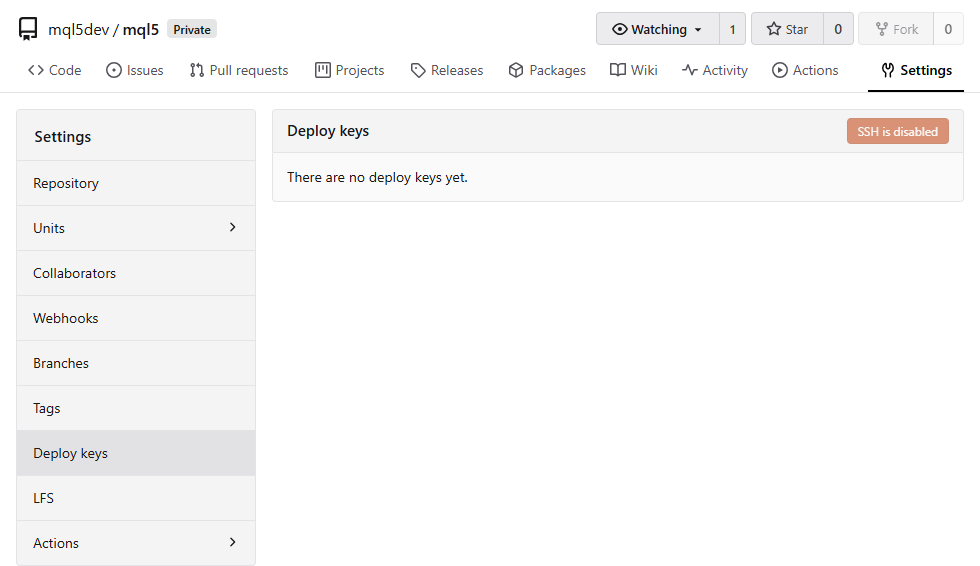
Fig. 15. The deploy keys page, stating that SSH is disabled
The REST API says otherwise: every repository response carries an ssh_url pointing at port 65022. Following it leads to key configuration and firewall debugging that go nowhere. Clone over HTTPS and authenticate with an access token.
Code search works one repository at a time. Explore offers repository, user and organization search only, and /explore/code redirects to repository search, so you cannot search code across everyone's repositories. Inside a single repository, search at /{owner}/{repo}/search works without logging in for a public repository, while a private one needs access to the repository first. It offers exact, union and regular-expression modes, and returns matching lines with their file paths, so a query for OnTick lands you on the function itself.
The catch is that this search runs on git grep, which skips files it considers binary, and a UTF-16 file looks binary to it. Git classifies a file as binary when it finds a NUL byte near its start, and UTF-16 stores every ASCII character next to a NUL. You can see the classification locally: git diff --numstat on a commit that adds a UTF-16 file prints - - instead of line counts, and git grep for an identifier inside it returns nothing. MetaEditor saves .mq5 and .mqh files as UTF-8, so code you write today is fine, but older sources and third-party libraries still circulate as UTF-16. On Algo Forge, searches for identifiers visible in UTF-16 files came back empty in all three modes, while the same searches on UTF-8 repositories matched immediately, which is what that classification predicts. Nothing in the interface says which case you are in. If search matters in a repository with inherited files, convert them to UTF-8. It costs one diff, and it also makes those files readable in every Git diff.
Two smaller boundaries complete the picture: repositories are SHA-1 only, with no SHA-256 option, and ActivityPub federation, though present in the API specification, returns 404 on this instance.
Final Thoughts
Algo Forge gives the MQL5 community a mature forge behind the authentication it already uses, three additions built for this audience, and far more capability than the getting-started material covers. Four things here are worth doing this week, and each has a state you can check when you are finished:
- Check what your gitignore actually excludes, whichever one you started from. Done when git check-ignore -v something.set prints the pattern that matched it.
- Put a metaeditor5://checkout link wherever you share code, alongside the plain HTTPS URL. Done when clicking your own link on a machine with MetaTrader 5 installed opens MetaEditor at a checkout prompt.
- Add a branch protection rule to any library that matters, with its header folder in the protected file patterns, Include/** in the layout used here. Done when a direct push to the protected branch touching a header is refused and the same change goes through as a pull request.
- If a broken compile costs you real time, register a runner and let the platform compile every push. Done when a deliberately broken commit turns the run red and the fixed commit turns it green, remembering that MetaEditor's exit code counts the files it compiled, so a successful single-file build returns 1, and that its log is UTF-16.
Everything described here was checked on the live instance, on the dates given at the start and to the depth Table 1 records. The files below are the CI pipeline: drop them into a repository with a self-hosted runner attached, adjust the MetaEditor path, add /inc: if your sources have includes, and push.
| # | File | Description |
|---|---|---|
| 1 | HelloForge.mq5 | Minimal script used as the compile target for the CI pipeline. In the demo repository it sits at Scripts/HelloForge.mq5, relative to the repository root |
| 2 | compile.yml | Forgejo Actions workflow: checkout, compile with MetaEditor, decode the UTF-16 log, fail on errors. Place it at .forgejo/workflows/compile.yml in your repository |
Warning: All rights to these materials are reserved by MetaQuotes Ltd. Copying or reprinting of these materials in whole or in part is prohibited.
This article was written by a user of the site and reflects their personal views. MetaQuotes Ltd is not responsible for the accuracy of the information presented, nor for any consequences resulting from the use of the solutions, strategies or recommendations described.

 Building Your Personal Expert Advisor (Part 7): Risk Management VI (Final)—Consolidating the Risk Framework
 Neural Networks in Trading: A Spiking-Semantic Approach to Spatiotemporal Identification (S3CE-Net)
 Building a Prop Firm Compliance Monitor in MQL5 (Part 2): Daily Sessions and Restart-Safe Starting Balances
 Price Action Analysis Toolkit Development (Part 87): Searching Chart History with Recorded Double-Bottom Samples

- Free trading apps
- Over 8,000 signals for copying
- Economic news for exploring financial markets
You agree to website policy and terms of use
I have a question about webhooks. I had been using them (my Telegram bot sent notifications), but a few weeks ago the notifications stopped. When I try to open settings/hooks in my repository and /user/settings/hooks at account level, I only get a plain “Forbidden” page: