Trade Panel HotKey
- 实用工具
- 版本: 2.20
- 激活: 5

Trade Panel HotKey – MT5 Scalping Utility
Fast Trade Panel HotKey is a lightweight MT5 trading utility designed for traders who need to open, manage, and close positions as quickly as possible.
The main purpose of this tool is to reduce the time between a trading decision and execution. Instead of moving the mouse, opening order windows, or manually modifying multiple positions, most important actions can be performed instantly through customizable keyboard hotkeys or directly from the compact on-chart panel.
This makes the tool especially useful for scalping, short-term trading, news trading, and fast discretionary strategies, where even a small execution delay can affect the entry price, exit price, or overall trade result.
Key Features
- Ultra-fast Market Buy / Sell with customizable hotkeys.
- Adjustable trading lot directly from the panel.
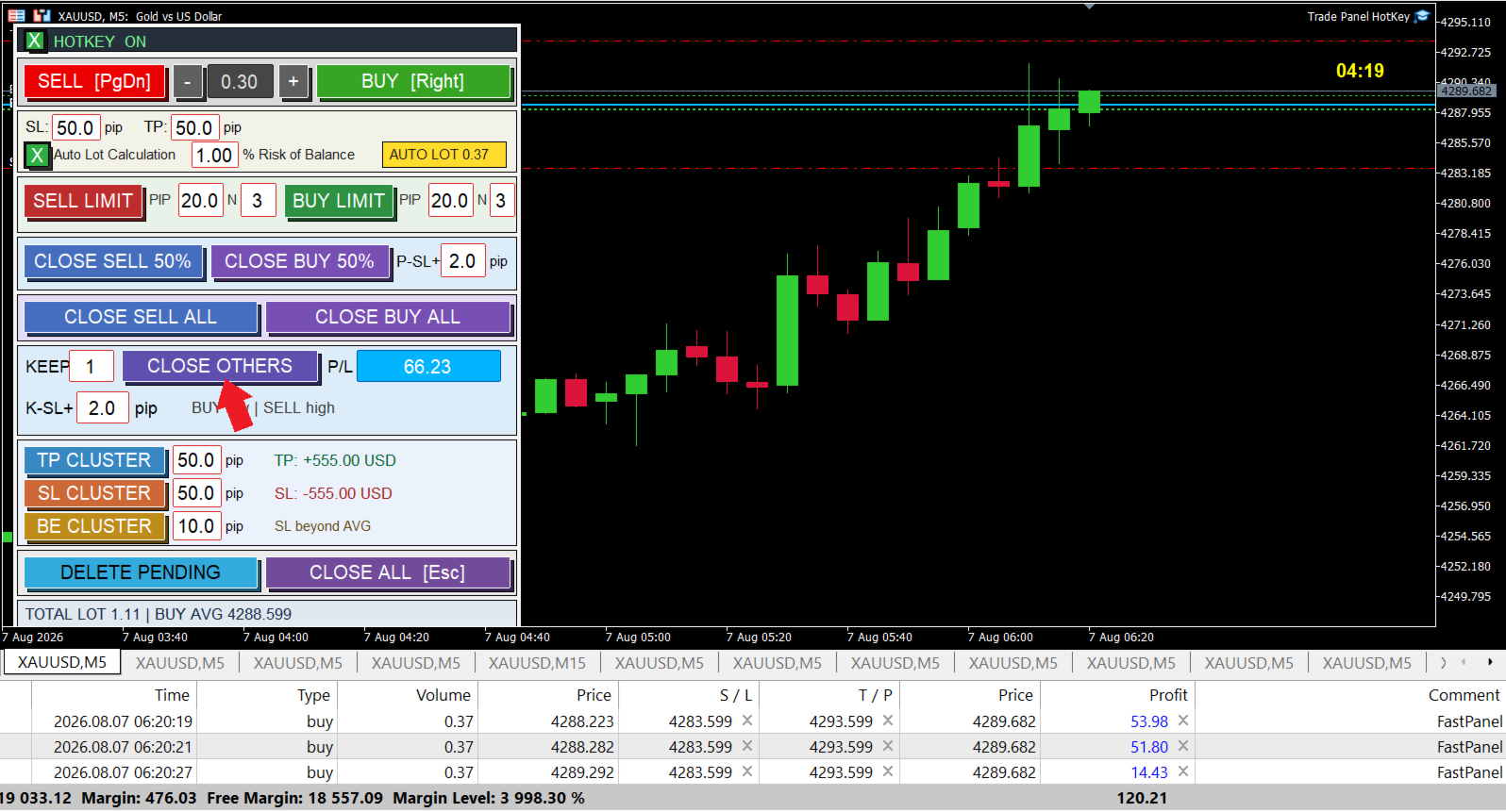
- Auto Lot Calculation based on account balance, Stop Loss distance, and user-defined Risk %.
- Adjustable SL and TP for new trades.
- Buy Limit / Sell Limit grid orders with adjustable pip spacing and number of pending orders.
- Partial Close for Buy or Sell positions, with automatic SL movement to Break Even + configurable pips.
- Close All Buy / Close All Sell instantly.
- Close All Positions with one button or hotkey.
- Close All Except keeps the outermost position(s) while closing the remaining positions.
- Automatically move the kept position SL to Break Even + X pips.
- TP Cluster – set the TP of the entire position cluster based on the volume-weighted average entry price.
- SL Cluster – set the SL of the entire cluster from the average entry price.
- BE Cluster – move all cluster Stop Losses beyond the average entry price by a configurable number of pips.
- Displays the estimated USD profit/loss at Cluster TP and SL.
- Displays current Total Lot and volume-weighted Average Entry Price.
- Automatically draws Buy/Sell average entry lines on the chart.
- Live candle countdown timer displayed next to the current price.
- Delete all pending orders instantly.
- Hotkeys can be enabled or disabled directly from the panel.
- Compact panel designed to remain visible above chart objects and trading lines.
Built for Fast Scalping
For scalping strategies, speed and simplicity are extremely important. With Fast Trade Panel HotKey, actions such as:
Buy → Partial Close → Break Even → Close Cluster
or
Sell → Add Position → Set Cluster TP → Close All
can be performed with only a few keystrokes.
This minimizes unnecessary mouse movement and allows the trader to focus more on price action, timing, liquidity, and execution rather than repeatedly operating the standard MT5 trade interface.
The EA also uses an optimized execution path for market orders so the number of existing positions does not unnecessarily slow down new Buy/Sell commands. Where supported, asynchronous trade requests are used to reduce terminal-side waiting time.
Trade Panel HotKey does not generate trading signals or automatically decide when to enter the market. It is an execution and position-management utility. Trading results still depend entirely on the trader's strategy, risk management, broker execution, spread, slippage, and market conditions.