UTralVirtual

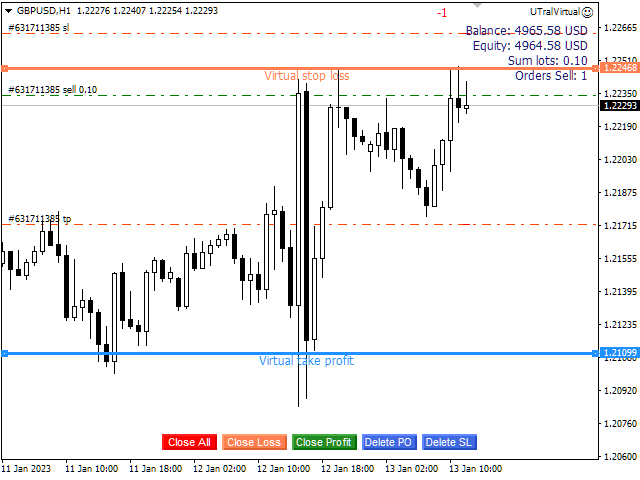
用於管理未平倉頭寸和掛單的實用程序。 內置追踪止損有五種模式和七種工具。 有虛擬止損和虛擬止盈,可以在圖表上自由移動。 借助內置的交易模擬器,您可以檢查 EA 在策略測試器中的工作方式。

UTralVirtual 的詳細指南可以在“評論”部分找到。

好處

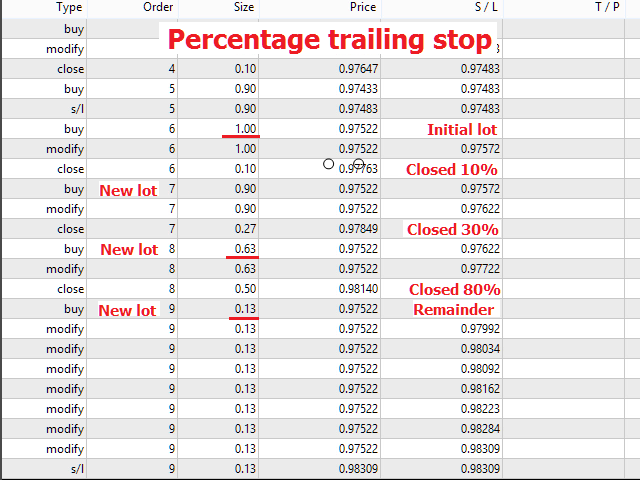
  • 5種追踪止損模式:虛擬、正常、總計、百分比和移動止損;
  • 7 個選項:按點、按柱極值、按分形、按交易量、按 MA、按拋物線 SAR 和按 ATR;
  • 虛擬 TP 和 SL - 根據圖表手動自由移動;
  • 為所有未平倉頭寸添加止損和止盈;
  • 通過以下方式設置止損:點、分形、ATR 指標、每日高/低;
  • 圖表上打開的所有訂單的追踪止損;
  • 迷你利潤開始追踪止損。;
  • 通過幻數和方向為未平倉頭寸設置追踪止損;
  • 掛單的尾隨:按類型、方向、點、分形、柱極值;
  • 圖表上的“熱鍵”用於快速執行命令;
  • 適用於具有 4 位和 5 位報價的帳戶;
  • 5位數賬戶,參數自動加10;
  • 用於處理加密貨幣、指數、期貨、差價合約的特殊參數乘數。.

參數

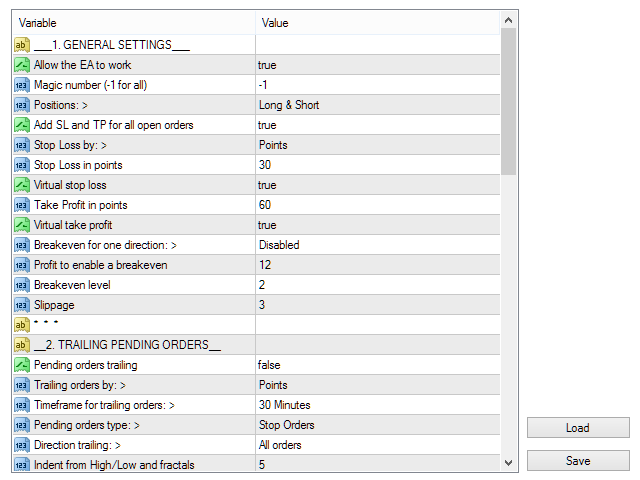
Block 1. GENERAL SETTINGS

  • Allow the EA to work
  • Magic number (-1 for all)
  • Positions:
  • Add SL and TP for all open orders
  • Stop Loss by:
  • Stop Loss in points
  • Virtual stop loss
  • Take Profit in points
  • Virtual take profit
  • Breakeven for one direction:
  • Profit to enable a breakeven
  • Breakeven level
  • Slippage

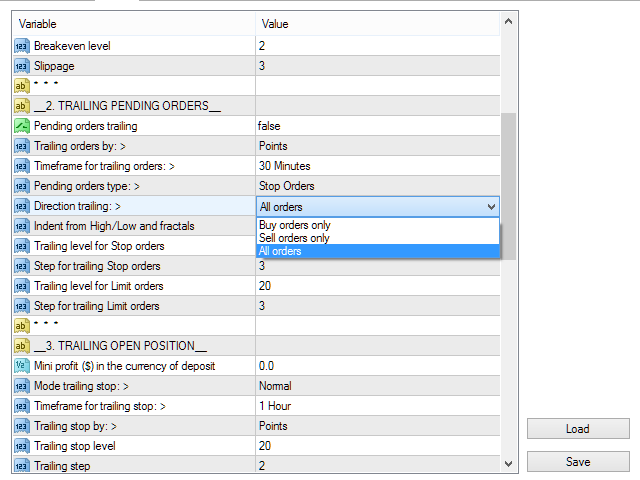
Block 2. TRAILING PENDING ORDERS

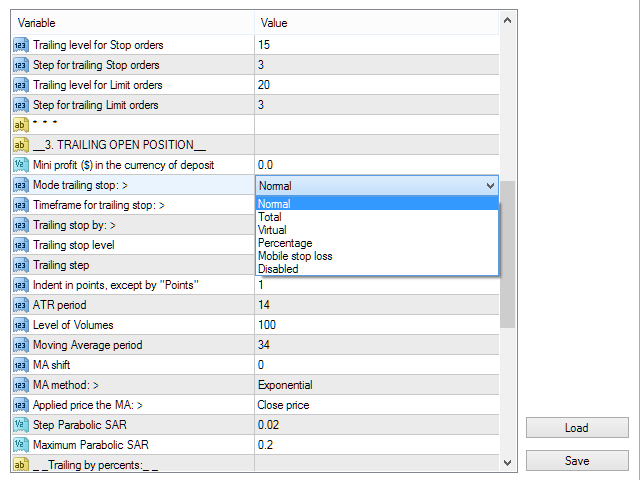
Block 3. TRAILING OPEN POSITIONS

  • Mini profit ($) in the currency of deposit
  • Mode trailing stop:
  • Timeframe for trailing stop:
  • Trailing stop by:
  • Trailing stop level
  • Trailing step
  • Indent in points, except "by Points"
  • ATR period
  • Level of Volumes

Block 4. OTHER SETTINGS


推荐产品
BreakEven ProSync EA – 交易管理与风险控制工具 概述 BreakEven ProSync EA 是一款专为 MetaTrader 4 设计的专家顾问(EA),旨在通过自动化止损调整和确保仓位同步,帮助交易者高效管理未平仓头寸。该工具适合希望在多笔交易中标准化止损和止盈水平,并集成盈亏平衡功能的交易者。 该 EA 通过计算所有未平仓头寸的平均价格,并根据交易者的判断将止损调整至盈亏平衡点。它还提供了可视化总止损(Total SL)和总止盈(Total TP)水平的工具,并高效管理交易退出。 主要功能 Customizable HotKeys: Market Buy Market Sell Buy Limit Sell Limit Buy Stop Sell Stop HotKeys for BreakEven and Close All positions alongside with the Buttons 盈亏平衡功能 激活后,将止损移至盈亏平衡水平。 添加新仓位时,自动重新计算盈亏平衡价格。 止损与止盈同步 确保所选交易品种的所有未平仓交易具有相同的止损
MARKET MAKER EXPERT is an customizable advanced, fully automated Grid Trading Expert Advisor developed to trade on MULTIPAIR MODE ( EURUSD,USDJPY,USDCHF,USDCAD,EURCHF ), by spreading out risks. Expanding Grid is its speciality. It focuses on opening a large number of orders. The currency pairs have been chosen carefully to run this system. Once it analyze the market, it does a hedge order immediately, (so margin levels are not affected on the initial trade) Starts grid when the price move aga
Ultimate MT4 to Telegram (UMT) sends controlled trades (via symbol, magic, comment) to your telegram channel. It sends open and closed trades, including pending orders and TP/SL modifications, along with chart screenshots, to any telegram channel. Additionally, you can send trade reports of open trades and summary profit/pip reports for day, week, or month. You can customize the design of the trade actions or reports with variables and emoticons.  A beautiful panel allows you to visualize all t
Risk Control Utility MT4   designed for manual trading. It helps to calculate and control your risks, transfer transactions to breakeven and accompany positions with trailing stop. Easy to set up and use. It can be used for calculating a trading lot, calculating stop loss and take profit levels. Works with currency pairs, CFDs, stocks, indices, futures, cryptocurrencies Displays   volume,   potential loss and profit before   placing an order Ability to set the expiration time of a pending order
Close_All_Trades_with_TP_SL is a reliable and efficient MQL4 Expert Advisor designed to simplify and automate trade management for all open positions on your MT4 account. This EA is especially useful for traders who open multiple trades quickly or use high-frequency strategies where manual TP/SL placement becomes difficult and time-consuming. The primary purpose of the EA is to ensure that every open trade—whether Buy or Sell—always has a predefined Take Profit (TP) and Stop Loss (SL) applied. M
FREE
Equity Trailing Stop Manager EA The Equity Trailing Stop Manager EA is a powerful risk-management tool for MetaTrader. Instead of trailing the stop loss of individual trades, this EA trails your entire account equity . When your account equity increases, the EA records the highest equity reached . If equity later drops by the trailing amount you set, the EA closes all open trades automatically to protect your profits. The EA does not open trades . It simply manages existing positions. This ma
News Hedging Pro  is a unique robot that allows you to trade during the most critical news announcement periods by your predefined strategy. You can preset the strategy to trade, and then it will trade that news automatically when the news comes. News release gives opportunity to have pips since the price usually has big move at that time. Now with this tool, trading news become easier, more flexible and more exciting than ever. No waiting, no confusing anymore. Product Links Fully  Description
Account tracker for a personal use. Collect account balance, equity, margin, initial margin, p/l and push to a webserver. Lifetime license. Settings: Allow dll import Allow webrequest for certain urls drag and drop expert advisor on a new chart, minimize the chart and leave on the backgroud. Statistics will be update every 3 second and push it to the server.
如果产品有任何问题或者您需要在此产品上添加功能,请联系我 Contact/message me if you encounter any issue using the product or need extra feature to add on the base version. There is Demo version of this panel Dashboard Super Three MA Demo in my product list, please try it out to get familiar with all functionalities free, LINK . This system basically utilizes PA and three adjustable Moving Average as the main indicator set to generate trading signal. With the feature that all MA_timeframe, MA_period, MA_applied_price are ad
Send periodic (Health Check) notification from your MT4 terminal to your mobile phone to be sure that your MT4 terminal is still running. When you did not receive the notification, it means that your terminal is unavailable. Optional information like Account Equity and Trading Pairs are also available. Notification Period - 1 Hour, 2 Hours, 4 Hours, 8 Hours, 12 Hours, 24 Hours Attach EA to any H1 chart
This utility allows you to easily close profit or loss positions. You can close profit or loss positions by clicking each buttons. If profit or loss positions reaches or exceed value specified as pips, they would be closed. This panel would be placed left bottom corner of the chart. If the users want to change the placement and functions contact me. Important :  -Check allow live trading. -Enable Auto Trade trading.
Auto Close & Delete All is an assistant to help you quickly close all trades of a selected symbol or all symbols and delete pending orders. Through its flexible settings, you can set the script to either close only trades, or only pending orders, or both market trades and pending orders. The script can close deals and delete pending orders wither for the current instrument, or for all instruments. This is selected in settings. The settings are displayed on the screen before the script execution,
FREE
VirtualStops
Viktor Shpakovskiy
A utility for managing open positions using virtual (invisible to the broker) stops. Virtual stop loss and virtual take profit can be freely moved around the chart. If the price touches the virtual stop line (TP, SL, TS), the EA will close all orders of the same direction on the current chart. Closing orders by virtual take profit is possible only if there is a profit. With the help of the built-in trading simulator, you can, in the strategy tester, see how the adviser works. Parameters Block
FXFledgling Exit Tool is a complete risk management tool that analyzes both the open trades and the direction of the pair of open trades. As long as the suggested entry and lotsizing management presented here is followed strictly, you will have a high chance (but no guarantee) of surviving the trade. What It Does It is used as an exit tool. It helps the trader to manage any manual trade that he transacted. It does the following: Trail Stop Dynamic Stop Loss - a calculated stop-loss that changes
Overview The script displays information about the trade account and the current financial instrument. Information about the trade account: Account - account number and type (Real or Demo); Name - name of the account owner; Company - name of a company that provide the access to trading; Server - trade server name; Connection State - connection state; Trade Allowed - shows whether trading is allowed on the account at the moment; Balance - account balance; Equity - account equity; Credit - amount
Averager NEW
Oleg Popov
4 (7)
Expert Advisor Features trailing profit in the deposit currency (Trailing Stop Money) closing by a profit or loss in the deposit currency opening orders at a specified time managing positions opened manually or by another Expert Advisor calculating initial lot based on the current balance limiting the maximum lot volume choosing trading type several types and methods of averaging visually displays the current breakeven price, draws horizontal lines "Line break even BUY"-blue, "Line break even S
FREE
Signal Provider Utility Pro (Telegram & Discord) The Professional Solution for Signal Providers. Automated Broadcasting | Smart GUI Panel | Performance Reports Stop managing your signals manually.   Signal Provider Utility Pro   is the realiable bridge between your MetaTrader 4 terminal and your community on Telegram and Discord. Designed for high-performance signal services, this tool gives you instant control over your broadcasts without ever needing to open the settings window. From   real-ti
Hello, boys and girls! Script allows you either to quickly save opened charts and then close all charts opened by visual tester mode or just faster close all charts. Feel free to take a look at video manual about how to use this script on my YouTube channel. Also, feel free to join my telegram channel , where time to time I publish some exclusive stuffs. Feel free to leave feedback and thoughts how to improve this script - I'd highly appreciate that. All the best.
Transform Your MT4 Trading: From Chaos to Command Center in One Click! Struggling with manual position sizing? Losing track of multiple entries? Watching your basket trades spiral out of control? Stop the madness. The Trade Panel Manager MT4 is the professional-grade EA that elite traders use to dominate the markets. This isn't just another trade manager – it's your complete trading command center that handles everything from lightning-fast single trades to sophisticated multi-position basket
Universal TP SL Pips
Genesis Hafalla
5 (1)
This EA utility does not trade on its own, but it only modifies the   open  trades    to add   take profit   and   stop loss   that was  opened manually or by any other expert advisors.  The distance is based on Pips . How Does It Work? If   Symbol to modify   is set to   "All Symbol"   simply attach it to one chart, and all   open trades   in the entire terminal will set the   take profit   and   stop loss   .  If  Symbol to modify   is set to   "Local Symbol"   , it will only set the   ta
Manage trades
Makarii Gubaydullin
活跃和挂单管理:自动盈亏平衡、止盈/止损更改、部分/全部平仓、图表上水平的可视化显示 查看我的 #1  Utility :66+ 功能,包括 PRO 交易管理   |    联系我  如有任何问题 1) 主窗口:管理订单时,可以设置特定交易品种 [Symbol] 或选择所有交易品种 [ALL] 关闭所有活跃仓位 [ALL] 关闭所有盈利交易 [profits] 关闭所有亏损交易 [losses] 关闭所有多头交易(买入)[longs] 关闭所有空头交易(卖出)[shorts] 删除所有限价订单 [Delete limit orders] 删除所有止损订单 [Delete stop order] 右侧显示每个订单类别的当前浮动盈亏(以账户货币和当前余额百分比计算),并计算每个类别的订单数量。 2) 手动将交易调整为盈亏平衡 [- Move SL to BE now -]:SL 水平将移动到入场价格: 所有交易 [ALL] 买入交易 [longs] 卖出交易 [shorts] 如果利润超过: [if profit > than:] 指定的存款百分比 指定的货币利润(账户货币自动确定) 如果
Exp Swing
Vladislav Andruschenko
4.43 (63)
它使用称为 Swinger (Pendulum, Cheburashka) 的著名策略模型 - 交替放置增加手数的挂单。 策略在于放置两个相反的挂单。当价格向某个方向移动时,触发一个挂单,同时增加另一个订单的手数。 EA 提供三种类型的挂单(TypeofTrade) 放置后自动开仓(即时开仓AutoTrade) 手动开仓后的开仓管理(Manual opening ManualTrade) 按高/低水平开盘(过去的 TFTrade 柱线的高低) OCO(一个取消另一个)订单是一种由两个订单组成的条件订单。如果第二个订单被执行,第一个订单就会自动取消。 Swing - 完整说明 MT5 version 如何购买 如何安装     如何获取日志文件     如何测试和优化     Expforex 的所有产品 这个怎么运作? 开始时,EA 发出两个订单 - 买入止损 和 卖出止损 ,距离当前价格的距离为 StopOrderDeltaifUSE。 如果 Buy Stop 触发,则 Sell Stop 将被删除,并且将放置一个交易量为 BuyStop   *   Martin 的 Sel
FREE
Daily Pips Target
Makarii Gubaydullin
用于跟踪每日交易结果的资讯面板 查看我的  #1 交易助手 : 66+ 功能,包括此工具  |   联系我  如有任何问题 在面板的上部,您可以设置每日盈利目标(以点数为单位): 手动输入数值; 使用 [+] 和 [-] 按钮(步长可在设置中配置); 然后,仪表板将交易分为两类: 当前浮动结果; 汇总已平仓交易; 最终结果显示在底部:是否达成每日目标,以及超出或不足的点数。 提供 折叠界面 功能(左上角):折叠后的面板在不需要时不会占用工作空间。 您可以配置(3张截图): 1) 默认 每日目标  (之后可通过界面快速修改); 2) 通知设置: 启用/禁用达成每日目标时的通知; 启用/禁用未达成每日目标时的通知; 目标检查时间(默认为每日结束时间 23:50); 启用/禁用终端通知; 启用/禁用电子邮件通知; 启用/禁用移动设备通知; 3) 视觉样式: [+] 和 [-] 按钮的步长; 盈利结果的显示颜色; 亏损结果的显示颜色; 零仓位(0 点)的显示颜色;
One Click Trader is a tool designed for MetaTrader 4 platform, which enables you to take your trading to the next level. It enables you to open, manage and close your trades in simple an efficient way by just one click of your mouse button. Up arrow minimizes the OCT panel Down arrow maximizes the OCT panel Right arrow displays the next panel with additional features Left arrow hides the panel with additional features Red SELL button enables you to open short market orders Red SELL STOP button e
EA Follower Version any Follow Copy Account  (Acc. Number)  need a open MT Terminal, download multiple times Step1:   Open Master MT5 Terminal    =  install master- Version   (on any Symbol just one Time) Step2:   Open Follower MT5 Terminal = install follower- Version  (on any Symbol just one Time) Step3:   all Trades from any Symbol or any Robot are copy now to follow- Terminal immediately for simple copy set on Chart and   Start   no optimization. This Robot is a Trade Copier for MT5 that auto
Discord Notify MT4
Aleh Piatrenka
5 (1)
自动将 MT4 交易的开仓、平仓、部分平仓及修改的实时通知发送到 Discord。 该工具支持16种语言:英语、法语、德语、印地语、印尼语、意大利语、哈萨克语、韩语、荷兰语、波兰语、葡萄牙语、俄语、西班牙语、土耳其语、乌克兰语和越南语。该产品专为无需持续监控终端即可接收 Discord 通知的交易者设计。适用于使用 Expert Advisor 的用户、交易多个品种的交易者以及 VPS 用户。 能够正确识别全部和平仓(例如:0.10 / 0.30 手),并实现了防止重复消息的机制。 通知可以发送到交易账户的所有品种,或仅发送到附加该工具的图表品种(可选)。 提供 Test Discord 按钮用于验证聊天功能,并可在设置后从图表中隐藏。还新增了 Send open positions 按钮,可将当前所有未平仓头寸以表格形式发送到 Discord。 通知内容: 开仓通知包括:交易品种、交易量、交易方向(BUY / SELL)、开仓价格,以及 Take Profit 和 Stop Loss(可选)。 平仓通知包括:交易品种、平仓量(部分或全部)、平仓价格(可选),以及最终盈亏(毛或净 -
FREE
这是一个常规面板,放置买卖订单网络。 这个专家顾问关闭设置中定义的利润订单。 然后,有一个名为Ladder的参数,其中包括订单之间的距离开始增加由梯形参数指示的点(这里,在主要设置中,它是10点),这意味着二阶是10点,三阶是20点,四阶 然后,你需要知道这个顾问是什么,因为这不是在设置中,但它会影响这个顾问提出的策略的逻辑。. 假设在这里的设置中,顾问将打开五个订单。.. 或购买。.. 或出售。.. 好。.. 但是,当打开订单时,它会将下一个打开订单的手数增加先前打开订单的一半。 也就是说,如果您在设置中设置了0.1手,那么根据方案将打开五个订单,第一个更接近当前价格的订单将以0.1手的价格打开。 第二,对于给定的步骤,这里50点的步骤将以0.15手的价格打开。 第三个,在另一个50点之后,将以大约0.22手的价格开盘。 第四个,以0.33手的价格通过50点的设定步骤。 第五个,以0.49手的价格设定50点。 也就是说,通过打开订单,这个顾问将增加每个后续订单的一半数量的前一个订单每次。 这种交易的逻辑是什么? (我通常使用日间交易和未平仓头寸,在上午10:00之前的某个时间。.
Extra Martingale
Vladimir Pokora
5 (1)
Is your trade at a loss? Does not matter ! You can use this Extra martingale tool.  In the set loss of your trade or your EA's trade , this tool will open another trade at a better price. It can also open multiple trades at different distances and with different lot sizes. Each trade will be assigned a TakeProfit. This tool has a lot of settings. You can set variable lot sizes, variable trade distances, variable TakeProfit sizes, maximum total profit or loss in money. You can also close trades
The Trading Panel is designed for easy, convenient, and intuitive use. It is built for both scalping and day trading. The Trading Panel is designed to recognize every instrument it is applied to, without the need to calculate pips or points. The Trading Panel includes Breakeven and Trailing functions, as well as the ability to open and close multiple orders simultaneously. The Breakeven and Trailing functions can be activated either together or separately. The number of trades opened at the same
Superior Telegram Signals Multi-Platform Trade Copier & Notification System   Available for MetaTrader 4 and MetaTrader 5 Superior Telegram Signals   is a utility that connects a trading terminal to the Telegram application. It is designed to send automated trade notifications, chart screenshots, and account status updates to a specified Telegram chat, channel, or group. Use Cases This tool can be used by: Signal Providers:   To automate the broadcasting of trade signals, modifications, and clos
该产品的买家也购买
欢迎来到 Trade Manager EA——这是一个终极风险管理工具,旨在使交易变得更直观、精准和高效。它不仅仅是一个下单工具,而是一个用于无缝交易计划、仓位管理和风险控制的全面解决方案。不论您是新手交易员、资深交易员,还是需要快速执行的剥头皮交易员,Trade Manager EA 都可以满足您的需求,适用于外汇、指数、大宗商品、加密货币等各种市场。 借助 Trade Manager EA,复杂的计算已成过去。只需分析市场,在图表上用水平线标记入场、止损和止盈,设置您的风险水平,Trade Manager 就会立即计算出理想的头寸规模,并实时显示以点、账户货币计价的止损和止盈。每笔交易都得以轻松管理。 主要功能: 头寸规模计算器 :根据定义的风险瞬间确定交易规模。 简单的交易计划 :在图表上用可拖动的水平线直接计划交易,设置入场、止损和止盈。 实时显示 SL 和 TP :以账户货币、点或分显示止损和止盈,便于分析。 高级保护工具 盈亏平衡选项 : 基本盈亏平衡 :当您的交易达到设定水平时自动保护利润。 多级盈亏平衡 :设置多达 4 个级别以逐步保护利润。 尾随止损选项 : 基本尾随
Strategy Builder offers an incredible amount of functionality. It combines a trade panel with configurable automation (covert indicators into an EA), real-time statistics (profit & draw down) plus automatic optimization of SL, TP/exit, trading hours, indicator inputs. Multiple indicators can be combined into an single alert/trade signal and can include custom indicators, even if just have ex4 file or purchased from Market. The system is easily configured via a CONFIG button and associated pop-up
PZ Trade Pad Pro MT4
PZ TRADING SLU
3.67 (3)
这是一个可视化的交易面板,可帮助您轻松进行交易管理,避免人为错误并增强交易活动。它结合了易于使用的视觉界面以及完善的风险和位置管理方法。 [ 安装指南 | 更新指南 | 故障排除 | 常见问题 | 所有产品 ] 易于使用 从图表轻松交易 精确的风险管理交易,无忧 保本是重中之重 让利润不受您的关注 尽快享受无风险交易 所有已开通交易的自动追踪止损 交易开始后立即设置初始止损 进行交易后,EA将执行以下任务: 初始止损/获利被自动放置 它会尽快锁定自由行(可选) 它将止损首次移动到盈亏平衡点(可选) 它使用您所需的方法跟踪止损,直到止损为止 其他很酷的功能是: 出色的终端活动报告 单一但功能强大的尾随止损方法 干净的图表界面 没有输入参数 我进行交易后会怎样? 这是您进行交易后EA的操作: 它放置初始止损并获利订单。 尽快搭便车并确保保本。默认情况下,这是通过在达到盈亏平衡点时关闭50%的交易来完成的,默认情况下为5点。这意味着,如果您日后被淘汰,您将一无所获(可选)。 盈亏平衡后,跟踪止损开始运行。 它跟踪止损,直到止损为止,让利润运行。 尾随止损如何运作? 追踪止损表示为所管
The product will copy all telegram signal to MT4   ( which you are member  ) , also it can work as remote copier.  Easy to set up, copy order instant, can work with almost signal formats, image signal, s upport to translate other language to English Work with all type of channel or group, even channel have "Restrict Saving Content", work with  multi channel, multi MT5 Work as remote copier: with signal have ticket number, it will copy exactly via ticket number. Support to backtest signal. How to
神速EA跟单(TradeMirror)是一款MT4/MT5平台的订单复制软件。 使用教程 请点击 神速EA跟单使用教程 链接以查看更多使用教程 为什么选择神速EA跟单 我们深知对于金融软件而言安全、稳定和隐私的重要性,因此我们在细节处对这三大要素进行了额外的加固: 提供用户友好的图形界面,操作简单易用 注重隐私安全,适合对订单分发有隐私要求各种金融场景 精准复制订单,毫秒级分发 支持全平台,MT4/MT5全面覆盖 智能感知系统状态,邮件通知守护交易安全 核心功能列表 对于跟单软件而言,功能并不是越多越好的,因此经过严谨的需求分析,我们对程序进行了精简,并最终保留了如下核心功能: 多重连接 邮件通知 手数缩放 信号过滤 反向跟单 重置止盈/止损 免费演示 在购买Trademirror之前,你总是可以尝试免费演示。 点击本页面上的免费演示按钮 点击是的,我有Metatrader 4/5 允许浏览器打开Mt4/5 在Mt4/5中,找到专家顾问/市场/TradeMirror,打开它并点击测试 启用复盘显示(否则你将看不到GUI界面)。 点击开始 现在你可以在可视化图表上看到TradeMirro
Простая в управлении Торговая панель обеспечит безопасную торговлю. Вычислит объём сделки от заданного уровня Stop Loss и величины убытка. Поможет рассчитать сейф, и в ноль закрыть неверную сделку. Интуитивно понятный интерфейс делает панель удобной в управлении, освобождая внимание трейдера для принятия решения о входе в сделку. Программа сделает все расчёты за вас. Поэтому работа с помощью панели Снайпер - оптимальное решение для торговли с соблюдением Мани-менеджмента. А это главный ключ к по
Custom Alerts AIO:多市场智能监控,一键启动,无需设置 概述 Custom Alerts AIO 是一款“开箱即用”的高级市场扫描工具,无需额外安装任何其他指标或进行复杂设置。它内置了 Stein Investments 的所有核心指标(FX Power、FX Volume、FX Dynamic、FX Levels 和 IX Power),可帮助您轻松监控所有主要资产类别,如外汇、黄金、指数和加密货币。如果您的经纪商支持股票,您也可以手动添加个股进行监控。 1. 为什么选择 Custom Alerts AIO? 无需额外购买任何指标 • 所有关键指标均已内置,开箱即用。 • 专注于实时预警,不包含任何图形元素,性能高效,界面简洁。 全面覆盖所有主要市场 • 支持监控外汇、金属、加密货币和指数市场。 • 无需手动输入任何交易品种,只需在设置中勾选资产类别即可启用。 • 股票并不属于默认类别,如有需要可手动通过参数输入添加。 高效、专业、便捷 • 无需图表模板和手动加载,适合自动化或远程交易环境。 • 非常适合 VPS 上长期运行,或作为后台市场预警工具使用。 2
EasyInsight AIO MT4
Alain Verleyen
4 (2)
EASY Insight AIO – 全能智能交易一站式解决方案 概述 想象一下,您可以在几秒钟内扫描整个市场——外汇、黄金、加密货币、指数,甚至股票——无需手动筛选图表、繁琐安装或配置指标。 EASY Insight AIO 是您专为 AI 交易打造的即装即用数据导出工具。它将整个市场快照一次性输出为简洁的 CSV 文件,直接支持 ChatGPT、Claude、Gemini、Perplexity 等各类 AI 平台的即时分析。 无需窗口切换,无需图表叠加,也没有任何杂乱。只需纯净、结构化的数据自动导出,让您专注于基于数据的高效决策,无需再盯盘耗时。 为什么选择 EASY Insight AIO? 真正的一体化 • 无需设置,无需安装指标,无图表叠加。只需安装、运行并导出——就是这么简单。 多资产全覆盖 • 扫描分析外汇、金属、加密货币、指数、股票——您的券商所能提供的一切市场。 AI 专属数据导出 • 高度结构化、针对 AI 优化的 CSV 文件,直接适配主流智能工具和平台。 完整导出内容: • 三个可选周期的货币强度分析 • 净多头头寸变化体现市场情绪 • 成交量变化、
Unlimited Trade Copier Pro is a tool to copy trade remotely to multiple MT4, MT5 and cTrader accounts at different computers/locations over internet. This is an ideal solution for you if you are a signal provider and want to copy your trades to other receivers globally on your own rules. One provider can copy trades to multiple receivers and one receiver can get trade from multiple providers as well. The provider can even set the subscription expiry for each receiver, so that receiver will not b
ManHedger MT4
Peter Mueller
5 (2)
THIS EA IS A SEMI-AUTO EA, IT NEEDS USER INPUT. Manual & Test Version Please TEST this product before   BUYING  and watch my video about it. Contact me for user support or bug reports, or if you want the MT5 version! MT5 Version I do not guarantee any profits or financial success using this EA. With this Expert Advisor, you can: Implement your own   Zone Recovery   strategy to capitalize on trending markets. Create   Grid   trading strategies, to profit from ranging markets. Place orders easil
Smart Channel M4
Vahidreza Heidar Gholami
The trend in the market can be predicted using trend lines but the problem is you don’t know where exactly the price is going to touch the trend line where you can put your pending orders on. Smart Channel Expert Advisor makes it possible to put an advanced channel around the price data, which can be configured to handle placing orders, opening and closing positions, managing risk per trade, spread, slippage, and trailing stop-loss and take-profit automatically. Features Money Management (Calcul
Local Trade Copier EA 是针对需要从外部来源执行交易信号或需要同时管理多个账户的个人交易者或账户经理的解决方案,无需 MAM 或 PAMM 账户。它可以从多达 8 个主帐户复制到无限的从帐户 [ 安装指南 | 更新指南 | 故障排除 | 常见问题 | 所有产品 ] 100% 自托管 容易安装和使用 不使用安装程序、配置文件、服务器、内存管道或 DLL 1000 次激活可永久使用 EA 本地执行,无网络延迟 它实现了您需要的所有功能: 最多8个主账户和无限从属账户 适用于所有经纪人和 DD/NDD/ECN/STP 执行 适用于具有不同帐户货币的帐户 在真实账户和模拟账户之间工作不明显 支持主从账户中的符号名称后缀 按幻数和订单评论过滤 不会干扰其他交易 可选择复制 SL 和 TP 水平 可选择复制挂单 支持符号翻译 支持部分关闭 反向模式 灵活的交易规模: - 固定地段 - 乘数 - 成比例的 - 与乘数成比例 EA 可以使用投资者或任何账户的主密码复制交易。 如何将交易从一个主账户复制到一个或多个从账户 在源终端中安装 EA 将 EA 加载到任何图表并选择“MA
Ultimate Trailing Stop EA
BLAKE STEVEN RODGER
4.33 (15)
This EA Utility allows you to manage (with advanced filtering) unlimited open orders (manual or EA) with 16 trailing stop methods: fixed, percent, ATR Exit, Chandelier Exit, Moving Average, Candle High Low Exit, Bollinger Bands, Parabolic, Envelope, Fractal, Ichimoku Kijun-Sen, Alligator, Exit After X Minutes or Bars, RSI and Stochastic. The trailing stop can be either real or virtual, and you can exit fully or with a partial close percent on touch or bar close.  Moreover, you can add (overrid
Riskless Pyramid
Snapdragon Systems Ltd
5 (1)
Introduction This powerful MT4 trade mangement EA offers a way potentially to aggressively multiply trade profits in a riskfree manner. Once a trade has been entered with a defined stoploss and take profit target then the EA will add three pyramid add-on trades in order to increase the overall level of profit. The user sets the total combined profit target to be gained if everything works out. This can be specified either as a multiple of the original trade profit or as a total dollar amount. Fo
MultiOrder Assistent V3.0   - Your professional trading assistant for MetaTrader 4 The  MultiOrder Manager  is a powerful trading tool designed to optimize your trading while managing risk efficiently. With intuitive features and a user-friendly interface, this Tool is ideal for traders who want to manage multiple orders simultaneously without losing track.   Symbols: FX pairs, gold and cryptocurrencies Here you get a detailed description of the parameters and functions Manual     Features and
The Expert Advisor will help you forward all pop-up alert with screenshot from  MetaTrader 4 to Telegram channel/ group, also forward all notifications to Telegram. Parameters  -  Telegram Bot Token - create bot on Telegram and get token.  -  Telegram Chat ID  - input your Telegram user ID,  group / channel ID  -  Forward Alert - default true, to forward alert.  -  Send message as caption of Screenshot - default false, set true to send message below Screenshot  How to setup and guide  - Telegram
Automate Risk Management with Smart Trailing Stop Manager for MetaTrader 4 Looking for MetaTrader 5 version? I t is available separately in the Market:   Smart Trailing Stop Manager MT5 Full User Guide    –  Public channel:   CLICK HERE Struggling with manually adjusting stops and securing profits? Smart Trailing Stop Manager MT4 is an intelligent utility for MetaTrader 4 that automates trailing stops, break-even management, partial closes, and auto SL. Optimized specifically for MT4 users, it e
Crystal Trade Manager PRO – 高级 MT4 风险与交易控制系统 免费版: https://www.mql5.com/en/market/product/150632 概述 Crystal Trade Manager PRO(CTM)是一款为 MetaTrader 4 打造的完整专业级风险管理与交易控制工具。 它专为需要严格执行、稳定风险保护和智能自动化的交易者而设计。 系统可全面管理风险、保护账户权益、执行每日限制、自动设置 SL/TP,并提供专业级的一键式快速交易面板。 非常适合参与 prop firm 挑战、日内交易、剥头皮交易以及专业资金管理的交易者。 同时提供完整的 MT5 版本。 核心亮点功能 1. 高级风险与回撤保护 支持每日回撤限制 1%–70% 。 一旦达到回撤上限,系统将立即平掉 所有仓位 。 可选:突破后自动删除 所有挂单 。 每日锁仓模式:当天达到限制后阻止新下单,次日自动恢复。 完全符合各大 prop firm 的规则与要求。 2. 日内盈利与亏损目标自动化 可设置每日 盈利目标 与 亏损限制 (账户货币,例如 USD)。 达到任何目
RedFox Copier Pro
Rui Manh Tien
4.7 (10)
Time saving and fast execution Whether you’re traveling or sleeping, always know that Telegram To Mt4 performs the trades for you. In other words, Our   Telegram MT4 Signal Trader  will analyze the trading signals you receive on your selected Telegram channels and execute them to your Telegram to MT4 account. Reduce The Risk Telegram To Mt4   defines the whole experience of copying signals from   Telegram signal copier to mt4 platforms. Users not only can follow all instructions from the signa
If you need an advisor on any arrow indicator signals - this utility will definitely help you.  You will be able, with the help of this utility to form an unlimited number of EAs on YOUR signals , with your set of settings, with your copyright and complete source code . You will be able to use the resulting EAs unlimitedly , including adding them to the Market and other resources. Free simple version of the generation script to help you understand how it works - here What does the utility do? 
The product will copy all  Discord  signal   to MT4   ( which you are member  ) , also it can work as remote copier.  Easy to set up. Work with almost signal formats, support to translate other language to English Work with multi channel, multi MT4. Work with Image signal. Copy order instant, auto detect symbol. Work as remote copier: with signal have ticket number, it will copy exactly via ticket number. How to setup and guide: Let read all details about setup and download Discord To MetaTrader
EchoTrade Telegram to MT4 Copier
Perpetual Chinemerem Vincent
5 (2)
EchoTrade Telegram to MT5 Copier Seamless, Instant, and Reliable Signal Copying - Direct from Telegram to MetaTrader 4! The product does not run in the strategy tester but you can get free trial version   here  for testing before purchase. Tired of manually executing trades from Telegram signals? EchoTrade automates the process, instantly copying trades from any Telegram channel or group directly into your MT5 account—accurately, efficiently, and without delay. Key Features: Universal Compatib
Dashboard.mq4 - 简单交易管理器 为那些喜欢手动交易并希望简化交易管理的交易者设计,这个强大的MQL4工具通过提供实时仪表盘来管理交易,提升了交易效率。它无缝集成到MetaTrader中,轻松计算仓位大小,并跟踪风险指标。 主要特点: 风险和保证金显示 :实时计算仓位大小、保证金要求和胜率,以便做出精确的交易决策。 交易管理按钮 :一键按钮用于下达买入/卖出订单、平仓(所有、盈利或亏损的交易)以及通过取消止盈或止损来修改订单。 可定制的胜率跟踪 :分析不同时间段的交易表现,包括当前月份、最近的交易或所有历史交易。 互动和直观的UI :清晰、易于导航的仪表盘,具有可定制按钮,方便快速操作。 准确的计算 :基于账户余额和风险百分比的内置仓位大小计算器。 这个工具非常适合那些希望在MetaTrader 4平台上直接管理交易并优化风险回报策略的交易者。
Auto Trade Driver
Vu Trung Kien
4.6 (15)
自动交易驾驶员 是一款强力工具 (作为 EA 运行),帮助您管理风险,控制订单,以及通过多重保护/尾随停止规则来最大化您的盈利。 此工具对于剥头皮和趋势跟随交易者都很有用。它不仅计算交易的准确风险,而且还可以实时地保护并最大限度地提高您的利润。 拥有这个工具,您所要做的唯一一件事就是根据您自己的策略入场交易,它会按照您选择的出场策略自动驱动您的持仓。 用于测试的演示版在此下载: https://www.mql5.com/zh/market/product/4660 自动交易驾驶员结合了两种工具: 我的资金经理: https://www.mql5.com/zh/market/product/5398 交易控制器: https://www.mql5.com/zh/market/product/5405 以下是主要功能: 1. 下单面板 这个面板用来计算您能够接受的风险范围内的交易量。您可以选择指定的余额百分比作为入场价和止损,即您可承受的亏损点数 (包括佣金), 此工具将自动计算所需交易量。 之后, 您只需在 BUY, SELL, 或 PLACE ORDER (挂单) 按钮上点击一次,
面板 FFx 隐藏管理 轻松帮助您在图表上直接管理您的订单。下面描述所有特征: 止盈, 止损和尾随停止均隐藏 每笔交易在图表上都有自己的指示线 可按您的需要拖拽任何线来改变止盈/止损 当止盈 #1 到达,自动将止损位移到盈亏平衡位置的选项 选择止盈/止损类型的选项 (通过点数或价格) 选择尾随停止类型的选项 (通过点数, MA, 分形, PSAR 或 ATR) 定义哪些订单您希望在当前图表上进行管理 (所有订单或特定单号) 最大化 / 最小化面板按钮 在图表上将面板拖拽到任意位置 显示交易信息的选项 如何使用它? (参看以下截图) 选择您希望管理的订单 (所有或特定的) 设置您的目标, 止损和尾随停止 … 之后点击 “放置”。它们都独立工作,这样您就只需设置一次。 如果您希望删除一个止盈, 止损或尾随停止, 选择正确的订单 … 然后点击 “删除” 当您选择设置 “所有当前符号”, 则 “当前设置”显示在面板里。这些设置将自动用于所有新开订单。若要重置/删除这些设置, 点击 “重置所有”。 如果 “显示交易信息”被选中, 一个新的小表格显示在面板之下, 包括每笔订单及其当前的目标和尾随停
FFx Risk Calculator panel will help you to calculate very easily your trades size, SL or the risk directly on the chart. All features are described below: Option to select which parameter to calculate: Risk, Stop Loss or Lot Size The panel will show if the lot size is allowed according to the current account free margin Button to maximize/minimize the panel Drag and Drop the panel anywhere on the chart How to use it? Select the parameter you want to be calculated. It will be based on the 2 other
Trade Copier Pro
Vu Trung Kien
4.29 (14)
Trade Copier Pro 是一个强大的工具,多账户之间进行远程复制的贸易超过互联网不同的位置。这是一个信号提供商的理想解决方案,谁想要与全球范围内对自己规则的人分享他的贸易。一个供应商的交易可以复制到多接收器和一个接收器可以得到贸易额从多供应商也是如此。 供应商和接收器可与供电内置的数据库管理系统来管理他的合作伙伴名单。 这个工具允许全局配置模式(copy过来互联网)和本地模式(在同一台PC/服务器内复制)之间进行选择。 要求: MetaTrader4的4.00版构建670或以上。 参考: 如果你只需要在本地复制与更低的价格,你可以检查Auto Trade Copier在: https://www.mql5.com/en/market/product/4676 以下是亮点功能:     在一个工具提供商或接收器之间转换角色。     一个供应商的交易可以复制到多接收器和一个接收器可以从多个供应商收到交易。     供应/接收器可通过供电数据库管理系统,而无需额外的工具管理自己的接收器/供应商名单(添加,删除,编辑,启用/禁用)。     全球模式(copy过来互联网)和本
News Trader Pro
Vu Trung Kien
4.38 (16)
新闻操盘手专业版 是一个独特的机器人,让您使用您预先定义的策略进行消息交易。它从几个流行的外汇网站加载的每条消息的片断。您可以选择任何消息和预设的策略进行交易,之后新闻操盘手专业版根据选定的策略,在新闻来临时自动进行交易。 新闻发布给出了赚点数的机会,因为在那个时刻,价格通常有大动作。现在,利用这款工具,新闻交易变得比以往任何时候更容易,更灵活,更令人兴奋。不要等待,不要错失,不要再迷惑了。每周只需针对重要新闻设置一次,这个工具将完全按照您的计划进行精准交易。 演示版: 由于这不是一个自动交易机器人 (它是半自动), 您需要下载单独的演示版本: https://www.mql5.com/zh/market/product/5931 参考: 如果您只需要加载新闻 (无需交易), 您可以购买新闻加载机专业版: https://www.mql5.com/zh/market/product/5463 功能 包括所有 新闻加载机专业版 的功能 (查看详情)。 针对每条新闻构建您自己的策略,具有非常灵活的参数。 支持五种高级策略,带有大量控制参数 (止损, 止盈, 尾随, 网格间隔, 手数缩放,
Bears CD HTB Global  (Bears Convergence/Divergence High Top Bottom Global) is an analytical bears convergence/divergence indicator (C, D or CD) between a financial instrument and 22 MT4 indicators working on all periods simultaneously. The indicator measures the power of CD for indicators and periods and is the second one out of the two possible versions (HBT and HTB). Features The analyzer is not a lagging one. It works by ticks and is able to show CD in the main window even in case the MT4 in
Bulls CD LBT Global  (Bulls Convergence/Divergence Low Bottom  Top   Global) is an analytical bulls convergence/divergence indicator (C, D or CD) between a financial instrument and 22 MT4 indicators working on all periods simultaneously. The indicator measures the power of CD for indicators and periods and is the first one out of the two possible versions (LBT and LTB). Features The analyzer is not a lagging one. It works by ticks and is able to show CD in the main window even in case the MT4 i
作者的更多信息
UTrailingMin
Viktor Shpakovskiy
The EA for manual trading to manage open positions.The built-in trailing stop has five modes and seven instruments. There is a virtual stop loss and a virtual take profit, which can be freely moved around the chart. With the help of the built-in trading simulator, you can check how the EA works in the strategy tester. Guide to UTrailingMin can be found in the "Comments" section. Benefits 5 trailing stop modes: virtual, normal, total, percentage and mobile stop loss; 7 options: by points, by bar
Taranus
Viktor Shpakovskiy
5 (1)
Taranus is a multifunctional EA, a universal assistant to a trader, designed to work under the control of a trader. The EA has a large set of tools and can work: by indicators, by trading levels, by trend lines, by martingale strategy, trade on news. It has: several filters to determine the trend, a multi-level risk management system, money management, virtual stop loss, universal trailing stop, can work with any type of orders. Set files and a guide to the Taranus EA can be found in the "Commen
Taranus Light
Viktor Shpakovskiy
Taranus Light is a reduced version of the universal, semi-automatic EA Taranus, designed to work under the control of a trader. It can work with or without indicators, has several filters for determining the trend direction and can only work with market or pending order. Trailing stop capabilities of the EAd has been expanded by adding functions from UTrailing EA. Taranus Light EA is suitable for both experienced and beginner traders. Set files and a guide to the Taranus Light EA can be found in
Martex
Viktor Shpakovskiy
Martex is a moderately aggressive EA working on a martingale strategy with hedge. The EA independently monitors the risk and, if the risk is high, takes measures to exit the market with a minimum profit. In the hedging mode, the EA independently leaves the "lock" with a profit. A complete guide to the Martex EA can be found in the "Comments" section. Benefits automatic magic number, individual for each currency pair; automatic breakeven and automatic trailing stop; at high risk, reducing the mar
UTrailing
Viktor Shpakovskiy
5 (2)
用於手動交易以管理未平倉頭寸和掛單的 EA。 內置追踪止損有五種模式和七種工具。 有虛擬止損和虛擬止盈,可以在圖表上自由移動。 借助內置的交易模擬器,您可以檢查 EA 在策略測試器中的工作方式 UTrailing 指南可以在“評論”部分找到。 好處 <5種追踪止損模式:虛擬、正常、總計、百分比和移動止損; 7 個選項:按點、按柱極值、按分形、按交易量、按 MA、按拋物線 SAR 和按 ATR; 虛擬 TP 和 SL - 根據圖表手動自由移動; 為所有未平倉頭寸添加止損和止盈; 通過以下方式設置止損:點、分形、ATR 指標、每日高/低; 圖表上打開的所有訂單的追踪止損; 迷你利潤開始追踪止損。; 通過幻數和方向為未平倉頭寸設置追踪止損; 掛單的尾隨:按類型、方向、點、分形、柱極值; 圖表上的“熱鍵”用於快速執行命令; 適用於具有 4 位和 5 位報價的帳戶; 5位數賬戶,參數自動加10; 用於處理加密貨幣、指數、期貨、差價合約的特殊參數乘數。. 參數 Block 1. GENERAL SETTINGS Allow the EA to work Magic number (-1 for a

ForexNewsTrader
Viktor Shpakovskiy
EA is intended for trading on news only. News appear on the chart in the form of text messages and vertical lines. When the price approaches this line, the adviser places pending orders for purchase and for sale. If the "Modify pending orders" function is enabled, orders will move behind the price (up and down) and stay at the set distance from the price, which will not allow the order to worked ahead of time, before the news releases. If, after the news release, not one of the orders has not wo
McDuckEA
Viktor Shpakovskiy
McDuckEA – works on the martingale strategy. It shows good results when trading on Gold, XAUUSD. Martingale orders are opened with a step from each other and only after the opening of a new bar of the set timeframe. During the release of important news, the EA suspends the opening of new orders. The EA has an internal risk control system and, if the risk is exceeded, it starts to exit the market, closing extreme positions in pairs. The level of loading of the deposit determines the risk and prof
UTrailingMini
Viktor Shpakovskiy
The utility for manual trading to manage open positions.The built-in trailing stop has three modes and seven instruments: by pips, by bar extremes, by fractals, by volumes, by MA, by Parabolic SAR and by ATR. With the help of the built-in trading simulator, you can check how the EA works in the strategy tester. Guide to UTrailingMini can be found in the "Comments" section. Benefits 3 trailing stop modes: normal, total and mobile stop loss; 7 options: by points, by bar extremes, by fractals, by v
Fractalan
Viktor Shpakovskiy
Fractalan – a moderately aggressive EA who works on a martingale strategy with a partial hedging system. With reasonable money management, the EA can withstand significant price corrections against open positions! The first order in the series can be opened manually by both the EA and the trader. Subsequent orders are opened when the fractal level of the specified timeframe is broken. The complete guide to the Fractalan EA, the set files can be found in the "Comments" section. Benefits types of
MartexPO
Viktor Shpakovskiy
MartexPO is a moderately aggressive advisor working on a martingale strategy and with the ability to hedge unprofitable positions. Uses pending orders for opening the first order and for hedging. With an asymmetric "lock" - the MartexPO EA is able to independently exit the "lock" with a profit. The MartexPO EA can average orders manually opened by a trader and orders opened by another EA. The EA will be of interest to both beginners and experienced traders. A set files and a complete guide to th
TralDynamic
Viktor Shpakovskiy
The utility for managing open positions can work with stops (take profit and stop loss) in money, percentages or points. The built-in trailing stop starts working from profit, the size of which can be set in currency or as a percentage. With the help of the built-in trading simulator, you can check how the utility works in the strategy tester. Benefits setting stop loss and take profit in the deposit currency, as a percentage of the account balance or by points; adding stop loss and take profit
PriceActionInd
Viktor Shpakovskiy
The indicator shows 7 patterns of the Price Action trading system, as well as the maximum and minimum price lines for the day. Timeframe: H1, H4, D1. Pin bar Outside Vertical Bar (OVB) Pivot Point Reversal (PPR) Closing Price Reversal (CPR) Double Extremums ( DMax/DMin ) Wide Range Bar (WRB) Inside Bar (IB) Settings PRICE ACTION PATTERNS Show Pin Bar   Color Pin Bar - pointer arrow color.                                        Show Outside Vertical Bar (OVB)  Color Outside Vertical Bar   - poin
TralDynamicU
Viktor Shpakovskiy
The utility for managing open positions can work with stops (take profit and stop loss) in money, percentages or points. The built-in trailing stop starts working from profit, the size of which can be set in currency or as a percentage. Trailing stop can work in three modes and for five instruments. With the help of the built-in trading simulator, you can check how the utility works in the strategy tester. Benefits setting stop loss and take profit in the deposit currency, as a percentage of the
VirtualStops
Viktor Shpakovskiy
A utility for managing open positions using virtual (invisible to the broker) stops. Virtual stop loss and virtual take profit can be freely moved around the chart. If the price touches the virtual stop line (TP, SL, TS), the EA will close all orders of the same direction on the current chart. Closing orders by virtual take profit is possible only if there is a profit. With the help of the built-in trading simulator, you can, in the strategy tester, see how the adviser works. Parameters Block
NebularMan
Viktor Shpakovskiy
用於手動交易的 EA,能夠在一批中添加新訂單並取平均值。 您可以通過更改手數、訂單之間的步長以及限制未平倉頭寸數量和總手數來管理風險。 有移動止損、虛擬止損和虛擬止盈,可以在圖表上自由移動。 借助內置的交易模擬器,您可以檢查 EA 在策略測試器中的工作方式。 好處 初始手數由交易員或其他顧問開立; EA 將新訂單添加到平均 1 手的未平倉頭寸; 增加的手數是固定的,不取決於未平倉頭寸的大小; 風險管理(按手數、訂單數量和訂單之間的步驟); 以存款貨幣獲利; 虛擬止損和虛擬止盈; 按點追踪止損; 開始追踪止損的小利潤; 圖表上的“熱鍵”用於快速打開和關閉訂單; 適用於報價為小數點後 4 位和 5 位的賬戶; 5位數賬戶,參數自動加10; 用於處理加密貨幣、指數、期貨、差價合約的特殊參數乘數。 參數 Block 1. GENERAL SETTINGS Magic number (-1 for all) Lot for manual opening Fixed profit Profit in the deposit currency Virtual Take Profit Virtual

Aweron
Viktor Shpakovskiy
The Aweron EA works according to the martingale strategy and opens orders based on the signals of the Awesome Oscillator indicator. If desired, the martingale can be disabled, and the EA will work with one order. You can choose the size of lots depending on your risk: normal lots - high risk, economy lots - moderate risk, initial lots - low risk. The EA has an internal risk control system and, if the risk is exceeded, it starts to exit the market, closing extreme orders in pairs. Profitable sing
McDuckEA MT5
Viktor Shpakovskiy
McDuckEA MT5 – works on the martingale strategy. It shows good results when trading on Gold, XAUUSD. Martingale orders are opened with a step from each other and only after the opening of a new bar of the set timeframe. During the release of important news, the adviser suspends the opening of new orders. The EA has an internal risk control system and, if the risk is exceeded, it starts to exit the market, closing extreme positions in pairs. The level of loading of the deposit determines the risk
UTrailingMT5
Viktor Shpakovskiy
用於手動交易以管理未平倉頭寸和掛單的 EA。 內置追踪止損有五種模式和七種工具。 有虛擬止損和虛擬止盈,可以在圖表上自由移動。 借助內置的交易模擬器,您可以檢查 EA 在策略測試器中的工作方式 UTrailingMT5 指南可以在“評論”部分找到。 在 MT5 策略測試器中,手動移動虛擬線(SL 和 TP)不起作用! 好處 5種追踪止損模式:虛擬、正常、總計、百分比和移動止損; 7 個選項:按點、按柱極值、按分形、按交易量、按 MA、按拋物線 SAR 和按 ATR; 虛擬 TP 和 SL - 根據圖表手動自由移動; 為所有未平倉頭寸添加止損和止盈; 通過以下方式設置止損:點、分形、ATR 指標、每日高/低; 圖表上打開的所有訂單的追踪止損; 迷你利潤開始追踪止損。; 通過幻數和方向為未平倉頭寸設置追踪止損; 掛單的尾隨:按類型、方向、點、分形、柱極值; 圖表上的“熱鍵”用於快速執行命令; 適用於具有 4 位和 5 位報價的帳戶; 5位數賬戶,參數自動加10; 用於處理加密貨幣、指數、期貨、差價合約的特殊參數乘數。. 參數 Block 1. GENERAL SETTINGS Allow
MartexMT5
Viktor Shpakovskiy
MartexMT5 is a moderately aggressive EA working on a martingale strategy with hedge. The EA independently monitors the risk and, if the risk is high, takes measures to exit the market with a minimum profit. In the hedging mode, the EA independently leaves the "lock" with a profit. A complete guide to the MartexMT5 EA can be found in the "Comments" section. Benefits automatic magic number, individual for each currency pair; automatic breakeven and automatic trailing stop; at high risk, reducing t
MartexPO MT5
Viktor Shpakovskiy
MartexPO MT5 is a moderately aggressive advisor working on a martingale strategy and with the ability to hedge unprofitable positions. Uses pending orders for opening the first order and for hedging. With an asymmetric "lock" - the MartexPO MT5 EA is able to independently exit the "lock" with a profit. The MartexPO MT5 EA can average orders manually opened by a trader and orders opened by another EA. The EA will be of interest to both beginners and experienced traders. A set files and a guide to
FractalanMT5
Viktor Shpakovskiy
FractalanMT5 – a moderately aggressive EA who works on a martingale strategy with a partial hedging system. With reasonable money management, the EA can withstand significant price corrections against open positions! The first order in the series can be opened manually by both the EA and the trader. Subsequent orders are opened when the fractal level of the specified timeframe is broken. The guide to the FractalanMT5 EA, the set files can be found in the "Comments" section. Benefits types of ord
TralDynamicMT5
Viktor Shpakovskiy
The utility for managing open positions can work with stops (take profit and stop loss) in money, percentages or points. The built-in trailing stop starts working from profit, the size of which can be set in currency or as a percentage. With the help of the built-in trading simulator, you can check how the utility works in the strategy tester. Benefits setting stop loss and take profit in the deposit currency, as a percentage of the account balance or by points; adding stop loss and take profit
UTrailingMinMT5
Viktor Shpakovskiy
The EA for manual trading to manage open positions.The built-in trailing stop has five modes and seven instruments. There is a virtual stop loss and a virtual take profit, which can be freely moved around the chart. With the help of the built-in trading simulator, you can check how the EA works in the strategy tester. Guide to UTrailingMinMT5 can be found in the "Comments" section. In the MT5 strategy tester, manual movement of virtual SL and TP lines according to the schedule does not work! Ben
UTrailingMiniMT5
Viktor Shpakovskiy
The utility for manual trading to manage open positions.The built-in trailing stop has three modes and seven instruments: by pips, by bar extremes, by fractals, by volumes, by MA, by Parabolic SAR and by ATR. With the help of the built-in trading simulator, you can check how the EA works in the strategy tester. Guide to UTrailingMiniMT5 can be found in the "Comments" section. Benefits 3 trailing stop modes: normal, total and mobile stop loss; 7 options: by points, by bar extremes, by fractals, b
TralDynamicU MT5
Viktor Shpakovskiy
The utility for managing open positions can work with stops (take profit and stop loss) in money, percentages or points. The built-in trailing stop starts working from profit, the size of which can be set in currency or as a percentage. Trailing stop can work in three modes and for five instruments. With the help of the built-in trading simulator, you can check how the utility works in the strategy tester. Benefits setting stop loss and take profit in the deposit currency, as a percentage of the
UTralVirtualMT5
Viktor Shpakovskiy
用於管理未平倉頭寸和掛單的實用程序。 內置追踪止損有五種模式和七種工具。 有虛擬止損和虛擬止盈,可以在圖表上自由移動。 借助內置的交易模擬器,您可以檢查 EA 在策略測試器中的工作方式。 UTralVirtualMT5 的詳細指南可以在“評論”部分找到。 在 MT5 策略測試器中,手動移動虛擬線(SL 和 TP)不起作用! 好處 5種追踪止損模式:虛擬、正常、總計、百分比和移動止損; 7 個選項:按點、按柱極值、按分形、按交易量、按 MA、按拋物線 SAR 和按 ATR; 虛擬 TP 和 SL - 根據圖表手動自由移動; 為所有未平倉頭寸添加止損和止盈; 通過以下方式設置止損:點、分形、ATR 指標、每日高/低; 圖表上打開的所有訂單的追踪止損; 迷你利潤開始追踪止損。; 通過幻數和方向為未平倉頭寸設置追踪止損; 掛單的尾隨:按類型、方向、點、分形、柱極值; 圖表上的“熱鍵”用於快速執行命令; 適用於具有 4 位和 5 位報價的帳戶; 5位數賬戶,參數自動加10; 用於處理加密貨幣、指數、期貨、差價合約的特殊參數乘數。. 參數 Block 1. GENERAL SETTINGS All

VirtualStopsMT5
Viktor Shpakovskiy
A utility for managing open positions using virtual (invisible to the broker) stops. Virtual stop loss and virtual take profit can be freely moved around the chart. If the price touches the virtual stop line (TP, SL, TS), the EA will close all orders of the same direction on the current chart. Closing orders by virtual take profit is possible only if there is a profit. With the help of the built-in trading simulator, you can, in the strategy tester, see how the adviser works. Parameters Block
NebularManMT5
Viktor Shpakovskiy
用於手動交易的 EA,能夠在一批中添加新訂單並取平均值。 您可以通過更改手數、訂單之間的步長以及限制未平倉頭寸數量和總手數來管理風險。 有移動止損、虛擬止損和虛擬止盈,可以在圖表上自由移動。 借助內置的交易模擬器,您可以檢查 EA 在策略測試器中的工作方式。 在 MT5 策略測試器中,根據時間表手動移動虛擬 SL 和 TP 線不起作用! 好處 初始手數由交易員或其他顧問開立; EA 將新訂單添加到平均 1 手的未平倉頭寸; 增加的手數是固定的,不取決於未平倉頭寸的大小; 風險管理(按手數、訂單數量和訂單之間的步驟); 以存款貨幣獲利; 虛擬止損和虛擬止盈; 按點追踪止損; 開始追踪止損的小利潤; 圖表上的“熱鍵”用於快速打開和關閉訂單; 適用於報價為小數點後 4 位和 5 位的賬戶; 5位數賬戶,參數自動加10; 用於處理加密貨幣、指數、期貨、差價合約的特殊參數乘數。 參數 Block 1. GENERAL SETTINGS Magic number (-1 for all) Fixed profit Profit in the deposit currency Virtual Tak

AweronMT5
Viktor Shpakovskiy
The AweronMT5 EA works according to the martingale strategy and opens orders based on the signals of the Awesome Oscillator indicator. If desired, the martingale can be disabled, and the EA will work with one order. You can choose the size of lots depending on your risk: normal lots - high risk, economy lots - moderate risk, initial lots - low risk. The EA has an internal risk control system and, if the risk is exceeded, it starts to exit the market, closing extreme orders in pairs. Profitable s
筛选:
无评论
回复评论