Forex Panda Dashboard MT5 Indicator

5
FOREXPANDA Performance Dashboard

A complete visual overview of your trading account — directly on your MetaTrader 5 chart.

Turn your account statistics into a clean, professional dashboard. FOREXPANDA Performance Dashboard helps you monitor trading results, drawdown, floating profit and loss, profitability metrics, daily performance, and account balance history in one convenient place.

Designed for traders who value clarity and efficient account monitoring, the dashboard brings essential performance information together in an attractive, customizable interface.

Also check out: forexpanda.net

KEY FEATURES 

1. Real-Time Account Overview

Monitor your account performance at a glance with dedicated panels displaying:

  • Results Today — today's performance using your selected calculation method.

  • Drawdown Today — today's drawdown percentage and monetary value.

  • Floating P/L — the current unrealized profit or loss of open positions.

  • Maximum Drawdown — the maximum drawdown percentage tracked by the dashboard.

  • Total Result — cumulative trading profit or loss.

  • Profit Factor — gross profit divided by gross loss.

  • Total Balance — your current account balance.

  • Total Deposits — deposits recorded in the available account history.

Green and red highlights make positive and negative results easy to distinguish, while visual gauges and percentage badges help you interpret performance quickly.

2. Daily Performance Table

Review your trading performance day by day in a dedicated calendar-style table.

The table displays daily drawdown, monetary results, and percentage results, making it easier to identify profitable days, losing days, and periods of inactivity.

Choose how many daily rows to display to suit your preferred layout.

3. Historical Performance Chart

Visualize your account performance over time with a configurable chart covering 7 to 90 days.

Choose between two chart modes:

  • Balance Curve — displays historical account balance development.

  • Cumulative Profit — displays cumulative trading profit with deposits excluded.

The chart helps you see periods of growth, flat performance, and changes in your account's historical results.

FULLY CUSTOMIZABLE DASHBOARD

Adapt the interface to your trading environment:

  • Three independent sections: Basic Info, Calendar Performance, and 30 Days Performance.

  • Light and Dark themes to match your preference.

  • Modern and Professional styles for different visual preferences.

  • Custom dashboard title and currency symbol.

  • Adjustable canvas width, height, position, and font sizes.

  • Configurable daily reset hour and performance calculation method.

  • Adjustable drawdown warning thresholds.

  • Optional chart styling to customize the appearance of the MT5 chart.

MULTIPLE DASHBOARDS ON ONE CHART

Want to monitor different account setups or compare performance displays?

You can attach multiple instances of FOREXPANDA Performance Dashboard to the same chart. Each instance automatically selects a unique dashboard object name, allowing several dashboards to coexist without using the same canvas name.

DESIGNED FOR MT5

FOREXPANDA Performance Dashboard is a chart-window indicator for MetaTrader 5. It focuses on presenting account-performance information in a convenient visual format.

It does not generate trading signals or automatically open and close trades. It is a monitoring tool designed to help you understand your account statistics more easily.

WHO IS IT FOR?

  • Traders who want a clear overview of account performance.

  • EA users who want to monitor their trading account visually.

  • Manual traders who want quick access to performance statistics.

  • Traders who appreciate historical balance and daily-result tracking.

  • Users who prefer a customizable dashboard over constantly checking account-history reports.

IMPORTANT INFORMATION

The dashboard displays account statistics calculated from the available trading history and current account data. Results depend on the selected calculation method, broker account data, trading history, and account activity.

Historical performance does not guarantee future results. This indicator is a monitoring and visualization tool, not financial advice or a guarantee of profitability.

FOREXPANDA Performance Dashboard — Your trading performance. Clearly visualized.

------------------------------------------------------------------------------------------------------------------------------------------------------------------------------------------------------------


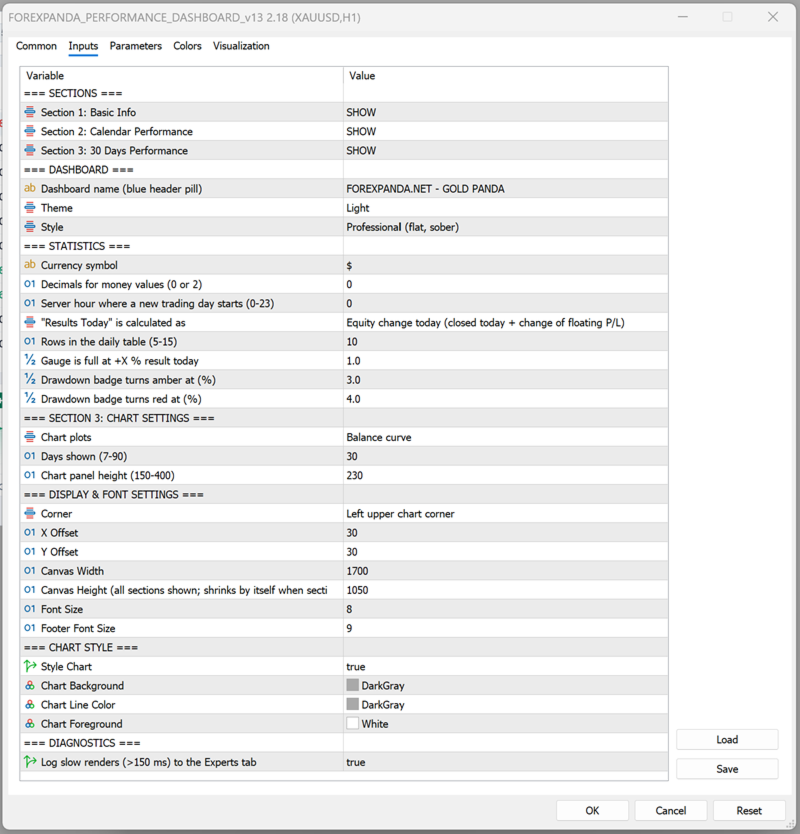
FOREXPANDA Performance Dashboard — Input Settings Guide

The indicator's inputs are organized into groups so you can customize the dashboard's content, calculations, appearance, and historical chart.

A. SECTIONS

Control which of the three dashboard sections are visible.

Input Description
Section 1: Basic Info Shows or hides the main performance statistics and account overview.
Section 2: Calendar Performance Shows or hides the daily performance table.
Section 3: 30 Days Performance Shows or hides the historical performance chart.

Available values: SHOW / HIDE.

You can disable sections you do not need. The dashboard automatically adjusts its height when sections are hidden.

B. DASHBOARD

Customize the dashboard's identity and visual appearance.

Input Description
Dashboard name Text displayed in the dashboard's header pill. For example, FOREXPANDA.NET - GOLD PANDA.
Theme Select Light or Dark.
Style Select Modern or Professional.

Theme options

  • Light: A light background with blue accents and contrasting text.

  • Dark: A dark interface with contrasting text and colored performance indicators.

Style options

  • Modern: Uses visual effects such as gradients, shadows, highlights, and rounded surfaces.

  • Professional: Uses a flatter, more restrained design with fewer decorative effects.

These options affect the dashboard's appearance, not the underlying trading performance.

C. STATISTICS

Configure how monetary values and daily performance are displayed and calculated.

Input Default Description
Currency symbol $ Text displayed before monetary amounts. Change it to match your preferred display currency. This changes the label, not the account's actual currency or converted values.
Decimals for money values 0 Choose 0 or 2 decimal places for displayed monetary values.
Server hour where a new trading day starts 0 Sets the server-time hour used to define a new trading day. Values range from 0 to 23.
Results Today calculation Equity change Select how today's result is calculated.
Rows in the daily table 10 Controls the number of daily rows displayed. Supported range: 5–15.
Gauge is full at +X% result today 1.0 Sets the positive daily result percentage at which the results gauge reaches its full scale.
Drawdown badge turns amber at (%) 3.0 Sets the drawdown threshold at which the badge changes to amber.
Drawdown badge turns red at (%) 4.0 Sets the drawdown threshold at which the badge changes to red.

Results Today calculation modes

Equity change today — default

Measures today's equity change, accounting for closed trading results and the change in floating profit or loss relative to the start of the day.

This is useful when you want today's result to reflect both realized and unrealized performance.

Closed trades only

Calculates today's result using closed trades only. Floating profit or loss from open positions is not included in this result calculation.

Closed trades + all floating P/L

Uses the alternative calculation method that combines today's closed results with all current floating profit or loss. Because existing open-position profit or loss can be included, this value may not represent only the change that occurred today.

Daily reset hour

The daily reset hour determines where the dashboard draws the boundary between trading days, using broker server time.

For example, setting the hour to 0 starts a new reporting day at server midnight. Setting it to 1 shifts the reporting boundary to 01:00 server time.

Choose a reset hour that matches your preferred reporting schedule.

Drawdown thresholds

The amber and red thresholds help you recognize increasing drawdown.

With the default settings:

  • Below 3%: normal badge color.

  • From 3% to below 4%: amber warning.

  • At 4% or above: red warning.

These thresholds are visual alerts, not automatic risk controls. The indicator does not close trades when a threshold is reached.

D. SECTION 3: CHART SETTINGS

Configure the historical chart displayed in the third dashboard section.

Input Default Description
Chart plots Balance curve Select the type of historical performance series to display.
Days shown 30 Sets the historical chart period. Supported range: 7–90 days.
Chart panel height 230 Controls the chart panel's height. Supported range: 150–400.

Chart plots

Balance curve

Displays the historical development of account balance.

Cumulative profit

Displays cumulative trading profit with deposits excluded. This helps distinguish trading performance from account growth caused by deposits.

Days shown

Use a shorter period for a more compact view of recent performance or a longer period to examine a broader historical trend.

Chart panel height

Increase the height when you want a larger chart, or reduce it to save space on your MT5 chart.

E. DISPLAY & FONT SETTINGS

Control the dashboard's placement, dimensions, and text size.

Input Default Description
Corner Left upper chart corner Selects the chart corner used as the positioning reference.
X Offset 30 Sets the horizontal distance from the selected corner.
Y Offset 30 Sets the vertical distance from the selected corner.
Canvas Width 1700 Sets the dashboard's design width.
Canvas Height 1050 Sets the dashboard's design height when all sections are shown.
Font Size 8 Controls the main dashboard font scaling.
Footer Font Size 9 Controls the footer text size.

Position and offsets

Choose the corner that best suits your chart layout. Adjust the X and Y offsets to move the dashboard away from candles, price labels, or other chart elements.

Canvas width and height

The canvas dimensions control the dashboard's overall layout. Adjust the width to fit your monitor and the height to accommodate your selected sections.

When sections are hidden, the dashboard automatically reduces its height as needed.

Font sizes

Increase the font sizes for better readability on high-resolution displays or larger monitors. Reduce them when you need a more compact layout.

The dashboard uses Arial for its text.

F. CHART STYLE

These inputs control the appearance of the underlying MetaTrader 5 chart.

Input Default Description
Style Chart true Enables or disables the indicator's chart styling.
Chart Background DarkGray Sets the chart background color when styling is enabled.
Chart Line Color DarkGray Sets the chart line color when styling is enabled.
Chart Foreground White Sets the chart foreground color when styling is enabled.

If you prefer to preserve your existing chart colors, disable Style Chart.

These settings concern the MT5 chart itself and are separate from the dashboard's Light/Dark theme.

G. DIAGNOSTICS

Input Default Description
Log slow renders (>150 ms) to the Experts tab false Enables diagnostic logging for slow dashboard rendering operations.

Enable this option when investigating performance or rendering delays. Slow renders exceeding the configured 150 ms threshold are logged in the MT5 Experts tab.

For normal use, you can leave this option disabled.

RECOMMENDED STARTING CONFIGURATION

For a clean, general-purpose dashboard:

  • Sections 1, 2, and 3: SHOW.

  • Theme: Light or Dark, according to preference.

  • Style: Professional for a restrained appearance, or Modern for a more visual interface.

  • Results Today: Equity change today.

  • Daily table rows: 10.

  • Chart period: 30 days.

  • Chart height: 230.

  • Position: Upper-left corner, with offsets adjusted to your chart.

  • Slow-render logging: Disabled unless troubleshooting.

These are suggested starting values, not performance or profitability recommendations.

IMPORTANT NOTES

  • The currency symbol is a display setting; it does not convert monetary amounts.

  • The daily reset hour uses broker server time.

  • Historical statistics depend on the available account history and data.

  • Drawdown thresholds provide visual warnings only.

  • The dashboard monitors account performance; it does not place trades or manage risk automatically.

  • Multiple indicator instances can be attached to the same chart, each with its own dashboard canvas name. Arrange their positions and dimensions to avoid overlap.


Also visit us at: forexpanda


评分 2
GerwinW1973
35
GerwinW1973 2026.10.20 09:16 

Great work, Martin! FOREXPANDA Performance Dashboard brings essential account statistics together in a clear, professional layout directly on the MT5 chart. The daily performance calendar, drawdown tracking, and floating P/L overview are particularly useful features. The option to view cumulative profit with deposits excluded is a thoughtful touch, while the customizable themes and layouts add flexibility. A well-designed tool for keeping trading performance in focus!

推荐产品
Pin Bars MT5
Yury Emeliyanov
Main purpose:   "Pin Bars"   is designed to automatically detect pin bars on financial market charts. A pin bar is a candle with a characteristic body and a long tail, which can signal a trend reversal or correction. How it works:   The indicator analyzes each candle on the chart, determining the size of the body, tail and nose of the candle. When a pin bar corresponding to predefined parameters is detected, the indicator marks it on the chart with an up or down arrow, depending on the directi
FREE
Ninja Trend Matrix MT5 Ninja Trend Matrix MT5是一款MetaTrader 5指标,将多个时间周期的趋势方向、相对强度和基于ATR的波动状态集中显示在一个面板中。它可用于在进行主观判断或使用其他交易系统之前,快速了解当前市场环境。 本指标不会开仓、修改订单或平仓,也不显示入场箭头、止盈、止损、胜率或利润预测。 主要功能 将每个选定周期分类为 STRONG UP、UP、RANGE、DOWN、STRONG DOWN 或 N/A 显示0至100的相对趋势强度 基于ATR显示 LOW、NORMAL、HIGH 或 SHOCK 波动状态 综合EMA 20/50、EMA斜率、近期高低点结构、ADX和+DI/-DI 使用已收盘K线,而不是当前尚未收盘的K线 面板可直接拖动、最小化、自动布局并支持紧凑网格 时间周期 DEFAULT显示M5、M15、H1、H4和D1。CUSTOM可输入逗号分隔的列表,例如M1,M5,M30,H1,W1,MN1。ALL显示从M1到MN1的全部21个MT5标准时间周期。 综合状态与提醒 面板汇总显示 BULLISH ALIGNMENT
FREE
This Mt5 Indicator Signals when there is two opposite direction bars engulfed by current bar.  has a recent Exponential Moving Average Cross and past bar was oversold/bought Expert Advisor Available in Comments  Free Version Here : https://www.mql5.com/en/market/product/110114?source=Site&nbsp ; Full Alerts for mt5 terminal , phone , email, print to file, print to journal  Buy Signal ( blue line ) Past ema cross ( set at 30 bars back ) Past bar rsi is oversold ( level 40  ) Engulfing bar closes
FREE
Trade Behavior Mirror 只读取您自己账户中已经平仓的交易历史,并且只统计一种具体行为:在一次已确认的亏损之后不久,以高于自己平常水平的手数开出新仓位。这个工具不做任何预测,也不给出任何建议。面板上出现的每一个数字,都是这个账户上已经发生过的事实。 数字是这样算出来的:它读取所有品种、所有魔术号在内的最多31天已平仓交易 —— 这是整个账户的画面,而不只是当前图表所在品种的画面。从今天之前的30天里,它计算每天新开仓笔数的中位数,以及这些开仓手数的中位数。之所以用中位数而不是平均值,是为了不让某一笔异常大的交易拉偏整体基准。如果这30天窗口内的开仓不足5笔,历史数据就不足以建立一个公平的基准,面板会显示"Collecting history",而不是用过少的数据硬凑出一个数字。 核心统计,即面板上的 Entries within 10min of a loss, at above-median lot: 一行:对每一次新开仓,它都会检查前10分钟内是否有一笔亏损被确认平仓,以及这次开仓的手数是否高于30天中位数。符合条件的次数会分别按 Today 和 Last 7
FREE
Automatic Trendlines
Pasi Hakamaki
4.69 (51)
该指标在图表上绘制趋势线。该指标有六个输入。用户可以为这两行指定替代标签。如果使用了指标的多个实例,则标签必须不同。用户可以设置线条的宽度和颜色以及深度,以指定应使用哪些显着的峰。例如,“深度= 10”使用当前的峰和谷设置趋势线,这些峰和谷在右侧和左侧至少有10条,并且高/低比峰值的高/低小/大。指标还绘制以前的高峰和低谷。指示器还具有警报功能,当价格与支撑线/阻力线相距预设距离时,可用于通知用户。警报距离以点为单位设置。.............................................................................................
FREE
Sierra Capital Session Sweep Scanner maps out the Asian, London, and New York trading sessions directly on your chart, then watches for a specific price-action pattern: a candle that spikes through the Asian session's high or low and closes back inside it — a classic liquidity sweep. What it shows: Colour-coded boxes marking the Asian, London, and NY session ranges, with the Asian high/low projected forward as reference lines Arrows marking each qualifying sweep-and-reject candle, with projected
FREE
Show Pips for MT5
Roman Podpora
4.5 (32)
对于那些总是想了解帐户当前情况的人来说,此信息指示器将很有用。 VERSION MT 4 -   More useful indicators 该指标显示诸如利润点数、百分比和货币等数据,以及当前货币对的点差以及柱在当前时间范围内收盘的时间。 有多种选项可用于将信息线放置在图表上: 价格右侧(运行在价格后面); 作为评论(在图表的左上角); 在屏幕的选定角落。 还可以选择信息分隔符: | / \ # 该指标易于使用且信息丰富。可以在设置中禁用不必要的信息项目。 设置 外观类型     - 信息行的显示类型。有以下三种选择: 跟随价格     - 遵循价格; 作为评论     - 作为评论; 在屏幕的选定角落     - 在屏幕的选定角落。 附件图角     - 如果您选择屏幕选定角的显示类型,则此项目允许您选择四个捕捉角之一; 显示利润?       - 该参数负责以存款货币显示利润; 以百分比显示利润?       - 该参数负责以百分比形式显示利润; 显示传播?       - 该参数负责显示当前点差; 显示酒吧关闭时间?       - 该参数负责显示柱关闭之前的时间; 文字颜
FREE
Multi Currency Strength Dashboard Mini (FREE) – Currency Strength Meter for MetaTrader 5 Multi Currency Strength Dashboard Mini 是一款适用于 MetaTrader 5 的免费指标,以清晰快读的仪表板形式实时显示 8 大主要货币 (USD、EUR、GBP、JPY、CHF、CAD、AUD、NZD)的相对强弱。 目标:在几秒内识别强势和弱势货币,帮助您构建有针对性的关注列表(例如,选择强势货币对弱势货币的交易对)。 2.00 版本新功能 全新视觉刷新 – TradingTips UI(深蓝面板、霓虹边框、蓝色标题栏)。 分区方框内的彩色强度条(绿 / 金 / 红)。 8 个货币每行显示趋势箭头(上 / 下 / 中性)。 面板拖放 – 抓取标题栏即可在图表上移动。 最小化按钮 – 紧凑模式不占用图表空间。 面板位置在 MT5 重启后自动保存。 主要功能 在单个面板中分析 8 大主要货币。 自动实时更新。 适用于所有时间周期(在所选时间周期上计算)。 兼容大多数经纪商(
FREE
Smart Trend Suite Pro – Advanced Trend Indicator with Dashboard & Alerts Overview: Smart Trend Suite Pro is a powerful trend-detection indicator that offers traders a complete set of tools for accurate trend analysis and actionable insights. Designed for versatility and precision, Smart Trend Suite Pro adapts seamlessly to multiple timeframes and market conditions, making it suitable for various trading styles, including scalping and swing trading. Key Features: Real-Time Trend Detection: Identi
FREE
FullInfo MTX Levels is the free indicator version of FullInfo MTX Pro. The full version is available in the MQL5 Market. It puts the levels traders watch, a few pieces of market analysis and the numbers of your account on the M5 chart. It does not send, change or close orders, and it does not touch your positions. On the chart (M5) • Previous day, week and month high/low, daily and weekly open, New York midnight open, and the highs/lows of the Asia, London and New York sessions. Labels sit at
FREE
Rainbow MT5
Jamal El Alama
4 (1)
Description : Rainbow MT5 is a technical indicator based on Moving Average with period 34 and very easy to use. When price crosses above MA and MA changes color to green, then this is a signal to buy. When price crosses below MA and MA changes color to red, then this is a signal to sell. The Expert advisor ( Rainbow EA MT5 ) based on Rainbow MT5 indicator is now available here . MT4 version is available here .
FREE
MSX SuperTrend Visual Indicator Overview MSX SuperTrend Visual Indicator is a MetaTrader 5 indicator designed to display trend direction and market structure using a SuperTrend-based calculation with optional filtering components. The indicator combines trend visualization, volatility measurement and optional EMA-based filtering to provide a clear graphical representation of market conditions. Features • SuperTrend-based trend visualization • ATR-based volatility calculation • Optional Heikin A
FREE
Girassol Sunflower MT5 Indicator
Saullo De Oliveira Pacheco
3.86 (7)
This is the famous Sunflower indicator for Metatrader5. This indicator marks possible tops and bottoms on price charts. The indicator identifies tops and bottoms in the asset's price history, keep in mind that the current sunflower of the last candle repaints, as it is not possible to identify a top until the market reverses and it is also not possible to identify a bottom without the market stop falling and start rising. If you are looking for a professional programmer for Metatrader5, please
FREE
RatingMeter
Evgeniy Zhdan
Rating Meter:26 个指标,一个综合评级 Rating Meter 会自动计算 26 个常用指标的信号,并将它们汇总为简洁的"卖出 / 中性 / 买入"评级。无需逐个打开指标窗口手动对比,看一眼面板,就能知道所选周期上市场偏向哪一边。 Our products: https://www.mql5.com/en/users/trendhunter/seller 面板显示的内容 **Oscillators 仪表盘:**由 11 个震荡指标组成的评级:RSI、Stochastic、CCI、ADX、Awesome Oscillator、Momentum、MACD、Stochastic RSI、Williams %R、Bulls/Bears Power 和 Ultimate Oscillator。 **Moving Averages 仪表盘:**由 15 个趋势指标组成的评级:周期为 10、20、30、50、100、200 的 SMA 和 EMA,以及 Ichimoku、VWMA 和 Hull MA。 **Overall 综合条:**所有已启用指标的综合评级。 仪表盘上的指针和边缘的
FREE
APICT Smart Trendline and Pattern Tool APICT Trendline + Pattern Indicator is a powerful all-in-one technical analysis tool designed to automatically identify market structure, draw dynamic support and resistance trendlines, and detect high-probability chart patterns in real time. Smart Trendline Detection The indicator automatically draws major and minor trendlines , clearly marking key support and resistance levels based on market structure. Separate controls for major and minor trends Adju
FREE
Dsc Oscillator
Diogo Sawitzki Cansi
Recomended broker: https://tinyurl.com/5ftaha7c Indicator used to monitor price fluctuations in the market and discover possible reversals through reversal points or divergences in the indicator. All assets and all timeframes.   SEE OUR RESULTS ON INSTAGRAM:  https://www.instagram.com/diogo.cansi/   TELEGRAM GROUP =  https://t.me/robosdsc More information by email dscinvestimentos@gmail.com or by Whatsapp 55-991372299
FREE
PZ Three Drives MT5
PZ TRADING SLU
2.83 (6)
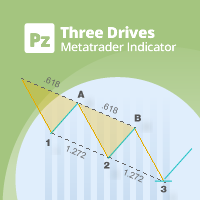
This indicator finds Three Drives patterns. The Three Drives pattern is a 6-point reversal pattern characterised by a series of higher highs or lower lows that complete at a 127% or 161.8% Fibonacci extension. It signals that the market is exhausted and a reversal can happen. [ Installation Guide | Update Guide | Troubleshooting | FAQ | All Products  |  Get Help ] Customizable pattern sizes Customizable colors and sizes Customizable breakout periods Customizable 1-2-3 and 0-A-B ratios It impl
FREE
Shadow Flare MT5
Kestutis Balciunas
Shadow Flare 指标是一款适用于 MetaTrader 5 的 非重绘型趋势与流动性工具 。它基于可配置的移动平均基线(可选 HMA、EMA、SMA 或 RMA),外包一层平均真实波幅(ATR)通道,并生成一个“黏性”趋势状态:只有当价格收盘突破上/下包络带时才发生方向翻转。同一套趋势引擎还驱动自动供需区模块,用于检测枢轴高点和枢轴低点,在其周围绘制彩色矩形,并在价格收盘有效突破该区域时立即将其标记为失效并移除。 买卖信号在趋势状态翻转的那一根 K 线上触发,可选的成交量与 RSI 过滤器能够帮助交易者屏蔽弱势或逆动能的入场。内置仪表盘会实时显示趋势偏向(Trend Bias)、动能(基于 RSI)以及成交量状态。完整的报警组件——弹窗、声音、手机推送和电子邮件——都在每次信号出现时于收盘触发一次,从而保证实盘交易与回测中的信号计数完全一致。 MT4 版本请查看:  Shadow Flare MT4 更多作者产品:   查看所有产 品 想查看实盘示例和最新工具,请访问我的个人主页并发送好友请求,以免错过更新! 工作原理 自适应趋势引擎 指标首先使用用户选择的方法(HMA、
FREE
Auto Triangle Patterns 概述 Auto Triangle Patterns 是一款用于 MetaTrader 5 的图表指标。它会扫描当前图表的价格历史,寻找三种经典三角形形态:上升三角形、下降三角形和对称三角形。找到形态后,指标会绘制两条边界线,填充两条线之间的区域,并添加一个写有形态名称的文字标签。形态会保留在图表上,并随每根新 K 线向右延伸。 当价格向上或向下离开形态,或形态在没有突破的情况下走到顶点时,指标会标注结果并停止更新该形态。已经结束的形态会保留在图表上,便于回顾此前的形态。 本指标不会开仓或管理仓位,不会下单,也不产生交易信号。它是技术分析与图表可视化工具,所有标注都只是对已有价格数据的解读。 工作原理 形态搜索分为几个步骤。 摆动点。指标先寻找摆动高点与摆动低点。摆动高点是指其最高价不被左右两侧 K 线最高价超过的 K 线,摆动低点以同样方式寻找。左右两侧检查的 K 线数量由 InpPivotLeft 和 InpPivotRight 设定。由于右侧 K 线必须先收盘,一个摆动点只有在它之后出现 InpPivotRight 根 K 线后才会被
FREE
Mini Charts MTF EMA Mini Charts MTF EMA is a MetaTrader 5 indicator that displays multiple mini charts from selected timeframes directly on the main chart. It helps traders monitor multi-timeframe price movement and EMA direction in one clean visual layout. Main Features Multiple mini charts on the main chart Custom timeframe selection for each mini chart Up to 4 EMA lines for every mini chart Custom EMA period, shift, method, applied price, color, style, and width Custom mini chart width, heigh
FREE
参考水平结构可视化工具 (Reference Level Structure Visualizer) “参考水平结构可视化工具”是一款适用于 MetaTrader 5 的技术分析指标。 它专为日内图表观察而设计,能直接在图表上直观显示前一时段水平、日线水平、流动性扫荡(liquidity sweeps)、后续收复(reclaims)以及基于 M1 周期的市场结构。 该指标不会进行交易、挂单或管理仓位。 参考水平 该指标显示重要的前一时段及日线参考水平: 前一亚洲时段高点与低点 前一伦敦时段高点与低点 前一纽约时段高点与低点 前一日高点与低点 这些水平为日内市场观察提供了结构化的参考点。 扫荡与收复 当价格首次以K线影线(wick)突破活跃参考水平时,即标记为“扫荡”(Sweep)。 对于高点水平,指K线最高价升至该水平之上。 对于低点水平,指K线最低价跌至该水平之下。 “收复”(Reclaim)的标记条件是:价格首先收于该水平之外,随后有一根 M1 K线收回至该水平的初始一侧。 不计入同一根 K 线内的收复情况。 市场结构 该指标直观显示以下基于 M1 周期的市场结构要素: ChoC
FREE
Double Correlation indicator (free) plots two windowed correlations in a separate window.  the size of window is taken as input before the two symbols to correlate to. Two symbols are taken as an input parameters as well as period length. and the two correlations are computed with the currently shown symbol ex: input GBPJPY and AUDNZD.  current symbol EURUSD then the following will be computed corr(EURUSD,GBPJPY) and corr(EURUSD,AUDNZD) The indicator can be useful to run a multi-symbol pair trad
FREE
Key Market Zones and Levels — MetaTrader 5 自动识别关键价格区域 Key Market Zones and Levels 是一款适用于 MetaTrader 5 的市场结构分析指标,可自动识别重要的支撑位和阻力位区域,评估区域质量,并分析当前市场环境。 与其在每个局部高点和低点绘制大量独立的水平线,该指标会根据市场结构、历史价格反应、趋势性行情的起始区域以及多时间周期分析,将相近的价格水平整合为具有分析价值的价格区域。 最终,交易者可以获得一张结构化的价格区域地图,用于识别重要市场区域、评估其相对重要性,并了解当前价格与整体市场结构之间的关系。 主要功能 自动识别支撑与阻力区域 — 无需手动绘制水平位,即可识别重要的价格区域。 多时间周期分析 — 分析 H1、H4、D1、W1 和 MN1 时间周期上的市场水平。 Working Zone(工作区域) — 识别当前市场分析中最值得关注的主要价格区域。 Reaction Core(反应核心区域) — 标记宽幅价格区域内历史价格反应最集中的部分。 区域质量评分 — 使用 0 至 100 的数值评估区域
FREE
Smart RR Pro
Simon Draxler
5 (2)
DRX Smart Risk - Visual Trade Planner Utility DRX Smart Risk 是一款用于 MetaTrader 5 的图表叠加工具,旨在协助交易者进行风险管理和头寸规模计算。与标准图表线不同,该实用程序创建了一个交互式界面,允许用户直观地规划入场、止损 (Stop Loss) 和止盈 (Take Profit) 水平,同时自动计算财务指标。 重要提示 本产品是用于规划和计算目的的技术指标/实用程序。它可视化风险和回报,但不直接执行交易。 核心功能 可视化风险回报计算: 该工具在图表上投射风险框(止损)和回报框(止盈)。移动线条时,它会实时显示当前的风险回报比 (R:R)。 头寸规模计算: 根据选定的手数大小,该实用程序计算账户货币中的潜在利润和损失。 智能拖动逻辑 (Smart Drag): 移动入场线会自动平移止盈和止损线,以保持当前的设置结构。 自动反转检测 (Auto-Flip): 该工具检测预期的交易方向。将止盈拖动到入场线下方会自动将计算从做多切换到做空(反之亦然)。 控制面板: 图表上的仪表板允许快速调整手数大小,将工具重置为当前
FREE
VolumeBasedColorsBars
Henrique Magalhaes Lopes
VolumeBasedColorsBars — Free Powerful Volume Analysis for All Traders Unlock the hidden story behind every price bar! VolumeBasedColorsBars is a professional-grade, 100% FREE indicator that colorizes your chart candles based on real, adaptive volume analysis. Instantly spot surges in market activity, identify exhaustion, and catch the moves that matter. This indicator gives you:    • Dynamic color-coded bars for instant volume context    • Adaptive thresholds based on historical, session-awar
FREE
HCS SessionPulse
HADDEN CAPITAL SOLUTIONS LLC
HCS SessionPulse is a free, read-only global trading session monitor for MetaTrader 5. A compact on-chart panel shows the current status of the Sydney, Tokyo, London, and New York trading sessions and continuously counts down to upcoming session transitions. SessionPulse displays: • Sydney session OPEN/CLOSED status • Tokyo session OPEN/CLOSED status • London session OPEN/CLOSED status • New York session OPEN/CLOSED status • Time remaining until each session's next open or close • Currently
FREE
Fimathe PCM Indicador
Cristiano Rodrigo Olegini
5 (3)
Velas Forex FIMATHE PCM Indicator(免费) Velas Forex FIMATHE PCM Indicator 是一款免费指标,旨在帮助交易者以简单、快速且直观的方式进行市场分析。 该指标通过清晰的视觉信号帮助交易者识别市场状况,从而更有信心地做出交易决策。 XAUUSD 最佳测试结果: 时间周期: 5分钟(5M) MT5 服务器时间: 02:00 资金管理: 达到 1 次止盈(Take Profit)后: 停止交易,等待下一交易日。 达到 2 次止损(Stop Loss)后: 停止交易,等待下一交易日。 主要功能 简洁直观的用户界面。 安装和配置简单方便。 兼容 MetaTrader 5 平台上的所有金融交易品种。 支持多个时间周期(Timeframes)。 适合初学者和经验丰富的交易者使用。 占用平台资源少,运行高效。 免费 本指标 100% 免费 提供给所有 MQL5 社区用户使用。 如果您觉得本指标对您有所帮助,欢迎留下评分和评论。您的反馈将帮助我们持续开发更多优质工具。 免责声明 本指标仅作为技术分析辅助工具, 不保证任何盈利或投资回报 。在
FREE
Value Chart Candlesticks
Flavio Javier Jarabeck
4.57 (14)
The idea of a Value Chart indicator was presented in the very good book I read back in 2020 , " Dynamic Trading Indicators: Winning with Value Charts and Price Action Profile ", from the authors Mark Helweg and David Stendahl. The idea is simple and the result is pure genius: Present candlestick Price analysis in a detrended way! HOW TO READ THIS INDICATOR Look for Overbought and Oversold levels. Of course, you will need to test the settings a lot to find the "correct" one for your approach. It
FREE
MACD Enhanced
Nikita Berdnikov
4 (4)
Introducing the MACD  Enhanced – an advanced MACD (Moving Average Convergence Divergence) indicator that provides traders with extended capabilities for trend and momentum analysis in financial markets. The indicator uses the difference between the fast and slow exponential moving averages to determine momentum, direction, and strength of the trend, creating clear visual signals for potential entry and exit points. Attention! To achieve the best results, it is recommended to adapt the indicator
FREE
MultiTF Moving Average Panel
Mohamed Amine Talbi
5 (1)
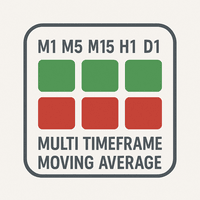
The   "MultiTF Moving Average Panel"   indicator is more of a helping tool than an indicator, it serves to help know the trend direction for the current currency pair of all timeframes in one place. It is best used with other indicators and signals, to help filter the signals according the trend based on multiple timeframes. Indicator inputs : - Moving Average period   : Default is set to 34. - Moving Average method   : The method of calculation of the Moving Average. Default is set to Exponent
FREE
该产品的买家也购买
Trend Sniper X
Sarvarbek Abduvoxobov
4.9 (42)
Trend Sniper X 是一款适用于 MetaTrader 5 的多周期趋势跟踪指标,可帮助交易者清晰精准地识别趋势方向和潜在的反转点。 适用于 MT4: https://www.mql5.com/en/market/product/193245 价格信息: 当前价格为促销价,随着后续更新和新功能的推出,价格可能会有所变动。 赠品优惠: 购买后联系作者,即可免费获取该指标的 Auto-Trade Assistant EA(自动交易助手 EA)。 Code2Profit 频道 通过多时间框架分析掌控市场! 如何使用 Trend Sniper X 最大化您的胜率:核心规则与交易时段技巧 技术规格 平台 MetaTrader 5 指标类型 多时间周期趋势指标 运行时间周期 任何图表时间周期,可独立选择更高的时间周期 (M1–MN1) 主要交易品种 外汇、黄金 (XAUUSD) 及其他差价合约 (CFD) 推荐账户 任何账户类型 可视化 彩色趋势蜡烛 (买入/卖出/微弱/变化) + 买入/卖出箭头 附加模块 交易时段方框 (悉尼、东京、伦敦、纽约) 主要功能 多时间周期趋势分析: 直接在
Smart Trend Trading System — MetaTrader 5 购买后,请在 MQL5 上给我发消息,即可免费获得 Smart Universal Expert Advisor,以及在线课程、PDF 手册和私人群组访问权限。 STTS 将趋势方向、入场和出场信号、反转区域及重要价格水平集中呈现在图表上。您可以根据系统手动交易,也可以连接单独的兼容 EA,按照您选择的设置自动执行交易。 一套系统,四种交易思路 STTS 将交易方法分为四大类: • 剥头皮交易 — 跟踪短期信号和市场波动。 • 趋势交易 — 评估方向,寻找趋势中的交易机会。 • 反转交易 — 识别潜在的转折区域和方向变化。 • 成交量交易 — 利用成交量相关信息评估市场活跃程度。 入场和出场箭头、趋势信息、支撑与阻力位及反转区域,帮助您直接在图表上分析交易形态。 先从一种方法开始。了解其信号和设置后,再探索其他方法。 从信号到自动化 Smart Universal Expert Advisor 可连接 STTS,让您自动执行受支持的交易信号。 启用自动交易前,请配置指标连接、仓位大小和交易管理设置
Zoryk Gold
Reda El Koutbane
4.76 (17)
折扣将在 24 小时后结束——下一价格为 69 美元 ZORYK — MetaTrader 5 专用高级 XAUUSD 黄金信号系统 你一定熟悉这种感觉。 你花了很多时间分析黄金,等待合适的入场机会。终于开仓后,价格却立刻朝相反方向移动。你过早平仓、移动止损,或者只犹豫了几秒钟。随后,市场却在没有你的情况下到达了你原本预期的目标。 问题并不总是方向判断错误。 真正的问题是缺乏确定性。 你不知道准确的入场位置在哪里。 你不知道什么时候交易逻辑已经失效。 你不知道应该先锁定较近的利润,还是继续等待更大的行情。 你也不知道当前信号是否足够强,还是自己只是在强行寻找交易机会。 黄金市场变化非常快。一个没有明确计划的好想法,可能在几秒钟内变成错误的交易决定。 ZORYK 正是为了解决这个问题而开发。 什么是 ZORYK ZORYK 是一套完整的 XAUUSD 黄金信号与交易计划系统,专门为 MetaTrader 5  和 M5 时间周期 开发。 它不是一个只显示 BUY 或 SELL 箭头,然后让你独自决定其余所有内容的简单指标。 每个确认后的信号都可以在图表上显示完整的可视化交易计划,包
SuperScalp Pro
Van Minh Nguyen
4.56 (36)
SuperScalp Pro - Professional Multi-Layer Confluence Scalping System SuperScalp Pro 是一款高级剥头皮交易指标,在经典 Supertrend 的基础上加入了多个智能确认过滤器。它可以帮助您识别概率更高的 Buy/Sell 交易机会,同时显著减少虚假信号。 清晰的 Buy 和 Sell 箭头会直接显示在图表上,基于 ATR 的 Stop Loss 和 Take Profit 水平会实时自动计算。 购买后,请联系我获取设置指导和推荐配置。 使用 SuperScalp Pro Auto Trader 轻松实现信号自动化: [Auto Trader] 下载推荐设置文件: [Set File] 完整文档请参阅产品博客: [User Guide] 加入官方频道获取最新更新: [Official Channel] 您将获得什么 SuperScalp Pro Indicator – 多层级 Buy/Sell 信号,并自动计算基于 ATR 的 Stop Loss 和 Take Profit。 免费 VM Auto SLTP
全新王者降临 - 指标 + 订单管理提示(TP1 + TP2 + TP3)+ 可选 Telegram 信号发送器 INCLUDED(免费) (完整交易与信号系统) 我们最强的黄金 EA: Gold Slayer 该指标包含先进的交易策略、可自定义订单管理系统,以及结合 Envelope 扩展的均值回归系统,并通过 RSI 等多重智能确认过滤器进行验证,以捕捉高概率反转入场机会,提供 BUY 与 SELL 信号。 你不仅能够学习如何交易,还能学会如何高效管理多个仓位,并利用之前盈利的持仓来覆盖亏损交易。 专为 M5 周期打造并优化,在 BTCUSD 和 XAUUSD 上表现尤为出色,因为这些市场的流动性能够让信号更加干净、可靠。 该指标会自动生成清晰的多头(Long)与空头(Short)信号,同时基于 ATR 自动计算入场位、止损位和止盈位,让风险管理从一开始就融入系统之中。 多 TP 系统设有三个渐进式目标位,你可以在 TP1 锁定部分利润、在 TP2 继续持仓,并在更大的行情中将仓位持有至 TP3,而这正是平均风险回报比真正开始大放异彩的地方。 默认参数开箱即用,已经针对稳定表现进行
SMC Intraday Formula
VividMind Digital Solutions
5 (26)
让我们先坦诚一点。 没有任何一个指标可以单独让你实现盈利。如果有人告诉你可以,那他是在向你兜售一个梦想。任何显示完美买卖箭头的指标都可以被做得看起来毫无瑕疵——只需要放大历史中的某一段并截取成功交易的截图。我们不会这样做。 SMC Intraday Formula 是一个工具。 它为你读取市场结构,标记出概率最高的价格区域,并用简单直白的语言准确告诉你当前智能资金的行为轨迹。你仍然需要做决定。你仍然需要执行交易。但现在,你是带着精确性执行,而不是靠希望。 我们已经在黄金(XAUUSD)以及主要外汇货币对的日内剥头皮交易中使用该指标将近三年。这是我们在 M1、M5、M15 和 M30 上的日常主力工具。它之所以有效,是因为它不试图预测未来——它展示的是当前正在形成的高概率交易机会,并解释 为什么 。 它与其他所有指标有什么不同? 大多数交易指标只做一件事。移动平均线交叉。振荡指标触及某个水平。出现一个箭头。你进场交易。你亏损。你责怪指标。重复。 SMC Intraday Formula 将多个机构级概念整合为一个统一的市场解读: - 斐波那契共振引擎 不只是普通的斐波那契水平——该指标
M5 Sniper
MeanFX
5 (3)
让您的交易优势尽在视野之中! M5 Sniper 是 MeanFX 推出的一款全新指标。它将 精准的交易信号 与 自适应 TP/SL 水平 相结合——从而创造出最佳的统计交易机会! 每售出 5 份,价格上涨一次,下一价格为 69$ 购买后请给我发消息,以获取技巧/指南和奖励 EA 它有哪些突出优势? 经过验证的统计表现 ,适用于 Gold XAUUSD( 几乎适用于每一种资产 ,专注于掌握一个时间周期,而不是试图面面俱到却无法获得稳定的结果) 每天每个交易品种 1 至 8 笔交易 ,具有较高的胜率百分比,并让所有统计优势站在我们这一边 图表上 仅显示已确认的 BUY 和 SELL 信号 自适应 TP 和 SL 水平 ,由指标针对每笔交易生成 平均胜率 75%+ 平均 Signal Ratio 最低 1.1+ 警报 和通知也会发送至 手机 **适合 Prop Firm(资金管理公司)**的交易方式 易于理解——适合 所有经验水平 的交易者 创作者提供的个人支持 100% 不重绘、不重新绘制、不滞后 奖励自动化 Expert Advisor(EA) 背后的策略: M5 Sniper 基于
GoldenX Entry MT5
VividMind Digital Solutions
5 (16)
GoldenX Entry 是一款用于 MT5 的指标,包含自适应 Smart Entry Trend 算法、信号评分系统、市场状态识别器以及波动率过滤器。每个信号都包含计算得出的入场位、三个止盈位(TP1、TP2、TP3)以及止损位。它基于多个分析层构建,旨在适应不同市场条件,将多层分析系统与内置优化器及统计跟踪系统相结合。该指标基于风险收益比(RR)指标和历史交易行为提供量化分析。 开始使用非常简单——在所选时间周期上运行优化器,然后在图表上开始使用该指标。 核心功能 GoldenX Entry 将信号引擎与内置交易管理及历史统计跟踪整合在同一图表中: - 内置优化器: 优化器可在图表上单击运行。它通过两阶段搜索流程测试200种参数组合——先进行探索,再进行优化——并在完成后自动应用选定配置。结果会按时间周期缓存,因此当返回已优化的周期时,会立即恢复相同设置。 - 黄金品种自动周期识别: 将指标加载到任何 XAUUSD 图表(M1 到月线)。系统会自动识别当前周期并加载对应预设。共包含9个时间周期配置文件,专为黄金在标准周期上优化设计。切换周期时,参数会自动调整。 - 资金参考面
M1 Sniper MT5
Oleg Rodin
5 (7)
M1 SNIPER   是一款易于使用的交易指标系统。它是一个专为 M1 时间框架设计的箭头指标。该指标可以作为独立的系统在 M1 时间框架下进行剥头皮交易,也可以作为您现有交易系统的一部分使用。虽然该交易系统专为 M1 时间框架交易而设计,但它也可以用于其他时间框架。我最初设计此方法是为了交易 XAUUSD 和 BTCUSD。但我发现这种方法在其他市场交易中也同样有用。 指标信号既可以顺势交易,也可以逆势交易。我教授一种特殊的交易技巧,帮助您利用指标信号进行双向交易。该方法基于使用特殊的动态支撑位和阻力位区域。 购买后,您可以立即下载 M1 SNIPER 箭头指标。此外,我还为所有 M1 SNIPER 工具用户免费提供下方屏幕截图所示的 Apollo Dynamic SR 指标!这两个指标的组合可以帮助您更轻松、更准确地利用 M1 时间框架进行交易。 购买后请联系我,免费获取交易提示和奖励指标! 祝您交易成功!
Boba Analysis Suite
Trade Ready Solutions LLC
Boba Analysis Suite Boba Analysis Suite 是一款适用于 MetaTrader 5 的分析指标。它将市场结构、关键价格区域和整体市场背景整合到同一图表视图中。 该指标源于交易及交易教学的实践经验,旨在帮助用户建立有条理的分析流程:评估市场方向、识别重要价位,并结合多个时间周期进行分析。 结合市场背景进行分析 单个信号的意义取决于市场背景。Boba Analysis Suite 帮助用户将当前图表状况与更大范围的市场结构相结合,并根据预先制定的规则评估交易思路。 分析功能包括: **趋势与市场结构:**评估市场方向及相关结构背景。 **关键价格区域与价位:**在图表上直观标示值得进一步分析的重要区域。 **多时间周期:**整合不同时间周期的信息,评估整体市场背景。 **可视化分析流程:**直接在图表上查看分析信息。 自主做出交易决策 Boba Analysis Suite 适合希望系统分析图表并结合多个时间周期信息的交易者。 该指标用于辅助分析,不会开仓或平仓,也不能替代交易策略或风险管理。每一笔交易的决策均由用户自行做出。 使用与许可 平台:Meta
Entry Points Pro for MT5
Yury Orlov
4.52 (152)
传奇回归:Entry Points Pro 10。 这款传奇指标曾 3 年稳居 MQL5 Market 前三,如今全面重启。 数百条热情好评(两个版本合计 589 条),每天有数千名交易者用它交易,演示版下载 31,000+   MT4+MT5  次。 五年来我读过你们的每一条评价——在第 10 版里,我没有给出许诺,而是把答案直接做进了产品。指标作者自 1999 年入市, 珍视诚信、自己的声誉和自己的客户 。 Entry Points Pro 给出的入场信号严格不重绘。 而且这一次不再只是作者的一面之词,而是可验证的事实:确认信号只在 K 线收盘后标出,自动化测试记录到 零重绘 (在 EURUSD、XAUUSD 和 BTCUSD 上共 2,486,568 次不变量检查——0 次违规)。测试方法完全公开——您可以在策略测试器中自行复现。 购买后请务必第一时间给我发私信。 我会发给您 扩展版说明书《交易者圣经》 ——使用本指标交易的完整指南——并告诉您如何免费获得 赠品:市场扫描器 ,它能同时分析多个品种和多个时间周期,并在一个界面上显示 Entry Points Pro 此刻在哪里表现
Gold Trend Coach MT5
Cristhian Alexander Gaibor Cuasquer
5 (2)
Gold Trend Coach 是 MetaTrader 5 的黄金(XAUUSD)趋势指标,提供买入和卖出信号、止损和三个止盈目标,在 K 线收盘时确认,并配有多周期教练面板和手机和 Telegram 提醒。专为 M5 剥头皮和 M15 日内交易设计,适用于伦敦和纽约时段。 Gold Trend Coach:XAUUSD 黄金趋势信号,带入场、止损和三个目标。首发价 $39,仅限前 20 份,之后 $59。 购买后给我留言,买家套件马上发给你。 把你最长连亏直接显示在图表上的黄金指标。 这个市场上的每一个 XAUUSD 指标都会给你看它的盈利信号。Gold Trend Coach 也会给你看它的亏损信号,用红色计数,连同最长连亏和净结果一起显示在一个面板上,这个面板什么都算,而不是只算好看的。信号打到止损,你看得到。连续三个打到止损,你同样看得到。这就是约定:每个信号都有入场、止损和三个目标,以及它们真实结果的真相。 指标只提供信息,不开仓。为黄金 M5 和 M15 而设计,适用于伦敦和纽约时段。终身免费更新。 图表上你会看到什么 一次只显示一个信号。图表上只有当前这一波行情、它
Auto Optimized SpeedAngle 是一款机构级的动量向量化系统,通过持续的前瞻优化(Walk-Forward Optimization, WFO)彻底消除了曲线拟合(curve-fitting)。该指标没有采用在市场 状态转换时容易失效的静态输入参数,而是利用出样外验证(Out-of-Sample, OOS) dynamically 动态重新校准设置,从而确保显示的 信号代表真正的统计优势,而非历史巧合。 核心机构级架构 前瞻优化引擎(Walk-Forward Optimization Engine): 核心算法持续扫描数千种回溯周期(lookback)与阈值组合,严格将数据划分为样本内(in-sample)和样本外(out-of-sample)。只有当参数配置在未知数据环境中证明具备数学优越性时,系统才会对其进行 adoption。 量化目标函数(Quantitative Objective Functions): 优化引擎不一味追求绝对毛利,而是聚焦于机构级的稳定性指标。用户可针对系统质量数(SQN)、期望值(每笔交易的平均 R 倍数)或净 R 值进行优化,从而优
Neuro Poseidon MT5
Daria Rezueva
4.75 (52)
Neuro Poseidon is a new indicator by Daria Rezueva. It combines precise trading signals with adaptive TP/SL levels - creating best possible trades as a result! Message me and get  Neuro Poseidon Assistant  as a gift to automize your trading process! What makes it stand out? 1. Proven profitability on all assets and timeframes 2. Only confirmed BUY and SELL signals present on the chart 3. Adaptive TP & SL levels generated by the software for each trade 4. Easy to understand - suitable for al
ARIPoint
Temirlan Kdyrkhan
1 (4)
ARIPoint is a powerful trading companion designed to generate high-probability entry signals with dynamic TP/SL/DP levels based on volatility. Built-in performance tracking shows win/loss stats, PP1/PP2 hits, and success rates all updated live. Key Features: Buy/Sell signals with adaptive volatility bands Real-time TP/SL/DP levels based on ATR Built-in MA Filter with optional ATR/StdDev volatility Performance stats panel (Success, Profit/Loss, PP1/PP2) Alerts via popup, sound, push, or email Cu
Adaptive Price Action Engine 买指标,免费送EA 自适应多时间框架趋势与K线形态智能分析系统 市场环境始终在变化,不同的市场阶段中,并非所有 Price Action 形态都具有相同的参考价值。 Adaptive Price Action Engine 旨在适应不断变化的市场条件,将 趋势结构、多时间框架分析、K线形态与统计优化 整合到一个统一的分析框架中。 两种自适应模式 Dual Alpha Trend Mode(双 Alpha Trend 模式) 自动搜索适合的 Alpha Trend 参数,并结合低周期与高周期市场结构,使指标能够根据近期市场行为动态调整趋势识别。 Candlestick + Alpha Mode(K线 + Alpha 模式) 将 Alpha Trend 市场状态与 22种多空K线形态 相结合。系统不会简单地对所有形态一视同仁,而是对不同的形态组合进行统计评估,并识别在特定市场环境下表现出更强历史统计特征的配置。 主要功能 趋势参数自动优化 多时间框架市场状态分析 22种多头与空头 Price Action K线形态 对数千种可能
Gann Made Easy MT5
Oleg Rodin
5 (12)
Gann Made Easy   是一个专业且易于使用的外汇交易系统,它基于使用先生理论的最佳交易原则。 W.D.江恩。该指标提供准确的买入和卖出信号,包括止损和获利水平。您甚至可以使用推送通知在旅途中进行交易。 购买后请联系我,即可免费获得交易指导和超棒的额外指标! 您可能已经多次听说过江恩交易方法。通常 Gann 的理论不仅对于新手交易者而且对于那些已经有一定交易经验的人来说都是非常复杂的东西。这是因为江恩的交易方法在理论上并不那么容易应用。我花了几年时间来完善这些知识,并将最好的原则应用到我的外汇指标中。 该指标非常易于应用。您所需要的只是将其附加到您的图表并遵循简单的交易建议。该指标不断进行市场分析工作并寻找交易机会。当它检测到一个好的入口点时,它会为您提供一个箭头信号。该指标还显示止损和获利水平。 换句话说,当您像先生一样进行交易时,该指标会为您提供最佳江恩建议。江恩亲自告诉你此时此刻该做什么。但最好的部分是您不需要了解任何有关江恩交易原则的知识,因为该指标会为您完成整个市场分析工作。
Gold Entry Sniper
Tahir Mehmood
5 (21)
Gold Entry Sniper – 专业多周期ATR黄金交易仪表盘,适合黄金剥头皮与波段交易 Gold Entry Sniper 是一款先进的 MetaTrader 5 指标,旨在为 XAUUSD 及其他品种提供精准的 买/卖信号 。基于 ATR 移动止损逻辑 和 多周期分析仪表盘 ,适合剥头皮交易者与波段交易者,帮助识别 高概率黄金入场点 。 主要功能与优势 多周期信号分析 – 同时显示 M1、M5、M15 趋势方向。 基于ATR的动态止损 – 根据波动性自动调整。 专业图表仪表盘 – 展示信号状态、ATR水平、线性回归中线和交易方向。 清晰买卖标记 – 自动箭头与文字标签提示。 离场提示与交易管理 – 自动检测离场信号锁定利润。 全面自定义 – 调整仪表盘位置、颜色、字体及参数。 专为黄金优化 – 适用于 M1至M15 黄金剥头皮 ,也适合外汇、指数与加密货币。 为什么选择 Gold Entry Sniper? 为追求 快速、精准、可视化交易决策 的交易者打造,ATR 与多周期确认结合,帮助你抓住 最佳黄金入场点
Scalper Vault MT5
Oleg Rodin
5 (1)
Scalper Vault 是一套功能强大且配置完善的交易系统,专为追求日内交易稳定性的交易者而设计。 作为一套完整且独立的交易系统,该高精度指标能够为外汇和二元期权交易者提供机构级的市场分析。 购买后请联系我,获取我的独家交易技巧以及一份超值赠品! Scalper Vault 能够消除凭感觉交易和复杂的各种手动分析,让您只需专注于执行交易,并运用简单易行的交易技巧进行操作。 精准的顺势交易信号:其核心算法通过分析市场结构,仅在市场主导趋势的方向上提供高胜率信号,从而大幅减少错误的入场操作。 精确的顶部与底部探测:系统能够识别市场动能耗尽的状态,从而锁定潜在的反转区域。 基于江恩(Gann)理论的买卖区域:系统会自动绘制江恩数学市场点位,让您能清晰洞察大型机构交易者在何处寻求买入或卖出。 100% 不会重绘(Non-Repainting):一旦K线收盘,生成的信号便会永久固定在图表上。绝无动态偏移,绝无虚假信号——您在历史数据中所见,即为该指标的真实表现。 广泛的市场适用性:适用于各类货币对、黄金、指数以及加密货币交易。
Tokyo mt5 Indicator
Vasiliy Strukov
5 (10)
Tokyo Indicator(东京指标)直观地展示了趋势方向、潜在交易信号及市场状况。 其采用颜色编码的阶梯式趋势线,以蓝色标识看涨阶段,以洋红色标识看跌阶段。配套的方向箭头会在趋势发生变化时,标示出潜在的买入与卖出机会。 内置的综合仪表盘将当前信号、市场倾向、动能、波动率及信号质量整合于同一视图中,方便交易者在观察价格走势的同时评估指标数据,无需在不同面板间切换。 凭借清晰的图表显示和简洁的市场概览,Tokyo Indicator 支持以系统化的方式进行趋势分析与交易确认。 适用于任何时间周期及各类交易品种,尤其适合黄金交易。 购买后请立即联系我,以获取专属赠品!您可以免费获得我们的“强力支撑与趋势扫描”(Strong Support and Trend Scanner)指标,请私信我! 设置说明与使用手册请见此处。 请注意:我不会在 Telegram 上出售我的 EA 或特殊参数设置(set files);我的 EA 仅在 Mql5 平台上提供,而参数设置文件仅在我的博客(此处链接)上发布。请务必警惕诈骗,切勿从他人处购买任何参数设置! 设置 ShowHUD —— 在图表上显示
Entry In The Zone and SMC Multi Timeframe is a real-time market analysis tool based on Smart Money Concepts (SMC), designed to analyze market structure, price direction, and key trading zones. It supports both Single-Timeframe and Multi-Timeframe Analysis, providing a clearer view of overall market structure across multiple timeframes, with real-time BUY / SELL signals designed with a strict focus on No-Repaint principles. The signals are designed to help filter unclear setups and evaluate tradi
FiboSniper Pro
Van Minh Nguyen
5 (3)
FiboSniper Pro – Multi-Filter Fibonacci System with Auto SL/TP and Control Panel FiboSniper Pro 是一款技术指标,将动态 Fibonacci Envelopes 与多个确认过滤器相结合,以生成经过筛选的 Buy 和 Sell 信号。Fibonacci 水平基于 Moving Average 和 ATR 计算,然后通过 ADX、EMA、RSI、ATR、Volume、Time 和 Candle 结构进行过滤。该指标直接在图表上显示基于 ATR 自动计算的 Stop Loss 和 Take Profit 水平,并提供交互式控制面板,以便快速调整参数。 购买后,请联系我以获取推荐的设置文件和详细使用说明。 使用 Auto Trader X 自动执行 FiboSniper Pro 信号: [Auto Trader X] 用户指南和设置文件: [Click here] 完整文档请参阅产品博客: [Click here] 加入官方频道获取最新更新: [Click here] 专为偏好结构化入场和清晰风险管理
Trend Catcher ind mt5
Ramil Minniakhmetov
5 (18)
趨勢捕捉指標 趨勢捕捉指標結合了作者獨有的客製化自適應趨勢分析指標,用於分析市場價格趨勢。它透過過濾掉短期噪音,並專注於潛在的動能強度、波動性擴張和價格結構行為,來識別真實的市場方向。此外,它還結合了平滑和趨勢過濾等客製化指標,例如移動平均線、相對強弱指標 (RSI) 和波動率過濾器。 您可以在這裡查看實際運行情況以及我的其他產品: https://www.mql5.com/en/users/mechanic/seller 請注意,我不會在 Telegram 上出售 EA 或任何設置,那是騙局。所有設定都可以在我的部落格上免費取得。 重要提示!購買後請立即聯繫我,以獲取使用說明和額外獎勵! 請注意,我不會在 Telegram 上出售 EA 或任何設置,那是騙局。所有設定都可以在我的部落格上免費取得。
Break and Retest Hunter
Mohamed Hassan
5 (2)
Break and Retest Hunter is a powerful MetaTrader 5 indicator designed to automatically identify support and resistance levels, breakout structures, and potential retest opportunities in real time. Bonus Indicator: After purchasing Break and Retest Hunter , contact me to receive Trade Indicator Assistant EA completely free as a bonus utility. $65 for the next 10 copies . Next price is $120.  Combining adaptive market analysis, clear BUY/SELL signals, Fibonacci-based profit targets, and a premiu
Divergence Bomber
Ihor Otkydach
4.89 (94)
购买该指标的每位用户将额外免费获得以下内容: 原创工具“Bomber Utility”,该工具会自动跟踪每一笔交易,设置止损和止盈点,并根据策略规则自动平仓; 适用于不同交易品种的指标设置文件(Set 文件); 三种不同风险模式下的 Bomber Utility 设置文件:“最低风险”、“平衡风险” 和 “观望策略”; 一套详细的 视频操作手册,帮助您快速完成安装、配置并开始使用本交易系统。 注意: 要获取以上所有赠品,请通过 MQL5 的私人消息系统联系卖家。 我为您介绍原创的自定义指标 “Divergence Bomber”(背离轰炸机),它是一套基于 MACD 背离交易策略 的“全功能”交易系统。 该技术指标的主要任务是识别 价格与 MACD 指标之间的背离,并发出交易信号(包括推送通知),指示未来价格可能的运动方向。平均而言,这些信号的准确率超过 98%。有关该指标如何工作的详细说明,请观看本页面上的视频演示。 该系统使用 止损订单 和 动态回撤平仓机制 来管理交易。 Divergence Bomber 指标的主要特点: 支持交易的品种: AUDCAD、AUDCHF、AUDS
PainX GainX Blue Spike Fusion AI Advanced Synthetic Index Spike Detection Indicator for MetaTrader 5 Discover potential spike setups with a clear, organized, and professional trading interface. PainX GainX Blue Spike Fusion AI is a specialized indicator designed for traders who monitor synthetic indices and want a structured way to observe potential price spike opportunities. The indicator combines signal monitoring, market-condition analysis, visual alerts, and event tracking in one convenient
Unix Scalper
Issam Kassas
4 (4)
Unix Scalper — MetaTrader 5 购买后,请在 MQL5 上给我发消息,即可免费获得 Smart Universal Expert Advisor,以及在线课程、PDF 手册和私人群组访问权限。 发现交易形态,看清交易计划,选择执行方式。 UNIX Scalper 将市场分析、BUY/SELL/WAIT 决策以及 Entry、Stop Loss、TP1 和 TP2 水平集中在一个清晰的面板中。 看清信号与交易计划 • 明确的决策:BUY、SELL 或 WAIT。 • 明确的价格水平:Entry、Stop Loss、TP1 和 TP2。 • 多时间周期概览:比较面板中各时间周期的信号。 • 辅助分析:趋势、动量、成交量、波动率、支撑与阻力,以及市场质量。 • 灵活的布局:Minimized、Compact、Standard 或 Full。 查看信号,检查价格水平,再判断该交易形态是否符合您的交易规则。 从黄金和比特币开始 建议首先使用的交易品种:XAUUSD 和 BTCUSD。 探索短期剥头皮交易和较高时间周期分析。选择历史K线范围,通过表现曲线查看所选设置
Atomic Analyst MT5
Issam Kassas
4.48 (62)
Atomic Analyst — MetaTrader 5 购买后,请在 MQL5 上给我发消息,即可免费获得 Smart Universal Expert Advisor,以及在线课程、PDF 手册和私人群组访问权限。 Atomic Analyst 将价格行为、趋势方向、入场和出场信号、止损位及多个止盈位集中呈现在图表上。 看清信号,理解交易形态 Atomic Analyst 将分析结果整理为清晰的可视化信息: • 买入和卖出箭头,用于识别潜在的入场机会。 • 止损位和多个止盈位,帮助规划交易。 • 趋势、强度和动量读数,用于评估市场方向。 • 多时间周期分析,用于比较更广泛的市场背景。 • 彩色K线和提醒,帮助您跟踪变化的市场条件。 结合辅助分析查看信号,再判断该交易形态是否符合您的交易规则。 从短期形态到更大级别的行情 您可以将 Atomic Analyst 用于剥头皮交易、日内交易,或跟踪持续时间更长的市场走势。 建议从 H1 时间周期开始。建议交易品种包括 EURUSD、AUDUSD 和 XAUUSD。 从信号到自动化 Smart Universal Expert A
Market Structure Order Block Dashboard MT5 是一款专为希望直接在图表上解读市场结构和主要价格反应区域的交易者设计的MT5指标。它结合了BOS、ChoCH、订单块(Order Blocks)、公允价值缺口(FVG)、流动性、Kill Zones、成交量分布图以及一个紧凑的面板,便于快速分析。 本指标面向使用市场结构、ICT和Smart Money概念作为决策框架的交易者。它可以帮助以更结构化的方式识别趋势延续、可能的反转、价格失衡、流动性目标和关注区域。 面向买家的资源 购买后可通过MQL5私信申请获取完整的PDF使用指南和参数配置建议。通过MQL5私信提供直接技术支持。 1.20版本带来两项重要新增: Pending BOS / Pending ChoCH 检测 和 可拖动面板 (按住面板标题栏即可将其拖动到图表任意位置,不影响图表本身)。当K线收于前一摆动点之外时,Pending Breaks 立即显示待确认的结构突破,无需等待经典的摆动确认。 重要 本产品仅为指标。它不会自动开仓、平仓或管理仓位。它不是EA(智能交易系统)。 主要功能 市场
RangeXpert Plus
Steve Rosenstock
点击此处查看我所有免费产品 当一张图表不足以判断突破时——因为更高一级的周期可能已经在讲述不同的故事—— RangeXpert Plus 会 一次显示您的所有周期 。它是我为免费指标 RangeXpert 开发的多周期扩展:在您的图表上绘制 RangeXpert 的信号、价位和区域,并增加一个 每个周期一行 的面板,每一行都在其自身周期的已收盘K线上独立计算。每一行显示方向、信号已持续的时间、价格位于 止损与止盈之间 的位置,以及距入场已运行了多远。这回答了您每次交易前都会问的两个问题: 各周期是否一致 ——以及 这波行情已经走完了多少? 规格 多周期面板 :最多 21 个周期(M1 至 MN1),每个周期一行,可在设置中自由选择 独立的行 :每一行都运行自己的 RangeXpert 计算,因此 M1 上的短暂回调不会让 H1 信号变灰 图表上的完整交易计划 :两个入场位、保本位、追踪位、止盈和止损,并带有蓝色风险区和绿色信号区 基于波动率的价位 :每个价位都是信号K线 ATR 的倍数,并随品种和周期自动调整 已收盘K线上的过滤信号 :区间线在已收盘K线上翻转,并由 M30 Hu
筛选:
tom forex pan
8
tom forex pan 2026.10.20 13:09 

用户没有留下任何评级信息

Martin Strachota
432
来自开发人员的回复 Martin Strachota 2026.10.20 16:37
Thank you. BTW check out the new version v2.22. Its even better on the chart.
GerwinW1973
35
GerwinW1973 2026.10.20 09:16 

Great work, Martin! FOREXPANDA Performance Dashboard brings essential account statistics together in a clear, professional layout directly on the MT5 chart. The daily performance calendar, drawdown tracking, and floating P/L overview are particularly useful features. The option to view cumulative profit with deposits excluded is a thoughtful touch, while the customizable themes and layouts add flexibility. A well-designed tool for keeping trading performance in focus!

Martin Strachota
432
来自开发人员的回复 Martin Strachota 2026.10.20 16:37
Thank you. BTW check out the new version v2.22. Its even better on the chart.
回复评论