Forex Panda Dashboard MT5 Indicator
- Göstergeler
- Sürüm: 2.18

A complete visual overview of your trading account — directly on your MetaTrader 5 chart.
Turn your account statistics into a clean, professional dashboard. FOREXPANDA Performance Dashboard helps you monitor trading results, drawdown, floating profit and loss, profitability metrics, daily performance, and account balance history in one convenient place.
Designed for traders who value clarity and efficient account monitoring, the dashboard brings essential performance information together in an attractive, customizable interface.
KEY FEATURES
1. Real-Time Account Overview
Monitor your account performance at a glance with dedicated panels displaying:
-
Results Today — today's performance using your selected calculation method.
-
Drawdown Today — today's drawdown percentage and monetary value.
-
Floating P/L — the current unrealized profit or loss of open positions.
-
Maximum Drawdown — the maximum drawdown percentage tracked by the dashboard.
-
Total Result — cumulative trading profit or loss.
-
Profit Factor — gross profit divided by gross loss.
-
Total Balance — your current account balance.
-
Total Deposits — deposits recorded in the available account history.
Green and red highlights make positive and negative results easy to distinguish, while visual gauges and percentage badges help you interpret performance quickly.
2. Daily Performance Table
Review your trading performance day by day in a dedicated calendar-style table.
The table displays daily drawdown, monetary results, and percentage results, making it easier to identify profitable days, losing days, and periods of inactivity.
Choose how many daily rows to display to suit your preferred layout.
3. Historical Performance Chart
Visualize your account performance over time with a configurable chart covering 7 to 90 days.
Choose between two chart modes:
-
Balance Curve — displays historical account balance development.
-
Cumulative Profit — displays cumulative trading profit with deposits excluded.
The chart helps you see periods of growth, flat performance, and changes in your account's historical results.
FULLY CUSTOMIZABLE DASHBOARD
Adapt the interface to your trading environment:
-
Three independent sections: Basic Info, Calendar Performance, and 30 Days Performance.
-
Light and Dark themes to match your preference.
-
Modern and Professional styles for different visual preferences.
-
Custom dashboard title and currency symbol.
-
Adjustable canvas width, height, position, and font sizes.
-
Configurable daily reset hour and performance calculation method.
-
Adjustable drawdown warning thresholds.
-
Optional chart styling to customize the appearance of the MT5 chart.
MULTIPLE DASHBOARDS ON ONE CHART
Want to monitor different account setups or compare performance displays?
You can attach multiple instances of FOREXPANDA Performance Dashboard to the same chart. Each instance automatically selects a unique dashboard object name, allowing several dashboards to coexist without using the same canvas name.
DESIGNED FOR MT5
FOREXPANDA Performance Dashboard is a chart-window indicator for MetaTrader 5. It focuses on presenting account-performance information in a convenient visual format.
It does not generate trading signals or automatically open and close trades. It is a monitoring tool designed to help you understand your account statistics more easily.
WHO IS IT FOR?
-
Traders who want a clear overview of account performance.
-
EA users who want to monitor their trading account visually.
-
Manual traders who want quick access to performance statistics.
-
Traders who appreciate historical balance and daily-result tracking.
-
Users who prefer a customizable dashboard over constantly checking account-history reports.
IMPORTANT INFORMATION
The dashboard displays account statistics calculated from the available trading history and current account data. Results depend on the selected calculation method, broker account data, trading history, and account activity.
Historical performance does not guarantee future results. This indicator is a monitoring and visualization tool, not financial advice or a guarantee of profitability.
FOREXPANDA Performance Dashboard — Your trading performance. Clearly visualized.
------------------------------------------------------------------------------------------------------------------------------------------------------------------------------------------------------------
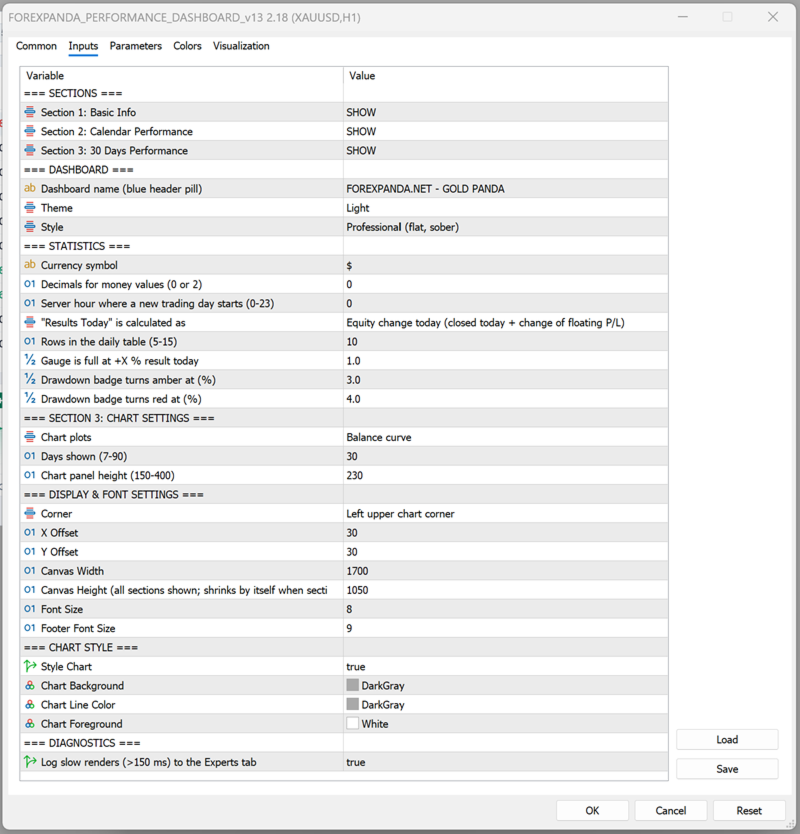
The indicator's inputs are organized into groups so you can customize the dashboard's content, calculations, appearance, and historical chart.
A. SECTIONS
Control which of the three dashboard sections are visible.
| Input | Description |
|---|---|
| Section 1: Basic Info | Shows or hides the main performance statistics and account overview. |
| Section 2: Calendar Performance | Shows or hides the daily performance table. |
| Section 3: 30 Days Performance | Shows or hides the historical performance chart. |
Available values: SHOW / HIDE.
You can disable sections you do not need. The dashboard automatically adjusts its height when sections are hidden.
B. DASHBOARD
Customize the dashboard's identity and visual appearance.
| Input | Description |
|---|---|
| Dashboard name | Text displayed in the dashboard's header pill. For example, FOREXPANDA.NET - GOLD PANDA. |
| Theme | Select Light or Dark. |
| Style | Select Modern or Professional. |
Theme options
-
Light: A light background with blue accents and contrasting text.
-
Dark: A dark interface with contrasting text and colored performance indicators.
Style options
-
Modern: Uses visual effects such as gradients, shadows, highlights, and rounded surfaces.
-
Professional: Uses a flatter, more restrained design with fewer decorative effects.
These options affect the dashboard's appearance, not the underlying trading performance.
C. STATISTICS
Configure how monetary values and daily performance are displayed and calculated.
| Input | Default | Description |
|---|---|---|
| Currency symbol | $ | Text displayed before monetary amounts. Change it to match your preferred display currency. This changes the label, not the account's actual currency or converted values. |
| Decimals for money values | 0 | Choose 0 or 2 decimal places for displayed monetary values. |
| Server hour where a new trading day starts | 0 | Sets the server-time hour used to define a new trading day. Values range from 0 to 23. |
| Results Today calculation | Equity change | Select how today's result is calculated. |
| Rows in the daily table | 10 | Controls the number of daily rows displayed. Supported range: 5–15. |
| Gauge is full at +X% result today | 1.0 | Sets the positive daily result percentage at which the results gauge reaches its full scale. |
| Drawdown badge turns amber at (%) | 3.0 | Sets the drawdown threshold at which the badge changes to amber. |
| Drawdown badge turns red at (%) | 4.0 | Sets the drawdown threshold at which the badge changes to red. |
Results Today calculation modes
Equity change today — default
Measures today's equity change, accounting for closed trading results and the change in floating profit or loss relative to the start of the day.
This is useful when you want today's result to reflect both realized and unrealized performance.
Closed trades only
Calculates today's result using closed trades only. Floating profit or loss from open positions is not included in this result calculation.
Closed trades + all floating P/L
Uses the alternative calculation method that combines today's closed results with all current floating profit or loss. Because existing open-position profit or loss can be included, this value may not represent only the change that occurred today.
Daily reset hour
The daily reset hour determines where the dashboard draws the boundary between trading days, using broker server time.
For example, setting the hour to 0 starts a new reporting day at server midnight. Setting it to 1 shifts the reporting boundary to 01:00 server time.
Choose a reset hour that matches your preferred reporting schedule.
Drawdown thresholds
The amber and red thresholds help you recognize increasing drawdown.
With the default settings:
-
Below 3%: normal badge color.
-
From 3% to below 4%: amber warning.
-
At 4% or above: red warning.
These thresholds are visual alerts, not automatic risk controls. The indicator does not close trades when a threshold is reached.
D. SECTION 3: CHART SETTINGS
Configure the historical chart displayed in the third dashboard section.
| Input | Default | Description |
|---|---|---|
| Chart plots | Balance curve | Select the type of historical performance series to display. |
| Days shown | 30 | Sets the historical chart period. Supported range: 7–90 days. |
| Chart panel height | 230 | Controls the chart panel's height. Supported range: 150–400. |
Chart plots
Balance curve
Displays the historical development of account balance.
Cumulative profit
Displays cumulative trading profit with deposits excluded. This helps distinguish trading performance from account growth caused by deposits.
Days shown
Use a shorter period for a more compact view of recent performance or a longer period to examine a broader historical trend.
Chart panel height
Increase the height when you want a larger chart, or reduce it to save space on your MT5 chart.
E. DISPLAY & FONT SETTINGS
Control the dashboard's placement, dimensions, and text size.
| Input | Default | Description |
|---|---|---|
| Corner | Left upper chart corner | Selects the chart corner used as the positioning reference. |
| X Offset | 30 | Sets the horizontal distance from the selected corner. |
| Y Offset | 30 | Sets the vertical distance from the selected corner. |
| Canvas Width | 1700 | Sets the dashboard's design width. |
| Canvas Height | 1050 | Sets the dashboard's design height when all sections are shown. |
| Font Size | 8 | Controls the main dashboard font scaling. |
| Footer Font Size | 9 | Controls the footer text size. |
Position and offsets
Choose the corner that best suits your chart layout. Adjust the X and Y offsets to move the dashboard away from candles, price labels, or other chart elements.
Canvas width and height
The canvas dimensions control the dashboard's overall layout. Adjust the width to fit your monitor and the height to accommodate your selected sections.
When sections are hidden, the dashboard automatically reduces its height as needed.
Font sizes
Increase the font sizes for better readability on high-resolution displays or larger monitors. Reduce them when you need a more compact layout.
The dashboard uses Arial for its text.
F. CHART STYLE
These inputs control the appearance of the underlying MetaTrader 5 chart.
| Input | Default | Description |
|---|---|---|
| Style Chart | true | Enables or disables the indicator's chart styling. |
| Chart Background | DarkGray | Sets the chart background color when styling is enabled. |
| Chart Line Color | DarkGray | Sets the chart line color when styling is enabled. |
| Chart Foreground | White | Sets the chart foreground color when styling is enabled. |
If you prefer to preserve your existing chart colors, disable Style Chart.
These settings concern the MT5 chart itself and are separate from the dashboard's Light/Dark theme.
G. DIAGNOSTICS
| Input | Default | Description |
|---|---|---|
| Log slow renders (>150 ms) to the Experts tab | false | Enables diagnostic logging for slow dashboard rendering operations. |
Enable this option when investigating performance or rendering delays. Slow renders exceeding the configured 150 ms threshold are logged in the MT5 Experts tab.
For normal use, you can leave this option disabled.
RECOMMENDED STARTING CONFIGURATION
For a clean, general-purpose dashboard:
-
Sections 1, 2, and 3: SHOW.
-
Theme: Light or Dark, according to preference.
-
Style: Professional for a restrained appearance, or Modern for a more visual interface.
-
Results Today: Equity change today.
-
Daily table rows: 10.
-
Chart period: 30 days.
-
Chart height: 230.
-
Position: Upper-left corner, with offsets adjusted to your chart.
-
Slow-render logging: Disabled unless troubleshooting.
These are suggested starting values, not performance or profitability recommendations.
IMPORTANT NOTES
-
The currency symbol is a display setting; it does not convert monetary amounts.
-
The daily reset hour uses broker server time.
-
Historical statistics depend on the available account history and data.
-
Drawdown thresholds provide visual warnings only.
-
The dashboard monitors account performance; it does not place trades or manage risk automatically.
-
Multiple indicator instances can be attached to the same chart, each with its own dashboard canvas name. Arrange their positions and dimensions to avoid overlap.
Also visit us at: forexpanda