

风险管理(第五部分):将风险管理系统集成到 EA 中
 620
620
 0
0

概述
欢迎来到我们风险管理系列的最后一部分。在本文中,我们将探讨使用风险管理系统如何改变结果:它是否真的有所作为,动态风险管理的利弊,以及何时使用最合理。
我们将通过创建一个简单的 EA 来回答这些问题,该 EA 使用之前风险管理文章中描述的订单区块指标。
我们先来优化这个指标,这将使回测更快更高效,也更容易优化 EA。
我们还将逐步介绍创建 EA、定义其参数以及集成关键事件(例如 OnTradeTransaction)的过程,这些事件只能在该函数中处理。
最后,我们将通过使用不同的参数组合对 EA 进行四次测试来回答本文提出的问题。这样,我们将比较有无损失和利润限制的交易,并评估动态风险管理在何时最有效。
订单区块指标的改进
我们将首先优化订单区块指标。该指标此前的性能并不理想。经过分析,我发现了通过优化蜡烛图数据处理和移除不必要的循环等性能优化点。
1.优化用于检测订单区块的循环
在该指标的第一个循环中,我们将减少迭代次数,因为我们不需要在每次更新时对所有蜡烛图进行迭代。当指标加载时,OnCalculate 的 prev_calculated 参数为 0。 此参数主要表示已计算了多少根蜡烛图。由于第一次运行中没有计算任何蜡烛图,因此 prev_calculated 值等于 0。因此,在第一次计算时,循环将遍历从 Rango_universal_busqueda 到第 6 根蜡烛的所有蜡烛;当 prev_calculated 大于 0 时,它将只检查第 6 根蜡烛。
int inicio = prev_calculated == 0 ? Rango_universal_busqueda : 6;

    for(int i = inicio  ; i  > 5  ; i--)
     {
      //----

     }
2.在订单区块中寻找缓解
为了确定订单区块是否已被缓解(即价格是否达到或超过该块水平),我们改进了两个函数:一个用于看涨区块,一个用于看跌区块。这两个函数都简化为仅使用蜡烛图的最高价和最低价。
看涨订单区块中的缓解
datetime  mitigados_alcsitas(double price, const double &lowArray[], const  datetime &Time[], datetime start, datetime end)
 {
  int startIndex = iBarShift(_Symbol, PERIOD_CURRENT, start);
  int endIndex = iBarShift(_Symbol, PERIOD_CURRENT, end);

  NormalizeDouble(price, _Digits);
  for(int i = startIndex - 2 ; i >= endIndex + 1 ; i--)
   {
    if(price > lowArray[i])
     {
      return Time[i]; //si encuentra que si hubo retorna el tiempo de la vela donde hubo la mitigacion
      Print("el orderblock tuvo mitigaciones", TimeToString(end));
     }
   }

  return 0; //En caso no se haya encontrado  niguna mitigacion retorna 0
 }
看跌订单区块中的缓解
//+------------------------------------------------------------------+
datetime  mitigado_bajista(double price, const  double &highArray[], const datetime &Time[], datetime start, datetime end)
 {
  int startIndex = iBarShift(_Symbol, PERIOD_CURRENT, start);
  int endIndex = iBarShift(_Symbol, PERIOD_CURRENT, end);
  NormalizeDouble(price, _Digits);
  for(int i = startIndex - 2 ; i >= endIndex + 1 ; i--)
   {
    if(highArray[i] > price)
     {
      return Time[i]; //retorna el time de la vela encontrada
     }
   }
  return 0; // no se mitigo hasta el momento
 }
在这两个函数中,我们直接使用蜡烛图的最高价和最低价来减少参数数量并略微减少循环执行时间。
此外,我们还将这些更改应用到了 esOb_mitigado_array_... 函数中,这些函数过去会调用 iOpen、iClose 和类似的函数。这并非必要,因为例如,如果一根蜡烛图的收盘价低于订单区块水平,那么它的最低价也低于该水平。因此,我们可以根据区块的类型,仅依赖低值或高值来简化缓解检查。
看涨订单区块
//+------------------------------------------------------------------+
datetime esOb_mitigado_array_alcista(OrderBlocks &newblock, datetime end)
 {
  int endIndex = iBarShift(_Symbol, PERIOD_CURRENT, end);
  NormalizeDouble(newblock.price2, _Digits);
  for(int i = 0 ; i <  endIndex - 2  ; i++)
   {
    double low = iLow(_Symbol, PERIOD_CURRENT, i);
    if(newblock.price2 >= low)
     {
      newblock.mitigated = true;
      newblock.time2 = iTime(_Symbol, _Period, i);
      return newblock.time2; //retorna el time de la vela encontrada
     }
   }
  return 0; // no se mitigo hasta el momento
 }
看跌订单区块
//+------------------------------------------------------------------+
datetime esOb_mitigado_array_bajista(OrderBlocks &newblock, datetime end)
 {
  int endIndex = iBarShift(_Symbol, PERIOD_CURRENT, end);
  NormalizeDouble(newblock.price2, _Digits);
  for(int i = 0 ; i <  endIndex - 2  ; i++)
   {
    double high = iHigh(_Symbol, PERIOD_CURRENT, i);
    if(high >= newblock.price2)
     {
      newblock.mitigated = true;
      newblock.time2 = iTime(_Symbol, _Period, i);
      return newblock.time2;
     }
   }
  return 0; // no se mitigo hasta el momento
 }
3.用于向数组添加元素的模板函数
我们添加了几个模板函数,这些函数在向数组中插入元素时效率更高。之前,我们创建了只接受一种特定类型的专用函数。例如,要添加一个 Order_Blocks 结构,我们必须编写一个单独的函数。
模板函数允许对不同类型的对象执行相同的操作。在我们的例子中,我们创建了一个函数来向数组中添加元素。
template <typename S>
bool AddArray(S &Array[], const S &Value)
 {
  for(int i = 0 ; i < ArraySize(Array) ; i++)
   {
    if(Array[i].name == Value.name)
      return false;
   }
  ArrayResize(Array, Array.Size() + 1);
  Array[Array.Size() - 1] = Value;
  return true;
 }

template <typename X>
void AddArrayNoVerification(X &array[], const X &value)
 {
  ArrayResize(array, array.Size() + 1);
  array[array.Size() - 1] = value;
 }
4.用于按名称删除元素的模板函数
现在,让我们创建一个模板函数,用于按名称删除元素。这意味着我们使用的数组必须是具有公共成员 “name” 的结构或类。此函数根据 targetName 参数删除一个元素,这对于从已缓解的订单区块数组中清除不需要的元素非常有用。
template<typename T>
bool DeleteArrayBiName(T &array[], const string targetName)
 {
  int size = ArraySize(array);
  int index = -1;

// Buscar el índice y desplazar elementos en un solo bucle
  for(int i = 0; i < size; i++)
   {
    if(array[i].name == targetName)
     {
      index = i;
     }
    if(index != -1 && i < size - 1)
     {
      array[i] = array[i + 1]; // Desplaza los elementos
     }
   }

  if(index == -1)
    return false;

  if(size > 1)
    ArrayResize(array, size - 1);
  else
    ArrayFree(array); // Si el array tenía solo un elemento, se libera completamente

  return true;
 }
5.新增“删除”订单区块的功能
在之前的版本中,当一个订单区块被缓解时,它的名称存储在一个辅助数组中,而该区块本身则保留在主数组中。通过这一改进,辅助数组中仅存储缓解订单区块的名称,而该区块本身则从主数组中完全移除。
看跌订单区块
    static bool buscar_obb = true;
    static datetime time_b = 0;
    string curr_elimiandor_obb[];

    for(int i = 0; i < ArraySize(ob_bajistas); i++)
     {
      datetime mitigadoTime = esOb_mitigado_array_bajista(ob_bajistas[i], ob_bajistas[i].time1);

      if(ob_bajistas[i].mitigated == false)
       {
        if(ObjectFind(ChartID(), ob_bajistas[i].name) < 0)
         {
          RectangleCreate(ChartID(), ob_bajistas[i].name, 0, ob_bajistas[i].time1, ob_bajistas[i].price1,
                          time[0], ob_bajistas[i].price2, Color_Order_Block_Bajista, Witdth_order_block, Fill_order_block, Back_order_block, STYLE_SOLID);
          sellOrderBlockBuffer[iBarShift(_Symbol, _Period, ob_bajistas[i].time1)] = ob_bajistas[i].price2;
         }
        else
          ObjectMove(ChartID(), ob_bajistas[i].name, 1, time[0], ob_bajistas[i].price2);
       }
      else
       {
        Alert("El order block bajista esta siendo mitigado: ", TimeToString(ob_bajistas[i].time1));
        AddArrayNoVerification(pricetwo_eliminados_obb, ob_bajistas[i].name);
        AddArrayNoVerification(curr_elimiandor_obb, ob_bajistas[i].name);

        if(buscar_obb == true)
         {
          time_b = iTime(_Symbol, _Period, 0);
          buscar_obb = false;
         }
       }
     }

    for(int i = 0; i < ArraySize(curr_elimiandor_obb) ; i++)
     {
      DeleteArrayBiName(ob_bajistas, curr_elimiandor_obb[i]);
     }
看涨订单区块
    static bool buscar_oba = true;
    static datetime time_a = 0;
    string curr_elimiandor_oba[];

    for(int i = 0; i < ArraySize(ob_alcistas); i++)
     {
      datetime mitigadoTime = esOb_mitigado_array_alcista(ob_alcistas[i], ob_alcistas[i].time1);

      if(ob_alcistas[i].mitigated == false)
       {
        if(ObjectFind(ChartID(), ob_alcistas[i].name) < 0)
         {
          RectangleCreate(ChartID(), ob_alcistas[i].name, 0, ob_alcistas[i].time1, ob_alcistas[i].price1,
                          time[0], ob_alcistas[i].price2, Color_Order_Block_Alcista, Witdth_order_block, Fill_order_block, Back_order_block, STYLE_SOLID);
          buyOrderBlockBuffer[iBarShift(_Symbol, _Period, ob_alcistas[i].time1)] = ob_alcistas[i].price2;
         }
        else
          ObjectMove(ChartID(), ob_alcistas[i].name, 1, time[0], ob_alcistas[i].price2); //por el contrario si si existe el objeto lo unico que haremos es actulizarlo al tiempo actual usando el punto de anclaje 1
       }
      else
       {
        Alert("El order block alcista esta siendo mitigado: ", TimeToString(ob_alcistas[i].time1));
        AddArrayNoVerification(pricetwo_eliminados_oba, ob_alcistas[i].name);
        AddArrayNoVerification(curr_elimiandor_oba, ob_alcistas[i].name);

        if(buscar_oba == true)
         {
          buscar_oba = false;
          time_a = iTime(_Symbol, _Period, 1);
         }
       }
     }

    for(int i = 0; i < ArraySize(curr_elimiandor_oba) ; i++)
     {
      DeleteArrayBiName(ob_alcistas, curr_elimiandor_oba[i]);
     }
6.删除对象的函数
从图表中删除对象时,需要进行一些更改。之前,我们将缓解后的订单区块名称存储在数组中,以避免再次处理它们。我们现在已经实现了一个新函数,可以从主数组中删除这些订单区块。因此,缓解订单区块名称必须存储在辅助数组中,以便稍后可以从图表中删除。
下面修改了 Delete_Objects 函数,使其能够遍历辅助数组并删除其内容:
void Eliminar_Objetos()
 {
  ObjectsDeleteAll(0, "ENTRY", -1, -1);
  for(int i = 0; i < ArraySize(pricetwo_eliminados_oba) ; i++) ObjectDelete(0,pricetwo_eliminados_oba[i]);
  for(int i = 0; i < ArraySize(pricetwo_eliminados_obb) ; i++) ObjectDelete(0,pricetwo_eliminados_obb[i]);
  for(int i = 0; i < ArraySize(ob_alcistas) ; i++) ObjectDelete(0,ob_alcistas[i].name);
  for(int i = 0; i < ArraySize(ob_bajistas) ; i++) ObjectDelete(0,ob_bajistas[i].name);

  ArrayFree(pricetwo_eliminados_oba);
  ArrayFree(pricetwo_eliminados_obb);
 }
7.使用预定义数组
通过使用 MQL 在 OnCalculate 中提供的预定义数组,优化了逻辑。现在我们将使用这些数组来计算订单区块。关键 K 线数据包括“open”、“close”、“high”、“low” 和 “tick_volume”。
这种方法使得在处理订单区块时更容易管理和解释数据。
    ArraySetAsSeries(open, true);
    ArraySetAsSeries(close, true);
    ArraySetAsSeries(high, true);
    ArraySetAsSeries(low, true);
    ArraySetAsSeries(time, true);
    ArraySetAsSeries(tick_volume, true);
    ArraySetAsSeries(atr, true);
创建 EA 并定义其参数
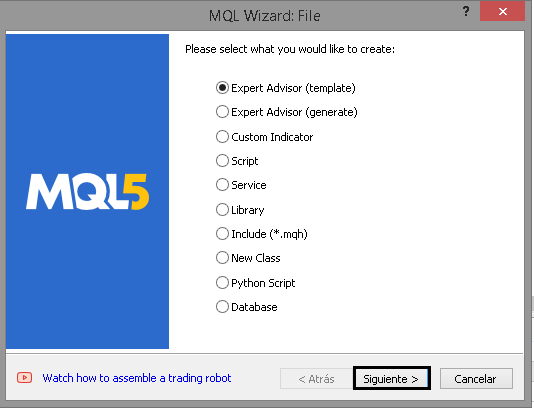
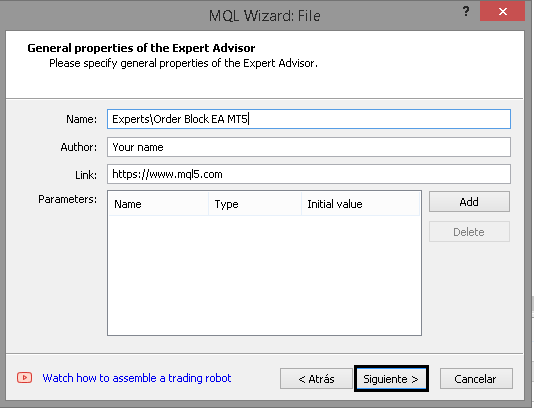
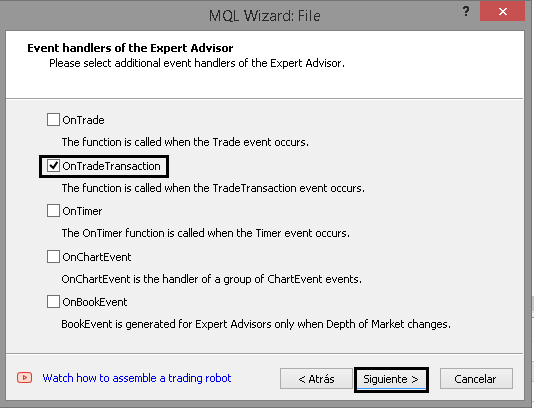
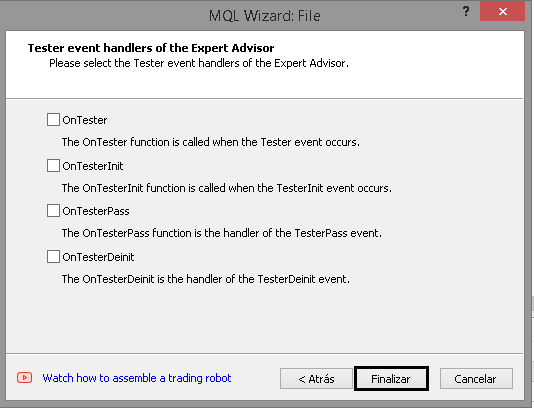
我们先来创建一个 EA:
1.从模板创建 EA 交易:
2.注明姓名和作者:
3.仅选择 OnTradeTransaction 事件:
4.结束:
接下来,我们将创建 EA 交易正常运行所需的参数。让我们从 EA 交易的通用参数开始,例如订单区块指标中已经使用的幻数和默认设置。
1.一般参数
在设置通用参数之前,我们将定义一个枚举,其中包含指标所使用的止盈和止损类型;这些类型将与指标中的类型相匹配。
enum ENUM_TP_SL_STYLE
 {
  ATR = 0,
  POINT = 1
 };
以下是对每个新增参数的简要说明:
-
Magic: 用于识别 EA 交易的幻数,使您可以将它们与其他交易区分开来。
-
timeframe_order_block: 设置用于检测订单区块的时间周期。
-
Rango_universal_busqueda: EA 交易在寻找潜在订单区块时需要回溯的蜡烛图数量。
-
Witdth_order_block: 设置表示订单区块的矩形的线条(边框)粗细。
-
Back_order_block 和 Fill_order_block: 用于绘制代表每个订单区块的矩形的背景和填充的图形参数。
-
Color_Order_Block_Bassist 和 Color_Order_Block_Bullish: 分别用不同颜色表示看跌和看涨的订单区块。
-
tp_sl_style: 计算止盈和止损的方法(ATR 或点数)。
-
Atr_Multiplier_1 和 Atr_Multiplier_2 : ATR 方法中使用的乘数。
-
TP_POINT 和 SL_POINT : 使用 POINT 方法时,设定止盈和止损值。
sinput group "--- Order Block EA settings ---"
input ulong Magic = 545244; //Magic number
input ENUM_TIMEFRAMES timeframe_order_block = PERIOD_M5; //Order block timeframe

sinput group "-- Order Block --"
input int  Rango_universal_busqueda = 500; //search range of order blocks
input int  Witdth_order_block = 1; //Width order block

input bool Back_order_block = true; //Back order block?
input bool Fill_order_block = true; //Fill order block?

input color Color_Order_Block_Bajista = clrRed; //Bearish order block color
input color Color_Order_Block_Alcista = clrGreen; //Bullish order block color

sinput group "-- Strategy --"
input ENUM_TP_SL_STYLE tp_sl_style = POINT;//tp and sl style

sinput group "- ATR "
input double Atr_Multiplier_1 = 1.5;//Atr multiplier 1
input double Atr_Multiplier_2 = 2.0;//Atr multiplier 2

sinput group "- POINT "
input int TP_POINT = 1000; //TL in Points
input int SL_POINT = 1000; //SL in Points
2.风险管理参数
接下来继续完善 EA 交易参数列表,让我们定义用于风险管理的参数。一般参数:
-
Lote_Type: 决定是使用动态手数(基于每笔交易的风险管理)还是固定手数。
-
lot: 当 Lote_Type 设置为 “Fixed” 时使用的批次大小。
-
risk_mode: 允许您选择帐户是个人帐户还是 PropFirm 帐户(例如,propfirm_ftmo)。
-
get_mode: 决定手数大小的计算方式。它使用止损值,并根据每笔交易的风险调整手数大小。
-
prop_firm_balance: 如果使用 FTMO 账户(或其他具有类似规则的自营公司),则确定初始账户余额。如前文所述,此参数用于计算每笔交易的最大亏损和每日最大亏损。
input ENUM_LOTE_TYPE Lote_Type = Dinamico; //Lote Type
input double lote = 0.1; //lot size (only for fixed lot)
input ENUM_MODE_RISK_MANAGEMENT risk_mode = personal_account;//type of risk management mode
input ENUM_GET_LOT get_mode = GET_LOT_BY_STOPLOSS_AND_RISK_PER_OPERATION; //How to get the lot
input double prop_firm_balance = 1000; //If risk mode is Prop Firm FTMO, then put your ftmo account balance
3.最大损失参数(每日、每周和总计)
现在让我们定义控制最大损失 (ML)、每周最大损失 (MWL) 和每日最大损失 (MDL) 的参数。这些限额中的每一个都基于三个变量,这些变量决定了损失限额的计算和应用方式:
-
percentage_or_money_..._input: 根据所选的计算模式,表示百分比或货币金额。如果该值设置为 0,则不使用损失限额。
-
mode_calculation_...: 指示参数是以百分比还是货币金额的形式进行评估。
-
applied_percentages_...: 确定百分比所应用的基准(例如,余额、账户利润等)。
sinput group "- ML/Maxium loss/Maxima perdida -"
input double percentage_or_money_ml_input = 0; //percentage or money (0 => not used ML)
input ENUM_RISK_CALCULATION_MODE mode_calculation_ml = percentage; //Mode calculation Max Loss
input ENUM_APPLIED_PERCENTAGES applied_percentages_ml = Balance; //ML percentage applies to:

sinput group "- MWL/Maximum weekly loss/Perdida maxima semanal -"
input double percentage_or_money_mwl_input  = 0; //percentage or money (0 => not used MWL)
input ENUM_RISK_CALCULATION_MODE mode_calculation_mwl = percentage; //Mode calculation Max weekly Loss
input ENUM_APPLIED_PERCENTAGES applied_percentages_mwl = Balance;//MWL percentage applies to:

sinput group "- MDL/Maximum  daily loss/Perdida maxima diaria -"
input double percentage_or_money_mdl_input  = 0; //percentage or money (0 => not used MDL)
input ENUM_RISK_CALCULATION_MODE mode_calculation_mdl = percentage; //Mode calculation Max daily loss
input ENUM_APPLIED_PERCENTAGES applied_percentages_mdl = Balance;//MDL percentage applies to:
4.GMLPO:单笔交易最大风险
继续进行 EA 交易参数设置,我们来配置单笔交易的最大亏损额。本节内容更为复杂,因为它包含三个以上的参数;如前所述,本节还引入了动态风险。
4.1 一般 GMLPO 参数
让我们首先来定义动态风险的五个主要参数。这包括三个已用于最大日损失、周损失和总损失的参数,以及另外两个参数。后者允许您配置系统检查每笔交易风险是否需要调整的频率,以及使用哪种动态风险配置类型。使用的其他枚举:
//--- Enumeration of the types of dynamic operational risk
enum ENUM_OF_DYNAMIC_MODES_OF_GMLPO
 {
  DYNAMIC_GMLPO_FULL_CUSTOM, //Customisable dynamic risk per operation
  DYNAMIC_GMLPO_FIXED_PARAMETERS,//Risk per operation with fixed parameters
  NO_DYNAMIC_GMLPO //No dynamic risk for risk per operation
 };
//--- Enumeration to determine when to review a decrease in the initial balance to modify the risk per operation
enum ENUM_REVISION_TYPE
 {
  REVISION_ON_CLOSE_POSITION, //Check GMLPO only when closing positions
  REVISION_ON_TICK //Check GMLPO on all ticks
 };
sinput group "- GMLPO/Gross maximum loss per operation/Porcentaje a arriesgar por operacion -"
input ENUM_OF_DYNAMIC_MODES_OF_GMLPO mode_gmlpo = DYNAMIC_GMLPO_FULL_CUSTOM; //Select GMLPO mode:
input ENUM_REVISION_TYPE revision_type_gmlpo = REVISION_ON_CLOSE_POSITION; //Type revision
input double percentage_or_money_gmlpo_input  = 1.0; //percentage or money (0 => not used GMLPO)
input ENUM_RISK_CALCULATION_MODE mode_calculation_gmlpo = percentage; //Mode calculation Max Loss per operation
input ENUM_APPLIED_PERCENTAGES applied_percentages_gmlpo = Balance;//GMPLO percentage applies to:
- mode_gmlpo : 确定每笔交易的风险是否为动态风险。选择一种动态风险配置模式。如果未使用动态风险,就选择 NO_DYNAMIC_GMLPO。
- revision_type_gmlpo: 指示何时检查账户净值以调整每笔交易的风险:在仓位平仓时或在每个市场报价时。
- percentage_or_money_gmlpo_input: 用作确定每笔交易风险基准的百分比或货币金额。如果该值设置为 0,则不会激活 GMLPO 功能。
- mode_calculation_gmlpo: 确定 percentage_or_money_gmlpo_input 是作为百分比还是固定货币金额来解释。
- applied_percentages_gmlpo: 当选择该计算模式时,设置用于计算百分比的基础(例如,余额或净值)。
请注意:这里使用的每个枚举(已在之前的文章中介绍过)都提供了关于内部如何计算风险的更多详细信息。
4.2 动态 GMLPO 设置
如前所述,配置动态风险有两种模式:完全自定义模式和固定参数模式。在上一篇文章中,我解释了我们做出这个选择的原因。简而言之,使用字符串作为参数的问题在于它们无法被优化,这使得寻找最佳动态风险参数变得更加困难。因此,我们实现了一个枚举来解决这个问题。
4.2.1 可配置的动态 GMLPO
在此模式下,用户需指定余额减少到何种百分比时风险必须发生变化,以及新的每笔交易风险值应为多少。这种模式提供了最大的灵活性,尽管它基于字符串,而这会妨碍优化。
sinput group "-- Optional GMLPO settings, Dynamic GMLPO"
sinput group "--- Full customizable dynamic GMLPO"
input string note1 = "subtracted from your total balance to establish a threshold.";  //This parameter determines a specific percentage that will be
input string str_percentages_to_be_reviewed = "2,5,7,9"; //percentages separated by commas.
input string note2 = "a new risk level will be triggered on your future trades: "; //When the current balance (equity) falls below this threshold
input string str_percentages_to_apply = "1,0.7,0.5,0.33"; //percentages separated by commas.
input string note3 = "0 in both parameters => do not use dynamic risk in gmlpo"; //Note:
-
str_percentages_to_be_reviewed: 包含一个按升序排列的百分比列表,这些百分比定义了每笔交易风险变化的阈值。默认情况下,设置的值是“2、5、7、9”。这意味着当账户利润(以百分比表示)低于 2% 时,风险将调整为匹配值,并应用 str_percentages_to_apply (1) 中的第一个值。
-
str_percentages_to_apply:包含将对每笔交易风险进行调整的新风险百分比。
4.2.2 具有固定参数的动态 GMLPO
如果您更喜欢通过固定参数配置动态风险,则 EA 交易设置中有一个单独的部分。其操作方式与可配置模式相似,但在此情况下,您最多可以设置四个参数。如果你不需要全部四个,只想使用三个,只需在不需要使用的字段中输入两个零即可。例如,如果在“-- 4 --”部分中只使用了三个“修饰符” ,则剩余的两个参数必须设置为 0。
sinput group "--- Fixed dynamic GMLPO with parameters"
sinput group "- 1 -"
input string note1_1 = "subtracted from your total balance to establish a threshold.";  //This parameter determines a specific percentage that will be
input double inp_balance_percentage_to_activate_the_risk_1 = 2.0; //percentage 1 that will be exceeded to modify the risk separated by commas
input string note2_1 = "a new risk level will be triggered on your future trades: "; //When the current balance (equity) falls below this threshold
input double inp_percentage_to_be_modified_1 = 1.0;//new percentage 1 to which the gmlpo is modified
sinput group "- 2 -"
input double inp_balance_percentage_to_activate_the_risk_2 = 5.0;//percentage 2 that will be exceeded to modify the risk separated by commas
input double inp_percentage_to_be_modified_2 = 0.7;//new percentage 2 to which the gmlpo is modified
sinput group "- 3 -"
input double inp_balance_percentage_to_activate_the_risk_3 = 7.0;//percentage 3 that will be exceeded to modify the risk separated by commas
input double inp_percentage_to_be_modified_3 = 0.5;//new percentage 3 to which the gmlpo is modified
sinput group "- 4 -"
input double inp_balance_percentage_to_activate_the_risk_4 = 9.0;//percentage 4 that will be exceeded to modify the risk separated by commas
input double inp_percentage_to_be_modified_4 = 0.33;//new percentage 4  1 to which the gmlpo is modified
5.每日最高利润 (MDP)
为了完善风险控制参数列表,添加了每日最大利润(MDP)参数。它包含了所有最大损失/利润限制的三个通用参数,以及一个新的 mdp_is_strict 参数。此参数表示是否启用“每笔交易最大利润”检查模式。
如果 mdp_is_strict 为 false,则表示无论当天发生任何损失,都足以超过 MDP 值。例如,如果利润目标是 10 美元,而当天亏损了 4 美元,那么盈利 5 美元,这被视为超过了每笔交易的最大利润。另一方面,如果 mdp_is_strict 的值为 true 会发生什么情况?这意味着,你不仅需要达到目标利润水平,还必须在利润超过 MDP 之前弥补所有每日亏损。例如,如果目标金额是 10 美元,而已经损失了 5 美元,那么你必须首先追回这 5 美元,然后再赚取额外的 10 美元。
sinput group "- MDP/Maximum daily profit/Maxima ganancia diaria -"
input bool mdp_is_strict = true; //MDP is strict?
input double percentage_or_money_mdp_input = 0; //percentage or money (0 => not used MDP)
input ENUM_RISK_CALCULATION_MODE mode_calculation_mdp = percentage; //Mode calculation Max Daily Profit
input ENUM_APPLIED_PERCENTAGES applied_percentages_mdp = Balance;//MDP percentage applies to:
6.交易时段
为了避免在低波动性时期或不适当的时间进行交易,新增了定义交易时段的功能。
如果当前时间在指定范围内,EA 交易将执行交易;否则,不会进行任何交易。
sinput group "--- Session ---"
input         char hora_inicio = 16;//start hour to operate (0-23)
input         char min_inicio = 30;//start minute to operate (0-59)
input         char hora_fin = 18;//end hour to operate (1-23)
input         char min_fin =0;//end minute to operate (0-59)
参数完整列表:
sinput group "--- Order Block EA settings ---"
input ulong Magic = 545244; //Magic number
input ENUM_TIMEFRAMES timeframe_order_block = PERIOD_M5; //Order block timeframe

sinput group "-- Order Block --"
input int  Rango_universal_busqueda = 500; //search range of order blocks
input int  Witdth_order_block = 1; //Width order block

input bool Back_order_block = true; //Back order block?
input bool Fill_order_block = true; //Fill order block?

input color Color_Order_Block_Bajista = clrRed; //Bearish order block color
input color Color_Order_Block_Alcista = clrGreen; //Bullish order block color

sinput group "-- Strategy --"
input ENUM_TP_SL_STYLE tp_sl_style = POINT;//tp and sl style

sinput group "- ATR "
input double Atr_Multiplier_1 = 1.5;//Atr multiplier 1
input double Atr_Multiplier_2 = 2.0;//Atr multiplier 2

sinput group "- POINT "
input int TP_POINT = 1000; //TL in Points
input int SL_POINT = 1000; //SL in Points

sinput group "--- Risk Management ---"
input ENUM_LOTE_TYPE Lote_Type = Dinamico; //Lote Type
input double lote = 0.1; //lot size (only for fixed lot)
input ENUM_MODE_RISK_MANAGEMENT risk_mode = personal_account;//type of risk management mode
input ENUM_GET_LOT get_mode = GET_LOT_BY_STOPLOSS_AND_RISK_PER_OPERATION; //How to get the lot
input double prop_firm_balance = 1000; //If risk mode is Prop Firm FTMO, then put your ftmo account balance

sinput group "- ML/Maxium loss/Maxima perdida -"
input double percentage_or_money_ml_input = 0; //percentage or money (0 => not used ML)
input ENUM_RISK_CALCULATION_MODE mode_calculation_ml = percentage; //Mode calculation Max Loss
input ENUM_APPLIED_PERCENTAGES applied_percentages_ml = Balance; //ML percentage applies to:

sinput group "- MWL/Maximum weekly loss/Perdida maxima semanal -"
input double percentage_or_money_mwl_input  = 0; //percentage or money (0 => not used MWL)
input ENUM_RISK_CALCULATION_MODE mode_calculation_mwl = percentage; //Mode calculation Max weekly Loss
input ENUM_APPLIED_PERCENTAGES applied_percentages_mwl = Balance;//MWL percentage applies to:

sinput group "- MDL/Maximum  daily loss/Perdida maxima diaria -"
input double percentage_or_money_mdl_input  = 0; //percentage or money (0 => not used MDL)
input ENUM_RISK_CALCULATION_MODE mode_calculation_mdl = percentage; //Mode calculation Max daily loss
input ENUM_APPLIED_PERCENTAGES applied_percentages_mdl = Balance;//MDL percentage applies to:

sinput group "- GMLPO/Gross maximum loss per operation/Porcentaje a arriesgar por operacion -"
input ENUM_OF_DYNAMIC_MODES_OF_GMLPO mode_gmlpo = DYNAMIC_GMLPO_FULL_CUSTOM; //Select GMLPO mode:
input ENUM_REVISION_TYPE revision_type_gmlpo = REVISION_ON_CLOSE_POSITION; //Type revision
input double percentage_or_money_gmlpo_input  = 1.0; //percentage or money (0 => not used GMLPO)
input ENUM_RISK_CALCULATION_MODE mode_calculation_gmlpo = percentage; //Mode calculation Max Loss per operation
input ENUM_APPLIED_PERCENTAGES applied_percentages_gmlpo = Balance;//GMPLO percentage applies to:

sinput group "-- Optional GMLPO settings, Dynamic GMLPO"
sinput group "--- Full customizable dynamic GMLPO"
input string note1 = "subtracted from your total balance to establish a threshold.";  //This parameter determines a specific percentage that will be
input string str_percentages_to_be_reviewed = "2,5,7,9"; //percentages separated by commas.
input string note2 = "a new risk level will be triggered on your future trades: "; //When the current balance (equity) falls below this threshold
input string str_percentages_to_apply = "1,0.7,0.5,0.33"; //percentages separated by commas.
input string note3 = "0 in both parameters => do not use dynamic risk in gmlpo"; //Note:

sinput group "--- Fixed dynamic GMLPO with parameters"
sinput group "- 1 -"
input string note1_1 = "subtracted from your total balance to establish a threshold.";  //This parameter determines a specific percentage that will be
input double inp_balance_percentage_to_activate_the_risk_1 = 2.0; //percentage 1 that will be exceeded to modify the risk separated by commas
input string note2_1 = "a new risk level will be triggered on your future trades: "; //When the current balance (equity) falls below this threshold
input double inp_percentage_to_be_modified_1 = 1.0;//new percentage 1 to which the gmlpo is modified
sinput group "- 2 -"
input double inp_balance_percentage_to_activate_the_risk_2 = 5.0;//percentage 2 that will be exceeded to modify the risk separated by commas
input double inp_percentage_to_be_modified_2 = 0.7;//new percentage 2 to which the gmlpo is modified
sinput group "- 3 -"
input double inp_balance_percentage_to_activate_the_risk_3 = 7.0;//percentage 3 that will be exceeded to modify the risk separated by commas
input double inp_percentage_to_be_modified_3 = 0.5;//new percentage 3 to which the gmlpo is modified
sinput group "- 4 -"
input double inp_balance_percentage_to_activate_the_risk_4 = 9.0;//percentage 4 that will be exceeded to modify the risk separated by commas
input double inp_percentage_to_be_modified_4 = 0.33;//new percentage 4  1 to which the gmlpo is modified

sinput group "- MDP/Maximum daily profit/Maxima ganancia diaria -"
input bool mdp_is_strict = true; //MDP is strict?
input double percentage_or_money_mdp_input = 0; //percentage or money (0 => not used MDP)
input ENUM_RISK_CALCULATION_MODE mode_calculation_mdp = percentage; //Mode calculation Max Daily Profit
input ENUM_APPLIED_PERCENTAGES applied_percentages_mdp = Balance;//MDP percentage applies to:

sinput group "--- Session ---"
input         char hora_inicio = 16;//start hour to operate (0-23)
input         char min_inicio = 30;//start minute to operate (0-59)
input         char hora_fin = 18;//end hour to operate (1-23)
input         char min_fin =0;//end minute to operate (0-59)
声明全局变量
本节将创建各种全局变量来管理风险和 EA 交易系统的交易活动。
1.CTrade 和 CRiskManagement 对象
为了进行交易操作,我们将包含我们开发的 Risk_Management.mqh 库,该库是在本系列文章中开发的。此外,还将声明一个 CTrade 类型的对象。
#include  <Risk_Management.mqh>
CTrade trade;
然后,创建一个 CRiskManagement 类的实例,并设置构造函数所需的参数:
CRiskManagemet risk(mdp_is_strict, get_mode, Magic, risk_mode, prop_firm_balance);
2.用于存储指标描述符的变量
为了可视化 EA 交易的决策过程,我们将引入两个变量来存储指标描述符:一个 — 用于订单区块指标,另一个 — 用于 EMA。
//--- Handles
int order_block_indicator_handle;
int hanlde_ma;
3.用于存储 TP 和 SL 值的数组
为了存储从订单区块指标缓冲区复制的值,将创建四个数组:
double tp1[];
double tp2[];
double sl1[];
double sl2[];
4.先前收盘价的变量(日线、周线和订单区块时间周期)
EA 交易需要存储时间戳,即检测到订单区块的时间周期内最后一个日线、周线或特定蜡烛的收盘时间:
//---
datetime TiempoBarraApertua;
datetime TiempoBarraApertua_1;
datetime prev_vela;
5.用于启用/禁用交易活动的布尔变量
为了控制 EA 交易在超过特定盈亏限制后是否可以运行,将创建一个布尔变量,用于指示是否允许交易(true)或不允许交易(false):
//---
bool opera = true;
6.用于存储交易时段开始和结束时间的变量
最后,定义变量以标记搜索买入或卖出信号的时段的开始和结束:
datetime start_sesion;
datetime end_sesion;
OnInit 函数
在本节中,我们将设置 EA 交易正常运行所需的一切。我们声明并设置订单区块指标的参数,初始化其描述符和EMA,最后配置风险管理系统。
1.为订单区块指标创建 MqlParam 数组
第一步是准备一组参数,每个参数对应一个指标设置。使用 MqlParam 结构,可以按顺序将这些参数传递给 IndicatorCreate() 函数:
//---
  MqlParam param[17];

  param[0].type = TYPE_STRING;
  param[0].string_value = "::Indicators\\Order_Block_Indicador_New_Part_2";

  param[1].type = TYPE_STRING;
  param[1].string_value = "--- Order Block Indicator settings ---";

  param[2].type = TYPE_STRING;
  param[2].string_value = "-- Order Block --";

  param[3].type = TYPE_INT;
  param[3].integer_value = Rango_universal_busqueda;

  param[4].type = TYPE_INT;
  param[4].integer_value = Witdth_order_block;

  param[5].type = TYPE_BOOL;
  param[5].integer_value = Back_order_block;

  param[6].type = TYPE_BOOL;
  param[6].integer_value = Fill_order_block;

  param[7].type = TYPE_COLOR;
  param[7].integer_value = Color_Order_Block_Bajista;

  param[8].type = TYPE_COLOR;
  param[8].integer_value = Color_Order_Block_Alcista;

  param[9].type = TYPE_STRING;
  param[9].string_value = "-- Strategy --";

  param[10].type = TYPE_INT;
  param[10].integer_value = tp_sl_style;

  param[11].type = TYPE_STRING;
  param[11].string_value = "- ATR";

  param[12].type = TYPE_DOUBLE;
  param[12].double_value = Atr_Multiplier_1;

  param[13].type = TYPE_DOUBLE;
  param[13].double_value = Atr_Multiplier_2;

  param[14].type = TYPE_STRING;
  param[14].string_value = "- POINT";

  param[15].type = TYPE_INT;
  param[15].integer_value = TP_POINT;

  param[16].type = TYPE_INT;
  param[16].integer_value = SL_POINT;
param[] 数组索引对应于订单区块指标运行所需的每个参数。
2.创建和验证指标描述符
数组填充完毕后,使用 IndicatorCreate() 函数获取订单区块指标的描述符。此外,还会创建一个 EMA 描述符,作为进入和退出策略的额外指导。
//---
  order_block_indicator_handle = IndicatorCreate(_Symbol, timeframe_order_block, IND_CUSTOM, ArraySize(param), param);
  hanlde_ma = iMA(_Symbol, timeframe_order_block, 30, 0, MODE_EMA, PRICE_CLOSE);
  trade.SetExpertMagicNumber(Magic);

  if(order_block_indicator_handle == INVALID_HANDLE)
   {
    Print("The order blocks indicator is not available last error: ", _LastError);
    return INIT_FAILED;
   }

  if(hanlde_ma == INVALID_HANDLE)
   {
    Print("The ema indicator is not available latest error: ", _LastError);
    return INIT_FAILED;
   }
3.在图表中添加指标
为了简化调试和可视化监控,您可以将指标直接添加到图表中。此步骤是可选的;但是,在图表上查看对象可以更容易地验证参数和可视化是否正确。
  ChartIndicatorAdd(0, 0, order_block_indicator_handle);
  ChartIndicatorAdd(0, 0, hanlde_ma);
4.风险管理设置
配置 CRiskManagement 对象,该对象负责应用损失和利润限制并计算理想的交易手数。
//---
  risk.SetPorcentages(percentage_or_money_mdl_input, percentage_or_money_mwl_input, percentage_or_money_gmlpo_input
                      , percentage_or_money_ml_input, percentage_or_money_mdp_input);
  risk.SetEnums(mode_calculation_mdl, mode_calculation_mwl, mode_calculation_gmlpo, mode_calculation_ml, mode_calculation_mdp);
  risk.SetApplieds(applied_percentages_mdl, applied_percentages_mwl, applied_percentages_gmlpo, applied_percentages_ml, applied_percentages_mdp);
动态 GMLPO 配置
根据所选配置模式(固定或完全可自定义),设置每笔交易的风险值。
  if(mode_gmlpo == DYNAMIC_GMLPO_FIXED_PARAMETERS)
   {
    string percentages_to_activate, risks_to_be_applied;
    SetDynamicGMLPOUsingFixedParameters(inp_balance_percentage_to_activate_the_risk_1, inp_balance_percentage_to_activate_the_risk_2, inp_balance_percentage_to_activate_the_risk_3
                                        , inp_balance_percentage_to_activate_the_risk_4, inp_percentage_to_be_modified_1, inp_percentage_to_be_modified_2, inp_percentage_to_be_modified_3, inp_percentage_to_be_modified_4
                                        , percentages_to_activate, risks_to_be_applied);
    risk.SetDynamicGMLPO(percentages_to_activate, risks_to_be_applied, revision_type_gmlpo);
   }
  else
    if(mode_gmlpo == DYNAMIC_GMLPO_FULL_CUSTOM)
      risk.SetDynamicGMLPO(str_percentages_to_be_reviewed, str_percentages_to_apply, revision_type_gmlpo);
SetDynamicGMLPOUsingFixedParameters() 函数将固定参数(inp_balance_percentage_to_activate_the_risk_X 和 inp_percentage_to_be_modified_X)转换为字符串。这个函数非常简单:本质上,它通过将变量值转换为字符串并进行拼接来创建字符串。
void SetDynamicGMLPOUsingFixedParameters(
  double _balance_percentage_to_activate_the_risk_1, double _balance_percentage_to_activate_the_risk_2, double _balance_percentage_to_activate_the_risk_3, double _balance_percentage_to_activate_the_risk_4,
  double _percentage_to_be_modified_1, double _percentage_to_be_modified_2, double _percentage_to_be_modified_3, double _percentage_to_be_modified_4,
  string &percentages_to_activate, string &risks_to_be_applied)
 {
  percentages_to_activate = DoubleToString(_balance_percentage_to_activate_the_risk_1) + "," + DoubleToString(_balance_percentage_to_activate_the_risk_2) + "," + DoubleToString(_balance_percentage_to_activate_the_risk_3)
                            + "," + DoubleToString(_balance_percentage_to_activate_the_risk_4);
  risks_to_be_applied = DoubleToString(_percentage_to_be_modified_1) + "," + DoubleToString(_percentage_to_be_modified_2) + "," + DoubleToString(_percentage_to_be_modified_3)
                        + "," + DoubleToString(_percentage_to_be_modified_4);
 }
5.为订单区块指标设置止盈/止损数组
最后,将数组配置为按顺序存储订单区块指标数据:
//---
  ArraySetAsSeries(tp1, true);
  ArraySetAsSeries(tp2, true);
  ArraySetAsSeries(sl1, true);
  ArraySetAsSeries(sl2, true);
OnTick 和 OnTradeTransaction 函数
OnTick 和 OnTradeTransaction 函数是任何交易系统的基础。在我们的例子中,OnTick 用于检查是否超过亏损限额,检测新的每日和每周蜡烛图(等等),并根据订单区块指标数据执行信号。
1.检查新的一天和一周,时段设置
在 OnTick 中,第一步是确定是新的一天还是新的一周开始了。这是通过比较日线(PERIOD_D1)和周线(PERIOD_W1)时间周期内最新柱线的日期时间来完成的。
在每日蜡烛图检查期间,“opera” 变量被重置为 true(表示是否允许交易)。此外,还会调用 “risk” 对象的 OnNewDay 函数,并计算当天的交易时段。
//---
  if(TiempoBarraApertua != iTime(_Symbol, PERIOD_D1, 0))
   {
    opera = true;
    risk.OnNewDay();
    start_sesion = HoraYMinutoADatetime(hora_inicio,min_inicio);
    end_sesion = HoraYMinutoADatetime(hora_fin,min_fin);

    if(TiempoBarraApertua_1 != iTime(_Symbol, PERIOD_W1, 0))
     {
      risk.OnNewWeek();
      TiempoBarraApertua_1 = iTime(_Symbol, PERIOD_W1, 0);
     }

    TiempoBarraApertua = iTime(_Symbol, PERIOD_D1, 0);
   }
请注意: HoraYMinutoADatetime(int hora, int minuto) 将输入参数中设置的小时和分钟转换为日期时间变量。
datetime HoraYMinutoADatetime(int hora, int minuto) {
  MqlDateTime tm;
  TimeCurrent(tm);
// Asigna la hora y el minuto deseado
  tm.hour = hora;
  tm.min = minuto;
  tm.sec = 0; // Puedes ajustar los segundos si es necesario
  return StructToTime(tm);;
}
2.对订单区块时间周期内的每个新蜡烛图进行检查和逻辑运算
下一步是检查订单区块指标设定的时间周期内是否形成了新的 K 线。检测到新的 K 线后,复制指标缓冲区以获取 TP 和 SL 值。接下来,根据信号设置止损点以计算手数,并执行买入或卖出订单。
 if(prev_vela != iTime(_Symbol, timeframe_order_block, 0))
   {
    CopyBuffer(order_block_indicator_handle, 2, 0, 5, tp1);
    CopyBuffer(order_block_indicator_handle, 3, 0, 5, tp2);
    CopyBuffer(order_block_indicator_handle, 4, 0, 5, sl1);
    CopyBuffer(order_block_indicator_handle, 5, 0, 5, sl2);

    if(tp1[0] > 0 && tp2[0]  > 0 && sl1[0] > 0 &&  sl2[0] > 0)
     {
      if(tp2[0] > sl2[0] && risk.GetPositionsTotal() == 0)  //compras
       {
        double ASK = NormalizeDouble(SymbolInfoDouble(_Symbol, SYMBOL_ASK), _Digits);
        risk.SetStopLoss(ASK - sl1[0]);
        double lot = (Lote_Type == Dinamico ? risk.GetLote(ORDER_TYPE_BUY) : lote);

        if(lot > 0.0)
          trade.Buy(lot, _Symbol, ASK, sl1[0], tp1[0], "Order Block EA Buy");
       }
      else
        if(sl2[0] > tp2[0] && risk.GetPositionsTotal() == 0)  //venta
         {
          double BID = NormalizeDouble(SymbolInfoDouble(_Symbol, SYMBOL_BID), _Digits);
          risk.SetStopLoss(sl1[0] - BID);
          double lot = (Lote_Type == Dinamico ? risk.GetLote(ORDER_TYPE_SELL) : lote);

          if(lot > 0.0)
            trade.Sell(lot, _Symbol, BID, sl1[0], tp1[0], "Order Block EA Sell");
         }
     }

    prev_vela = iTime(_Symbol, timeframe_order_block, 0);
   }
注意: risk.GetPositionsTotal() 限制了可以同时持有的交易数量。此示例在下新订单之前会检查是否存在未平仓头寸。
可以使用 sl1 和 tp1 值,但也可以使用 tp2 设置不同的比例,例如 1:2,具体取决于参数设置。
3.最终风险管理检查
在每个 OnTick 结束时,代码会检查是否超过了亏损或盈利限制。如果超过限制,则 EA 交易开仓的所有仓位将被平仓,并且 “opera” 变量的值将被设置为 false。
 risk.OnTickEvent();

  if(risk.ML_IsSuperated(CLOSE_POSITION_AND_EQUITY)  == true)
   {
    if(risk_mode == propfirm_ftmo)
     {
      Print("The expert advisor lost the funding test");
      ExpertRemove();
     }
    else
     {
      risk.CloseAllPositions();
      Print("Maximum loss exceeded now");
      opera = false;
     }
   }

  if(risk.MDL_IsSuperated(CLOSE_POSITION_AND_EQUITY) == true)
   {
    risk.CloseAllPositions();
    Print("Maximum daily loss exceeded now");
    opera = false;
   }

  if(risk.MDP_IsSuperated(CLOSE_POSITION_AND_EQUITY) == true)
   {
    risk.CloseAllPositions();
    Print("Excellent Maximum daily profit achieved");
    opera = false;
   }
请注意: 可以添加其他检查来监控其他类型的损失,例如每周最大损失。
 if(risk.MWL_IsSuperated(CLOSE_POSITION_AND_EQUITY) == true)
   {
    risk.CloseAllPositions();
    Print("The maximum weekly loss has been exceeded");
    opera = false;
    extra = false;
   }
4.OnTradeTransaction 事件
最后,为了接收开仓、平仓或修改事件,实现了 OnTradeTransaction 函数。该函数调用风险管理类的相关方法来处理这些事件。
//+------------------------------------------------------------------+
//| TradeTransaction function                                        |
//+------------------------------------------------------------------+
void OnTradeTransaction(const MqlTradeTransaction& trans,
                        const MqlTradeRequest& request,
                        const MqlTradeResult& result)
 {
  risk.OnTradeTransactionEvent(trans);
 }
OnDeinit 函数
OnDeinit 函数会在 EA 交易从图表中移除或断开连接之前立即调用。现阶段,理想的解决方案是释放所有资源,并删除运行时添加的任何指标或对象,以保持图表干净并避免内存泄漏。
以下是如何执行此清理操作的示例。
//+------------------------------------------------------------------+
//| Expert deinitialization function                                 |
//+------------------------------------------------------------------+
void OnDeinit(const int reason)
 {
//---
  ChartIndicatorDelete(0, 0, ChartIndicatorName(0, 0, GetMovingAverageIndex()));
  ChartIndicatorDelete(0, 0, "Order Block Indicator");

  if(hanlde_ma != INVALID_HANDLE)
    IndicatorRelease(hanlde_ma);

  if(order_block_indicator_handle != INVALID_HANDLE)
    IndicatorRelease(order_block_indicator_handle);

 }
从图表中查找并移除指数移动平均线(EMA)
要删除移动平均线指标,首先需要找到它的名称,即图表“指标”选项卡上显示的名称。有时,实现这一目标的唯一方法就是遍历指标名称,并搜索全称或部分名称。
//+------------------------------------------------------------------+
//| Extra Functions                                                  |
//+------------------------------------------------------------------+
int GetMovingAverageIndex(long chart_id = 0)
 {
  int total_indicators = ChartIndicatorsTotal(chart_id, 0);
  for(int i = 0; i < total_indicators; i++)
   {
    string indicator_name = ChartIndicatorName(chart_id, 0, i);
    if(StringFind(indicator_name, "MA") >= 0)  return i;
   }
  return -1;
 }
//+------------------------------------------------------------------+
ChartIndicatorsTotal(chart_id, 0) : 返回附加到图表主窗口的指标总数。
ChartIndicatorName(chart_id, 0, i) : 返回图表主窗口中每个指标的名称。
StringFind(indicator_name, "MA") : 检查名称是否包含 “MA”(可以是 “EMA”、“MA” 等等)。如果找到匹配项,该函数将返回索引。
一旦您将指标添加到指标列表中,您就可以使用名称通过 ChartIndicatorDelete 删除指标。
释放指标描述符
调用 IndicatorRelease() 可确保指标从内存中完全释放,尤其对于自定义指标或通过描述符访问其数据时更是如此。如果不这样做,即使 EA 交易关闭后,内存中可能仍会残留数据。- handle_ma : 指数移动平均线(EMA)的描述符。
- order_block_indicator_handle : 订单区块指标的描述符。
测试
最后,我们将测试这个 EA 交易,并评估使用该风险管理系统的优缺点。
我们的首次回测将使用过去一年的数据。
测试期从 2024.01.01 至 2025.03.28。
- 交易品种:Gold
- 时间周期:M5
- 模型:每个点基于实时点
- 杠杆:1:100
设置:
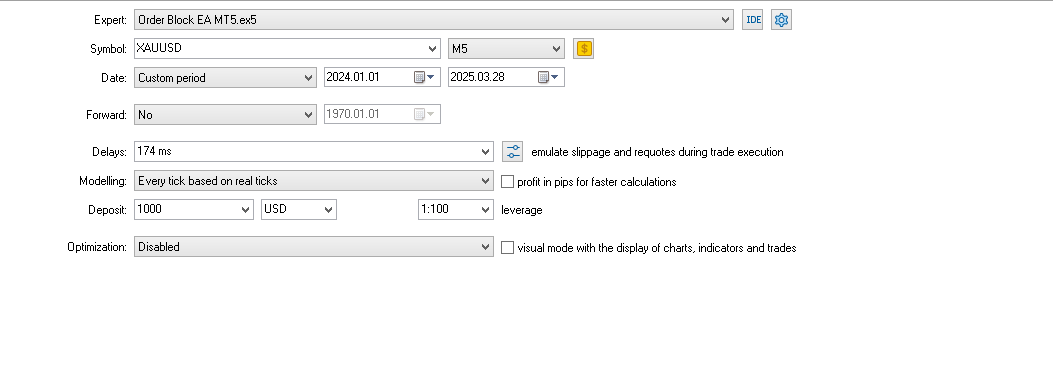
图表:
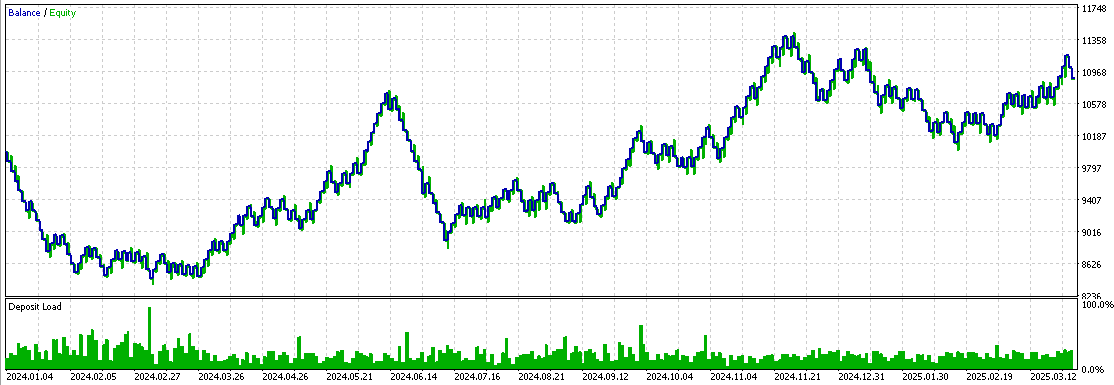
回测 1
请注意: 请注意,本次回测并未进行优化。
现在我们将优化 EA 交易。结果如下:
- 新时间周期:M3
- 使用的参数:每日最大盈利和每日最大亏损。
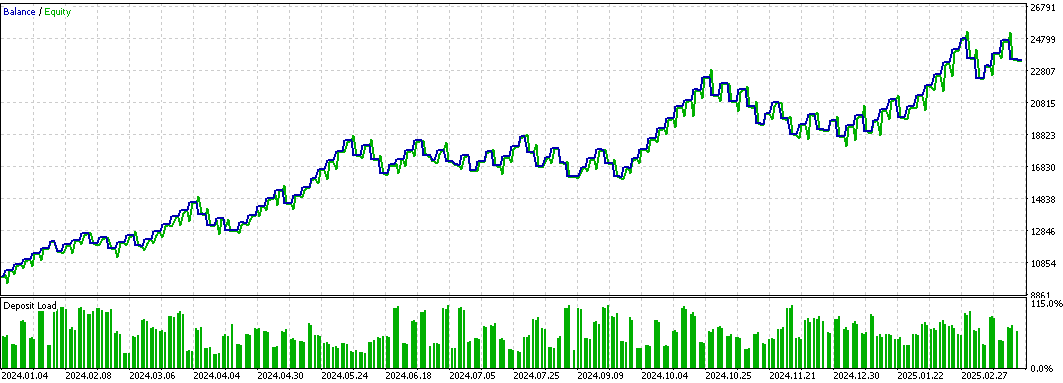
回测 2
我们优化了交易时间、最大亏损、最大盈利、单笔交易风险、ATR 倍数和时间周期,理想情况下为 3 分钟。
请注意:在两次回测中,均使用 ATR 来计算止损和止盈。
最后,为了证明风险管理可以影响回测结果,我们将移除每日最大亏损和最大盈利参数,同时保留其余参数。
图表如下:
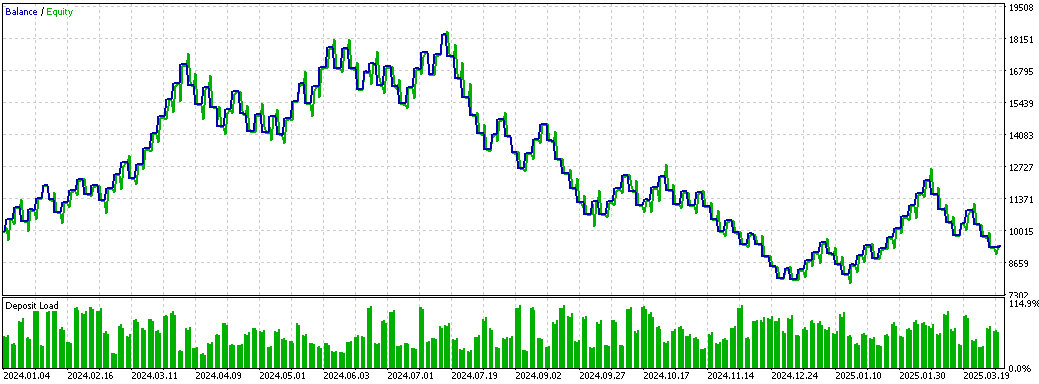
回测 3
如您所见,回测 3 图表显示初始增长较快,但随后受到各种因素的影响而开始下降。相比之下,回测 2 图表显示的是平稳、稳定的增长,没有明显的峰值。这表明设定盈利限额可以防止过度交易,并保护您免受连败和意外情况的困扰。同时,最大损失限额有助于限制可能发生的潜在损失,例如在连败期间。每日最大亏损限额有助于使 EA 交易恢复到盈亏平衡状态。
我们将使用与回测 3 相同的参数运行最终测试,但有一个区别:当账户收益开始转负时,动态风险将被激活。
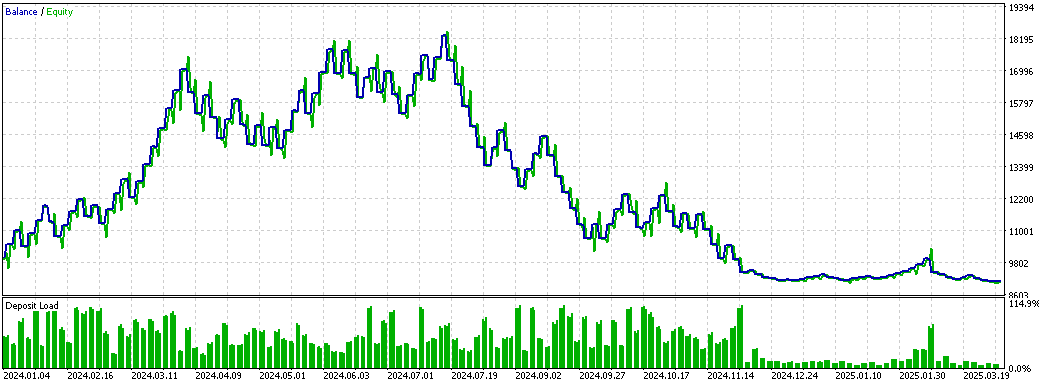
回测 4
你可以看到,当账户盈利百分比为负时,每笔交易的风险会急剧下降,从而限制了潜在损失。回测 3 和回测 4 之间有两个主要区别:
- 连续盈利阶段
在回测 3 中,不仅在连续盈利阶段弥补了损失,而且账户余额还增长了 10%。对于资金核查而言,这种情况会导致损失,因为余额将降至约 8600 美元。相比之下,在回测 4 中,尽管账户出现了连续盈利阶段,但仍保持在初始水平(10000美元)附近,没有实现有意义的增长。
- 损失后的恢复
在回测 4 中,弥补损失通常需要更多的时间和更多的交易。动态风险的优势在于,即使在资金核查期间,账户也能得到更好的保护,最低余额也能维持在 9086 美元左右。
这些结果表明,对于自营公司而言,动态风险更可取,因为它能显著限制 EA 交易可能产生的潜在损失。然而,对于普通账户而言,动态风险可能会延长恢复时间,但对于一家以账户管理而非快速盈利为目标的自营公司而言,这并不是问题。
结论
在本文中,我们基于订单区块指标在 EA 交易中实现了风险管理系统。正如你所看到的,使用盈亏限制 —— 以及使用动态风险 —— 会带来明显不同的结果。在文章的最后部分,我们阐述了该系统的工作原理,并展示了保护机制的实际效果。
本文中使用或更新的文件:
| 文件名称 | 类型 | 描述 |
|---|---|---|
| Risk_Management.mqh | .mqh(包含文件) | 主文件包含通用函数和 CRiskManagement 类的实现,该类负责系统中的风险管理。此文件定义并扩展了所有与损益管理相关的函数。 |
| Order_Block_Indicador_New_Part_2.mq5 | .mq5 | 包含订单区块指标代码的文件。 |
| Order Block EA MT5.mq5 | .mq5 | 包含订单区块 EA 交易代码的文件。 |
| Set 1% Risk.set | .set | 回测 1 使用的设置。 |
| Set Order Block EA.set | .set | 回测 2 中使用的设置,包括每日最大亏损和盈利限制。 |
| Set Dynamic Risk.set | .set | 用于动态风险测试(回测 3)的设置,没有每日亏损和盈利限制。 |
| Set No Dynamic Risk.set | .set | 未使用动态风险设置(回测 4),也未设置每日盈亏限制。 |
本文由MetaQuotes Ltd译自西班牙语
原文地址: https://www.mql5.com/es/articles/17640
注意: MetaQuotes Ltd.将保留所有关于这些材料的权利。全部或部分复制或者转载这些材料将被禁止。
本文由网站的一位用户撰写,反映了他们的个人观点。MetaQuotes Ltd 不对所提供信息的准确性负责,也不对因使用所述解决方案、策略或建议而产生的任何后果负责。

 配对交易:基于Z值差异的自动优化算法交易
 价格行为分析工具包开发(第三十部分):商品通道指数(CCI)零线的EA
 珊瑚礁优化算法(CRO)
 市场模拟(第 14 部分):套接字(八)
