Termina informations for MT4

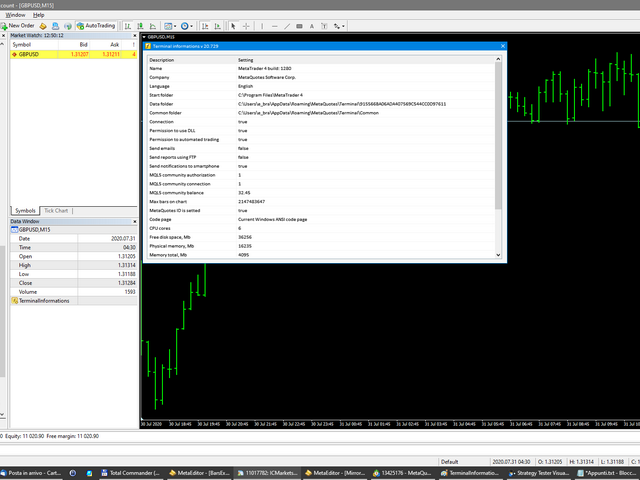
Utility for know all informations and settings of terminal where the utility is loaded.

The informations that you can know are for example:
- The path of folder where the terminal start
- The path of  folder where the terminal store the indicators, experts advisors etc
- The path of  common folder
- The permission to use DLL, to automated trading etc
- The permission to send email, FTP or notifications to smartphone
and many other informations
Önerilen ürünler
Renko Chart with Moving Average. Classic Renko charts idea. It is protted on main chart and Moving Average can be applied. Prices for bars are used from a lower timeframe. Parameters: BarsBack - how many bars of lower timeframe to use. If value is zero than it will use all available bars. LTF - lower timeframe. BrickSize - Renko bar in points. BullishColor - color for bull candle. BearishColor - color for bear candle. HideLineChart - if this value is true the line chart when be hidden when sele
FREE
Fibonacci will be designed by default based on the monthly candle but you can simultaneously view Fibonacci on a weekly candle or you can choose your two favorite timeframes. When you run this script, an input prompt will appear and the following input parameters can be configured: Input Parameters: Name Example Default Timeframe1 Monthly 43200 Timeframe2 Weekly 10080 TF1status 1 on 1 TF2status 0 off 0 candleID you can choose which candle to apply 1 Prefix1 It's is the prefix of the first object
FREE
VadineroLab MT4 Export Master to CSV EXEL JSON - Expert Advisor for exporting and analyzing symbols, account, terminal parameters, active trades, current account state, trading history, global variables.   Generates the following report types: * Symbols Parameters — spread, tick size, min/max lot, swap, … * Account Parameters — balance, equity, leverage, currency, margin info, … * Terminal Parameters — server, version, language, date, environment, … * Trade History — orders, deals, positions, se
FREE
Candle GAP
Thushara Dissanayake
3 (1)
Mum GAP   göstergesi, haftanın her günü için mum boşluklarını otomatik olarak belirlediğinden,   Boşluk Ticareti Stratejilerini   kullanan tacirler için önemli bir araçtır. Boşluk, art arda iki günün kapanış ve açılış arasındaki fiyat seviyesi farkını ifade eder. Bu gösterge dört tür boşluk modelini tanır: Ortak, Koparma, Devam ve Tükenme. Tüccarlar, bu göstergeyi herhangi bir tabloya dahil ederek sinyallerini doğrulayabilir ve alım satım kararlarını geliştirebilir. Mum GAP göstergesinin temel ö
FREE
Renko bars builder
Navdeep Singh
4.2 (5)
The indicator builds a Renko chart in the sub window for the current symbol. The bars are formed from live data and the desired bar size can be set in the inputs tab. Most importantly, because the Renko chart only uses price to construct bars and ignores time, the indicator can be applied to any time frame and same results can be achieved. Recommended usage As Renko charts are famous for eliminating noise so traders can use this tool to see clear picture of the trend to help their analysis, entr
FREE
MT4 için Alfa: Akıllı Alım Satım Komuta Merkeziniz Sıkıcı işlemlere veda edin, karar vermeye odaklanın. Birden fazla grafik penceresi arasında geçiş yapmaktan yoruldunuz mu? Düzensiz emir yönetimi yüzünden fırsatları kaçırdınız veya zarar ettiniz mi?   Alfa   sizin için yapıldı. Bu sadece bir araç değil; MT5/MT4 platformunda konuşlandırılmış   alım satım komuta merkezinizdir . İş akışınızı otomatikleştirmek ve akıllı hale getirmek, sizi tekrarlayan görevlerden kurtarmak ve piyasa fırsatlarını ya
FREE
MASi Three Screens
Aleksey Terentev
5 (2)
MASi Three Screens is based on the trading strategy by Dr. Alexander Elder. This indicator is a collection of algorithms. Algorithms are based on the analysis of charts of several timeframes. You can apply any of the provided algorithms. List of versions of algorithms:     ThreeScreens v1.0 - A simple implementation, with analysis of the MACD line;     ThreeScreens v1.1 - A simple implementation, with analysis of the MACD histogram;     ThreeScreens v1.2 - Combines the first two algorithms in
FREE
Pivot Points MT4
KEENBASE SOFTWARE SOLUTIONS
KT Pivot Points, en son verilere dayanarak günlük, haftalık ve aylık pivot seviyelerini otomatik olarak grafiğe çizer. Pivot noktaları, özellikle Forex piyasasında teknik analizde yaygın olarak kullanılan bir göstergedir. Özellikler Fiyat bir pivot seviyesine ulaştığında uyarı gönderir.  Her pivot seviyesi türü için tam özelleştirme sunar.   Günlük, haftalık ve aylık pivot seviyelerini net bir şekilde gösterir. Daha hızlı hesaplama için minimum CPU kaynağı kullanır. Grafikteki diğer göstergele
RedeeCash Multime XMA
Patrick Odonnell Ingle
Hareketli Ortalamaları Çoklu Zaman Çerçevelerinde Geçmek. Geleneksel bir trend stratejisi, trendi tahmin etmek için Günlük gibi bir zaman çerçevesi seçmek olsa da, bu uzman danışman, 5M'den Aylık'a kadar TÜM zaman dilimleri aynı trendi gösterdiğinde trend yönünde bir işlem başlatacaktır.       SINGLE_CURRENCY = true, tek bir para biriminde işlemlere izin verir, devre dışı bırakıldığında (FALSE), metatrader'da piyasa izleme penceresinde seçilen para birimlerinin ticaretini yapar.       CONCUR
FREE
Features: 1- Get OB/OS Levels from Golden MA Levels 2- Wait for Buy/Sell Start Level Cross 3- Optional: Should price cross Mid Level in earlier bars 4- Optional: Crossing bar High/Medium Volume 5- Optional: MA Stacked to check up/down trend for current TF 6- Optional: NRTR higher timeframes aligned Check Detailed blog post explained: https://www.mql5.com/en/blogs/post/758457 Levels with Buffers available here: Golden MA Levels Indicator: https://www.mql5.com/en/market/product/119515 Note: Arr
FREE
MT4 için NAS100 Auto SL ve TP Maker ile tanışın: MetaTrader 4'te Nasdaq 100 piyasasında gezinen yatırımcılar için vazgeçilmez bir yardımcı olan NAS100 Auto SL ve TP Maker ile StopLoss ve TakeProfit ayarlarını bir daha asla kaçırmayın. Bu araç, StopLoss ve TakeProfit seviyelerinin yönetimini otomatikleştirmek için sorunsuz bir çözüm arayanlar için tasarlanmıştır. Temel Özellikler: Zahmetsiz Otomasyon: StopLoss ve/veya TakeProfit olmadan Nasdaq 100 işlemlerini otomatik olarak izler. Kullanıcı tar
FREE
This MQL4 code is a custom indicator that draws multiple colored rectangles on a chart, spaced apart by a defined pip distance, and projected into the future. Here's a brief breakdown: Purpose: Draws several horizontal rectangles (zones) starting from a specified price. Rectangles are spaced apart vertically by a pip distance. Colors alternate between FirstColor and SecondColor . Rectangles can be drawn behind candles and optionally filled. Each rectangle extends into the future for a specified
FREE
The CandleStick Factory is a tool that allow you to perform a   market scan   and search any candlestick pattern that you already created. The   lite version  can be downloaded here :  https://www.mql5.com/en/market/product/75622 You can perform a quick search in the current chart (500 bars will be scanned), or save your custom candlestick patterns, and search in different Symbols/Timeframes that you can select in the settings tab, the scan can be scheduled every 1, 5 or 10 minutes by updating t
FREE
Free automatic Fibonacci is an indicator that automatically plots a Fibonacci retracement based on the number of bars you select on the BarsToScan setting in the indicator. The Fibonacci is automatically updated in real time as new highest and lowest values appears amongst the selected bars. You can select which level values to be displayed in the indicator settings. You can also select the color of the levels thus enabling the trader to be able to attach the indicator several times with differe
FREE
Auto TP SL Manul Open Panding Orders Overview: AUto TP SL Manul Open Panding Orders is an innovative trading platform designed to enhance trading efficiency and effectiveness in managing financial investments. Key Features: Automated Management : Seamlessly manage take-profit (TP) and stop-loss (SL) orders with our advanced automation tools. Manual Adjustments : Maintain control with manual options, allowing traders to adjust orders according to market conditions.
FREE
AdvanceZigZag
Gholamreza Mohammad Mojaveri
5 (1)
AdvaneZigZag Indicator Are you tired of the limitations of the traditional ZigZag indicator? Meet AdvaneZigZag, the ultimate tool to simplify your market structure analysis and enhance your trading strategies. Designed with flexibility and precision in mind, AdvaneZigZag brings you advanced features to navigate the market with confidence. Key Features: 1. Enhanced Flexibility:    - While maintaining the familiar simplicity of the conventional ZigZag indicator, AdvaneZigZag offers superior a
FREE
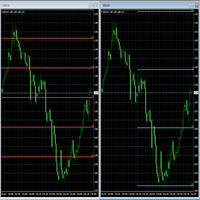
Zenner Trading Presents FX Gambit Streaming Live on YouTube:  https://youtu.be/rD9bCSxypio FX Gambit is an Adaptive, Market Neutral, Dual MT4 based Parallel Launch Automated Trading System, designed to respond to all directional combinations and permutations of the market, and still produce a Net Positive Outcome. There are 2 instances of MT4 with 2 charts in each. The LONG LEG of the HEDGE is in the left chart and the SHORT LEG on the right. The two MT4 instances exchange current market BID
FREE
Golden Sizer By SKPAD
Matthias Hubert Patrick Snidaro
Golden Sizer By SKPAD – Calculateur et Gestionnaire de Position Intelligent Golden Sizer est bien plus qu'un simple outil de trading : c'est un assistant stratégique complet pour la gestion des risques et des positions. Conçu pour s'adapter à tous les styles de trading – du débutant au professionnel, du swing trader au scalpeur – il transforme votre approche des marchés grâce à une interface intuitive, une précision de calcul optimale et une exécution rapide. Compatible avec tous les marchés (F
FREE
Advisor-assistant for those who like trading on Fibonacci levels. Automatically finds manually plotted Fibonacci Lines on the chart, and opens an order when the levels are broken. The Expert Advisor has 4 customizable levels and the ability to turn them off as unnecessary. Parameters:   Lot - order volume (lot);   Requote - price slippage;   Magic - individual number for all EA orders, works only with own orders;   Name Fibo - set initial name of Fibonacci lines;       Level parameters are ide
FREE
ProfPro
Dzintars Ansons
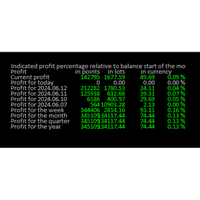
Online  Diary:  This indicator is designed to help traders keep track of profits and losses over various time periods, such as current profit, today’s profit, yesterday’s profit, and so on, up to the profit for the current year. The indicator offers several configuration options, such as the calculation of profit percentage relative to the balance at the beginning of the day, week, month, quarter, or year. It also allows for the customization of text placement and colors to suit the user’s needs
FREE
UPD1 D Levels
Vitaliy Kuznetsov
5 (3)
Seviye göstergesi bir önceki günün verilerine dayanır. Matematiksel formül giriş ve çıkış seviyelerini belirler.  Ticaret önerileri. Seviyeler, volatilite göründüğünde Avrupa seansının başında işlem görür. Yetersiz volatilite durumunda, çıkmak için kar almanın yarısını kullanın. Fiyat yarı karla tersine dönerse, tersine döndüğünde de yarı kar alma seviyesinde bir hedef arayın. Fiyat giriş seviyesinden sıçradıysa, ters yönde fiyat ikinci alım karına ulaşabilir. Her zaman bir kopuşa girmemelisi
FREE
KT ROC Divergence MT4
KEENBASE SOFTWARE SOLUTIONS
KT ROC divergence shows the regular and hidden divergences build between the price and Rate of change oscillator. Rate of change (ROC) is a pure momentum oscillator that calculates the change of percentage in price from one period to another. It compares the current price with the price "n" periods ago. ROC = [(Close - Close n periods ago) / (Close n periods ago)] * 100 There is an interesting phenomenon associated with ROC oscillator. In ROC territory there is no upward limit, but there is a do
Our offer also includes a free panel — Indicator Panel — which allows you to show or hide indicators created by BOToBRACIA. Pivot Points are a classic technical analysis indicator that calculates the central pivot point (PP) as well as support (S1–S3) and resistance (R1–R3) levels based on the previous day’s High, Low, and Close. The indicator allows you to: • identify key zones where the price may bounce or break through • determine the direction of the trend • find good entry points, as well
FREE
Opsiyon piyasasından gerçek zamanlı Gamma Exposure (GEX) seviyeleri SP500 grafiğinizde. Her 30 dakikada güncelleme. Full description: GammaOrderBook Free — Hepsi bir arada EA. GEX verilerini indirip doğrudan grafikte gösterir. Ayrı indikatör gerekmez. Görüntülenen içerik • GEX Bars — Call/Put gamma seviyeleri yatay çubuklar olarak, ETF/Index kaynağına göre farklı renklerle • Zero Gamma Line — Satıcıların hedge yönünün değiştiği kritik seviye • Panorama V4 — Çoklu zaman dilimi gamma konumland
FREE
Trendline indicator
David Muriithi
2 (1)
Are you tired of drawing trendlines every time you're analyzing charts? Or perhaps you would like more consistency in your technical analysis. Then this is for you. This indicator will draw trend lines automatically when dropped on a chart. How it works Works similar to standard deviation channel found on mt4 and mt5. It has 2 parameters: 1. Starting Bar 2. Number of bars for calculation The   starting bar   is the bar which drawing of the trend lines will begin, while the   number of bars for c
FREE
Auto Supply and Demand Oscillator is an indicator for MetaTrader 4 and MetaTrader 5 that detects supply and demand zones automatically and displays them as a single oscillator value at the bottom of the chart, instead of drawing rectangles directly on price. Concept Supply zones are price areas where strong selling created a sharp downward move away from a balance area. Demand zones are price areas where strong buying created a sharp upward move. Traditional implementations draw boxes on the
FREE
PZ Fibonacci
PZ TRADING SLU
4.8 (10)
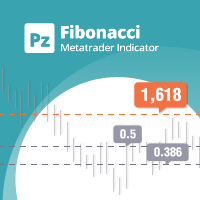
Are you tired of plotting fibonacci retracements or extensions manually? This indicator displays fibonacci retracements or extensions automatically, calculated from two different price points, without human intervention or manual object anchoring.  [ Installation Guide | Update Guide | Troubleshooting | FAQ | All Products  |  Get Help ] Easy to use Manual anchoring is not needed Perfect for price confluence studies The indicator evaluates if retracements or extensions are needed Once drawn, yo
FREE
Our offer also includes a free panel — Indicator Panel — which allows you to show or hide indicators created by BOToBRACIA. High and Low Points is a practical technical analysis indicator that plots levels corresponding to the highs and lows from previous periods (day / week / month) — levels that, in the Smart Money Concepts (SMC) and ICT approach, are treated as liquidity zones, while in classical technical analysis they serve as potential support and resistance levels. Indicator settings: •
FREE
Geçmiş grafiklerin oynatılması için basit bir grafik oynatıcıdır. Piyasa hareketlerini, mumları tek tek ilerleterek inceleyebilirsiniz. Oynatma sırasında istediğiniz anda duraklatabilir ve tekrar devam edebilirsiniz. [Özellikler] Geçmişten geleceğe otomatik oynatma Sabit aralıklarla 1 mum ilerleme Oynatma sırasında duraklatma desteği [Oynatma Özellikleri] Oynatma yönü: Geçmiş → Gelecek Oynatma hızı: Sabit Hareket eden mum sayısı: 1 mum Oynatmayı duraklat / devam ettir END ile oynatmayı sonlan
FREE
Free indicator, that displays the remaining time until the current candle closes directly on the chart. Designed for traders who demand precision and timing, this lightweight and fully customizable tool enhances your trading experience. It is easy to install, compatible with all assets, markets, and timeframes, and provides real-time updates to support smarter decision-making.
FREE
Bu ürünün alıcıları ayrıca şunları da satın alıyor
Trade Manager EA’ye hoş geldiniz! Ticaretin daha sezgisel, hassas ve verimli hale gelmesi için tasarlanmış nihai risk yönetim aracı ile tanışın. Bu sadece bir emir verme aracı değil; ticaret planlaması, pozisyon yönetimi ve risk kontrolü için kapsamlı bir çözüm. İster yeni başlayan bir yatırımcı olun, ister deneyimli bir trader ya da hızlı emir gerektiren bir scalper, Trade Manager EA ihtiyaçlarınıza uyum sağlar ve forex, endeksler, emtialar ve kripto paralar dahil tüm piyasalarda esneklik sunar
Local Trade Copier EA MT4
Juvenille Emperor Limited
4.96 (110)
Local Trade Copier EA MT4 ile olağanüstü hızlı işlem kopyalama deneyimi yaşayın. Kolay 1 dakikalık kurulumuyla bu işlem kopyalayıcısı, aynı Windows bilgisayarda veya Windows VPS'te birden fazla MetaTrader terminali arasında işlemleri kopyalamanıza olanak tanır ve 0.5 saniyenin altındaki şimşek hızında kopyalama hızları sunar. Başlangıç seviyesinde veya profesyonel bir tüccar olsanız da, Local Trade Copier EA MT4 , spesifik ihtiyaçlarınıza göre özelleştirmek için geniş bir seçenek yelpazesi sunar
Unlimited Trade Copier Pro is a tool to copy trade remotely to multiple MT4, MT5 and cTrader accounts at different computers/locations over internet. This is an ideal solution for you if you are a signal provider and want to copy your trades to other receivers globally on your own rules. One provider can copy trades to multiple receivers and one receiver can get trade from multiple providers as well. The provider can even set the subscription expiry for each receiver, so that receiver will not b
Exp COPYLOT CLIENT for MT4
Vladislav Andruschenko
4.69 (65)
MetaTrader 4 için profesyonel işlem kopyalayıcı MetaTrader 4 için hızlı, güvenilir ve profesyonel bir işlem kopyalayıcı. COPYLOT , MetaTrader 4 ve MetaTrader 5 terminalleri arasında Forex işlemlerinin kopyalanmasını sağlar ve farklı hesap türleri ile işlem senaryoları için esnek senkronizasyon sunar. COPYLOT MT4 sürümü şunları destekler: MetaTrader 4 → MetaTrader 4 MetaTrader 5 Hedge → MetaTrader 4 MetaTrader 5 Netting → MetaTrader 4   MT5 sürümü Tam açıklama + DEMO + PDF Nasıl satın alınır Nası
Trade Assistant MT4
Evgeniy Kravchenko
4.43 (197)
It helps to calculate the risk per trade, the easy installation of a new order, order management with partial closing functions, trailing stop of 7 types and other useful functions. Additional materials and instructions Installation instructions   -   Application instructions   -   Trial version of the application for a demo account Line function -   shows on the chart the Opening line, Stop Loss, Take Profit. With this function it is easy to set a new order and see its additional characteris
Ticaret yapmak istediğiniz temel alanları belirledikten sonra otomatik olarak destek ve direnç veya arz ve talep bölgelerini değiştirin. Bu EA, tek bir tıklamayla alım ve satım bölgeleri çizmenize ve ardından bunları fiyatın dönmesini beklediğiniz yere tam olarak yerleştirmenize olanak tanır. EA daha sonra bu bölgeleri izler ve bölgeler için belirttiğiniz fiyat hareketine göre otomatik olarak işlemler gerçekleştirir. İlk işlem gerçekleştirildikten sonra EA, hedef bölge haline gelen yerleştirdiğ
News Filter EA: Advanced Algo Trading Assistant News Filter EA is an advanced algo trading assistant designed to enhance your trading experience. By using the   News Filter EA , you can integrate a Forex economic news filter into your existing expert advisor, even if you do not have access to its source code. In addition to the news filter, you can also specify   trading days   and   hours   for your expert. The News Filter EA also includes   risk management   and   equity protection   features
Trade copier MT4
Alfiya Fazylova
4.58 (33)
Trade Copier, ticaret hesapları arasındaki işlemleri kopyalamak ve senkronize etmek için tasarlanmış profesyonel bir yardımcı programdır. Kopyalama, tedarikçinin hesabından/terminalinden alıcının aynı bilgisayarda veya vps'de kurulu olan hesabına/terminaline gerçekleşir. KAMPANYA - Eğer zaten "Trade copier MT4" aldıysanız, "Trade copier MT5"ü ücretsiz olarak alabilirsiniz (MT4 > MT5 ve MT4 < MT5 kopyalamalar için). Koşullar hakkında daha fazla bilgi almak için lütfen bizimle özel mesaj yoluyla i
Trade Copier Professional — Yerel Kopyalama Çözümü   Trade Copier Professional, MetaTrader 4/5 için güvenilir bir yerel işlem kopyalama sistemidir. Aynı bilgisayardaki birden fazla hesap arasında pozisyonları anında çoğaltmaya imkân tanır, dahili güvenlik kontrolleri ve profesyonel bir kontrol paneli ile birlikte gelir.   Genel Bakış   EA, tek bir dosya üzerinden hem Master hem de Slave modlarında çalışır ve sorunsuz geçiş sağlar. İşlemler, internet bağlantısına ihtiyaç duymadan MT4 ile MT5 ter
DrawDown Limiter MT4
Haidar Lionel Haj Ali
5 (8)
Drawdown Limiter EA You are in the right place if you were searching for Drawdown control, Drawdown limiter, Balance protection, Equity Protection or Daily Drawdown Limit related to Prop Firm, FTMO, or Funded account trading, or if you want to protect your trading account. Have you suffered from controlling your drawdown when trading funded accounts? This EA is meant for you. Prop firms usually set a rule called “Trader Daily Drawdown”, and if it is not respected, you are disqualified.  I am an
Close If Profit or Loss with Trailing for MetaTrader 4 — toplam kâr veya toplam zarar ile otomatik kapatma MetaTrader 4 için pratik bir işlem yönetimi aracıdır. Toplam kâr veya toplam zarar belirlediğiniz seviyeye ulaştığında, seçilen pozisyonları otomatik olarak kapatabilir. Expert Advisor açık işlemleri izler, değişken kâr/zarar sonucunu hesaplar, Trailing Profit kullanabilir ve pozisyonları manuel müdahaleden daha hızlı yönetmenize yardımcı olur. MetaTrader 4 hâlâ manuel trader’lar, scalper’
Equity Protect Pro: Endişesiz İşlem İçin Kapsamlı Hesap Koruma Uzmanınız Hesap koruması, öz sermaye koruması, portföy koruması, çoklu strateji koruması, kar koruması, kar toplama, işlem güvenliği, risk kontrol programları, otomatik risk kontrolü, otomatik tasfiye, koşullu tasfiye, planlı tasfiye, dinamik tasfiye, iz süren stop loss, tek tıklamayla kapatma, tek tıklamayla tasfiye ve tek tıklamayla geri yükleme gibi özellikler arıyorsanız, Equity Protect Pro ihtiyacınız olan programdır. Kurulumu
Support and Resistance Dashboard for MT4 is a multi-timeframe and multi-symbol scanner and alert system that finds S/R zones and pivot points for all timeframes and symbols and alerts when price has interaction with them. If you are using support and resistance (or supply and demand) zones in your trading strategy, this dashboard and its alert and filtering system is a big time saver for you. Download demo version   (works on M 1,M5,M30,W1   timeframes) Full description of scanner parameters ->
Çalışan Deneme Sürümünü İndir Copy Cat More (Taklitçi Kedi) — İşlem Kopyalayıcı (Trade Copier) MT4 sadece basit bir yerel işlem kopyalayıcı değildir; bugünün ticaret zorlukları için tasarlanmış eksiksiz bir risk yönetimi ve yürütme çerçevesidir (risk management and execution framework). Prop firm challenge'larından kişisel portföy yönetimine kadar, sağlam yürütme, sermaye koruması, esnek yapılandırma ve gelişmiş işlem yönetimi karışımıyla her duruma uyum sağlar. Kopyalayıcı hem   Master (Mast
Telegram to MT4 Multi-Channel Copier , Telegram kanallarınızdaki trading sinyallerini otomatik olarak doğrudan MetaTrader 4'e kopyalar. Bot yok, tarayıcı uzantısı yok, manuel kopyalama yok. Telegram'da bir sinyal alırsınız ve EA birkaç saniye içinde terminalinizde işlem açar. Ürün iki bileşen içerir: Telegram kanallarınızı dinleyen bir Windows uygulaması ve sinyalleri MT4 terminalinizde yürüten bu Expert Advisor. Bir MT5 sürümü de mevcuttur. Kurulum kılavuzu ve uygulama indirme: https://www.mql5
Master Close via Telegram can help you perform some management tasks on MT4/MT5 remotely via your Telegram by one click, easy to set up & use. Demo here (see more Master Notify   Master Control  ) ************************************************************************************ LIST OF COMMANDS: info_acc -  Get account info info_pen -   Get pending orders details info_pos -   Get positions details info_pos_sum -   Get positions summary close_pen -   Delete all pending orders close_pos_all -
Strategy Builder offers an incredible amount of functionality. It combines a trade panel with configurable automation (covert indicators into an EA), real-time statistics (profit & draw down) plus automatic optimization of SL, TP/exit, trading hours, indicator inputs. Multiple indicators can be combined into an single alert/trade signal and can include custom indicators, even if just have ex4 file or purchased from Market. The system is easily configured via a CONFIG button and associated pop-up
Trendline EA
Carlos Oliveira
4.5 (10)
Trendline EA MT4 Trendline EA MT4, kullanıcının çizdiği trend çizgilerine dayalı olarak işlem gerçekleştirmek veya uyarılar üretmek üzere tasarlanmış, MetaTrader 4 için yarı otomatik bir Expert Advisor’dır. MetaTrader 4, trend çizgilerinden doğrudan işlem açma veya yönetme konusunda yerel bir özellik sunmaz. Bu Expert Advisor, kullanıcının tanımladığı trend çizgilerini izleyerek ve fiyat bunlarla etkileşime girdiğinde önceden belirlenmiş eylemleri gerçekleştirerek platformun standart davranışını
Effortlessly calculate lot sizes and manage trades to save time and avoid costly errors The Trade Pad Pro EA is a tool for the Metatrader Platform that aims to help traders manage their trades more efficiently and effectively. It has a user-friendly visual interface that allows users to easily place and manage an unlimited number of trades, helping to avoid human errors and enhance their trading activity. [ Installation Guide | Update Guide | Troubleshooting | FAQ | All Products ] One of the k
MT4 to Telegram Signal Provider , Telegram'a sinyal göndermeyi sağlayan ve hesabınızı bir sinyal sağlayıcısına dönüştüren kullanımı kolay ve tamamen özelleştirilebilir bir araçtır. Mesajların formatı tamamen özelleştirilebilir! Ancak basit kullanım için, önceden tanımlanmış bir şablonu seçebilir ve mesajın belirli kısımlarını etkinleştirebilir veya devre dışı bırakabilirsiniz. [ Demo ]  [ Kullanım Kılavuzu ] [ MT5 Sürümü ] [ Discord Sürümü ] [ Telegram Kanalı ]  New: [ Telegram To MT5 ] Kurulum
The product will copy all telegram signal to MT4   ( which you are member  ) , also it can work as remote copier.  Easy to set up, copy order instant, can work with almost signal formats, image signal, s upport to translate other language to English Work with all type of channel or group, even channel have "Restrict Saving Content", work with  multi channel, multi MT5 Work as remote copier: with signal have ticket number, it will copy exactly via ticket number. Support to backtest signal. How to
Manuel işlem için profesyonel bir panel: işlemin tüm döngüsü, hassas girişten hesabınızı korumaya kadar, grafik üzerindeki tek bir pencerede toplanır. Her pozisyonun lotunu tam olarak belirlediğiniz riske göre hesaplayın; RR Tool ile işlemi doğrudan grafik üzerinde çizgilerle kurun; piyasa emirleri, bekleyen emirler, gridler ve OCO emirleri açın. Pozisyon yönetimini panel üstlenir: beş seviyeye kadar kısmi kapatma, altı tür trailing stop, maliyetine çekme ve Virtual SL/TP. Günlük, haftalık ve ay
Dear valued clients, Have a good day! This application will support you to manage the risk of your account according to your settings such as automated set the stop loss, take profit, automated close the position of total loss or profit greater than the preset input. You also can set your target equity, it will close all positions when it meet the desired target. The followings are the input parameters: Equity Target To Close and Delete All Orders ($) Equity Limit To Protect (Close All) Appl
MT4 MT5 Trade Bridge for MetaTrader 4 is the MetaTrader 4 component of the MT4 MT5 Trade Bridge system. It allows a MetaTrader 4 terminal to work either as a Master or as a Slave in a local bridge connection with MetaTrader 5. When configured as Master , the MT4 component reads trading activity from the MetaTrader 4 terminal and writes structured trade data into a local bridge file. The connected MT5 component can then read this data and mirror the trading activity according to its selected set
Kalifx Trade Manager is a smart on-chart trading and risk-management panel for MetaTrader 4. It replaces manual order tickets and spreadsheet risk math with a compact, draggable panel that lets you place, size, and manage trades directly from the chart — including automatic breakeven, trailing stops, and a 3-level partial close (multi-TP) system with draggable on-chart lines. Built for discretionary traders who want the speed of a one-click panel with the discipline of automated risk rules runn
TradePanel MT4
Alfiya Fazylova
4.84 (95)
Trade Panel, çok işlevli bir ticaret asistanıdır. Uygulama, manuel ticaret için 50'den fazla ticaret fonksiyonu içerir ve çoğu ticaret görevini otomatikleştirmeyi mümkün kılar. Satın almadan önce demo hesapta demo sürümü test edebilirsiniz. Demo hesap için uygulamanın deneme sürümünü indirin: https://www.mql5.com/en/blogs/post/750865 . Talimatların tamamı buraya . Ticaret. Tek tıklamayla ticaret işlemleri yapmayı sağlar: Risk otomatik hesaplaması ile bekleyen emirleri ve pozisyonları açmak. Bird
Trade Manager Ultimate (MT4/MT5) - Profesyonel Risk ve Trailing Yönetimi Trade Manager Ultimate ’a hoş geldiniz — manuel işlemlerinizi daha sezgisel, hassas ve tamamen kontrollü hale getirmek için tasarlanmış nihai risk yönetimi ve trailing çözümü. Bu sadece bir panel değil; sorunsuz pozisyon yönetimi ve gelişmiş sermaye koruması için kapsamlı bir sistemdir. İster profesyonel bir scalper olun ister uzun vadeli trend yatırımcısı, Trade Manager Ultimate stratejinize uyum sağlar ve işlemleriniz üze
Hedef kâra ulaşıldığında otomatik kâr kilitleme EquityTargetCloser   — MetaTrader 5 için,   öz kaynak (Equity) mevcut bakiyeyi belirtilen kâr tutarı kadar aştığında tüm piyasa pozisyonlarını otomatik olarak kapatan ve bekleyen emirleri silen bir yardımcı uzman danışmandır. Tüm pozisyonlar kapandıktan sonra hedef otomatik olarak yükseltilir: yeni eşik = yeni bakiye + belirtilen kâr. EA işlem açmaz, yalnızca mevcut pozisyonları yönetir; kârı güvenilir bir şekilde kilitlemeye ve birikmiş fonları ko
Fotokopi->Kullanışlı ve hızlı arayüz etkileşimi, kullanıcılar hemen kullanabilir       ->>>> Windows bilgisayarlarda veya VPS Windows'ta kullanılması önerilir Özellikler: Çeşitlendirilmiş ve kişiselleştirilmiş kopyalama ticareti ayarları: 1. Farklı sinyal kaynakları için farklı lot modları ayarlanabilir 2. İleri ve geri kopyalama ticareti için farklı sinyal kaynakları ayarlanabilir 3. Sinyaller yorumlarla ayarlanabilir 4. Lotun sözleşme lotuna göre kalibre edilip edilmeyeceği Çeşitlendirilmiş v
Trade Copier Global: The name speaks for itself. This copier allows you to copy orders between MT4 terminals even if they are not installed on the same computer. Features Copying trades between MT4 terminals around the world with a short delay. Automatically recognizes symbol prefixes. Can connect many Slaves to the same Master. Supports pending and market orders. Supports partial order close (with limitations, see below) Can send messages and notifications to the Slaves from the Master Several
Yazarın diğer ürünleri
Script to create arrows and lines   on chart   of history positions traded on account for the symbol where you launch the application. From inputs you can select: - Magic number (default is -1; -1 = all magics number) - "From" date and time (default is 1970.01.01 00:00; all positions) - "To" date and time (default is 1970.01.01 00:00; all positions) - Color for buy open positions (arrows and lines between open and close) - Color for buy closing positions (arrows) - Color for sell open positions
FREE
Script to create arrows and lines on chart of history positions traded on account for the symbol where you launch the application. From inputs you can select: - Magic number (default is -1; -1 = all magics number) - "From" date and time (default is 1970.01.01 00:00; all positions) - "To" date and time (default is 1970.01.01 00:00; all positions) - Color for buy open positions (arrows and lines between open and close) - Color for buy closing positions (arrows) - Color for sell open positions (arr
FREE
The new version of  MirrorSoftware 2021  has been completely rewriten and optimized.  This version requires to be loaded only on a single chart because  it can detect all actions on every symbol and not only the actions of symbol where it is loaded. Even the  graphics and the configuration mode  have been completely redesigned. The MirrorSoftware is composed of two components (all components are required to work):  MirrorController  (free indicator): This component must be loaded into the MASTER
FREE
Utility for show on charts the visual informations about: - a vertical line at start of each bar of selected timeframe - a vertical line at start of each day - a vertical line at start of each week - vertical lines at start / end of trading sessions selected - bid / ask prices, spread, money value for each point (of 1 standard lot) and last tick time recived" You can enable / disable each information and set the color for each line
FREE
This indicator is an utility for have always under control, how much time is left at the end of the bar setted. The utility show on the lower right of the chart, the countdown to the end. When the remaining seconds is = to the seconds set in the input, the color of remaining seconds on chart, change color and play a warning sound to warn you that the bar is about the end. When the remaining seconds is < to the seconds set in the input, the utility play a beep to warn you that the bar is in co
FREE
Script to calculate equity and balance at a specific date and time.  This script makes up for a lack of MetaTrader account history, that does not show how the balance and equity changes in time. Balance calculation includes closed orders only. Equity calculation includes orders closed before and orders that are still open at the specified time. Example: date and time set to 2020/07/06 00:00. If I had a Buy 1 lot EURUSD position opened at price 1.12470 on the 2020/07/02, the program would ca
FREE
The new version of  MirrorSoftware 2021  has been completely rewriten and optimized.  This version requires to be loaded only on a single chart because  it can detect all actions on every symbol and not only the actions of symbol where it is loaded. Even the  graphics and the configuration mode  have been completely redesigned. The MirrorSoftware is composed of two components (all components are required to work):  MirrorController  (free indicator): This component must be loaded into the MASTER
FREE
Utility for show on charts the visual informations about: - a vertical line at start of each bar of selected timeframe - a vertical line at start of each day - a vertical line at start of each week - vertical lines at start / end of trading sessions selected - bid / ask prices, spread, money value for each point (of 1 standard lot) and last tick time recived" You can enable / disable each information and set the color for each line
FREE
Bars expiration for MT4
Eugenio Bravetti
4.5 (2)
This indicator is an utility for have always under control, how much time is left at the end of the bar setted. The utility show on the lower right of the chart, the countdown to the end. When the remaining seconds is = to the seconds set in the input, the color of remaining seconds on chart, change color and play a warning sound to warn you that the bar is about the end. When the remaining seconds is < to the seconds set in the input, the utility play a beep to warn you that the bar is in co
FREE
Utility for know all informations and settings of account where the platform is connected The informations that you can know are for example: - The difference from server time and time of your PC - The limit orders that you can place at market - The credit that you have - The stopout mode of your broker - The exact name of company of your broker and other informations
FREE
Utility for know all informations and settings of account where the platform is connected The informations that you can know are for example: - The difference from server time and time of your PC - The limit orders that you can place at market - The credit that you have - The stopout mode of your broker - The exact name of company of your broker and other informations
FREE
Utility for know all informations and settings of all symbols available on your broker The informations that you can know are for example: - Spread - Digits - Tick value - Size step - Size minimum - Size maximum - Swap buy and sell - Margin required (for 1 standard lot) - Rollover day - Execution mode and many other informations You can filter the symbols by group or you can also choose to see the informations only of symbols available on market watch.
FREE
The new version of  MirrorSoftware 2021  has been completely rewriten and optimized.  This version requires to be loaded only on a single chart because  it can detect all actions on every symbol and not only the actions of symbol where it is loaded. Even the  graphics and the configuration mode  have been completely redesigned. The MirrorSoftware is composed of two components (all components are required to work):  MirrorController  (free indicator): This component must be loaded into the MASTER
Utility for know the performance of your acoount. From dialog you can filter data in this modes: - You can include or not include the open positions - You can include or not the closed positions - You can filter the data by date (from, to) - You can filter the data by simbols (multi selection) - You can filter the data by magic number (multi selection) On bottom of table, are show the total of: - Number of data - Total size - Total commissions paid - Total swap paids - Total profits - Total net
Script to load on chart the orders, starting from "Signal history report" downloaded from MQL5. If you found a good signal on "Signals" section of this site and you want to see the history orders on chart, you can do it, following this steps: - Download the csv file of history orders - Copy file in the common folder - Launch the script and set the input that are: - Report type (MT4 or MT5) - File name - Delimiter (default is ;) - Name of symbol to load (if symbol on file is for example EURUSDi,
FREE
Utility for know all informations and settings of all symbols available on your broker The informations that you can know are for example: - Spread - Digits - Tick value - Size step - Size minimum - Size maximum - Swap buy and sell - Margin required (for 1 standard lot) - Rollover day - Execution mode and many other informations You can filter the symbols by group or you can also choose to see the informations only of symbols available on market watch.
FREE
The new version of  MirrorSoftware 2021  has been completely rewriten and optimized.  This version requires to be loaded only on a single chart because  it can detect all actions on every symbol and not only the actions of symbol where it is loaded. Even the  graphics and the configuration mode  have been completely redesigned. The MirrorSoftware is composed of two components (all components are required to work):  MirrorController  (free indicator): This component must be loaded into the MASTER
Utility for know the performance of your acoount. From dialog you can filter data in this modes: - You can include or not include the open positions - You can include or not the closed positions - You can filter the data by date (from, to) - You can filter the data by simbols (multi selection) - You can filter the data by magic number (multi selection) On bottom of table, are show the total of: - Number of data - Total size - Total commissions paid - Total swap paids - Total profits - Total
Script to calculate equity and balance at a specific date and time.  This script makes up for a lack of MetaTrader account history, that does not show how the balance and equity changes in time. Balance calculation includes closed orders only. Equity calculation includes orders closed before and orders that are still open at the specified time. Example: date and time set to 2020/07/06 00:00. If I had a Buy 1 lot EURUSD position opened at price 1.12470 on the 2020/07/02, the program would ca
FREE
Utility for know all informations and settings of terminal where the utility is loaded. The informations that you can know are for example: - The path of folder where the terminal start - The   path of     folder where the terminal store the indicators, experts advisors etc - The   path of     common folder - The permission to use DLL, to automated trading etc - The permission to send email, FTP or notifications to smartphone and many other informations
FREE
Script to load on chart the orders, starting from "Signal history report" downloaded from MQL5. If you found a good signal on "Signals" section of this site and you want to see the history orders on chart, you can do it, following this steps: - Download the csv file of history orders - Copy file in the common folder - Launch the script and set the input that are: - Report type (MT4 or MT5) - File name - Delimiter (default is ;) - Name of symbol to load (if symbol on file is for example EURUSDi,

FREE
Filtrele:
Değerlendirme yok
Değerlendirmeye yanıt